
Sold by: PuzariCloud
Free Trial
AWS Free Tier
Nightly backups of your GitHub repositories, Jira projects and Confluence spaces into an S3 bucket in your own AWS account, with restore of a repository, an issue or a page when you need it. Flat price per organisation with unlimited users.
Overview
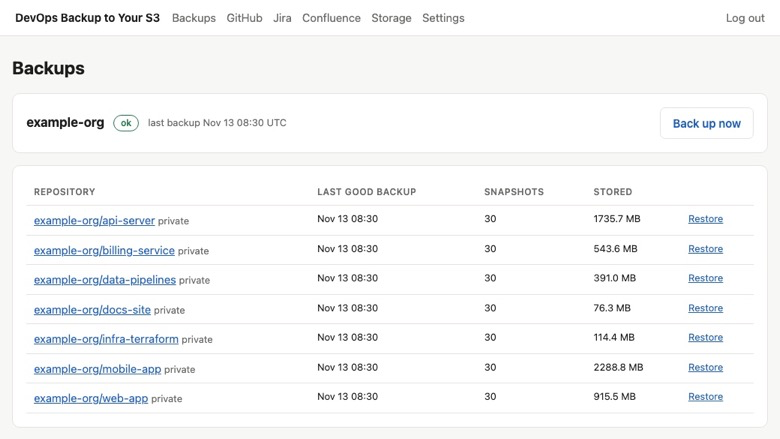
Keep your own copy of GitHub, Jira and Confluence
A deleted repository, a bulk edit that went wrong, a compromised account or a departing admin can remove years of work from tools that keep only one copy. GitHub and Atlassian protect their platforms; your content is your responsibility.
DevOps Backup to Your S3 copies that content every night into an S3 bucket in your own AWS account.
What is backed up
- GitHub: repositories with all branches and tags, issues, pull requests and their comments
- Jira Cloud: issues with comments, worklogs, attachments and change history
- Confluence Cloud: pages, blog posts, comments and attachments
Why your own bucket
- The data never leaves your AWS account: private bucket, encryption at rest, optional KMS key of your own
- Our role can write only under one prefix of that bucket
- You can read the backups with standard tools even if you stop using the product
Restore
- A repository is restored into a new private repository with its branches and tags
- An issue is restored as a new issue with its comments
- A Confluence page is restored as a new page beside the original
Nothing is ever overwritten.
Security and access
The CloudFormation stack creates a private, encrypted S3 bucket in your account (or uses one you already have, with your own KMS key if you want) and a role that can only write under one prefix of that bucket. Your GitHub token or Atlassian API token is stored encrypted and used only to read your repositories, projects and spaces. We never delete or change anything in GitHub, Jira or Confluence: restores always create new items. Deleting the stack removes our access, and the backups stay in your bucket.
Typical uses
- An independent copy of source code and issues for SOC 2, ISO 27001 or customer due-diligence questions
- Recovering a repository deleted by mistake, or by a compromised account
- Bringing back Jira issues or Confluence pages after a bulk edit went wrong
- Keeping history for 30, 90 or 365 days without paying per user
Who it is for
Engineering teams that need an independent backup for audits, customer contracts or peace of mind, and do not want to pay per user. Pricing is flat per organisation: 100, 500 or 5,000 repositories, projects and spaces, with 30, 90 or 365 days of snapshot history.
Getting started
- Subscribe, or start the 14-day free trial.
- Launch the CloudFormation stack to create the bucket and role.
- Add a GitHub token or an Atlassian API token. Backups then run every night.
Start the 14-day free trial: connect your bucket and a GitHub organisation, and the first backup starts straight away.
Highlights
- Your backups stay in your own AWS account. A CloudFormation stack creates a private, encrypted S3 bucket (or uses one you already have, with your own KMS key if you want) and a role limited to one prefix in it. You own the data and can read it with standard tools, with or without us.
- Restore what you lost without overwriting anything. Bring back a GitHub repository into a new private repository with its branches and tags, an issue as a new issue with its comments, or a Confluence page as a new page next to the original. Snapshots are kept for 30, 90 or 365 days depending on the plan.
- Covers the three tools most teams depend on. GitHub repositories with issues, pull requests and comments; Jira issues with comments, worklogs, attachments and change history; Confluence pages, blog posts, comments and attachments. One flat price per organisation for 100, 500 or 5,000 repositories, projects and spaces, with unlimited users.
Details
Sold by
Categories
Delivery method
Deployed on AWS
New
Introducing multi-product solutions
You can now purchase comprehensive solutions tailored to use cases and industries.

Features and programs
Financing for AWS Marketplace purchases
AWS Marketplace now accepts line of credit payments through the PNC Vendor Finance program. This program is available to select AWS customers in the US, excluding NV, NC, ND, TN, & VT.

Pricing
Free trial
Try this product free according to the free trial terms set by the vendor.
Pricing is based on the duration and terms of your contract with the vendor. This entitles you to a specified quantity of use for the contract duration. If you choose not to renew or replace your contract before it ends, access to these entitlements will expire.
Additional AWS infrastructure costs may apply. Use the AWS Pricing Calculator to estimate your infrastructure costs.
Dimension | Description | Cost/month |
|---|---|---|
Starter | Back up up to 100 repositories, Jira projects and Confluence spaces; 30-day snapshot history; unlimited users. | $49.00 |
Pro | Back up up to 500 repositories, Jira projects and Confluence spaces; 90-day snapshot history; unlimited users. | $149.00 |
Business | Back up up to 5,000 repositories, Jira projects and Confluence spaces; 365-day snapshot history; priority support; unlimited users. | $399.00 |
Dimensions summary
This listing offers three flat-rate contract tiers that scale by capacity, not by number of users. Each tier covers a different ceiling on how many repositories, Jira projects, and Confluence spaces you can back up. The tiers also differ in how long snapshot history is retained. Moving up a tier raises your backup count limit and extends retention. All tiers include unlimited users, and the Business tier adds priority support. You pay AWS separately for your own S3 storage, so the contract price covers the backup service itself.
Top-of-mind questions for buyers
Each backed-up item counts as one unit against your tier ceiling. That includes each repository, each Jira project, and each Confluence space. The Starter tier covers up to 100 such items combined, Pro up to 500, and Business up to 5,000. Users are not counted, since all tiers include unlimited users.
Each tier sets a ceiling on how many repositories, Jira projects, and Confluence spaces you can back up. To back up more items than your tier covers, you move to a higher tier. The higher tier applies a new ceiling to all your backed-up items, not just the additional ones.
No. The contract price covers the backup service that captures your repositories, issues, pull requests, Jira fields, and Confluence pages. Backups go into an S3 bucket you own, so you pay AWS separately for that storage. The vendor does not add storage charges on top of the contract fee.
backup.puzaricloud.in
Helpful?
Vendor refund policy
Full refund within 14 days of a new subscription if the product doesn't work for you. After that, cancel any time and you won't be renewed; we don't refund partial periods. Your backups stay in your own bucket either way. To request a refund, email ritom@puzaricloud.in with your AWS account ID.

Legal
Vendor terms and conditions
Upon subscribing to this product, you must acknowledge and agree to the terms and conditions outlined in the vendor's End User License Agreement (EULA) .
Content disclaimer
Vendors are responsible for their product descriptions and other product content. AWS does not warrant that vendors' product descriptions or other product content are accurate, complete, reliable, current, or error-free.
Delivery details
Software as a Service (SaaS)
SaaS delivers cloud-based software applications directly to customers over the internet. You can access these applications through a subscription model. You will pay recurring monthly usage fees through your AWS bill, while AWS handles deployment and infrastructure management, ensuring scalability, reliability, and seamless integration with other AWS services.
Support
Vendor support
Getting help
Email ritom@puzaricloud.in . We reply within one business day, Monday to Friday, India time, and usually much sooner.
What support covers
- Creating the bucket and role with the CloudFormation stack
- Connecting GitHub, Jira and Confluence
- Failed backup runs and how to fix them
- Restoring a repository, issue or page
- Billing and plan changes through AWS Marketplace
When you write to us
Include your AWS account ID and the name of the repository, project or space. Support is included on every plan, including the free trial.
Plans
Starter covers 100 repositories, projects and spaces with 30 days of history, Pro 500 with 90 days, and Business 5,000 with 365 days and priority support. Every plan has unlimited users.
Refunds
Full refund within 14 days of purchase if the product does not work for you. Email ritom@puzaricloud.in with your AWS account ID and we will arrange it through AWS Marketplace.
AWS infrastructure support
AWS Support is a one-on-one, fast-response support channel that is staffed 24x7x365 with experienced and technical support engineers. The service helps customers of all sizes and technical abilities to successfully utilize the products and features provided by Amazon Web Services.
Similar products

Industry experts recommend storing 3 copies of your data, on 2 types of media, with 1 offsite. This is often referred to as the 3-2-1 strategy.
Two different types of media are important, as the factors that can lead to hardware failure can affect all media types.
An offsite backup is important, as an event such as a natural disaster or unauthorized intrusion can affect all resources at that site.

Powerful cross-platform backup and disaster recovery that leverages the public cloud to enable a comprehensive data protection strategy.

Enterprise-grade backup and recovery for GitHub. Secure your critical intellectual property--including source code, CI/CD pipelines, and Infrastructure as Code (IaC)--against accidental deletion, malicious insiders, and sophisticated cyberattacks.

Powerful cross-platform backup and disaster recovery that leverages the public cloud to enable a comprehensive data protection strategy.
Customer reviews
No customer reviews yet
Be the first to review this product . We've partnered with PeerSpot to gather customer feedback. You can share your experience by writing or recording a review, or scheduling a call with a PeerSpot analyst.