
Sold by: South River Technologies
Deployed on AWS
AWS Free Tier
Titan MFT is a business grade Managed File Transfer (MFT) server with automated secure file transfers and scalability features providing enterprise-class high-availability, failover, and clustering.
4.5
Overview
Image
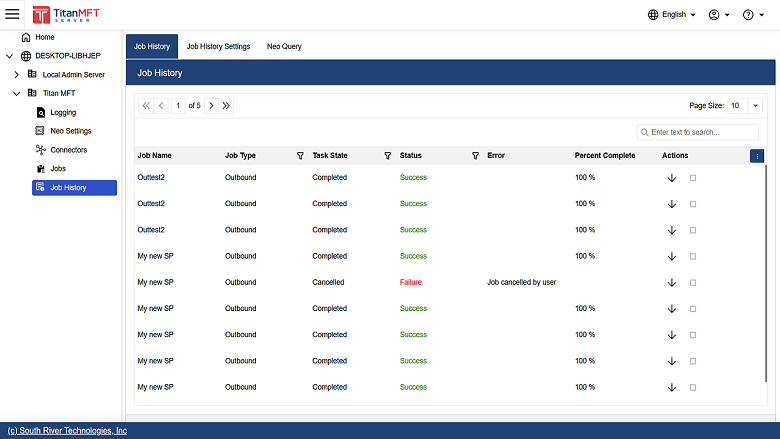
Job History
Image
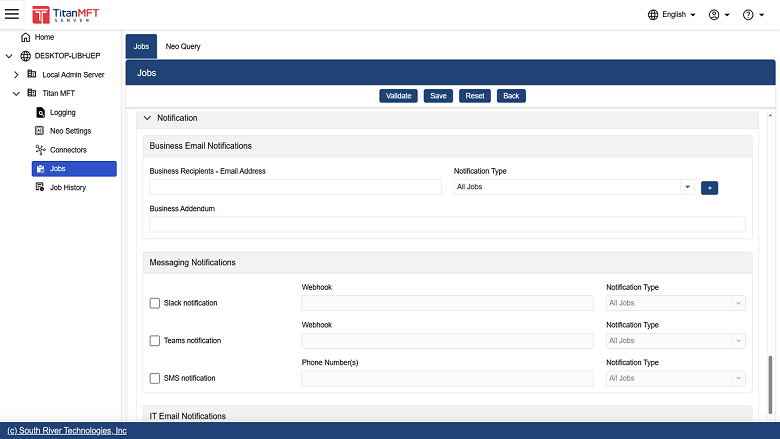
Notification for job transfer results
Image
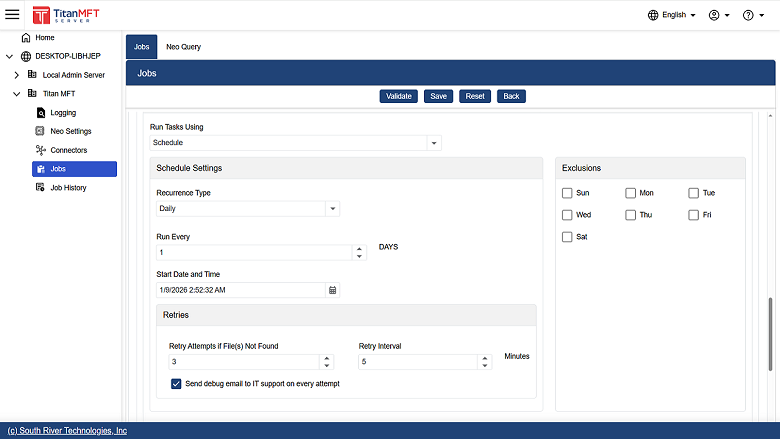
Scheduling
Image
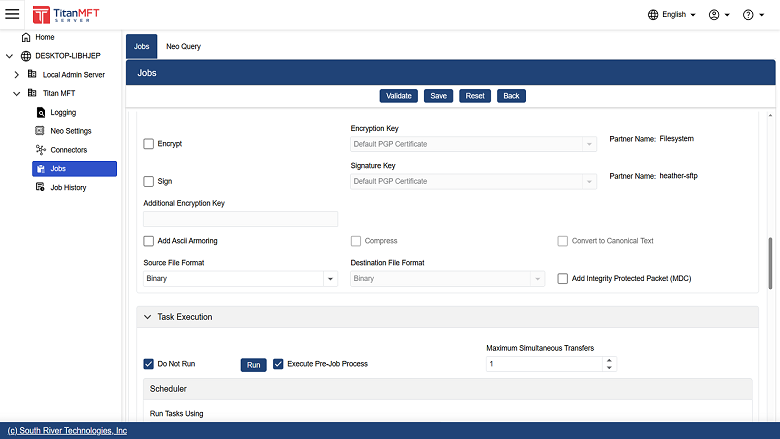
PGP encryption and signature verification

Video
Product video
Titan MFT is a business grade Managed File Transfer (MFT) server with automated secure file transfers and optional scalability features providing enterprise-class high-availability, failover, and clustering. Titan MFT offers: * FIPS 140-2, HIPAA, PCI and Sarbanes-Oxley compliance * Easy and secure file sharing with customers and partners * Advanced scheduling capabilities * Has connectors for SFTP, FTP, WebDAV, Amazon S3, GoogleDrive and more * Data Loss Prevention by scanning files before transfer to ensure they do not contain sensitive data, such as medical or financial information using the Titan Neo AI Module which is an optional feature requiring a separate license. * Optional PGP encryption and signing support. This feature requires an additional license. Titan MFT also has optional multi-server clustering and fail-over, and increased file transfer speeds with top-line data compression. Events management and automation distribute work volume and facilitate workflow to save you time on vital but tedious tasks.
Highlights
- Securely automates critical business file transfers with real time monitoring and alerts over SMS and email, thus reducing downtime and business delays
- Cloud-based deployment enables secure connectivity to both cloud-based and on-prem environments and trading partners
- Industry leading open architecture, SDKs, and CLI interfaces helps eliminate manual transfer processes and increases automation capabilities across the enterprise
Details
Sold by
Delivery method
Delivery option
64-bit (x86) Amazon Machine Image (AMI)
Latest version
Operating system
Ubuntu 24.04
Deployed on AWS
New
Introducing multi-product solutions
You can now purchase comprehensive solutions tailored to use cases and industries.

Features and programs
Financing for AWS Marketplace purchases
AWS Marketplace now accepts line of credit payments through the PNC Vendor Finance program. This program is available to select AWS customers in the US, excluding NV, NC, ND, TN, & VT.

Pricing
Pricing is based on actual usage, with charges varying according to how much you consume. Subscriptions have no end date and may be canceled any time.
Additional AWS infrastructure costs may apply. Use the AWS Pricing Calculator to estimate your infrastructure costs.
If you are an AWS Free Tier customer with a free plan, you are eligible to subscribe to this offer. You can use free credits to cover the cost of eligible AWS infrastructure. See AWS Free Tier for more details. If you created an AWS account before July 15th, 2025, and qualify for the Legacy AWS Free Tier, Amazon EC2 charges for Micro instances are free for up to 750 hours per month. See Legacy AWS Free Tier for more details.
Dimension | Cost/hour |
|---|---|
t2.small Recommended | $0.50 |
t3.micro | $0.50 |
t2.micro | $0.50 |
r6idn.16xlarge | $0.50 |
m6in.metal | $0.50 |
i7ie.xlarge | $0.50 |
c6id.metal | $0.50 |
i4i.4xlarge | $0.50 |
m5zn.6xlarge | $0.50 |
c6a.48xlarge | $0.50 |
Dimensions summary
You pay by the hour for Titan Managed File Transfer running on Linux, billed only for the time your instance runs. Pricing scales with the AWS EC2 instance type you select. Each listed dimension maps to one instance size, from small general-purpose types up to large memory-, compute-, and storage-optimized options. Software charges accrue per running hour and stop when you stop the instance. Larger instances with more CPU and memory carry higher hourly rates. You choose the instance that fits your workload, and your cost follows that choice plus your run time.
Top-of-mind questions for buyers
One unit is a single running AWS EC2 instance of the type you select. You pay for each hour that instance runs. The hourly software rate attaches to that specific instance size. Running two instances bills two hourly rates in parallel.
Software charges accrue only while the instance runs. Stopping the instance halts the hourly software charge. Underlying AWS resources like attached storage may still incur separate AWS fees, but the software license meters running time only.
Yes. Your rate follows the instance type you run. If you launch or resize to a larger type with more CPU and memory, the higher hourly software rate applies for that instance's running hours. No separate upgrade step is needed.
southrivertech.com
Helpful?
Vendor refund policy
Cancel at any time without penalties

Legal
Vendor terms and conditions
Upon subscribing to this product, you must acknowledge and agree to the terms and conditions outlined in the vendor's End User License Agreement (EULA) .
Content disclaimer
Vendors are responsible for their product descriptions and other product content. AWS does not warrant that vendors' product descriptions or other product content are accurate, complete, reliable, current, or error-free.
Delivery details
64-bit (x86) Amazon Machine Image (AMI)
Amazon Machine Image (AMI)
An AMI is a virtual image that provides the information required to launch an instance. Amazon EC2 (Elastic Compute Cloud) instances are virtual servers on which you can run your applications and workloads, offering varying combinations of CPU, memory, storage, and networking resources. You can launch as many instances from as many different AMIs as you need.
Version release notes
Additional details
Usage instructions
Usage Instructions
-
Create an Instance of our AMI through the Amazon EC2 Console. Port 22 access will be required for initial configuration of the application and port 47443 will be used to configure the Titan MFT application through a web browser.
-
Once the Instance has been created and is running, Connect to the instance over SSH following the SSH connectivity instructions in the EC2 Console.
-
Once you have securely connected to the instance over SSH, the initial Titan MFT administrator account needs to be configured. To configure the administrator account, use the following command and supply your new administrator credentials. It's important to use a complex password.
sudo /opt/southriver/titanmft/titanmft /LASINIT /username=<admin-username> /password=<admin-password>
Once the administrative credentials for Titan MFT Server have been established, you can now connect to the Titan MFT web-based admin console through your web-browser by pointing it to https://<ipaddress>:47443.
Note that this is a secure connection. However, since Titan is using a temporary certificate, you will see a security warning in the browser. Proceed past the security warning and log in to the Titan Admin console. At this point you will be able to configure the Titan MFT application including adding your own TLS certificate.
Questions can be addressed to our technical team at https://www.SrtHelpDesk.com
Thank you for using our solutions!
Resources
Vendor resources
Support
Vendor support
Complimentary support is available through our helpdesk at
AWS infrastructure support
AWS Support is a one-on-one, fast-response support channel that is staffed 24x7x365 with experienced and technical support engineers. The service helps customers of all sizes and technical abilities to successfully utilize the products and features provided by Amazon Web Services.
Similar products

Titan MFT is a business grade Managed File Transfer (MFT) server with automated secure file transfers and scalability features providing enterprise-class high-availability, failover, and clustering.

This product has charges associated with it for TurnKey integration, maintenance, and support. OpenLDAP is a preconfigured open-source appliance with automated security updates and backup tools.

A Secure syslog Server for enterprise data logging. Store syslog messages in a file, database, Azure Blob Storage, Amazon Cloud Watch, or Loggly service.

Secure Enterprise SFTP Server with Host Key support and WebUI based transfers. Titan SFTP Server software is trusted by over 25,000 companies worldwide. It's an ideal way to support a distributed workforce, providing secure transfers, automation and cost-effective file storage in the Cloud.
Customer reviews
Robert J.
Titan MFT Review
Reviewed on Aug 12, 2024
Review provided by G2
What do you like best about the product?
MFT Server is easy to configure. Lots of options built in
What do you dislike about the product?
Nothing actually, the product and the support is ok
What problems is the product solving and how is that benefiting you?
Solving flexibility issues and configurations. adjustable
Brian F.
Great Titan MFT Experience
Reviewed on Aug 12, 2024
Review provided by G2
What do you like best about the product?
Level of support was outstanding. Met all my Windows OS, On Premise, and HA needs. The Professional Services were easy to get the servers working with the respective load balancers. The Experience was easy
What do you dislike about the product?
Too easy to deploy. Great problem to have.
What problems is the product solving and how is that benefiting you?
Solves issues of flexibility and configurability. We can adjust to our liking and need. Solid product and reliable
Logistics and Supply Chain
Cornerstone MFT - Easy to setup & maintain
Reviewed on Aug 14, 2022
Review provided by G2
What do you like best about the product?
- It is very easy to use & train administrators.
- Very stable
- Very stable
What do you dislike about the product?
- The user interface could be updated for a more modern look
What problems is the product solving and how is that benefiting you?
- Manage SFTP and having redundant servers while doing so
Logistics and Supply Chain
Great Service
Reviewed on Aug 12, 2022
Review provided by G2
What do you like best about the product?
High Availability setup for our File Transfer Environment with additional reporting and events automation
What do you dislike about the product?
Performance, when connected to Azure Storage Accounts, compared to the local file storage
What problems is the product solving and how is that benefiting you?
Most of the data flow via large files to our organization. Cornerstone provides us with the HA option to manage our uptimes.
Financial Services
Corner Stone Review BW
Reviewed on Jul 25, 2022
Review provided by G2
What do you like best about the product?
Ease of use, intuitive, not difficult to learn, easy to set up customers, and secure.
What do you dislike about the product?
Lack of 24/7 support for what you pay in maintenance/licensing annually.
What problems is the product solving and how is that benefiting you?
Secure sFTP connections for our customers to connect to us and drop and pull files.