
Sold by: cloudimg
Deployed on AWS
Free Trial
AWS Free Tier
This product has charges associated with it for seller support. Unmanic automates media transcoding for video teams, normalising mixed-codec libraries to H.264 in minutes. Pre-secured with nginx auth and backed by 24/7 cloudimg support.
Overview
Image
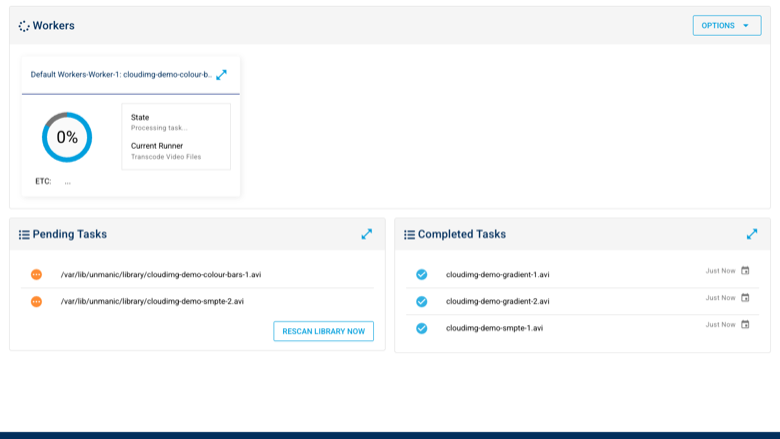
Transcoding dashboard
Image
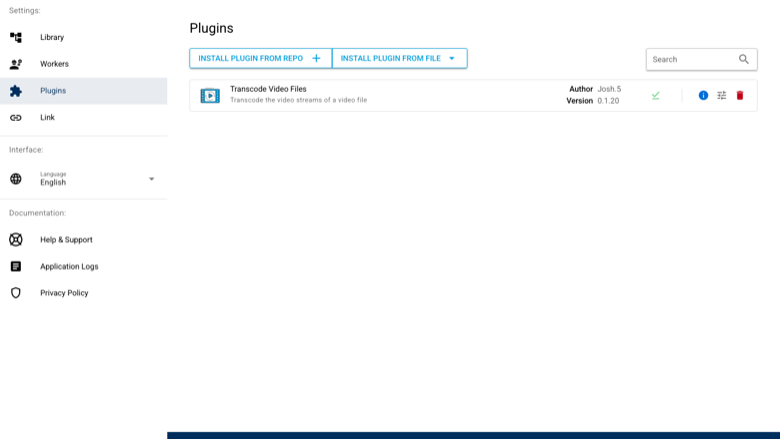
Pre-installed transcoding plugin
Image
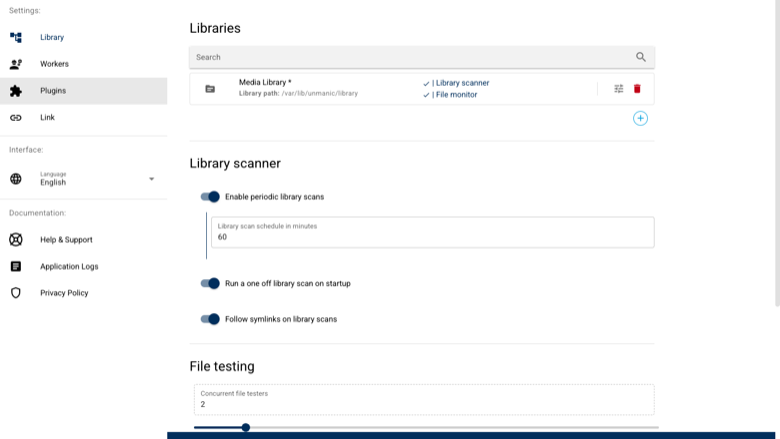
Library and scanner settings
This is a repackaged open source software product wherein additional charges apply for cloudimg support services.
Overview
Unmanic is a self-hosted media library optimiser that watches a library folder, tests every file against a configurable plugin flow, queues non-conforming files, and transcodes them with ffmpeg through a worker pool. A mixed collection of containers and codecs is automatically normalised to one consistent, space-efficient format. This image delivers Unmanic fully installed and configured behind an nginx reverse proxy, with the transcoding engine, a pre-installed video transcoder plugin, and a worker group ready to run within minutes of launch.
Why This Image Instead of Self-Installation
A stock Unmanic install ships with no authentication on its web UI or API - including mutating routes that can rewrite settings and install plugin code - and binds to every network interface by default. It also does no transcoding until you add a plugin, and its in-app plugin browser returns an empty catalogue for a free installation.
This image fixes all of that:
- The app is bound to loopback and fronted by nginx with per-instance HTTP Basic Auth generated on first boot
- The official video transcoder plugin is pre-installed and enabled from a pinned offline artifact
- A worker group is configured and the transcode target is set to universally playable H.264-in-MKV output
- Ongoing maintenance - security patches, version upgrades, and transcoding troubleshooting - is handled by cloudimg support
Example Use Case
A video production studio accumulates thousands of clips in a jumble of source containers and codecs. The team launches this image, points the library folder at their footage on a dedicated volume, and lets Unmanic continuously normalise everything to a single H.264 format in the background - reclaiming storage and standardising playback across their tools without anyone running ffmpeg by hand.
Application Stack
Unmanic runs as a Python application under systemd, bound to the loopback interface, reverse-proxied by nginx which also proxies the live-update WebSocket the dashboard relies on. ffmpeg and ffprobe from the operating system archive provide the transcoding engine. The entire state tree, media library, and worker transcode cache live on a dedicated, independently resizable data volume - keeping in-flight transcodes off the OS disk.
Security and Network Guidance
- No default credentials - The web UI and API sit behind nginx HTTP Basic Auth whose password is generated uniquely on first boot. No shared credentials ship in the image.
- Loopback-bound application - The app listens only on 127.0.0.1; nginx on port 80 is the sole public path, with only an unauthenticated static health endpoint exempt from auth.
- Encryption at rest - The dedicated data volume supports EBS encryption with AWS-managed or customer-managed KMS keys.
- TLS termination - nginx is ready for HTTPS. cloudimg support can assist with Let's Encrypt or load-balancer integration.
- Recommended security-group rules - Allow inbound TCP 443 from your listener IP ranges and restrict SSH (TCP 22) to your admin IP only.
- Codec licensing - The transcoding engine uses open source encoders from the OS archive. Patent licensing for codecs in your jurisdiction remains your responsibility.
Deployment Steps
- Launch the image in your chosen VPC and subnet, selecting an instance type appropriate to your transcoding throughput.
- Attach or confirm the dedicated data volume for your library and cache. Enable EBS encryption if required.
- Configure the security group: allow TCP 443 inbound from listener IPs and TCP 22 from your admin IP.
- Retrieve the first-boot web UI password from the credentials file on the instance, then browse to the instance and sign in as admin.
- Replace the seeded demo clips with your own media in the library folder, or point the library at your media path.
- Unmanic scans automatically and transcodes non-conforming files through the configured worker pool.
Risk-Free Evaluation
If the product does not meet your needs after deployment, contact cloudimg support to discuss refund options. This gives you a low-risk path to validate the image against your workload before committing long-term.
Get Started
Refer to the AWS Marketplace pricing tab for the current software rate. For pre-purchase questions, deployment consultations, or a guided walkthrough, reach out to cloudimg support via live chat or email.
Unmanic is a trademark of its respective owner.
Highlights
- Launch to automated transcoding in minutes - this image ships with ffmpeg, the official video transcoder plugin pre-installed and enabled, a configured worker group, and an nginx reverse proxy, eliminating the manual setup of plugins, workers, and authentication that a stock Unmanic install requires. Point it at your media folder and files are automatically queued and normalised to H.264-in-MKV output.
Details
Sold by
Categories
Delivery method
Delivery option
64-bit (x86) Amazon Machine Image (AMI)
Latest version
Operating system
Ubuntu 24.04
Deployed on AWS
New
Introducing multi-product solutions
You can now purchase comprehensive solutions tailored to use cases and industries.

Features and programs
Financing for AWS Marketplace purchases
AWS Marketplace now accepts line of credit payments through the PNC Vendor Finance program. This program is available to select AWS customers in the US, excluding NV, NC, ND, TN, & VT.

Pricing
Free trial
Try this product free for 7 days according to the free trial terms set by the vendor. Usage-based pricing is in effect for usage beyond the free trial terms. Your free trial gets automatically converted to a paid subscription when the trial ends, but may be canceled any time before that.
Pricing is based on actual usage, with charges varying according to how much you consume. Subscriptions have no end date and may be canceled any time. Alternatively, you can pay upfront for a contract, which typically covers your anticipated usage for the contract duration. Any usage beyond contract will incur additional usage-based costs.
Additional AWS infrastructure costs may apply. Use the AWS Pricing Calculator to estimate your infrastructure costs.
If you are an AWS Free Tier customer with a free plan, you are eligible to subscribe to this offer. You can use free credits to cover the cost of eligible AWS infrastructure. See AWS Free Tier for more details. If you created an AWS account before July 15th, 2025, and qualify for the Legacy AWS Free Tier, Amazon EC2 charges for Micro instances are free for up to 750 hours per month. See Legacy AWS Free Tier for more details.
Dimension | Description | Cost/hour |
|---|---|---|
m5.large Recommended | m5.large | $0.08 |
t3.micro | t3.micro instance type | $0.04 |
t2.micro | t2.micro instance type | $0.04 |
c6in.4xlarge | c6in.4xlarge instance type | $0.24 |
r8in.metal-48xl | r8in.metal-48xl instance type | $0.24 |
c8i.large | c8i.large instance type | $0.08 |
g4ad.xlarge | g4ad.xlarge instance type | $0.12 |
m6a.4xlarge | m6a.4xlarge instance type | $0.24 |
c8i.48xlarge | c8i.48xlarge instance type | $0.24 |
c7i.16xlarge | c7i.16xlarge instance type | $0.24 |
Vendor refund policy
Refunds available on request.

Legal
Vendor terms and conditions
Upon subscribing to this product, you must acknowledge and agree to the terms and conditions outlined in the vendor's End User License Agreement (EULA) .
Content disclaimer
Vendors are responsible for their product descriptions and other product content. AWS does not warrant that vendors' product descriptions or other product content are accurate, complete, reliable, current, or error-free.
Delivery details
64-bit (x86) Amazon Machine Image (AMI)
Amazon Machine Image (AMI)
An AMI is a virtual image that provides the information required to launch an instance. Amazon EC2 (Elastic Compute Cloud) instances are virtual servers on which you can run your applications and workloads, offering varying combinations of CPU, memory, storage, and networking resources. You can launch as many instances from as many different AMIs as you need.
Version release notes
Initial release of the Unmanic self-hosted media library optimiser appliance with a pre-installed transcoding plugin, a configured worker pool, and a secure per-instance authentication gate.
Additional details
Usage instructions
Connect via SSH on port 22 as the default login user for your operating system variant (the user guide lists it per variant; on Ubuntu it is 'ubuntu'). Unmanic is served on port 80 through nginx (the app listens on 127.0.0.1:8888) behind a per-instance HTTP Basic Auth gate. Retrieve the first-boot web UI password with 'sudo cat /root/unmanic-credentials.txt', then browse to http://<instance-public-ip>/ and sign in as admin. Three short synthetic demo clips are seeded into the library so the pending queue and completed history show real work on first login; delete them and copy your own media into /var/lib/unmanic/library when you are ready. The official video transcoder plugin is pre-installed and enabled, and a worker group is configured, so the library scanner has a real plugin flow to run. The unauthenticated health endpoint http://<instance-public-ip>/healthz returns 200. Services are managed with systemctl (unmanic, nginx). To enable HTTPS, follow the TLS section of the user guide.
Resources
Vendor resources
Support
Vendor support
cloudimg provides 24/7 technical support for this Unmanic image by email and live chat.
What We Help With
- Initial deployment and security-group configuration
- Version upgrades and patch application
- Plugin and worker-group configuration and tuning
- Transcoding troubleshooting (ffmpeg settings, target codecs and containers)
- Library migration (moving media onto the dedicated data volume)
- TLS termination setup (Let's Encrypt or load-balancer integration)
- Performance tuning and instance-type sizing guidance
- General troubleshooting of the application stack (Python, nginx, systemd, SQLite)
How to Reach Us
Email: support@cloudimg.co.uk Live chat: available 24/7 through the cloudimg support portal
Refunds and Evaluation
If you experience issues that cannot be resolved, or if the product does not meet your requirements during initial evaluation, contact support@cloudimg.co.uk to discuss refund options.
Instance Sizing Guidance
For help selecting the right instance type for your transcoding workload, contact support before or after launch. Our engineers can advise on matching instance families to your file count, resolution, and throughput requirements.
Prerequisites
- An AWS account with permissions to launch EC2 instances and create EBS volumes
- A key pair for SSH access
- A security group allowing inbound TCP 443 (HTTPS) and TCP 22 (SSH, admin only)
AWS infrastructure support
AWS Support is a one-on-one, fast-response support channel that is staffed 24x7x365 with experienced and technical support engineers. The service helps customers of all sizes and technical abilities to successfully utilize the products and features provided by Amazon Web Services.
Similar products

60-minute live analyst briefing focused on the Unmanned Surface Vehicles market, helping defense, offshore energy, and smart-port leaders optimize AWS cloud, AI, IoT, and maritime digital transformation roadmaps through 2035.

The South Korea UGV Market is projected to nearly double in value by 2030 driven by strong government support for robotics and the need to automate tasks amid labor shortages. Although investment costs and fragmented standards pose barriers, opportunities lie in autonomous and swarm-capable vehicle systems across defence, mining, agriculture and law enforcement sectors.

This report provides an in-depth analysis of the Europe unmanned ground vehicle market between 2024 and 2030. It covers market size forecasts, growth drivers, challenges, segmentation (by operation mode, locomotion, size, system type, end-use industry and country), competitive landscape and major players. It highlights the rising role of defense applications, government support, AI-enabled autonomy, and cost & standardization as key dynamics shaping the market.

The Unmanned Aerial Vehicle (UAV) Market is on a robust growth trajectory, with a valuation of USD 18.20 billion in 2022 projected to soar to USD 47.61 billion by 2030, showcasing a compelling CAGR of 13.0% during 2023-2030. The market's ascent is propelled by the escalating adoption of UAVs in security and defense sectors, revolutionizing military applications such as surveillance, mapping, logistics, and combat operations.
Customer reviews
No customer reviews yet
Be the first to review this product . We've partnered with PeerSpot to gather customer feedback. You can share your experience by writing or recording a review, or scheduling a call with a PeerSpot analyst.