
Sold by: OPSWAT
Deployed on AWS
MetaDefender Core detects over 99% of known and unknown malware and recursively sanitizes 200+ file types, helping organizations secure every file across security workflows and enforce zero trust at the file level.
4.3
Overview
Image
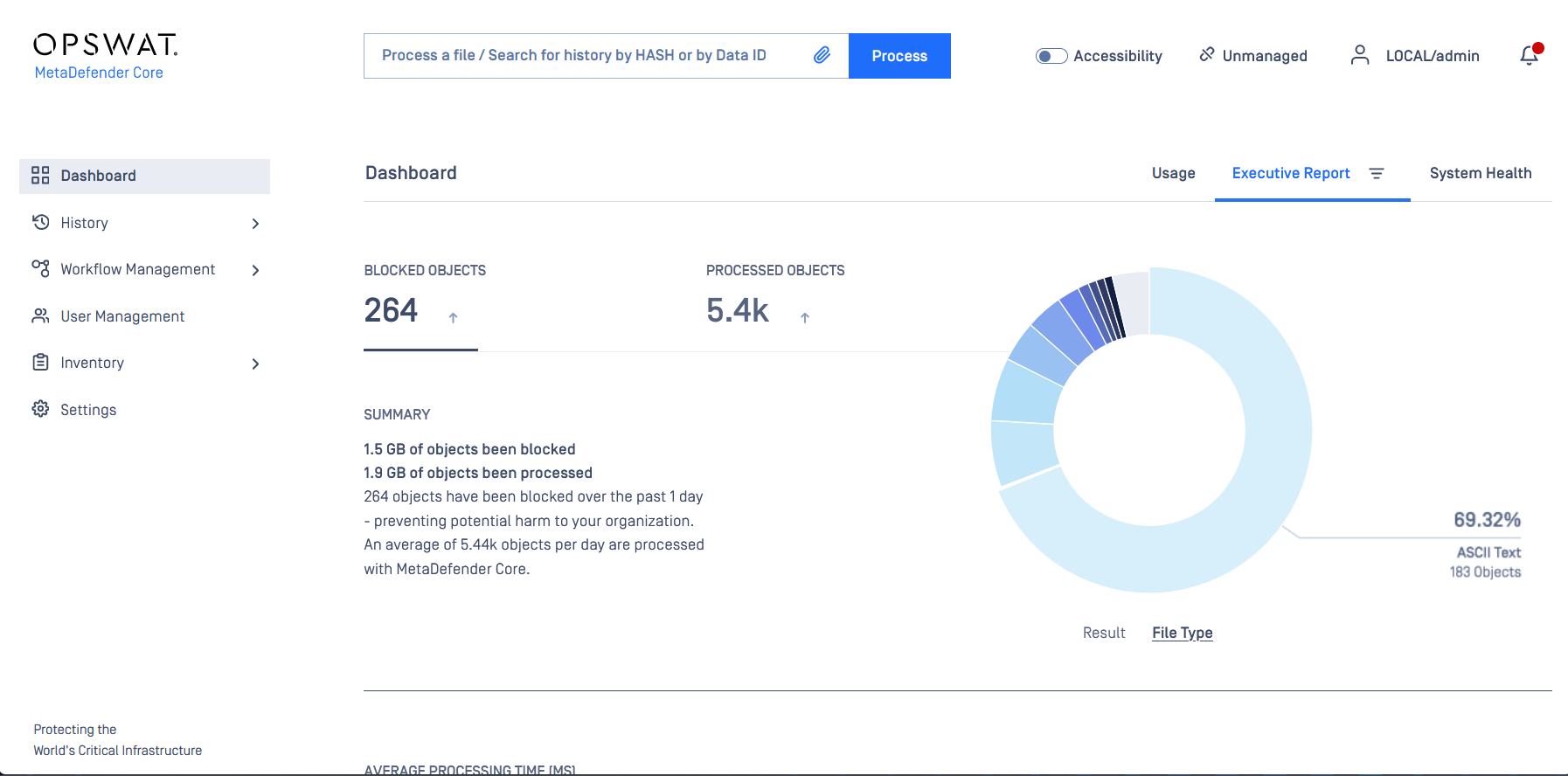
OPSWAT MetaDefender Core Security Dashboard
Image
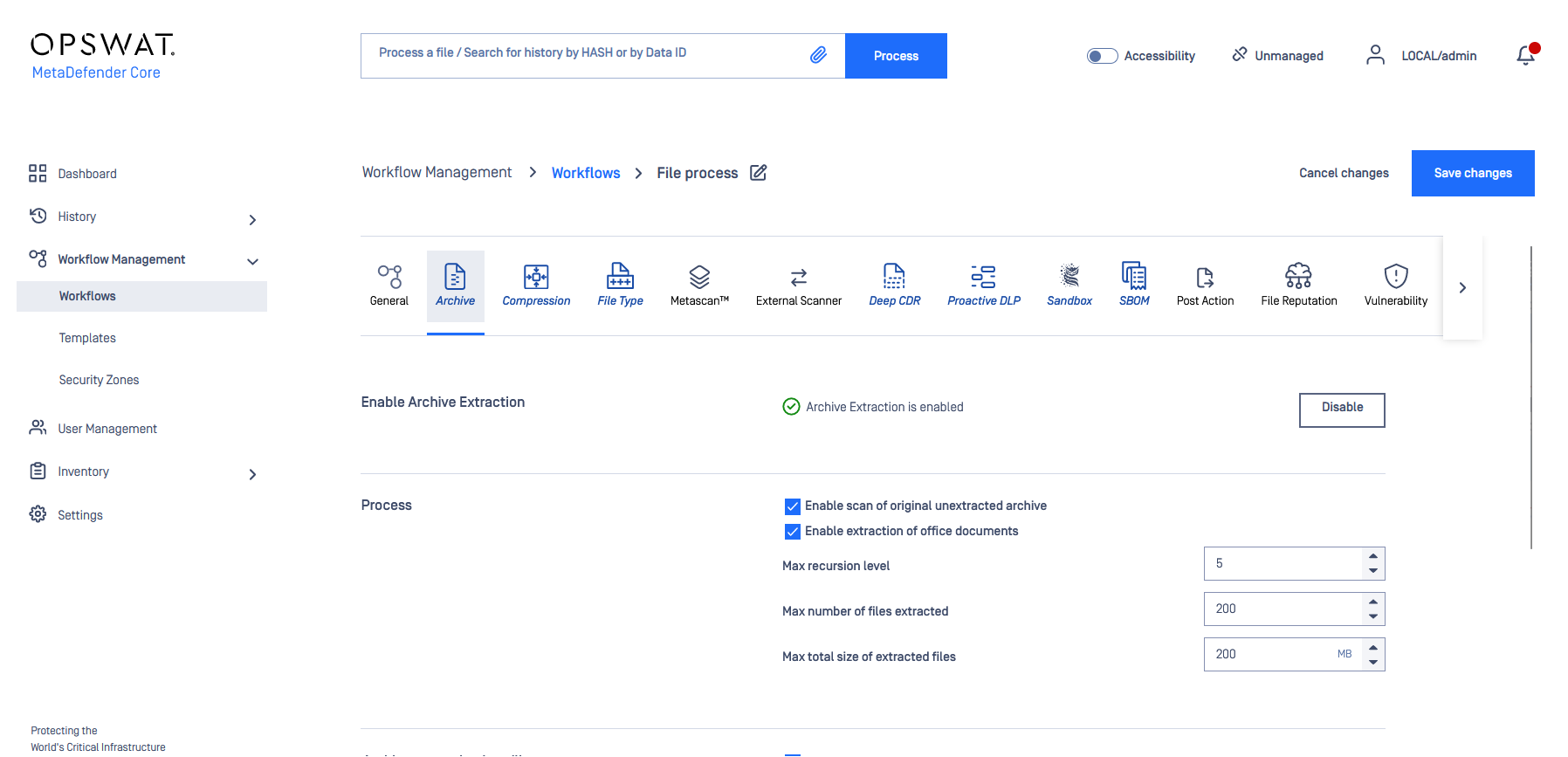
OPSWAT MetaDefender Core Workflow
Image
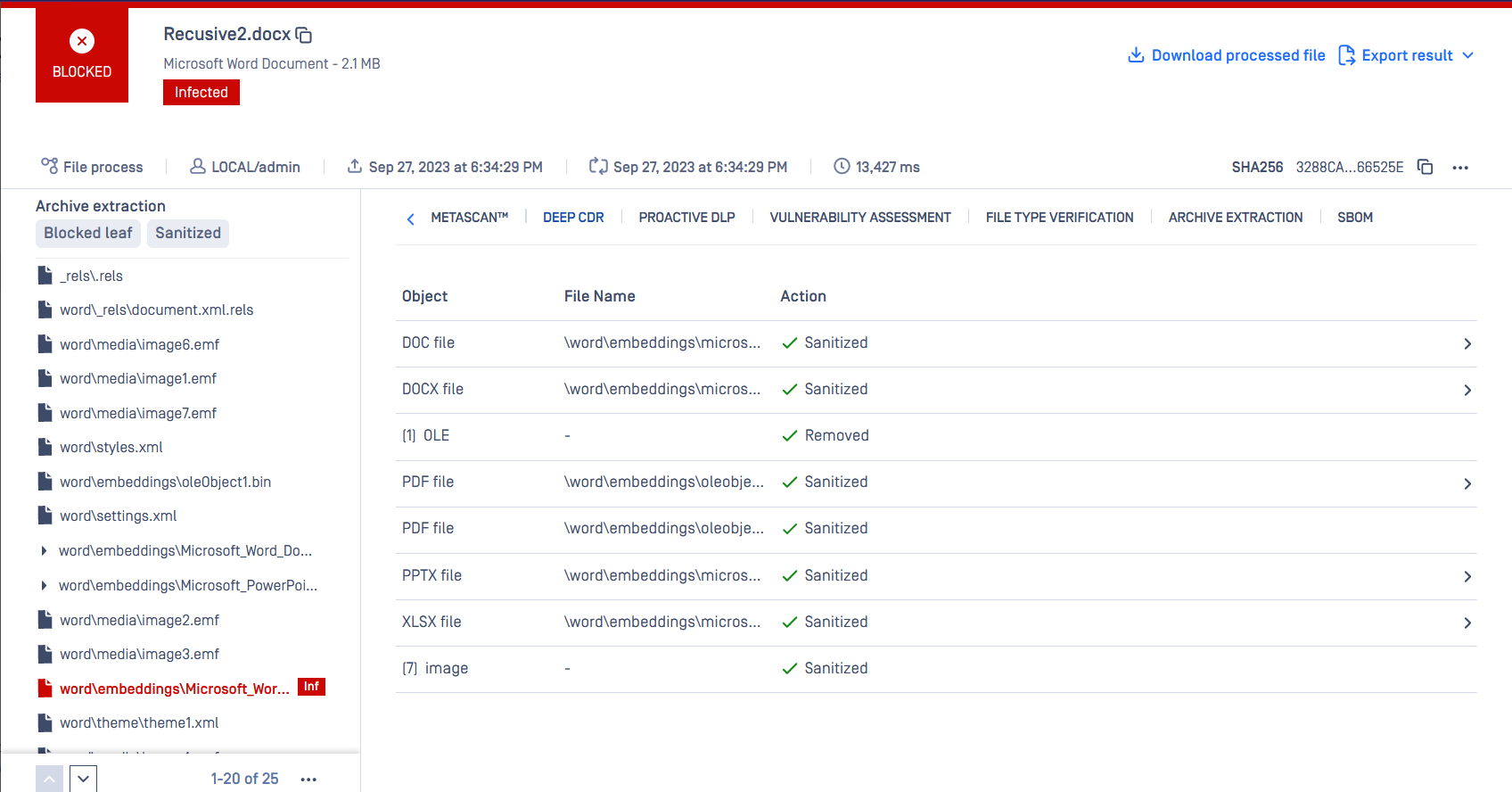
OPSWAT MetaDefender Core Archive Extraction
Video
Product video
MetaDefender Core - Advanced Threat Detection and Prevention for Critical IT and OT Environments
MetaDefender Core is an advanced threat prevention platform that neutralizes malware, ransomware, and zero-day attacks before they infiltrate your environment. It combines AI-enhanced technologies, including Predictive AI, Deep CDR, Metascan Multiscanning, AI Content Inspection, Adaptive Sandbox, Proactive DLP, Threat Intelligence, File-based Vulnerability Assessment, SBOM, and Country of Origin, to secure every file across every channel. Whether protecting uploads, downloads, network transfers, or shared documents, MetaDefender Core helps organizations maintain compliance, reduce operational risk, and build trust. Unlike reactive tools, it proactively analyzes and sanitizes potentially malicious content before execution, enforcing zero trust at the file level.
This is a contract listing for use with a private offer only. To request a private offer, guided demo, or 30-day pilot evaluation, contact apn-sales@opswat.com .
Core Technologies and Buyer Outcomes
Predictive AI uses machine learning to analyze deep file structures and block risky files instantly, without detonation or runtime analysis.
Metascan Multiscanning scans files with 30+ anti-malware engines simultaneously, detecting more than 99% of known and unknown threats and reducing SOC alert fatigue.
Deep CDR (Content Disarm and Reconstruction) recursively sanitizes and rebuilds 200+ file types, neutralizing embedded threats while preserving full file usability.
AI Content Inspector flags AI-generated content, document manipulation, and fraud indicators in images, PDFs, and text-bearing files at ingest, returning policy-ready verdicts.
Proactive DLP removes, redacts, or blocks sensitive data in 125+ file types before content leaves the organization, supporting GDPR, HIPAA, and PCI-DSS compliance.
Adaptive Sandbox detonates and analyzes suspicious files in a controlled environment to improve zero-day detection without risking production systems.
Threat Intelligence extracts sandbox-derived Indicators of Compromise and applies similarity scoring to identify novel variants and campaign-level relationships, with 99.6% detection accuracy.
Reputation classifies files as known good, known bad, or unknown by comparing hashes against a continuously updated database, plus metadata and contextual analysis.
File-based Vulnerability Assessment identifies vulnerabilities in installers, binaries, and applications before installation.
SBOM generates software bills of materials and identifies vulnerabilities in source code and containers, supporting EU CRA, NIS2, EO 14028, and NIST compliance.
Country of Origin determines the true origin and vendor of PE, MSI, and self-extracting files, then blocks or escalates files from high-risk sources.
Industry Use Case: Federal Agency Document Upload Portal
Federal agencies and critical infrastructure operators use MetaDefender Core to analyze citizen-submitted documents at upload portals before files reach backend storage. Every uploaded file passes through multi-layered inspection, neutralizing zero-day, ransomware, and malicious payloads embedded in PDFs, Office documents, or images before they enter the trusted environment. This reduces compliance burden and eliminates false positives from single-engine scanning.
AWS Deployment Options
MetaDefender Core deploys on AWS via Amazon Machine Image (AMI) on EC2 for high-throughput scanning, containers on Amazon EKS for horizontal scaling, or standard EC2 instances sized to scan volume. REST APIs and ICAP protocol enable integration with existing security workflows, web application firewalls, proxies, and storage systems. MetaDefender Core adapts to on-premises, cloud, containerized, air-gapped, or hybrid environments.
Getting Started
Contact apn-sales@opswat.com to request a private offer or schedule a guided demo. Once subscribed, launch the MetaDefender Core AMI on your chosen EC2 instance, activate your license, configure scanning policies via the management console, and integrate using REST API or ICAP protocol.
Compliance and Framework Alignment
MetaDefender Core helps organizations align with Zero Trust Architecture and frameworks including GDPR, HIPAA, and NIST Cybersecurity Framework.
Next Steps
- Request a Guided Demo: see MetaDefender Core in action with a solutions engineer
- Start a 30-Day Pilot: evaluate full functionality in your environment
- Contact Us: email apn-sales@opswat.com for a private offer
Highlights
- Metascan Multiscanning with 30+ anti-malware engines detects over 99% of known and unknown threats while Deep CDR recursively sanitizes 200+ file types to neutralize embedded threats and zero-day exploits - reducing false negatives, eliminating SOC alert fatigue, and ensuring files are safe before execution.
- Deploys flexibly on AWS via AMI on EC2 instances, containers on Amazon EKS, or air-gapped environments. Integrates seamlessly into existing architectures through REST APIs and ICAP protocol - connecting with web application firewalls, proxies, storage systems, and custom applications without requiring infrastructure redesign. Supports on-premises, cloud, hybrid, and disconnected deployments.
- Helps organizations align with zero-trust architecture and regulatory frameworks such as GDPR, HIPAA, NIST, etc. by reducing sensitive data exposure through Proactive DLP and strengthening supply chain visibility with SBOM generation. Trusted by governments, critical infrastructure operators, and over 2,100 global organizations.
Details
Sold by
Categories
Delivery method
Delivery option
64-bit (x86) Amazon Machine Image (AMI)
Latest version
Operating system
Win2022 Microsoft Windows Server 2022
Deployed on AWS
New
Introducing multi-product solutions
You can now purchase comprehensive solutions tailored to use cases and industries.

Features and programs
Trust Center

Access real-time vendor security and compliance information through their Trust Center powered by Drata or Vanta. Review certifications and security standards before purchase.
Buyer guide
Gain valuable insights from real users who purchased this product, powered by PeerSpot.
Financing for AWS Marketplace purchases
AWS Marketplace now accepts line of credit payments through the PNC Vendor Finance program. This program is available to select AWS customers in the US, excluding NV, NC, ND, TN, & VT.

Pricing
Pricing is based on the duration and terms of your contract with the vendor. This entitles you to a specified quantity of use for the contract duration. If you choose not to renew or replace your contract before it ends, access to these entitlements will expire.
Additional AWS infrastructure costs may apply. Use the AWS Pricing Calculator to estimate your infrastructure costs.
Dimension | Description | Cost/12 months |
|---|---|---|
MD Core Windows | Annual subscription for MetaDefender Core Windows | $1,200,000.00 |
Dimensions summary
This listing offers one pricing dimension: an annual subscription for MetaDefender Core Windows, billed per unit. You commit to a 12-month term and choose the number of units you need. Pricing scales with the unit quantity you select, so a larger deployment means more units. There are no separate tiers or add-on dimensions here — the single unit-based subscription covers your access to the file threat detection and prevention platform. To size your commitment, match the number of units to your expected file processing volume and deployment scope.
Top-of-mind questions for buyers
The listing bills per unit under the MD Core Windows (Units) dimension. A unit represents your licensed capacity for the file scanning and sanitization platform. Match your unit count to expected file processing volume and deployment scope. The vendor sizes units to your workflow needs, so confirm the exact mapping during purchase.
The platform lets you choose from 4 to more than 30 anti-malware engines based on your risk and performance goals. Engine selection is bundled into one license rather than billed as a separate dimension here. Your annual unit subscription covers platform access; confirm which engine package your units include with the vendor.
This is a contract model with a 12-month subscription billed per unit. You commit upfront to a fixed unit quantity for the annual term rather than metering usage hour by hour. This suits continuous, steady file processing where you can estimate your volume in advance.
www.opswat.com+1
Helpful?

Legal
Vendor terms and conditions
Upon subscribing to this product, you must acknowledge and agree to the terms and conditions outlined in the vendor's End User License Agreement (EULA) .
Content disclaimer
Vendors are responsible for their product descriptions and other product content. AWS does not warrant that vendors' product descriptions or other product content are accurate, complete, reliable, current, or error-free.
Delivery details
64-bit (x86) Amazon Machine Image (AMI)
Amazon Machine Image (AMI)
An AMI is a virtual image that provides the information required to launch an instance. Amazon EC2 (Elastic Compute Cloud) instances are virtual servers on which you can run your applications and workloads, offering varying combinations of CPU, memory, storage, and networking resources. You can launch as many instances from as many different AMIs as you need.
Version release notes
Additional details
Usage instructions
Accessing MetaDefender web-based management console:
- To access the MetaDefender Core web-based management console for the first time, connect to the IP address of the instance using a browser (e.g. http://localhost:8008 ). You will then be guided through the setup wizard to configure, license and use the product.
Connecting to MetaDefender Core AMI Instance console:
- To connect to your MetaDefender Core command-line console, you will need to use RDP. For further information about the standard AWS method of connecting to an instance, see information described here: Connect to your Windows instance - Amazon Elastic Compute Cloud
- Operation of the product is covered here: https://docs.opswat.com/mdcore/operating .
Health and Monitoring
- Maintenance information can be found here: https://docs.opswat.com/mdcore/operating/regular-maintenance
Additional Details
- There are no additional external resources that are required for the product to function.
- Customer data is not collected while running this product.
- To create custom AMI from this OPSWAT AMI is covered here: https://docs.opswat.com/mdcore/cloud-deployment/single-ec2-deployment#opswat-metadefender-ami-from-marketplace-usage
Support
Vendor support
OPSWAT provides technical support for MetaDefender Core customers through the OPSWAT support portal at https://my.opswat.com/ . Customers can submit support tickets, access product documentation, and manage their licenses through this portal.
Contact for Sales and Private Offers: For pricing inquiries, private offer requests, guided demos, or pilot evaluations, contact the OPSWAT AWS sales team at apn-apn-sales@opswat.com .
Self-Service Resources:
- Product documentation and deployment guides: https://www.opswat.com/docs/mdcore
- OPSWAT Academy free training (https://www.opswat.com/academy )
- Knowledge base articles for troubleshooting and configuration: https://www.opswat.com/docs/mdcore/troubleshooting
- REST API documentation for integration support: https://www.opswat.com/docs/mdcore/metadefender-core
Getting Help:
For technical issues including product configuration, scanning policy setup, integration troubleshooting, license activation, and operational questions, submit a ticket through the support portal. For billing questions or refund requests related to your AWS Marketplace subscription, contact apn-sales@opswat.com .
Important Note: This is a contract listing for use with AWS private offers only. Pricing varies depending on customer environment, scan volume requirements, and deployment configuration. Contact apn-sales@opswat.com to discuss your requirements and receive a tailored private offer.
AWS infrastructure support
AWS Support is a one-on-one, fast-response support channel that is staffed 24x7x365 with experienced and technical support engineers. The service helps customers of all sizes and technical abilities to successfully utilize the products and features provided by Amazon Web Services.
Updated weekly
By Cloud Storage Security
By Trend Micro
Sentiment is AI generated from actual customer reviews on AWS and G2
Functionality
Ease of use
Customer service
Cost effectiveness
Positive reviews
Mixed reviews
Negative reviews
AI generated from product descriptions
Multi-Engine Threat Detection
Metascan Multiscanning scans files with 30+ anti-malware engines simultaneously, detecting over 99% of known and unknown threats.
Content Disarm and Reconstruction
Deep CDR recursively sanitizes and rebuilds 200+ file types, neutralizing embedded threats while preserving full file usability.
Predictive Machine Learning Analysis
Predictive AI uses machine learning to analyze deep file structures and block risky files instantly without detonation or runtime analysis.
Data Loss Prevention
Proactive DLP removes, redacts, or blocks sensitive data in 125+ file types before content leaves the organization, supporting GDPR, HIPAA, and PCI-DSS compliance.
Deployment Flexibility
Deploys on AWS via Amazon Machine Image on EC2 instances, containers on Amazon EKS, or air-gapped environments with integration through REST APIs and ICAP protocol.
Multi-Engine Malware Detection
Support for Sophos, CSS Premium, and CSS Secure engines that can be used individually or simultaneously to optimize detection accuracy, performance, and operational fit across workloads.
Multiple Scanning Models
Event-based scanning on upload, retroactive scanning on demand or schedule, and API-based scanning before write operations across Amazon S3, EBS, EFS, and FSx.
In-Tenant Deployment Architecture
Installation and operation inside customer AWS account with data remaining within the environment or region, supporting private VPC endpoints and linked account management.
Automated Response and Remediation
Automated quarantine, tagging, deletion, and alerting capabilities with object tagging for downstream workflow automation and enforcement decisions.
Large File and Broad File Type Support
Support for virtually no file size or file type restrictions with CSS Premium engine, enabling protection across enterprise storage, data lakes, backups, and media workflows subject to AWS limits.
Intrusion Detection and Prevention
Host-based intrusion detection and prevention (IDS/IPS) capabilities to defend against network threats and zero-day exploits
Application Control
Application control functionality to lock down servers and secure Docker containers with DevOps-friendly API security processes
Malware Protection
Anti-malware protection with behavioral analysis and predictive machine learning for Windows and Linux workloads
Integrity Monitoring
File and System Integrity Monitoring to streamline compliance and audit evidence gathering
Vulnerability Exploitation Prevention
Vulnerability exploit shielding to prevent exploitation of unpatched systems without requiring live system patching
Standard contract
No
No
No
Customer reviews
JaiminDalwadi
Advanced file checks and deep sanitization have prevented threats at the entry point
Reviewed on Sep 14, 2026
Review from a verified AWS customer
What is our primary use case?
MetaDefender prevents organizations from file-borne malware and file-borne threats by preventing threats at the entry point itself.
What is most valuable?
MetaDefender's threat detection ratio is quite high because it uses multiple anti-malware engines. Sanitization helps eliminate typical zero-day threats such as macro-based attacks and script-based attacks.
Deep CDR feature in reconstructing files has provided significant value to customers. When they receive phishing links, dummy QR codes, or embedded actions defined on documents, Deep CDR removes all those potential threats.
MetaDefender supports all expanded file type and archive coverage features, which means most of the 4,000-plus file types are covered. It provides a quite deep scanning process. Archive extraction gives more visibility of the files.
The file-based vulnerability assessment feature is straightforward. When downloading a file from the internet and scanning it, information about known vulnerabilities is provided. It gives advanced information about the vulnerability.
With MetaScan multi-scanning feature, certain web shell attacks can be detected which others cannot. Whether it's 8 anti-malware engines or 20, the detection ratio and rate are quite good.
What needs improvement?
Reporting still requires improvement, but otherwise the solution is excellent. Other areas include centralized management, providing the capability to manage all instances from a single console, centralized reporting, and integration through central management.
For how long have I used the solution?
I started working with MetaDefender in 2021.
What do I think about the stability of the solution?
Uptime is 99.99%, so it is 99% stable and reliable.
What do I think about the scalability of the solution?
Scalability with MetaDefender is very good.
How are customer service and support?
Support is excellent. Technical support from OPSWAT is excellent.
Which solution did I use previously and why did I switch?
We are not working with Trend Micro, also called today Trend AI Vision One, which is hardcore competition. We are purely working on MetaDefender.
How was the initial setup?
Installation for the deployment of MetaDefender is straightforward.
What was our ROI?
Many threats are prevented before entering the organization with MetaDefender. It definitely saves more effort for the SOC team if threats are being eliminated at the entry point itself, allowing them to focus more on other things.
What's my experience with pricing, setup cost, and licensing?
MetaDefender is affordable. It is flexible, and pricing-wise there are no concerns with this solution.
Which other solutions did I evaluate?
When comparing MetaDefender to other solutions, I compare it to Trend Micro, Broadcom, and Check Point for email.
What other advice do I have?
MetaDefender is leading with respect to competitors as an all-in-one platform because no other tool has all the platform built-in.
For example, MetaDefender cannot identify the source itself, but if a file is scanned, the complete detail of the scanning can be seen.
If someone modifies a policy, adaptive sandbox analysis takes a little bit of time, but it gives accuracy up to 99%.
Continuous improvement that OPSWAT is doing with enhancements made to policy orchestration and to engine parallelization demonstrates that OPSWAT is adapting.
I rate this solution a 10.
Which deployment model are you using for this solution?
Hybrid Cloud
If public cloud, private cloud, or hybrid cloud, which cloud provider do you use?
Amazon Web Services (AWS)
Prajwal Chougale
Multi-layered file analysis has strengthened our email defense and reduced manual SOC effort
Reviewed on Sep 09, 2026
Review provided by PeerSpot
What is our primary use case?
My main use case for MetaDefender is for multi-scanning purposes, including Deep CDR, sandbox-based analysis, and protecting the organization from malware and other file-based threats delivered through email, particularly suspicious or unknown attachments. I primarily view it as an additional inspection layer for email attachments, using its multi-scanning capability to analyze files with multiple detection engines. The Deep Content Disarm and Destruction capability is also valuable because it can remove potentially malicious content from supported files and provide a safer version for the user. From a SOC's perspective, this is particularly useful for handling files that may bypass traditional signature-based security controls while email filtering is happening. It gives us additional confidence when dealing with documents such as PDFs and Office files and all other materials that we receive through email. MetaDefender prevents malicious or weaponized files from reaching users while reducing the risk associated with unknown, zero-day file-based threats.
What is most valuable?
The best features of MetaDefender include multi-scanning, multi-layered scanning of any email or attachment, the CDR feature, and the sandboxing analysis capability. The multi-scanning feature is particularly useful because a file can be checked against multiple antivirus engines instead of relying on a single detection engine. Deep CDR is one of the strongest features because instead of only detecting whether the file is malicious, it can sanitize supported files by removing potentially dangerous content and reconstructing a safe version. This is especially useful for documents and email attachments where we still need to allow the business to work with the file. The adaptive sandbox is another valuable feature for files that require deeper behavior analysis, providing another layer for identifying suspicious or malware-like content that may not be obvious through the traditional scanners that we use.
MetaDefender has a positive impact by adding multiple layers of file scanning, email classification, and attachment investigation in a more efficient way. Instead of just relying on the verdict from our primary email or endpoint security solution, we can use MetaDefender to get additional analysis across multiple engines. This is especially helpful when dealing with suspicious or previously unseen files, zero-day attack files. Deep CDR has also been useful from a risk reduction perspective because potentially dangerous content can be removed from supported files while still allowing users to work with a usable version of the document. Overall, MetaDefender has a positive impact on analysis and detecting suspicious files, leading to greater confidence in our environment. It has also helped reduce some of the manual efforts involved in determining whether the attachment is safe or not.
What needs improvement?
MetaDefender is quite better in all aspects it has been designed for. We could enhance the user interface and user experience, as the platform has many security capabilities, but some configuration and policy management tasks can take time to understand, especially for someone using the product for the first time. I would appreciate more intuitive reporting and dashboards. The security information is useful, but making key metrics, detection trends, false positives, and remediation actions easier to understand would help a SOC team quickly identify areas requiring attention. Another area for improvement would be reducing false positives and improving processing time for large or complex files, which sometimes may require additional manual review. The CDR is a very useful tool, but clearer handling and exception management should be implemented when sanitizing legitimate files. Automation and integrations could also be enhanced, particularly around recommending appropriate actions based on scan results and simplifying integration with other security tools.
For how long have I used the solution?
We have been using MetaDefender for more than two years.
What do I think about the stability of the solution?
From my overall experience, MetaDefender is a very stable and reliable product when it comes to the outcomes of file analysis and email attachments received. In my day-to-day experience, I have not encountered any major stability issues that would significantly affect email or file security operations. The core functions, such as multi-scanning, sandboxing, and file inspection, have been consistent. Once the policies and integrations are configured properly, there is minimal ongoing maintenance required to keep the solution operational. I would monitor its performance when handling very large or complex files, as scanning can sometimes take longer.
What do I think about the scalability of the solution?
MetaDefender can handle any traffic and is suitable for any organization regardless of size. With our security requirements, we can achieve this with the existing environment and scale without requiring redesign or re-architecture. Its main advantage is the flexibility in deployment, allowing it to be deployed in the cloud or on-premises. Additional instances can be added as email volume and the number of protected users increases. Overall, I consider MetaDefender to be highly scalable and suitable for any growing organization of any size, with the main requirements being proper planning for traffic and security workloads.
How are customer service and support?
Their customer support is outstanding. Whenever we raise any support case, they provide complete structural descriptions and solutions to the problems we report, and they resolve issues on the spot. I would rate them nine out of ten.
Which solution did I use previously and why did I switch?
We were previously using Evinent as a security tool, and we incorporated MetaDefender for extensive EDR plus email security.
How was the initial setup?
The decision to switch to MetaDefender was mainly taken by higher management, and as a SOC analyst, I was not involved in the evaluation of other options.
What about the implementation team?
We are a customer.
What was our ROI?
We have reduced some of our manual effort and saved time, even investing additional time on zero-day attacks. In file analysis, we have sometimes saved a lot of time, while also spending a little more on suspicious files. Overall, using MetaDefender has been beneficial and can be justified as a positive investment.
Which other solutions did I evaluate?
The decision to switch to MetaDefender was mainly taken by higher management, and as a SOC analyst, I was not involved in the evaluation of other options.
What other advice do I have?
If you are looking for a solution that enhances your email security or your EDR product, and if you are considering more security solutions that can protect both combinedly, I would recommend MetaDefender as one of the best tools. Its features include multi-scanning, Deep CDR, sandboxing, and file investigation, which are essential for effective detection while minimizing false positives and scanning times. Integration with the existing environment is also important; if you are using Microsoft 365, ensure that flow connectors and policies are planned and tested before moving into production. I would also check for potential conflicts or mail loops if another third-party email security solution is already deployed. Another recommendation is to spend time on policy tuning and user group segmentation. MetaDefender allows policies to be prioritized and applied to specific audiences, making administration much easier as the environment grows. I would recommend this approach as well. My overall rating for MetaDefender is eight out of ten.
Kevin-Liu
Central console has secured all API file traffic and supports multi-engine endpoint scanning
Reviewed on Aug 30, 2026
Review provided by PeerSpot
What is our primary use case?
My main use case for MetaDefender involves the Central Management Console, core service, and ICAP service.
In my day-to-day work, I use MetaDefender to scan endpoint security, but we did not have a product to cover API traffic scans. MetaDefender OPSWAT provides that solution, and also the ICAP scans. It is a really good product. We have customers sending all the files via API calls, and they will be scanned by OPSWAT for antivirus scan and also Data Loss Prevention scan. It is a great product.
We have more than ten different vendors connected to MetaDefender for scanning, and it is working very well.
What is most valuable?
The best features MetaDefender offers are the ICAP Scan and API Scan. For the ICAP Scan and API Scan, they stand out to me because they are easy to manage and can also adopt multi-clients at the same time and scan by seven different scan engines and different antivirus signatures scan.
MetaDefender positively impacts my organization by filling the gap, as we do not have any other product that can scan API calls. It has helped to improve compliance requests. It also scans all the API traffic and makes sure the API traffic is secured and clean.
What needs improvement?
MetaDefender can be improved by upgrading the Linux version, which is using many free tools such as MongoDB, Postgres, and OpenSSL. It can be easily targeted by hackers. If MetaDefender can upgrade those free versions of products regularly to cover those vulnerabilities, that would be beneficial. Regular patching, upgrades, and CVE coverage would be beneficial, especially because AI attacks can exploit any vulnerabilities, CVEs, and zero-days from those free MongoDB tools, which are an easy target.
Regarding MetaDefender's AI capabilities, I do not see much AI integration with MetaDefender at this moment. My thoughts on its accuracy and reliability of output are that it relies on signature-based antivirus scan, which is not sufficient for AI-kind vulnerabilities or hacking. This part needs improvement.
For how long have I used the solution?
I have been using MetaDefender for five years.
What do I think about the stability of the solution?
MetaDefender is a stable product.
What do I think about the scalability of the solution?
MetaDefender's scalability is great. We can increase the central management server by adding more CPU, RAM, and disks, and we can add more clients to the scan and create a policy for them. It has great scan capability and great extendibility.
How are customer service and support?
Customer support is great. I have worked with the Vietnam team quite a few times, and they are always very active, proactive, and offer remote sessions quite a few times. It is a great service.
Which solution did I use previously and why did I switch?
Previously, we were using McAfee antivirus scan servers for ICAP filters, but with increasing API call requests, MetaDefender filled that gap and provided the API call scan service, which is great.
How was the initial setup?
We tried Deep CDR for a while, but it was consuming a lot of CPU and RAM, so we stopped that.
What about the implementation team?
With the recent enhancements to policy orchestration and engine parallelization, we upload all MetaDefender detection events into Splunk, and our incident response team is using the Splunk SOAR product to automate all those detections and reactions. It is a Splunk integration. I assess the effectiveness of the solution in blocking or sanitizing content based on policy by noting that we are using Splunk, and the CISO and the incident response team are using the Splunk SOAR console to perform automation detections and reactions.
What was our ROI?
I see a return on investment.
What's my experience with pricing, setup cost, and licensing?
My experience with pricing, setup cost, and licensing is that the cost and license fee is increasing every year.
Which other solutions did I evaluate?
Before choosing MetaDefender, we did not evaluate other options. We mainly wanted to use OPSWAT for API call scans, and we could not find any other product in the market at that time.
What other advice do I have?
My advice to others looking into using MetaDefender is that it is a great product. We are only using the on-premise product because of company policy, as we are not allowed to upload our customer data into the public cloud. I think the hybrid cloud and private cloud product would be beneficial. That is the trend, so using hybrid cloud mode is a beneficial option for all other companies. We are currently still using the on-premise product.
We are not using the enhanced reporting and audit visibility features at this time.
The file-based vulnerability assessment feature is great because it can scan using seven different antivirus scan engines, but with AI attacks now, signature-based detection is not sufficient, which is a problem for all antivirus product vendors.
I give MetaDefender an overall rating of ten out of ten.
Rajkumar Gupta
Adaptive policies have reduced downtime and simplified secure protection for cloud-based VMs
Reviewed on Jul 22, 2026
Review from a verified AWS customer
What is our primary use case?
My main use case for MetaDefender is on my devices. I have a specific example of how I use MetaDefender on my devices in that it has been installed by the administrator on my VMs which are being listed on my public cloud.
I don't have anything specific to add about how I use MetaDefender in my setup, as it is protecting my whole VMs, so not any particular file.
What is most valuable?
The best features MetaDefender offers, in my opinion, are that it adapts the policies on the go, and that is the best feature.
When I say it adapts policies on the go, it has the ability that if there is a new policy or the new configuration that has come up without any downtime, it just adjusts it and reiterates to all of the users and all of the devices. MetaDefender has positively impacted my organization as it has reduced time for the users.
MetaDefender reduces time for users in their working, as it does not occupy the RAM usage of their devices plus it does not take time for the downtime or shutting down or the rebooting of the devices.
What needs improvement?
I have not seen any areas where I can suggest improvements for MetaDefender, so probably it is good enough. I would rate it an eight because its interface can be improved and it can improve their integrations as well, so there is room for improvement.
For how long have I used the solution?
I have been working in my current field for four and a half years. I have been using MetaDefender for the past six months.
What do I think about the stability of the solution?
MetaDefender is stable.
What do I think about the scalability of the solution?
MetaDefender's scalability is pretty much scalable.
How are customer service and support?
The customer support is good.
Which solution did I use previously and why did I switch?
I previously used a different solution, Palo Alto, which I switched from because it was very expensive.
What was our ROI?
I have seen a return on investment as fewer employees are needed in terms of implementation.
What's my experience with pricing, setup cost, and licensing?
My experience with pricing, setup cost, and licensing is that it is good and at par with other competitors.
Which other solutions did I evaluate?
Before choosing MetaDefender, I evaluated other options, including Palo Alto and Check Point, as many were evaluated.
What other advice do I have?
My impression of the detection rates provided by MetaScan Multi-scanning is that it is good and pretty accurate. I would assess the effectiveness of Deep CDR in reconstructing files safely and without signatures as they are pretty much effective, and it is really useful for the administrator.
My thoughts on the file-based vulnerability assessment feature in identifying vulnerabilities before deployment are that it is good, and it is a very good feature. I use adaptive sandbox analysis, and its impact on analyzing suspicious files is very great because it detects pretty much early.
I am using the enhanced reporting and audit visibility features, and they have helped meet our audit requirements as it has given us a great requirement study and plus it has also helped in ISO audit requirement as well. I would assess the effectiveness of the solution in blocking or sanitizing content based on policy as good and pretty much effective.
My advice to others looking into using MetaDefender is that if you are looking ahead at a solution which can be implemented quickly and at a lesser cost, go ahead with it. I would rate this product an eight overall.
DineshKumar31
Security workflows have improved as it identifies threats and streamlines vulnerability patching
Reviewed on Jul 06, 2026
Review provided by PeerSpot
What is our primary use case?
The major use cases of MetaDefender in my work environment involve preventing malware updates, data breaches, and compliance violations through scanning files for malware, vulnerabilities, and sensitive data at the network perimeter.
What is most valuable?
The best features of MetaDefender include its ability to detect malware and vulnerabilities, which I also use at server levels, including production and testing servers, helping me identify and address vulnerabilities by applying patch updates.
When sanitizing files based on policies, MetaDefender processes and sanitizes files to remove hidden content, including embedded objects and scripts while preserving the visible content.
I use MetaDefender Archive Extractor, which supports over 30 archive file types, improving detection and preventing archive bombs, allowing administrators to perform archive handling once for each file type.
What needs improvement?
I would like to see improvements in the tool's automation capabilities. It would be beneficial if it could automatically create tickets and notify responsible teams about any identified vulnerabilities rather than relying on a manual process.
I want to see enhancements allowing for automatic ticket creation using APIs to streamline the workflow and assign tickets to respective teams.
For how long have I used the solution?
I have been using MetaDefender for the last two years on my official laptop.
What do I think about the stability of the solution?
I do not have any stability issues with MetaDefender.
What do I think about the scalability of the solution?
MetaDefender is scalable; it allows for automation in scaling resources as needed during peak times.
How are customer service and support?
I would rate technical support as a nine out of ten.
Which solution did I use previously and why did I switch?
I have evaluated other options available in the market, such as Microsoft and McAfee, but found MetaDefender to be distinct.
I decided to go with MetaDefender due to its architectural compatibility with the client's budget requirements, as its scanning and vulnerability detection capabilities are better than other tools.
How was the initial setup?
For me, onboarding MetaDefender was not too difficult, being balanced between straightforward and complex.
What was our ROI?
I have seen measurable benefits, as MetaDefender saves time, preventing the need for manual processes associated with other tools.
What other advice do I have?
The detection rates from MetaScan multi-scanning are managed mainly by other teams in alignment with our organization policy, where they can achieve detection rates of 81-87% with four engines or 95% with sixteen engines, and the comparison with Microsoft Defender often yields similar results.
I do not have an opinion on the effectiveness of Deep CDR in file reconstruction.
We have a process in place for identifying vulnerabilities before deployment where team members raise tickets on the ServiceNow portal for the respective teams to address.
I do not use Adaptive Sandbox analysis, as that is managed by another team.
I do not notice improvements in workflow automation as recent enhancements are managed by other teams; I am focused on using the tool to identify vulnerabilities.
I do not have an assessment of how multi-scanning and content disarm and reconstruction affect our data security operations.
I recommend implementing MetaDefender for its impressive features that maintain the health of the system. My overall review rating for MetaDefender is nine out of ten.