Sold by: Solve DevOps
Deployed on AWS
AWS Free Tier
This is a repackaged open source software product wherein additional charges apply for the pre-configured Sonatype Nexus Repository server with Java 17, a dedicated service account and systemd unit, per-instance secrets-encryption key generated on first boot, an in-place upgrade helper, a configured Amazon CloudWatch agent shipping the Nexus application and request logs plus host metrics, Amazon SSM Agent for Session Manager access, security hardening, and vendor support.
Overview
Image
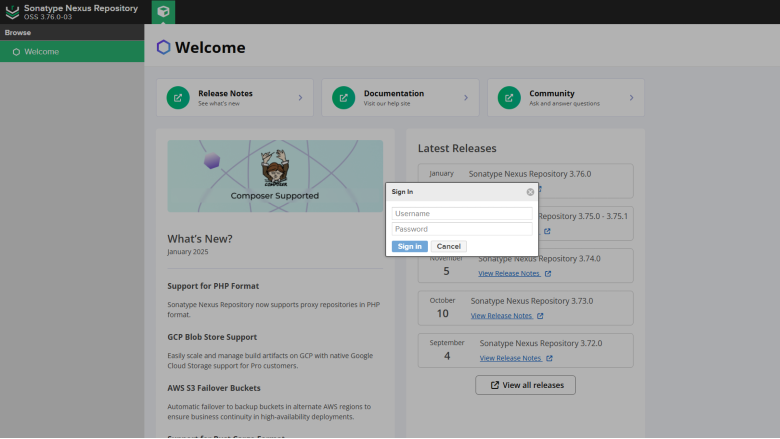
Nexus Login Page
Image
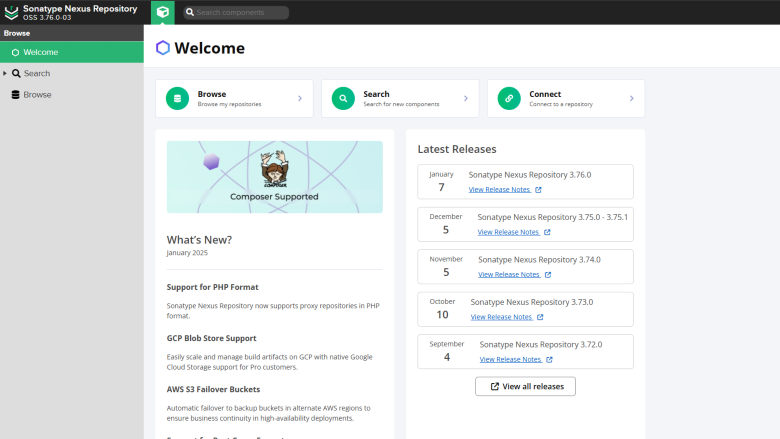
Nexus Home Page
Image
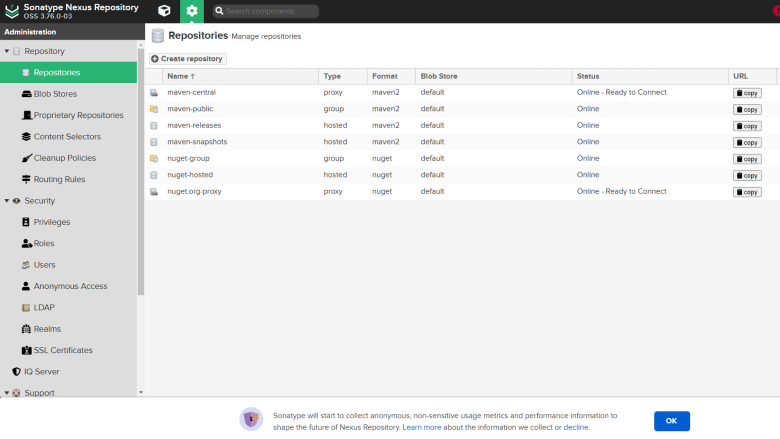
Nexus Repository Manager
Nexus Repository OSS on AWS - Ready-to-Run Artifact Management
Deploy a fully configured Sonatype Nexus Repository 3 server on AWS with a single click. This AMI gives software development teams and IT operations a secure, central repository for hosting and proxying Maven, npm, PyPI, Docker, Go, PHP, Python, and other artifact formats - so your CI/CD pipelines can publish and retrieve versioned applications and their dependencies from one trusted source.
Nexus is installed from the official Sonatype distribution (currently 3.80.x), runs as a dedicated non-root user under systemd with raised file-descriptor limits, and generates a unique secrets-encryption key on first boot. The Amazon CloudWatch and SSM agents are pre-configured so application logs, request logs, and host metrics flow into CloudWatch as soon as you attach an instance profile.
Key Benefits
- Universal Repository Support - Host and proxy Docker, Maven, npm, PyPI, Go, and many more artifact formats from a single platform
- Private Hosted Repositories - Store proprietary packages and container images in repositories you fully control
- Role-Based Access Controls - Manage who can publish, read, and administer repositories across your teams
- Native AWS Integration - CloudWatch logging and metrics plus Systems Manager support are built in from first boot
- Full Root SSH Access - Complete control over your instance for advanced configuration and customization
What is Included
- Nexus Repository 3 (3.80.x) installed under /opt/nexus with Java 17, running as a dedicated nexus system user with no login shell. The systemd unit is configured with Type=forking, Restart=on-failure, and LimitNOFILE=65536. Data is stored at /opt/sonatype-work/nexus3, and the service starts automatically on boot on port 8081. A nexus-upgrade helper is available in /usr/local/sbin.
- Per-Instance Credential Generation - A first-boot script writes /opt/nexus/nexus.secrets.json with a fresh UUID key ID and random 256-bit key (mode 600, owned by nexus) and restarts Nexus. Nexus then creates its own one-time admin password at /opt/sonatype-work/nexus3/admin.password.
- Amazon CloudWatch Integration - The CloudWatch agent ships nexus.log, request.log, syslog, and auth.log to CloudWatch Logs with 30-day retention and per-instance-ID streams. CPU, memory, disk, TCP connection, and process metrics are published under the SolveDevOps/Nexus namespace.
- AWS Systems Manager Integration - SSM Agent is installed and enabled for Session Manager, Run Command, Patch Manager, and Inventory.
- Security Hardening - Key-based SSH only, no root login permitted, no secrets or AWS credentials baked into the image. Installer archives, cloud-init instance data, and SSH authorized keys are scrubbed at build time.
- Operational Quick-Start - A login banner (motd) displays the admin-password location, the Nexus URL, the upgrade command, and CloudWatch/SSM activation steps.
Example Use Case: Centralized Docker and Maven Repository for CI/CD
A development team running Jenkins or GitLab CI on AWS needs a private registry for Docker images and a hosted Maven repository for internal Java libraries. After launching this AMI, the team configures their CI/CD pipelines to push Docker images and Maven artifacts to Nexus after each successful build. Downstream services and deployment pipelines then pull verified, versioned artifacts from the same Nexus instance - eliminating reliance on external registries and ensuring consistent, repeatable builds across development, staging, and production environments.
Quick Start
- Launch the instance - Provision a VM with capacity appropriate for your workload. We recommend at least 4GB RAM and 30GB SSD for small PoC and development environments. Attach an IAM instance profile with CloudWatchAgentServerPolicy and AmazonSSMManagedInstanceCore.
- Wait for bootstrap - Allow approximately 5 minutes for Nexus to finish starting.
- Access the Nexus Portal - Open http://:8081 and sign in as admin with the password from /opt/sonatype-work/nexus3/admin.password.
- Key paths - Install: /opt/nexus | JVM options: /opt/nexus/bin/nexus.vmoptions | Data: /opt/sonatype-work/nexus3 | Secrets key: /opt/nexus/nexus.secrets.json | Service: systemctl {start|stop|status} nexus | CloudWatch config: /opt/aws/amazon-cloudwatch-agent/etc/amazon-cloudwatch-agent.d/nexus.json
- Advanced configuration - More use cases and documentation are available at https://solvedevops.com/docs/nexus-repository-oss-on-aws/
Disclaimer
All product and company names are trademarks or registered trademarks of their respective holders. Use of them does not imply any affiliation with or endorsement by them.
Highlights
- Manage artifacts for Docker, Java, Python, Go, and more.
- Securely store artifacts in private repositories.
- Role-Based Access Control
Details
Sold by
Delivery method
Delivery option
64-bit (x86) Amazon Machine Image (AMI)
Latest version
Operating system
Rhel 9
Deployed on AWS
New
Introducing multi-product solutions
You can now purchase comprehensive solutions tailored to use cases and industries.

Features and programs
Financing for AWS Marketplace purchases
AWS Marketplace now accepts line of credit payments through the PNC Vendor Finance program. This program is available to select AWS customers in the US, excluding NV, NC, ND, TN, & VT.

Pricing
Pricing is based on actual usage, with charges varying according to how much you consume. Subscriptions have no end date and may be canceled any time.
Additional AWS infrastructure costs may apply. Use the AWS Pricing Calculator to estimate your infrastructure costs.
If you are an AWS Free Tier customer with a free plan, you are eligible to subscribe to this offer. You can use free credits to cover the cost of eligible AWS infrastructure. See AWS Free Tier for more details. If you created an AWS account before July 15th, 2025, and qualify for the Legacy AWS Free Tier, Amazon EC2 charges for Micro instances are free for up to 750 hours per month. See Legacy AWS Free Tier for more details.
Dimension | Cost/hour |
|---|---|
t3.medium Recommended | $0.015 |
t3.micro | $0.015 |
t2.micro | $0.015 |
t3a.xlarge | $0.015 |
t3a.large | $0.015 |
r5ad.4xlarge | $0.015 |
r5.12xlarge | $0.015 |
m5.2xlarge | $0.015 |
m4.16xlarge | $0.015 |
m5n.4xlarge | $0.015 |
Dimensions summary
You pay by the hour for this software running on an EC2 instance. Every dimension maps to a specific EC2 instance type, so your rate depends on the instance you pick. Options span burstable families (t2, t3, t3a) for lighter or variable workloads, general-purpose families (m4, m5, m5a, m5d, m5n, m5ad, m5dn, m5zn), memory-optimized families (r5 and its variants), and compute-optimized c4 types. Within each family, sizes scale from nano up to metal. Larger sizes carry higher hourly rates. Billing runs on usage, with no upfront commitment.
Top-of-mind questions for buyers
You pay for the pre-built Nexus Repository OSS image supported by Solve DevOps, metered per hour on the EC2 instance type you choose. AWS charges the underlying compute separately. The software itself is open-source, so this rate covers the packaged, one-click deployable image and its setup.
Hourly software charges apply only while the instance runs. A stopped or powered-off instance does not accrue the hourly software rate. You may still pay AWS for attached storage or other resources tied to the stopped instance, but the software meter counts running time only.
Your hourly rate maps to the specific instance type you select. Larger sizes within a family, such as moving from large to metal, carry higher hourly rates. The instance family also affects the rate, since burstable, general-purpose, memory-optimized, and compute-optimized types are priced differently.
solvedevops.com
Helpful?
Vendor refund policy
Cancel Anytime.

Legal
Vendor terms and conditions
Upon subscribing to this product, you must acknowledge and agree to the terms and conditions outlined in the vendor's End User License Agreement (EULA) .
Content disclaimer
Vendors are responsible for their product descriptions and other product content. AWS does not warrant that vendors' product descriptions or other product content are accurate, complete, reliable, current, or error-free.
Delivery details
64-bit (x86) Amazon Machine Image (AMI)
Amazon Machine Image (AMI)
An AMI is a virtual image that provides the information required to launch an instance. Amazon EC2 (Elastic Compute Cloud) instances are virtual servers on which you can run your applications and workloads, offering varying combinations of CPU, memory, storage, and networking resources. You can launch as many instances from as many different AMIs as you need.
Version release notes
Updates to the latest Security Patches for Nexus CE and Redhat Server
Additional details
Usage instructions
Getting Started:
- Provision an EC2 instance with the right capacity for your needs. For smaller installations we suggest; - 4 GB RAM - 20 GB hard disk. For larger sites, m3.xlarge if you intend to store huge artifacts.
- Access the web portal at: http://ip.adderss.of.instance:8081 e.g. (http://1.2.3.4:8081 ). The default Username is admin and unique instance password is stored here /opt/sonatype-work/nexus3/admin.password (As per Nexus documentation)
- Enjoy
Resources
Vendor resources
Support
Vendor support
Solve DevOps provides vendor support for this Nexus Repository OSS AMI. For questions about deployment, configuration, or troubleshooting, contact the support team by email at support@solvedevops.com .
AWS infrastructure support
AWS Support is a one-on-one, fast-response support channel that is staffed 24x7x365 with experienced and technical support engineers. The service helps customers of all sizes and technical abilities to successfully utilize the products and features provided by Amazon Web Services.
Similar products
This is a repackaged open-source software product wherein additional charges apply for the pre-configured Sonatype Nexus Repository server with Java, a dedicated service account and systemd unit, per-instance secrets-encryption key generated on first boot, an in-place upgrade helper, a configured Amazon CloudWatch agent shipping the Nexus application and request logs plus host metrics, Amazon SSM Agent for Session Manager access, security hardening, and vendor support.
This is a repackaged open source software product wherein additional charges apply for a cloud-ready base image with automatic disk growth, Amazon CloudWatch log and metric shipping, AWS Systems Manager integration, security hardening, and vendor support.
This is a repackaged open source software product wherein additional charges apply for the pre-configured Amazon ECS agent host with Docker, ECS metadata/IAM-task-role networking rules, a configured Amazon CloudWatch agent shipping the ECS agent log and host metrics, Amazon SSM Agent for Session Manager access, security hardening, and vendor support.

For Red Hat products (including Ansible, OpenShift, and Red Hat Enterprise Linux). For North American and non-EMEA regions, this listing is exclusively for private offers and is not intended for direct consumption. Red Hat retains the right to issue refunds for direct purchases. Kindly reach out to us for further details or inquiries. Accelerate your cloud transformation with Red Hats industry-leading software for AWS. enhance your environment's performance, security, and reliability. Seamlessly integrate, protect, and optimize your workloads with Red Hat's trusted solutions. Benefit from Red Hat's renowned support and unlock the full potential of your AWS infrastructure by starting your Red Hat journey today.
Customer reviews
No customer reviews yet
Be the first to review this product . We've partnered with PeerSpot to gather customer feedback. You can share your experience by writing or recording a review, or scheduling a call with a PeerSpot analyst.