
Sold by: cloudimg
Deployed on AWS
Free Trial
AWS Free Tier
This product has charges associated with it for seller support. FOG Project is a free, open source network imaging and cloning solution for capturing a disk image from a reference machine and deploying it to many machines over the network by PXE boot. This image runs a complete single-node FOG server, the web management console, REST API, database, TFTP boot service and NFS image store, hardened and secured out of the box. A unique administrator password and fresh API tokens are generated on each instance's first boot, so the default login is never reachable, and the appliance deliberately ships no DHCP server. Backed by 24/7 cloudimg support.
Overview
Image
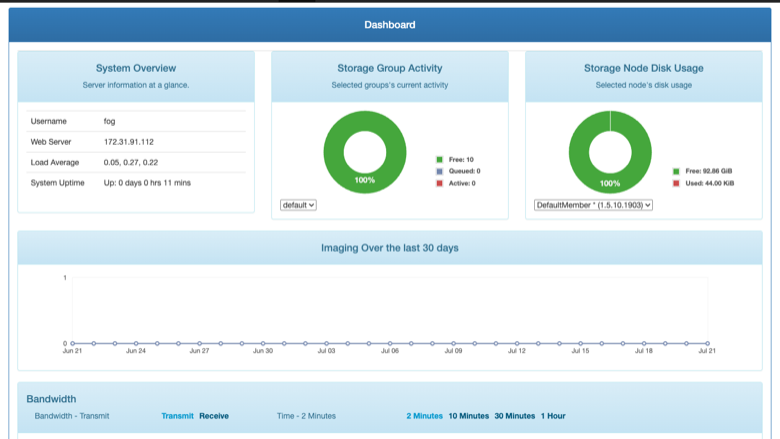
The FOG Project management dashboard
Image
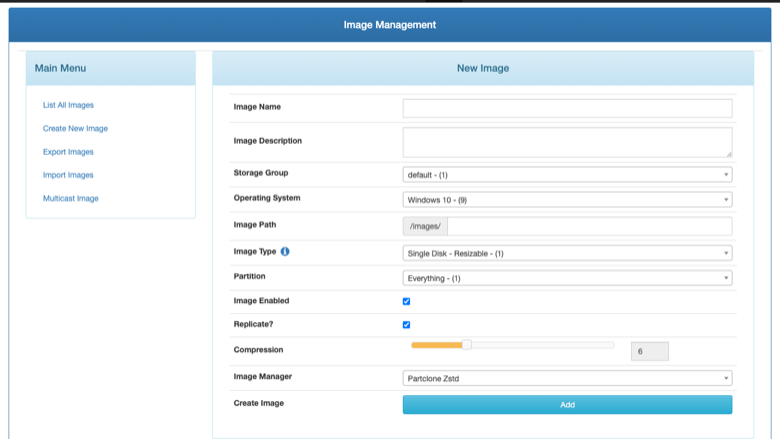
Defining a disk image
Image
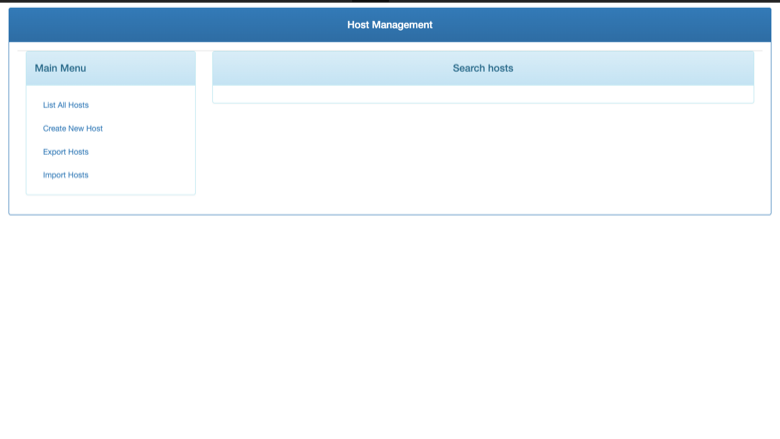
Host management and inventory
This is a repackaged open source software product wherein additional charges apply for cloudimg support services.
Overview
FOG Project is a popular free and open source network computer imaging and cloning platform. It captures a golden disk image from a reference machine and deploys it to many machines over the network. Machines network-boot into the FOG client by PXE, and FOG captures or deploys their disks, manages an inventory of hosts, organises images and drives the whole workflow from a browser-based management console and a REST API. This image delivers a complete single-node FOG server, fully installed and hardened, so an imaging server is operational within minutes of launch.
Why This Image vs a Manual Install
FOG's own installer is interactive by default and driving it correctly and unattended is the hardest part of packaging it; a subtly wrong answer produces a server that appears installed but is configured wrong. This image completes that install non-interactively at build time and then proves real function: the database schema is present, the web console answers, TFTP genuinely serves the iPXE bootloaders, and the NFS image store is exported. It also removes FOG's well known default web login and rotates every install-time secret. You launch the instance, read your unique credential, and start managing images.
Application Stack
A single-node FOG server: Apache and PHP serve the web management console and REST API, MariaDB holds the FOG database bound to loopback only, tftpd-hpa serves the iPXE network bootloaders, the NFS server exports the image store, and vsftpd handles image file management. The FOG scheduler, image replicator and multicast manager services run under systemd. The image store lives on a dedicated, independently resizable data volume separate from the OS disk.
Security Hardening
This image follows a defence-in-depth approach with the following hardening measures applied:
- No default or shared credentials: FOG's well known default web login is removed; a cryptographically random administrator password and fresh REST API tokens are generated on each instance's first boot and written only to a root-only file
- No DHCP server: FOG can run its own DHCP server, which would race your VPC's DHCP and disrupt networking; this appliance deliberately ships and asserts no DHCP server
- Database isolation: MariaDB is bound to the loopback interface and is never exposed to the network
- Scoped image store: the NFS export is scoped to the instance's own subnet on first boot rather than exported to every host, and can be widened deliberately
- Dedicated data volume: the image library lives on its own disk, so captured images survive OS-disk changes and can be resized independently
- Corresponding source included: the complete GPL source for the FOG version shipped is present on the image
Buyers requiring formal compliance documentation should contact cloudimg to discuss specific requirements.
How Network Imaging Works On AWS
FOG images machines that network-boot by PXE, an on-premises workflow: a client machine reaches this server over a routed network and is directed to it by DHCP options 66 and 67 set on your existing DHCP server. On AWS this server is typically reached from a routed imaging subnet over a VPN or Direct Connect link into your VPC. A VPC subnet does not carry broadcast or multicast, so FOG's multicast deployment and proxyDHCP modes do not operate on a cloud subnet; standard unicast capture and deploy to a routed subnet work normally. The user guide documents the supported topology in full.
Ready to Use
Read your credential from the root-only file, open the web management console in your browser, sign in, and start registering hosts, defining images and driving captures. Point DHCP option 66 (next-server) at this server and option 67 (filename) at the FOG bootloader on your existing DHCP server to network-boot your client machines.
AWS Integration
Deploy on any EC2 instance type. Reach the imaging subnet over a Site-to-Site VPN or Direct Connect. Back up the FOG database and image library with EBS snapshots or AWS Backup.
Use Cases
- A self-hosted network imaging and cloning server to capture a golden disk image and deploy it to many machines over the network
- Centralised host inventory and image management for a fleet of workstations, labs or point-of-sale machines, driven from a browser
- A cloud-hosted FOG control plane reached from a routed on-premises imaging subnet over VPN or Direct Connect
cloudimg Support
24/7 technical support by email and chat. Help with deployment, connecting a routed imaging subnet over VPN or Direct Connect, configuring DHCP options on your existing server, the FOG web console and API, and backup planning for your image library.
All product and company names are trademarks or registered trademarks of their respective holders. Use of them does not imply any affiliation with or endorsement by them.
Highlights
- Complete imaging server in minutes: FOG's own installer is interactive and hard to automate correctly; this image completes the unattended install at build time and proves real function, so the web management console, REST API, TFTP boot service and NFS image store all work the moment you launch, with no interactive setup and nothing to configure by hand.
- Secure by default with unique credentials and no rogue DHCP: FOG's well known default web login is removed and a cryptographically random admin password plus fresh REST API tokens are generated on each instance's first boot. The appliance deliberately ships no DHCP server so it cannot disrupt your VPC networking, the database is bound to loopback only, and the image store export is scoped to the local subnet.
- Production-grade with a dedicated image store and 24/7 support: the FOG database, web console, boot service and image store are hardened and run under systemd, and the captured image library lives on its own independently resizable data volume separate from the OS disk. The complete GPL source ships on the image. Backed by 24/7 cloudimg technical support via email and chat.
Details
Sold by
Categories
Delivery method
Delivery option
64-bit (x86) Amazon Machine Image (AMI)
Latest version
Operating system
Ubuntu 24.04
Deployed on AWS
New
Introducing multi-product solutions
You can now purchase comprehensive solutions tailored to use cases and industries.

Features and programs
Financing for AWS Marketplace purchases
AWS Marketplace now accepts line of credit payments through the PNC Vendor Finance program. This program is available to select AWS customers in the US, excluding NV, NC, ND, TN, & VT.

Pricing
Free trial
Try this product free for 7 days according to the free trial terms set by the vendor. Usage-based pricing is in effect for usage beyond the free trial terms. Your free trial gets automatically converted to a paid subscription when the trial ends, but may be canceled any time before that.
Pricing is based on actual usage, with charges varying according to how much you consume. Subscriptions have no end date and may be canceled any time. Alternatively, you can pay upfront for a contract, which typically covers your anticipated usage for the contract duration. Any usage beyond contract will incur additional usage-based costs.
Additional AWS infrastructure costs may apply. Use the AWS Pricing Calculator to estimate your infrastructure costs.
If you are an AWS Free Tier customer with a free plan, you are eligible to subscribe to this offer. You can use free credits to cover the cost of eligible AWS infrastructure. See AWS Free Tier for more details. If you created an AWS account before July 15th, 2025, and qualify for the Legacy AWS Free Tier, Amazon EC2 charges for Micro instances are free for up to 750 hours per month. See Legacy AWS Free Tier for more details.
Dimension | Description | Cost/hour |
|---|---|---|
m5.large Recommended | m5.large | $0.08 |
t3.micro | t3.micro instance type | $0.04 |
t2.micro | t2.micro instance type | $0.04 |
m8idn.xlarge | m8idn.xlarge instance type | $0.12 |
m8idb.8xlarge | m8idb.8xlarge instance type | $0.24 |
m5zn.large | m5zn.large instance type | $0.08 |
i7ie.24xlarge | i7ie.24xlarge instance type | $0.24 |
r6in.12xlarge | r6in.12xlarge instance type | $0.24 |
c5n.large | c5n.large instance type | $0.08 |
m8idb.metal-96xl | m8idb.metal-96xl instance type | $0.24 |
Vendor refund policy
Refunds available on request.

Legal
Vendor terms and conditions
Upon subscribing to this product, you must acknowledge and agree to the terms and conditions outlined in the vendor's End User License Agreement (EULA) .
Content disclaimer
Vendors are responsible for their product descriptions and other product content. AWS does not warrant that vendors' product descriptions or other product content are accurate, complete, reliable, current, or error-free.
Delivery details
64-bit (x86) Amazon Machine Image (AMI)
Amazon Machine Image (AMI)
An AMI is a virtual image that provides the information required to launch an instance. Amazon EC2 (Elastic Compute Cloud) instances are virtual servers on which you can run your applications and workloads, offering varying combinations of CPU, memory, storage, and networking resources. You can launch as many instances from as many different AMIs as you need.
Version release notes
Initial release of FOG Project as a ready-to-use single-node network imaging and cloning server: the web management console, REST API, database, TFTP boot service and NFS image store are installed and hardened, the well known default web login is removed and a unique admin password plus fresh API tokens are generated on each instance's first boot, no DHCP server is shipped, and the image store lives on a dedicated data volume.
Additional details
Usage instructions
Connect via SSH on port 22 as the default login user for your operating system variant (for the Ubuntu 24.04 variant the user is ubuntu). Read the per-instance admin credential and API tokens with: sudo cat /root/fog-project-credentials.txt. Open the web management console in a browser at http://<instance-public-ip>/fog/management and sign in with the fog username and the password from that file. To network-boot client machines, set DHCP option 66 (next-server) to this instance's address and option 67 (filename) to undionly.kpxe for BIOS clients or snponly.efi for UEFI clients, on your existing DHCP server; this appliance deliberately runs no DHCP server of its own. The image store is on a dedicated volume mounted at /images and is exported over NFS scoped to the instance's own subnet. The instance security group opens ports 22 (SSH), 80 (web console) and 69/udp (TFTP boot). The services run under systemd: systemctl status apache2 mariadb tftpd-hpa nfs-kernel-server.
Resources
Vendor resources
Support
Vendor support
cloudimg provides 24/7 technical support for this product by email and live chat. Our engineers help with deployment, configuration, updates, performance tuning and troubleshooting; critical issues receive a one hour average response. Contact support@cloudimg.co.uk .
AWS infrastructure support
AWS Support is a one-on-one, fast-response support channel that is staffed 24x7x365 with experienced and technical support engineers. The service helps customers of all sizes and technical abilities to successfully utilize the products and features provided by Amazon Web Services.
Similar products
Cybercrime and cheating threats, secure scaling, data capture and storage are all growing concerns for players and vendors alike in the gaming industry. Fog360 Security comprehensively scans and examines your AWS environment to protect you and your customers alike, as the threats come from more and more diverse tactics.
With unauthorized users relentlessly poking the perimeter and the cost of breach, downtime, and reputation loss so high, organizations are eager to harden their infrastructure running on AWS. Fog360 Security is a comprehensive security analysis and visualization service that takes a once complex and manual process and puts it in the hands of Evoque Cloud Engineering powered by Foghorn’s experienced engineers, who can update and automate your analysis.
Fog360 Security scans and examines your AWS environment from every angle. This 360-degree analysis tool lets you understand from a quantitative perspective what is actually running in your accounts. With Evoque Cloud Engineering powered by Foghorn’s help, a customized solution can be deployed quickly to analyze your AWS infrastructure, gain real-time visibility, and incorporate best practices. Fog360 Security allows customers to realize powerful security improvements around segregation of duties, role-based access, zero-trust networks, least permission, real-time alerting, and automated remediation.
Fog360 Security scans and examines a company’s AWS environment from every angle. As the overall connectivity and use of new and emerging technologies increases in the Aerospace & Satellite industry, the threat risk is also on the rise. The need for a partner with the expertise in Gov Cloud and FedRamp, and the knowledge and experience of navigating the complex public sector space in general is more pressing than ever.
Customer reviews
No customer reviews yet
Be the first to review this product . We've partnered with PeerSpot to gather customer feedback. You can share your experience by writing or recording a review, or scheduling a call with a PeerSpot analyst.