
Sold by: cloudimg
Deployed on AWS
Free Trial
AWS Free Tier
This product has charges associated with it for seller support. Dagster is an open-source data orchestration platform preinstalled and production-ready on EC2 - serving a working pipeline UI in minutes with secure authentication and 24/7 support.
Overview
Image
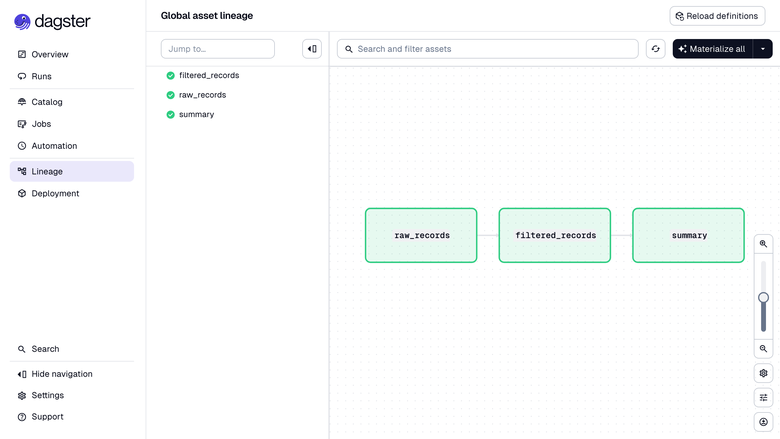
Dagster asset graph
Image
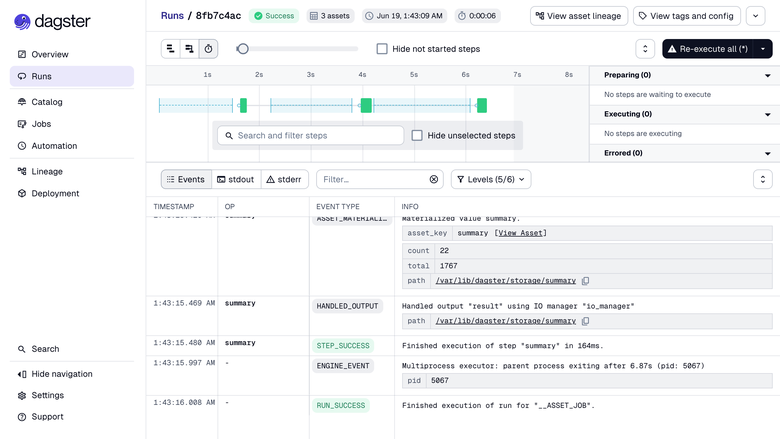
Dagster run view
Image
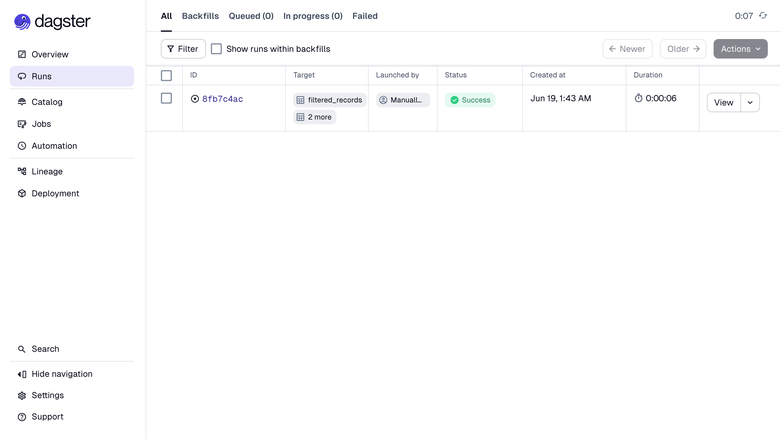
Dagster runs list
This is a repackaged open source software product wherein additional charges apply for cloudimg support services.
Dagster Data Orchestration - Ready to Run on AWS
Launch a fully configured Dagster orchestration platform on EC2 and start building, scheduling, and observing data pipelines in minutes - not hours. This AMI eliminates the manual setup of Python environments, reverse proxies, WebSocket forwarding, and service management so your team can focus on defining assets and shipping data products.
Why This AMI Instead of a Manual Install
Setting up Dagster from scratch means installing Python dependencies, configuring systemd services, troubleshooting WebSocket proxy headers (the UI hangs without them), and hardening credentials. This image solves every one of those problems out of the box:
- UI accessible behind authenticated nginx proxy within minutes of first boot
- No hanging loading screens - WebSocket upgrade headers are pre-configured
- No shared or default credentials - a unique admin password is generated per instance
- No risk of data loss from root volume resizing - instance storage lives on a dedicated, independently resizable data disk
Application Stack
- Dagster installed in a dedicated Python virtual environment under /opt/dagster, run by an unprivileged service account
- Instance directory (configuration, run storage, event log, schedule storage) on a separate data disk for independent resizing
- Two systemd services: the webserver (UI and GraphQL API) and the daemon (schedules, sensors, run queue)
- Nginx reverse proxy on port 80 with HTTP Basic authentication and full WebSocket upgrade support
- Default SQLite storage suitable for development, demos, and small teams; upgradeable to PostgreSQL for production scale
Ready-to-Run Demo Project
A demo project ships at /opt/dagster/demo containing software-defined assets and a job with a pre-configured workspace file. It loads automatically on start, giving you a working example to explore asset materialization, lineage graphs, and scheduling. Point the workspace at your own code location and restart the services to go live with your pipelines.
Secure First Boot
On first launch, a one-shot service generates a fresh admin password unique to your instance, writes it to the nginx credentials file, and stores it in a root-only file. The Dagster webserver binds exclusively to loopback and is never exposed without authentication. No shared or default credentials ship in the image.
Use Cases
- ELT/ETL orchestration: Schedule nightly extract-load-transform pipelines across multiple data sources with full lineage visibility and automatic retry on failure
- Software-defined asset management: Define assets in plain Python, materialize them on demand or on schedule, and trace lineage from source to dashboard
- Event-driven data jobs: Use Dagster sensors to trigger pipelines when new files land in S3 or upstream tables update
- Analytics and ML workflows: Orchestrate feature engineering, model training, and reporting jobs from a single control plane
- Development and demo environments: Spin up a self-contained Dagster instance for prototyping pipelines before promoting to a shared environment
cloudimg Support
24/7 technical support by email and live chat. Our engineers assist with deployment, defining assets and jobs, code locations and workspaces, scheduling and sensors, migrating from SQLite to PostgreSQL, TLS configuration, and performance tuning. Critical issues receive a one-hour average response time.
To discuss your deployment needs or request a guided walkthrough, contact support@cloudimg.co.uk .
All product and company names are trademarks or registered trademarks of their respective holders. Use of them does not imply any affiliation with or endorsement by them.
Highlights
- Production-ready in minutes, not hours: This AMI eliminates the manual setup of Python environments, systemd services, and WebSocket proxy configuration that typically takes hours. Launch the instance and your Dagster UI is accessible on port 80 behind authentication - no hanging loading screens, no troubleshooting proxy headers, no manual dependency installation. A demo project loads automatically so you can explore asset materialization and lineage immediately.
- Define assets in Python, observe everything from the web UI: Write pipelines as software-defined assets and jobs in plain Python, then materialize, schedule, and monitor them from Dagster's rich interface with full lineage graphs and live run streaming. Instance storage lives on a dedicated, independently resizable data disk - separate from your root volume - so you can scale storage without downtime or risk of data loss.
- Hardened security with unique credentials per instance and 24/7 expert support: Every launch generates a fresh admin password stored in a root-only file - no shared or default credentials ever ship. The webserver binds exclusively to loopback behind the authenticated nginx proxy. cloudimg provides 24/7 technical support with one-hour average response for critical issues, covering deployment, PostgreSQL migration, TLS, and performance tuning.
Details
Sold by
Categories
Delivery method
Delivery option
64-bit (x86) Amazon Machine Image (AMI)
Latest version
Operating system
Ubuntu 24.04
Deployed on AWS
New
Introducing multi-product solutions
You can now purchase comprehensive solutions tailored to use cases and industries.

Features and programs
Financing for AWS Marketplace purchases
AWS Marketplace now accepts line of credit payments through the PNC Vendor Finance program. This program is available to select AWS customers in the US, excluding NV, NC, ND, TN, & VT.

Pricing
Free trial
Try this product free for 7 days according to the free trial terms set by the vendor. Usage-based pricing is in effect for usage beyond the free trial terms. Your free trial gets automatically converted to a paid subscription when the trial ends, but may be canceled any time before that.
Pricing is based on actual usage, with charges varying according to how much you consume. Subscriptions have no end date and may be canceled any time. Alternatively, you can pay upfront for a contract, which typically covers your anticipated usage for the contract duration. Any usage beyond contract will incur additional usage-based costs.
Additional AWS infrastructure costs may apply. Use the AWS Pricing Calculator to estimate your infrastructure costs.
If you are an AWS Free Tier customer with a free plan, you are eligible to subscribe to this offer. You can use free credits to cover the cost of eligible AWS infrastructure. See AWS Free Tier for more details. If you created an AWS account before July 15th, 2025, and qualify for the Legacy AWS Free Tier, Amazon EC2 charges for Micro instances are free for up to 750 hours per month. See Legacy AWS Free Tier for more details.
Dimension | Description | Cost/hour |
|---|---|---|
t3.large Recommended | t3.large | $0.08 |
t2.micro | t2.micro instance type | $0.04 |
t3.micro | t3.micro instance type | $0.04 |
m5a.large | m5a.large instance type | $0.08 |
r5dn.24xlarge | r5dn.24xlarge instance type | $0.24 |
r8ib.metal-96xl | r8ib.metal-96xl instance type | $0.24 |
c8ine.xlarge | c8ine.xlarge instance type | $0.12 |
m5ad.xlarge | m5ad.xlarge instance type | $0.12 |
m6idn.32xlarge | m6idn.32xlarge instance type | $0.24 |
m7i.2xlarge | m7i.2xlarge instance type | $0.24 |
Vendor refund policy
Refunds available on request.

Legal
Vendor terms and conditions
Upon subscribing to this product, you must acknowledge and agree to the terms and conditions outlined in the vendor's End User License Agreement (EULA) .
Content disclaimer
Vendors are responsible for their product descriptions and other product content. AWS does not warrant that vendors' product descriptions or other product content are accurate, complete, reliable, current, or error-free.
Delivery details
64-bit (x86) Amazon Machine Image (AMI)
Amazon Machine Image (AMI)
An AMI is a virtual image that provides the information required to launch an instance. Amazon EC2 (Elastic Compute Cloud) instances are virtual servers on which you can run your applications and workloads, offering varying combinations of CPU, memory, storage, and networking resources. You can launch as many instances from as many different AMIs as you need.
Version release notes
Initial release of Dagster 1.13.10 with a ready-to-run demo project, the webserver and daemon services and an authenticating nginx proxy.
Additional details
Usage instructions
Connect via SSH on port 22 as the default login user for your operating system variant (the user guide lists it per variant). The Dagster UI is served on port 80: browse to http://<instance-public-ip>/ and sign in with user admin and the generated password. Retrieve the credentials with: sudo cat /root/dagster-credentials.txt. nginx reverse-proxies port 80 to the Dagster webserver on 127.0.0.1:3000 (with the GraphQL WebSocket upgrade the UI needs) behind HTTP Basic auth; the daemon (schedules, sensors, run queue) runs alongside it. A demo project ships at /opt/dagster/demo; point the workspace at your own code and restart: sudo systemctl restart dagster-webserver.service dagster-daemon.service. Install extra Python packages into the bundled virtual environment with: sudo /opt/dagster/venv/bin/pip install <package>. The Dagster instance directory DAGSTER_HOME, including the run and event storage, lives on a dedicated data disk mounted at /var/lib/dagster.
Resources
Vendor resources
Support
Vendor support
cloudimg Technical Support
cloudimg provides 24/7 technical support for this Dagster AMI by email and live chat.
Contact: support@cloudimg.co.uk
Response Times:
- Critical issues: one-hour average response
- General inquiries: handled during the same business day
Scope of Support:
- Deployment and initial configuration
- Defining assets, jobs, code locations, and workspaces
- Scheduling, sensors, and run queue management
- Migrating from default SQLite storage to PostgreSQL
- TLS/SSL certificate configuration
- Performance tuning and scaling guidance
- Troubleshooting service failures and connectivity issues
- Guidance on upgrading Dagster versions within the AMI
Instance Sizing Guidance: For development and demos, a t3.medium (2 vCPU, 4 GB RAM) is sufficient. For small teams running scheduled production pipelines, a t3.large or m5.large is recommended. Contact support for guidance on larger workloads or high-concurrency configurations.
Refunds: If you experience issues with the product, contact support@cloudimg.co.uk and our team will work to resolve them. Refund requests are handled on a case-by-case basis.
All support communication is in English.
AWS infrastructure support
AWS Support is a one-on-one, fast-response support channel that is staffed 24x7x365 with experienced and technical support engineers. The service helps customers of all sizes and technical abilities to successfully utilize the products and features provided by Amazon Web Services.
Similar products

We empower every organization to build a productive and scalable data platform.

Self-hosted data orchestration platform with built-in webserver UI. Define, test, and monitor data pipelines with a Python-first approach on EC2.

This product has charges associated with it for hardening, security configuration, and support.
Kestra is an event-driven workflow orchestration and scheduling platform with declarative YAML flows and 600+ plugins, built as a Java/Postgres stack. Unlike bare Kestra AMIs that ship without any admin credentials configured (so the API rejects every request, including the owner's), expose port 8080 directly with no TLS, and bake the demo Postgres password into the image, this Lynxroute build is ready out of the box: a per-instance admin credential with a policy-compliant random password generated at first launch, Postgres reachable only on the Docker bridge with a rotated password, nginx TLS termination on port 443, UFW firewall pre-configured, and a CIS Level 1 hardened Ubuntu 24.04 LTS base.
Apache-2.0 license - fully auditable, no vendor lock-in.

Get AI models to production in weeks, not months. Automat-it builds new AI/ML capabilities on AWS from scratch, covering Amazon Bedrock applications, SageMaker training and inference, MLOps pipelines, RAG systems, generative BI, computer vision, and AI-powered features. Backed by the AWS AI Competency and AWS Generative AI Competency, with 500+ AWS certifications and verified outcomes including 50% GPU cost reduction and 40-60% inference cost savings.
Customer reviews
No customer reviews yet
Be the first to review this product . We've partnered with PeerSpot to gather customer feedback. You can share your experience by writing or recording a review, or scheduling a call with a PeerSpot analyst.