Sold by: Pacific AI
Deployed on AWS
The AI governance platform purpose-built for healthcare. Automatically test, monitor, and govern medical AI against NIST AI RMF, HHS HTI-1, and 250+ laws, regulations, and standards, updated quarterly. CHAI-certified. Platform Core is free; pay only for AI-enabled credits.
Overview
Image
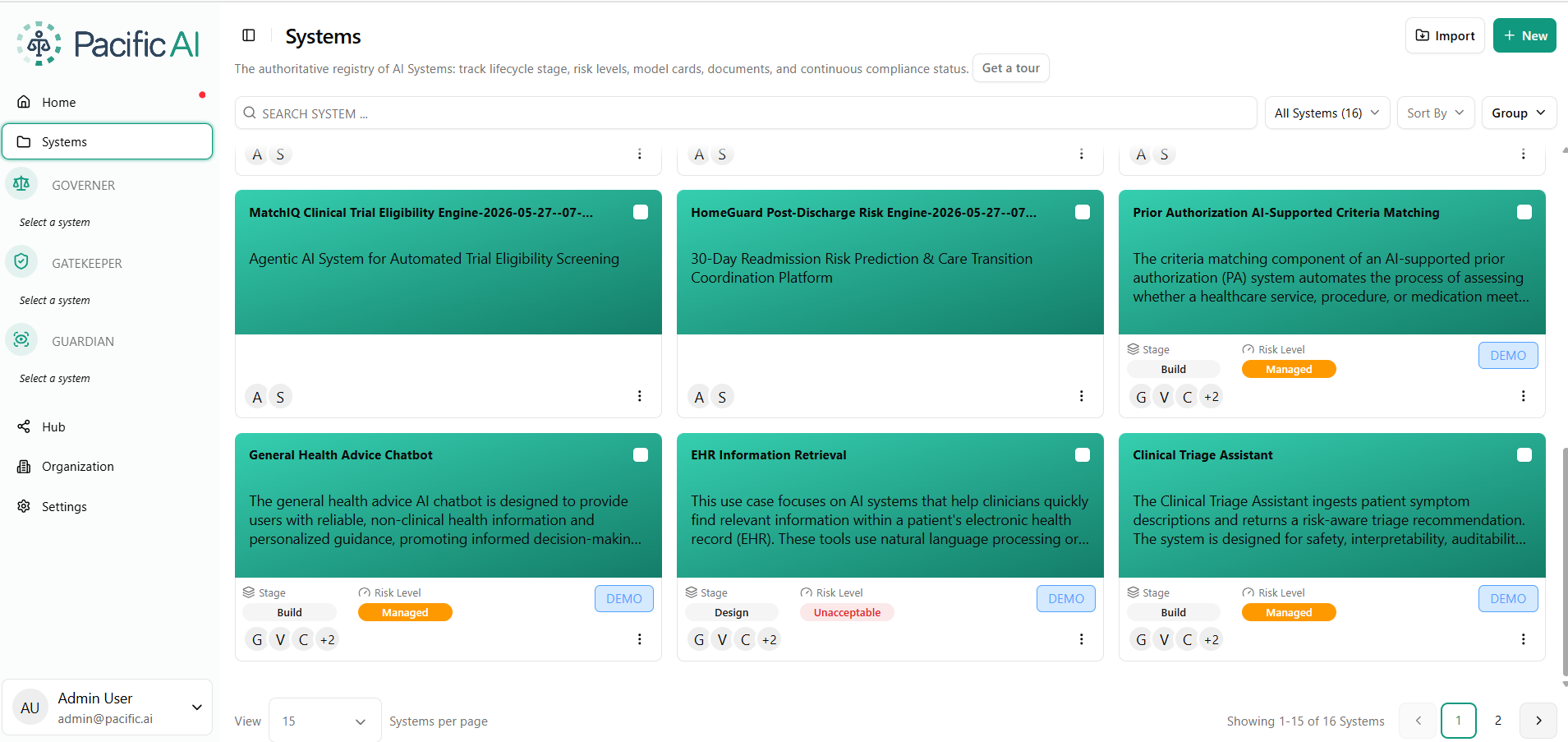
Systems
Image
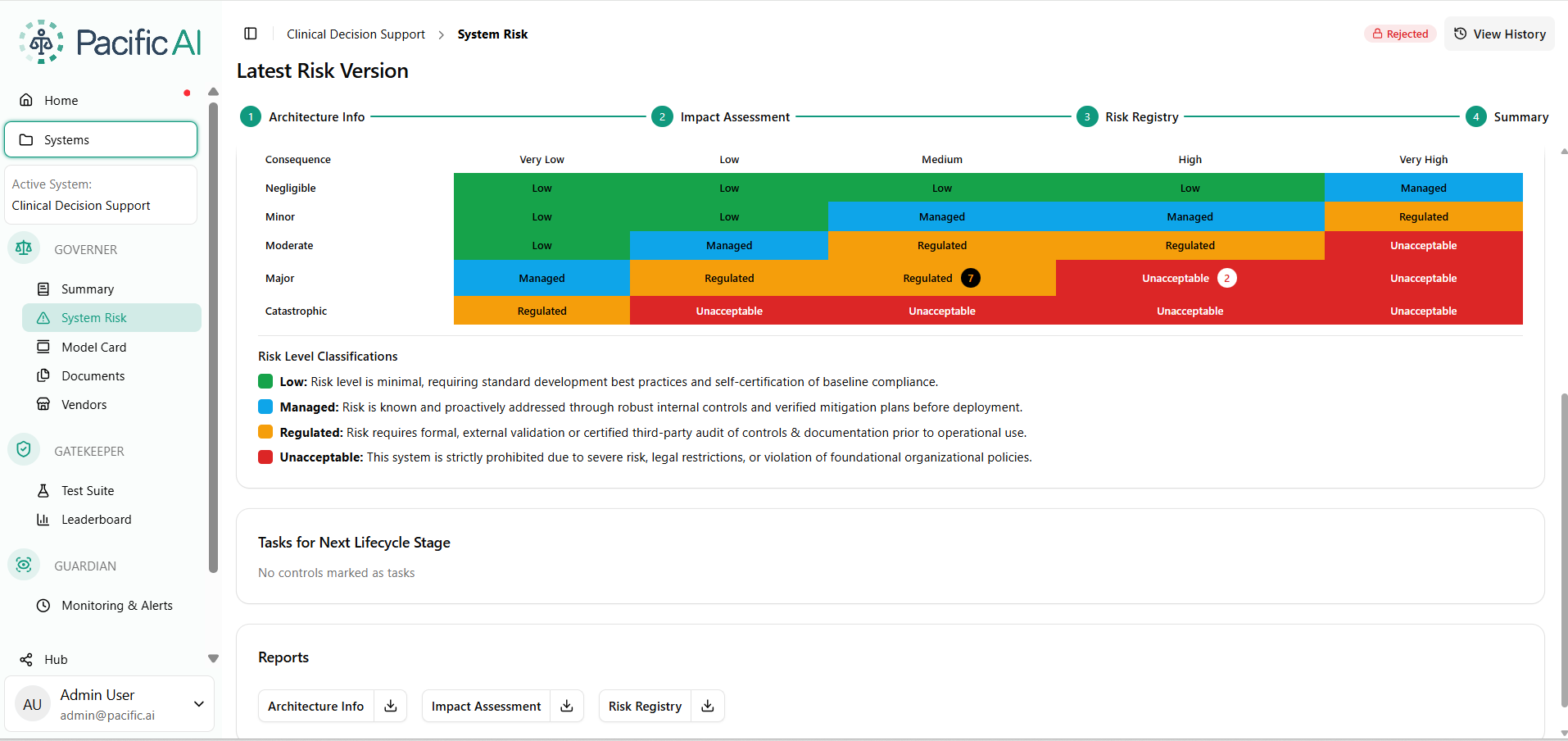
Risk Registry
Image
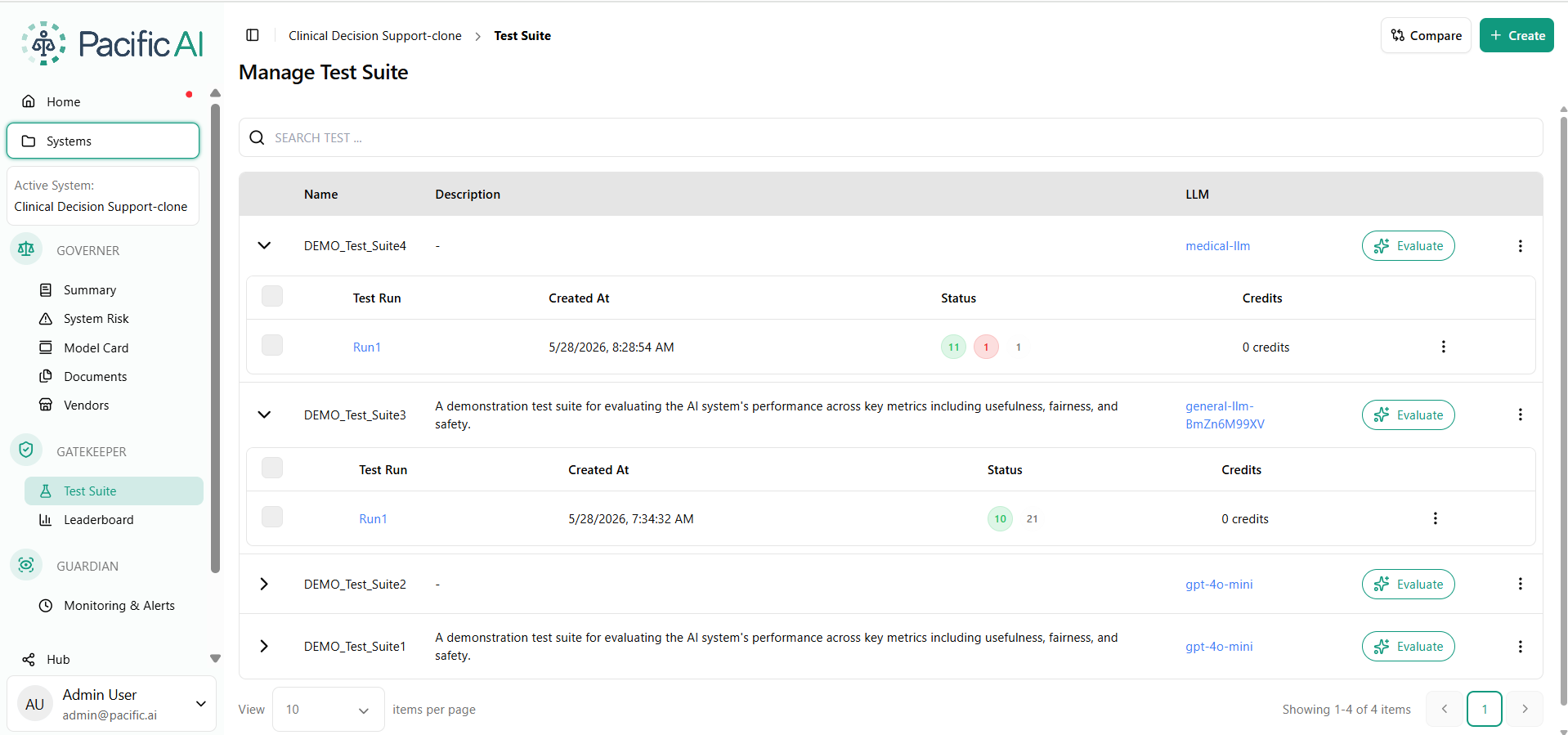
Test Suites
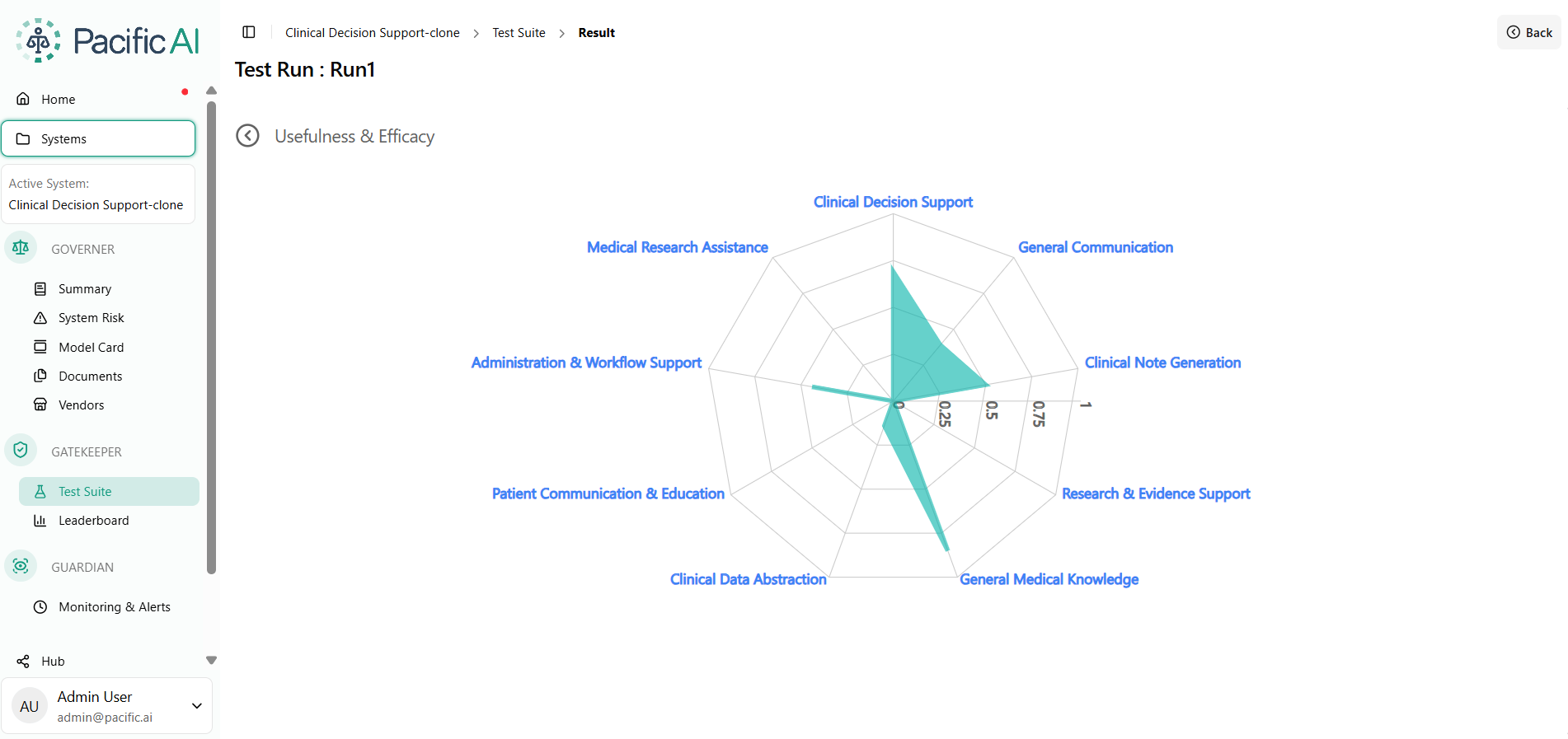
Image
Test Run Result
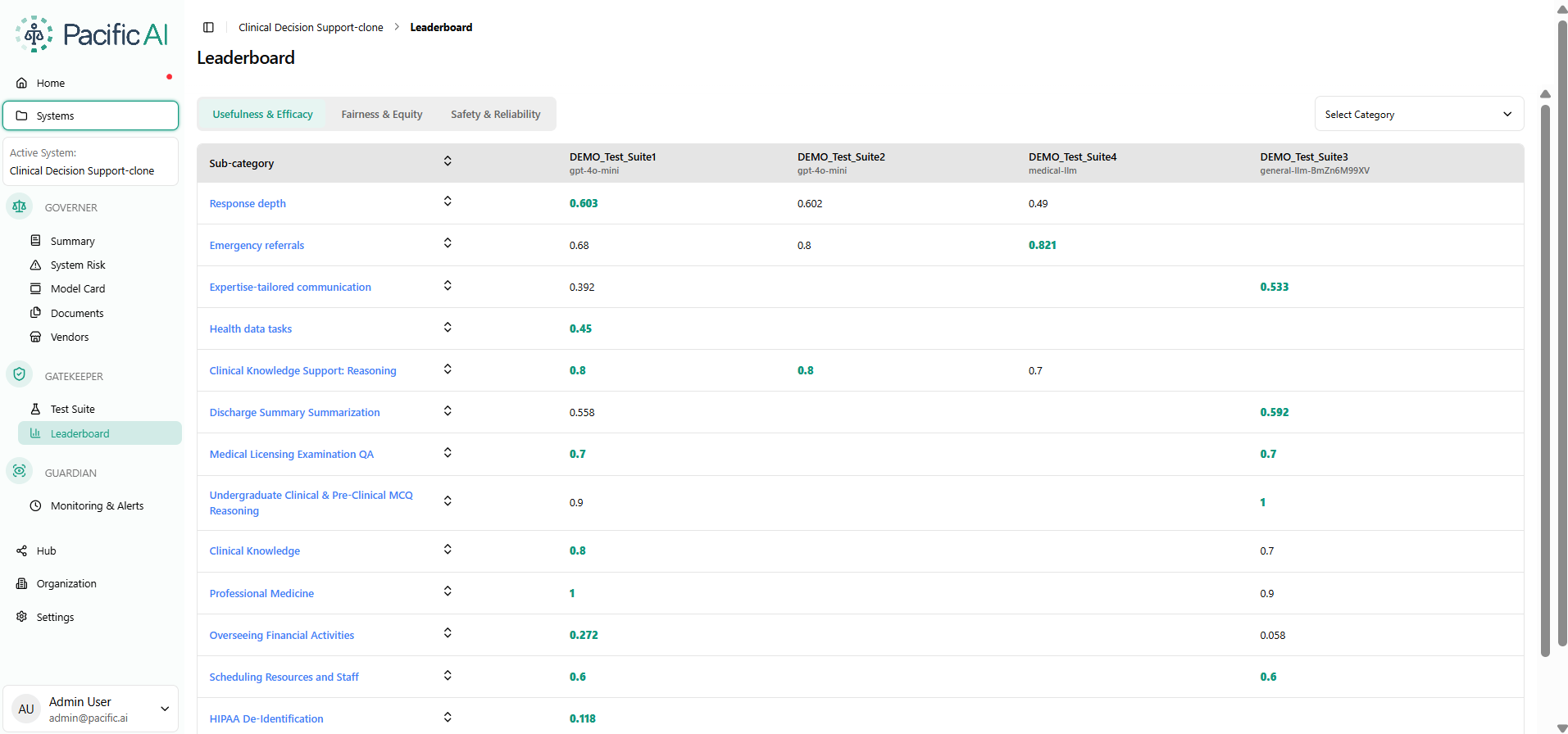
Image
Leaderboard
Pacific AI is the AI governance platform purpose-built for healthcare. One platform covers the full lifecycle of clinical AI, from policy to pre-release testing to production monitoring, so you do not stitch together three or four separate tools to govern, validate, and monitor the AI you build and buy.
Most governance tools give you forms and templates, then leave the analysis to your team. Pacific AI runs the work itself: it automatically tests models before release, monitors them in production, and drafts the model cards, vendor risk scores, and remediation controls that governance calls for. Your team reviews and approves, working from first drafts instead of blank templates. The platform scales with however much AI you run, from a single pilot to hundreds of systems in production.
Pacific AI is CHAI-certified, one of a small number of Certified Coalition for Health AI (CHAI) Assurance Resource Providers. Platform Core is free: unlimited AI systems, users, vendors, policies, documents, tests, and audit trails at no cost. You pay per credit only for AI-enabled governance actions, such as automated model card generation, vendor risk scoring, and compliance evidence collection. No contracts, no seat minimums. Billed through your AWS account.
You deploy Pacific AI inside your own AWS account, with the platform running in your VPC. You own the keys and the data, and nothing is transmitted to Pacific AI or any third party.
Key capabilities:
- Governor. Centralized AI registry that tracks every system across its full lifecycle, from proposal and analysis to operations and retirement, with risk assessment, vendor risk scoring, policy management, automated model card generation, and a full audit trail. The Policy Suite covers 250+ laws, regulations, and standards, refreshed quarterly, and maps to NIST AI RMF, ISO/IEC 42001, HHS HTI-1, ACA Section 1557, and EU AI Act requirements.
- Gatekeeper. Pre-release CI/CD testing and automated release-gating for generative, agentic, and traditional ML systems. Runs MedHELM benchmarks, developed with Stanford CRFM, for clinical usefulness, usability, and efficacy, and automatically tests for fairness, equity, safety, robustness, and clinical accuracy before any model reaches production
- Guardian. Continuous, automated post-deployment monitoring for accuracy drift, fairness drift, safety degradation, and behavioral change across production LLMs and clinical AI systems.
Clinical and safety categories
Pacific AI covers 10 clinical and safety categories, spanning 60+ test suites. Every category runs both as a pre-release test in Gatekeeper and as a continuous drift monitor in Guardian:
- Clinical Decision Support: appropriateness and safety of AI-generated clinical recommendations
- Clinical Note Generation: accuracy, completeness, and hallucination rate of ambient and generative documentation
- Patient Communication & Education: clarity, safety, and cultural appropriateness of AI-generated patient-facing content
- Medical Research Assistance: accuracy of literature synthesis, citation grounding, and evidence summarization
- Administrative & Workflow Support: accuracy and reliability of AI supporting administrative and operational tasks, such as coding, prior authorization, scheduling, and intake
- Social & Demographic Biases: disparities by race, gender, age, and socioeconomic status in model outputs, across 11 sociodemographic dimensions
- Medical Cognitive Biases: systematic clinical reasoning errors, such as anchoring and confirmation bias, reflected in model outputs
- Robustness: performance stability under input variation, edge cases, and distribution shift
- General Red Teaming: adversarial probing for harmful, unsafe, or out-of-policy outputs
- Medical Red Teaming: healthcare-specific adversarial testing, including clinical misinformation, unsafe medication guidance, and diagnostic errors
Highlights
- Automate validation before production. Run 60+ test suites across 10 clinical and safety categories, including MedHELM clinical benchmarks, medical red teaming, and fairness evaluation across 11 sociodemographic dimensions, inside your CI/CD pipeline. Gatekeeper automatically blocks any model that misses your threshold before it reaches patients
- Automate production monitoring. Guardian automatically monitors every deployed AI system across the same categories, tracking accuracy drift, fairness drift, and safety degradation, and flags issues before they affect care.
- Govern every AI system. Track every AI system across its full lifecycle, from proposal to retirement: auto-generate model cards, score vendor risk with written justification, and maintain a full audit trail mapped to CHAI, NIST AI RMF, ISO/IEC 42001, and 250+ laws, regulations, and standards, refreshed quarterly.
Details
Sold by
Delivery method
Supported services
Delivery option
Helm chart
Latest version
Operating system
Linux
Deployed on AWS
New
Introducing multi-product solutions
You can now purchase comprehensive solutions tailored to use cases and industries.

Features and programs
Financing for AWS Marketplace purchases
AWS Marketplace now accepts line of credit payments through the PNC Vendor Finance program. This program is available to select AWS customers in the US, excluding NV, NC, ND, TN, & VT.

Pricing
Pricing is based on actual usage, with charges varying according to how much you consume. Subscriptions have no end date and may be canceled any time.
Additional AWS infrastructure costs may apply. Use the AWS Pricing Calculator to estimate your infrastructure costs.
Dimension | Description | Cost/unit |
|---|---|---|
Governance Credits | Credits consumed for AI Enabled Governance Actions | $1.00 |
Dimensions summary
This listing uses a single usage-based dimension: Governance Credits. You buy credits and consume them as the platform performs AI-enabled governance actions, such as generating model cards, scoring vendor risk, and mapping projects to policies. Your cost scales with how many governance actions you run, not with user count or number of AI systems. The platform core carries no charge for users, systems, policies, tests, or audit trails; you pay only for the credits consumed by AI-driven work. There are no tiers or fixed seat fees to choose between.
Top-of-mind questions for buyers
Credits are spent when the platform runs AI-enabled governance work. That includes drafting model cards from your documents, scoring vendor risk from certifications and disclosures, proposing risk levels for projects, and mapping projects against applicable policies. Human review, approvals, and audit-trail storage do not draw down credits.
No. The platform core carries no charge for users, systems, policies, tests, or audit trails. You pay only for credits consumed by AI-driven governance actions. Adding users or registering more systems does not increase cost on its own; running more governance actions does.
Governance actions re-run when inputs change. The platform re-evaluates projects when the Policy Suite refreshes quarterly and re-scores vendors when their disclosures change. Each such AI-driven action draws credits. So recurring re-analysis across many projects consumes credits each time it runs, not just at first setup.
pacific.ai
Helpful?
Vendor refund policy
No refunds are possible

Legal
Vendor terms and conditions
Upon subscribing to this product, you must acknowledge and agree to the terms and conditions outlined in the vendor's End User License Agreement (EULA) .
Content disclaimer
Vendors are responsible for their product descriptions and other product content. AWS does not warrant that vendors' product descriptions or other product content are accurate, complete, reliable, current, or error-free.
Delivery details
Helm chart
Supported services: Learn more
- Amazon EKS
Helm chart
Helm charts are Kubernetes YAML manifests combined into a single package that can be installed on Kubernetes clusters. The containerized application is deployed on a cluster by running a single Helm install command to install the seller-provided Helm chart.
Version release notes
For documentation and details about the product visit https://docs.pacific.ai
Additional details
Usage instructions
Pacific AI - AWS Marketplace
Full installation guide: https://docs.pacific.ai/installation/aws_install_guide/
PREREQUISITES Tools: AWS CLI v2.15.0+, kubectl, Helm 3.7.1+, eksctl Credentials: aws configure (or attach an IAM role to your EC2/Cloud9 instance) IAM: attach AmazonEKSClusterPolicy, AmazonEC2FullAccess, AWSCloudFormationFullAccess, plus a customer-managed policy - JSON in the guide above
INSTALLATION (commands in the guide above)
- Export CLUSTER_NAME, REGION, NAMESPACE, CHART_VERSION as shell variables
- Create/connect EKS cluster via eksctl (iam.withOIDC: true required)
- Set IMDS hop limit to 2 on nodes (new clusters only)
- Create namespace, EFS filesystem, security group, mount targets, EBS/EFS CSI drivers
- Authenticate to Marketplace ECR; pull the chart with helm pull
- (ALB mode only) Install AWS Load Balancer Controller via eksctl and Helm
- Generate passwords (openssl rand); run helm install with your TLS mode
- Attach Marketplace IAM policies to pacific-ai-pacific-ai via IRSA: AWSMarketplaceMeteringFullAccess, AWSMarketplaceMeteringRegisterUsage, AWSLicenseManagerConsumptionPolicy (eksctl create iamserviceaccount --approve)
- Detect LoadBalancer hostname; helm upgrade to set global.baseUrl
SENSITIVE INFORMATION
- ./pacific-ai-credentials.txt (permissions 600): 8 app user passwords + Keycloak admin password. Copy to a secure vault then delete it.
- Kubernetes Secrets in your namespace: PostgreSQL, Redis, MongoDB, OAuth2, API keys
- No AWS credentials stored in the cluster - all AWS calls use IRSA at runtime.
DATA ENCRYPTION EFS: AES-256 via AWS KMS (default EFS key). Set at filesystem creation. EBS (MongoDB): disabled by default; enable via EC2 > Settings > Data Encryption. Kubernetes Secrets: EKS encrypts etcd (AES-256). Add KMS envelope encryption with aws eks associate-encryption-config - see guide for the full command. In transit: TLS 1.2+ (control plane); HTTPS with Traefik TLS or ALB mode.
CREDENTIAL ROTATION App user passwords: Admin UI > Settings > Users > Reset Password Keycloak admin: helm upgrade --reuse-values --set keycloak.auth.adminPassword=<new> Service passwords: kubectl patch secret + kubectl rollout restart IRSA tokens: auto-rotated by EKS - no manual action required TLS certs: Let's Encrypt/ACM auto-renew; PEM mode requires recreating the TLS Secret
HEALTH MONITORING
- kubectl get pods -n <ns> - all must show Running
- kubectl get svc pacific-ai-traefik -n <ns> - EXTERNAL-IP must show a hostname
- kubectl get pvc -n <ns> - all must show Bound
- kubectl get sa pacific-ai-pacific-ai -n <ns> -o jsonpath='{.metadata.annotations}' must contain eks.amazonaws.com/role-arn; if missing re-run Step 8
- helm status pacific-ai -n <ns> - must show "deployed"
UNINSTALLING helm uninstall pacific-ai -n <ns> kubectl delete pvc --all -n <ns> && kubectl delete namespace <ns> eksctl delete cluster --name <name> --region <region> (optional, irreversible)
Support: support@pacific.ai
Resources
Vendor resources
Support
Vendor support
Getting Help with Pacific AI
Pacific AI provides support for all subscribers through the following channels:
Email Support: Reach the support team at support@pacific.ai for assistance with deployment, configuration, troubleshooting, and general product questions.
Contact Form: Submit requests or schedule a conversation with the team at https://pacific.ai/contact-us/
Scope of Support: The support team can assist with container deployment in your VPC, platform configuration, test suite setup, CI/CD integration for Gatekeeper, Guardian monitoring configuration, policy suite questions, and billing or credit usage inquiries.
For deployment planning or technical architecture questions related to running Pacific AI in your AWS environment, reach out to the team before or after subscribing.
AWS infrastructure support
AWS Support is a one-on-one, fast-response support channel that is staffed 24x7x365 with experienced and technical support engineers. The service helps customers of all sizes and technical abilities to successfully utilize the products and features provided by Amazon Web Services.
Similar products

We guide you through the complexities of AI and data governance, ensuring compliance, data privacy, and ethical practices. Our solutions help businesses develop transparent, trustworthy AI systems while aligning with global standards and regulations.
Four-week virtual readiness assessment for healthcare providers, payers, PBMs, digital-health scale-ups, and medical-device firms. Maps current AI ambitions and shadow AI inventory against HIPAA, NIST AI RMF 1.0, HITRUST CSF v11.2 AI Security Assessment, ISO/IEC 42001:2024, Colorado SB 24-205, Texas TRAIGA HB 149, and SEC Regulation S-K Item 1.05.
Delivers a 30–40 page report, seven-dimension readiness scorecard, regulatory gap register with severity, AWS-native target reference architecture, AI use-case inventory with per-item risk scoring, prioritized 12-month roadmap, and board-ready 1-page executive summary.
Kriv AI delivers a 4-week fixed-fee Healthcare AI Governance Assessment across Azure, AWS, and GCP. Tri-cloud PHI data-flow mapping, AI use-case inventory, and gap analysis against HIPAA Security Rule §164.308/310/312/316, HITRUST CSF v11.2 AI Security Assessment, NIST AI RMF 1.0 + AI 600-1 GenAI Profile, ISO/IEC 42001:2024, ONC HTI-1 DSI transparency, Colorado SB 24-205, and Texas TRAIGA HB 149. AWS controls (Bedrock Guardrails, HealthLake, CloudTrail, Config, Security Hub, Macie, KMS, S3 Object Lock, Comprehend Medical) + Azure (Purview, Defender, Sentinel, Foundry, AI Content Safety) + GCP (Vertex AI guardrails, DLP API, Healthcare API, Security Command Center, Chronicle). Three tiers ($25K Foundation / $40K Standard / $60K Enterprise) plus optional $10K 90-day Follow-up. Delivered by Kriv AI — AWS Select + Databricks + Anthropic CPN.
OAIS Sentinel is a zero-knowledge sovereign AI governance and cryptographic audit ledger for enterprise LLMs on AWS. It delivers real-time DLP redaction, prompt injection defense, and RFC 6962 tamper-evident Merkle audit proofs with sub-millisecond latency.
Customer reviews
No customer reviews yet
Be the first to review this product . We've partnered with PeerSpot to gather customer feedback. You can share your experience by writing or recording a review, or scheduling a call with a PeerSpot analyst.