Sold by: Mobini Cloud Systems
Deployed on AWS
AWS Free Tier
Managed VPN Gateway for AWS simplifies secure remote access with one-click deployment, a web-based management portal, and streamlined VPN client administration. Powered by AmneziaWG.
Overview
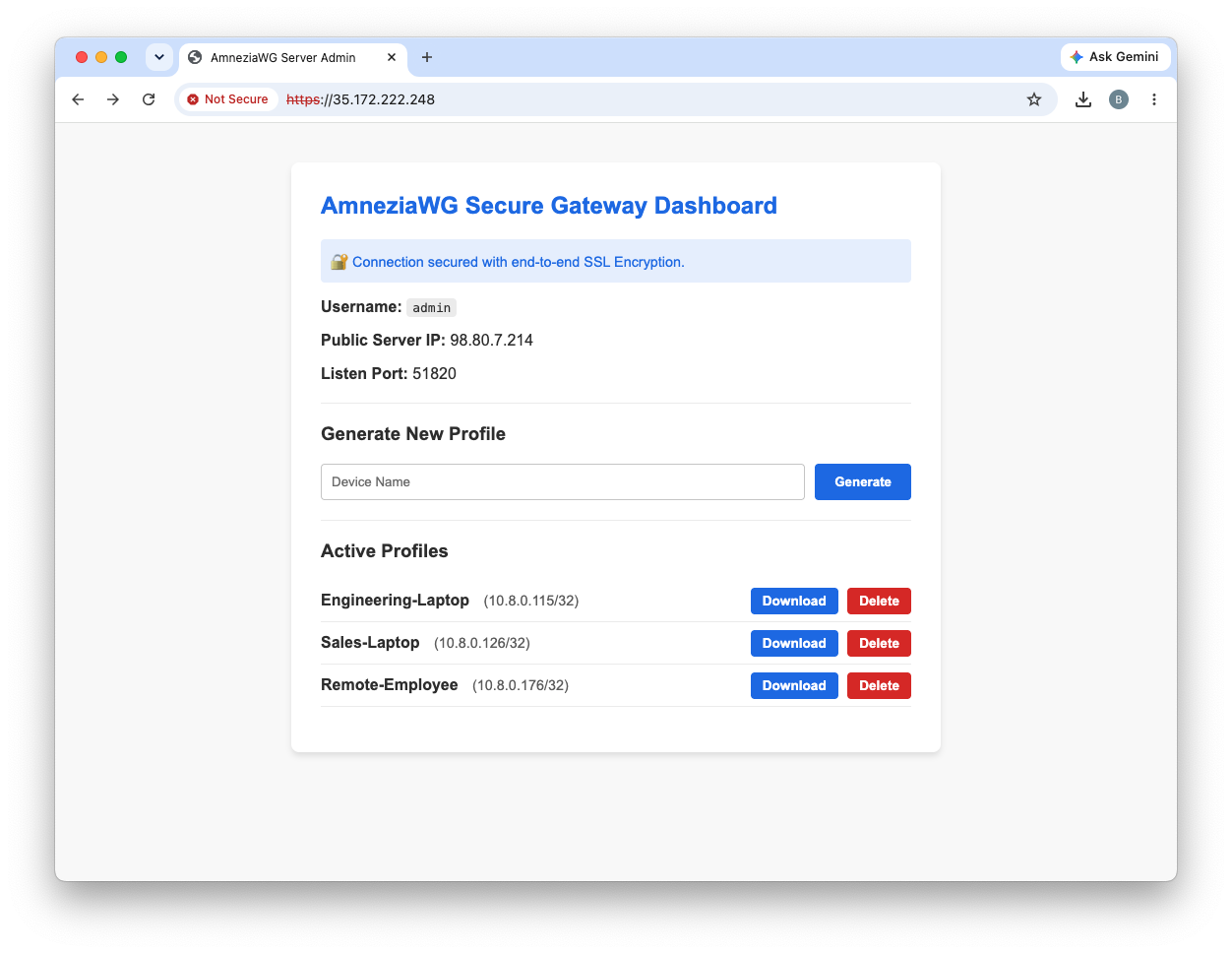
Managed VPN Gateway for AWS is a preconfigured Amazon Machine Image (AMI) that simplifies the deployment and management of secure VPN infrastructure on Amazon EC2.
Instead of manually installing, configuring, and maintaining a VPN server, you can deploy a fully configured gateway in minutes and manage it through an intuitive web-based administration portal.
The solution automates server initialization, simplifies VPN client management, and provides a streamlined administrative experience while allowing you to retain complete control of your AWS environment.
Whether you're securing remote users, connecting distributed teams, or providing secure access to cloud resources, Managed VPN Gateway for AWS helps you deploy a production-ready VPN with minimal effort.
Key Features
- One-click deployment from AWS Marketplace
- Secure VPN gateway powered by AmneziaWG
- Integrated web-based management portal
- Create, manage, and revoke VPN clients
- Download client configuration files
- Automated server initialization
- Secure default configuration
- Runs entirely within your own AWS account
- Simple administration with minimal Linux knowledge required
Benefits
- Deploy a secure VPN in minutes instead of hours
- Eliminate complex manual configuration
- Simplify VPN client lifecycle management
- Reduce operational overhead
- Maintain full ownership and control of your AWS infrastructure
- Quickly provision secure remote access for users and teams
Ideal Use Cases
- Secure remote workforce access
- Small and medium-sized businesses
- Consultants and managed service providers
- Software development teams
- Secure access to AWS resources
- Development, testing, and administrative environments
What's Included
- Preconfigured Ubuntu AMI
- AmneziaWG VPN server
- Integrated web management portal
- VPN client management
- Installation documentation
- Product updates
Support
Documentation and product support are available to assist with deployment, configuration, and ongoing operation.
Highlights
- Deploy a secure VPN gateway on Amazon EC2 in minutes with an integrated web-based management portal.
- Simplify VPN client provisioning, configuration management, and administration with an intuitive browser-based interface.
- Powered by AmneziaWG and designed to run securely within your own AWS account with full control of your infrastructure.
Details
Sold by
Categories
Delivery method
Delivery option
64-bit (x86) Amazon Machine Image (AMI)
Latest version
Operating system
Ubuntu 24.04 LTS
Deployed on AWS
New
Introducing multi-product solutions
You can now purchase comprehensive solutions tailored to use cases and industries.

Features and programs
Financing for AWS Marketplace purchases
AWS Marketplace now accepts line of credit payments through the PNC Vendor Finance program. This program is available to select AWS customers in the US, excluding NV, NC, ND, TN, & VT.

Pricing
Pricing is based on actual usage, with charges varying according to how much you consume. Subscriptions have no end date and may be canceled any time.
Additional AWS infrastructure costs may apply. Use the AWS Pricing Calculator to estimate your infrastructure costs.
If you are an AWS Free Tier customer with a free plan, you are eligible to subscribe to this offer. You can use free credits to cover the cost of eligible AWS infrastructure. See AWS Free Tier for more details. If you created an AWS account before July 15th, 2025, and qualify for the Legacy AWS Free Tier, Amazon EC2 charges for Micro instances are free for up to 750 hours per month. See Legacy AWS Free Tier for more details.
Dimension | Cost/hour |
|---|---|
t3.micro Recommended | $0.03 |
t3.medium | $0.03 |
t3.small | $0.03 |
Dimensions summary
You pay by the hour based on the EC2 instance size you run this VPN gateway on. There are three options: t3.micro, t3.small, and t3.medium. These represent different compute sizes, not feature tiers. Each larger instance provides more CPU and memory to handle more connections or higher traffic. You choose the size that fits your expected VPN load. Billing is usage-based, so charges accrue only while the instance runs. You can scale up or down by selecting a different instance size when you deploy.
Top-of-mind questions for buyers
Each rate covers the software running on one EC2 instance of that size, billed per hour. The instance size sets the CPU and memory available to the VPN gateway. Larger sizes handle more connections or higher traffic. You pick one size per deployment.
Hourly software charges accrue only while the instance runs. If you stop the instance, the hourly software charge stops. Underlying AWS storage and other AWS resource fees may still apply while the instance is stopped, since those are billed separately by AWS.
Billing is usage-based with no upfront commitment. You are metered per instance-hour for whichever size you run. Charges accrue while the instance runs and stop when it stops. This suits variable or short-term VPN workloads where you want to avoid a fixed commitment.
mobinicloudsystems.com
Helpful?
Vendor refund policy
Refund requests must be submitted within 30 days of purchase to support@mobinicloudsystems.com . Refunds may be granted for technical issues that prevent normal operation and cannot be resolved by our support team. Refund eligibility is determined on a case-by-case basis in accordance with AWS Marketplace policies.

Legal
Vendor terms and conditions
Upon subscribing to this product, you must acknowledge and agree to the terms and conditions outlined in the vendor's End User License Agreement (EULA) .
Content disclaimer
Vendors are responsible for their product descriptions and other product content. AWS does not warrant that vendors' product descriptions or other product content are accurate, complete, reliable, current, or error-free.
Delivery details
64-bit (x86) Amazon Machine Image (AMI)
Amazon Machine Image (AMI)
An AMI is a virtual image that provides the information required to launch an instance. Amazon EC2 (Elastic Compute Cloud) instances are virtual servers on which you can run your applications and workloads, offering varying combinations of CPU, memory, storage, and networking resources. You can launch as many instances from as many different AMIs as you need.
Version release notes
Automatic first-boot initialization of the VPN server. Generates unique server keys and AmneziaWG DPI obfuscation parameters for each deployment. Improved VPN service startup and reboot persistence. Clean Marketplace image with no preconfigured VPN clients or server configuration. General stability, reliability, and deployment improvements.
Additional details
Usage instructions
Launch the EC2 instance using the provided AMI. Associate an Elastic IP address (recommended), allow HTTPS (TCP 443) and the VPN port (UDP 51820) in the Security Group, then browse to https://<Elastic-IP> to access the management portal. Refer to the Quick Start Guide for detailed deployment and configuration instructions.
Resources
Vendor resources
Support
Vendor support
Support Email: support@mobinicloudsystems.com
Managed VPN Gateway for AWS includes installation guidance, deployment assistance, configuration support, and issue reporting. Support is provided via email. We strive to respond to support requests within one business day.
For documentation, updates, and additional information, please visit: https://mobinicloudsystems.com
AWS infrastructure support
AWS Support is a one-on-one, fast-response support channel that is staffed 24x7x365 with experienced and technical support engineers. The service helps customers of all sizes and technical abilities to successfully utilize the products and features provided by Amazon Web Services.
Similar products

Cloud Gateway's cutting-edge SASE platform powers our solutions - from network connectivity, to security and data analytics.
All of our services are fully managed as standard, allowing us to better support you in achieving your objectives regardless of size, digital maturity, or in-house technical skills.

Setup of a CheckPoint firewall providing a centralized VPN gateway service inside the AWS cloud.

Fortinet FortiGate allows mitigation of blind spots to improve policy compliance by implementing critical security controls within your AWS environment. FortiGate includes all of the security and networking services common to FortiGate physical appliances.

Enterprise-ready OpenVPN server that deploys in minutes with automated user management and email delivery of VPN profiles via AWS SES. No per-user fees, unlimited users.
Customer reviews
No customer reviews yet
Be the first to review this product . We've partnered with PeerSpot to gather customer feedback. You can share your experience by writing or recording a review, or scheduling a call with a PeerSpot analyst.