
Sold by: cloudimg
Deployed on AWS
Free Trial
AWS Free Tier
This product has charges associated with it for seller support. Deploy a production-ready Valkey in-memory store in under 3 minutes with auto-generated credentials and 24/7 cloudimg support - a secure Redis API-compatible alternative.
Overview
Image
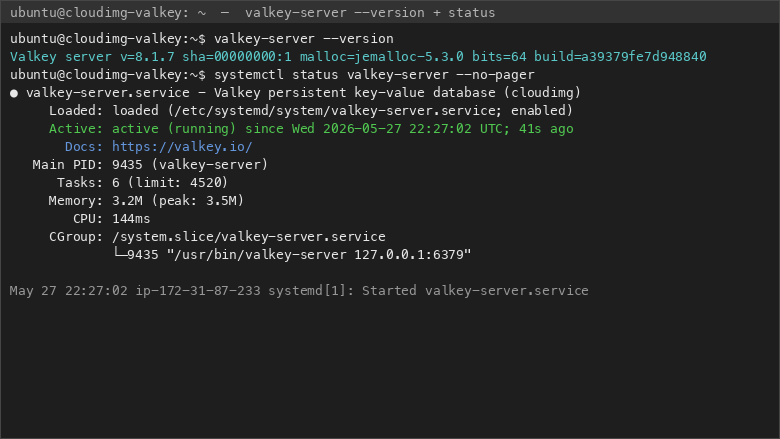
Valkey 8.1.7 version and service status
Image
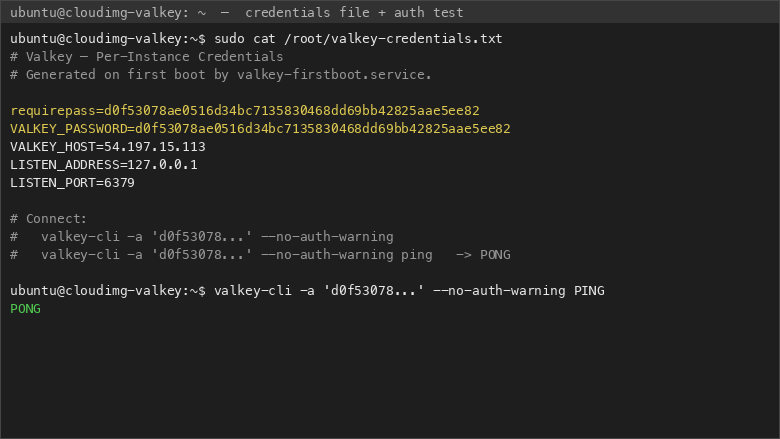
Per-instance credentials and authenticated PING
Image
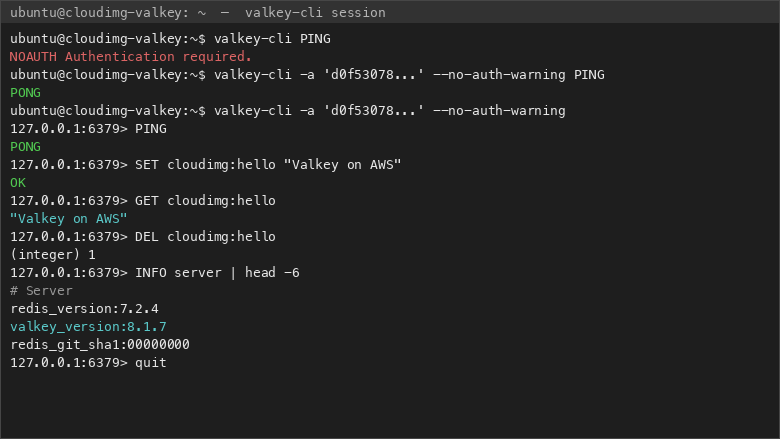
valkey-cli session and auth enforcement
This is a repackaged open source software product wherein additional charges apply for cloudimg support services.
Overview
Valkey is the open source, BSD-licensed, high-performance in-memory key-value store stewarded by the Linux Foundation. It serves as a drop-in replacement for the Redis API, including the RESP protocol on port 6379 and the full set of commands and data structures that client libraries expect. This AMI delivers Valkey fully installed and hardened, so you have a working in-memory store accepting authenticated connections within minutes of launch.
Valkey 8.1.x is built from the upstream Linux Foundation source tarball - not the older version available in the OS package archive - ensuring you run the current major line with the latest stability and performance improvements.
Why This AMI Over Alternatives
Unlike stock OS packages or manual installs, this image is secure by default from the first boot. Many generic Valkey or Redis images ship with no authentication or require manual password configuration, leaving a window of exposure. With this AMI, a one-shot systemd service generates a cryptographically strong password before the daemon accepts any connections, and Valkey binds exclusively to the loopback address (127.0.0.1). You never accidentally expose an unauthenticated data port to the internet.
Compared to self-managed deployments, you eliminate the time spent compiling from source, writing systemd unit files, configuring persistence directories, and hardening network bindings. Compared to managed services, you retain full control over instance sizing, persistence strategy, and replication topology - with no vendor lock-in.
What Is Included
- Valkey 8.1.x compiled from the upstream source tarball, running as a systemd service
- valkey-cli preconfigured for local administration
- nginx reverse proxy on port 80 serving a lightweight identification page that doubles as a cloud network health check endpoint
- Automatic credential generation - a fresh strong password set as requirepass on first boot, stored in a root-only file
- Loopback-only binding by default, preventing accidental internet exposure
Secure First Boot
The image ships with no shared password. On first boot, a one-shot systemd service generates a unique strong password, applies it as the Valkey requirepass directive, and writes it to /root/.valkey_password (readable only by root). Authentication is enforced from the moment the daemon is reachable - there is no window of unauthenticated access.
Getting Started
- Launch the AMI on your chosen EC2 instance type (recommended: r6g or r7g family for memory-intensive workloads)
- Ensure your security group allows SSH (port 22) and optionally port 80 for the health endpoint
- SSH into the instance and retrieve the generated password: cat /root/.valkey_password
- Connect locally: valkey-cli -a YOUR_PASSWORD
- Begin storing keys, lists, hashes, sorted sets, streams, and other Redis API data types
To open Valkey to a private network, update the bind address in /etc/valkey/valkey.conf and add port 6379 to your security group for your VPC CIDR only.
Migration Scenario: Redis to Valkey
Teams affected by the Redis license change to SSPL can migrate existing workloads to this Valkey AMI with minimal code changes. Because Valkey implements the full Redis API and RESP protocol, existing client libraries (Jedis, redis-py, ioredis, Lettuce) connect without modification. A typical migration for a web application caching layer serving thousands of requests per second involves launching this AMI, replicating data from the existing Redis instance using Valkey's replication commands, validating key parity, and cutting over the application connection string. cloudimg engineers can assist with replication setup, persistence tuning, and eviction policy configuration during migration.
Use Cases
- Application caching - Reduce database load with sub-millisecond key lookups
- Session stores - Maintain user sessions across stateless application tiers
- Real-time leaderboards and counters - Sorted sets for gaming, analytics, and engagement tracking
- Rate limiting - Protect APIs with atomic increment operations
- Pub/sub and stream-backed event ingestion - Decouple producers and consumers in event-driven architectures
- Redis API replacement - Maintain API compatibility while moving to a fully open-source BSD-licensed solution
cloudimg Support
24/7 technical support by email and live chat. Our engineers provide expert assistance with Valkey deployment, replication topology design, persistence tuning (RDB and AOF), eviction policies, and migration from existing Redis API workloads. Critical issues receive a one-hour average response time.
To discuss a migration plan or deployment architecture before purchase, contact our team for a free consultation.
Highlights
- Valkey preinstalled and ready, with a Redis API compatible RESP server on port 6379 and the valkey-cli command line shell, with no manual setup required
- Hardened first boot generates a fresh Valkey password for every instance and stores it in a file only the root user can read, so the store is never left open to anonymous clients
- 24/7 technical support from cloudimg, with expert assistance for Valkey deployment, replication, persistence tuning and migration from existing Redis API workloads
Details
Sold by
Delivery method
Delivery option
64-bit (x86) Amazon Machine Image (AMI)
Latest version
Operating system
Ubuntu 24.04
Deployed on AWS
New
Introducing multi-product solutions
You can now purchase comprehensive solutions tailored to use cases and industries.

Features and programs
Financing for AWS Marketplace purchases
AWS Marketplace now accepts line of credit payments through the PNC Vendor Finance program. This program is available to select AWS customers in the US, excluding NV, NC, ND, TN, & VT.

Pricing
Free trial
Try this product free for 7 days according to the free trial terms set by the vendor. Usage-based pricing is in effect for usage beyond the free trial terms. Your free trial gets automatically converted to a paid subscription when the trial ends, but may be canceled any time before that.
Pricing is based on actual usage, with charges varying according to how much you consume. Subscriptions have no end date and may be canceled any time. Alternatively, you can pay upfront for a contract, which typically covers your anticipated usage for the contract duration. Any usage beyond contract will incur additional usage-based costs.
Additional AWS infrastructure costs may apply. Use the AWS Pricing Calculator to estimate your infrastructure costs.
If you are an AWS Free Tier customer with a free plan, you are eligible to subscribe to this offer. You can use free credits to cover the cost of eligible AWS infrastructure. See AWS Free Tier for more details. If you created an AWS account before July 15th, 2025, and qualify for the Legacy AWS Free Tier, Amazon EC2 charges for Micro instances are free for up to 750 hours per month. See Legacy AWS Free Tier for more details.
Dimension | Description | Cost/hour |
|---|---|---|
m5.large Recommended | m5.large | $0.08 |
t3.micro | t3.micro instance type | $0.04 |
t2.micro | t2.micro instance type | $0.04 |
trn1.32xlarge | trn1.32xlarge instance type | $0.24 |
t3a.xlarge | t3a.xlarge instance type | $0.12 |
r8id.32xlarge | r8id.32xlarge instance type | $0.24 |
i7i.metal-24xl | i7i.metal-24xl instance type | $0.24 |
m8id.48xlarge | m8id.48xlarge instance type | $0.24 |
r5ad.4xlarge | r5ad.4xlarge instance type | $0.24 |
r7i.24xlarge | r7i.24xlarge instance type | $0.24 |
Vendor refund policy
Refunds available on request.

Legal
Vendor terms and conditions
Upon subscribing to this product, you must acknowledge and agree to the terms and conditions outlined in the vendor's End User License Agreement (EULA) .
Content disclaimer
Vendors are responsible for their product descriptions and other product content. AWS does not warrant that vendors' product descriptions or other product content are accurate, complete, reliable, current, or error-free.
Delivery details
64-bit (x86) Amazon Machine Image (AMI)
Amazon Machine Image (AMI)
An AMI is a virtual image that provides the information required to launch an instance. Amazon EC2 (Elastic Compute Cloud) instances are virtual servers on which you can run your applications and workloads, offering varying combinations of CPU, memory, storage, and networking resources. You can launch as many instances from as many different AMIs as you need.
Version release notes
Initial release of the Valkey image.
Additional details
Usage instructions
Connect via SSH on port 22 as the default login user for your operating system variant (the user guide lists it per variant). Valkey listens for the Redis API on 127.0.0.1 port 6379 on the instance itself. Retrieve the generated password with: sudo cat /root/valkey-credentials.txt. Open the Valkey shell with: valkey-cli -a '<password>' --no-auth-warning. nginx on port 80 serves a small identification page used as a network health endpoint. The user guide explains how to bind Valkey to a private network address, enable AOF persistence, and set a memory cap for cache workloads.
Resources
Vendor resources
Support
Vendor support
cloudimg provides 24/7 technical support for this Valkey AMI by email and live chat. Our engineers specialize in Valkey and Redis API workloads, offering assistance with:
- Initial deployment and instance sizing guidance
- Replication topology design and failover configuration
- Persistence tuning (RDB snapshots and AOF)
- Eviction policy optimization for your workload profile
- Migration from existing Redis or Redis-compatible deployments
- Security configuration and network binding adjustments
- Performance troubleshooting and monitoring setup
Response Times: Critical issues (data loss risk, service down) receive a one-hour average response. General inquiries and configuration questions are addressed within the same business day.
Getting Started After Launch:
- Launch the AMI on an EC2 instance (recommended: r6g or r7g family for memory-intensive workloads; t3/t4g suitable for development and testing)
- Configure your security group to allow SSH (port 22) and optionally port 80 for the health endpoint
- SSH into the instance
- Retrieve your unique generated password: cat /root/.valkey_password
- Connect: valkey-cli -a YOUR_PASSWORD
- To expose Valkey to your VPC, update the bind address in /etc/valkey/valkey.conf and add port 6379 to your security group restricted to your VPC CIDR
Expected time from launch to first authenticated connection is under 3 minutes.
Contact: support@cloudimg.co.uk
For migration planning or architecture consultations, reach out to the same address and our team will schedule a session.
AWS infrastructure support
AWS Support is a one-on-one, fast-response support channel that is staffed 24x7x365 with experienced and technical support engineers. The service helps customers of all sizes and technical abilities to successfully utilize the products and features provided by Amazon Web Services.
Similar products

Valkey is a high-performance data structure server that primarily serves key/value workloads. It supports a wide range of native structures and an extensible plugin system for adding new data structures and access patterns.
This product has charges associated with it for maintenance and support from Cloud Cost AI. Redis is an in-memory data store supporting strings, hashes, lists, sets, sorted sets, bitmaps, hyperloglogs, streams, and geospatial indexes.

Valkey is a high-performance data structure server that primarily serves key/value workloads. It supports a wide range of native structures and an extensible plugin system for adding new data structures and access patterns.

Open source freedom meets enterprise-grade in-memory performance
Customer reviews
No customer reviews yet
Be the first to review this product . We've partnered with PeerSpot to gather customer feedback. You can share your experience by writing or recording a review, or scheduling a call with a PeerSpot analyst.