
Sold by: cloudimg
Deployed on AWS
Free Trial
AWS Free Tier
This product has charges associated with it for seller support. Pre-configured Elasticvue AMI with a bundled OpenSearch cluster behind nginx. Launch a browser-based search cluster console in minutes with no manual setup required.
Overview
Image
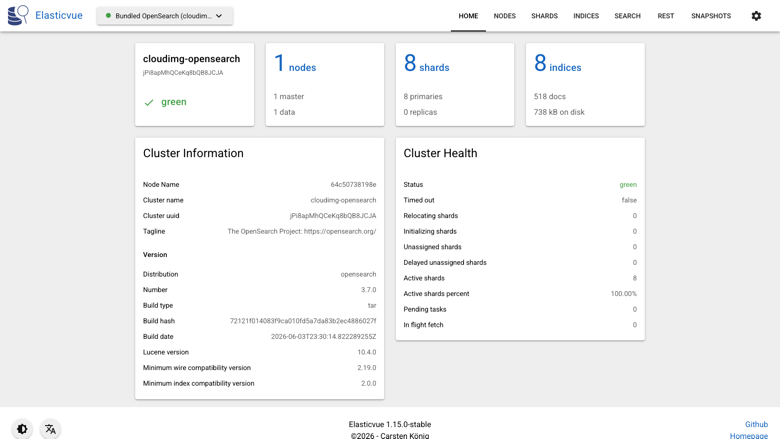
Cluster overview
Image
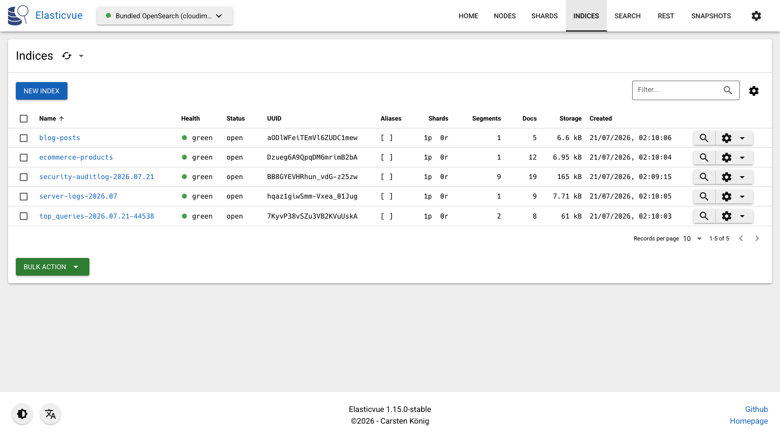
Index management
Image
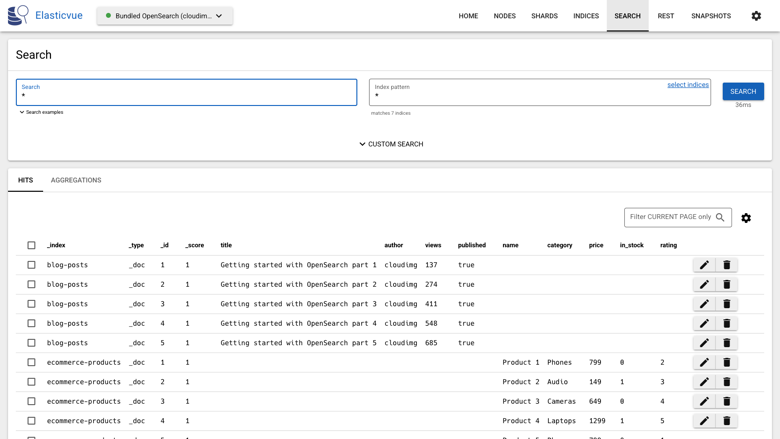
Search and documents
Image
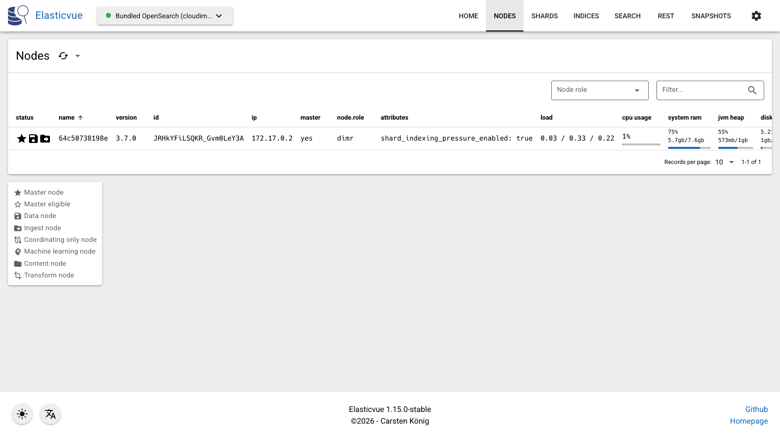
Cluster nodes
This is a repackaged open source software product wherein additional charges apply for cloudimg support services.
Overview
Elasticvue is a free, open source web front end for Elasticsearch and OpenSearch. It gives you a clean browser interface to check cluster and node health, browse and manage indices and shards, run searches and queries, and work with your documents - without installing a desktop tool. This AMI delivers Elasticvue 1.15 fully installed behind an nginx reverse proxy and pre-wired to a bundled single-node OpenSearch 3.7 cluster, so a working cluster console is serving within minutes of launch.
Why This AMI Instead of Self-Deployment
Deploying Elasticvue manually against your own OpenSearch cluster requires configuring CORS headers, setting up TLS, hardening the OpenSearch security plugin, provisioning storage, and wiring a reverse proxy - typically dozens of configuration steps across multiple files. This AMI eliminates that work entirely. The bundled stack handles origin policy, authentication, container orchestration, disk provisioning, and automatic restarts on failure. You get a production-ready console without writing a single config file.
Application Stack
Elasticvue and a single-node OpenSearch cluster run as containers behind nginx on port 80. Elasticvue is a static single-page application; OpenSearch provides a real cluster for it to manage out of the box. nginx serves the Elasticvue interface and reverse-proxies the OpenSearch REST API on the same origin, so the interface connects to the bundled cluster with no browser configuration. The container runtime and reverse proxy start on boot and the containers restart on failure.
Manage Your Cluster From the Browser
- View cluster health, node statistics, and shard allocation at a glance
- Create, open, close, reindex, and delete indices
- Edit mappings and settings, manage aliases and templates
- Explore documents in a searchable table, add and update documents
- Run queries with a built-in REST request editor against any endpoint
- Point Elasticvue at the bundled OpenSearch cluster or add connections to your own Elasticsearch or OpenSearch clusters
Secure First Boot
On the first boot a one-shot service generates a fresh admin password unique to that instance for the bundled OpenSearch cluster and records it in a file only the root user can read. No shared or default credentials ship in the image. The OpenSearch security plugin enforces authentication on the cluster, so the console is protected from the moment it comes online.
Ready To Use
Open the web interface in your browser and Elasticvue connects to the bundled cluster automatically, with cluster health and indices ready to explore. A built-in health endpoint answers on the reverse proxy for load balancer and uptime checks. The cluster data lives on a dedicated, independently resizable data disk.
Use-Case Scenario: Shared Developer Workbench
A development team managing 50+ indices across staging and production needs a shared console without granting SSH access to every engineer. With this AMI, a developer pushes a new mapping through the index management view, an analyst runs a saved query in the REST editor, and an operator checks shard balance on the cluster overview - all from a browser tab. During an incident, any team member can verify cluster health in seconds without CLI access or VPN tunneling.
Additional Use Cases
- A browser-based console to inspect and operate an Elasticsearch or OpenSearch cluster
- A quick way to explore indices, run queries, and manage documents from anywhere
- A lightweight alternative to OpenSearch Dashboards when you only need cluster and index management
cloudimg Support
24/7 technical support by email and chat. Help with deployment, HTTPS and reverse proxy configuration, connecting Elasticvue to your own clusters, index and security configuration, storage and upgrade planning.
Get Started
Launch the AMI, open port 80 (or 443 after HTTPS setup) in your security group, and navigate to your instance's public IP. The Elasticvue interface loads automatically connected to the bundled cluster. To schedule a guided deployment walkthrough or ask pre-purchase questions, contact support@cloudimg.co.uk .
All product and company names are trademarks or registered trademarks of their respective holders. Use of them does not imply any affiliation with or endorsement by them.
Highlights
- Skip manual CORS, TLS, and security configuration - this AMI delivers Elasticvue 1.15 pre-installed behind nginx and pre-wired to a bundled OpenSearch 3.7 cluster on the same origin. The interface connects automatically with no browser setup, giving you a working cluster console within minutes of launch instead of hours of manual deployment.
Details
Sold by
Categories
Delivery method
Delivery option
64-bit (x86) Amazon Machine Image (AMI)
Latest version
Operating system
Ubuntu 24.04
Deployed on AWS
New
Introducing multi-product solutions
You can now purchase comprehensive solutions tailored to use cases and industries.

Features and programs
Financing for AWS Marketplace purchases
AWS Marketplace now accepts line of credit payments through the PNC Vendor Finance program. This program is available to select AWS customers in the US, excluding NV, NC, ND, TN, & VT.

Pricing
Free trial
Try this product free for 7 days according to the free trial terms set by the vendor. Usage-based pricing is in effect for usage beyond the free trial terms. Your free trial gets automatically converted to a paid subscription when the trial ends, but may be canceled any time before that.
Pricing is based on actual usage, with charges varying according to how much you consume. Subscriptions have no end date and may be canceled any time. Alternatively, you can pay upfront for a contract, which typically covers your anticipated usage for the contract duration. Any usage beyond contract will incur additional usage-based costs.
Additional AWS infrastructure costs may apply. Use the AWS Pricing Calculator to estimate your infrastructure costs.
If you are an AWS Free Tier customer with a free plan, you are eligible to subscribe to this offer. You can use free credits to cover the cost of eligible AWS infrastructure. See AWS Free Tier for more details. If you created an AWS account before July 15th, 2025, and qualify for the Legacy AWS Free Tier, Amazon EC2 charges for Micro instances are free for up to 750 hours per month. See Legacy AWS Free Tier for more details.
Dimension | Description | Cost/hour |
|---|---|---|
m5.large Recommended | m5.large | $0.08 |
t3.micro | t3.micro instance type | $0.04 |
t2.micro | t2.micro instance type | $0.04 |
c8ib.8xlarge | c8ib.8xlarge instance type | $0.24 |
t3a.small | t3a.small instance type | $0.04 |
m6in.8xlarge | m6in.8xlarge instance type | $0.24 |
m8a.xlarge | m8a.xlarge instance type | $0.12 |
c6id.8xlarge | c6id.8xlarge instance type | $0.24 |
m7a.12xlarge | m7a.12xlarge instance type | $0.24 |
c6in.24xlarge | c6in.24xlarge instance type | $0.24 |
Vendor refund policy
Refunds available on request.

Legal
Vendor terms and conditions
Upon subscribing to this product, you must acknowledge and agree to the terms and conditions outlined in the vendor's End User License Agreement (EULA) .
Content disclaimer
Vendors are responsible for their product descriptions and other product content. AWS does not warrant that vendors' product descriptions or other product content are accurate, complete, reliable, current, or error-free.
Delivery details
64-bit (x86) Amazon Machine Image (AMI)
Amazon Machine Image (AMI)
An AMI is a virtual image that provides the information required to launch an instance. Amazon EC2 (Elastic Compute Cloud) instances are virtual servers on which you can run your applications and workloads, offering varying combinations of CPU, memory, storage, and networking resources. You can launch as many instances from as many different AMIs as you need.
Version release notes
Initial release of Elasticvue as a ready to use web GUI for Elasticsearch and OpenSearch, pre-wired to a bundled single-node OpenSearch cluster with the admin password generated on first boot.
Additional details
Usage instructions
Connect via SSH on port 22 as the default login user for your operating system variant (for the Ubuntu 24.04 variant the user is ubuntu). Retrieve the generated OpenSearch admin password with: sudo cat /root/elasticvue-credentials.txt. Open Elasticvue in a browser at http://<instance-public-ip>/ and it connects to the bundled OpenSearch cluster automatically, showing cluster health and indices. To use your own cluster, add a connection in Elasticvue with its URI and credentials. Elasticvue is served by nginx on port 80, which reverse proxies the OpenSearch REST API at http://<instance-public-ip>/os/; an unauthenticated health endpoint is available at http://<instance-public-ip>/healthz. The bundled OpenSearch data lives on a dedicated data disk mounted at /var/lib/opensearch. The instance security group opens ports 22, 80 and 443. Elasticvue and OpenSearch run as Docker containers: sudo docker ps; the reverse proxy runs under systemd: systemctl status nginx.
Resources
Vendor resources
Support
Vendor support
cloudimg Support
cloudimg provides 24/7 technical support for this product by email and live chat.
Contact: support@cloudimg.co.uk
What We Help With:
- Deployment and initial launch troubleshooting
- Retrieving the auto-generated admin password from your instance
- HTTPS and reverse proxy configuration (e.g., Let's Encrypt, custom certificates)
- Connecting Elasticvue to your own Elasticsearch or OpenSearch clusters
- Index management, security plugin configuration, and alias setup
- Storage planning, disk resizing, and upgrade guidance
- Refund and cancellation requests
Quick-Start Deployment Steps:
- Launch the AMI from AWS Marketplace and select your instance type
- Configure your security group to allow inbound TCP on port 80 (and 443 if using HTTPS)
- SSH into the instance and retrieve the generated admin password from the root-only file
- Open your instance's public IP in a browser - Elasticvue loads automatically connected to the bundled OpenSearch cluster
- Optionally add connections to your own external clusters via the Elasticvue interface
Prerequisites:
- AWS account with EC2 launch permissions
- Security group allowing inbound traffic on port 80
- SSH key pair for initial password retrieval
For a guided deployment walkthrough or pre-purchase questions, contact support@cloudimg.co.uk .
AWS infrastructure support
AWS Support is a one-on-one, fast-response support channel that is staffed 24x7x365 with experienced and technical support engineers. The service helps customers of all sizes and technical abilities to successfully utilize the products and features provided by Amazon Web Services.
Customer reviews
No customer reviews yet
Be the first to review this product . We've partnered with PeerSpot to gather customer feedback. You can share your experience by writing or recording a review, or scheduling a call with a PeerSpot analyst.