
Sold by: StableLogic Ltd
Deployed on AWS
Free Trial
AWS Free Tier
The StableLogic SFTP Transfer delivers business-grade SFTP security and control directly within your own AWS account, with no legacy managed file transfer platform required. Deploy in minutes via AWS Marketplace, connect any standard SFTP client, and land files directly in your own Amazon S3 bucket with SSE-KMS encryption, per-user access controls, IP whitelisting, and bandwidth throttling. ISO 27001 certified, GDPR compliant, and built for regulated industries, external partner file exchange, and cloud-native data platforms.
Overview
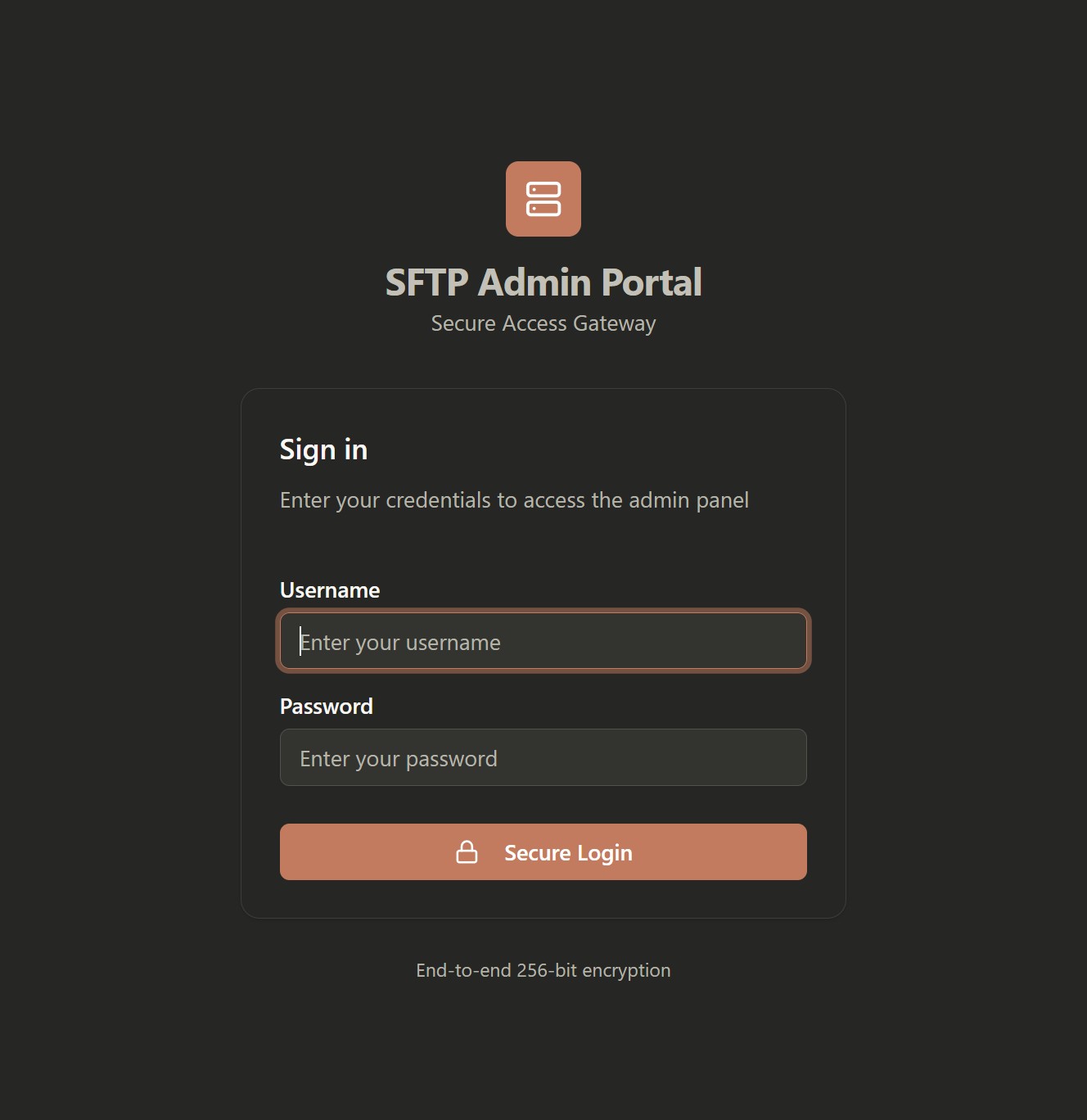
Image
SFTP Transfer
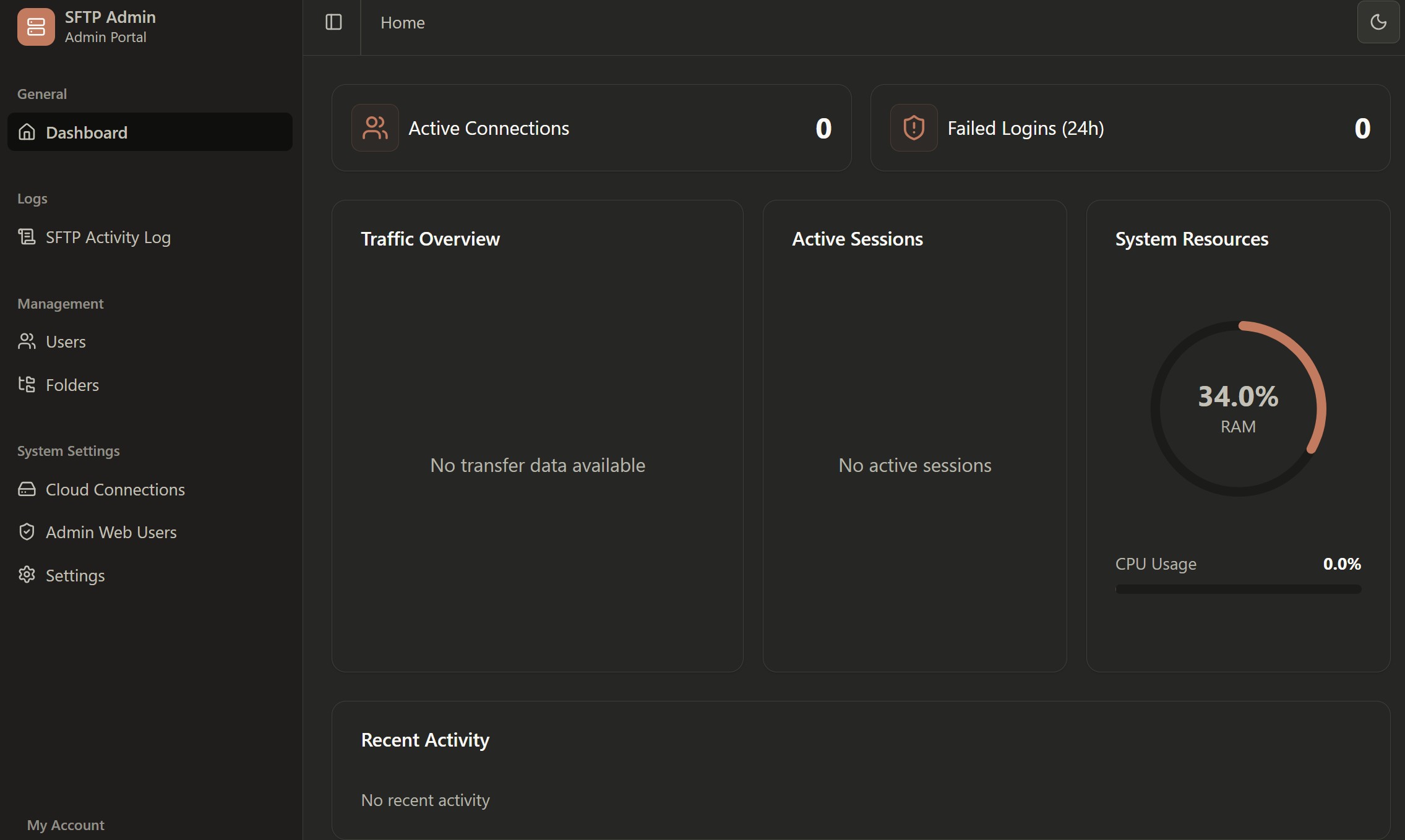
Image
SFTP Dashboard
The StableLogic SFTP Transfer is a secure, cloud-native SFTP gateway built natively on AWS, delivering business-grade file transfer security and control without the cost, complexity, or vendor lock-in of traditional managed file transfer (MFT) platforms. Deployed in minutes from AWS Marketplace directly into your own AWS VPC, the gateway acts as a secure front door for partners, customers, and internal teams to exchange files safely, with IT and security teams retaining complete control over access, behaviour, and data residency at all times. Files land directly in your own Amazon S3 bucket, with no shared storage and no data residency compromises.
Every user is governed by fine-grained security policies including SSH public key and password authentication, per-user home folders and virtual directory hierarchies, read/write permissions, IP address whitelisting, account lockout protection, file extension filtering, and upload/download bandwidth throttling. Server-side encryption is enforced at rest via SSE-S3 or SSE-KMS with AWS KMS customer-managed keys. SFTP activity is captured via built-in audit logging, with AWS API activity captured via CloudTrail, giving you a complete picture for audit and compliance purposes.
Purpose-built for regulated industries, B2B partner file exchange, cloud migration teams, and ISVs embedding secure file transfer into their platforms, the StableLogic SFTP Transfer is developed by an ISO 27001 and Cyber Essentials Plus certified organisation and is designed with GDPR data residency requirements in mind. With infrastructure-style pricing, no per-user fees, no feature-gated tiers, and billing consolidated through your existing AWS account, it is the simplest, most cost-effective way to deliver business-grade SFTP on AWS.
Highlights
- Business-grade SFTP security, deployed in minutes -- SSH public key authentication, IP whitelisting, per-user access controls, account lockout, and SSE-KMS encryption, all running inside your own AWS VPC with no legacy MFT platform required.
- Your data never leaves your AWS account -- Files transfer directly to your own Amazon S3 bucket with full data residency control, server-side encryption with your choice of key management, and zero StableLogic infrastructure in the data path. Ever.
- No per-user fees. No feature gating. No lock-in. -- A single, fully-featured SFTP gateway with transparent infrastructure-style pricing through AWS Marketplace, ISO 27001 certified, GDPR compliant, and built for regulated industries and partner file exchange at scale.
Details
Sold by
Categories
Delivery method
Delivery option
64-bit (x86) Amazon Machine Image (AMI)
Latest version
Operating system
Ubuntu 24.04
Deployed on AWS
New
Introducing multi-product solutions
You can now purchase comprehensive solutions tailored to use cases and industries.

Features and programs
Financing for AWS Marketplace purchases
AWS Marketplace now accepts line of credit payments through the PNC Vendor Finance program. This program is available to select AWS customers in the US, excluding NV, NC, ND, TN, & VT.

Pricing
Free trial
Try this product free for 30 days according to the free trial terms set by the vendor. Usage-based pricing is in effect for usage beyond the free trial terms. Your free trial gets automatically converted to a paid subscription when the trial ends, but may be canceled any time before that.
Pricing is based on actual usage, with charges varying according to how much you consume. Subscriptions have no end date and may be canceled any time.
Additional AWS infrastructure costs may apply. Use the AWS Pricing Calculator to estimate your infrastructure costs.
If you are an AWS Free Tier customer with a free plan, you are eligible to subscribe to this offer. You can use free credits to cover the cost of eligible AWS infrastructure. See AWS Free Tier for more details. If you created an AWS account before July 15th, 2025, and qualify for the Legacy AWS Free Tier, Amazon EC2 charges for Micro instances are free for up to 750 hours per month. See Legacy AWS Free Tier for more details.
Dimension | Cost/hour |
|---|---|
t3.medium Recommended | $0.05 |
t3.micro | $0.05 |
r5n.2xlarge | $0.05 |
t3.xlarge | $0.05 |
m8i.32xlarge | $0.05 |
m5ad.2xlarge | $0.05 |
h1.4xlarge | $0.05 |
i2.4xlarge | $0.05 |
m7i.xlarge | $0.05 |
g2.2xlarge | $0.05 |
Dimensions summary
You pay by the hour for the EC2 instance type that runs the software. Each dimension maps to one AWS instance size, so the rate reflects the compute you select. Smaller instances like t3.nano or t3.micro bill at lower hourly rates. Larger memory, compute, storage, and GPU instances, up to multi-terabyte sizes, bill at higher rates. You choose the instance that fits your file transfer load and scaling needs. The software carries no per-user fees, so all sizes support unlimited users. Your total cost depends on the instance you pick and how many hours it runs.
Top-of-mind questions for buyers
The hourly rate covers only the EC2 instance running the software. There are no per-user fees. Every instance size supports unlimited SFTP users, each individually configured with permissions, home folders, bandwidth limits, and access policies. You do not pay more as you add users.
The software bills by instance-hour, so charges accrue only while the instance runs. A stopped instance does not accrue software charges. Note the architecture uses an Auto Scaling Group and Network Load Balancer, which may keep instances running to stay available. Underlying AWS storage fees can still apply separately.
The software deploys into your own AWS account, so you also pay standard AWS fees. Files land in your own S3 bucket, meaning S3 storage charges apply. The Network Load Balancer and data transfer carry their own AWS costs. These are billed by AWS separately from the hourly software rate.
stablelogic.com
Helpful?
Vendor refund policy
Refund requests are considered on a case-by-case basis. Please contact us at support@stablelogic.com within 30 days of purchase to discuss your requirements. We will work with you to reach a fair resolution.
Custom pricing options
Request a private offer to receive a custom quote.

Legal
Vendor terms and conditions
Upon subscribing to this product, you must acknowledge and agree to the terms and conditions outlined in the vendor's End User License Agreement (EULA) .
Content disclaimer
Vendors are responsible for their product descriptions and other product content. AWS does not warrant that vendors' product descriptions or other product content are accurate, complete, reliable, current, or error-free.
Delivery details
64-bit (x86) Amazon Machine Image (AMI)
Amazon Machine Image (AMI)
An AMI is a virtual image that provides the information required to launch an instance. Amazon EC2 (Elastic Compute Cloud) instances are virtual servers on which you can run your applications and workloads, offering varying combinations of CPU, memory, storage, and networking resources. You can launch as many instances from as many different AMIs as you need.
Version release notes
This version provides the StableLogic SFTP Transfer gateway, delivering secure file transfer over SFTP directly into your own AWS VPC with Amazon S3 as the storage backend. Includes full setup and configuration for user management, access controls, encryption, and inbound and outbound file transfer workflows.
Additional details
Usage instructions
Prerequisites:
- An EC2 key pair in the target region. This is required: the admin password is generated on the instance at first use and retrieved over SSH, so without a key pair you cannot obtain it.
- An IAM role with the following S3 permissions on your target bucket: s3:GetObject, s3:PutObject, s3:DeleteObject, s3:ListBucket, s3:AbortMultipartUpload
- If using SSE-KMS encryption, also add kms:GenerateDataKey and kms:Decrypt on your KMS key.
- Note: the instance role is used only when the Access Key and Secret Key fields are left empty when you create a Cloud Connection. If you enter keys, they take precedence and the role is ignored.
Launching the Instance:
- Launch an EC2 instance from this AMI (t3.medium recommended as a minimum)
- Attach the IAM role created above to the instance
- Select your EC2 key pair so you can retrieve the admin password
- Assign a security group with the ports listed below
- Ensure the instance can reach the S3 API, via a public subnet, NAT, or an S3 VPC endpoint
Security Group - Required Ports
- Port 22 - SFTP file transfer (open to SFTP client/partner IPs only)
- Port 5173 - Admin web portal, HTTP only (restrict to your office or VPN IP)
- Port 2222 - EC2 admin SSH access (restrict to your IP only)
Retrieving the Admin Password
This AMI ships with no default or preset credentials. A unique random password is generated on your own instance. Allow 2-3 minutes after launch for the services to start, then connect over SSH and run:
ssh -p 2222 -i /path/to/your-key.pem ubuntu@<instance-public-ip> sudo stablelogic-sftp-bootstrapThe command prints the username (admin) and the generated password once. Record it in a password manager immediately. It applies to both the admin web portal and the SFTP 'admin' user.
If the command reports "no such container", the services are still starting - wait a further minute and run it again.
This is a one-time operation. If you need to reset it later, run the same command with --force, which overwrites any password subsequently set via the portal.
Accessing the Admin Portal
- Open http://<instance-public-ip>:5173 in your browser
- Log in as 'admin' using the password generated above
- Set your own password after first login, as the generated value may remain in your terminal history
- Enable MFA from the MFA section for additional security
Connecting via SFTP
- Host: <instance-public-ip>
- Port: 22
- Authenticate using password or SSH public key
- Use any standard SFTP client
First Steps
- Add your S3 bucket under Cloud Connections. Leave Access Key and Secret Key empty to use the attached instance role.
- Create your folder structure under Folders
- Create SFTP users under the Users section, assigning each user a home folder from that structure and read/write permissions as required
- Configure bandwidth throttling and per-user IP whitelisting as required
Network Access
The admin web portal is intended for access from a trusted network rather than the public internet. Restrict port 5173 to your office or VPN IP range in your security group, or reach it through an SSH tunnel over port 2222. The portal is served over HTTP, so if you require access from outside your network, place it behind a load balancer or reverse proxy that terminates TLS.
Port 22 should be restricted to known partner IP ranges where possible.
Set your own admin password after first login and enable MFA on all admin accounts.
Quick Start Guide: https://public.stablelogic.com/StableLogic%20SFTP%20Transfer%20%E2%80%94%20Quick%20Start%20Guide.pdf
Support
Vendor support
The StableLogic SFTP Transfer includes email support as standard across all purchasing tiers, with enhanced support options available for production and mission-critical deployments.
Self-Managed -- Access to full product documentation and knowledge base. No SLAs or response commitments. Best suited to platform teams who prefer full operational control.
Standard Support -- Business-hours email support with defined response targets, plus access to product updates and release notifications. Suitable for most production environments.
Enterprise Support -- 24x7 email and telephone support with priority escalation. Designed for regulated, partner-facing, or mission-critical services where rapid response is essential.
All support enquiries should be directed to support@stablelogic.com . Further information about support tiers, response targets, and optional professional services including assisted onboarding and architecture reviews is available at <www.stablelogic.com >.
AWS infrastructure support
AWS Support is a one-on-one, fast-response support channel that is staffed 24x7x365 with experienced and technical support engineers. The service helps customers of all sizes and technical abilities to successfully utilize the products and features provided by Amazon Web Services.
Similar products

SnapLogic is the Agentic Integration Company, integrating AI, data, applications, and microservices into one powerful platform that transforms how enterprises connect, automate, and scale. Unlike legacy integration tools, SnapLogic is built for the AI era and trusted by global leaders, including AstraZeneca, Adobe, Verizon, and Sony. With its industry-leading platform, SnapLogic empowers every team across the enterprise to securely integrate applications, automate business processes, and orchestrate agentic workflows at scale. SnapGPT, an AI copilot built into the platform, enables any user to describe an integration in plain language and have it built automatically, reducing dependency on specialist engineering resources.
Contact us for a complimentary deployment plan and private offer, which could save you up to 20%. SFTP Gateway is a lightweight SFTP server designed specifically for the cloud. Files are streamed directly to cloud storage locations such as AWS S3, Azure Blob, and Google Cloud Storage. Data is not stored anywhere along the way or exposed to a third party. Our Standard tier supports only 5 SFTP users. Need more? SFTP Gateway BYOL, also on AWS Marketplace, is licensed per customer in 10 user, 100 user and enterprise tiers and supports high availability: https://aws.amazon.com/marketplace/pp/prodview-w6sdp7f2ov6qi
Secure SFTP server solution using SFTP / SSH server software. Fast deployment with secure access

Panther is a modern Security Information and Event Management (SIEM) tool that solves the challenges of security operations at scale.
Customer reviews
No customer reviews yet
Be the first to review this product . We've partnered with PeerSpot to gather customer feedback. You can share your experience by writing or recording a review, or scheduling a call with a PeerSpot analyst.