
Sold by: digiDations
Deployed on AWS
Free Trial
At digiDations, we see Security Validation as fundamental to a robust, adaptive, and demonstrably effective security strategy. Our AI-powered validation platform, ATLAS, is engineered to provide this continuous assurance.
Overview
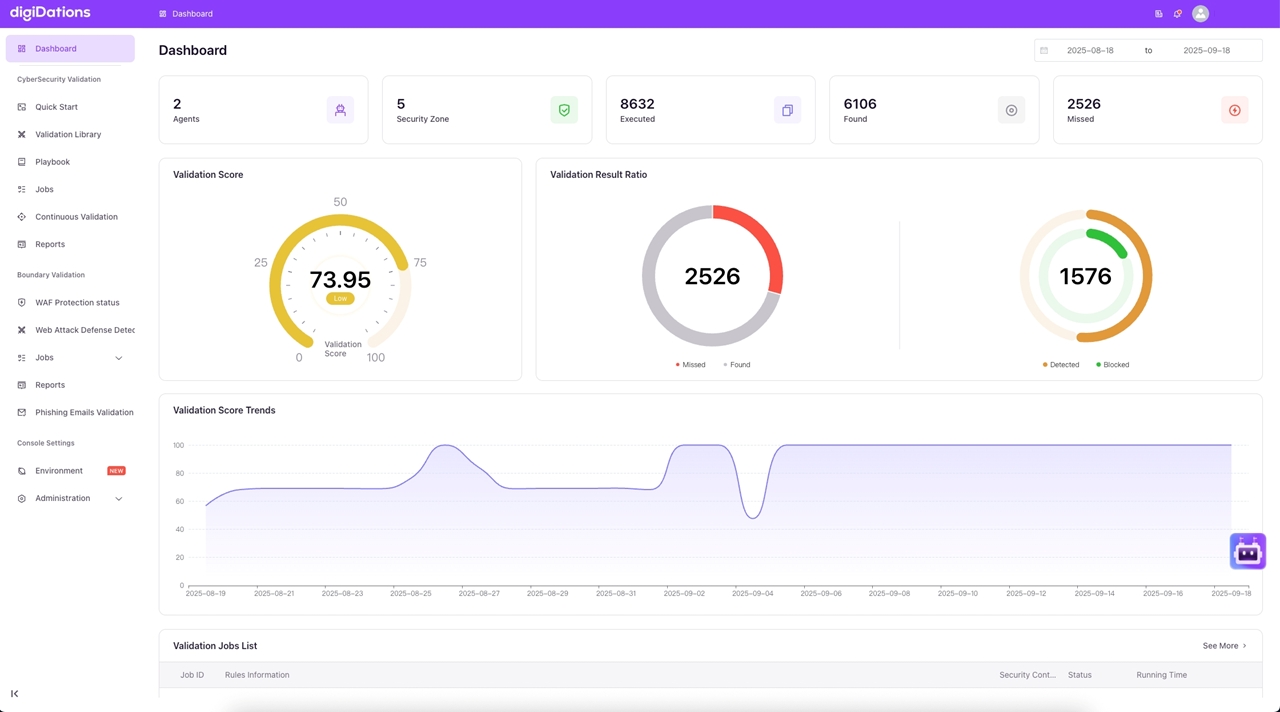
Image
Dashboard
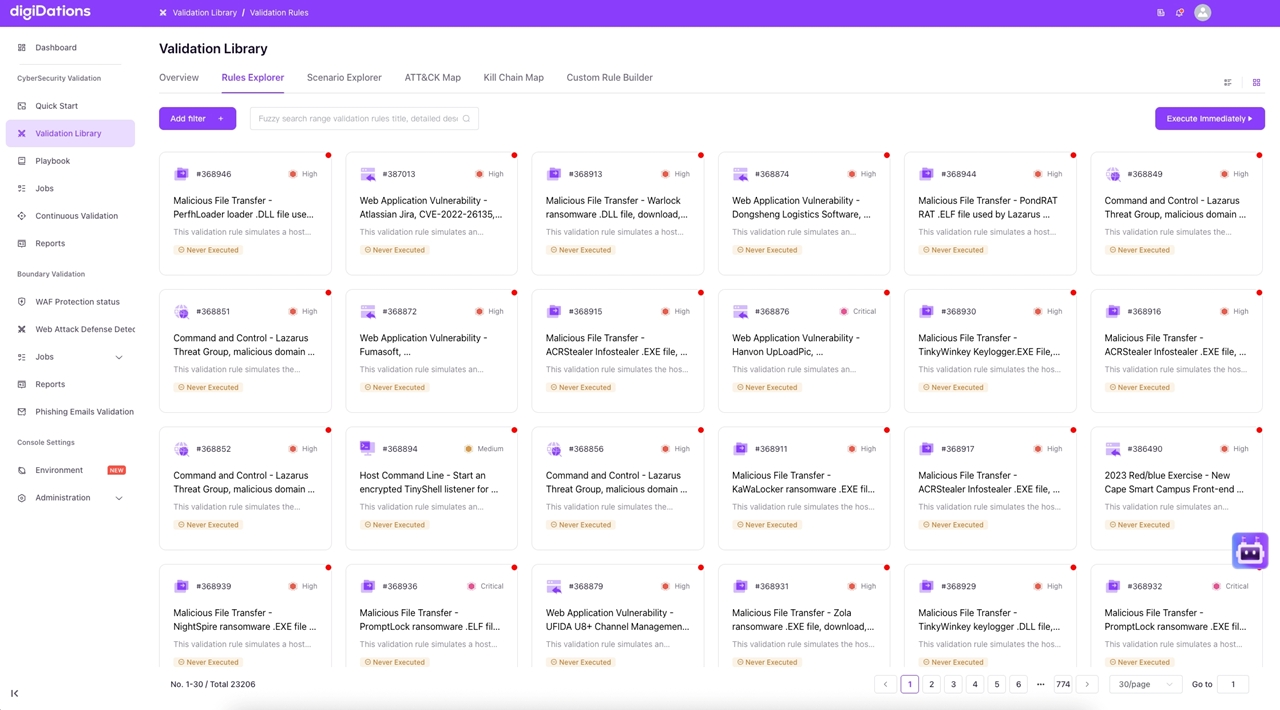
Image
Validation Library
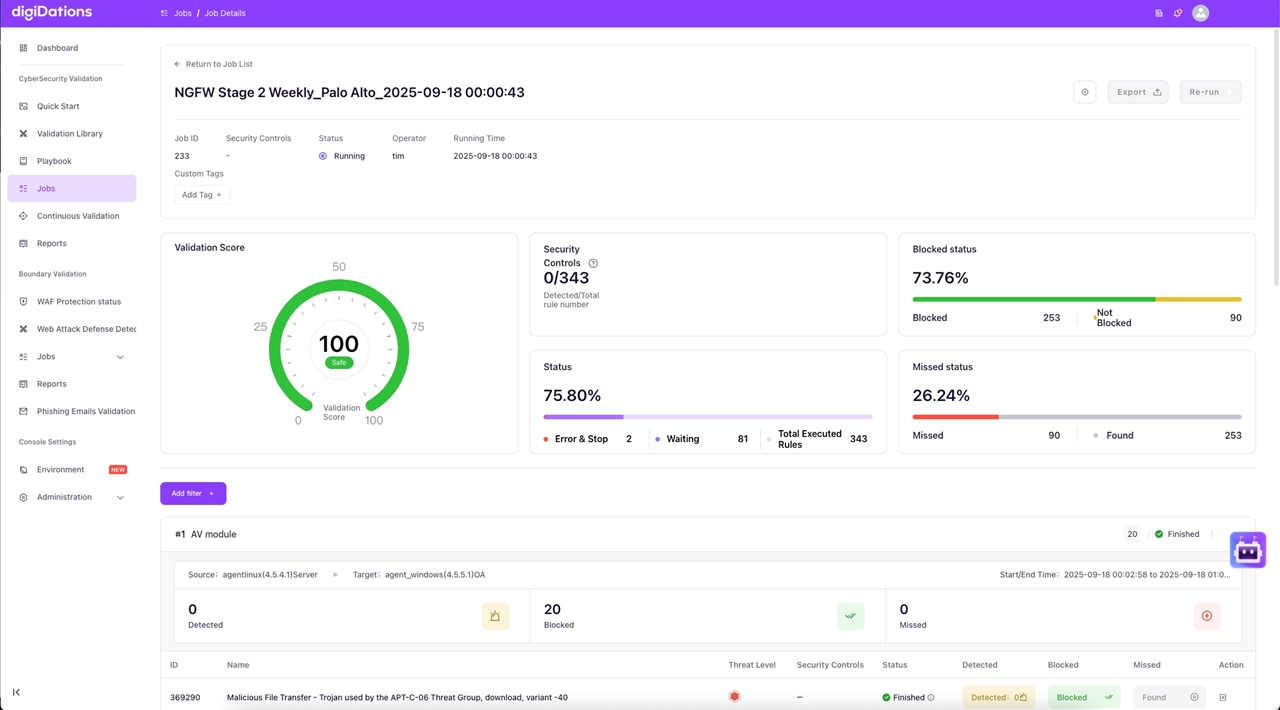
Image
Job Details
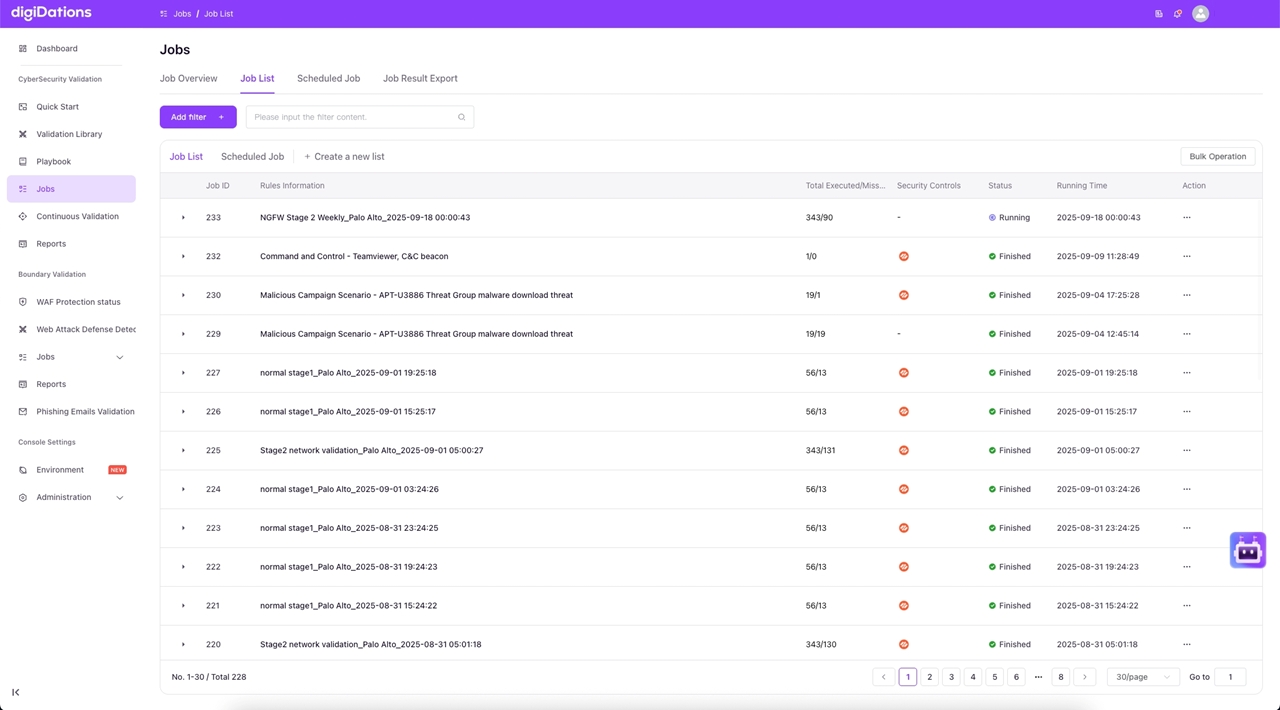
Image
Job List
ATLAS delivers real-time Security Validation through adversary simulations mapped to MITRE ATT&CK and the Cyber Kill Chain. It measures control effectiveness, detection and response gaps, and the before-and-after impact of changes thus helping leaders prove true resilience.
Highlights
- Enterprise-Grade Validation Framework Distribute and orchestrate security validation across your entire environment while ensuring zero business impact.
- Real-World Advanced Persistent Threat (APT) Simulation Leverage advanced AI to simulate sophisticated cyber threats and attack patterns with comprehensive attack coverage.
- Actionable Security Intelligence & Incident Response Transform complex security data into clear, actionable insights with comprehensive analytics and reporting.
Details
Sold by
Categories
Delivery method
Delivery option
64-bit (x86) Amazon Machine Image (AMI)
Latest version
Operating system
AmazonLinux 2023.5.20240903.0
Deployed on AWS
New
Introducing multi-product solutions
You can now purchase comprehensive solutions tailored to use cases and industries.

Features and programs
Financing for AWS Marketplace purchases
AWS Marketplace now accepts line of credit payments through the PNC Vendor Finance program. This program is available to select AWS customers in the US, excluding NV, NC, ND, TN, & VT.

Pricing
Free trial
Try this product free for 7 days according to the free trial terms set by the vendor. Usage-based pricing is in effect for usage beyond the free trial terms. Your free trial gets automatically converted to a paid subscription when the trial ends, but may be canceled any time before that.
Pricing is based on actual usage, with charges varying according to how much you consume. Subscriptions have no end date and may be canceled any time. Alternatively, you can pay upfront for a contract, which typically covers your anticipated usage for the contract duration. Any usage beyond contract will incur additional usage-based costs.
Additional AWS infrastructure costs may apply. Use the AWS Pricing Calculator to estimate your infrastructure costs.
Dimension | Cost/hour |
|---|---|
m5.xlarge Recommended | $20.00 |
c4.4xlarge | $60.00 |
c5n.2xlarge | $40.00 |
Dimensions summary
You pay by the hour based on the AWS instance type you run ATLAS on. Three instance options are available: c4.4xlarge, c5n.2xlarge, and m5.xlarge. Each represents a different compute configuration, so your hourly rate depends on which instance you choose. Billing is usage-based, meaning you pay only for the hours the platform runs. There are no tiers or feature differences between these options. The choice reflects the compute capacity you need for running security validation simulations in your environment.
Top-of-mind questions for buyers
Each name is an AWS instance type with a specific amount of CPU, memory, and network capacity. You pick one to run ATLAS on, and you pay that instance's hourly software rate. The option sets your compute capacity for running attack simulations.
Software charges meter running hours only. When you stop or power off the instance, the hourly software charge stops accruing. Note that stopped instances may still incur separate AWS storage fees for attached volumes, which are billed by AWS, not as part of the software rate.
They differ only in compute capacity. There are no tiers or feature differences between c4.4xlarge, c5n.2xlarge, and m5.xlarge. You choose based on the processing power your simulations need. A more capacity-heavy instance may run simulations faster but carries a different hourly rate.
www.digidations.com
Helpful?
Vendor refund policy
no refund

Legal
Vendor terms and conditions
Upon subscribing to this product, you must acknowledge and agree to the terms and conditions outlined in the vendor's End User License Agreement (EULA) .
Content disclaimer
Vendors are responsible for their product descriptions and other product content. AWS does not warrant that vendors' product descriptions or other product content are accurate, complete, reliable, current, or error-free.
Delivery details
64-bit (x86) Amazon Machine Image (AMI)
Amazon Machine Image (AMI)
An AMI is a virtual image that provides the information required to launch an instance. Amazon EC2 (Elastic Compute Cloud) instances are virtual servers on which you can run your applications and workloads, offering varying combinations of CPU, memory, storage, and networking resources. You can launch as many instances from as many different AMIs as you need.
Version release notes
[3.11.0] - 2024-09-14 ### Features - ATLAS-1839 Support modifying filtering criteria - ATLAS-1904 Add reset theme function - Resolve #ATLAS-1716 host_cli supports default path replacement - Resolve #ATLAS-1716 host_cli supports default path replacement - Resolve #ATLAS-1849 Added task id filtering to the report section
Additional details
Usage instructions
1\ Conntect to the device console use SSH . The username is ec2-user 2\ Basic Environment Check [root@linux]# setenforce 0 [root@linux]# getenforce Permissive [root@linux]# vi /etc/selinux/config SELINUX=disable //Change status to disable [root@linux]# systemctl stop firewalld //Stop and Disable Firewalld [root@linux]# systemctl disable firewalld [root@linux]# iptables -F [root@linux]# systemctl stop NetworkManager //Stop and Disable NetworkManager [root@linux]# systemctl disable NetworkManager [root@linux]# cat /etc/resolv.conf search . // make sure that it can't insolve "search 2" 3\ Unzip the Installation Package to /opt [root@linux]# sudo su [root@linux]# cd /home/ec2-user [root@linux]# tar -zxvf installer_amd64.tar.gz -C /opt 4\ Creat the Install Folder [root@linux]# mkdir -p /opt/digidations 5\ Install the rke2 [root@linux]# cd /opt/amd64/install/rke2-install [root@linux]# chmod +x kinstall.sh [root@linux]# ./kinstall.sh high availability node(yes/no)? no change system ntp server(yes/no)? yes ntp server: time.google.com enter rke2 server token(default: digidations_rke2_token): 8f68ae5d2334eecb0ee50b809b5cec58 //Configuring tokens is recommended for security enter current node name(default: linux.cn-north-1.compute.internal): +-----------+ + | Interface | IP Address | +-----------+ + | ens5 | 172.31.39.25 | +-----------+ + enter current node IP(default: 172.31.39.25): continue to install(yes/no)? yes 6\ Install the Business [root@linux]# cd /opt/amd64/install/business [root@linux]# ./appcdig -init [root@linux]# ./appcdig install -i xxxxxx.id -o /opt/digidation //Please contact us to get the activation ID file after purchasing our product WARN[0000]dat.cn/clustermanager/pkg/kubernetes/k8s.go:43 digidations.com/clustermanager/pkg/ kubernetes.GetConfig() get in cluster config failed:unable to load in-cluster configuration, KUBERNETES_SERVICE_HOST and KUBERNETES_SERVICE_PORT must be defined INFO[0000]digidations.com/clustermanager/pkg/kubernetes/k8s.go:77 digidations.com/clustermanager/pkg/ kubernetes.New() kubernetes access config, host: https://127.0.0.1:6443 username: userAgent: 1. ens5 172.31.39.25 20 2. ens5 fe80::c0:49ff:fef1:e700 64 3. flannel.1 10.42.0.0 32 4. flannel.1 fe80::20be:3aff:fe6d:b599 64 5. cali93c77651d4f fe80::ecee:eeff:feee:eeee 64 6. cali4e61bd40afe fe80::ecee:eeff:feee:eeee 64 7. cali49e62f11937 fe80::ecee:eeff:feee:eeee 64 8. calieb7536aa150 fe80::ecee:eeff:feee:eeee 64 9. calidc7649c49c5 fe80::ecee:eeff:feee:eeee 64 10. cali26260ca972f fe80::ecee:eeff:feee:eeee 64 11. cali079d0b489e9 fe80::ecee:eeff:feee:eeee 64 12. cali60b9c0c9aac fe80::ecee:eeff:feee:eeee 64 please select ip(default: 172.31.39.25): generated certs will store in /home/ec2-user/install/business/certs enter (yes) to continue install: yes release data: binaries.tar.gz [==================================================]100% 95662080/95662080 release data: data.tar.gz [==================================================]100% 16344453120/16344453120 INFO[0003]digidations.com/clustermanager/pkg/business/install/nfs.go:110 digidations.com/clustermanager/pkg/ business/install.writeConfig() check binaries and database files already decompressed,skip INFO[0003]digidations.com/clustermanager/cmd/appctr/main.go:270 main.installCommand.func1() business install successful!!
Support
Vendor support
If you want any help about business consultation, product trial and technical support, please send the emai to info@digidations.com .
AWS infrastructure support
AWS Support is a one-on-one, fast-response support channel that is staffed 24x7x365 with experienced and technical support engineers. The service helps customers of all sizes and technical abilities to successfully utilize the products and features provided by Amazon Web Services.
Similar products
An advanced security validation service powered by ATLAS platform. We deliver continuous, non-intrusive assessment of your security controls, SIEM correlation, and incident workflows against real-world adversary techniques.

The Picus Security Validation Platform simulates real-world cyber threats to validate organizations cyber readiness across on-premises environments and the cloud. Supplying actionable insights and mitigation suggestions, the platform helps security teams address coverage gaps and optimize security controls before breaches can occur.

Atlas Edition is your comprehensive solution for rapid application development and streamlined operations. Includes all the features of the technology platform, such as model driven development, processes and integrations management, databases and documents operations
SenseOn Atlas is a cloud-native SIEM alternative and security analytics platform built on AWS. It ingests and correlates security telemetry to reduce SIEM costs, improve SOC investigations, and prove security coverage.
Customer reviews
No customer reviews yet
Be the first to review this product . We've partnered with PeerSpot to gather customer feedback. You can share your experience by writing or recording a review, or scheduling a call with a PeerSpot analyst.