
Sold by: PuzariCloud
Free Trial
AWS Free Tier
See what AWS Extended Support is costing you on old RDS, Aurora and EKS versions, what starts charging in the next 12 months and on which date, plus Lambda runtimes being deprecated and ECR images nothing uses any more. Read-only, with Slack and email alerts before each charge begins.
Overview
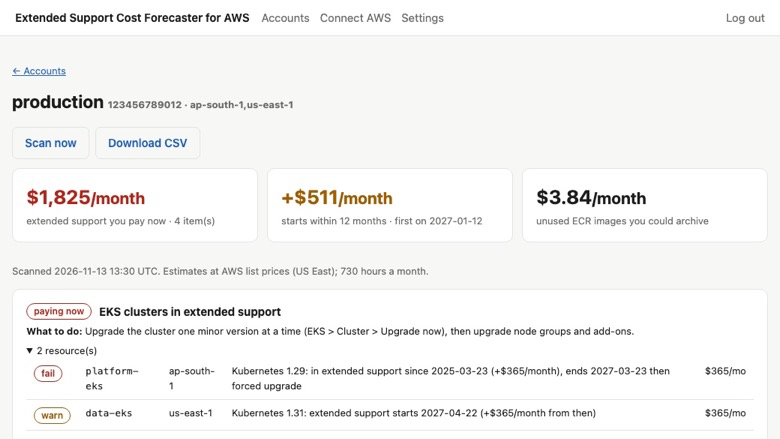
Find out what old versions will cost before AWS bills you
When an RDS, Aurora or EKS version reaches the end of standard support, AWS keeps it running and starts charging for Extended Support. The charge is per vCPU-hour for databases and per cluster-hour for Kubernetes, and it often shows up on the bill before anyone notices.
Extended Support Cost Forecaster for AWS lists every resource that is paying now, what starts paying in the next 12 months, the date and the monthly amount.
What it checks
- RDS and Aurora (MySQL and PostgreSQL): end of standard support, Extended Support cost per instance, year-three price step, Multi-AZ
- EKS: clusters on Kubernetes versions in extended support, and those that will be upgraded automatically
- Lambda: functions on deprecated or soon-deprecated runtimes
- ElastiCache: Redis OSS 4 and 5 clusters in extended support
- ECR: images not pulled in 90 days and not referenced by ECS or Lambda, with their storage cost
Why you can trust the dates
End-of-support dates come from AWS's own lifecycle APIs for RDS and EKS, not from a table we maintain. Prices are AWS list prices for US East (N. Virginia); other Regions differ slightly, so treat amounts as estimates.
What you get
- Cost now, cost coming in the next 12 months and the next date a charge starts
- Slack and email alerts when a resource starts costing money and when it is upgraded
- CSV export for your FinOps or platform team
Security and access
The CloudFormation stack creates one role with a short custom policy of describe and list actions for RDS, EKS, Lambda, ElastiCache, ECR and ECS, with an External ID so only your workspace can use it. One of them, lambda:GetFunction, returns a link to your function code; we never fetch it. Nothing in your account is changed. You can review the template before you deploy it, and deleting the stack removes our access.
Typical uses
- Finding out why the RDS or EKS bill went up after a version reached end of support
- Planning database and Kubernetes upgrades before Extended Support starts charging
- Giving FinOps a monthly figure and a date for each old version
- Cleaning up ECR images and Lambda runtimes nobody uses any more
Who it is for
Platform, DevOps and FinOps teams that run databases or Kubernetes on AWS and want to plan upgrades before Extended Support charges begin.
Getting started
- Subscribe, or start the 14-day free trial.
- Launch the read-only CloudFormation stack.
- Paste the role ARN. The first scan finishes in about a minute.
Plans cover 1, 5 or 25 AWS accounts, with unlimited users.
Start the 14-day free trial to see what Extended Support costs you now and next year, about a minute after connecting.
Highlights
- Know the cost before it reaches your bill. AWS charges extra for databases and Kubernetes clusters left on versions past end of standard support: per vCPU-hour on RDS and Aurora (doubling in year three, and twice for Multi-AZ) and per cluster-hour on EKS. Every affected instance and cluster is listed with its monthly cost now and from the date the charge starts.
- Dates come from AWS, not from a spreadsheet. End-of-support dates are read from AWS's own lifecycle APIs for RDS and EKS, so new versions and changed dates appear without anyone updating a table. Lambda functions on deprecated runtimes and ElastiCache Redis OSS 4 and 5 clusters are flagged too, and Slack or email alerts arrive when something new starts costing money.
- Read-only, with a narrow policy you can review. One CloudFormation stack creates a role with a short list of describe and list permissions; nothing in your account is changed. It also lists ECR images not pulled in 90 days and not used by ECS or Lambda, so you can archive them. Priced per AWS account: 1, 5 or 25, with unlimited users.
Details
Sold by
Delivery method
Deployed on AWS
New
Introducing multi-product solutions
You can now purchase comprehensive solutions tailored to use cases and industries.

Features and programs
Financing for AWS Marketplace purchases
AWS Marketplace now accepts line of credit payments through the PNC Vendor Finance program. This program is available to select AWS customers in the US, excluding NV, NC, ND, TN, & VT.

Pricing
Free trial
Try this product free according to the free trial terms set by the vendor.
Pricing is based on the duration and terms of your contract with the vendor. This entitles you to a specified quantity of use for the contract duration. If you choose not to renew or replace your contract before it ends, access to these entitlements will expire.
Additional AWS infrastructure costs may apply. Use the AWS Pricing Calculator to estimate your infrastructure costs.
Dimension | Description | Cost/month |
|---|---|---|
Starter | Forecast and daily monitoring for 1 AWS account; Slack and email alerts; CSV export; unlimited users. | $29.00 |
Pro | Forecast and daily monitoring for up to 5 AWS accounts; Slack and email alerts; CSV export; unlimited users. | $79.00 |
Business | Forecast and daily monitoring for up to 25 AWS accounts; priority support; Slack and email alerts; CSV export; unlimited users. | $199.00 |
Vendor refund policy
Full refund within 14 days of purchase if the product does not work for you: email ritom@puzaricloud.in with your AWS account ID. After 14 days, monthly contracts are not refunded; annual contracts can be refunded pro rata for unused full months at our discretion.

Legal
Vendor terms and conditions
Upon subscribing to this product, you must acknowledge and agree to the terms and conditions outlined in the vendor's End User License Agreement (EULA) .
Content disclaimer
Vendors are responsible for their product descriptions and other product content. AWS does not warrant that vendors' product descriptions or other product content are accurate, complete, reliable, current, or error-free.
Delivery details
Software as a Service (SaaS)
SaaS delivers cloud-based software applications directly to customers over the internet. You can access these applications through a subscription model. You will pay recurring monthly usage fees through your AWS bill, while AWS handles deployment and infrastructure management, ensuring scalability, reliability, and seamless integration with other AWS services.
Resources
Support
Vendor support
Getting help
Email ritom@puzaricloud.in . We reply within one business day, Monday to Friday, India time, and usually much sooner.
What support covers
- Launching the CloudFormation stack and connecting accounts
- How a cost estimate was worked out
- Planning the upgrade path for a flagged database or cluster
- Billing and plan changes through AWS Marketplace
When you write to us
Include your AWS account ID, the Region and the resource name. Support is included on every plan, including the free trial.
Plans
Starter covers 1 AWS account, Pro 5 and Business 25, with daily scans, alerts and unlimited users on every plan.
Refunds
Full refund within 14 days of purchase if the product does not work for you. Email ritom@puzaricloud.in with your AWS account ID and we will arrange it through AWS Marketplace.
AWS infrastructure support
AWS Support is a one-on-one, fast-response support channel that is staffed 24x7x365 with experienced and technical support engineers. The service helps customers of all sizes and technical abilities to successfully utilize the products and features provided by Amazon Web Services.
Similar products

CloudForecast is the easy-to-use AWS cost management tool for busy Engineering, DevOps, Infra, and Tech teams.

CloudForecast is the easy-to-use AWS cost management tool for busy Engineering, DevOps, Infra, and Tech teams.

This solution provides 24 hours of forecast of cloud database using historical hourly database resource usage data.
Cloud costs are volatile and hard to manage at scale. Umbrella gives full control, visibility, and automation-helping enterprises cut waste, forecast spend, and scale efficiently.
Customer reviews
No customer reviews yet
Be the first to review this product . We've partnered with PeerSpot to gather customer feedback. You can share your experience by writing or recording a review, or scheduling a call with a PeerSpot analyst.