
Sold by: TurnKey GNU/Linux
Deployed on AWS
Free Trial
AWS Free Tier
This product has charges associated with it for TurnKey integration, maintenance, and support. Simple Machines Forum is a preconfigured open-source appliance with automated security updates and backup tools.
Overview
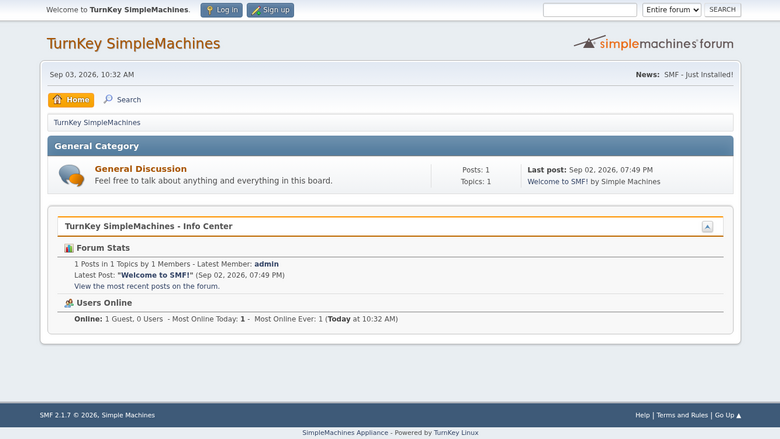
This product has charges associated with it for TurnKey Linux integration, automated security updates, backup tooling, and bundled support.
TurnKey SimpleMachines helps save you time and money by providing a ready-to-run SimpleMachines solution that is secure, supported and easy to maintain. The system auto-updates itself with security fixes and is built in a transparent 100% open source process free of hidden backdoors.
SimpleMachines provides an easy to use forum with many powerful features for you as well as your users. It features a powerful Package Manager, allowing you to quickly apply any of the hundreds of modifications in our database, as well as a variety of custom themes that change the way your site looks.
Highlights
- Secure, supported and easy to maintain: auto-updated daily with latest security patches. Bundled support for no extra charge.
- Free from hidden backdoors and vendor lock-in: transparent 100% opensource build of Debian GNU/Linux with no proprietary components or secret sauce.
- Free 1-click backup, restore and migrate: bundled backup software saves changes to files, databases and package management to encrypted storage which servers can be automatically restored from.
Details
Sold by
Delivery method
Delivery option
64-bit (x86) Amazon Machine Image (AMI)
Latest version
Operating system
Debian 13/Trixie
Deployed on AWS
New
Introducing multi-product solutions
You can now purchase comprehensive solutions tailored to use cases and industries.

Features and programs
Financing for AWS Marketplace purchases
AWS Marketplace now accepts line of credit payments through the PNC Vendor Finance program. This program is available to select AWS customers in the US, excluding NV, NC, ND, TN, & VT.

Pricing
Free trial
Try this product free for 7 days according to the free trial terms set by the vendor. Usage-based pricing is in effect for usage beyond the free trial terms. Your free trial gets automatically converted to a paid subscription when the trial ends, but may be canceled any time before that.
Pricing is based on actual usage, with charges varying according to how much you consume. Subscriptions have no end date and may be canceled any time. Alternatively, you can pay upfront for a contract, which typically covers your anticipated usage for the contract duration. Any usage beyond contract will incur additional usage-based costs.
Additional AWS infrastructure costs may apply. Use the AWS Pricing Calculator to estimate your infrastructure costs.
If you are an AWS Free Tier customer with a free plan, you are eligible to subscribe to this offer. You can use free credits to cover the cost of eligible AWS infrastructure. See AWS Free Tier for more details. If you created an AWS account before July 15th, 2025, and qualify for the Legacy AWS Free Tier, Amazon EC2 charges for Micro instances are free for up to 750 hours per month. See Legacy AWS Free Tier for more details.
Dimension | Cost/hour |
|---|---|
t2.small Recommended | $0.02 |
t2.micro | $0.02 |
t3.micro | $0.02 |
c1.medium | $0.02 |
c3.2xlarge | $0.02 |
c3.4xlarge | $0.02 |
c3.8xlarge | $0.02 |
c3.large | $0.02 |
c3.xlarge | $0.02 |
c4.2xlarge | $0.02 |
Dimensions summary
You pay by the hour for the AWS EC2 instance that runs this preconfigured forum appliance. The software itself carries no separate license fee. Your hourly rate depends only on the instance type you pick. Options span many families: burstable (t1, t2, t3, t3a), compute-optimized (c1, c3-c8), general-purpose (m1, m3-m8), memory-optimized (r3, r8), and storage-optimized (i2, i7). Within each family, larger sizes cost more per hour because they add CPU and memory. Pick the smallest size that meets your traffic needs. You can change instance size later by relaunching.
Top-of-mind questions for buyers
The hourly rate covers the running EC2 instance with the forum appliance preinstalled. The forum software itself is free and open source, so no license fee applies. AWS storage, data transfer, and any elastic IP are billed separately by AWS. Bundled support and 1-click backup require free registration with the vendor Hub.
The software hourly charge meters running time only. A fully stopped instance does not accrue the hourly appliance rate. Note that stopped instances may still incur AWS storage fees for the attached volume, and stopped AWS servers change their IP address on restart unless you attach an elastic IP.
Each dimension maps to one EC2 instance type, so scaling means relaunching on a larger size. You are billed the new size's hourly rate from launch. The vendor bundles free 1-click backup, restore, and migration through Hub registration, which helps move your data to the new instance.
www.turnkeylinux.org+1
Helpful?
Vendor refund policy
90 day money back guarantee if you are not fully satisfied.

Legal
Vendor terms and conditions
Upon subscribing to this product, you must acknowledge and agree to the terms and conditions outlined in the vendor's End User License Agreement (EULA) .
Content disclaimer
Vendors are responsible for their product descriptions and other product content. AWS does not warrant that vendors' product descriptions or other product content are accurate, complete, reliable, current, or error-free.
Delivery details
64-bit (x86) Amazon Machine Image (AMI)
Amazon Machine Image (AMI)
An AMI is a virtual image that provides the information required to launch an instance. Amazon EC2 (Elastic Compute Cloud) instances are virtual servers on which you can run your applications and workloads, offering varying combinations of CPU, memory, storage, and networking resources. You can launch as many instances from as many different AMIs as you need.
Version release notes
TurnKey Simple Machines 19.0 is based on Debian 13 (Trixie). See https://www.turnkeylinux.org/updates/simplemachines for appliance-specific release notes.
Additional details
Usage instructions
System Initialization:
After creating EC2 instance, browse to http://<Public_DNS>/ for system initialization instructions.
Alternatively, log in via SSH as user 'admin' to the instance. Use the SSH keypair selected during launch.
This step is required to set sensitive passwords & install security updates. You may also be asked to set a domain name for your server. If a domain name for your server is required, then it must be a valid domain name (i.e. have DNS configured).
Accessing the software main web app
http://<Public_DNS>/
This may redirect to https and/or the domain set at initialisation.
OS commands via SSH
Log into the running instance via SSH as user 'admin', using the SSH keypair set at launch time. Use 'sudo' to run commands requiring root access.
Web based System Admin control panel
https://<Public_DNS>:12321
Browser warnings
TurnKey AMIs ship with self signed SSL/TLS certs, causing https warnings in your web browser. To remove the warnings, you will need to get a SSL/TLS cert signed by an authorized Certificate Authority (CA). The recommended way to do that is to get a free Let's Encrypt SSL certificate. To do that log in via SSH & run 'sudo confconsole' & Select:
Advanced >> Lets Encrypt >> Gen certFor more info see: https://www.turnkeylinux.org/docs/confconsole
More info
For more info specific to this instance, visit the product homepage:
Support
Vendor support
E-mail support is provided through the TurnKey Hub at no additional cost. Once you sign up to the TurnKey Hub, your AWS marketplace subscription will be automatically identified. support@turnkeylinux.org
AWS infrastructure support
AWS Support is a one-on-one, fast-response support channel that is staffed 24x7x365 with experienced and technical support engineers. The service helps customers of all sizes and technical abilities to successfully utilize the products and features provided by Amazon Web Services.
Similar products
The Server Labs extends and configures the UltraCompute HPC platform on AWS to support advanced workloads, specialist storage architectures, and sector-specific operational requirements. With over 20 years of AWS platform engineering experience, this professional services engagement adapts UltraCompute to real-world production complexity — integrating with existing pipelines, enforcing regulatory controls, and enabling advanced scheduling — while preserving full platform upgradeability.

This product has charges associated with it for seller support. Flarum is a modern, open-source forum platform designed to make online discussions simple, fast, and engaging. It provides a clean and responsive interface for creating communities, managing discussions, and interacting with users. Flarum is lightweight, extensible, and suitable for organizations, support communities, and discussion-based websites.

SimpleFeed MCP Paid allows developers to use enriched rights cleared content from hundreds of Publishers to make their AI Applications perform better. Get access to articles, videos, metadata enrichments, and vectorized content. Your AI App is only as good as your content. Learn more at https://www.simplefeed.com/freemcp.

Production-ready WordPress stack powered by Ubuntu 26.04, NGINX 1.30.1, PHP 8.5, and MariaDB.
Customer reviews
No customer reviews yet
Be the first to review this product . We've partnered with PeerSpot to gather customer feedback. You can share your experience by writing or recording a review, or scheduling a call with a PeerSpot analyst.