Sold by: MATOFFO
Deployed on AWS
FinOps Essentials helps FinOps teams take control of AWS cloud spending. Connect directly to AWS Cost and Usage Reports (CUR) or upload a CSV - no coding required. Instantly visualize AWS expenses through clear, intuitive set up and get actionable cost-saving insights. Set up in minutes and start reducing cloud waste today.
Overview
Image
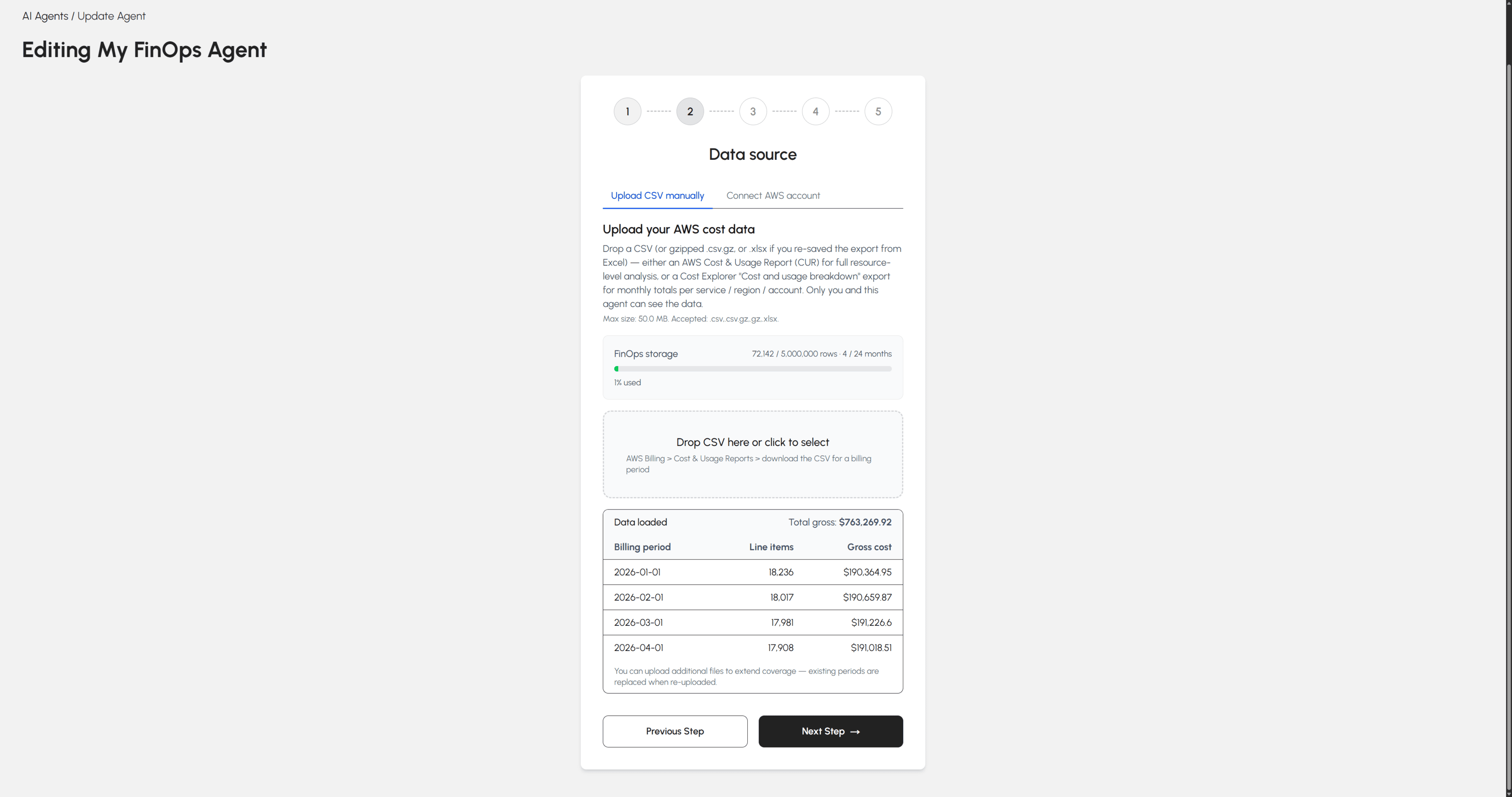
AWS Cost Data Upload
Image
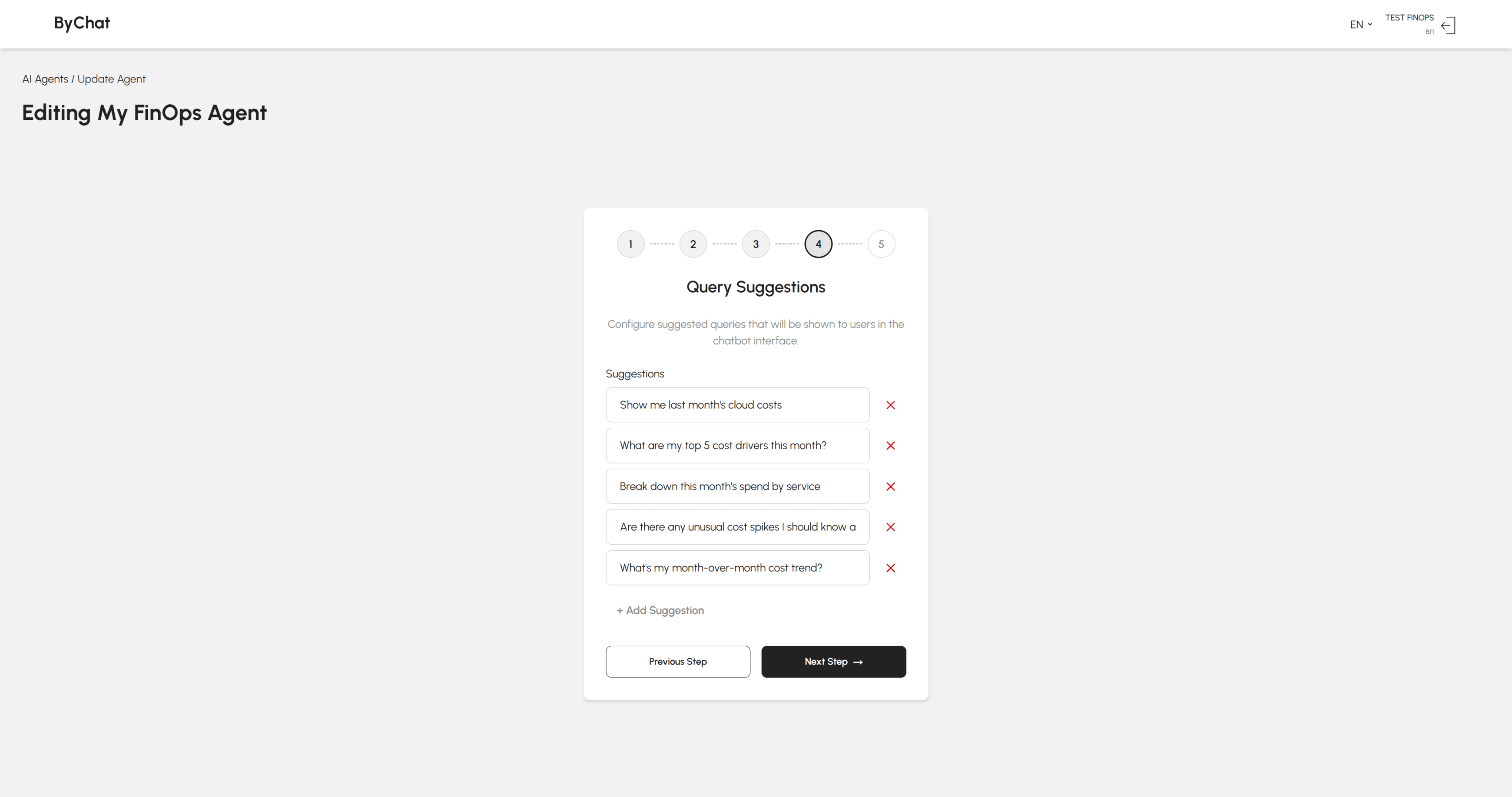
Prebuilt FinOps Questions
Image
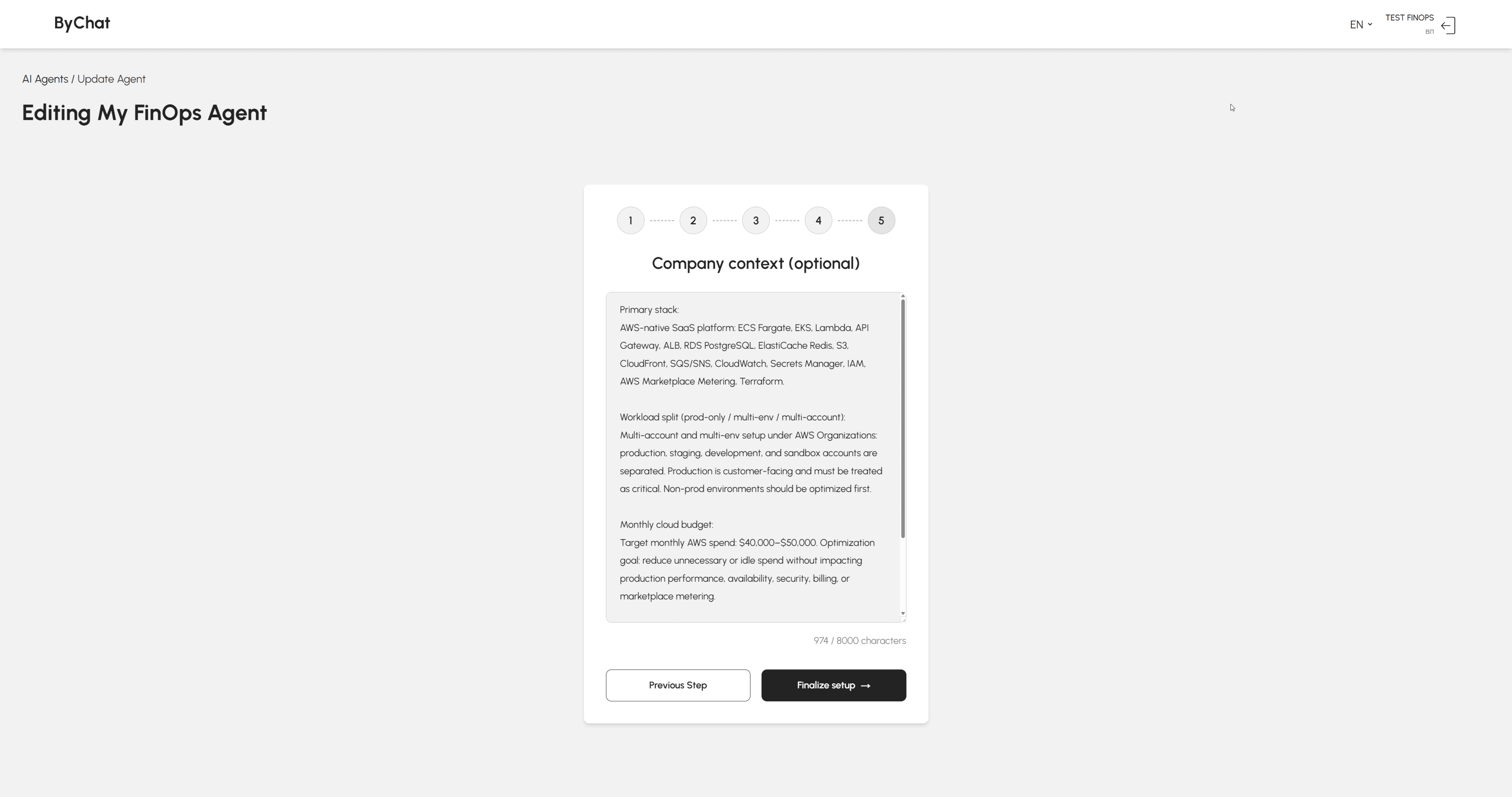
Agent Context for AWS Workloads
Image
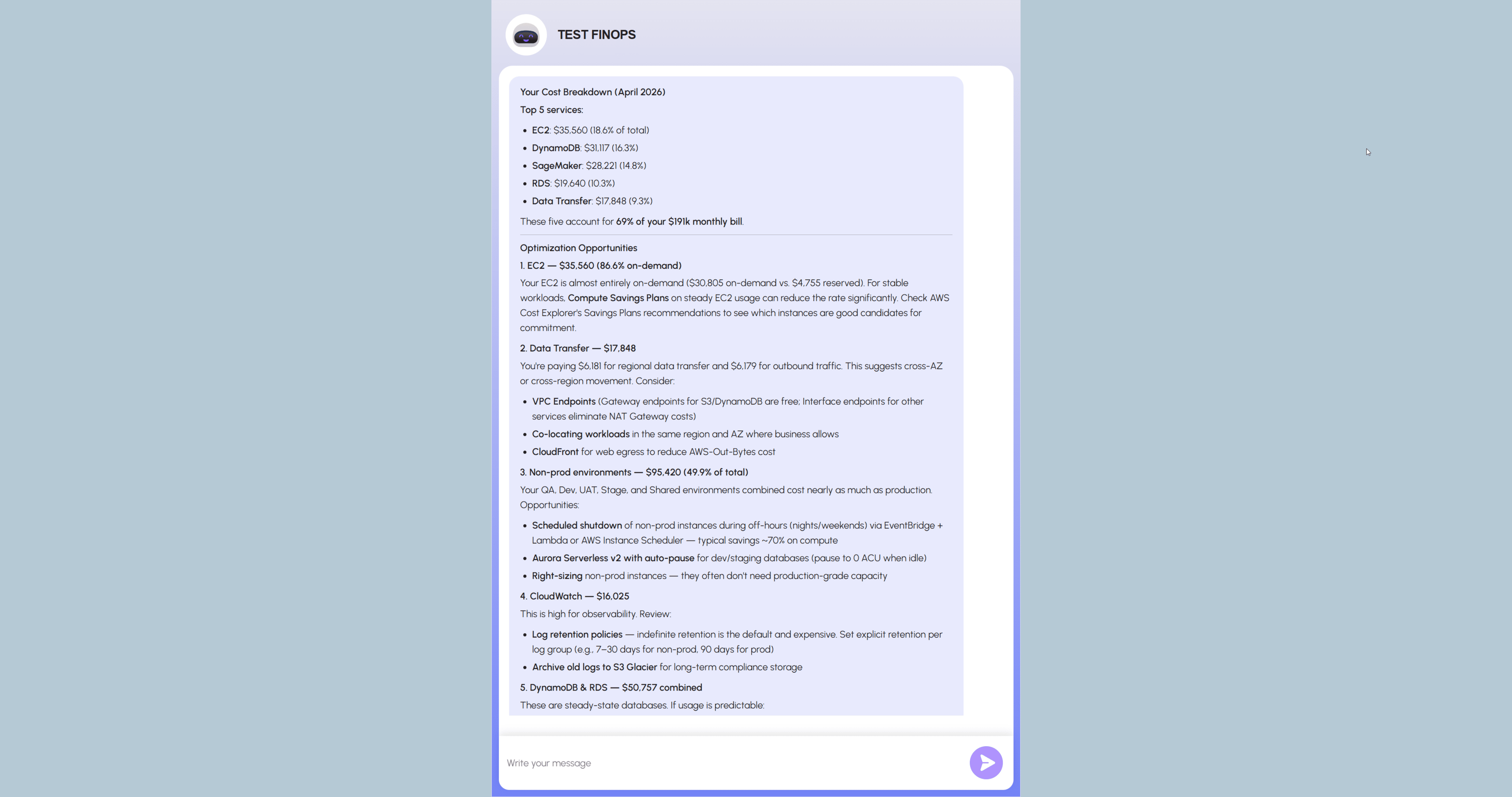
AI Cost Optimization Insights
Image
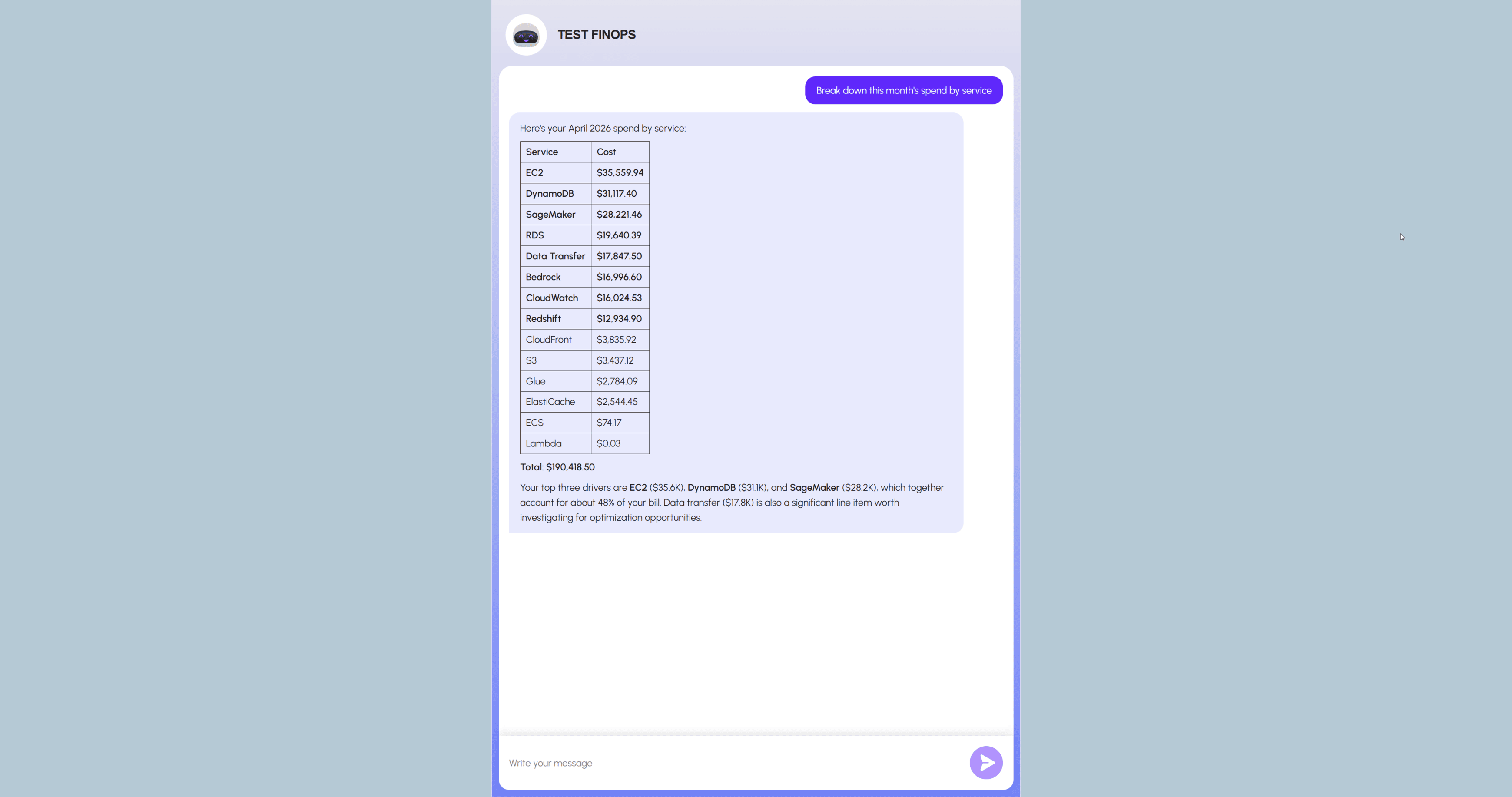
AWS Spend Breakdown by Service

Video
Product video
FinOps Essentials is a cloud cost management and optimization tool built for FinOps teams who need full visibility into AWS spending - without relying on engineering resources. Connect seamlessly to AWS Cost and Usage Reports (CUR) for live billing data, or upload a CSV file with expense data for instant analysis. Either way, FinOps Essence transforms raw cost data into clear views, interactive graphs that make it easy to track spending trends, identify anomalies, and uncover cost-saving opportunities. Key benefits:
No coding required - set up in minutes, no technical expertise needed Flexible data ingestion - live CUR connection or CSV upload Visual expense views - intuitive graphs of AWS costs by service, account, or time period Actionable insights - cost-saving recommendations to reduce cloud waste Built for FinOps - designed around FinOps Foundation principles and Finance team workflows
Highlights
- FinOps Essentials stands out by offering Finance and FinOps teams two powerful ways to analyze AWS costs - live AWS Cost and Usage Reports integration or simple CSV upload - no engineering help needed. Unlike complex cost tools, it delivers instant visual information and actionable cost-saving recommendations out of the box. Set up in minutes, not days. See your AWS spending clearly, act on it faster.
Details
Sold by
Delivery method
Delivery option
ByChat FinOps Essentials CloudFormation Stack
Latest version
Operating system
Ubuntu 24.04
Deployed on AWS
New
Introducing multi-product solutions
You can now purchase comprehensive solutions tailored to use cases and industries.

Features and programs
Financing for AWS Marketplace purchases
AWS Marketplace now accepts line of credit payments through the PNC Vendor Finance program. This program is available to select AWS customers in the US, excluding NV, NC, ND, TN, & VT.

Pricing
Pricing is based on the duration and terms of your contract with the vendor. This entitles you to a specified quantity of use for the contract duration. If you choose not to renew or replace your contract before it ends, access to these entitlements will expire.
Additional AWS infrastructure costs may apply. Use the AWS Pricing Calculator to estimate your infrastructure costs.
Dimension | Description | Cost/12 months |
|---|---|---|
ByChat FinOps Essentials License | Contract for a single ByChat FinOps Essentials deployment via CloudFormation | $2,400.00 |
Dimensions summary
This listing has one pricing dimension. You buy a contract license for a single ByChat FinOps Essentials deployment set up through CloudFormation. Pricing is measured in units, with one unit covering one deployment. There are no tiers or add-on options to compare. To cover more deployments, you add units under the same contract structure. The FinOps focus supports cloud cost visibility and governance across your AWS environment.
Top-of-mind questions for buyers
One unit covers a single ByChat FinOps Essentials deployment set up through CloudFormation. Each separate CloudFormation deployment counts as one unit. To run the product in more environments or accounts, you add units under the same contract.
It supports FinOps work: cloud cost visibility, tagging, budgets, and governance. The focus is aligning engineering and finance around predictable AWS spend. It helps surface waste, track commitments, and detect unexpected cost spikes.
Yes. Each deployment requires its own unit. Adding accounts or environments means adding units under the same contract structure. There are no tiers, so cost scales directly with the number of deployments you run.
matoffo.com
Helpful?
Vendor refund policy
ByChat FinOps Essential does not offer refunds for AWS Marketplace deployments, as the product is infrastructure-based and buyers are responsible for the underlying AWS resource costs (EC2, RDS, Bedrock, etc.) incurred during deployment and operation. If you believe you have been charged in error or have a billing dispute related to your ByChat FinOps Essential license: Email: contact@bychat.ai

Legal
Vendor terms and conditions
Upon subscribing to this product, you must acknowledge and agree to the terms and conditions outlined in the vendor's End User License Agreement (EULA) .
Content disclaimer
Vendors are responsible for their product descriptions and other product content. AWS does not warrant that vendors' product descriptions or other product content are accurate, complete, reliable, current, or error-free.
Delivery details
ByChat FinOps Essentials CloudFormation Stack
This delivery option deploys ByChat FinOps Essentials entirely within your own AWS account using a modular CloudFormation nested stack architecture.
Infrastructure Provisioned:
- VPC with public and private subnets, internet gateway, and route tables
- Application Load Balancer (ALB)
- EC2 instance running the ByChat application
- RDS Aurora Serverless v2 (PostgreSQL-compatible) for persistent data storage
- AWS Bedrock Knowledge Bases with S3 data source for RAG-powered document ingestion
- Lambda functions for automated knowledge base synchronization via EventBridge
- Secrets Manager for secure storage of database credentials and application secrets
- KMS encryption for data at rest across RDS, S3, and Secrets Manager
- SSM Parameter Store for cross-stack runtime configuration
- S3 bucket for knowledge base document storage and ingestion pipeline
Security & Compliance: All infrastructure is deployed with security best practices by default. Database credentials are managed exclusively through AWS Secrets Manager and never exposed in plaintext. Data at rest is encrypted via AWS KMS. The EC2 instance and RDS cluster are isolated within private subnets, accessible only through the ALB. IAM roles follow least-privilege principles, scoped to the specific resources provisioned by this stack.
Not included in this delivery option:
- HTTPS/TLS termination on the ALB
- Custom domain and DNS configuration
- Post-deployment changes to ALB security group inbound rules (if access requirements change)
Deployment Requirements:
- AWS account with sufficient service quotas for EC2, RDS Aurora Serverless v2, and Bedrock
- AWS Bedrock model access enabled in the target region (Claude or Titan embeddings)
- (Optional) Route 53 hosted zone or external DNS if you plan to use a custom domain
Estimated deployment time: 20 minutes
This delivery option is recommended for enterprise customers who require full data sovereignty, private cloud isolation, regulatory compliance, or deep integration with existing AWS infrastructure.
CloudFormation Template (CFT)
AWS CloudFormation templates are JSON or YAML-formatted text files that simplify provisioning and management on AWS. The templates describe the service or application architecture you want to deploy, and AWS CloudFormation uses those templates to provision and configure the required services (such as Amazon EC2 instances or Amazon RDS DB instances). The deployed application and associated resources are called a "stack."
Version release notes
Initial release of ByChat FinOps Essentials on AWS Marketplace.
This version includes:
- AI-powered knowledge assistant backed by AWS Bedrock
- Support for PDF data source ingestion
- Customizable branding, system prompts, and response formats (summaries, bullet points, detailed explanations)
- Enterprise-grade security with data isolation and access control
- Support for 23 languages
- SOC2-friendly architecture with full AWS environment deployment support
Additional details
Usage instructions
Customer responsibilities
Network and access: At deployment, you must provide AlbIngressCidr to control who can reach the ALB on HTTP/80 (for example 0.0.0.0/0 for public access, or a corporate VPN/office CIDR). Enter the value without quotes. This stack deploys HTTP on port 80 only. To change access after deployment, update the ALB security group inbound rules (TCP/80) in the EC2 console.
DNS and HTTPS: This stack outputs AlbDnsName and AlbHostedZoneId for Route 53 alias or external CNAME records. Custom domain, ACM certificate, ALB HTTPS listener (port 443), and security group rule for 443 are not provisioned by this template and must be configured in your AWS account if required.
If you prefer assisted setup for DNS, HTTPS/TLS, or custom domain configuration, contact contact@bychat.ai for paid implementation support.
Prerequisites
- AWS account with IAM permissions to deploy CloudFormation stacks
- Enable AWS Bedrock model access in your target region:
- Go to AWS Console / Bedrock / Model Access
- Enable Claude (Anthropic) and Amazon Titan Embeddings
- Ensure service quotas are sufficient for EC2, RDS Aurora Serverless v2, and Lambda
- Plan your ALB access policy: you will be required to enter AlbIngressCidr during deployment (no default value).
Deployment Steps
- Subscribe to ByChat on AWS Marketplace and click "Launch CloudFormation Stack"
- On the CloudFormation console, review the template and click "Next"
- Fill in the required stack parameters:
- Stack name (e.g. bychat-prod)
- Environment (e.g. prod, staging)
- EC2 instance type (recommended: t3.medium or higher)
- DB capacity settings (Aurora Serverless v2 min/max ACU)
- ALB ingress CIDR (Required): Enter the IPv4 CIDR allowed to access the ALB on HTTP/80 (e.g. 0.0.0.0/0). You are responsible for selecting a value appropriate for your security policy. Enter the value without quotes.
- Acknowledge IAM resource creation and click "Create Stack"
- Wait ~20 minutes for all nested stacks to reach CREATE_COMPLETE status
Post-Deployment Configuration
- Retrieve AlbDnsName from the root CloudFormation stack Outputs and open the application at: http://<AlbDnsName>/
- Register using /signup.
- Upload your business documents via the application UI
- Configure branding, system prompt, and response formats
- Copy the embed snippet and deploy ByChat to your website or application (optional) If ALB ingress was left as 0.0.0.0/0 for initial setup, update it to a trusted VPN/office IP CIDR range for production access control (Optional) Configure custom domain and HTTPS/TLS according to your organization standards
Support
For technical issues or questions, contact us at: contact@bychat.ai
Resources
Vendor resources
Support
Vendor support
Together with Matoffo we offer 24/7 Support: round-the-clock customer support to address any issues or concerns that customers may encounter at any time. Our company will provide guidance on best practices to ensure customers are getting the most out of the product and making use of its features effectively. In case of troubleshooting, enabling services, requests of pricing policy, refunds do not hesitate to contact us on contact@matoffo.com , we will provide fast feedback and resolve problems with proper care and handling. For more contacts please check our website:
AWS infrastructure support
AWS Support is a one-on-one, fast-response support channel that is staffed 24x7x365 with experienced and technical support engineers. The service helps customers of all sizes and technical abilities to successfully utilize the products and features provided by Amazon Web Services.
Similar products
The no-code, conversational analytics platform that enables speed to insights.

Automatic identification of company, people, products, industries, events, and investment themes in news based on ChinaScope’s proprietary NLP algorithms.

5,000+ U.S. Banks Rated Quarterly for Operational Efficiency & Business Quality Since 2010
Our DevOps services include cloud infrastructure setup, CI/CD pipeline implementation, containerization using Docker and Kubernetes, infrastructure automation, monitoring, logging, backup, disaster recovery, security hardening, and ongoing operational support. We help teams migrate workloads, optimize cloud resources, improve deployment speed, reduce downtime, and maintain reliable production environments. Our team supports AWS, Azure, GCP, Linux, Kubernetes, Docker, Terraform, GitHub Actions, Jenkins, Grafana, Prometheus, Wazuh, and related DevOps tools. Clouds Analytics works as a trusted DevOps partner for startups, SaaS companies, and enterprises looking for reliable cloud operations and continuous improvement.
Customer reviews
No customer reviews yet
Be the first to review this product . We've partnered with PeerSpot to gather customer feedback. You can share your experience by writing or recording a review, or scheduling a call with a PeerSpot analyst.