
Sold by: cloudimg
Deployed on AWS
Free Trial
AWS Free Tier
This product has charges associated with it for seller support. Deploy a production-ready WireGuard VPN on EC2 in minutes. A unique Curve25519 server keypair is generated on first boot and never baked into the image, zero peers are pre-configured so it is never an open relay, and 24/7 cloudimg support is included.
Overview
Image
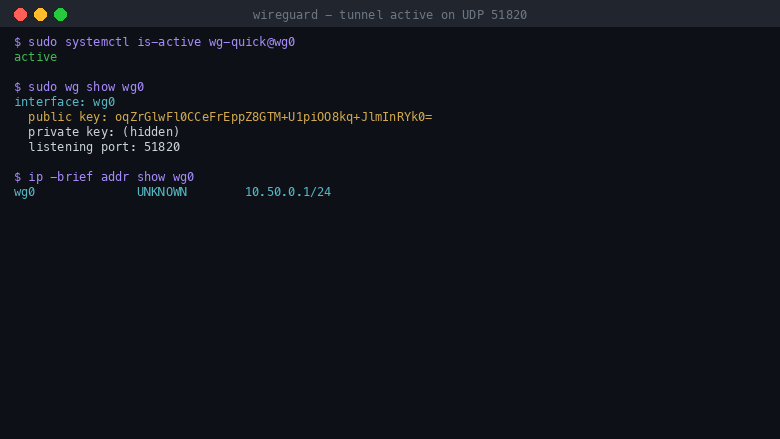
WireGuard tunnel active on UDP 51820
Image
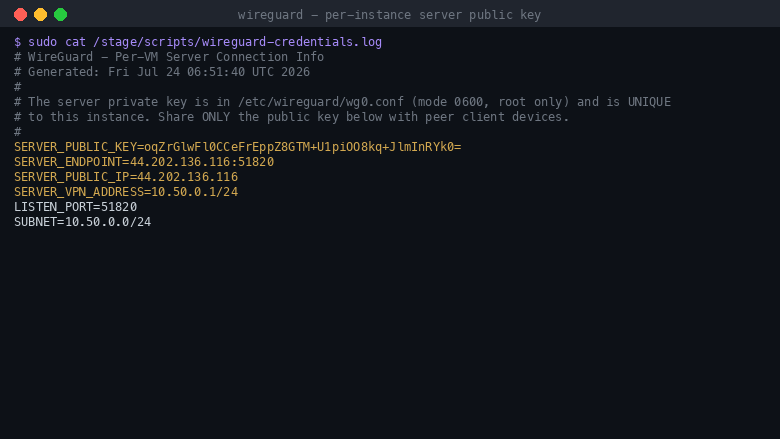
Per-instance server key, none baked
Image
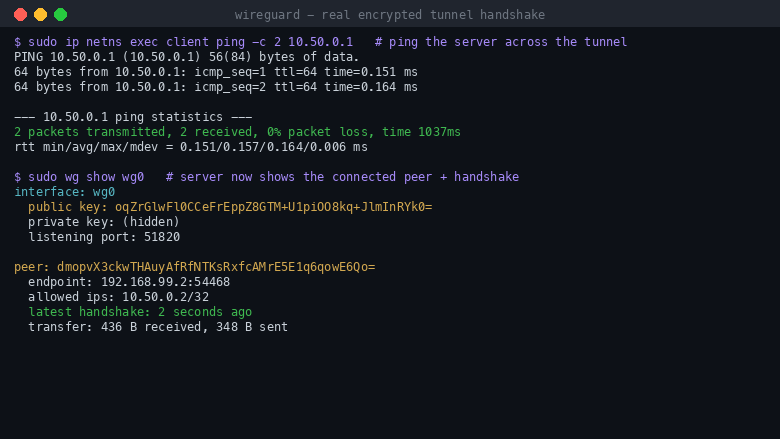
Real encrypted tunnel handshake
This is a repackaged open source software product wherein additional charges apply for cloudimg support services.
WireGuard is a modern VPN that aims to be faster, simpler and leaner than IPsec and OpenVPN. It runs inside the Linux kernel, uses state-of-the-art cryptography (Curve25519 key exchange, ChaCha20-Poly1305 encryption), and presents a single UDP listener with a small, stateless configuration file - no PKI, no certificate authority and no IKE daemon to operate. This image eliminates the usual work of compiling software, managing certificates and hardening a base OS: WireGuard is preinstalled, configured under systemd, and listening on UDP 51820 within minutes of launch, with no compilation and no third-party repositories.
Designed for AWS. The image runs on Amazon EC2 inside your Amazon VPC, and its default security group opens UDP 51820 for tunnel traffic. Assign an Elastic IP for a stable endpoint that your client devices can point at, and place the instance in the subnet that reaches the private resources you want to protect.
Secure by default - no shared secrets. Unlike images that bake a shared private key into the image, this appliance generates a fresh Curve25519 server keypair on first boot. The private key is written only into the root-only server configuration and never captured into the image, so every instance you launch mints its own unique cryptographic identity. The appliance ships with zero peers configured, making it a private server-only endpoint rather than an open relay - you explicitly authorise each client device by adding one peer block per device. The server public key and connection details are written to a root-only file on first boot for you to hand to your clients. IP forwarding is enabled so the instance can route between connected peers, and the operating system ships fully patched with unattended security updates enabled.
Use cases. Give a distributed team encrypted, low-latency access to internal services in a private subnet without exposing them to the public internet; build encrypted site-to-site tunnels linking VPCs across regions; or give a small fleet of devices a fast private overlay network. By default the tunnel is a private peer-to-peer overlay; to make the instance act as an internet gateway for your clients you uncomment the provided NAT rules in the configuration, as described in the deployment guide.
Quick start. Launch the AMI in your VPC with UDP 51820 open in the security group; SSH in and read the server public key and connection details from /stage/scripts/wireguard-credentials.log; on each client device create a WireGuard configuration using that server public key and the instance public IP; add each client's public key as a peer in /etc/wireguard/wg0.conf and reload; then activate the tunnel on the client and verify connectivity.
What is included: WireGuard running under systemd with automatic start on boot; Curve25519 key exchange and ChaCha20-Poly1305 encryption; a per-instance server keypair generated on first boot and never baked into the image; IP forwarding enabled for routing between peers; an optional NAT gateway mode documented in the configuration; a fully patched operating system with unattended security updates; and 24/7 cloudimg support.
This is a repackaged open source software product with additional charges for cloudimg support services. WireGuard is distributed under the GPL-2.0 license. WireGuard is a registered trademark of Jason A. Donenfeld. cloudimg is not affiliated with or endorsed by the WireGuard project or Jason A. Donenfeld. All product and company names are trademarks or registered trademarks of their respective holders. Use of them does not imply any affiliation with or endorsement by them.
Highlights
- Deploys a fully configured WireGuard VPN endpoint on Amazon EC2, listening on UDP 51820 within minutes of launch - no compilation, no third-party repositories and no certificate authority to manage. Runs inside your Amazon VPC with an Elastic IP for a stable endpoint. Ideal for DevOps and platform teams who need a fast private tunnel without the overhead of IPsec or OpenVPN
- Secure by default with no shared secret baked into the image - every instance generates its own unique Curve25519 server keypair on first boot, stored only in root-protected configuration. Ships with zero pre-configured peers so it is never an open relay: you explicitly authorise each client device you add
- IP forwarding enabled for peer-to-peer routing, an optional NAT gateway mode documented for internet-gateway use cases, a fully patched OS with unattended security updates enabled, and 24/7 cloudimg support - ready to add one peer per client device and connect
Details
Sold by
Categories
Delivery method
Delivery option
64-bit (x86) Amazon Machine Image (AMI)
Latest version
Operating system
Ubuntu 24.04
Deployed on AWS
New
Introducing multi-product solutions
You can now purchase comprehensive solutions tailored to use cases and industries.

Features and programs
Financing for AWS Marketplace purchases
AWS Marketplace now accepts line of credit payments through the PNC Vendor Finance program. This program is available to select AWS customers in the US, excluding NV, NC, ND, TN, & VT.

Pricing
Free trial
Try this product free for 7 days according to the free trial terms set by the vendor. Usage-based pricing is in effect for usage beyond the free trial terms. Your free trial gets automatically converted to a paid subscription when the trial ends, but may be canceled any time before that.
Pricing is based on actual usage, with charges varying according to how much you consume. Subscriptions have no end date and may be canceled any time. Alternatively, you can pay upfront for a contract, which typically covers your anticipated usage for the contract duration. Any usage beyond contract will incur additional usage-based costs.
Additional AWS infrastructure costs may apply. Use the AWS Pricing Calculator to estimate your infrastructure costs.
If you are an AWS Free Tier customer with a free plan, you are eligible to subscribe to this offer. You can use free credits to cover the cost of eligible AWS infrastructure. See AWS Free Tier for more details. If you created an AWS account before July 15th, 2025, and qualify for the Legacy AWS Free Tier, Amazon EC2 charges for Micro instances are free for up to 750 hours per month. See Legacy AWS Free Tier for more details.
Dimension | Description | Cost/hour |
|---|---|---|
m5.large Recommended | m5.large | $0.08 |
t2.micro | t2.micro instance type | $0.04 |
t3.micro | t3.micro instance type | $0.04 |
c5a.12xlarge | c5a.12xlarge instance type | $0.24 |
c5a.16xlarge | c5a.16xlarge instance type | $0.24 |
c5a.24xlarge | c5a.24xlarge instance type | $0.24 |
c5a.2xlarge | c5a.2xlarge instance type | $0.24 |
c5a.4xlarge | c5a.4xlarge instance type | $0.24 |
c5a.8xlarge | c5a.8xlarge instance type | $0.24 |
c5a.large | c5a.large instance type | $0.08 |
Vendor refund policy
Refunds available on request.

Legal
Vendor terms and conditions
Upon subscribing to this product, you must acknowledge and agree to the terms and conditions outlined in the vendor's End User License Agreement (EULA) .
Content disclaimer
Vendors are responsible for their product descriptions and other product content. AWS does not warrant that vendors' product descriptions or other product content are accurate, complete, reliable, current, or error-free.
Delivery details
64-bit (x86) Amazon Machine Image (AMI)
Amazon Machine Image (AMI)
An AMI is a virtual image that provides the information required to launch an instance. Amazon EC2 (Elastic Compute Cloud) instances are virtual servers on which you can run your applications and workloads, offering varying combinations of CPU, memory, storage, and networking resources. You can launch as many instances from as many different AMIs as you need.
Version release notes
Initial release of WireGuard as a ready-to-use, secure-by-default VPN server, with a unique Curve25519 server keypair generated on first boot, the encrypted tunnel listening on UDP 51820, and zero peers configured by default.
Additional details
Usage instructions
Connect via SSH on port 22 as the default login user for your operating system variant (for the Ubuntu 24.04 variant the user is ubuntu). Retrieve the per-instance server public key and connection details with: sudo cat /stage/scripts/wireguard-credentials.log - this holds the SERVER_PUBLIC_KEY generated on first boot, the server VPN address (10.50.0.1) and the listen port (UDP 51820). The server private key lives only in /etc/wireguard/wg0.conf (mode 0600, root only) and is never shipped in the image. Check the tunnel with: sudo wg show wg0 (shows the listening port and the server public key). The instance security group opens ports 22 (SSH) and UDP 51820 (WireGuard). To authorise a client device: generate a client keypair on the device (wg genkey | tee privkey | wg pubkey > pubkey), then on the server add a peer block to /etc/wireguard/wg0.conf - [Peer] with PublicKey set to the client public key and AllowedIPs set to 10.50.0.2/32 (increment for each device) - and run sudo systemctl reload wg-quick@wg0. On the client, use the server's public key, the instance public IP, endpoint port 51820 and AllowedIPs 10.50.0.0/24 for the private overlay (or 0.0.0.0/0 to route all traffic through the VPN). To act as an internet gateway for clients, uncomment the PostUp/PostDown MASQUERADE lines in wg0.conf and reload. The tunnel runs under systemd: systemctl status wg-quick@wg0.
Resources
Vendor resources
Support
Vendor support
cloudimg provides 24/7 technical support for this WireGuard VPN AMI. Our engineers help with deployment and VPC and security-group setup, server public key retrieval and peer configuration, NAT gateway mode, OS patching, and billing or refund questions. Reach us by email at support@cloudimg.co.uk or through the AWS Marketplace listing.
AWS infrastructure support
AWS Support is a one-on-one, fast-response support channel that is staffed 24x7x365 with experienced and technical support engineers. The service helps customers of all sizes and technical abilities to successfully utilize the products and features provided by Amazon Web Services.
Similar products

This VPN server is built on WireGuard technology and designed to provide the secure internet access for computers and mobile devices. It is easy to use: after launching, the server is immediately fully operational without the need for any setup. WireGuard technology is quite modern; it offers data transfer speeds through WireGuard tunnels that are higher than those using IKEv2 and significantly higher than the OpenVPN protocol. The server has a convenient and intuitive web control panel including user management features. Suitable for both individual users and companies offering VPN services.

WireGuard VPN Server on Debian for Internet access for computers and mobile devices. Additionally, it contains a Pi-Hole proxy DNS server that blocks advertising DNS requests. Thus, this VPN server allows clients to surf the web and significantly reduce the amount of advertising displayed. It is easy to use: after launching, it is immediately fully operational without the need for any setup. WireGuard technology is quite modern; it offers data transfer speeds through VPN tunnels that are higher than those using IKEv2 and significantly higher than the OpenVPN protocol. This server provides a stable VPN connection at the highest possible speed. The server has a convenient and intuitive web control panel. Suitable for both individual users and companies offering VPN services.

This product has charges associated with it for support and pre-configuration to be instantaneously deployed on AWS Marketplace with all security and enterprise standards. WireGuard VPN Server on Linux Stream 10 is packaged to leverage cost-effectiveness, scalability, and flexibility.

WireGuard VPN Server on Linux/Debian for secure Internet access with UI (Web Interface) and IP rotation. This WireGuard server uses UDP protocol for VPN communication, ensuring high-speed VPN performance. After launching, the secure Wireguard VPN Server is immediately fully operational without the need for any setup. WireGuard is a modern VPN technology, and WireGuard tunnels provide higher data transfer speeds than IPSec or IKEv2 and significantly higher than those of OpenVPN. This WireGuard server provides a stable VPN connection at the highest possible speed. Wireguard VPN Server on Linux/Debian has a convenient and intuitive control web panel including user management features. Client configuration settings can be easily transferred to the WireGuard mobile application using a QR code. WireGuard VPN server is suitable for both individual users and companies offering VPN services.

WireGuard VPN Server with Control Web Panel (UI) and IP rotation. The WireGuard VPN platform uses UDP protocol for communication, ensuring high-speed VPN performance. After launching, the secure Wireguard VPN Server is immediately fully operational without the need for any setup. WireGuard is a modern VPN technology, and WireGuard tunnels provide higher data transfer speeds than IPSec or IKEv2 and significantly higher than those of OpenVPN. This WireGuard server provides a stable VPN connection at the highest possible speed. Wireguard VPN Server on Linux/Debian has a convenient and intuitive control web panel including user management features. Client configuration settings can be easily transferred to the WireGuard mobile application using a QR code. WireGuard VPN server is suitable for both individual users and companies offering VPN services.
Customer reviews
No customer reviews yet
Be the first to review this product . We've partnered with PeerSpot to gather customer feedback. You can share your experience by writing or recording a review, or scheduling a call with a PeerSpot analyst.