
Sold by: cloudimg
Deployed on AWS
Free Trial
AWS Free Tier
This product has charges associated with it for seller support. Eliminate hardcoded secrets with OpenBao - a ready-to-run secrets manager that initializes, unseals, and serves requests in minutes with zero manual setup. Backed by 24/7 cloudimg support.
Overview
Image
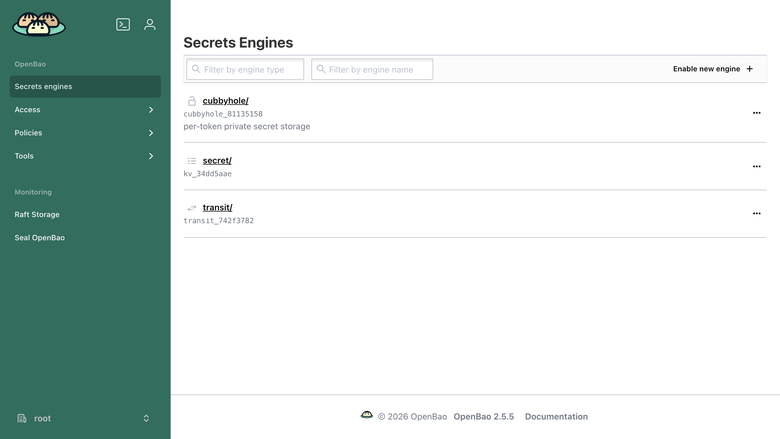
OpenBao secrets engines
Image
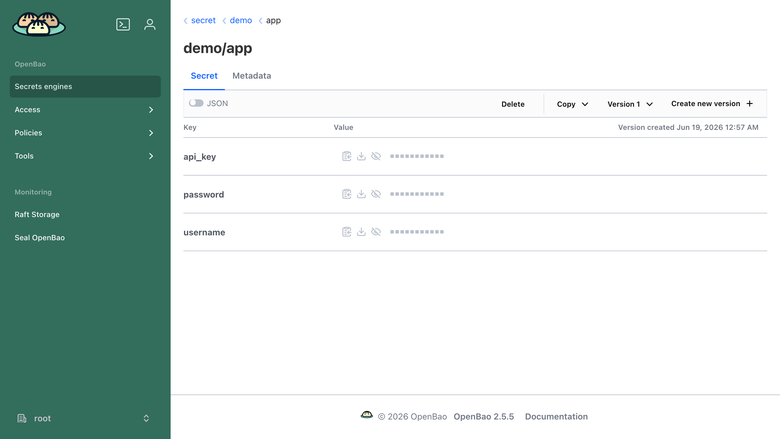
OpenBao key value secret
Image
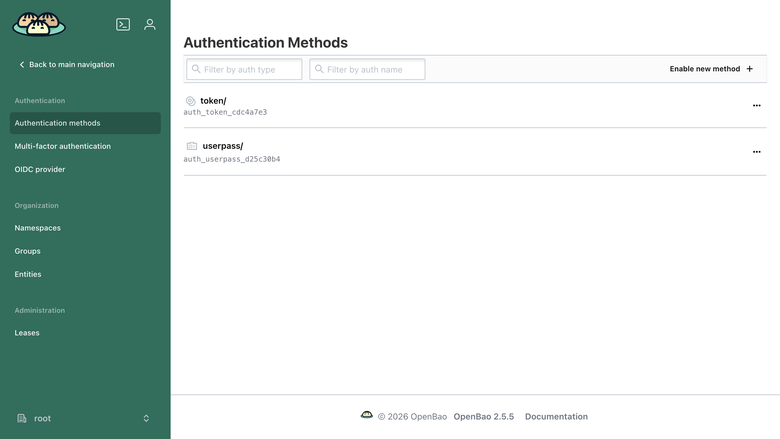
OpenBao auth methods
This is a repackaged open source software product wherein additional charges apply for cloudimg support services.
Overview
OpenBao is an open source, community-driven secrets management platform: a Linux Foundation project and the MPL-2.0 licensed fork of Vault. It centrally stores, accesses, and tightly controls access to tokens, passwords, certificates, API keys, and other secrets, and provides encryption as a service so applications never have to handle raw keys. This image delivers OpenBao fully installed and configured as a system service backed by integrated raft storage, so a working secrets engine is running within minutes of launch.
Application Stack
- Single static bao server binary installed under /usr/local/bin, run by a dedicated unprivileged service account
- Encrypted secret store on integrated raft storage on a dedicated data disk, independently resizable
- A systemd service that starts the server on boot, initializes it on first boot, and automatically unseals it after a reboot
- Built-in web UI and the full HTTP API published on port 8200
Secrets Management
Enable secrets engines for key/value secrets, dynamic database credentials, PKI certificate issuance, SSH, transit encryption as a service, and more. Authenticate with tokens, AppRole, userpass, JWT/OIDC, or cloud auth methods, and govern every path with fine-grained policies. Drive everything from the web UI, the bao CLI, or the HTTP API.
Secure First Boot
On the first boot of your instance a one-shot service initializes the store, captures the single unseal key and the initial root token unique to that instance, unseals the server, and writes both to a root-only file. No shared or default credentials, no pre-initialized store, and no preset unseal key ship in the image.
Auto Unseal Across Reboots
A dedicated service re-unseals the server automatically after every reboot so the appliance returns to a healthy, ready state unattended. The included user guide documents switching to AWS KMS auto-unseal and enabling TLS for production deployments.
Concrete Use Case: Dynamic Database Credentials in CI/CD
A platform team running GitHub Actions or GitLab CI pipelines enables the database secrets engine to issue short-lived PostgreSQL credentials per job. Each pipeline step requests a unique credential scoped to the exact tables it needs, and the credential is automatically revoked when the lease expires. This eliminates long-lived database passwords stored in environment variables and reduces blast radius if a pipeline is compromised - ideal for teams managing dozens to hundreds of microservices.
cloudimg Support
24/7 technical support by email and live chat. Our engineers help with deployment, secrets engine and auth method configuration, policies, PKI, transit encryption, AWS KMS auto-unseal, TLS, raft storage, and backup. Critical issues receive a one-hour average response.
Additional Use Cases
- A central secrets store for applications and CI/CD pipelines
- Dynamic, short-lived database and cloud credentials
- PKI and internal certificate authority
- Encryption as a service via the transit engine
- A drop-in open source alternative to Vault for teams that need an MPL-2.0 licence
Getting Started
Launch the AMI, wait for the systemd initialization to complete, then access the web UI at https://your-instance-ip:8200 . Retrieve your unique root token from the root-only file documented in the user guide and begin configuring secrets engines and auth methods immediately. Consult the included user guide for production hardening steps including AWS KMS auto-unseal and TLS termination.
All product and company names are trademarks or registered trademarks of their respective holders. Use of them does not imply any affiliation with or endorsement by them.
Highlights
- OpenBao secrets management and encryption as a service, fully installed and running as a systemd service within minutes of launch. Built-in web UI and HTTP API on port 8200 over integrated raft storage on a dedicated, independently resizable data disk. Zero manual setup required - just launch the instance and start managing secrets immediately.
- Hardened security from first boot: the appliance initializes the store and generates a unique root token and unseal key per instance, written to a root-only file. No shared credentials, no pre-initialized store, and no preset keys ship in the image. A dedicated systemd service automatically re-unseals the server after every reboot so the appliance returns to a ready state unattended.
- Linux Foundation MPL-2.0 open source fork of Vault with a documented production path including AWS KMS auto-unseal and TLS termination. Backed by 24/7 cloudimg technical support with one-hour average response for critical issues. An ideal drop-in alternative for teams needing an open source secrets manager with enterprise-grade support.
Details
Sold by
Delivery method
Delivery option
64-bit (x86) Amazon Machine Image (AMI)
Latest version
Operating system
Ubuntu 24.04
Deployed on AWS
New
Introducing multi-product solutions
You can now purchase comprehensive solutions tailored to use cases and industries.

Features and programs
Financing for AWS Marketplace purchases
AWS Marketplace now accepts line of credit payments through the PNC Vendor Finance program. This program is available to select AWS customers in the US, excluding NV, NC, ND, TN, & VT.

Pricing
Free trial
Try this product free for 7 days according to the free trial terms set by the vendor. Usage-based pricing is in effect for usage beyond the free trial terms. Your free trial gets automatically converted to a paid subscription when the trial ends, but may be canceled any time before that.
Pricing is based on actual usage, with charges varying according to how much you consume. Subscriptions have no end date and may be canceled any time. Alternatively, you can pay upfront for a contract, which typically covers your anticipated usage for the contract duration. Any usage beyond contract will incur additional usage-based costs.
Additional AWS infrastructure costs may apply. Use the AWS Pricing Calculator to estimate your infrastructure costs.
If you are an AWS Free Tier customer with a free plan, you are eligible to subscribe to this offer. You can use free credits to cover the cost of eligible AWS infrastructure. See AWS Free Tier for more details. If you created an AWS account before July 15th, 2025, and qualify for the Legacy AWS Free Tier, Amazon EC2 charges for Micro instances are free for up to 750 hours per month. See Legacy AWS Free Tier for more details.
Dimension | Description | Cost/hour |
|---|---|---|
t3.medium Recommended | t3.medium | $0.04 |
t3.micro | t3.micro instance type | $0.04 |
t2.micro | t2.micro instance type | $0.04 |
c5d.4xlarge | c5d.4xlarge instance type | $0.24 |
i7i.16xlarge | i7i.16xlarge instance type | $0.24 |
c8i.2xlarge | c8i.2xlarge instance type | $0.24 |
c6in.24xlarge | c6in.24xlarge instance type | $0.24 |
c6a.large | c6a.large instance type | $0.08 |
i3en.3xlarge | i3en.3xlarge instance type | $0.24 |
m6a.24xlarge | m6a.24xlarge instance type | $0.24 |
Vendor refund policy
Refunds available on request.

Legal
Vendor terms and conditions
Upon subscribing to this product, you must acknowledge and agree to the terms and conditions outlined in the vendor's End User License Agreement (EULA) .
Content disclaimer
Vendors are responsible for their product descriptions and other product content. AWS does not warrant that vendors' product descriptions or other product content are accurate, complete, reliable, current, or error-free.
Delivery details
64-bit (x86) Amazon Machine Image (AMI)
Amazon Machine Image (AMI)
An AMI is a virtual image that provides the information required to launch an instance. Amazon EC2 (Elastic Compute Cloud) instances are virtual servers on which you can run your applications and workloads, offering varying combinations of CPU, memory, storage, and networking resources. You can launch as many instances from as many different AMIs as you need.
Version release notes
Initial release of OpenBao 2.5.5 secrets management server on integrated raft storage.
Additional details
Usage instructions
Connect via SSH on port 22 as the default login user for your operating system variant (the user guide lists it per variant). The OpenBao web UI and HTTP API are served on port 8200: browse to http://<instance-public-ip>:8200/ and sign in with the Token method using the initial root token. Retrieve the root token and the unseal key with: sudo cat /root/openbao-credentials.txt. From the CLI export BAO_ADDR=http://<instance-public-ip>:8200 and run bao login with the root token, then enable secrets engines and auth methods. The encrypted store lives on a dedicated raft data disk mounted at /var/lib/openbao. For production, follow the user guide to enable TLS and switch to AWS KMS auto-unseal, then create your own admin auth method and revoke the initial root token.
Resources
Vendor resources
Support
Vendor support
cloudimg Support
cloudimg provides 24/7 technical support for this product by email and live chat.
Coverage includes:
- Deployment and initial configuration assistance
- Secrets engine and auth method setup (KV, database, PKI, SSH, transit)
- Policy authoring and access control configuration
- AWS KMS auto-unseal setup and TLS termination
- Raft storage management, snapshots, and backup
- Performance tuning and troubleshooting
- Software updates and upgrade guidance
Response Times:
Critical issues receive a one-hour average response. Our engineers work with you until the issue is resolved.
How to Get Help:
Email: support@cloudimg.co.uk Live chat: Available 24/7
For refund requests or billing inquiries, contact us via the same email address and we will respond within one business day.
Getting Started:
After launching your instance, consult the included user guide for production hardening steps. If you need assistance with initial deployment, secrets engine configuration, or migrating from another secrets manager, our support team is ready to help at no additional charge beyond your subscription.
AWS infrastructure support
AWS Support is a one-on-one, fast-response support channel that is staffed 24x7x365 with experienced and technical support engineers. The service helps customers of all sizes and technical abilities to successfully utilize the products and features provided by Amazon Web Services.
Similar products

This product has charges associated with it for hardening, security configuration, and support.
OpenBao is the Linux Foundation community fork of HashiCorp Vault - identity-based secrets management, encryption as a service, dynamic database credentials, PKI, transit and KV stores in a single Go binary with a built-in Web UI. Unlike bare OpenBao AMIs that ship uninitialised, sealed, with the API in cleartext and no auto-unseal, this Lynxroute build is ready out of the box: store auto-initialised at first boot with a 5-of-3 key share, auto-unsealed from root-only on-disk keys, exposed only through Nginx with TLS - working secrets manager the moment SSH lights up.
MPL-2.0 license - fully auditable, no vendor lock-in.

This is a repackaged software product wherein additional charges apply for seller maintenance.
Safeguard credentials, API keys, and sensitive information with a robust, easy-to-deploy OpenBao Vault server (an open source fork of Hashicorp Vault).

This product has charges associated with it for image hardening, maintenance, and support. OpenBao secrets management on Amazon Linux 2023, security-hardened for production: minimal package set, SSH key-only access, IMDSv2-only, listener on loopback until you configure TLS, uninitialized at launch (your keys never leave you), and continuously patched images.
Customer reviews
No customer reviews yet
Be the first to review this product . We've partnered with PeerSpot to gather customer feedback. You can share your experience by writing or recording a review, or scheduling a call with a PeerSpot analyst.