
Sold by: cloudimg
Deployed on AWS
Free Trial
AWS Free Tier
This product has charges associated with it for seller support. Deploy a production-ready cloud-native traffic orchestration gateway in minutes. Easegress pre-configured with a live load-balanced demo route, a secure per-instance admin credential, and 24/7 cloudimg support.
Overview
Image
Easegress service and security posture
Image
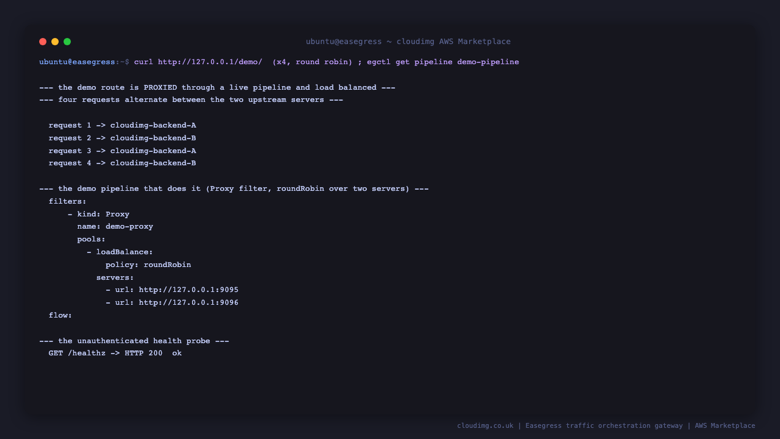
Real round-robin traffic orchestration
This is a repackaged open source software product wherein additional charges apply for cloudimg support services.
Why This AMI Over Manual Deployment
Standing up Easegress by hand means downloading and checksum-verifying the release binary, writing the server config, keeping the administration API off the public network, generating an admin credential, wiring a reverse-proxy pipeline, and running it as an unprivileged service that can still bind port 80. This AMI does all of that for you: a working traffic gateway is serving requests within minutes of launch, with a unique administration credential generated automatically on first boot. Unlike a default install that leaves the admin API reachable without authentication, this image binds the admin API to loopback only and puts the one network-facing administration path behind a per-instance basic-auth credential. It runs as native systemd services with no container runtime required.
Application Stack
Easegress is a single Go binary (easegress-server) with an embedded configuration store, driven by declarative HTTPServer and Pipeline objects applied with the egctl command-line tool. The data-plane HTTP server owns port 80 and runs as a dedicated unprivileged service account. A health-probe pipeline answers an unauthenticated load-balancer check, a demo pipeline round-robin load-balances a real proxied route across two local upstreams, and an administration pipeline gates the REST API behind basic authentication. The administration API and its embedded config store are bound to the loopback interface so they are never exposed to the network directly.
Traffic Orchestration
Easegress routes and shapes traffic through pipelines built from composable filters: proxy and load balancing, request and response building, header manipulation, request validation, rate limiting, circuit breaking, retries, and more. Point a pipeline at your own upstreams to place any service behind the gateway. The bundled demo route shows a real request being proxied and round-robin load-balanced across two distinct backends, so the full orchestration path works end to end out of the box.
Ecosystem Compatibility
Easegress fits in front of any HTTP workload. Pair it with an Application Load Balancer or Amazon Route 53 for public ingress, back it with services running on Amazon EC2, Amazon ECS, or Amazon EKS, and terminate TLS at the gateway or upstream. Its declarative objects are managed with egctl or the REST API, so configuration can be version-controlled and applied through your existing automation.
Secure First Boot
On the first boot of your instance, a one-shot service generates a fresh administration password unique to that instance, stores it as a bcrypt hash for the gateway to validate against, and writes it to a root-only file. No shared or default credential ships in the image, and the gateway's own administration API stays bound to loopback so the only network administration path is the authenticated one.
Use Case: Put a Service Behind a Gateway
A team wanting a single point of control in front of an internal API replaces the demo upstreams with their own backends, applies the change with one egctl command, and immediately gets load balancing, health checking, and a place to add rate limiting, retries, and request validation - without writing that logic into every service.
Additional Use Cases
- A reverse proxy and load balancer for self-hosted HTTP services
- An API gateway with rate limiting, circuit breaking, and request validation
- A traffic-shaping layer for canary and blue-green rollouts
Getting Started
Launch the AMI, retrieve the generated admin credential from the root-only file, and call the unauthenticated health endpoint and the demo route to see traffic being proxied and load-balanced. To bring your own service under the gateway, edit the objects file to point the demo pipeline at your upstreams and re-apply it with egctl. The user guide walks through it.
cloudimg Support
24/7 technical support by email and live chat. Our engineers help with deployment, pipeline and filter configuration, load balancing and health checks, rate limiting and resilience, securing and exposing the administration API, and putting your own services behind the gateway.
All product and company names are trademarks or registered trademarks of their respective holders. Use of them does not imply any affiliation with or endorsement by them.
Highlights
- Production-ready in minutes: Easegress pre-configured as a systemd service with a live demo route that round-robin load-balances a real proxied request across two backends. No manual binary install, no config authoring, no reverse-proxy wiring. Launch the AMI and the traffic gateway is orchestrating requests immediately.
- Secure by default: the administration API and embedded config store bind to loopback only, so nothing administrative is on the network directly. The one network-facing admin path is gated by a per-instance bcrypt credential generated fresh on first boot. No shared or default secret ships in the image.
- Composable traffic orchestration with 24/7 cloudimg support: build pipelines from proxy, load balancing, rate limiting, circuit breaking, retries, header manipulation, and request validation filters, all managed declaratively with the egctl CLI or REST API. Expert support covers deployment, configuration, and putting your own services behind the gateway.
Details
Sold by
Delivery method
Delivery option
64-bit (x86) Amazon Machine Image (AMI)
Latest version
Operating system
Ubuntu 24.04
Deployed on AWS
New
Introducing multi-product solutions
You can now purchase comprehensive solutions tailored to use cases and industries.

Features and programs
Financing for AWS Marketplace purchases
AWS Marketplace now accepts line of credit payments through the PNC Vendor Finance program. This program is available to select AWS customers in the US, excluding NV, NC, ND, TN, & VT.

Pricing
Free trial
Try this product free for 7 days according to the free trial terms set by the vendor. Usage-based pricing is in effect for usage beyond the free trial terms. Your free trial gets automatically converted to a paid subscription when the trial ends, but may be canceled any time before that.
Pricing is based on actual usage, with charges varying according to how much you consume. Subscriptions have no end date and may be canceled any time. Alternatively, you can pay upfront for a contract, which typically covers your anticipated usage for the contract duration. Any usage beyond contract will incur additional usage-based costs.
Additional AWS infrastructure costs may apply. Use the AWS Pricing Calculator to estimate your infrastructure costs.
If you are an AWS Free Tier customer with a free plan, you are eligible to subscribe to this offer. You can use free credits to cover the cost of eligible AWS infrastructure. See AWS Free Tier for more details. If you created an AWS account before July 15th, 2025, and qualify for the Legacy AWS Free Tier, Amazon EC2 charges for Micro instances are free for up to 750 hours per month. See Legacy AWS Free Tier for more details.
Dimension | Description | Cost/hour |
|---|---|---|
m5.large Recommended | m5.large | $0.08 |
t2.micro | t2.micro instance type | $0.04 |
t3.micro | t3.micro instance type | $0.04 |
m5a.4xlarge | m5a.4xlarge instance type | $0.24 |
c8i.16xlarge | c8i.16xlarge instance type | $0.24 |
c5a.xlarge | c5a.xlarge instance type | $0.12 |
c6id.32xlarge | c6id.32xlarge instance type | $0.24 |
r6idn.xlarge | r6idn.xlarge instance type | $0.12 |
m6in.32xlarge | m6in.32xlarge instance type | $0.24 |
g7.12xlarge | g7.12xlarge instance type | $0.24 |
Vendor refund policy
Refunds available on request.

Legal
Vendor terms and conditions
Upon subscribing to this product, you must acknowledge and agree to the terms and conditions outlined in the vendor's End User License Agreement (EULA) .
Content disclaimer
Vendors are responsible for their product descriptions and other product content. AWS does not warrant that vendors' product descriptions or other product content are accurate, complete, reliable, current, or error-free.
Delivery details
64-bit (x86) Amazon Machine Image (AMI)
Amazon Machine Image (AMI)
An AMI is a virtual image that provides the information required to launch an instance. Amazon EC2 (Elastic Compute Cloud) instances are virtual servers on which you can run your applications and workloads, offering varying combinations of CPU, memory, storage, and networking resources. You can launch as many instances from as many different AMIs as you need.
Version release notes
Initial release of Easegress 2.11.0, a cloud-native traffic orchestration gateway, with a live round-robin load-balanced demo route, a loopback-only administration API, and a per-instance basic-auth credential generated on first boot.
Additional details
Usage instructions
Connect via SSH on port 22 as the default login user for your operating system variant (the user guide lists it per variant). Retrieve the generated admin credential with: sudo cat /root/easegress-credentials.txt. The gateway serves three routes on port 80: /healthz is an unauthenticated health probe, /demo is a real proxied route that round-robin load-balances across two local demo upstreams (run it twice to see the response alternate between backend A and backend B), and /apis/v2 is the administration API gated by basic authentication against the per-instance credential. Try them: curl http://SERVER/healthz returns 200; curl http://SERVER/demo/ returns an alternating backend page; curl http://SERVER/apis/v2/status/members returns 401 without a credential and the member list with the admin user and password. Locally, egctl talks to the loopback admin API with no password (sudo egctl get all). The Easegress administration API (127.0.0.1:2381) and embedded config store (127.0.0.1:2379/2380) are bound to loopback only and are never exposed to the network. To put your own service behind the gateway, edit /opt/easegress/objects.yaml to replace the demo-pipeline upstreams with your backends and re-apply with sudo egctl apply -f /opt/easegress/objects.yaml.
Resources
Vendor resources
Support
Vendor support
cloudimg Support
cloudimg provides 24/7 technical support for this product by email and live chat. Critical issues receive a one-hour average response time.
What We Help With:
- Deployment and initial configuration
- Pipeline and filter configuration
- Proxy, load balancing, and health checks
- Rate limiting, circuit breaking, and retries
- Securing and exposing the administration API
- Request validation and header manipulation
- Putting your own services behind the gateway
- TLS termination guidance
- Performance tuning and troubleshooting
- Updates and security patching guidance
Getting Started After Launch:
- Ensure your security group allows inbound traffic on ports 80 (HTTP) and 22 (SSH)
- SSH into the instance and retrieve the generated admin credential from the root-only file
- Call the /healthz and /demo routes to see the gateway proxying and load-balancing traffic
- Call /apis/v2/status/members with the admin credential to reach the administration API
- Edit the objects file to point the gateway at your own upstreams and re-apply with egctl
Contact: support@cloudimg.co.uk
For refund requests, troubleshooting, or any product issues, contact us via email or live chat and our engineers will respond promptly.
AWS infrastructure support
AWS Support is a one-on-one, fast-response support channel that is staffed 24x7x365 with experienced and technical support engineers. The service helps customers of all sizes and technical abilities to successfully utilize the products and features provided by Amazon Web Services.
Customer reviews
No customer reviews yet
Be the first to review this product . We've partnered with PeerSpot to gather customer feedback. You can share your experience by writing or recording a review, or scheduling a call with a PeerSpot analyst.