
Sold by: ADEO Imaging
Deployed on AWS
Free Trial
AWS Free Tier
This is an easy-to use VPN server to bypass regional internet restrictions with user management web panel. Based on Xray, it uses the modern, lightweight, and efficient VLESS protocol together with the REALITY traffic obfuscation technology, masking traffic as regular HTTPS and making it difficult for deep packet inspection (DPI) systems to detect, ensuring high performance and censorship bypass. This technology is currently considered the most effective solution for bypassing internet censorship in countries where authorities restrict the use of the internet.
Overview
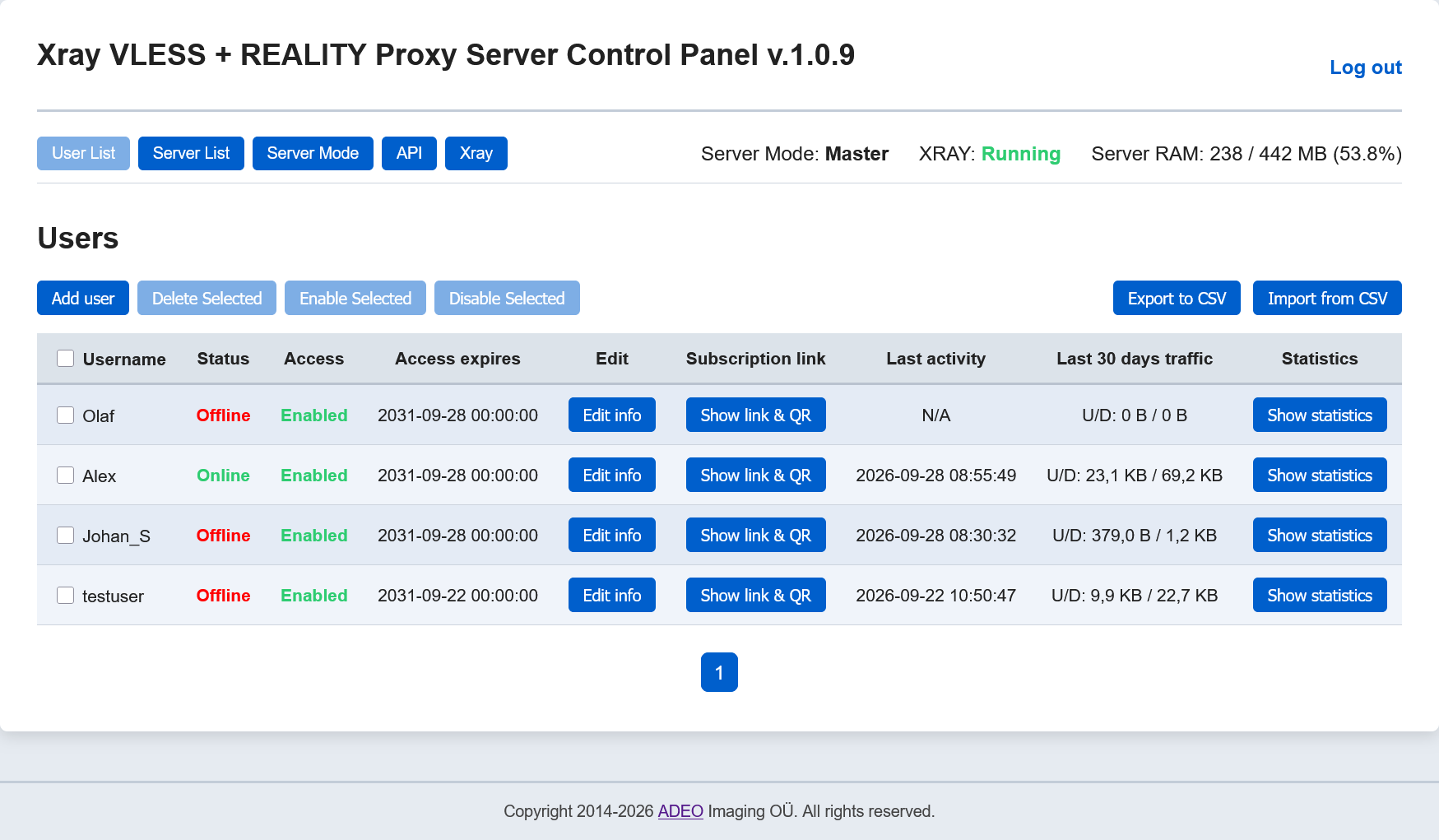
This is an easy-to use VPN server to bypass regional internet restrictions with user management web panel. Based on Xray, it uses the modern, lightweight, and efficient VLESS protocol together with the REALITY traffic obfuscation technology, masking traffic as regular HTTPS and making it difficult for deep packet inspection (DPI) systems to detect, ensuring high performance and censorship bypass. This technology is currently considered the most effective solution for bypassing internet censorship in countries where authorities restrict the use of the internet.
This VPN server is well suited for:
- Users who want full control over their own VPN server to ensure secure internet access and overcome regional online restrictions.
- Small groups - such as families, friends, or acquaintances - who wish to use a single, centrally managed VPN server together.
To access this VPN server from client devices, you must install the Hiddify Client application, available online for Windows, Android, Linux, iOS, and macOS.
To ensure a more resilient bypass of blocking, you can deploy multiple instances of this server in different regions and add the shared link of each server to the Hiddify client application. In this case, the Hiddify client will automatically select the server that is currently optimal for connection.
Highlights
- High efficiency allows this VPN server to run even on low-performance machines, helping reduce costs.
- Easy-to-use. After launching, the VPN server is immediately fully operational without the need for any setup. Client profiles can be obtained via a browser, even without SSH access.
- This VPN server uses the modern, lightweight, and efficient VLESS protocol together with the REALITY traffic obfuscation technology, masking traffic as regular HTTPS and making it difficult for deep packet inspection (DPI) systems to detect.
Details
Sold by
Categories
Delivery method
Delivery option
64-bit (x86) Amazon Machine Image (AMI)
Latest version
Operating system
Debian 13
Deployed on AWS
New
Introducing multi-product solutions
You can now purchase comprehensive solutions tailored to use cases and industries.

Features and programs
Financing for AWS Marketplace purchases
AWS Marketplace now accepts line of credit payments through the PNC Vendor Finance program. This program is available to select AWS customers in the US, excluding NV, NC, ND, TN, & VT.

Pricing
Free trial
Try this product free for 5 days according to the free trial terms set by the vendor. Usage-based pricing is in effect for usage beyond the free trial terms. Your free trial gets automatically converted to a paid subscription when the trial ends, but may be canceled any time before that.
Pricing is based on actual usage, with charges varying according to how much you consume. Subscriptions have no end date and may be canceled any time. Alternatively, you can pay upfront for a contract, which typically covers your anticipated usage for the contract duration. Any usage beyond contract will incur additional usage-based costs.
Additional AWS infrastructure costs may apply. Use the AWS Pricing Calculator to estimate your infrastructure costs.
If you are an AWS Free Tier customer with a free plan, you are eligible to subscribe to this offer. You can use free credits to cover the cost of eligible AWS infrastructure. See AWS Free Tier for more details. If you created an AWS account before July 15th, 2025, and qualify for the Legacy AWS Free Tier, Amazon EC2 charges for Micro instances are free for up to 750 hours per month. See Legacy AWS Free Tier for more details.
Dimension | Cost/hour |
|---|---|
t3.micro Recommended | $0.063 |
t2.micro | $0.063 |
m5n.2xlarge | $0.126 |
t3.large | $0.063 |
t3a.xlarge | $0.063 |
t3a.large | $0.063 |
m5.2xlarge | $0.126 |
m5n.4xlarge | $0.126 |
t3a.2xlarge | $0.126 |
m5.xlarge | $0.063 |
Dimensions summary
You pay by the hour based on the EC2 instance type you run this VPN server on. The dimensions map to different AWS instance families and sizes. The t2, t3, and t3a options are general-purpose instances, with t-series designed for burstable workloads. The m5, m5a, and m5n options are steady-state general-purpose instances. Within each family, sizes scale from nano and micro up through large, xlarge, 2xlarge, and 4xlarge. Larger sizes carry more compute and memory, so the hourly rate rises as you move up. Software runs alongside standard AWS infrastructure charges.
Top-of-mind questions for buyers
Hourly software charges apply only while the instance runs. A fully stopped instance stops accruing software charges. Stopped instances may still incur underlying AWS storage fees for the attached disk, but the software itself meters running time only.
The rate covers running the VPN server on one EC2 instance for one hour. The t2, t3, and t3a instances are burstable, so they suit variable traffic. The m5, m5a, and m5n instances give steady compute for continuous, higher-volume use.
You get an Xray VLESS VPN server with a user management web panel and an API for managing users. These features come with every instance size. Underlying AWS infrastructure charges, such as compute and storage, are billed separately from the software.
www.adeoclouds.eu
Helpful?
Vendor refund policy
You may terminate the instance at anytime to stop incurring charges.

Legal
Vendor terms and conditions
Upon subscribing to this product, you must acknowledge and agree to the terms and conditions outlined in the vendor's End User License Agreement (EULA) .
Content disclaimer
Vendors are responsible for their product descriptions and other product content. AWS does not warrant that vendors' product descriptions or other product content are accurate, complete, reliable, current, or error-free.
Delivery details
64-bit (x86) Amazon Machine Image (AMI)
Amazon Machine Image (AMI)
An AMI is a virtual image that provides the information required to launch an instance. Amazon EC2 (Elastic Compute Cloud) instances are virtual servers on which you can run your applications and workloads, offering varying combinations of CPU, memory, storage, and networking resources. You can launch as many instances from as many different AMIs as you need.
Version release notes
Web panel has been modified.
Additional details
Usage instructions
Launch the instance. The server is ready for use immediately and requires no configuration. User management Web Panel:
- https://[Public IP address].sslip.io:8443
- http://[Public IP address]
- use "admin" as username and your instance ID as password.
Linux username: admin
When accessing the Web Panel via HTTPS, your web browser may display a warning about potential risks due to the use of IP address in the URL. In this case, you should proceed and accept the risks, as our goal is to encrypt traffic, and there is no reason to worry about using IP address in a web browser.
To connect to this Proxy Server from client devices, you need to install the Hiddify Client application, which is available for Windows, Linux, Android, macOS, and iOS. The Hiddify Client application also requires no configuration - simply import the provided shared link or QR code into it.
Do not worry about the encryption=none parameter in the shared VLESS link - your traffic is encrypted by the TLS connection. This is the standard and recommended way to use VLESS.
========
This VPN server can operate in three modes: Standalone, Master and Slave.
Standalone mode. This mode is set by default. In this mode, you can create users, and users use this server to access the internet.
Master and Slave modes. You can run multiple instances of this server in different regions and designate one server as Master and the others as Slave. After pairing the servers, user management (creating users, deleting, enabling, disabling) can be done on the Master server, while users can use both the Master and all paired Slave servers to establish a VPN connection. In this case, the Hiddify client application will automatically select the best server for connection.
How to pair servers using the control panel:
-
Switch the current server to Master mode (Menu: Server Mode->Master)
-
To create a Slave server, launch a new instance of this server in another region.
-
In the control panel menu of the Master server, select Server List, then Add Server. Enter the IP address of the Slave server. A new entry will appear in the server list with status Unpaired and a synchronization token, which must be entered on the Slave server.
-
Switch the server that will act as Slave (it starts in Standalone mode by default), to Slave mode (Menu: Server Mode->Slave), and enter the IP address of the Master server and the previously obtained synchronization token into the input fields. Click the Test Connection button, then Save.
Server pairing is complete. Make sure that in the web panel of the Master server the status of the added Slave server has changed to Paired (refresh the page if needed). Now users can be managed on the Master server, the list of users on the Master server and their status (Enabled/Disabled) will be copied to the Slave server, and users will be able to use both the Master and all paired Slave servers to establish a VPN connection. Note that changes on the Slave server take effect 1-2 minutes after changes are made on the Master server.
A dynamic subscription link generated for a specific user on the Master will include all servers available to the client, and the Hiddify client application will automatically determine which server to connect to at any given moment. A dynamic link means that if, for example, a new available server is added for a user, their Hiddify client application will learn about it automatically, without the need to add a new configuration again.
API documentation is available in the Web Panel in the API section.
Support
Vendor support
If you have any questions regarding the deployment or use of this server, you can use the Contact Us form on our website or reach out via email. We guarantee a response within 24 hours.
Contact us: https://www.adeoclouds.eu/contact.php?id=23
E-mail: admin@adeoclouds.eu
AWS infrastructure support
AWS Support is a one-on-one, fast-response support channel that is staffed 24x7x365 with experienced and technical support engineers. The service helps customers of all sizes and technical abilities to successfully utilize the products and features provided by Amazon Web Services.
Similar products

This is an easy-to use and effective VPN Server to bypass regional internet restrictions. Based on Xray, it uses the modern, lightweight, and efficient VLESS protocol together with the REALITY traffic obfuscation technology, masking traffic as regular HTTPS and making it difficult for deep packet inspection (DPI) systems to detect, ensuring high performance and censorship bypass. This technology is currently considered the most effective solution for bypassing internet censorship in countries where authorities restrict the use of the internet.

This is an easy-to use and effective proxy server to bypass regional internet restrictions. Based on Xray, it uses the modern, lightweight, and efficient VLESS protocol together with the REALITY traffic obfuscation technology, masking traffic as regular HTTPS and making it difficult for deep packet inspection (DPI) systems to detect, ensuring high performance and censorship bypass. This technology is currently considered the most effective solution for bypassing internet censorship in countries where authorities restrict the use of the internet.

Access Server is a self-hosted business VPN and ZTNA software solution developed by the creators of the OpenVPN protocol. Deploy on EC2 and get secure access to VPCs and other connected networks. Route traffic by domain name for application-aware access control, and leverage Data Channel Offload (DCO) for kernel-accelerated throughput that keeps pace with demanding AWS workloads. With MFA, granular access controls, and Zero Trust-ready policies, Access Server is trusted by businesses to protect AWS infrastructure and beyond.

Access Server is a self-hosted business VPN and ZTNA software developed by the creators of the OpenVPN protocol, deployed on EC2 and billed through AWS.
Get secure access to your VPCs and other connected networks, route traffic by domain name for application-aware access control, and leverage Data Channel Offload (DCO) for kernel-accelerated throughput that keeps pace with demanding AWS workloads. With MFA, granular access controls, SAML single sign-on via AWS IAM Identity Center, and Zero Trust-ready policies, Access Server is trusted by businesses to protect AWS infrastructure and beyond.
Purchase connections through AWS as a monthly or yearly contract and consolidate your VPN software and infrastructure costs onto a single AWS invoice.
Customer reviews
No customer reviews yet
Be the first to review this product . We've partnered with PeerSpot to gather customer feedback. You can share your experience by writing or recording a review, or scheduling a call with a PeerSpot analyst.