
Sold by: cloudimg
Deployed on AWS
Free Trial
AWS Free Tier
This product has charges associated with it for seller support. Skip hours of manual setup - launch a preconfigured Apache Druid real-time analytics database with the unified web console, per-instance secure credentials, a dedicated data disk, and 24/7 cloudimg support in minutes.
Overview
Image
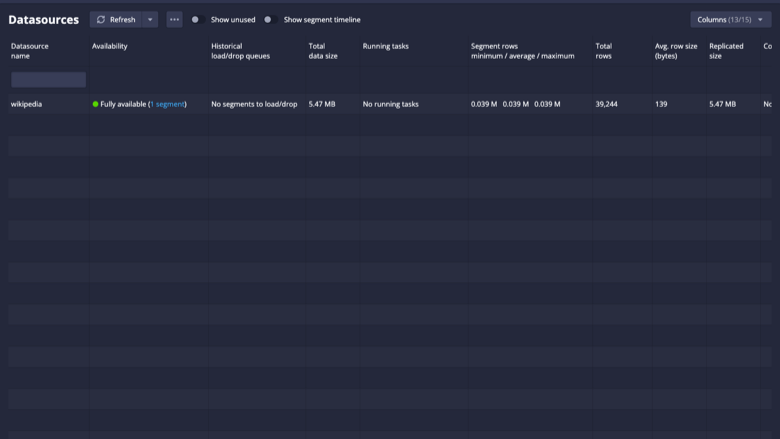
Druid console datasources view
Image
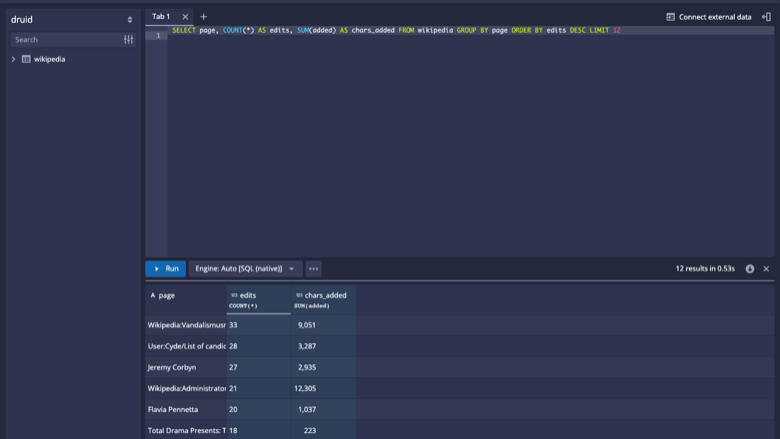
SQL query editor with results
Image
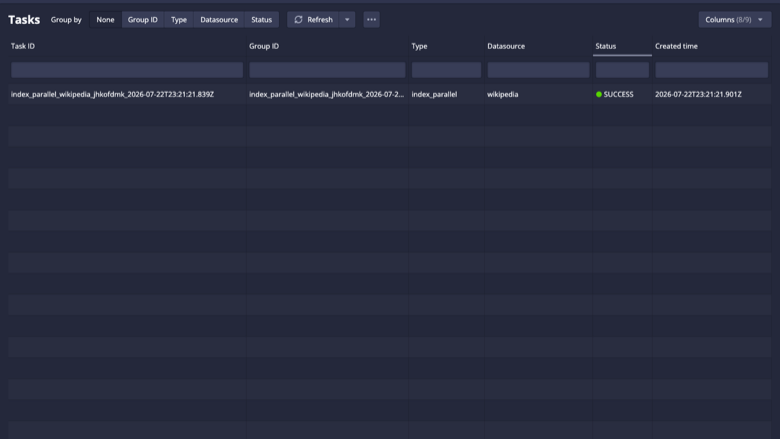
Ingestion tasks view
Image
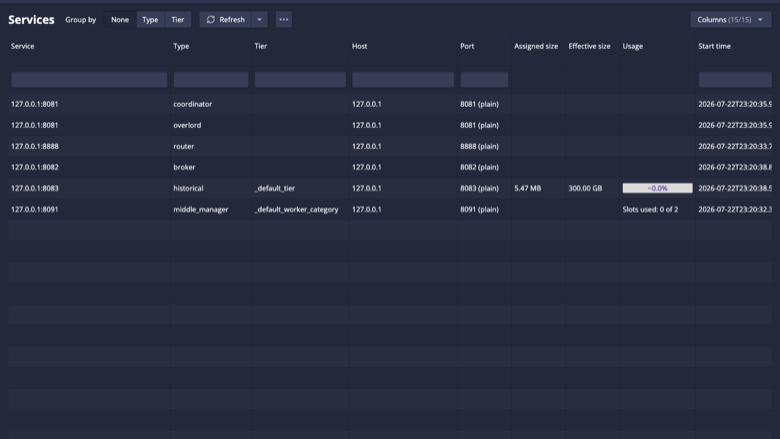
Druid services view
This is a repackaged open source software product wherein additional charges apply for cloudimg support services.
Apache Druid - Production-Ready Real-Time Analytics Database AMI
Deploy a fully configured Apache Druid analytics database on AWS in minutes - not hours. This AMI delivers Druid preinstalled and running as a managed single-server deployment, so you can ingest event and time-series data and run fast, interactive slice-and-dice queries from the built-in web console immediately after launch.
Built for data engineers and analytics teams who need a production-grade OLAP database without the overhead of manual installation, JVM tuning and security hardening - especially teams running Kafka or Kinesis pipelines that need a low-latency query layer.
Why This AMI Instead of a DIY Install
- Versus manual EC2 setup: Skip the hours of installing a Java runtime, verifying the Druid distribution, wiring up ZooKeeper, the metadata store and deep storage, writing systemd units, provisioning a data disk and tuning JVM memory so every Druid process fits your instance.
- Versus a raw upstream install: Druid's web console ships with no authentication and every service listening on all interfaces. This image binds every Druid process to loopback and fronts the console with an authenticated nginx reverse proxy, so the only thing exposed is a password-protected console on port 80.
- Versus other community AMIs: Benefit from a first-boot process that generates a unique console password per instance, a dedicated data disk for segments and metadata, memory tuned to the instance size, and 24/7 professional support from cloudimg.
- Versus container-based Druid deployments: No orchestration layer required. A single EC2 instance runs the full Druid stack with systemd managing process lifecycle, restarts and boot ordering.
Application Stack
- Apache Druid installed under /opt/druid, run by a dedicated unprivileged service account
- A single-server deployment: coordinator, overlord, broker, historical, middleManager and router, with a bundled ZooKeeper and an embedded metadata store
- Headless OpenJDK Java runtime with JVM memory computed at boot to fit the instance
- A dedicated EBS data disk holding the deep-storage segments, metadata store, ZooKeeper data and task logs - independently resizable for IOPS and capacity
- systemd services that start Druid on boot and restart on failure
- nginx reverse proxy publishing the authenticated Druid console on port 80
Real-Time Analytics and Web Console
Druid is built for fast aggregations and interactive, low-latency queries over large event and time-series datasets. Ingest streaming or batch data, then explore it with sub-second group-bys, filters and time-range scans. The unified web console (served on port 80 through nginx) provides a SQL query editor, a data-source explorer, an ingestion and supervisor manager and a services view; Druid also exposes a native JSON query API and a SQL-over-HTTP endpoint for your applications and dashboards. See our deployment guide for annotated console walkthrough screenshots.
Security
Secure First Boot: A one-shot service generates a fresh console password unique to each instance and stores it in a root-only file. No shared or default credentials ship in the image.
Loopback Isolation: Every Druid process and the bundled ZooKeeper bind only to loopback. The single public entry point is the nginx reverse proxy on port 80, protected by HTTP basic authentication.
Encryption at Rest: The dedicated data disk can leverage AWS EBS encryption. Enable EBS encryption when launching the instance or use encrypted snapshots.
Network Isolation: Deploy in a private VPC subnet and use security groups to restrict access to only the ports your clients require (80 for the console).
Use Cases
- Ad-tech and clickstream analytics: ingest bid, impression and clickstream events from Kafka and query campaign metrics with sub-second latency for real-time budget-pacing dashboards.
- Real-time operational dashboards over streaming event data from Kinesis or Kafka topics.
- Interactive exploration of time-series and operational metrics over streaming or historical data.
- Ad-hoc slice-and-dice queries over billions of rows with fast response times for data analysts.
Evaluation Path
Launch this AMI on the recommended instance type to evaluate Druid with minimal AWS infrastructure cost. The bundled wikipedia sample dataset lets you validate query and console access before scaling up.
24/7 cloudimg Support
Technical support by email and live chat covers deployment and instance sizing, ingestion and data-source configuration, query tuning, JVM and memory administration, and console authentication and TLS setup.
All product and company names are trademarks or registered trademarks of their respective holders. Use of them does not imply any affiliation with or endorsement by them.
Highlights
- Unlike container-based Druid deployments that require orchestration, this AMI runs the full stack - coordinator, overlord, broker, historical, middleManager, router, ZooKeeper and metadata store - as systemd-managed services on a single EC2 instance. Launch and reach a queryable console in minutes, not the hours a manual install demands for Java setup, distribution verification, service wiring and memory tuning.
- Compared to community AMIs that ship static JVM settings, this image computes memory allocation at every boot to fit your specific instance size. Deep-storage segments, metadata, ZooKeeper data and task logs live on a dedicated EBS volume you can resize independently for IOPS and capacity - enabling safe instance replacement and predictable storage scaling without risking ingested data.
- Unlike raw Druid installs that expose an unauthenticated console on all interfaces, every Druid process and ZooKeeper here bind to loopback only. An authenticated nginx reverse proxy is the single public entry point on port 80. Each instance generates a unique console password stored in a root-only file - no shared or default credentials ever ship. Backed by 24/7 cloudimg technical support via email and live chat.
Details
Sold by
Categories
Delivery method
Delivery option
64-bit (x86) Amazon Machine Image (AMI)
Latest version
Operating system
Ubuntu 24.04
Deployed on AWS
New
Introducing multi-product solutions
You can now purchase comprehensive solutions tailored to use cases and industries.

Features and programs
Financing for AWS Marketplace purchases
AWS Marketplace now accepts line of credit payments through the PNC Vendor Finance program. This program is available to select AWS customers in the US, excluding NV, NC, ND, TN, & VT.

Pricing
Free trial
Try this product free for 7 days according to the free trial terms set by the vendor. Usage-based pricing is in effect for usage beyond the free trial terms. Your free trial gets automatically converted to a paid subscription when the trial ends, but may be canceled any time before that.
Pricing is based on actual usage, with charges varying according to how much you consume. Subscriptions have no end date and may be canceled any time. Alternatively, you can pay upfront for a contract, which typically covers your anticipated usage for the contract duration. Any usage beyond contract will incur additional usage-based costs.
Additional AWS infrastructure costs may apply. Use the AWS Pricing Calculator to estimate your infrastructure costs.
If you are an AWS Free Tier customer with a free plan, you are eligible to subscribe to this offer. You can use free credits to cover the cost of eligible AWS infrastructure. See AWS Free Tier for more details. If you created an AWS account before July 15th, 2025, and qualify for the Legacy AWS Free Tier, Amazon EC2 charges for Micro instances are free for up to 750 hours per month. See Legacy AWS Free Tier for more details.
Dimension | Description | Cost/hour |
|---|---|---|
m5.large Recommended | m5.large | $0.08 |
t2.micro | t2.micro instance type | $0.04 |
t3.micro | t3.micro instance type | $0.04 |
c5a.12xlarge | c5a.12xlarge instance type | $0.24 |
c5a.16xlarge | c5a.16xlarge instance type | $0.24 |
c5a.24xlarge | c5a.24xlarge instance type | $0.24 |
c5a.2xlarge | c5a.2xlarge instance type | $0.24 |
c5a.4xlarge | c5a.4xlarge instance type | $0.24 |
c5a.8xlarge | c5a.8xlarge instance type | $0.24 |
c5a.large | c5a.large instance type | $0.08 |
Vendor refund policy
Refunds available on request.

Legal
Vendor terms and conditions
Upon subscribing to this product, you must acknowledge and agree to the terms and conditions outlined in the vendor's End User License Agreement (EULA) .
Content disclaimer
Vendors are responsible for their product descriptions and other product content. AWS does not warrant that vendors' product descriptions or other product content are accurate, complete, reliable, current, or error-free.
Delivery details
64-bit (x86) Amazon Machine Image (AMI)
Amazon Machine Image (AMI)
An AMI is a virtual image that provides the information required to launch an instance. Amazon EC2 (Elastic Compute Cloud) instances are virtual servers on which you can run your applications and workloads, offering varying combinations of CPU, memory, storage, and networking resources. You can launch as many instances from as many different AMIs as you need.
Version release notes
Initial release of Apache Druid single-server on a dedicated EBS data volume, with a per-instance console password rotated on first boot and JVM memory tuned to the instance size.
Additional details
Usage instructions
Connect via SSH on port 22 as the default login user for your operating system variant (the user guide lists it per variant; on Ubuntu it is ubuntu). The Apache Druid unified web console is served on port 80: browse to http://<instance-public-ip>/ and sign in as user admin. Retrieve the per-instance password with: sudo cat /root/druid-credentials.txt. Use the console's SQL editor to query, the Load data wizard to ingest, and the Supervisors, Tasks and Services views to operate the cluster. Every Druid process binds to loopback and nginx enforces HTTP basic auth on port 80. The persistent working tree (segments, metadata store, ZooKeeper data and task logs) lives on a dedicated data disk mounted at /var/lib/druid.
Resources
Vendor resources
Support
Vendor support
cloudimg Support - 24/7 Technical Assistance
cloudimg provides round-the-clock technical support for this Apache Druid AMI via email and live chat. Our engineers assist with:
- Initial deployment and instance sizing guidance
- Data-source, ingestion and supervisor configuration
- SQL and native query tuning
- JVM and memory administration
- Deep-storage, metadata-store and ZooKeeper operation
- Console authentication and TLS setup
- Troubleshooting connectivity and performance issues
Response Times: Critical issues receive a one-hour average response time.
Contact: Email support@cloudimg.co.uk or reach us via live chat.
Deployment Prerequisites
- Instance type: Launch the recommended instance size or larger; JVM memory is computed at boot to fit the instance.
- EBS data volume: Druid uses a dedicated data disk for segments and metadata. Provision an EBS volume sized for your data and growth.
- Security groups: Open port 80 (console) only to trusted sources.
- VPC: Deploy in a VPC subnet appropriate for your network isolation requirements.
Getting Started
- Launch the AMI and attach or confirm the dedicated data volume.
- Retrieve the generated console password from /root/druid-credentials.txt via SSH.
- Open port 80 in your security group and navigate to the instance public IP to access the Druid console.
- Use the Load data wizard to ingest data and the SQL editor to query; sign in as admin with the retrieved password.
For sizing recommendations, production architecture planning, or any issues including requesting refunds, contact support@cloudimg.co.uk .
AWS infrastructure support
AWS Support is a one-on-one, fast-response support channel that is staffed 24x7x365 with experienced and technical support engineers. The service helps customers of all sizes and technical abilities to successfully utilize the products and features provided by Amazon Web Services.
Similar products

Apache Hudi connector with shaded dependencies to work with AWS Glue.

Easily access Iceberg tables and operate DDLs, reads/writes, time-travels, streaming writes on the Iceberg tables.

Bansir offers this software product repackaged where additional charges apply for technical support provided by Bansir Cloud email support@bansircloud.com.

This is a repackaged open source software product wherein additional charges apply for technical support. Softwares included: Ubuntu and Apache Web Server

This product has a fee associated with the provision and deployment of the application and AMI support. Apache Superset is a modern, enterprise-ready business intelligence web application.
Customer reviews
No customer reviews yet
Be the first to review this product . We've partnered with PeerSpot to gather customer feedback. You can share your experience by writing or recording a review, or scheduling a call with a PeerSpot analyst.