
Sold by: cloudimg
Deployed on AWS
Free Trial
AWS Free Tier
This product has charges associated with it for seller support. Plakar backup appliance with encryption, deduplication, and a self test that proves restores work. Per instance keys mean no vendor can decrypt your data. 24/7 cloudimg support.
Overview
Image
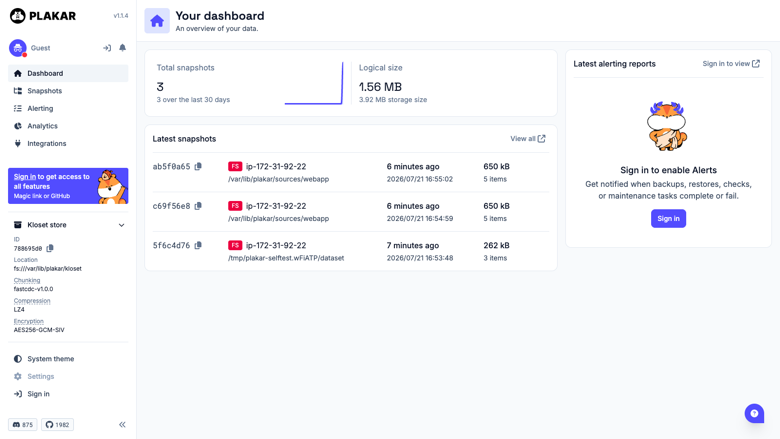
Plakar dashboard
Image
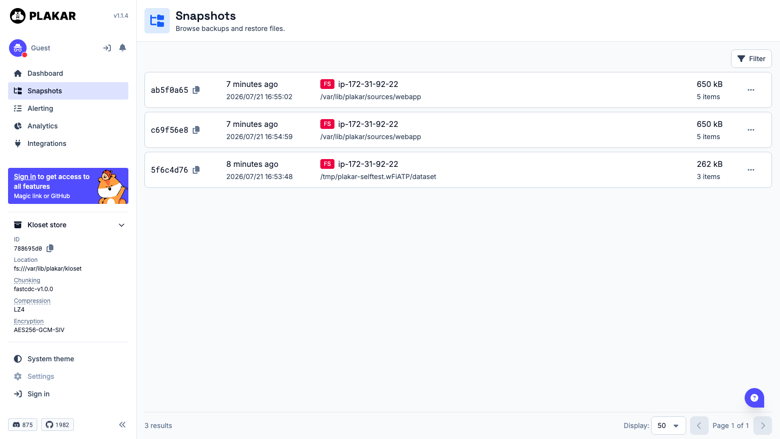
Snapshot list
Image
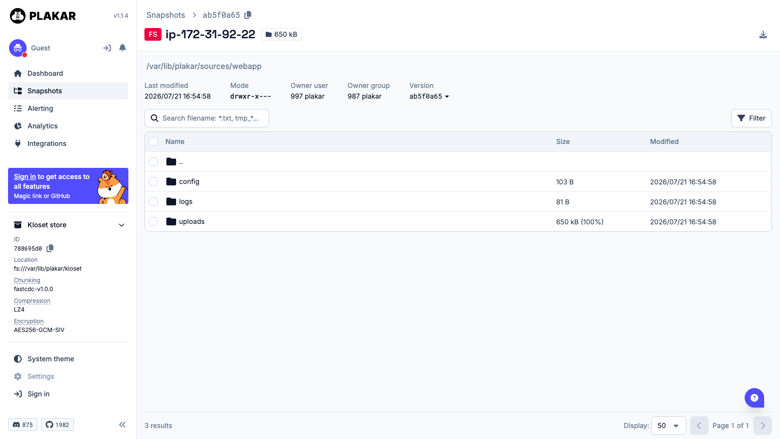
Browse a snapshot
Image
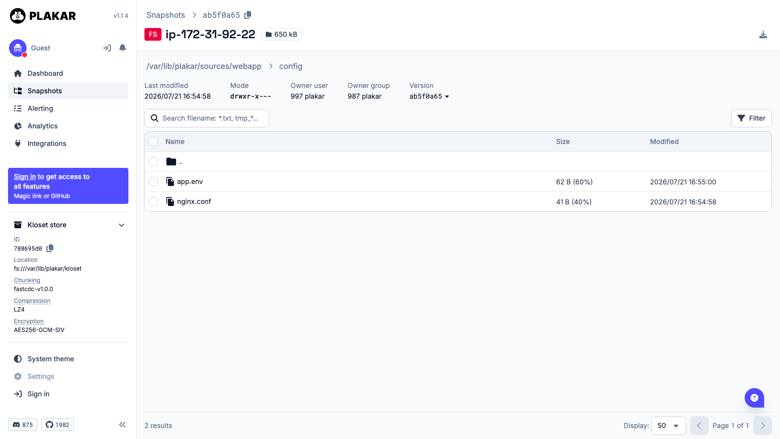
Restore individual files
This is a repackaged open source software product wherein additional charges apply for cloudimg support services.
Backups You Can Prove You Can Restore
Plakar is an open source backup engine that creates versioned, encrypted, deduplicated snapshots in a content addressed Kloset store. Identical data is stored exactly once regardless of how many snapshots reference it, so long retention histories cost a fraction of repeated full backups. Every snapshot is independently restorable and integrity checkable, and the built in web interface lets you browse snapshots, compare revisions, and restore files without touching the command line.
Who This Is For
- Infrastructure teams running scheduled server and application backups who need long retention without paying for it in storage
- Security and compliance teams who require that the encryption key never leaves the customer's instance and that no vendor can decrypt the archive
- Operations teams running disaster recovery drills who need a restore that can be proven byte for byte rather than assumed
Application Stack
- Plakar 1.1.4 installed from the official upstream release binary, checksum verified against the upstream manifest
- nginx reverse proxy on port 80; the Plakar server binds to loopback only and is never exposed directly
- Encrypted Kloset repository on a dedicated EBS volume, independently resizable and separate from the OS disk
- A hardened, fully patched Linux base with plakar-ui and nginx as enabled systemd units
Zero Shared Secrets, Per Instance Key Generation
A backup appliance that shipped one passphrase for every customer would let anyone holding the image read anyone else's backups. This image ships nothing cryptographic at all:
- The repository encryption passphrase is generated uniquely on first boot of every instance
- The web interface API token is generated uniquely on first boot of every instance
- The repository is created fresh on first boot, not at build time
- Both secrets are written to a root only file, and the build verifies no key material survives image capture
- The API rejects unauthenticated requests and wrong tokens
Because the passphrase never leaves the instance, cloudimg cannot decrypt your backups and cannot recover the passphrase for you. Store it somewhere safe on first launch.
Shipped Self Test Proves End To End Integrity
The image includes a self test at /usr/local/sbin/plakar-selftest. It writes a known dataset, backs it up into the real encrypted repository, restores it to a different path, and compares every restored file by sha256. It then runs a full integrity check and exercises four negative controls: a wrong passphrase must not open the repository, a bogus snapshot ID must not restore, an unauthenticated API call must be refused, and a wrong token must be refused. Run it any time to confirm the appliance genuinely backs up and genuinely restores.
Getting Started
- Launch the AMI on an m5.large or larger, opening ports 22 and 80 in the security group
- SSH in and run: sudo cat /root/plakar-credentials.txt
- Record the repository passphrase somewhere safe, then open the web interface link shown in that file
- Point Plakar at the directories you want protected and take your first snapshot
- Run sudo /usr/local/sbin/plakar-selftest to confirm backup and restore end to end
Recommended Sizing
- Compute: m5.large (2 vCPU, 8 GB RAM) for routine server and application backup workloads
- Storage: repository on its own EBS volume, sized to your retention needs; deduplication keeps costs far below repeated full backups
- Networking: port 22 for SSH, port 80 for the web interface
Evaluate Before You Commit
Launch the AMI, run the self test, and take a test snapshot to validate the backup and restore cycle in your own environment. For pre-purchase deployment questions, email support@cloudimg.co.uk .
24/7 cloudimg Support
Every deployment is backed by cloudimg engineers available around the clock by email. Support covers deployment guidance, instance sizing, repository and volume layout, scheduling backups, restore and integrity check procedures, TLS termination, and Plakar version upgrades.
Plakar is open source under the ISC licence with no licence fee. The cloudimg charge covers packaging, security patching, image maintenance, and 24/7 support. Plakar is a trademark of its respective owner; cloudimg is not affiliated with or endorsed by the Plakar project.
Highlights
- Storage efficient encrypted backups with built in deduplication store identical data exactly once, so long retention histories cost a fraction of repeated full backups. The web interface lets you browse snapshots, compare revisions, and restore files without the command line.
- Every instance generates its own unique encryption passphrase and API token on first boot. No shared key ever ships in the image, the build verifies no secrets survive image capture, and cloudimg cannot decrypt your backups. The repository lives on a dedicated, independently resizable EBS volume behind an nginx reverse proxy.
- A shipped self test at /usr/local/sbin/plakar-selftest proves the appliance really backs up and really restores by writing data, snapshotting it, restoring to a separate path, and comparing every file by sha256. It also exercises four negative controls including wrong passphrase and bogus snapshot rejection. Backed by 24/7 cloudimg support by email.
Details
Sold by
Categories
Delivery method
Delivery option
64-bit (x86) Amazon Machine Image (AMI)
Latest version
Operating system
Ubuntu 24.04
Deployed on AWS
New
Introducing multi-product solutions
You can now purchase comprehensive solutions tailored to use cases and industries.

Features and programs
Financing for AWS Marketplace purchases
AWS Marketplace now accepts line of credit payments through the PNC Vendor Finance program. This program is available to select AWS customers in the US, excluding NV, NC, ND, TN, & VT.

Pricing
Free trial
Try this product free for 7 days according to the free trial terms set by the vendor. Usage-based pricing is in effect for usage beyond the free trial terms. Your free trial gets automatically converted to a paid subscription when the trial ends, but may be canceled any time before that.
Pricing is based on actual usage, with charges varying according to how much you consume. Subscriptions have no end date and may be canceled any time. Alternatively, you can pay upfront for a contract, which typically covers your anticipated usage for the contract duration. Any usage beyond contract will incur additional usage-based costs.
Additional AWS infrastructure costs may apply. Use the AWS Pricing Calculator to estimate your infrastructure costs.
If you are an AWS Free Tier customer with a free plan, you are eligible to subscribe to this offer. You can use free credits to cover the cost of eligible AWS infrastructure. See AWS Free Tier for more details. If you created an AWS account before July 15th, 2025, and qualify for the Legacy AWS Free Tier, Amazon EC2 charges for Micro instances are free for up to 750 hours per month. See Legacy AWS Free Tier for more details.
Dimension | Description | Cost/hour |
|---|---|---|
m5.large Recommended | m5.large | $0.08 |
t3.micro | t3.micro instance type | $0.04 |
t2.micro | t2.micro instance type | $0.04 |
p6-b300.48xlarge | p6-b300.48xlarge instance type | $0.24 |
m6id.metal | m6id.metal instance type | $0.24 |
g7.8xlarge | g7.8xlarge instance type | $0.24 |
r7iz.2xlarge | r7iz.2xlarge instance type | $0.24 |
c8id.8xlarge | c8id.8xlarge instance type | $0.24 |
g6e.2xlarge | g6e.2xlarge instance type | $0.24 |
c8i.4xlarge | c8i.4xlarge instance type | $0.24 |
Vendor refund policy
Refunds available on request.

Legal
Vendor terms and conditions
Upon subscribing to this product, you must acknowledge and agree to the terms and conditions outlined in the vendor's End User License Agreement (EULA) .
Content disclaimer
Vendors are responsible for their product descriptions and other product content. AWS does not warrant that vendors' product descriptions or other product content are accurate, complete, reliable, current, or error-free.
Delivery details
64-bit (x86) Amazon Machine Image (AMI)
Amazon Machine Image (AMI)
An AMI is a virtual image that provides the information required to launch an instance. Amazon EC2 (Elastic Compute Cloud) instances are virtual servers on which you can run your applications and workloads, offering varying combinations of CPU, memory, storage, and networking resources. You can launch as many instances from as many different AMIs as you need.
Version release notes
Initial release of Plakar 1.1.4, an open source backup engine with encrypted, deduplicated, content addressed snapshots and a web interface.
Additional details
Usage instructions
Connect via SSH on port 22 as the default login user for your operating system variant (the user guide lists it per variant; on Ubuntu it is 'ubuntu'). Retrieve the per instance repository passphrase and web interface token with: sudo cat /root/plakar-credentials.txt. Record the repository passphrase somewhere safe, because it is the only thing that can decrypt your backups and it never leaves your instance. Open the web interface using the plakar.url link shown in that file, which hands the token to the interface. The Plakar server listens on 127.0.0.1:9090 and is reached only through nginx on port 80. Verify the appliance end to end at any time with: sudo /usr/local/sbin/plakar-selftest. Services are managed with systemctl (plakar-ui, nginx). The encrypted repository lives at /var/lib/plakar/kloset on a dedicated EBS volume.
Resources
Vendor resources
Support
Vendor support
cloudimg Support
cloudimg provides 24/7 technical support for this Plakar AMI by email.
Contact: support@cloudimg.co.uk
Response Times:
- Critical issues (service down, restore failure, data loss risk): one-hour average response
- General inquiries: responded to within business hours
Support Scope:
- Initial deployment guidance and instance sizing recommendations
- Repository and EBS volume layout, and resizing the repository volume
- Scheduling backups and choosing what to protect
- Restore and integrity check procedures, including disaster recovery drills
- Interpreting the shipped self test at /usr/local/sbin/plakar-selftest
- TLS termination for the web interface with Let's Encrypt or custom certificates
- Plakar version upgrades and nginx reverse proxy tuning
- Troubleshooting service, authentication and connectivity issues
- Pre-purchase deployment planning
Important limitation: the repository encryption passphrase is generated on your instance at first boot and never leaves it. cloudimg has no copy and cannot recover it. If the passphrase is lost, the snapshots it protects are unrecoverable by anyone, including us. Please store it safely at first launch.
Getting Help:
Email support@cloudimg.co.uk with a description of your issue. Include your instance ID and AWS region to expedite troubleshooting. For pre-purchase deployment questions, use the same address.
Refunds:
If you experience issues with the product, contact support@cloudimg.co.uk . Our team will work to resolve your concern or assist with the refund process through AWS Marketplace.
AWS infrastructure support
AWS Support is a one-on-one, fast-response support channel that is staffed 24x7x365 with experienced and technical support engineers. The service helps customers of all sizes and technical abilities to successfully utilize the products and features provided by Amazon Web Services.
Similar products

Plakar Control Plane is a self-hosted backup management platform built on open-source Plakar, the open backup engine enabling resilience as code for teams preparing for inevitable breach.
Deployed as a virtual appliance in your own AWS account, your backup data never leaves your environment. Connect your providers through inventories to surface unprotected assets, protect cloud-native resources agentlessly via native AWS APIs, add lightweight agents for on-premises and hybrid workloads, and manage scheduling, policies, and restores from a single web interface. All data is encrypted client-side with keys you exclusively control, zero trust by default.
Customer reviews
No customer reviews yet
Be the first to review this product . We've partnered with PeerSpot to gather customer feedback. You can share your experience by writing or recording a review, or scheduling a call with a PeerSpot analyst.