Sold by: John Snow Labs
Deployed on AWS
Automate systematic literature reviews end-to-end. Search PubMed,
Semantic Scholar, Europe PMC, OpenAlex, and your own documents; auto-screen against inclusion/exclusion rules; and extract structured, evidence-backed data with medical LLMs - all in your own AWS account.
Overview
Image
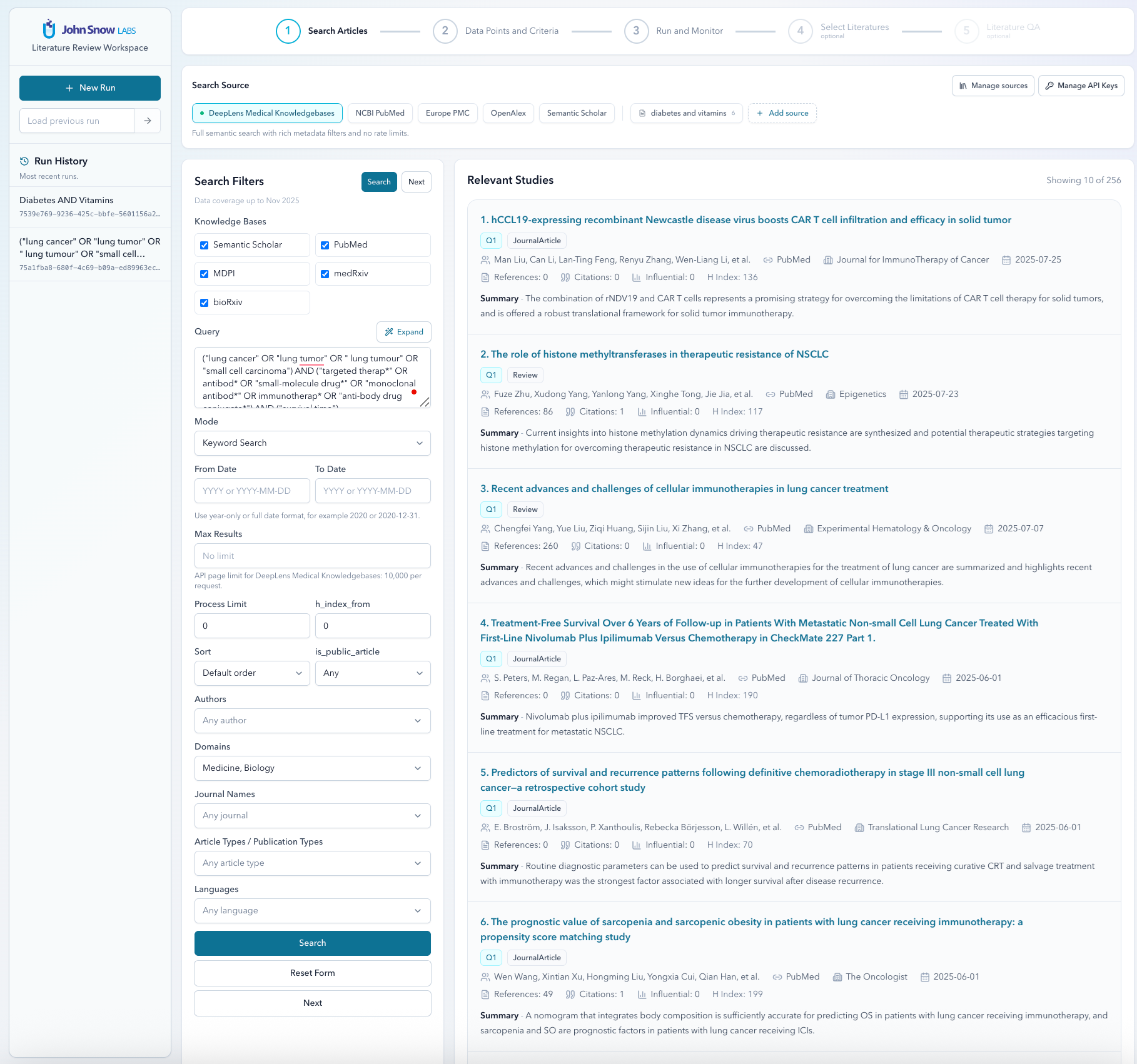
Relevant Studies
Image
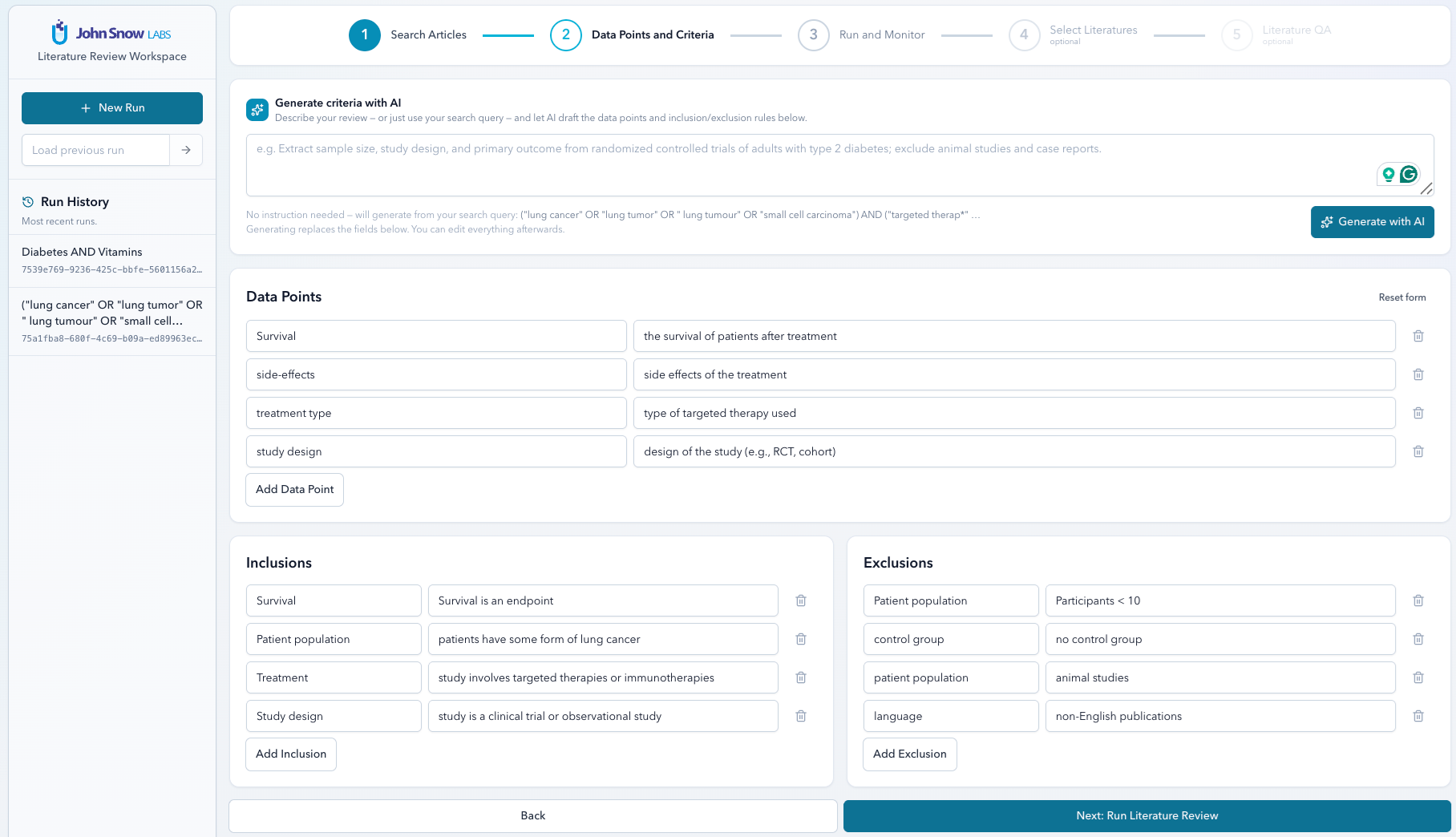
Data Points
Image
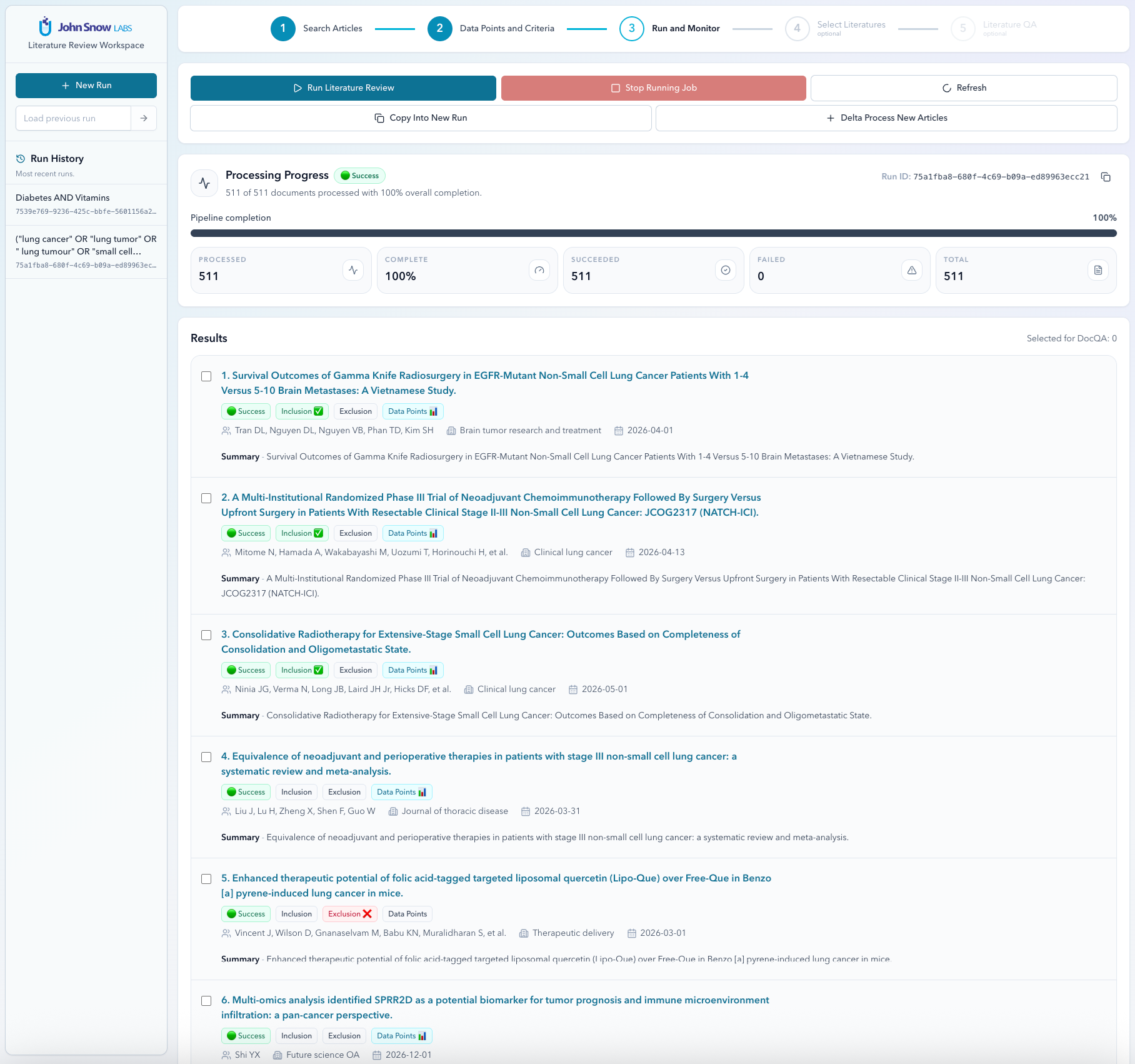
Run and Monitor
Image
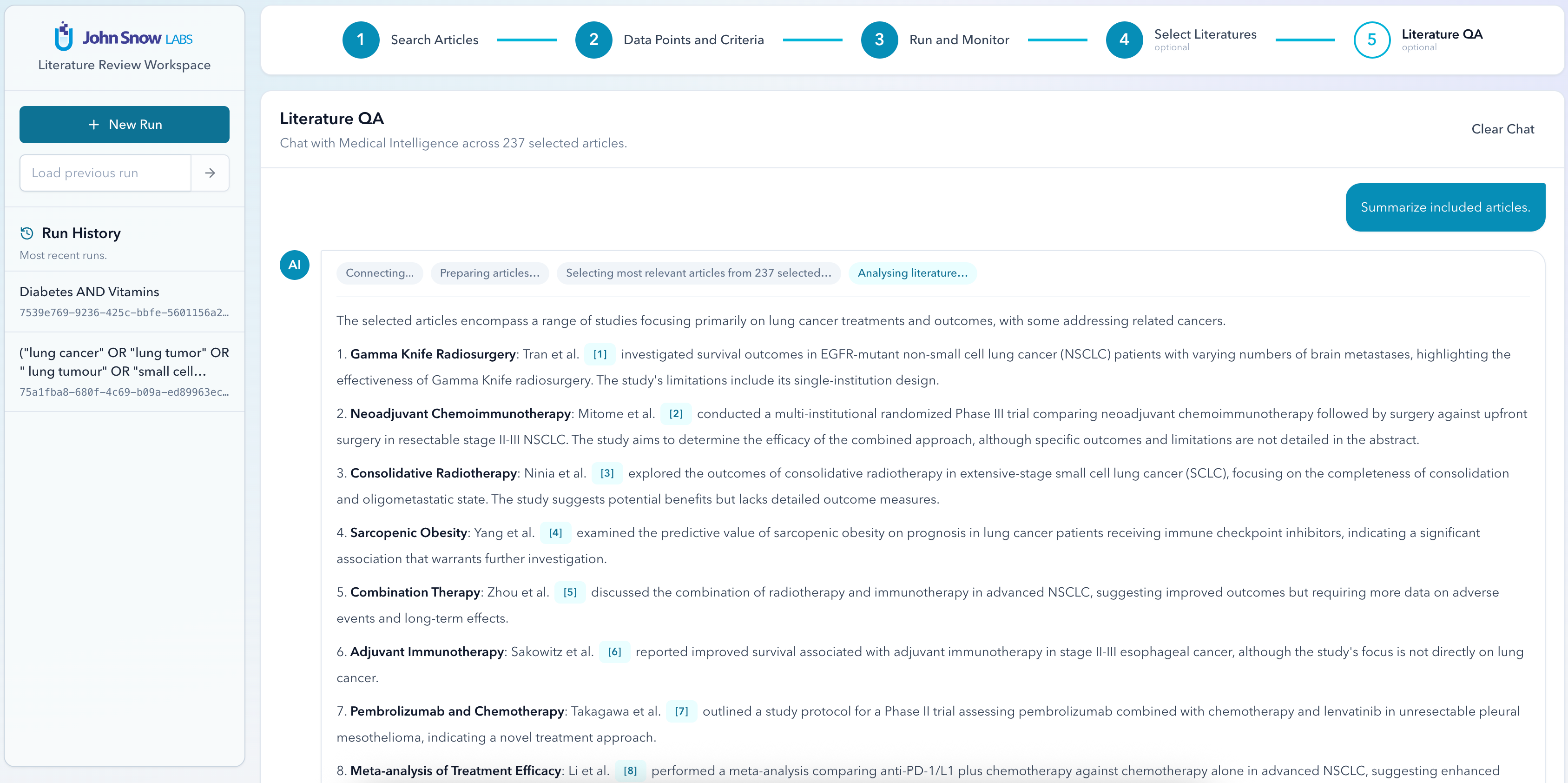
Ask Questions
The Problem:
Systematic and scoping reviews are slow and repetitive. Teams spend weeks searching multiple databases, de-duplicating results, screening titles and abstracts against inclusion/exclusion criteria, and hand-extracting the same data points (study design, sample size, outcomes, etc. ) into spreadsheets. The work is error-prone, hard to reproduce, and difficult to audit.
The Solution:
Literature Review Agent is a guided workspace that automates the heavy lifting of evidence synthesis while keeping a human in control. You search trusted medical and academic sources, define what you want to extract in plain language, and let medical-grade LLMs pull structured, evidence-backed data from every article - with inclusion/exclusion screening applied automatically. Results are reviewable in the UI and exportable to CSV.
Literature Review Agent runs as a self-contained appliance inside your own cloud account, so your queries, documents, and extractions never leave your infrastructure.
Search across many sources from one screen and narrow fast with rich filters. Multiple sources, one query: medical knowledge bases plus PubMed (NCBI), Semantic Scholar, Europe PMC, and OpenAlex (250M+ scholarly works) - or your own uploaded documents (ZIP upload or an S3 prefix).
Keyword, semantic, or document-ID search modes, with MeSH-aware query expansion. Powerful filters: date range, journal, article type, language, author, open-access, and quality signals like impact factor, journal quartile, h-index, and citation counts.
How to use:
Requirement: This app requires a John Snow Labs medical LLM - either the DeepLens API (accessed with an API key) or a John Snow Labs medical LLM model deployed on your own Amazon SageMaker endpoint. Allow outbound internet access.
- Launch the AMI and configure the security group to allow inbound HTTP traffic on port 80. Make sure all outbound traffic is allowed.
- Wait approximately 3-5 minutes for the application to initialize, then open http://INSTANCE_PUBLIC_IP in your browser.
- Log in using the EC2 Instance ID as the password (available in the EC2 console). No username is required.
- On the Setup page:
- Select your provider (DeepLens or SageMaker).
- Enter your API key (if you selected DeepLens) or SageMaker endpoint respectivelly.
- Choose the model you want to use.
- Click Test Connection.
- Click Save.
- Start a literature review:
- Enter your research topic.
- Define the data points you want to extract.
- Click Run Review.
- Review the extracted results in the table.
- Export the results to CSV if needed.
- (Optional) Select a set of articles and use Literature Q&A to ask questions about the selected papers.
- (Optional) Under Manage API Keys, add external literature-source API keys for:
- PubMed
- Semantic Scholar
- Europe PMC
- OpenAlex
Note: If you need a DeepLens API key, please Contact John Snow Labs
For additional information see Documentation
Highlights
- Multi-source medical & academic search (PubMed, Semantic Scholar, Europe PMC, OpenAlex, custom uploads) with rich filtering and semantic search; AI-assisted criteria building plus automated inclusion/exclusion screening; Structured, evidence-backed data extraction at scale, exportable to CSV; Runs entirely in your AWS account your data never leaves your environment; Powered by John Snow Labs medical LLMs, hosted on Amazon SageMaker or accessed via the DeepLens API.
- Who it is for? - Medical researchers and systematic / scoping review teams - Evidence-synthesis and HEOR groups - Guideline developers and meta-analysis authors - Anyone who repeatedly extracts structured data from large bodies of literature
Details
Sold by
Delivery method
Delivery option
64-bit (x86) Amazon Machine Image (AMI)
Latest version
Operating system
AmazonLinux 2023
Deployed on AWS
New
Introducing multi-product solutions
You can now purchase comprehensive solutions tailored to use cases and industries.

Features and programs
Financing for AWS Marketplace purchases
AWS Marketplace now accepts line of credit payments through the PNC Vendor Finance program. This program is available to select AWS customers in the US, excluding NV, NC, ND, TN, & VT.

Pricing
Pricing and entitlements for this product are managed through an external billing relationship between you and the vendor. You activate the product by supplying a license purchased outside of AWS Marketplace, while AWS provides the infrastructure required to launch the product. AWS Subscriptions have no end date and may be canceled any time. However, the cancellation won't affect the status of the external license.
Additional AWS infrastructure costs may apply. Use the AWS Pricing Calculator to estimate your infrastructure costs.
Vendor refund policy
No refunds are possible.

Legal
Vendor terms and conditions
Upon subscribing to this product, you must acknowledge and agree to the terms and conditions outlined in the vendor's End User License Agreement (EULA) .
Content disclaimer
Vendors are responsible for their product descriptions and other product content. AWS does not warrant that vendors' product descriptions or other product content are accurate, complete, reliable, current, or error-free.
Delivery details
64-bit (x86) Amazon Machine Image (AMI)
Amazon Machine Image (AMI)
An AMI is a virtual image that provides the information required to launch an instance. Amazon EC2 (Elastic Compute Cloud) instances are virtual servers on which you can run your applications and workloads, offering varying combinations of CPU, memory, storage, and networking resources. You can launch as many instances from as many different AMIs as you need.
Version release notes
For release notes, usage and other deiled information about this application, visit https://nlp.johnsnowlabs.com/docs/en/literature_review/literature_review
Additional details
Usage instructions
For complete usage information , samples and release notes about this application, visit https://nlp.johnsnowlabs.com/docs/en/literature_review/literature_review
Resources
Vendor resources
Support
Vendor support
For any assistance, please reach out to support@johnsnowlabs.com or visit the public documentation
AWS infrastructure support
AWS Support is a one-on-one, fast-response support channel that is staffed 24x7x365 with experienced and technical support engineers. The service helps customers of all sizes and technical abilities to successfully utilize the products and features provided by Amazon Web Services.
Similar products

Adverse Drug Reaction Screening & Reporting is a multi-agent AI framework that empowers case processors to autonomously search, extract, validate, and report drug safety information from scientific journals, regulatory bulletins, and clinical trial publications. Leveraging 5 specialized agents—including Orchestrator, Literature Screening, Adverse Event Extraction, Report Generation, and Knowledgebase Agents the system scans public databases like PubMed and MedLine, extracts adverse event data, and converts it into regulatory-compliant ICSR reports. This solution helps streamline pharmacovigilance workflows, enhances signal detection, and confirms accurate, timely regulatory submissions.

Deloitte has built a set of 3 AI agents as a part of its Innovation Support Agent Suite. These form a part of Agent Fleet - a fleet of agents built by Deloitte . Each of the 3 agents is designed to assist with different aspects of research and innovation by locating sources, drafting patents, and synthesizing scientific literature. These enhance research, intellectual property management, and documentation processes. This can enable improved accuracy and quality of research documents, reduced time spent on manual tasks, and increased operational efficiency.

Deloitte has built a set of 3 AI agents as a part of its Innovation Support Agent Suite. These form a part of Agent Fleet - a fleet of agents built by Deloitte . Each of the 3 agents is designed to assist with different aspects of research and innovation by locating sources, drafting patents, and synthesizing scientific literature. These enhance research, intellectual property management, and documentation processes. This can lead to improved accuracy and quality of research documents, reduced time spent on manual tasks, and increased operational efficiency.

Advanced AI agent that detects fake reviews using AWS Bedrock and Comprehend. Provides real-time analysis, sentiment detection, and authenticity scoring for e-commerce platforms with integrated demo shop.
Customer reviews
No customer reviews yet
Be the first to review this product . We've partnered with PeerSpot to gather customer feedback. You can share your experience by writing or recording a review, or scheduling a call with a PeerSpot analyst.