
Sold by: cloudimg
Deployed on AWS
Free Trial
AWS Free Tier
This product has charges associated with it for seller support. Dashy is a customizable self-hosted dashboard and start page, preinstalled and secured behind nginx with TLS. Dashy is bound to the loopback interface and every request is gated by HTTP basic authentication, with a unique admin credential generated on each instance's first boot, so there is no shared or default login. A working dashboard serves within minutes of launch. Backed by 24/7 cloudimg support.
Overview
Image
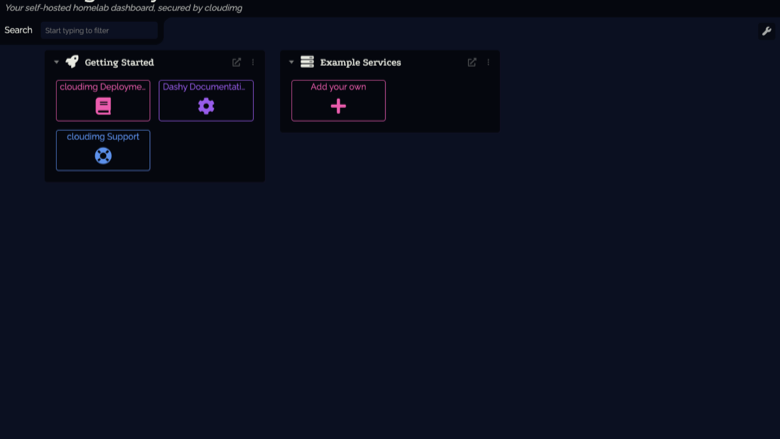
The Dashy dashboard
Image
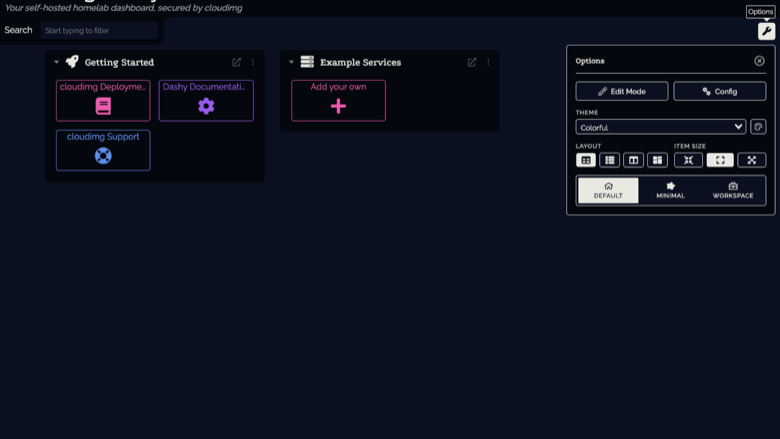
Themes, layout and options
Image
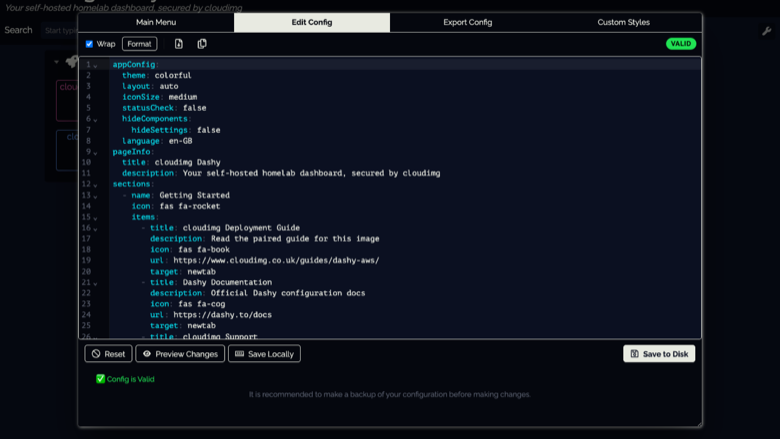
Built-in visual config editor
This is a repackaged open source software product wherein additional charges apply for cloudimg support services.
Overview
Dashy is a popular open source, self-hosted dashboard with over 18,000 GitHub stars and an active community of contributors. It brings all of your links, apps and bookmarks together on one customizable start page, organised into sections with icons, themes, search, keyboard shortcuts, live status checks and a built-in visual editor for changing the layout from the browser. It is an ideal single front door to everything you run, kept privately on infrastructure you control. This image delivers Dashy fully built and secured so a working dashboard is operational within minutes of launch.
Why This Image vs a Manual Install
Compared to deploying Dashy yourself from source or Docker, this image eliminates the manual Node.js build process, nginx configuration, TLS certificate generation and credential setup. What typically requires multiple steps across package management, reverse-proxy configuration and security hardening is completed for you at image build time. You launch the instance, read your unique credential, and start adding services.
Application Stack
Dashy is built from source at a pinned stable release and runs as an unprivileged system user under systemd on the Node.js runtime. It is bound to the loopback interface only and fronted by an nginx reverse proxy that terminates TLS and enforces authentication. systemd starts the dashboard and the web server on boot and restarts them on failure, and the memory-heavy build is done for you so there is no toolchain to run yourself.
Security Hardening
This image follows a defence-in-depth approach with the following hardening measures applied:
- Network isolation: Dashy binds exclusively to the loopback interface and is unreachable from the network directly
- Reverse-proxy enforcement: all external traffic passes through nginx, which enforces HTTP basic authentication on every request before proxying to the application
- Unique credential generation: a cryptographically random administrator password is generated on each instance's first boot; only its one-way bcrypt hash is stored on the server
- No default or shared credentials: nothing usable is baked into the image, so no two deployments share the same login
- TLS by default: a self-signed certificate is regenerated per instance on first boot; port 80 redirects to HTTPS
- Least privilege: the application runs as an unprivileged system user with no elevated permissions
- Automatic restart: systemd monitors both Dashy and nginx and restarts them on failure
Buyers requiring formal compliance documentation should contact cloudimg to discuss specific requirements.
Ready to Use
Read your credential from the root-only file, open the dashboard in your browser, and start adding your own services. Organise links into sections, choose a theme, enable live status checks, and edit the layout from the built-in visual editor or by editing a single configuration file.
AWS Integration
Deploy on any EC2 instance type. Use the unauthenticated health endpoint with an Application Load Balancer for availability monitoring. Pair with AWS Certificate Manager and a custom domain to replace the self-signed certificate with a trusted one. Back up your configuration using EBS snapshots or AWS Backup.
Use Cases
- A single self-hosted start page for a homelab or a team's internal applications and links
- A private, customizable dashboard with live status checks for the services you run in your own account
- A branded landing page that organises bookmarks, tools and admin consoles into one secured view
cloudimg Support
24/7 technical support by email and chat. Help with deployment, reverse-proxy and TLS termination with your own domain and certificate, dashboard configuration, adding status checks and widgets, and backup planning.
All product and company names are trademarks or registered trademarks of their respective holders. Use of them does not imply any affiliation with or endorsement by them.
Highlights
- Prebuilt and ready in minutes: unlike a manual Dashy install that requires a Node.js build, nginx configuration, TLS setup and credential management, this image completes all build and hardening steps at image creation time. Launch an instance and have a fully operational HTTPS dashboard without running a single build command or editing proxy configuration files yourself.
- Secure by default with unique credentials: every instance generates its own cryptographically random admin password on first boot - no shared or default logins exist across deployments. Dashy is bound exclusively to the loopback interface and unreachable from the network directly; all traffic passes through nginx enforcing HTTP basic authentication over TLS before reaching the application.
- Customizable dashboard with live monitoring and 24/7 support: organise links, apps and bookmarks into themed sections with icons, search, keyboard shortcuts and live status checks for your services. Edit layouts from the built-in visual editor or a single config file. Backed by 24/7 cloudimg technical support via email and chat for deployment, configuration and troubleshooting.
Details
Sold by
Categories
Delivery method
Delivery option
64-bit (x86) Amazon Machine Image (AMI)
Latest version
Operating system
Ubuntu 24.04
Deployed on AWS
New
Introducing multi-product solutions
You can now purchase comprehensive solutions tailored to use cases and industries.

Features and programs
Financing for AWS Marketplace purchases
AWS Marketplace now accepts line of credit payments through the PNC Vendor Finance program. This program is available to select AWS customers in the US, excluding NV, NC, ND, TN, & VT.

Pricing
Free trial
Try this product free for 7 days according to the free trial terms set by the vendor. Usage-based pricing is in effect for usage beyond the free trial terms. Your free trial gets automatically converted to a paid subscription when the trial ends, but may be canceled any time before that.
Pricing is based on actual usage, with charges varying according to how much you consume. Subscriptions have no end date and may be canceled any time. Alternatively, you can pay upfront for a contract, which typically covers your anticipated usage for the contract duration. Any usage beyond contract will incur additional usage-based costs.
Additional AWS infrastructure costs may apply. Use the AWS Pricing Calculator to estimate your infrastructure costs.
If you are an AWS Free Tier customer with a free plan, you are eligible to subscribe to this offer. You can use free credits to cover the cost of eligible AWS infrastructure. See AWS Free Tier for more details. If you created an AWS account before July 15th, 2025, and qualify for the Legacy AWS Free Tier, Amazon EC2 charges for Micro instances are free for up to 750 hours per month. See Legacy AWS Free Tier for more details.
Dimension | Description | Cost/hour |
|---|---|---|
m5.large Recommended | m5.large | $0.08 |
t2.micro | t2.micro instance type | $0.04 |
t3.micro | t3.micro instance type | $0.04 |
r5b.xlarge | r5b.xlarge instance type | $0.12 |
r7i.16xlarge | r7i.16xlarge instance type | $0.24 |
m8azn.3xlarge | m8azn.3xlarge instance type | $0.24 |
i4i.32xlarge | i4i.32xlarge instance type | $0.24 |
r8i.48xlarge | r8i.48xlarge instance type | $0.24 |
m8idb.96xlarge | m8idb.96xlarge instance type | $0.24 |
m8ib.16xlarge | m8ib.16xlarge instance type | $0.24 |
Vendor refund policy
Refunds available on request.

Legal
Vendor terms and conditions
Upon subscribing to this product, you must acknowledge and agree to the terms and conditions outlined in the vendor's End User License Agreement (EULA) .
Content disclaimer
Vendors are responsible for their product descriptions and other product content. AWS does not warrant that vendors' product descriptions or other product content are accurate, complete, reliable, current, or error-free.
Delivery details
64-bit (x86) Amazon Machine Image (AMI)
Amazon Machine Image (AMI)
An AMI is a virtual image that provides the information required to launch an instance. Amazon EC2 (Elastic Compute Cloud) instances are virtual servers on which you can run your applications and workloads, offering varying combinations of CPU, memory, storage, and networking resources. You can launch as many instances from as many different AMIs as you need.
Version release notes
Initial release of Dashy as a ready-to-use self-hosted dashboard, built from source at a pinned stable release, served over TLS behind nginx basic authentication, with a unique admin credential generated on each instance's first boot.
Additional details
Usage instructions
Connect via SSH on port 22 as the default login user for your operating system variant (for the Ubuntu 24.04 variant the user is ubuntu). Read the per-instance admin credential with: sudo cat /root/dashy-credentials.txt. Open the dashboard in a browser at https://<instance-public-ip>/ and sign in with the admin username and password from that file (the certificate is self-signed per instance, so a browser warning is expected). An unauthenticated health endpoint is available at https://<instance-public-ip>/healthz. Customize your dashboard by editing /opt/dashy/user-data/conf.yml then running sudo systemctl restart dashy, or use the built-in visual editor. Verify the appliance end-to-end at any time with sudo /usr/local/bin/dashy-selftest. The instance security group opens ports 22, 80 and 443. The services run under systemd: systemctl status dashy nginx.
Resources
Vendor resources
Support
Vendor support
cloudimg provides 24/7 technical support for this product by email and live chat. Our engineers help with deployment, configuration, updates, performance tuning and troubleshooting; critical issues receive a one hour average response. Contact support@cloudimg.co.uk .
AWS infrastructure support
AWS Support is a one-on-one, fast-response support channel that is staffed 24x7x365 with experienced and technical support engineers. The service helps customers of all sizes and technical abilities to successfully utilize the products and features provided by Amazon Web Services.
Similar products

This product has charges associated with it for deployment, configuration, and ongoing support. Deploy a customizable self-hosted dashboard for organizing services and bookmarks on EC2.

This product has charges associated with it for Websoft9 support. Pre-configured, web-based, cloud-native, secure, one-click to deploy Websoft9 Applications Hosting Platform on AWS. Websoft9 is a lightweight, self-hosting PaaS that allows you to deploy multiple applications on your own cloud infrastructure.
Customer reviews
No customer reviews yet
Be the first to review this product . We've partnered with PeerSpot to gather customer feedback. You can share your experience by writing or recording a review, or scheduling a call with a PeerSpot analyst.