
Sold by: Pixalate
Deployed on AWS
Filter bid requests by advertising ID with Pixalate's invalid traffic data, inside AWS RTB Fabric. The module checks each request's device ID against mobile and connected TV IDs Pixalate has linked to invalid traffic, and drops requests at or above the risk threshold you choose.
Overview
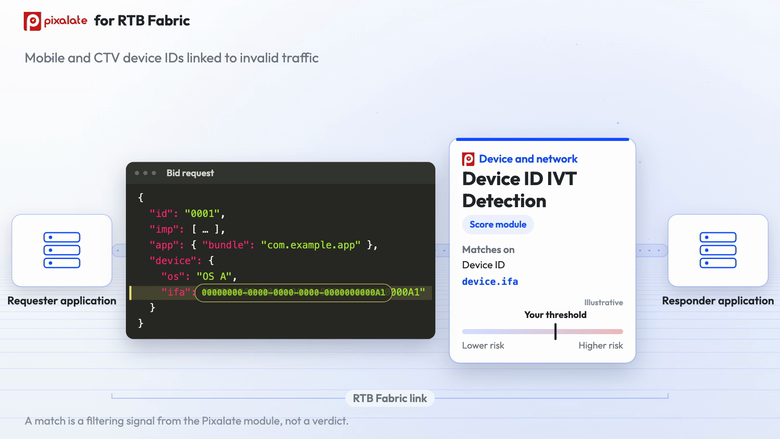
Pixalate Device ID Invalid Traffic (IVT) Detection checks the advertising ID of each OpenRTB bid request on your RTB Fabric link (device.ifa) against Pixalate's device ID data. Each listed ID carries a risk score from 0.5 to 1.0, where higher means riskier. You choose a threshold score: a request whose device ID scores at or above it is dropped before it reaches your bidder. Requests below the threshold, and requests whose ID isn't in Pixalate's data, pass through unchanged.
The data covers mobile advertising IDs, such as Apple IDFA and Google advertising IDs, and connected TV device IDs that Pixalate has linked to invalid traffic or malicious activity, including spoofed IDs.
Each Pixalate module runs inside RTB Fabric, so requests are checked with no call out to Pixalate during the auction. There are no servers to run, no SDK to install and no change to your bid request format.
A match is a filtering signal from the Pixalate module, not a verdict on any app, device or seller.
Highlights
- Checks every bid request's advertising ID against mobile and connected TV device IDs Pixalate has linked to invalid traffic.
- A risk score for each listed ID and a threshold you choose, so you decide how strictly to filter.
- Runs inside AWS RTB Fabric, with no call out to Pixalate during the auction and no servers or SDK.
Details
Sold by
Categories
Delivery method
Deployed on AWS
Features and programs
Financing for AWS Marketplace purchases
AWS Marketplace now accepts line of credit payments through the PNC Vendor Finance program. This program is available to select AWS customers in the US, excluding NV, NC, ND, TN, & VT.

Pricing
Pricing is based on the duration and terms of your contract with the vendor. This entitles you to a specified quantity of use for the contract duration. If you choose not to renew or replace your contract before it ends, access to these entitlements will expire.
Additional AWS infrastructure costs may apply. Use the AWS Pricing Calculator to estimate your infrastructure costs.
Dimension | Description | Cost/12 months |
|---|---|---|
Fixed | Annual access to the module | $60,000.00 |
Dimensions summary
This listing uses a single pricing dimension billed as a fixed annual contract. You pay one flat rate for a year of access to the Device ID Invalid Traffic (IVT) Filtering module. Pricing does not scale by usage, volume, or seats. You get the same yearly access regardless of how much data you process. The module provides a blocklist feed identifying high-risk mobile and connected TV device IDs flagged for invalid traffic, letting you filter them from your ad supply before or after a bid.
Top-of-mind questions for buyers
One unit buys a full year of access to the module. It delivers a blocklist feed of high-risk mobile and connected TV device IDs flagged for invalid traffic. The feed includes fields such as device ID, fraud type, operating system, ID type, and a probability score for each flagged device.
No. This is a flat annual fee with no usage, volume, or seat-based metering. You pay the same yearly rate no matter how much data you process or how many device IDs you filter. Nothing in the pricing structure triggers an automatic increase mid-term.
You can integrate the feed into your own stack and apply it pre-bid or post-bid. The blocklist lets you build custom logic to filter flagged device IDs from your ad supply at the point that fits your workflow.
www.pixalate.com
Helpful?
Vendor refund policy
Contract fees are non-refundable except where required by law or by AWS Marketplace policy. Contact rtbfabric@pixalate.com for billing questions.

Legal
Vendor terms and conditions
Upon subscribing to this product, you must acknowledge and agree to the terms and conditions outlined in the vendor's End User License Agreement (EULA) .
Content disclaimer
Vendors are responsible for their product descriptions and other product content. AWS does not warrant that vendors' product descriptions or other product content are accurate, complete, reliable, current, or error-free.
Delivery details
RTB Fabric Module
Software modules that can be attached to AWS RTB Fabric links to process real-time bidding traffic
Additional details
Usage instructions
You need an active AWS RTB Fabric link. The module runs on that link, with no SDK or server.
-
Email support@pixalate.com to have the module added to your link. Include your RTB Fabric gateway ID and link ID, and the threshold score you want.
-
Choose a threshold. Each listed device ID carries a risk score from 0.5 to 1.0. A request whose device ID scores at or above your threshold is dropped. A lower threshold drops more requests, and a higher one drops only the riskiest.
To watch before you filter, ask for enrich mode. Nothing is dropped: the action the module would have taken is added to the bid request's ext object, with Pixalate's data, for your bidder to see.
- Check your link. In the AWS CLI, get-link lists active modules under flowModules and changes still being applied under pendingFlowModules. The RTB Fabric console shows them on the link's Modules tab.
Requests whose device ID isn't in Pixalate's data pass through unchanged.
Questions: support@pixalate.com
Support
Vendor support
Email support@pixalate.com . Pixalate's support team helps with module setup, threshold choice and questions about the data.
Similar products

Filter bid requests by user agent with Pixalate's invalid traffic data, inside AWS RTB Fabric. The module checks each request's user agent against user agents Pixalate has linked to non-human traffic, such as known bots, crawlers and spiders, and drops the requests that match at or above your threshold.

Filter bid requests by IP address with Pixalate's invalid traffic data, inside AWS RTB Fabric. The module checks each request's IP against IPs Pixalate has linked to invalid traffic, such as data centers, bad proxies and Tor, and drops requests at or above the risk threshold you choose.

Filter mobile app bid requests with Pixalate's app risk data, inside AWS RTB Fabric. The module checks each request's app and operating system against iOS and Android apps Pixalate flags as high risk, for invalid traffic and for app store, ads.txt, privacy and inventory quality risks, and drops requests at or above your threshold.

Filter connected TV bid requests with Pixalate's CTV app risk data, inside AWS RTB Fabric. The module checks each request's app and operating system against CTV apps Pixalate flags as high risk, on platforms including Roku, Fire TV, Apple TV, Android, Samsung and LG, and drops requests at or above your threshold.
Customer reviews
No customer reviews yet
Be the first to review this product . We've partnered with PeerSpot to gather customer feedback. You can share your experience by writing or recording a review, or scheduling a call with a PeerSpot analyst.