Sold by: Sol4Cloud
Deployed on AWS
AWS Free Tier
ALinkServer AMI image implementing SAP ArchiveLink interface for archiving data and documents from S/4HANA or SAP ECC to your own Amazon S3 buckets with pay-per-use pricing.
Overview
Overview
ALinkServer by Sol4Cloud is an EC2 AMI image of implementation of the SAP ArchiveLink interface, purpose-built for archiving data and documents from SAP ECC and S/4HANA systems directly to your own Amazon S3 buckets. Unlike traditional SAP content servers that require dedicated infrastructure, complex licensing, and vendor-managed storage, ALinkServer runs entirely within your AWS account using cloud-native services.
Key Benefits
- Data sovereignty - All archived documents remain in your own S3 buckets. No data leaves your AWS account or passes through third-party storage.
- Pay-per-use model - No upfront license fees or content server hardware. You are charged only for the number of requests processed.
- Minimal infrastructure - Uses a single DynamoDB table for application and SAP repository configuration. No expensive databases and file systems to provision and manage.
- Simple deployment - Deploy on Amazon EC2 using CloudFormation template
Architecture and AWS Integration
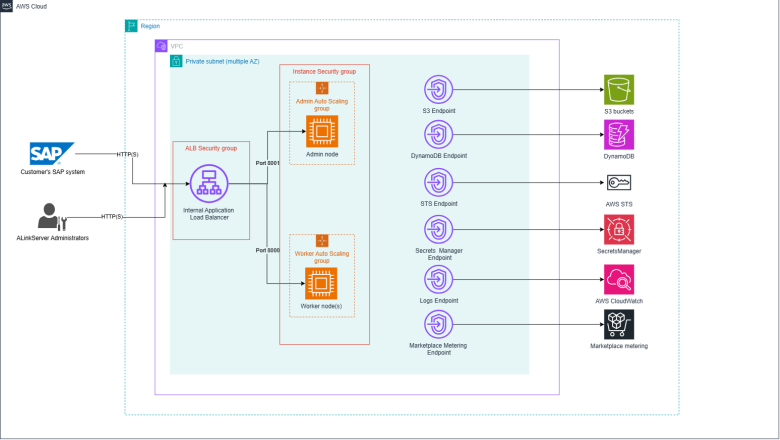
ALinkServer leverages the following AWS services within your account:
- Amazon S3 - Primary storage for all archived SAP documents and data, natively acess via S3 API, avoiding the hidden cost of S3 File Gateway
- Amazon DynamoDB - Stores application configuration and SAP content repository definitions
- AWS Secrets Manager - Manages credentials and sensitive configuration securely
- Amazon CloudWatch - Provides logging and monitoring for operational visibility
- Amazon EC2 - Runs the ALinkServer EC2 instances, scaled by Auto Scaling Groups and served via Application Load Balancer
Security
Because ALinkServer operates entirely within your AWS account, you retain full control over encryption, access policies, and network configuration. All communication between SAP and ALinkServer can be secured with TLS. IAM policies control access to S3 buckets, DynamoDB tables, and Secrets Manager entries, enabling least-privilege configurations aligned with your organization's security standards.
Use Cases
- SAP data archiving for database reduction - Archive completed fiscal year documents (FI, MM, SD) to reduce SAP database size before or after S/4HANA migration.
- Regulatory compliance - Retain SAP documents in immutable S3 storage with versioning and Object Lock to comply with retention requirements.
- System decommissioning - Archive documents from legacy SAP systems being retired while maintaining retrieval access through S3.
Deployment
ALinkServer is deployed in AWS AMI EC2 images. The CloudFormation supported deployment involves configuring EC2 instances and Application Load Balancer. Initial configuration sets up the DynamoDB configuration table, configures S3 buckets for document storage, and configures SAP content repositories (transaction OAC0) to point to your ALinkServer endpoint. The solution supports multi-system landscapes (DEV, QA, PRD) through separate content repository configurations. For Elastic Container Services or Elastic Kubernetes Services deployment of ALinkServer visit ALinkServer ECS/EKS version
Getting Started
Subscribe through AWS Marketplace to begin. After subscription, deploy your AMI EC2 installation using CloudFormation Stack configuration. Configure your SAP system's ArchiveLink content repositories to connect to ALinkServer.
(SAP is a registered trademark of SAP SE in Germany and other countries. Amazon Web Services, AWS, and Amazon S3 are trademarks of Amazon.com, Inc. or its affiliates.)
Highlights
- Eliminates traditional SAP content server infrastructure - ALinkServer replaces dedicated archiving servers with a lightweight AMI EC2 instances and dedicated Application Load Balancer. No file systems to provision, no content server licenses to purchase, and no vendor-managed storage. Your archived SAP documents are stored directly in your own S3 buckets, giving you full control over data residency, encryption policies, and access permissions.
- True pay-per-use pricing with no upfront investment - Unlike legacy SAP archiving solutions that require perpetual licenses and dedicated hardware, ALinkServer charges only for requests processed. There are no minimum commitments and no storage fees beyond standard S3 rates. This model aligns archiving costs directly with actual usage volume from your S/4HANA or SAP ECC systems.
- Complete data sovereignty within your own AWS account - ALinkServer uses only services running in your AWS account: S3 for document storage, DynamoDB for configuration, Secrets Manager for credentials, and CloudWatch for monitoring. No archived data passes through or is stored in third-party systems. You maintain full ownership of IAM policies, encryption keys, network controls, and retention rules for all archived SAP content.
Details
Sold by
Categories
Delivery method
Delivery option
ALinkServer AMI deployment using CloudFormation
Latest version
Operating system
AmazonLinux 2023
Deployed on AWS
New
Introducing multi-product solutions
You can now purchase comprehensive solutions tailored to use cases and industries.

Features and programs
Financing for AWS Marketplace purchases
AWS Marketplace now accepts line of credit payments through the PNC Vendor Finance program. This program is available to select AWS customers in the US, excluding NV, NC, ND, TN, & VT.

Pricing
Pricing is based on actual usage, with charges varying according to how much you consume. Subscriptions have no end date and may be canceled any time.
Additional AWS infrastructure costs may apply. Use the AWS Pricing Calculator to estimate your infrastructure costs.
Dimension | Description | Cost/unit |
|---|---|---|
ALinkServer processed requests - Tier 1 (0-100K) | Applies to the first 100,000 processed SAP ArchiveLink requests per year in one AWS region | $0.03 |
ALinkServer processed requests - Tier 2 (>100K in region) | Discounted rate for SAP ArchiveLink requests exceeding 100,000 per year in one AWS region | $0.006 |
Vendor refund policy
We do not offer refunds.

Legal
Vendor terms and conditions
Upon subscribing to this product, you must acknowledge and agree to the terms and conditions outlined in the vendor's End User License Agreement (EULA) .
Content disclaimer
Vendors are responsible for their product descriptions and other product content. AWS does not warrant that vendors' product descriptions or other product content are accurate, complete, reliable, current, or error-free.
Delivery details
ALinkServer AMI deployment using CloudFormation
Product Overview ALinkServer offers deployment on AWS through AWS CloudFormation. This deployment utilizes single multi-purpose Amazon Machine Image (AMI).
-
Admin Server: Deployed within its own Auto Scaling Group (configured with a fixed size of 1), this instance serves the ALinkServer Admin UI.
-
Worker Nodes: Deployed in a separate Auto Scaling Group, these instances process ArchiveLink requests. Administrators can easily configure the minimum, maximum, and desired capacity to allow the worker pool to scale dynamically with the workload.
-
Application Load Balancer (ALB): An internal ALB is automatically provisioned to route incoming traffic—directing port 8001 requests to the Admin Target Group and port 8000 requests to the Worker Target Group.
Secure Networking & VPC Endpoints When "Create VPC Endpoints" is enabled during deployment CloudFormation provisions Interface and Gateway VPC Endpoints for required AWS services (Amazon S3, DynamoDB, AWS Secrets Manager, AWS STS, CloudWatch Logs, and AWS Marketplace Metering). This configuration ensures that all communication between the ALinkServer instances and underlying AWS services remains strictly on the private AWS network and never traverses the public internet.
Advanced Security & Compliance
-
Automated IAM Provisioning: CloudFormation template can automatically generate a new EC2 Instance Profile that provides the running instances access to Marketplace Metering, DynamoDB, S3, Secrets Manager, SSM Core, and CloudWatch Logging.
-
Strict Security Groups: The template creates custom Security Groups that lock down inbound communication, ensuring EC2 instances only accept HTTP traffic directly from the ALB's security group.
Flexible Compute Options To ensure maximum compatibility and cost-effectiveness across AWS Regions, the template allows you to select from a wide range of x86_64 instance families. Administrators can select lightweight instances (such as t3.medium) for the Admin UI, while assigning robust, compute-optimized instances (such as c5.xlarge, c7i.xlarge, or c8a.xlarge) to the Worker ASG to handle heavy archiving workloads.
CloudFormation Template (CFT)
AWS CloudFormation templates are JSON or YAML-formatted text files that simplify provisioning and management on AWS. The templates describe the service or application architecture you want to deploy, and AWS CloudFormation uses those templates to provision and configure the required services (such as Amazon EC2 instances or Amazon RDS DB instances). The deployed application and associated resources are called a "stack."
Version release notes
ALinkServer release 1.0.9, fully tested for AMI EC2 deployment using CloudFormation template
Additional details
Usage instructions
Deployment instructions
-
Launch CloudFormation Stack After subscribing to ALinkServer on AWS Marketplace open the Manage Subscriptions page and click on Launch CloudFormation Stack button to start configuring the deployment
-
Launch page On the Launch page you can review the available documentation and view the CloudFormation template. When you're ready select target AWS region and click Launch with CloudFormation button.
-
Create stack wizard Complete the CloudFormation Create stack process to deploy ALinkServer to your target VPC. For detailed explanation about the CloudFormation parameters see the ALinkServer documentation on ALinkServer suppor page
-
Run through first ALinkServer configuration Follow the product documentation for a step-by-step guide on initial product launch.
Resources
Vendor resources
Support
Vendor support
Contact Support
For technical support, deployment assistance, or general inquiries, contact Sol4Cloud at support@sol4cloud.com . Please include details of your issue such as error messages, log excerpts, and your ALinkServer version.
Support Hours
Support is available Monday through Friday, 8:00 AM to 6:00 PM Central European Time (CET/CEST). Requests received outside business hours will be addressed on the next business day.
What We Support
- Troubleshooting ALinkServer container deployment and configuration
- SAP ArchiveLink content repository setup guidance (OAC0 configuration)
- AWS service integration issues (S3, DynamoDB, Secrets Manager, CloudWatch)
- Request processing errors and performance questions
- Subscription and billing inquiries
Getting Started
For new customers seeking deployment guidance, proof-of-concept assistance, or a walkthrough of ALinkServer configuration with your SAP environment, reach out to the same support address. We can arrange a guided session to help you get up and running.
AWS infrastructure support
AWS Support is a one-on-one, fast-response support channel that is staffed 24x7x365 with experienced and technical support engineers. The service helps customers of all sizes and technical abilities to successfully utilize the products and features provided by Amazon Web Services.
Similar products
Containerized SAP ArchiveLink 4.6 server that archives data and documents from SAP ECC or S/4HANA directly to your own Amazon S3 buckets with pay-per-use pricing.

S3zipper V2 is a high performance Go based microservice that zips AWS S3 files on the fly, streaming archives directly to S3 buckets or generating instant browser download links with automated HTTPS.

This AWS Data Exchange product uses data from the Registry of Open Data on AWS: AWS Public Blockchain Data. This product provides the transactions datasets from the Bitcoin blockchain. The blockchain data is transformed into single table, called transactions, in compressed Parquet files partitioned by date to allow efficient access for most common analytics queries. Assets of this product resides on Requestor Pays S3 bucket.

High performance Go based microservice for Amazon S3 that zips files on the fly, streaming archives directly to S3 buckets or generating instant browser download links via IIS.
Customer reviews
No customer reviews yet
Be the first to review this product . We've partnered with PeerSpot to gather customer feedback. You can share your experience by writing or recording a review, or scheduling a call with a PeerSpot analyst.