Sold by: EKS Manager
Deployed on AWS
A platform you own, not one you rent. No operator, CRD, or control plane of ours runs in your clusters - only upstream ArgoCD, Traefik, ExternalDNS, ECK, and Headlamp, pre-integrated, version-compatible, and upgraded together three times a year. Cancel and nothing is torn down: every cluster keeps running in your own AWS account. A billion-dollar+ financial institution runs 6 clusters globally on EKS Manager.
Overview
Image
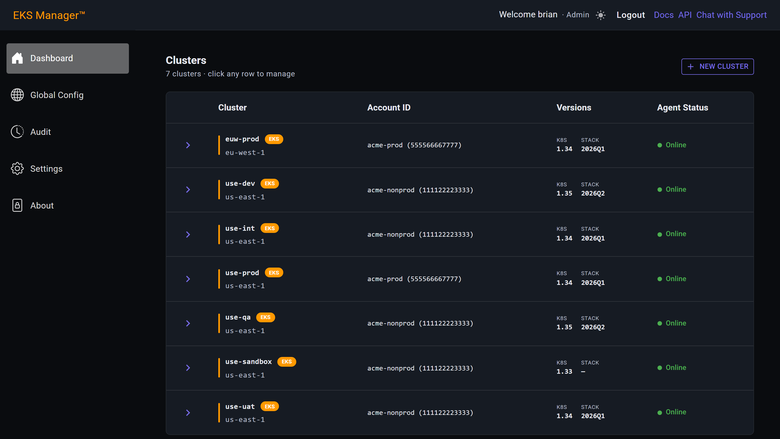
Every cluster, every account
Image
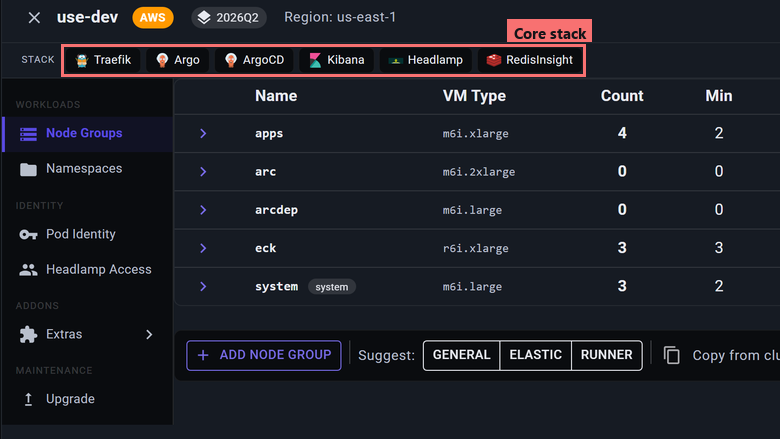
The integrated core stack
Image
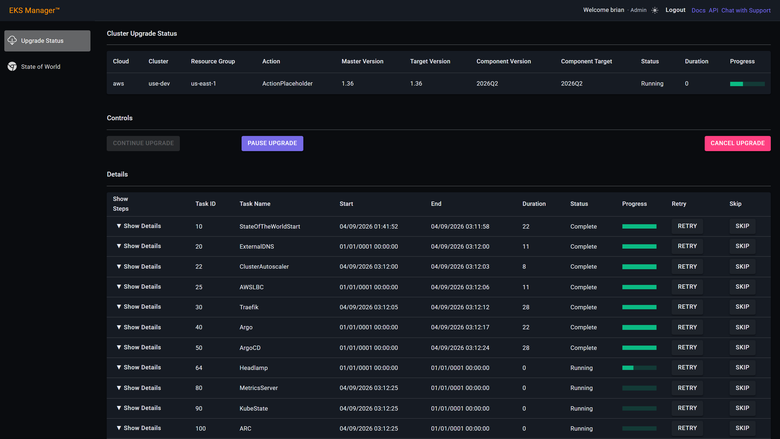
Upgrades you can watch
Image
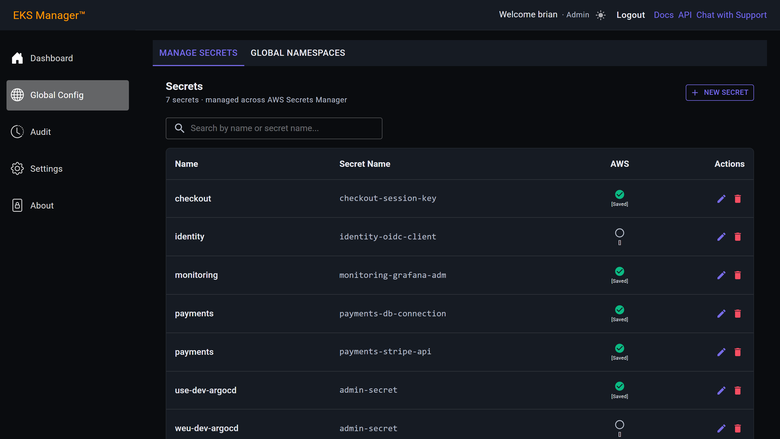
Secrets, defined once
EKS Manager - Landing Zone in a Box for EKS
Native AWS tools provision a cluster. EKS Manager provisions a platform - declarative, reproducible, and identical from a developer's laptop to production. Creating an EKS control plane and node groups is the easy part. Wiring DNS, TLS, ingress, monitoring, and continuous delivery is where teams lose weeks, and where every engineer does it slightly differently. EKS Manager delivers all of it as one integrated platform so your team ships workloads instead of assembling infrastructure.
A billion-dollar+ financial institution runs 6 clusters globally on EKS Manager, with a platform team managing production workloads across multiple environments from day one.
What You Get on Every Cluster
Each cluster arrives with a pre-integrated, version-compatible stack that is upgraded together three times a year:
- ArgoCD for GitOps delivery - every environment is a declared, auditable state
- Traefik for ingress with automated wildcard TLS certificates via DNS-01
- ExternalDNS for automated Route 53 record management
- ECK for logging and metrics (full-stack observability)
- Headlamp for a modern Kubernetes UI and cluster access
- Managed EKS add-ons - vpc-cni, kube-proxy, CoreDNS, aws-ebs-csi-driver, metrics-server, and eks-pod-identity-agent kept in step with each Kubernetes version
- Node group isolation with automated taints and tolerations separating platform components from your workloads
- KMS envelope encryption for secrets at rest via hardware-backed security
- Pod Identity with native short-lived tokens - no static keys, no IRSA complexity
How Pricing Works
EKS Manager is priced across four dimensions through AWS Marketplace:
- EKS Manager Server - one required per installation (the hosted control plane your agent connects to)
- Managed EKS Cluster - one per cluster configured in EKS Manager
- Production Support (optional) - includes up to 5 managed clusters with P1 response in 4 business hours and P2 in 1 business day (Mon-Fri, 09:00-18:00 CET)
- Production Support - Additional Clusters - for clusters beyond the first 5 included with Production Support
AWS infrastructure consumed by the agent and your clusters is billed to you by AWS, separately from this subscription. The EKS Manager server itself runs in a dedicated account we operate and is covered by your subscription.
Getting Started - From Subscription to Production in a Day
- Subscribe on AWS Marketplace. Your installation is built and a welcome email arrives, usually within a day, with your address and temporary password.
- Sign in to the Settings page. Configure MFA and set up SSO through your Entra directory.
- Fill in the GUI fields - your AWS management account, shared services account, VPC, and subnet.
- Copy-paste the generated environment variables into your shell and run the bootstrap script (Terraform). CodeBuild provisions the agent, ECR repository, StackSets, and configuration.
- Define your topology - the OUs, accounts, and AWS Regions you want EKS Manager to manage.
- Create your first cluster - a new cluster with the full core stack takes 30 minutes or less.
Prerequisites include AWS Organizations, a shared services account, Route 53 hosted zones with delegation, a VPC with subnets, a GitHub organisation with Actions enabled, and an Entra directory for SSO. Full details at the documentation site.
Security Model - Zero Trust, Least Privilege
The agent runs in your own AWS account with outbound-only TLS connections on port 443. No inbound ports, no VPN tunnels, no firewall rules to open.
- No AdministratorAccess - permissions are an explicit allow list with deny statements that cannot be overridden
- Permissions boundary enforced on every role the agent creates
- Region-restricted to only the AWS Regions you approve
- Secrets never stored server-side - entered via the GUI, relayed over TLS to the agent, and written to AWS Secrets Manager in your account
- SCP deny layer at the OU blocks billing access, org management, and cost explorer for all roles including EKSManagerAdmin
- Cluster isolation - each cluster is self-sufficient at runtime with per-cluster KMS keys and no cross-account IAM dependencies
- Full audit log - every action records who did it, when, what it touched, and where every secret was deployed
New accounts joining your EKS OU are provisioned automatically via AWS StackSets with the full stack of roles and permissions.
Open-Source CI/CD Toolchain
EKS Manager includes open-source GitHub Actions for GitOps-driven Kubernetes deployments, multi-cloud Docker builds with BuildKit caching, ArgoCD application lifecycle management, and automated cluster restoration. Explore the toolchain at github.com/gitopsmanager.
Highlights
- A platform, not just a cluster. ArgoCD, Traefik, ExternalDNS, ECK, and Headlamp ship pre-integrated, version-compatible, and upgraded together three times a year. Dev, QA, UAT, and production stay identical instead of drifting apart. A billion-dollar+ financial institution runs 6 clusters globally on EKS Manager. The documentation describes a path from subscription to a production-ready platform in as little as a day, with new clusters and the full core stack provisioned in under 30 minutes.
- CI/CD included, and open source. Self-hosted GitHub Actions runners deploy into your own clusters and register with your GitHub organisation: one for builds with Docker Bake, one for deployments. The actions that build images, render manifests, and drive ArgoCD are open source at github.com/gitopsmanager and separate from the product, so what they do with access to your repositories can be read rather than taken on trust.
- No standing credentials. EKS Pod Identity binds service accounts to IAM roles with short-lived tokens - no static keys and no IRSA complexity. Secrets are defined once and deployed to the clusters and namespaces you choose, held in AWS Secrets Manager rather than copied around. The agent itself holds no AdministratorAccess; IAM deny statements block creation of IAM users, deletion of CloudTrail or GuardDuty, S3 access, KMS key deletion, and billing changes.
Details
Sold by
Delivery method
Deployed on AWS
New
Introducing multi-product solutions
You can now purchase comprehensive solutions tailored to use cases and industries.

Features and programs
Financing for AWS Marketplace purchases
AWS Marketplace now accepts line of credit payments through the PNC Vendor Finance program. This program is available to select AWS customers in the US, excluding NV, NC, ND, TN, & VT.

Pricing
Pricing is based on the duration and terms of your contract with the vendor. This entitles you to a specified quantity of use for the contract duration. If you choose not to renew or replace your contract before it ends, access to these entitlements will expire.
Additional AWS infrastructure costs may apply. Use the AWS Pricing Calculator to estimate your infrastructure costs.
Dimension | Description | Cost/month |
|---|---|---|
EKS Manager Server | Required, one per installation. The hosted control plane your agent connects to. Set quantity to 1. | $250.00 |
Managed EKS Cluster | One per EKS cluster configured in EKS Manager, plus any cluster removed from it within the last 120 days. Your current requirement is shown in EKS Manager under Settings, Licences. Set quantity to at least that number. | $850.00 |
Production Support | Optional. Includes up to 5 managed clusters - beyond that, add "Production Support - additional clusters". Target response within 4 business hours for P1 and 1 business day for P2, Monday to Friday 09:00 to 18:00 CET. Targets are for acknowledgement, not resolution. Applies to clusters on the current or previous EKS Manager release. One per installation. | $2,500.00 |
Production Support - additional clusters | Additional clusters beyond the first 5, which are included with Production Support. If you manage 20 clusters, enter 15. Requires Production Support. | $100.00 |
Dimensions summary
You build your subscription from four items billed monthly in advance through AWS. You always set the Server to one, since each installation needs a single hosted control plane. You then add one Managed EKS Cluster unit per cluster, including any cluster removed within the last 120 days; cluster size does not change the count. Production Support is an optional single unit that covers up to five clusters. When you manage more than five, you add one Production Support - additional clusters unit for each cluster beyond the first five. That add-on requires Production Support.
Top-of-mind questions for buyers
One unit covers one EKS cluster configured in the installation, whether EKS Manager created it or you added it later. Cluster size makes no difference: a three-node and a hundred-node cluster each count as one unit. A cluster removed within the last 120 days still counts until that period passes.
Your licence requirement is measured continuously and shown under Settings, Licences. If it exceeds your subscribed quantity, you must raise the quantity within 14 days; no extra is owed for the prior period if you do. Mid-term increases work only while automatic renewal is on. AWS pro-rates the added amount.
No. The subscription covers the hosted control plane and your managed clusters as licence units only. You pay AWS separately for the agent instance, worker nodes, storage, data transfer, DNS queries, secrets and KMS usage. Those infrastructure charges appear on your normal AWS bill, not from the vendor.
eksmanager.io+1
Helpful?
Vendor refund policy
Subscriptions are billed monthly in advance. Turn on automatic renewal when you subscribe: a monthly contract that does not renew ends after one month, and your EKS Manager environment is then shut down. To cancel, turn off automatic renewal in the AWS Marketplace console; access continues to the end of the current billing month. Pro-rated refunds are not offered. If you believe you were charged in error, contact support@eksmanager.io and we will resolve it with AWS Marketplace.

Legal
Vendor terms and conditions
Upon subscribing to this product, you must acknowledge and agree to the terms and conditions outlined in the vendor's End User License Agreement (EULA) .
Content disclaimer
Vendors are responsible for their product descriptions and other product content. AWS does not warrant that vendors' product descriptions or other product content are accurate, complete, reliable, current, or error-free.
Delivery details
Software as a Service (SaaS)
SaaS delivers cloud-based software applications directly to customers over the internet. You can access these applications through a subscription model. You will pay recurring monthly usage fees through your AWS bill, while AWS handles deployment and infrastructure management, ensuring scalability, reliability, and seamless integration with other AWS services.
Resources
Vendor resources
Support
Vendor support
Support is provided by GitOps Manager, S.L.
Email: support@eksmanager.io Support portal: https://eksmanager.io/support.html Documentation: https://eksmanager.io/docs.html
Community Support
Community Support is included with every subscription at no additional cost. It covers email support and access to the verified support chat, on a best-efforts basis with no committed response time. Verified chat is available to any customer whose work email is registered against an active EKS Manager licence; a secure chat link is sent to that address on request.
Production Support
Production Support is an optional subscription dimension that includes coverage for up to 5 managed clusters. For installations managing more than 5 clusters, an additional-clusters dimension is available. Production Support uses the same channels and adds committed response targets: 4 business hours for P1 issues and 1 business day for P2, Monday to Friday 09:00 to 18:00 CET. Response targets are for acknowledgement, not resolution.
Scope
Support covers the EKS Manager platform, the agent, and the core stack it installs. AWS infrastructure support is provided by AWS under your own AWS Support plan.
Getting Started
Setup begins with the prerequisites listed at https://eksmanager.io/docs.html and follows a guided flow: fill in account details in the Settings GUI, paste environment variables into a shell, and run the bootstrap script. The full path from subscription to a production-ready platform takes as little as one day, and each new cluster with the complete core stack provisions in under 30 minutes.
Security and Access
EKS Manager operates without access to your AWS accounts or clusters. Where diagnosing an issue requires access to your environment, you provide it for the duration of the investigation, typically a managed workstation or jump host with a time-limited session. We do not hold standing credentials to customer environments.
AWS infrastructure support
AWS Support is a one-on-one, fast-response support channel that is staffed 24x7x365 with experienced and technical support engineers. The service helps customers of all sizes and technical abilities to successfully utilize the products and features provided by Amazon Web Services.
Similar products

As an AWS Partner, we are delighted to present our EKS (Amazon Elastic Kubernetes Service) Deployment and Management Service. EKS is a powerful platform for running, scaling, and managing containerized applications using Kubernetes. Our service is designed to make EKS adoption seamless and efficient for your organization, ensuring you get the most out of this versatile container orchestration solution.

TeraSky has bundled the necessary AWS features that address production needs, packaging them together for worry-free, hassle-free EKS deployment that leverages our experience and knowledge to save your team time and avoid failures in production.
Also included is a one-day, Production-Ready EKS operation training session that covers Kubernetes, CI/CD, and Packaging with hands-on sample workload deployment demonstrations to give customers everything they need for success.
Every Production Ready EKS deployment incorporates industry standards and AWS best practices and includes everything you need to ensure your EKS is production-ready

Production-ready Grafana with full root access, unlimited dashboards, and security hardening - a self-hosted alternative to managed visualization services on AWS.
CoreNova SSM EKS Admin Bastion AMI (Amazon Linux 2023, Graviton ARM64): private Amazon EKS administration bastion for teams replacing public SSH jump hosts. Includes AWS CLI v2, Session Manager Plugin, kubectl version selector, Helm, eksctl, k9s, IAM examples, and AL2023 hardening.
Customer reviews
No customer reviews yet
Be the first to review this product . We've partnered with PeerSpot to gather customer feedback. You can share your experience by writing or recording a review, or scheduling a call with a PeerSpot analyst.