
Sold by: DataModal
Deployed on AWS
Spider turns distributed enterprise data into governed, AI-ready business context in your own Amazon EKS cluster, so AI agents act with quality, privacy, traceability and control.
Overview
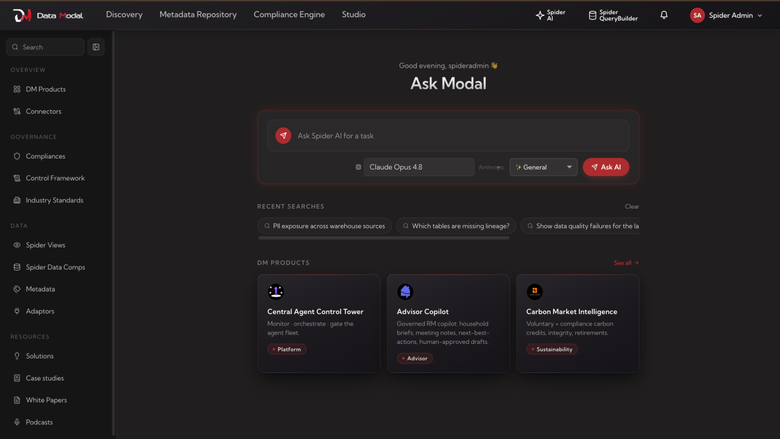
Spider Platform turns distributed enterprise data into governed, AI-ready business context, and runs entirely inside your own Amazon EKS cluster, so your data, credentials and models stay in your AWS account.
Connect your sources (databases, warehouses, lakes, applications and files), discover and profile them, and publish governed data products with lineage, quality rules, owners and approvals. Spider's Business Context Engine maps your data to industry data models and a knowledge graph, so people and AI agents work from the same trusted definitions. Agents reach that context through governed APIs and MCP tools, with access controlled, traced and auditable in the AI Control Plane.
Built for private and regulated environments: install into an existing cluster in your VPC, keep the console behind an internal load balancer, and run with no internet access at runtime; industry models are preloaded, and AI runs on Amazon Bedrock through an IAM role in your account with no API key, or on your own Anthropic, OpenAI or Gemini key. Use Spider-managed PostgreSQL and Valkey, or bring Amazon RDS for PostgreSQL, Amazon ElastiCache and AWS Secrets Manager. Updates are a single Helm command that keeps every setting, connection and data product.
Pricing is pay-as-you-go in Data Metering Units (DMUs), reported hourly through AWS Marketplace. The first 30 days from install are not billed.
Highlights
- Business Context Engine: governed, AI-ready business context from your distributed enterprise data
- Automated lineage, quality enforcement, and continuous monitoring
- Governed data delivered to Gen-AI and agents, inside your own Amazon EKS cluster and AWS account
Details
Sold by
Categories
Delivery method
Supported services
Delivery option
Helm chart on Amazon EKS
Latest version
Operating system
Linux
Deployed on AWS
New
Introducing multi-product solutions
You can now purchase comprehensive solutions tailored to use cases and industries.

Features and programs
Financing for AWS Marketplace purchases
AWS Marketplace now accepts line of credit payments through the PNC Vendor Finance program. This program is available to select AWS customers in the US, excluding NV, NC, ND, TN, & VT.

Pricing
Pricing is based on actual usage, with charges varying according to how much you consume. Subscriptions have no end date and may be canceled any time.
Additional AWS infrastructure costs may apply. Use the AWS Pricing Calculator to estimate your infrastructure costs.
Dimension | Description | Cost/unit |
|---|---|---|
Data Metering Unit | One DMU per active 10-minute window (max 6 per hour); idle time is not charged. | $1.00 |
Vendor refund policy
Usage is billed hourly in Data Metering Units through AWS Marketplace, and the first 30 days from install are not billed. If you believe a charge is incorrect, email support@datamodal.com within 30 days of the charge with your AWS account ID and the billing period. Approved refunds are issued through AWS Marketplace.

Legal
Vendor terms and conditions
Upon subscribing to this product, you must acknowledge and agree to the terms and conditions outlined in the vendor's End User License Agreement (EULA) .
Content disclaimer
Vendors are responsible for their product descriptions and other product content. AWS does not warrant that vendors' product descriptions or other product content are accurate, complete, reliable, current, or error-free.
Delivery details
Helm chart on Amazon EKS
Supported services: Learn more
- Amazon EKS
Helm chart
Helm charts are Kubernetes YAML manifests combined into a single package that can be installed on Kubernetes clusters. The containerized application is deployed on a cluster by running a single Helm install command to install the seller-provided Helm chart.
Version release notes
Spider 2.0.11 for Amazon EKS: the Marketing Intelligence apps run on your own data. An existing install updates in place; its settings, data, address, AI provider key, connectors, workspaces and deployments are unchanged. Spider's databases do not restart.
Marketing Intelligence apps
- Each of the eleven Marketing Intelligence apps has a Make live button. It opens the assistant with the request already sent: the assistant connects the app, finds the tables in your connected sources that hold each tab's data, builds the components that read them, tests each one, and asks you to approve once before anything changes.
- Your column names, codes and formats can differ from the app's: the assistant matches tables by what their columns mean and converts dates, flags and amounts to the formats the app reads. A tab with no matching data stays empty, and the assistant says which tabs those are and what would fill them.
- Each app's agent starts with the app and proposes recommendations as soon as the app has data; you approve or reject them in the app.
- The apps' views and data model are fixed; only the components that feed them change. Updating an app keeps its address and key. The Studio shows the views and components for anyone who wants to check them.
Security
- Fixes for vulnerabilities published since 2.0.10 in the certificate store, libcurl, certifi and the image library (pillow 13).
The other images are 2.0.10's.
Additional details
Usage instructions
Spider runs in your own Amazon EKS cluster, standard or EKS Auto Mode (Kubernetes 1.32+), on Linux amd64 nodes (not Fargate). It requests about 4.5 vCPU and 12 GiB: start with 3 x m6i.xlarge. Helm 3.14+ or Helm 4.
-
Get the package (CloudFormation templates, example values). aws ecr get-login-password --region us-east-1 | helm registry login --username AWS --password-stdin 709825985650.dkr.ecr.us-east-1.amazonaws.com helm pull oci://709825985650.dkr.ecr.us-east-1.amazonaws.com/datamodal/spider --version 2.0.11 --untar
-
Prerequisites. Deploy spider/aws/prerequisites.yaml (CloudFormation): Spider's IAM role (IRSA, with aws-marketplace:MeterUsage), an encrypted EFS file system, the EBS and EFS CSI add-ons. Fill in its Spider fields (domain, admin email, organisation, AI provider, MTU). No cluster yet: spider/aws/new-cluster.yaml makes an EKS Auto Mode one in your VPC, with the endpoints a private VPC needs. A standard cluster also needs the AWS Load Balancer Controller. Autoscaling needs the metrics-server add-on. For Bedrock, enable Claude in the Bedrock console. Tag your subnets kubernetes.io/role/internal-elb=1 (internal, the default) or kubernetes.io/role/elb=1 (internet-facing).
-
Configure. Save the stack's HelmValues output as my-values.yaml: it is a complete values file. Another provider's API key: Settings, LLM providers. Other setups (your own databases, private VPC, no internet, behind your ALB): spider/aws/examples/. All settings: spider/values.yaml. Keep your file.
-
Install. helm install spider oci://709825985650.dkr.ecr.us-east-1.amazonaws.com/datamodal/spider --version 2.0.11 -n spider --create-namespace -f my-values.yaml --timeout 30m First admin's password: kubectl -n spider get secret spider-keys -o jsonpath='{.data.ADMIN_PASSWORD}' | base64 -d
Updates. Turn on AWS User Notifications ("Products and Solutions") for new versions. To update: helm upgrade spider oci://709825985650.dkr.ecr.us-east-1.amazonaws.com/datamodal/spider --version <new> -n spider --reset-then-reuse-values --atomic --timeout 30m With Helm 4, add --server-side=false (whichever Helm installed it). Settings, data and keys are kept. An update that would change a setting you did not ask to change is refused first. Spider-managed databases are dumped to the data root first. Use the Helm CLI: Argo CD cannot read Spider's kept keys. Interrupted ("another operation is in progress"): helm rollback spider <last deployed revision> -n spider, then update again.
Sensitive data. Connector credentials are encrypted in PostgreSQL with a key generated in your cluster (Secret spider-keys), or kept in your AWS Secrets Manager (secretStore.mode awsSecretsManager). Nothing is sent to the seller. Back up spider-keys with your cluster: without it, stored credentials cannot be decrypted.
Encryption. Spider-managed disks are encrypted EBS (optionally your KMS key), EFS is encrypted at rest and in transit, and nginx serves TLS 1.2+ (your certificate, Let's Encrypt, or self-signed).
Backup and recovery. Use AWS Backup for EKS (cluster, EBS and EFS), or RDS snapshots for your own database. Restore: reinstall with the same release name and values over the kept volumes and spider-keys.
Health. kubectl -n spider get pods: all Running and Ready; https://<domain>/healthz answers 200. Load balancer pending: check the subnet tags.
Network. Spider needs no internet at runtime. A VPC without one needs endpoints for ECR (api, dkr), S3 (gateway), STS, EC2, EKS, EKS Auth, Elastic Load Balancing, CloudWatch Logs, EFS and metering-marketplace, plus Secrets Manager and Bedrock (bedrock, bedrock-runtime, bedrock-mantle) if used. Other LLM providers, and Let's Encrypt, need outbound access.
Costs. Usage is billed in DMUs through AWS Marketplace; the first 30 days from install are not billed. AWS bills the EKS, EC2, EBS, EFS, load balancer and any RDS or ElastiCache.
Support
Vendor support
Email: support@datamodal.com Phone: +91 8978077220
AWS infrastructure support
AWS Support is a one-on-one, fast-response support channel that is staffed 24x7x365 with experienced and technical support engineers. The service helps customers of all sizes and technical abilities to successfully utilize the products and features provided by Amazon Web Services.
Similar products
Web Spiders offers comprehensive assistance and expertise in managing and optimising Amazon Elastic Kubernetes Service (Amazon EKS). This includes deployment, configuration, monitoring, troubleshooting, and ongoing maintenance of Amazon EKS environments. Web Spiders help the customers to streamline their container orchestration efforts, ensuring reliable and efficient operation of applications within the Amazon EKS.

exaBase Studio for EKS is a low-code/no-code platform that accelerates cloud-native development on AWS EKS. It offers an integrated GUI for microservice design, CI/CD, and auto-scaling configuration, dramatically streamlining the entire process from development through operations.
Build, deploy and manage Amazon EKS clusters from one SaaS control plane. Create new clusters or import the ones you run across accounts and regions, apply the same access rules and configuration to all of them, find cost savings, and get answers from an AI assistant powered by Amazon Bedrock. Nothing to host or upgrade. 30-day free trial.

Modernize and operate Kubernetes with Amazon EKS Platform Engineering & Lifecycle Management Services. We design, build, automate, secure, and continuously optimize enterprise Kubernetes platforms using AWS best practices, Infrastructure as Code, observability, and proven operational processes to improve reliability, scalability, and application delivery.
Customer reviews
No customer reviews yet
Be the first to review this product . We've partnered with PeerSpot to gather customer feedback. You can share your experience by writing or recording a review, or scheduling a call with a PeerSpot analyst.