
Sold by: cloudimg
Deployed on AWS
Free Trial
AWS Free Tier
This product has charges associated with it for seller support. Production-ready Apache Tika Server on AWS with TLS and auth hardened per-instance. Extracts text and metadata from thousands of file types via REST, backed by 24/7 cloudimg engineer support.
Overview
Image
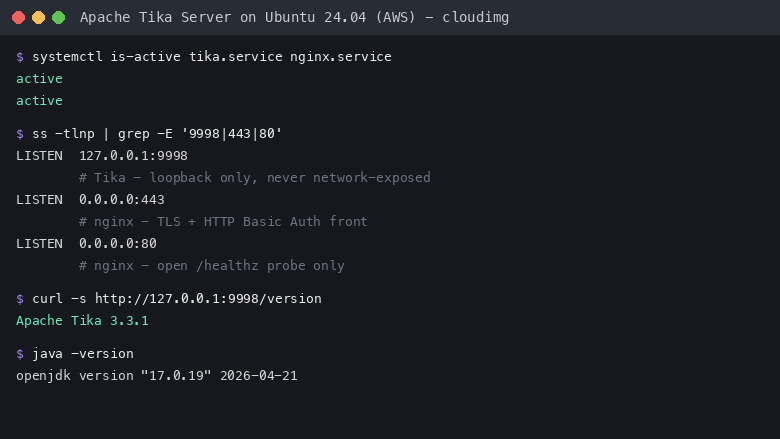
Service status and security posture
Image
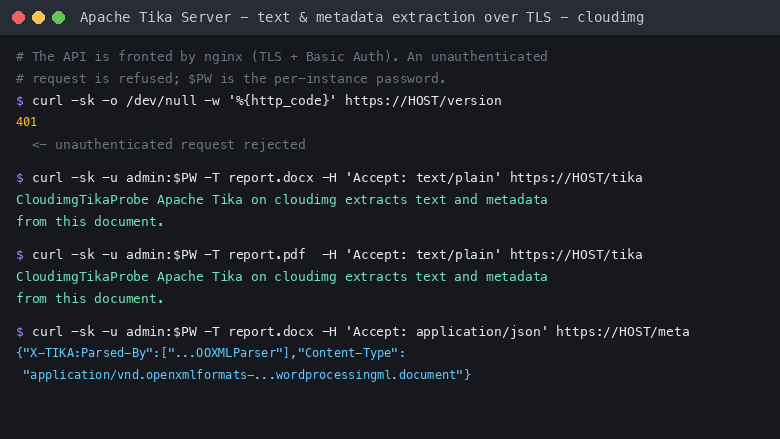
Authenticated extraction over TLS
This is a repackaged open source software product wherein additional charges apply for cloudimg support services.
Text and Metadata Extraction as a Service
Apache Tika is the Apache Software Foundation's content detection and extraction toolkit. It detects and extracts text and metadata from thousands of file types - PDF, Microsoft Office and OpenDocument, HTML, RTF, EPUB, images, email and archive formats - through one consistent REST API. This image runs Tika Server 3.3.1 on OpenJDK 17 as a hardened, stateless service, so you can turn a document into clean text or structured metadata within minutes of launch rather than assembling a parser stack yourself.
Who This Is For
Search and data teams building a document ingestion pipeline who need reliable text extraction as the first stage. AI and RAG builders who need to turn PDFs, spreadsheets and slide decks into plain text before chunking and embedding. Application developers who need a standards-based extraction endpoint to call from their own services instead of bundling dozens of parser libraries.
What Is Installed
- Apache Tika Server 3.3.1 (tika-server-standard), the official build pulled from Maven Central and SHA-512 verified
- OpenJDK 17 (headless) as the runtime
- nginx as a TLS-terminating reverse proxy in front of the Tika listener
- A dedicated unprivileged tika service account and a hardened systemd unit that starts the service on boot
- Sample DOCX and PDF fixtures so a real extraction round trip can be verified out of the box
Secure By Default
Tika Server has no built-in authentication and a real history of parser CVEs, so this image does not expose it directly:
- The Tika listener is bound to the loopback interface only and is never reachable from the network
- nginx fronts the whole REST surface, terminating TLS on port 443 with a certificate generated uniquely on each instance
- A one-shot first-boot service generates a unique HTTP Basic Auth password on every instance and writes it to a root-only file
- The dangerous URL-fetching and unpack features are left disabled, closing the classic server-side request forgery path to the instance metadata service, and IMDSv2 is enforced as a second line of defence
- Resource limits contain a malicious oversized or zip-bomb upload: the JVM heap is hard capped, the service has a systemd memory ceiling and is auto-restarted, and nginx caps the upload size
Network Model
The shipped security group opens only port 22. The HTTPS listener on port 443 is not exposed by default. Add a port 443 ingress rule scoped to your own network when you are ready, or reach the service over an SSH tunnel. The user guide covers both, along with pointing an upstream load balancer or your own certificate at the service.
Getting Started
- Launch the image on an m5.large instance or larger, with port 22 open to your management network
- Connect over SSH as the default login user for your variant (the user guide lists it)
- Retrieve the generated API password with sudo cat /root/tika-server-credentials.txt
- Extract text from a document: curl -u admin:PASSWORD -k -T report.pdf -H 'Accept: text/plain' https://INSTANCE/tika
- Extract metadata as JSON from the /meta endpoint, or recursive text and metadata from /rmeta
- Add a port 443 rule scoped to your network, or front the service with your own load balancer and certificate
24/7 cloudimg Support
Every deployment is backed by cloudimg engineers available around the clock by email and live chat. Support covers deployment and sizing guidance, tuning the JVM heap and Tika configuration for your document mix, enabling OCR or additional parsers, wiring Tika into a search or retrieval-augmented-generation pipeline, TLS certificate and reverse proxy configuration, credential management, and Tika upgrades and troubleshooting. Critical issues receive a one-hour average response time.
Evaluation
This image uses standard AWS pay-as-you-go infrastructure billing. Launch an instance to evaluate extraction against your own documents, and terminate at any time.
Apache, Apache Tika and Tika are trademarks of The Apache Software Foundation. All product and company names are trademarks or registered trademarks of their respective holders. Use of them does not imply any affiliation with or endorsement by them.
Highlights
- Apache Tika Server installed from the official Maven Central build (SHA-512 verified) on OpenJDK 17, fronted by nginx as a TLS-terminating reverse proxy, with a dedicated service account and a hardened systemd unit that starts it on boot. One REST API detects and extracts text and metadata from thousands of file types including PDF, Microsoft Office, images and archives - production-ready within minutes of launch on an m5.large or larger instance.
- Secure by default with no shared credentials. The Tika listener is bound to loopback only; nginx terminates TLS with a certificate generated uniquely per instance and enforces a unique HTTP Basic Auth password created on first boot. URL-fetching and unpack features are disabled to close the SSRF-to-metadata path, IMDSv2 is enforced, and JVM heap caps, systemd memory ceilings, and nginx upload-size limits protect against oversized or zip-bomb uploads.
- 24/7 technical support from cloudimg engineers by email and live chat, with a one-hour average response for critical issues. Support scope covers deployment and sizing, JVM and Tika tuning, enabling OCR and additional parsers, integrating Tika into search and RAG pipelines, TLS and reverse-proxy configuration, credential management, and Tika upgrades and troubleshooting.
Details
Sold by
Categories
Delivery method
Delivery option
64-bit (x86) Amazon Machine Image (AMI)
Latest version
Operating system
Ubuntu 24.04
Deployed on AWS
New
Introducing multi-product solutions
You can now purchase comprehensive solutions tailored to use cases and industries.

Features and programs
Financing for AWS Marketplace purchases
AWS Marketplace now accepts line of credit payments through the PNC Vendor Finance program. This program is available to select AWS customers in the US, excluding NV, NC, ND, TN, & VT.

Pricing
Free trial
Try this product free for 7 days according to the free trial terms set by the vendor. Usage-based pricing is in effect for usage beyond the free trial terms. Your free trial gets automatically converted to a paid subscription when the trial ends, but may be canceled any time before that.
Pricing is based on actual usage, with charges varying according to how much you consume. Subscriptions have no end date and may be canceled any time. Alternatively, you can pay upfront for a contract, which typically covers your anticipated usage for the contract duration. Any usage beyond contract will incur additional usage-based costs.
Additional AWS infrastructure costs may apply. Use the AWS Pricing Calculator to estimate your infrastructure costs.
If you are an AWS Free Tier customer with a free plan, you are eligible to subscribe to this offer. You can use free credits to cover the cost of eligible AWS infrastructure. See AWS Free Tier for more details. If you created an AWS account before July 15th, 2025, and qualify for the Legacy AWS Free Tier, Amazon EC2 charges for Micro instances are free for up to 750 hours per month. See Legacy AWS Free Tier for more details.
Dimension | Description | Cost/hour |
|---|---|---|
m5.large Recommended | m5.large | $0.08 |
t2.micro | t2.micro instance type | $0.04 |
t3.micro | t3.micro instance type | $0.04 |
c5a.12xlarge | c5a.12xlarge instance type | $0.24 |
c5a.16xlarge | c5a.16xlarge instance type | $0.24 |
c5a.24xlarge | c5a.24xlarge instance type | $0.24 |
c5a.2xlarge | c5a.2xlarge instance type | $0.24 |
c5a.4xlarge | c5a.4xlarge instance type | $0.24 |
c5a.8xlarge | c5a.8xlarge instance type | $0.24 |
c5a.large | c5a.large instance type | $0.08 |
Vendor refund policy
Refunds available on request.

Legal
Vendor terms and conditions
Upon subscribing to this product, you must acknowledge and agree to the terms and conditions outlined in the vendor's End User License Agreement (EULA) .
Content disclaimer
Vendors are responsible for their product descriptions and other product content. AWS does not warrant that vendors' product descriptions or other product content are accurate, complete, reliable, current, or error-free.
Delivery details
64-bit (x86) Amazon Machine Image (AMI)
Amazon Machine Image (AMI)
An AMI is a virtual image that provides the information required to launch an instance. Amazon EC2 (Elastic Compute Cloud) instances are virtual servers on which you can run your applications and workloads, offering varying combinations of CPU, memory, storage, and networking resources. You can launch as many instances from as many different AMIs as you need.
Version release notes
Initial release of Apache Tika Server 3.3.1, the Apache text and metadata extraction REST service, fronted by nginx with per-instance TLS and Basic Auth.
Additional details
Usage instructions
Connect over SSH on port 22 as the default login user for your operating system variant (the user guide lists it per variant; on Ubuntu it is 'ubuntu'). Retrieve the generated API credentials with: sudo cat /root/tika-server-credentials.txt. Apache Tika Server listens on 127.0.0.1:9998 (loopback only) and is fronted by nginx, which terminates TLS on port 443 with a per-instance self-signed certificate and enforces HTTP Basic Auth (user 'admin'). The shipped security group opens only port 22 - add a port 443 ingress rule scoped to your own network, or reach the service over an SSH tunnel: ssh -L 8443:127.0.0.1:443 <login-user>@<instance-public-ip>. Extract text from a document: curl -u admin:<password> -k -T report.pdf -H 'Accept: text/plain' https://127.0.0.1/tika (use -k for the self-signed certificate, or install your own). Extract metadata as JSON from /meta, or recursive metadata and text from /rmeta. An unauthenticated request returns 401; the open health endpoint is http://<instance>/healthz. The service is managed with systemctl (tika, nginx). Do not remove the loopback bind or enable the URL-fetching features without understanding the SSRF exposure - see the user guide.
Resources
Vendor resources
Support
Vendor support
cloudimg provides 24/7 technical support for this product by email and live chat.
Support Channels:
- Email: support@cloudimg.co.uk
- Live chat: available around the clock
Response Times:
- Critical issues: one-hour average response time
Scope of Support: Our engineers assist with deployment and sizing guidance, JVM heap and Tika configuration tuning for your document mix, enabling OCR and additional parsers, integrating Tika into search and retrieval-augmented-generation pipelines, TLS certificate and reverse-proxy configuration, HTTP Basic Auth credential management, and Tika Server upgrades and general troubleshooting.
Billing and Refunds: Subscription billing and refunds are handled through AWS Marketplace. For any product issue, contact support@cloudimg.co.uk and our engineers will work with you on a resolution.
All support interactions are handled directly by cloudimg engineers with hands-on Apache Tika operational experience.
AWS infrastructure support
AWS Support is a one-on-one, fast-response support channel that is staffed 24x7x365 with experienced and technical support engineers. The service helps customers of all sizes and technical abilities to successfully utilize the products and features provided by Amazon Web Services.
Similar products

Apache Hudi connector with shaded dependencies to work with AWS Glue.

Easily access Iceberg tables and operate DDLs, reads/writes, time-travels, streaming writes on the Iceberg tables.

Bansir offers this software product repackaged where additional charges apply for technical support provided by Bansir Cloud email support@bansircloud.com.

This is a repackaged open source software product wherein additional charges apply for technical support. Softwares included: Ubuntu and Apache Web Server

This product has a fee associated with the provision and deployment of the application and AMI support. Apache Superset is a modern, enterprise-ready business intelligence web application.
Customer reviews
No customer reviews yet
Be the first to review this product . We've partnered with PeerSpot to gather customer feedback. You can share your experience by writing or recording a review, or scheduling a call with a PeerSpot analyst.