Sold by: Trustwise
Deployed on AWS
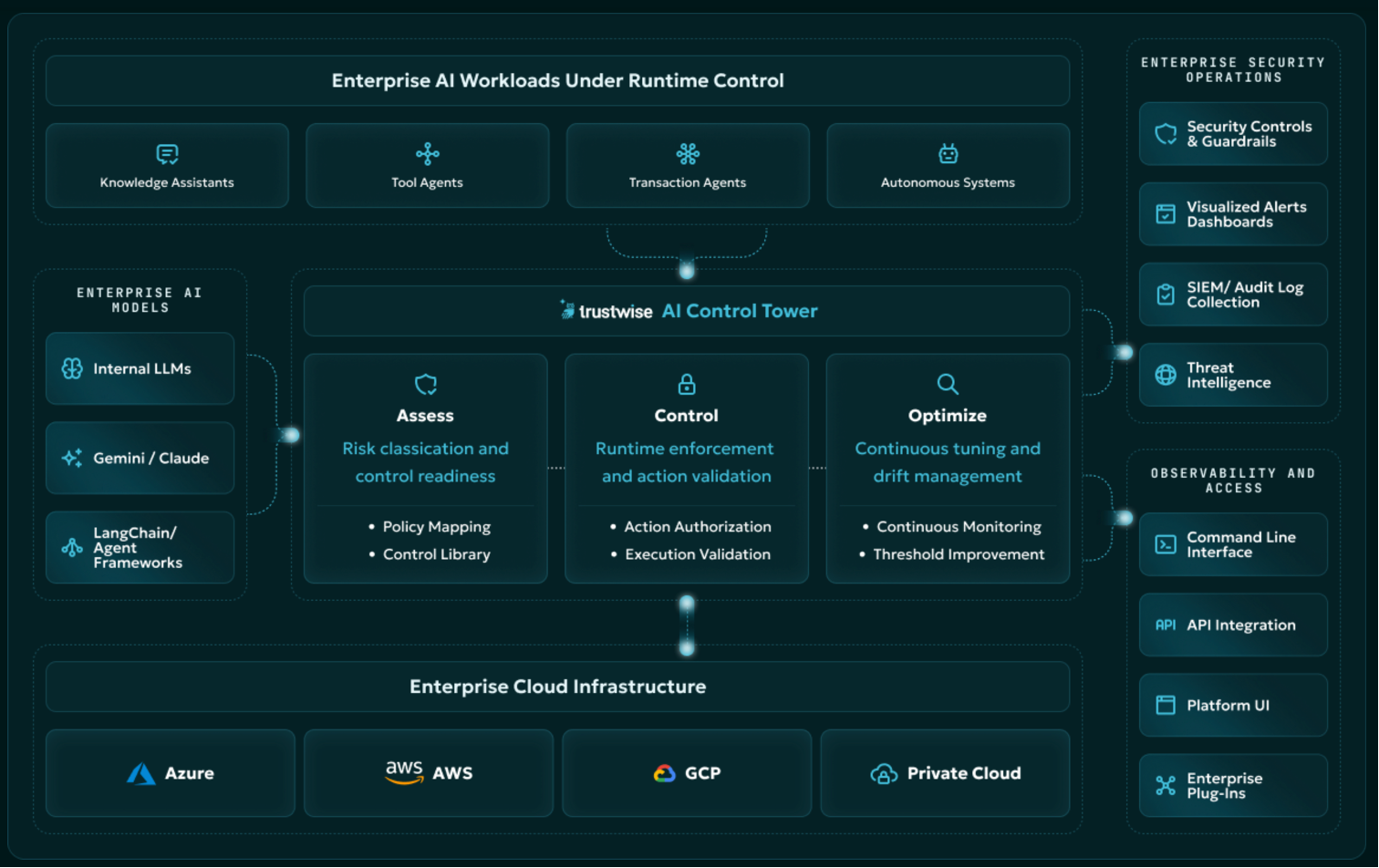
Trustwise AI Control Tower helps enterprises safely deploy and scale autonomous AI by applying policy controls before agent actions are executed. Each action is intercepted, evaluated against enterprise and regulatory policies, and either authorized, blocked, or escalated with a complete evidence trail. Trustwise works across models, clouds, frameworks, and toolchains to provide runtime enforcement, behavioral control, and audit-grade proof for agentic AI systems.
Overview
Image
Where Trustwise Fits in your Enterprise
Image
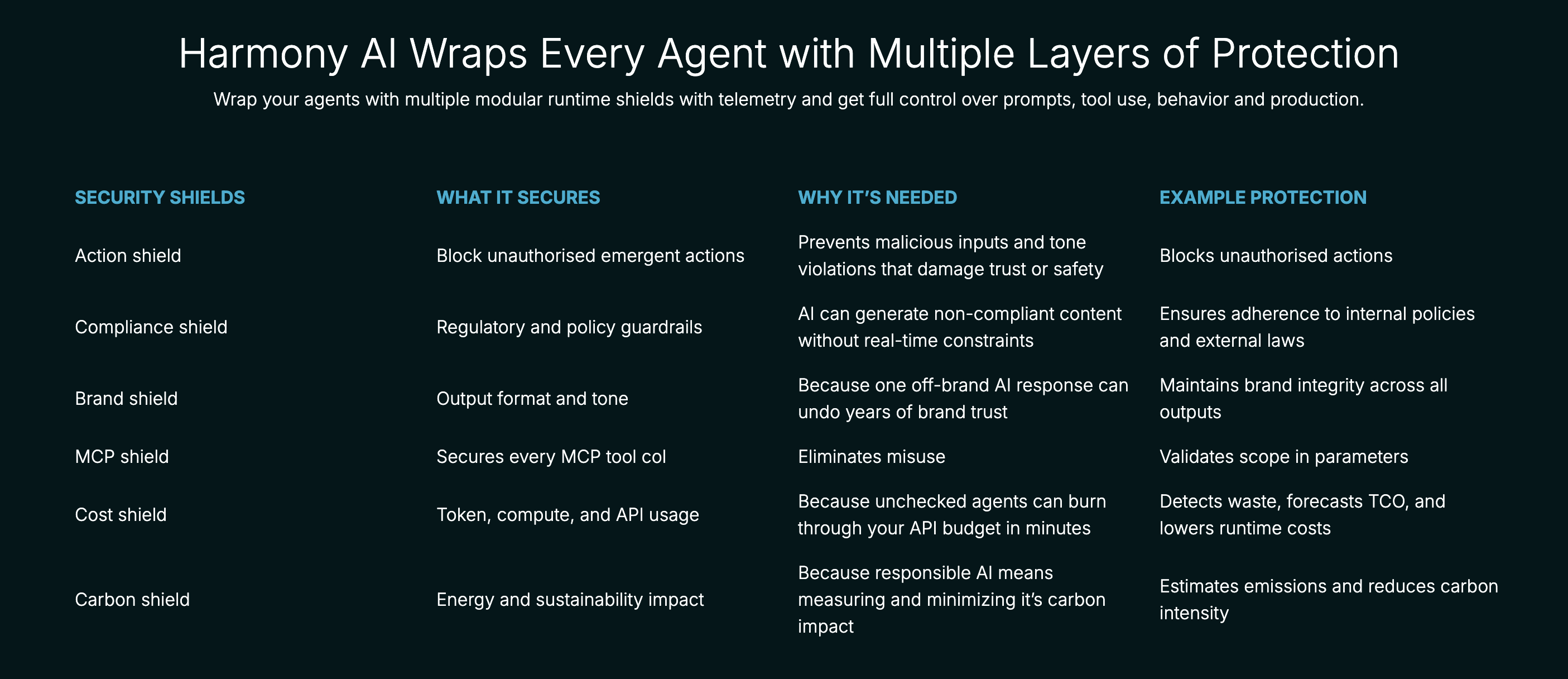
Wrap Every Agent with Layers of Protection
Control every AI action before it happens: Every agent request is intercepted before it touches enterprise systems. Authority, scope, risk, and compliance assessed in real time, with subsecond blocking.
Enforce your policies, not just the defaults: The Policy to Guardrail engine converts any enterprise policy into a working runtime guardrail (compliance, brand rules, use-case restrictions) in plain English, no code required.
Create audit-grade evidence for every decision: Every actor, action, context, policy, decision, and outcome recorded and independently verified, with 1,100+ controls mapped across NIST AI RMF, EU AI Act, ISO 42001, OWASP, HIPAA, and MITRE ATLAS.
Govern your entire AI fleet from one place: Every agent across homegrown systems, copilots, and ISV apps inventoried, classified, and controlled from a single dashboard. This ranges from single agents to multi-agent fleets.
Works with your existing stack: Model-agnostic, cloud-agnostic, and framework-compatible - works across your current models, clouds, orchestration tools, and reporting platforms without replacing what you've built.
**Stay in control continuously, not just at deployment: Drift detection flags behavioral change as it begins, so agents that clear risk review stay in policy after go-live.
Cut AI cost and carbon at runtime: Documented outcomes in live enterprise deployments: up to 83% reduction in AI costs and 64% reduction in carbon emissions.
Contact sales@trustwise.ai for custom bundling and private pricing.
Highlights
- Control every AI action before it happens
- Enforce your policies, not just the defaults
- Create audit-grade evidence for every decision
Details
Sold by
Categories
Delivery method
Supported services
Delivery option
Trustwise Harmony AI
Latest version
Operating system
Linux
Deployed on AWS
New
Introducing multi-product solutions
You can now purchase comprehensive solutions tailored to use cases and industries.

Features and programs
Financing for AWS Marketplace purchases
AWS Marketplace now accepts line of credit payments through the PNC Vendor Finance program. This program is available to select AWS customers in the US, excluding NV, NC, ND, TN, & VT.

Pricing
Pricing is based on actual usage, with charges varying according to how much you consume. Subscriptions have no end date and may be canceled any time. Alternatively, you can pay upfront for a contract, which typically covers your anticipated usage for the contract duration. Any usage beyond contract will incur additional usage-based costs.
Additional AWS infrastructure costs may apply. Use the AWS Pricing Calculator to estimate your infrastructure costs.
Dimension | Description | Cost/unit/hour |
|---|---|---|
Hours | Container Hours | $25.00 |
Vendor refund policy
No Refund after 24 hrs of purchase for standard offer. Refund on private offer as per agreement.

Legal
Vendor terms and conditions
Upon subscribing to this product, you must acknowledge and agree to the terms and conditions outlined in the vendor's End User License Agreement (EULA) .
Content disclaimer
Vendors are responsible for their product descriptions and other product content. AWS does not warrant that vendors' product descriptions or other product content are accurate, complete, reliable, current, or error-free.
Delivery details
Trustwise Harmony AI
Supported services: Learn more
- Amazon EKS
Helm chart
Helm charts are Kubernetes YAML manifests combined into a single package that can be installed on Kubernetes clusters. The containerized application is deployed on a cluster by running a single Helm install command to install the seller-provided Helm chart.
Version release notes
Trustwise Harmomy v4.8.6
Additional details
Usage instructions
Trustwise - Quick Start Guide
AI governance platform: safety metrics, RAG evaluation, LLM proxying and a web portal, on your cluster.
CREDENTIALS
Trustwise ships no default, static or shared passwords. Every credential is generated randomly inside your cluster at install time, is unique to your deployment, and is never known to Trustwise. The initial administrator password is a one-time bootstrap credential you replace at first login (STEP 5).
PREREQUISITES
- Kubernetes 1.24+ (EKS, GKE, AKS) with Istio
- One NVIDIA GPU node with the NVIDIA device plugin
- helm v3.10+, kubectl, a domain with a wildcard TLS certificate
STEP 1 - NAMESPACE
kubectl create namespace trustwise kubectl label namespace trustwise istio-injection=enabled
STEP 2 - SECRETS
You supply only these two; all application credentials are generated.
kubectl create secret docker-registry ecr-registry-credentials
--namespace trustwise
--docker-server=709825985650.dkr.ecr.us-east-1.amazonaws.com
--docker-username=AWS
--docker-password=$(aws ecr get-login-password --region us-east-1)
kubectl create secret tls trustwise-tls -n istio-system
--cert=tls.crt --key=tls.key
STEP 3 - my-values.yaml
global: baseDomain: "your-domain.com" imagePullSecrets: - name: ecr-registry-credentials istio_gateway: existingTlsSecret: "trustwise-tls"
Do not set keycloak.auth.adminPassword; unset generates a unique random password for your deployment.
STEP 4 - INSTALL
helm install trustwise
oci://709825985650.dkr.ecr.us-east-1.amazonaws.com/trustwise/helm/trustwise
--version 4.8.6 --namespace trustwise -f my-values.yaml
kubectl get pods -n trustwise -w # Running in ~10 min
STEP 5 - FIRST LOGIN (PASSWORD CHANGE REQUIRED)
Access this URL first; all other services authenticate through it.
https://auth.your-domain.com/admin
Retrieve the one-time password for your deployment:
kubectl get secret trustwise-keycloak -n trustwise
-o jsonpath='{.data.admin-password}' | base64 -d; echo
Sign in as "tw-admin" with that value, then change it immediately:
- Select "tw-admin" (top right) > "Manage account"
- Open "Signing in"
- Under "Password", select "Update" and set a new password
The bootstrap value is valid only until you complete this step. Trustwise support will never ask you for it. Add users under "Users" in the console.
STEP 6 - ACCESS
Portal https://portal.your-domain.com API https://api.your-domain.com Auth https://auth.your-domain.com AI Gateway https://aigw.your-domain.com MCP https://mcp.your-domain.com
USAGE METERING
Usage hours are reported to the AWS Marketplace Metering Service. Launching via AWS Marketplace provisions the service account and IAM role for you. For a self-managed install, grant the release service account aws-marketplace:MeterUsage and RegisterUsage via IRSA:
irsa: enabled: true annotations: eks.amazonaws.com/role-arn: arn:aws:iam::<account-id>:role/<your-role>
PARAMETERS
See CONFIGURATION.md for the full reference.
global.baseDomain example.com istio_gateway.existingTlsSecret "" (required) keycloak.auth.adminUser tw-admin keycloak.auth.adminPassword "" (generated - leave unset) irsa.enabled true models.*.enabled true (GPU required)
UPGRADE
helm upgrade trustwise
oci://709825985650.dkr.ecr.us-east-1.amazonaws.com/trustwise/helm/trustwise
--version <new-version> --namespace trustwise -f my-values.yaml
Your administrator password is preserved across upgrades.
SUPPORT
Docs: https://docs.trustwise.ai Support: support@trustwise.ai
Support
Vendor support
For support inquiries related to Trustwise AI Control Plane, please contact the Trustwise team directly at support@trustwise.ai . Support is available for issues including product setup, troubleshooting, and subscription management.
AWS infrastructure support
AWS Support is a one-on-one, fast-response support channel that is staffed 24x7x365 with experienced and technical support engineers. The service helps customers of all sizes and technical abilities to successfully utilize the products and features provided by Amazon Web Services.
Similar products
Trustwise AI Control Tower helps enterprises safely deploy and scale autonomous AI by applying policy controls before agent actions are executed. Each action is intercepted, evaluated against enterprise and regulatory policies, and either authorized, blocked, or escalated with a complete evidence trail. Trustwise works across models, clouds, frameworks, and toolchains to provide runtime enforcement, behavioral control, and audit-grade proof for agentic AI systems.

Unleash unparalleled developer productivity with the Control Plane Platform. It frees developers to concentrate on code and not DevOps goo. It gives DevOps and other engineers a superpower.

The AI Runtime Security Discovery Workshop is a structured engagement designed to help organizations identify and prioritize security risks in AI-powered applications, including LLM, RAG, and agent-based architectures. It provides threat modelling, control gap analysis, and mapping of runtime protection capabilities such as Lakera to real-world use cases. The result is a clear, low-risk pathway to implementing AI runtime security through a defined pilot and adoption plan.

For the Free plan only ¤ To try our paid plans, see https://aws.amazon.com/marketplace/pp/prodview-hsytxo2hoxkxa.
Plane is the work infrastructure for humans and the AI agent era. Projects, knowledge, and service in one system people and AI agents operate as peers on cloud, self-hosted, or air-gapped
Customer reviews
No customer reviews yet
Be the first to review this product . We've partnered with PeerSpot to gather customer feedback. You can share your experience by writing or recording a review, or scheduling a call with a PeerSpot analyst.