Sold by: Xtasis
Deployed on AWS
NoteGuard leverages advanced AI to detect and redact PHI across multilingual, multi-format clinical text with 99.3% entity masking precision and <80ms per note throughput. The intuitive UI, enterprise SSO, and easy in-tenant deployment give you full control of high-throughput de-identification and revision logs without sensitive information ever leaving your secure environment. Mask, pseudonymize, replace, or suppress based on your policy regulations and use case. HIPAA & GDPR compliance templates are available.
Overview
Image
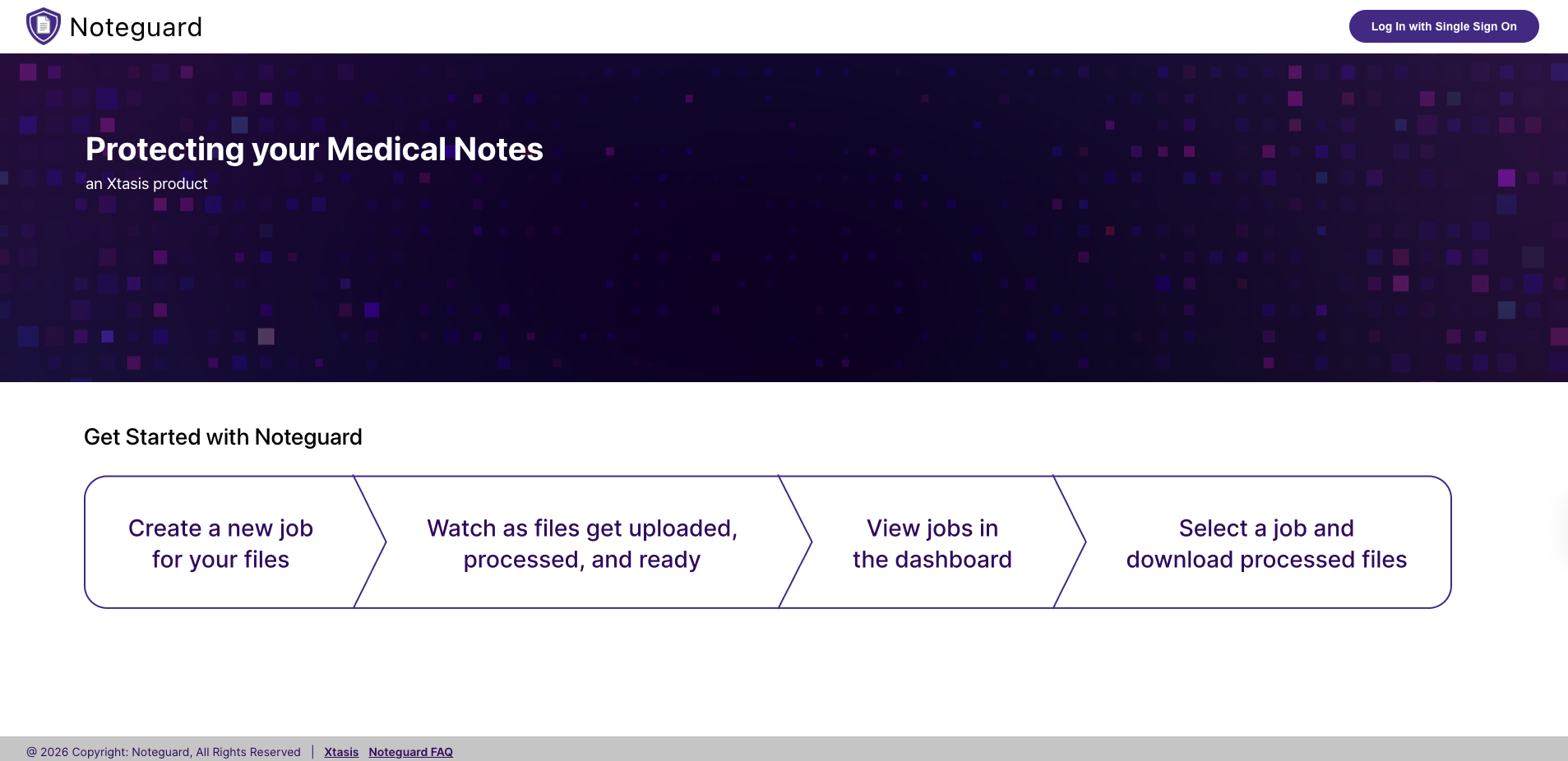
NoteGuard Login Page
Image
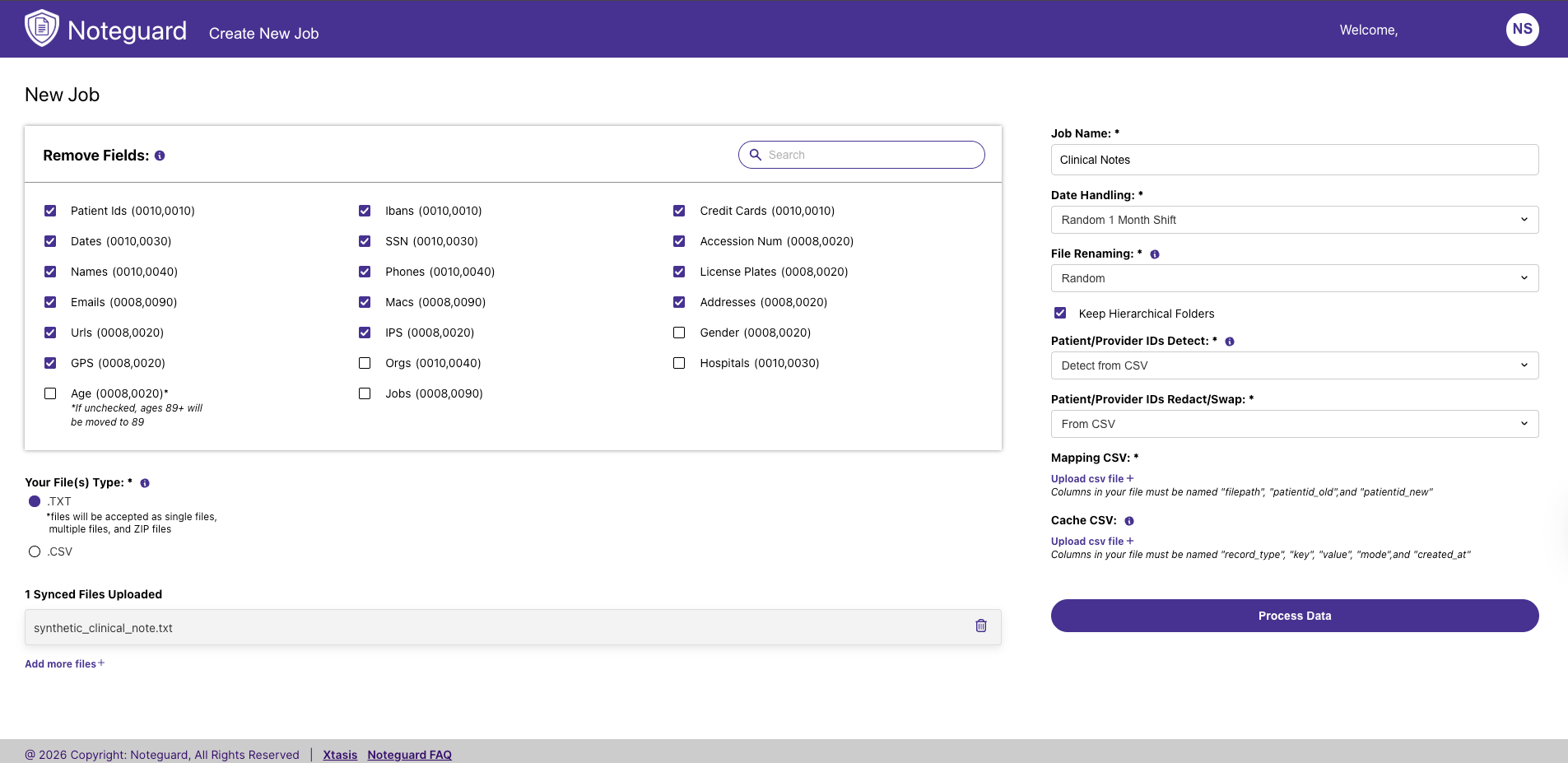
NoteGuard Job Creation Page
Image
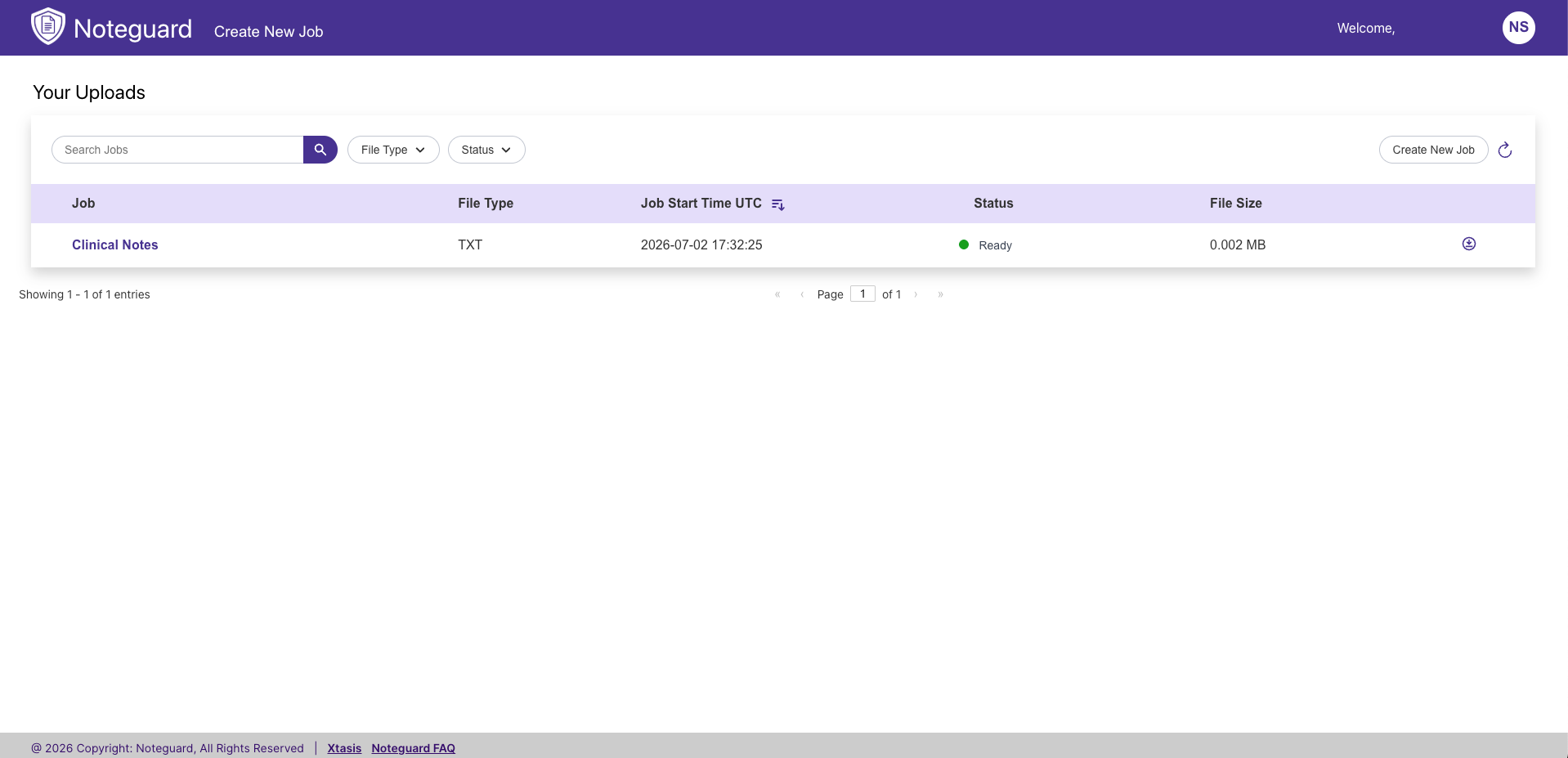
NoteGuard Job Dashboard
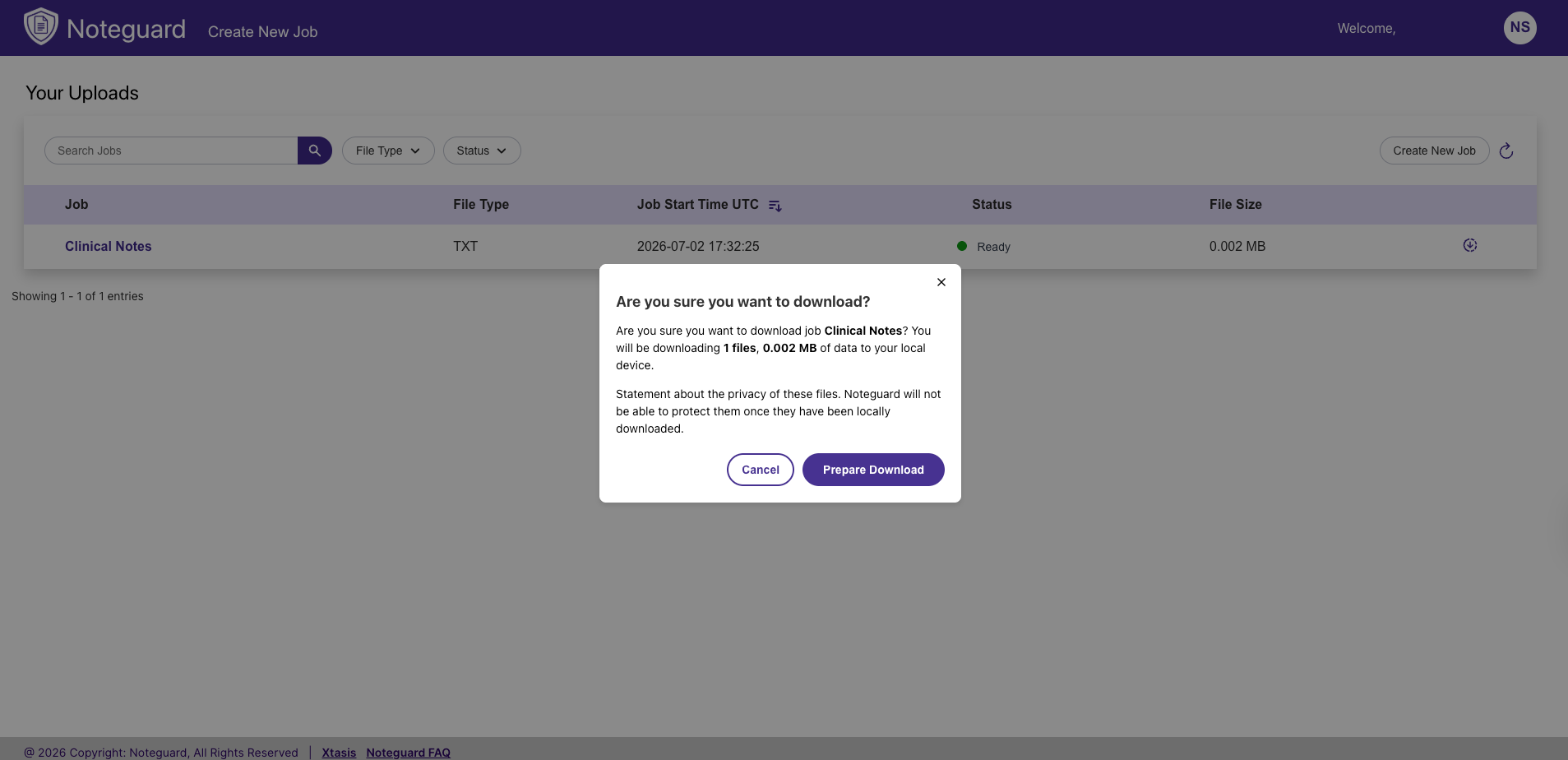
Image
NoteGuard Processed File Download Option
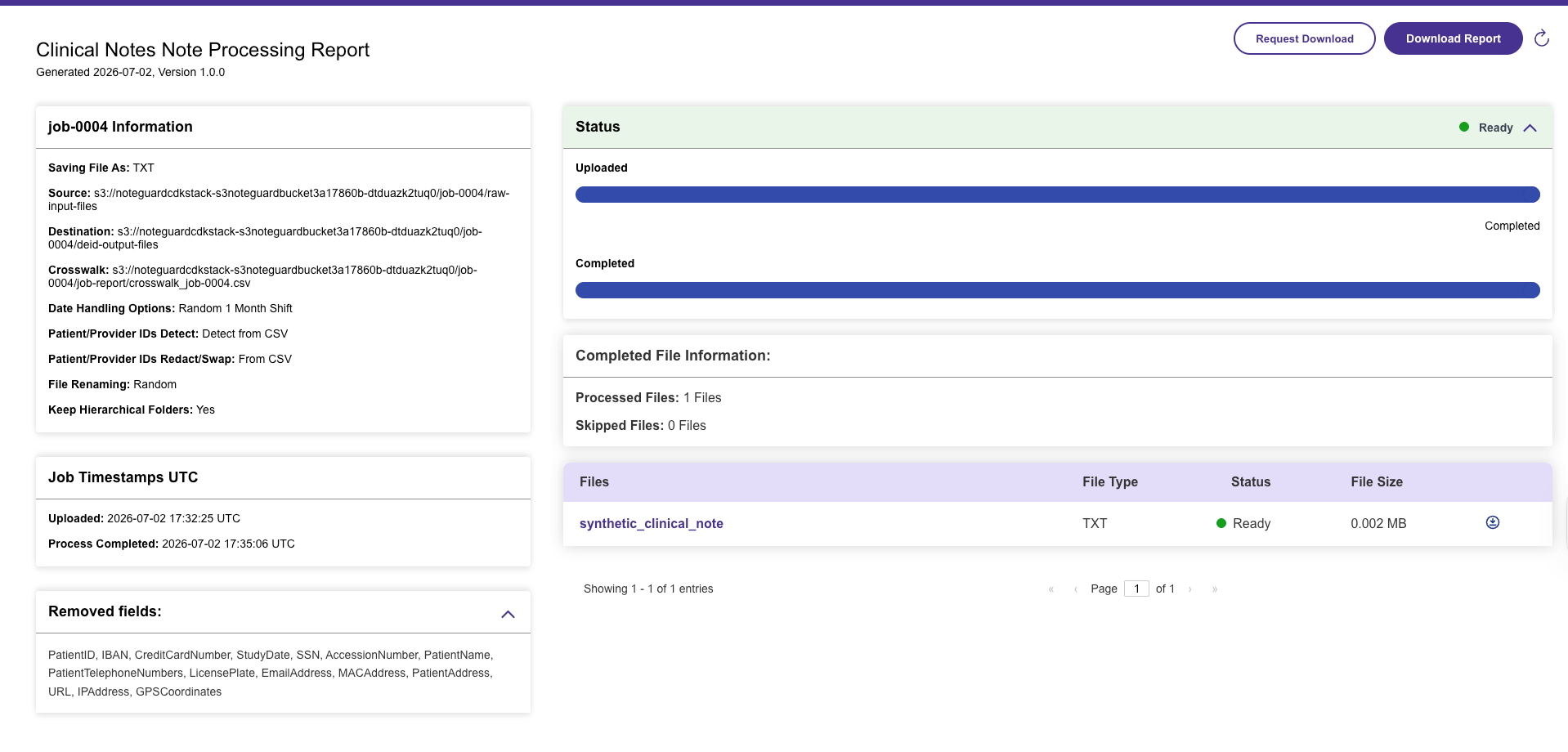
Image
NoteGuard Job Status
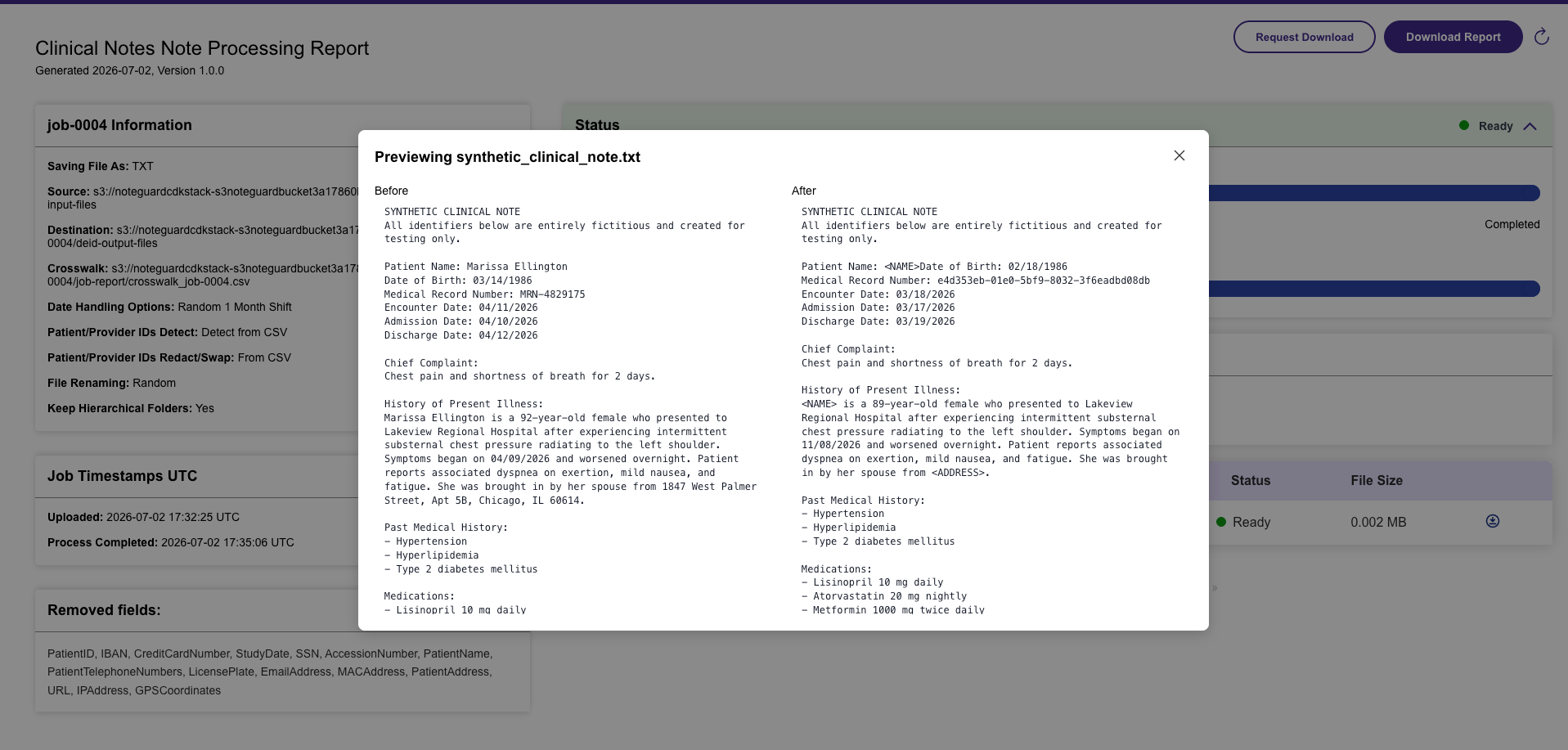
Image
NoteGuard Processed File Preview

Video
NoteGuard UI Demo
Deployment
NoteGuard can be deployed directly within the customer's AWS environment, including private VPC configurations, to support secure, scalable enterprise workloads. In-tenant deployment keeps PHI within the customer-controlled AWS infrastructure with zero data egress and can also support managed cloud or on-premises deployment models.
What is NoteGuard?
NoteGuard is an enterprise-grade clinical text de-identification solution designed to help healthcare organizations safely unlock sensitive clinical data for research, analytics, AI, machine learning, quality improvement, and other downstream workflows.
Powered by advanced AI, NoteGuard identifies and de-identifies protected health information (PHI) within complex clinical text while preserving the clinical meaning, context, and documentation integrity needed to keep the resulting data useful. NoteGuard is designed to recognize sensitive information within the highly variable language, abbreviations, formatting, and contextual patterns found in real-world medical documentation.
With 99.3% entity masking precision, support for 20 PHI classes, and processing performance of less than 80 milliseconds per note, NoteGuard combines high-accuracy detection with the throughput required for enterprise-scale clinical data workflows.
Identifier classes can be configured independently, allowing organizations to align de-identification behavior with institutional privacy policies, data-use requirements, and specific downstream use cases. Organizations can determine how identified information is transformed, enabling privacy policies to be applied consistently across large datasets rather than requiring manual review and redaction of individual documents.
Researchers and data teams can analyze longitudinal patterns without exposing the original identifying information. NoteGuard can maintain consistent patient identifiers and deterministic date shifts, preserving important temporal relationships, encounter sequences, and cohort structure.
Enterprise SSO supports integration with existing organizational identity and access controls. Built-in audit capabilities provide visibility into the de-identification process, helping organizations maintain a traceable record of how sensitive information is detected and transformed. Audit-ready revision logs and one-click evidence packets support governance, internal review, compliance workflows, and documentation requirements.
Accepted Data Formats
NoteGuard is built to work with the diversity of clinical documentation found across healthcare environments. It processes multilingual and multi-format clinical text, including free-text narratives, progress notes, structured reports, discharge summaries, and EHR-derived datasets, with support for .csv and .txt inputs.
Identifier classes: PATIENT IDS, DATES, NAMES, EMAILS, URLS, GPS, AGE, IBANS, SSN, PHONES, IPS, ORGS, JOBS, CREDIT CARD, ACCESSION NUM, ADDRESSES, GENDER, HOSPITALS
NoteGuard + PixelGuard
Pair NoteGuard with PixelGuard for the full intuitive de-identification workflow experience. PixelGuard + NoteGuard is the only solution on the market that connects visual data and clinical context together in one synchronized, privacy-safe dataset layer while preserving the relationships that make it useful.
Get In Touch For demos, custom pricing, and annual commitments, contact info@xtasis.com .
Highlights
- Complete, Configurable HIPAA Compliance
- Longitudinal Cohort Deidentification and Anonymization Consistency
- Secure, In-Tenant Deployment with Zero Data Egress
Details
Sold by
Delivery method
Supported services
Delivery option
Placeholder
Latest version
Operating system
Linux
Deployed on AWS
New
Introducing multi-product solutions
You can now purchase comprehensive solutions tailored to use cases and industries.

Features and programs
Financing for AWS Marketplace purchases
AWS Marketplace now accepts line of credit payments through the PNC Vendor Finance program. This program is available to select AWS customers in the US, excluding NV, NC, ND, TN, & VT.

Pricing
Pricing is based on the duration and terms of your contract with the vendor. This entitles you to a specified quantity of use for the contract duration. If you choose not to renew or replace your contract before it ends, access to these entitlements will expire.
Additional AWS infrastructure costs may apply. Use the AWS Pricing Calculator to estimate your infrastructure costs.
Dimension | Description | Cost/12 months |
|---|---|---|
1 Note Deidentified | One note has been deidentified using NoteGuard | $0.05 |
1,000 Notes | Includes entitlement to deidentify up to 1,000 notes during the contract term. | $50.00 |
5,000 Notes | Includes entitlement to deidentify up to 5,000 notes during the contract term. | $250.00 |
Bulk or Enterprise Plans - Contact for Private Pricing | Pricing is tailored based on data volume, usage, and support requirements. The listed price is a placeholder and does not represent final contract pricing. Contact our team at info@xtasis.com for a customized quote based on your organization's needs. | $1.00 |
Dimensions summary
NoteGuard prices around the number of medical notes you deidentify during the contract term. You can pay per single note, or buy an entitlement covering up to 1,000 notes or up to 5,000 notes. These volume options let you match the plan to your expected processing needs. For larger or organization-wide use, the Bulk or Enterprise Plans option offers custom pricing based on data volume, usage, and support requirements; you contact the vendor for a quote. The listed price on that option is a placeholder, not the final contract price.
Top-of-mind questions for buyers
One note is a single clinical note run through NoteGuard, which automatically removes protected health information (PHI) from the text. Each note you process counts as one unit against your entitlement, whether you buy per-note or an entitlement covering up to 1,000 or up to 5,000 notes.
The 1,000-note and 5,000-note options each cover up to that number of notes during the contract term. If you expect volume beyond these entitlements, the Bulk or Enterprise Plans option provides custom pricing based on your data volume, usage, and support needs. You contact the vendor for a quote.
The per-note option charges for each single note you deidentify, with no set quantity. The 1,000-note and 5,000-note options give you an entitlement covering up to that number during the contract term. Per-note fits occasional processing; the entitlements fit planned, higher-volume workloads.
xtasis.com
Helpful?
Vendor refund policy
We stand behind NoteGuard's performance. Refunds are issued only if you were charged for notes that were not properly de-identified. To request a refund, email info@xtasis.com with you're your subscriber AWS account ID, usage reported date, job details, number of affected files and evidence of de-identification failure. Once verified, eligible refunds will be processed within a reasonable time period. For inquiries or other assistance, contact our support team at info@xtasis.com .

Legal
Vendor terms and conditions
Upon subscribing to this product, you must acknowledge and agree to the terms and conditions outlined in the vendor's End User License Agreement (EULA) .
Content disclaimer
Vendors are responsible for their product descriptions and other product content. AWS does not warrant that vendors' product descriptions or other product content are accurate, complete, reliable, current, or error-free.
Delivery details
Placeholder
Supported services: Learn more
- Amazon ECS
Container image
Containers are lightweight, portable execution environments that wrap server application software in a filesystem that includes everything it needs to run. Container applications run on supported container runtimes and orchestration services, such as Amazon Elastic Container Service (Amazon ECS) or Amazon Elastic Kubernetes Service (Amazon EKS). Both eliminate the need for you to install and operate your own container orchestration software by managing and scheduling containers on a scalable cluster of virtual machines.
Version release notes
Version: v1.0.0 Release Date: June 26, 2026 Update Classification: Initial Release
Overview: This is the first official release of the NoteGuard De-identification Platform on AWS Marketplace. It provides secure, scalable de-identification of clinical documents and medical text with AI-powered PHI and PII detection and redaction.
Key Features: Upload and process medical documents and clinical text AI-powered PHI/PII detection and redaction Configurable de-identification policies (redact/mask/replace) HIPAA-focused security architecture Integration with Amazon S3, Lambda, and Cognito Containerized infrastructure deployed via AWS CDK (IaC)
Known Limitations: Amazon ECS deployment is supported in this release. Amazon EKS support and additional deployment options are planned for future versions.
Getting Started: Follow the deployment instructions in the README provided with the CDK repository. For configuration help or onboarding support, contact info@xtasis.com .
Additional details
Usage instructions
Usage Instructions:
Step 1: Generate an SSH Key Pair and Share the Public Key
To access the NoteGuard repository, you must first generate an SSH key pair and send your public key to info@xtasis.com .
How to generate the key:
For macOS/Linux:
-
Open Terminal.
-
Run:
ssh-keygen -t rsa -b 4096 -C "your_email@example.com "
-
Press Enter to accept the default file location.
-
Optionally add a passphrase.
For Windows (Git Bash or WSL):
-
Open Git Bash or WSL.
-
Run:
ssh-keygen -t rsa -b 4096 -C "your_email@example.com "
Your public key will be saved to:
~/.ssh/id_rsa.pub
Copy and email the contents of this file to:
Tip: Use this to copy the key to clipboard:
macOS: cat ~/.ssh/id_rsa.pub | pbcopy
Windows: cat ~/.ssh/id_rsa.pub | clip
Linux: xclip -sel clip < ~/.ssh/id_rsa.pub (requires xclip)
Step 2: Clone the NoteGuard Git Repository Once access is granted:
git clone git@gitlab.com :xtasis/noteguard.git
Step 3: Navigate into the Project and Checkout the v1.0 Branch
cd noteguard
git fetch origin v1.0
git checkout v1.0
Step 4: Follow the Project README
Inside the cloned folder, follow the instructions provided in the README.md file for setup and deployment.
Support
Vendor support
Reach out to us any time at info@xtasis.com . Our support specialists monitor this inbox around the clock and aim to respond to all inquiries within one business day. Our comprehensive FAQ is also available at https://xtasis.com/noteguard_faq/ . It's updated regularly with answers to common questions, configuration tips, and troubleshooting steps. Pre-built scripts and step-by-step instructions are provided to deploy the platform within the user's tenant using Infrastructure as Code. Additionally, comprehensive training and onboarding sessions are available to get your team up to speed quickly. NoteGuard's bulk and enterprise order pricing varies with consumption needs. Listed prices are placeholders. Reach out to our sales team at info@xtasis.com for a quote tailored to your needs.
AWS infrastructure support
AWS Support is a one-on-one, fast-response support channel that is staffed 24x7x365 with experienced and technical support engineers. The service helps customers of all sizes and technical abilities to successfully utilize the products and features provided by Amazon Web Services.
Similar products
GenerativeMDnote is an AI-powered medical documentation platform designed for physicians and healthcare providers. It records patient encounters and converts them into accurate, structured medical notes, saving time and improving workflow efficiency. Ideal for clinics, hospitals, and private practices seeking seamless note generation and EHR integration.
Replace values in metadata with pseudonyms, and most of the tags in the metadata of the DICOM image analyzed.
AI meeting security platform that detects unauthorized notetakers, bots, and impersonation risks across Zoom, Teams, and Google Meet for regulated organizations.

Intelliguards MDR defends your organization with high confidence using the most advanced technologies, threat intelligence, and expertise. The service provides continuous monitoring, triage, and advanced response.
Customer reviews
No customer reviews yet
Be the first to review this product . We've partnered with PeerSpot to gather customer feedback. You can share your experience by writing or recording a review, or scheduling a call with a PeerSpot analyst.