
Sold by: PuzariCloud
Free Trial
AWS Free Tier
Find out when an AWS scheduled job did not run, failed or ran too long. Reads your EventBridge rules and Scheduler schedules through a read-only role and alerts on Slack and email for ECS, Batch, Step Functions and Lambda jobs. No agent and no code changes.
Overview
Image
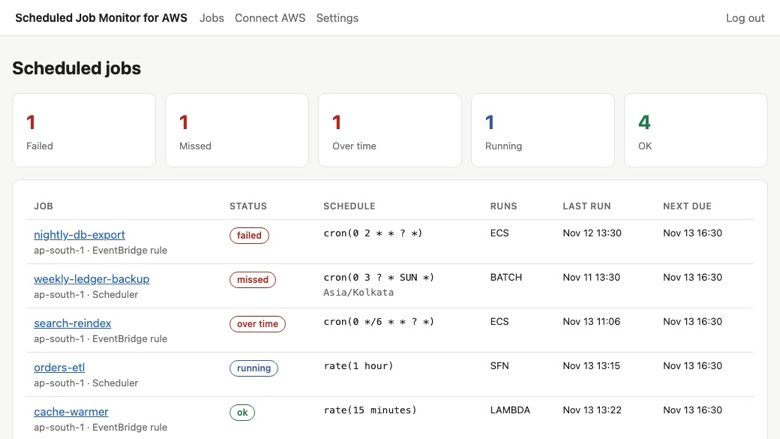
Jobs dashboard: failed, missed, over time
Image
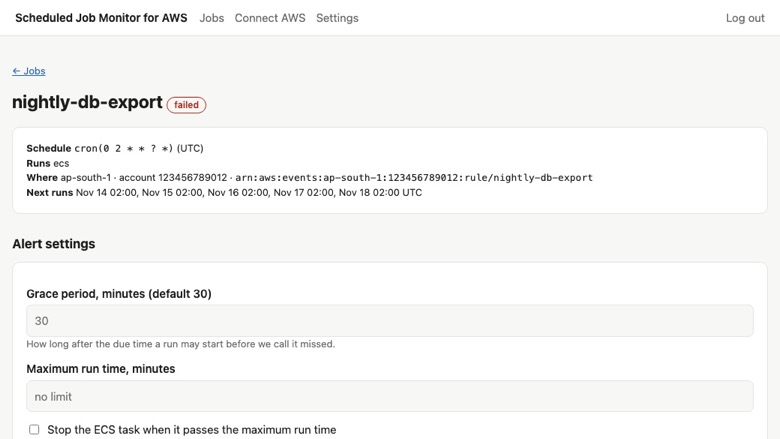
Job details: next runs and alert settings
Find out when a scheduled job did not run
EventBridge rules and Scheduler schedules do not tell you when a job never started, ran twice or hung. Most teams learn about it days later, from a missing report or a customer.
Scheduled Job Monitor for AWS reads your schedules through a read-only cross-account role, works out when each job should have fired, and alerts you on Slack or email when a run is missed, fails or runs too long.
What it monitors
- EventBridge rules and EventBridge Scheduler schedules, discovered automatically
- ECS tasks, AWS Batch jobs, Step Functions executions and Lambda functions started by those schedules
- Full AWS cron and rate syntax, including L, W and # expressions, time zones and daylight saving changes
What you are told
- Missed: the job should have started and did not
- Failed: the run ended with an error, with the exit code where AWS provides one
- Overrunning or stuck: the run is taking longer than it should
- Recovered: the next run succeeded
You can also let the monitor stop an ECS task that runs past its limit. This is optional and off unless you enable it in the stack.
Security and access
The CloudFormation stack creates two things in your account: a read-only IAM role that lists your EventBridge rules and Scheduler schedules, and an EventBridge rule that forwards ECS, Batch and Step Functions state changes to us. No agent is installed and your jobs are never changed. Stopping an ECS task that runs past its limit is a separate opt-in in the stack and is off by default. You can review the template before you deploy it, and deleting the stack removes our access.
Typical uses
- A nightly database export or backup that silently stopped after a deploy
- A monthly billing run that must not be missed
- A data pipeline step that hangs and blocks the next one
- Hourly Lambda jobs whose errors nobody watches
Who it is for
Teams that run nightly exports, billing runs, backups, data pipelines and other scheduled work on AWS, and need to know the same morning when one of them did not happen. No agent to install, no heartbeat calls to add to your code.
Getting started
- Subscribe, or start the 14-day free trial.
- Launch the CloudFormation stack from the Connect page. It creates a read-only role and forwards job state events.
- Paste the role ARN. Your schedules appear within a minute.
- Add a Slack webhook or email addresses for alerts.
Plans cover 25, 150 or 1,000 monitored jobs, with unlimited users.
Start the 14-day free trial to see every scheduled job in your account and its last run within minutes of connecting.
Highlights
- Catches the job that silently never ran. The monitor reads every EventBridge rule and EventBridge Scheduler schedule, works out when each one should fire (full AWS cron and rate syntax, time zones and daylight saving included) and alerts you when a run does not start within the grace period you set, 30 minutes by default. CloudWatch alarms tell you about runs that happened; this tells you about the ones that did not.
- Failed, stuck and overrunning runs in one place. ECS tasks, AWS Batch jobs, Step Functions executions and Lambda targets are matched to their schedule, so you see failures, exit codes and runs that take longer than they should, with a Slack or email alert on each change and another when the job recovers. Optionally stop an ECS task that runs past its limit.
- No agent, no heartbeat pings, no code changes. One CloudFormation stack creates a read-only role and forwards job state events, and your schedules are discovered automatically; new ones appear by themselves. Plans cover 25, 150 or 1,000 monitored jobs across your AWS accounts, with unlimited users.
Details
New
Introducing multi-product solutions
You can now purchase comprehensive solutions tailored to use cases and industries.

Features and programs
Financing for AWS Marketplace purchases
AWS Marketplace now accepts line of credit payments through the PNC Vendor Finance program. This program is available to select AWS customers in the US, excluding NV, NC, ND, TN, & VT.

Pricing
Free trial
Try this product free according to the free trial terms set by the vendor.
Pricing is based on the duration and terms of your contract with the vendor. This entitles you to a specified quantity of use for the contract duration. If you choose not to renew or replace your contract before it ends, access to these entitlements will expire.
Additional AWS infrastructure costs may apply. Use the AWS Pricing Calculator to estimate your infrastructure costs.
Dimension | Description | Cost/month |
|---|---|---|
Starter | Monitor up to 25 scheduled jobs across your AWS accounts, Slack and email alerts, unlimited users. | $29.00 |
Pro | Monitor up to 150 scheduled jobs across your AWS accounts, Slack and email alerts, ECS auto-stop, unlimited users. | $99.00 |
Business | Monitor up to 1,000 scheduled jobs across your AWS accounts, Slack and email alerts, ECS auto-stop, priority support, unlimited users. | $249.00 |
Dimensions summary
You pick a plan based on how many scheduled jobs you need to monitor across your AWS accounts. Starter covers up to 25 jobs. Pro raises the limit to 150 jobs and adds ECS auto-stop. Business covers up to 1,000 jobs, keeps ECS auto-stop, and adds priority support. All three tiers include Slack and email alerts and unlimited users, so pricing scales by job count rather than by seats. These are flat-rate contract tiers, not usage add-ons; you move up a tier when you need to watch more jobs.
Top-of-mind questions for buyers
A scheduled job is one thing you watch, such as a cron job, backup, or recurring task. Each is tracked by a heartbeat that expects a ping after every run. The job alerts you when a run is missed, fails, or hangs. Servers running the agent are counted separately from jobs.
Jobs already set up keep being monitored. New jobs beyond your tier's number wait until you move up a tier or remove an existing job. Nothing is charged automatically for going over. You move up a tier manually when you need to watch more jobs.
ECS auto-stop is included on the Pro and Business tiers but not on Starter. Starter covers up to 25 jobs with Slack and email alerts. Pro and Business add ECS auto-stop, which lets you stop ECS tasks automatically based on job monitoring.
puzaricloud.in+1
Helpful?
Vendor refund policy
Full refund within 14 days of a new subscription if the product doesn't work for you. After that, cancel any time and you won't be renewed; we don't refund partial periods. To request a refund, email ritom@puzaricloud.in with your AWS account ID.

Legal
Vendor terms and conditions
Upon subscribing to this product, you must acknowledge and agree to the terms and conditions outlined in the vendor's End User License Agreement (EULA) .
Content disclaimer
Vendors are responsible for their product descriptions and other product content. AWS does not warrant that vendors' product descriptions or other product content are accurate, complete, reliable, current, or error-free.
Delivery details
Software as a Service (SaaS)
SaaS delivers cloud-based software applications directly to customers over the internet. You can access these applications through a subscription model. You will pay recurring monthly usage fees through your AWS bill, while AWS handles deployment and infrastructure management, ensuring scalability, reliability, and seamless integration with other AWS services.
Resources
Support
Vendor support
Getting help
Email ritom@puzaricloud.in . We reply within one business day, Monday to Friday, India time, and usually much sooner.
What support covers
- Launching the CloudFormation stack and connecting the role
- Jobs that are not discovered or not matched to their schedule
- Slack and email alert setup
- Billing and plan changes through AWS Marketplace
When you write to us
Include your AWS account ID, the Region and the name of the rule or schedule. Support is included on every plan, including the free trial.
Plans
Starter covers 25 monitored jobs, Pro 150 and Business 1,000, across any number of AWS accounts, with unlimited users. Support is the same on every plan.
Refunds
Full refund within 14 days of purchase if the product does not work for you. Email ritom@puzaricloud.in with your AWS account ID and we will arrange it through AWS Marketplace.
AWS infrastructure support
AWS Support is a one-on-one, fast-response support channel that is staffed 24x7x365 with experienced and technical support engineers. The service helps customers of all sizes and technical abilities to successfully utilize the products and features provided by Amazon Web Services.
Similar products

marbot is a Slack app for event-driven AWS monitoring. Don't miss critical alerts from Amazon Web Services to avoid downtimes and data loss. Get notified about security incidents in real time. Keep up to date about the system status of your storage systems. marbot rolls out and updates the monitoring configuration to your AWS accounts and regions automatically.

Put Your AWS Cloud Infrastructure On AutoPilot Mode. Tevico is a self monitoring , self-healing and self-managing system that takes care of your AWS cloud infrastructure 24x7 and 365 days a year.

marbot is a Microsoft Teams app for event-driven AWS monitoring. Don't miss critical alerts from Amazon Web Services to avoid downtimes and data loss. Get notified about security incidents in real time. Keep up to date about the system status of your storage systems. marbot rolls out and updates the monitoring configuration to your AWS accounts and regions automatically.

Healthchecks 5.0.3 (BSD-3-Clause) with PostgreSQL 17 on Ubuntu 24.04, with HTTPS, sign-up closed and a generated administrator created before the site is published. Alert email needs your own SMTP server.
Customer reviews
No customer reviews yet
Be the first to review this product . We've partnered with PeerSpot to gather customer feedback. You can share your experience by writing or recording a review, or scheduling a call with a PeerSpot analyst.