
Sold by: cloudimg
Deployed on AWS
Free Trial
AWS Free Tier
This product has charges associated with it for seller support. Launch a hardened rsync daemon (rsyncd) for fast, efficient file synchronisation, mirroring and backup over the network in minutes. rsync transfers only the differences between source and destination on TCP 873. This image ships secure by default with an authenticated, chrooted module and a unique module user and password generated per instance, with no anonymous access and no baked credential. Backed by 24/7 cloudimg expert support.
Overview
Image
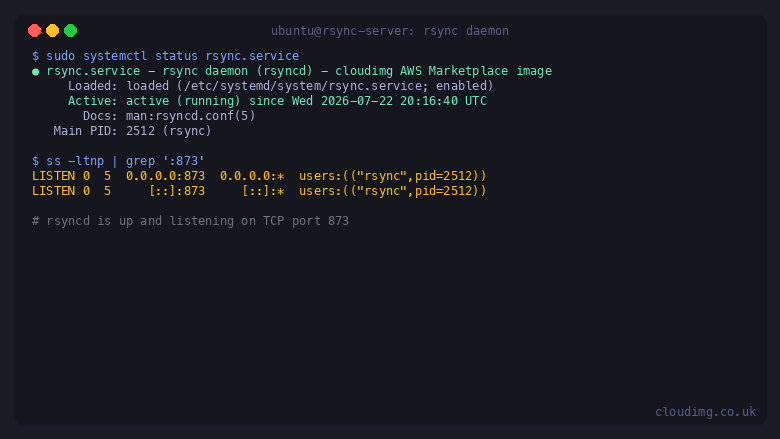
rsync daemon active on TCP 873
Image
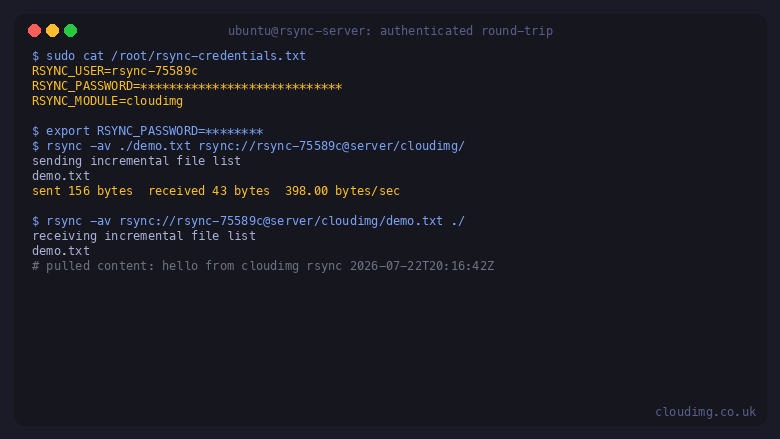
Authenticated push and pull round-trip
Image
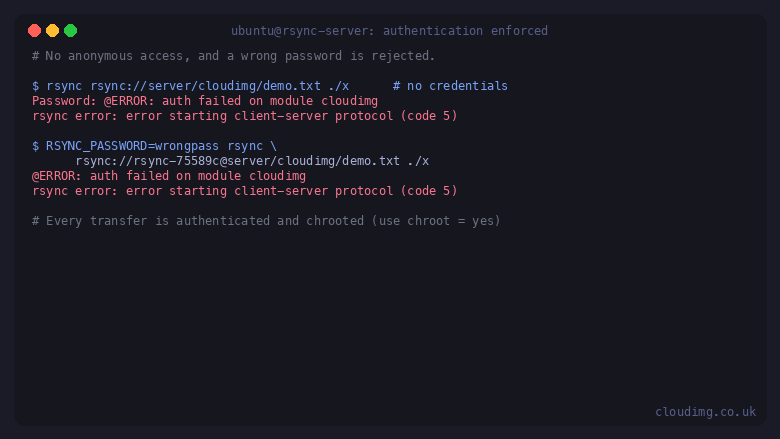
Authentication enforced, no anonymous access
This is a repackaged open source software product wherein additional charges apply for cloudimg support services.
rsync is the de facto standard tool for fast, efficient file synchronisation, mirroring and backup. Its delta transfer algorithm sends only the parts of files that have changed, so repeated syncs of large trees complete in a fraction of the time and bandwidth of a full copy. This image delivers rsync running in daemon mode, known as rsyncd, fully installed and configured as a hardened systemd service, so a working rsync server is answering on the network within minutes of launch and you skip hours of manual configuration and hardening.
rsync in daemon mode is driven entirely by its configuration file at /etc/rsyncd.conf. The server listens on TCP port 873 and exposes one or more named modules, each mapped to a directory on the server. Clients connect with the rsync protocol, for example rsync file rsync://user@server/module/, to push files to the server or pull files from it. This image ships one module named cloudimg whose file store lives on a dedicated data volume, so your synchronised data is kept on its own disk, separate from the operating system disk.
Application stack: the rsync daemon runs under systemd and answers the rsync protocol on TCP 873. The cloudimg module authenticates every transfer against a module user and password and chroots each transfer inside the module directory, so a client can never escape the module path. The whole server configuration lives in a single text file you can version control and reload with one command, with no database to run.
Secure by default: a naive rsync daemon exposes modules with no authentication and no isolation. This image does the opposite. The module requires a user and password on every transfer, there is no anonymous access, and every transfer is chrooted. There is no baked or shared credential: on the first boot of your instance a one shot service generates a unique module user and a long random password for that specific instance and writes them to a root owned credentials file, so no two instances share a credential and nothing is published in the image. For an even stronger transport you can run rsync over SSH instead, which the deployment guide covers.
Key capabilities: fast delta based synchronisation, mirroring and backup of large file trees; an authenticated, chrooted module served on TCP 873; a dedicated data volume for your synchronised files; a simple single file configuration you can grow with more modules; and a battle tested open source tool that underpins a large share of the world's backup and mirroring pipelines. Common uses include a central backup target for servers and workstations, a mirror or distribution point for large datasets and build artifacts, and a scheduled off host copy of important directories.
Get started: retrieve the generated module user and password from the credentials file, then push and pull files from any rsync client using the rsync protocol on port 873, or over SSH for end to end encryption. cloudimg engineers can help with module design, backup scheduling, rsync over SSH, bandwidth limits and retention after purchase.
This is a repackaged open source software product with additional charges for cloudimg support services. rsync is distributed under the GNU GPL v3. All product and company names are trademarks or registered trademarks of their respective holders. Use of them does not imply any affiliation with or endorsement by them.
Highlights
- rsync, the de facto standard tool for fast, efficient file synchronisation, mirroring and backup, running in daemon mode (rsyncd) as a hardened systemd service. Its delta transfer algorithm sends only the changed parts of files over TCP 873, and the module file store lives on a dedicated data volume separate from the OS disk.
- Secure by default with no known bootstrap credential and no anonymous access: the shipped module requires a user and password on every transfer and chroots each transfer inside the module directory. On first boot a unique module user and a long random password are generated for this specific instance and written to a root owned credentials file, so no two instances share a credential and nothing is baked into the image.
- 24/7 expert technical support from cloudimg with a one hour average response time for critical issues. Our engineers help with rsync module design, backup scheduling, rsync over SSH for encrypted transport, bandwidth limits and retention policy, and rsync version upgrades.
Details
Sold by
Categories
Delivery method
Delivery option
64-bit (x86) Amazon Machine Image (AMI)
Latest version
Operating system
Ubuntu 24.04
Deployed on AWS
New
Introducing multi-product solutions
You can now purchase comprehensive solutions tailored to use cases and industries.

Features and programs
Financing for AWS Marketplace purchases
AWS Marketplace now accepts line of credit payments through the PNC Vendor Finance program. This program is available to select AWS customers in the US, excluding NV, NC, ND, TN, & VT.

Pricing
Free trial
Try this product free for 7 days according to the free trial terms set by the vendor. Usage-based pricing is in effect for usage beyond the free trial terms. Your free trial gets automatically converted to a paid subscription when the trial ends, but may be canceled any time before that.
Pricing is based on actual usage, with charges varying according to how much you consume. Subscriptions have no end date and may be canceled any time. Alternatively, you can pay upfront for a contract, which typically covers your anticipated usage for the contract duration. Any usage beyond contract will incur additional usage-based costs.
Additional AWS infrastructure costs may apply. Use the AWS Pricing Calculator to estimate your infrastructure costs.
If you are an AWS Free Tier customer with a free plan, you are eligible to subscribe to this offer. You can use free credits to cover the cost of eligible AWS infrastructure. See AWS Free Tier for more details. If you created an AWS account before July 15th, 2025, and qualify for the Legacy AWS Free Tier, Amazon EC2 charges for Micro instances are free for up to 750 hours per month. See Legacy AWS Free Tier for more details.
Dimension | Description | Cost/hour |
|---|---|---|
m5.large Recommended | m5.large | $0.08 |
t2.micro | t2.micro instance type | $0.04 |
t3.micro | t3.micro instance type | $0.04 |
c5a.12xlarge | c5a.12xlarge instance type | $0.24 |
c5a.16xlarge | c5a.16xlarge instance type | $0.24 |
c5a.24xlarge | c5a.24xlarge instance type | $0.24 |
c5a.2xlarge | c5a.2xlarge instance type | $0.24 |
c5a.4xlarge | c5a.4xlarge instance type | $0.24 |
c5a.8xlarge | c5a.8xlarge instance type | $0.24 |
c5a.large | c5a.large instance type | $0.08 |
Vendor refund policy
Refunds available on request.

Legal
Vendor terms and conditions
Upon subscribing to this product, you must acknowledge and agree to the terms and conditions outlined in the vendor's End User License Agreement (EULA) .
Content disclaimer
Vendors are responsible for their product descriptions and other product content. AWS does not warrant that vendors' product descriptions or other product content are accurate, complete, reliable, current, or error-free.
Delivery details
64-bit (x86) Amazon Machine Image (AMI)
Amazon Machine Image (AMI)
An AMI is a virtual image that provides the information required to launch an instance. Amazon EC2 (Elastic Compute Cloud) instances are virtual servers on which you can run your applications and workloads, offering varying combinations of CPU, memory, storage, and networking resources. You can launch as many instances from as many different AMIs as you need.
Version release notes
Initial release.
Additional details
Usage instructions
Connect via SSH on port 22 as the default login user for your operating system variant (the user guide lists it per variant; ubuntu on Ubuntu). The rsync daemon (rsyncd) listens on TCP 873 and exposes one authenticated, chrooted module named cloudimg whose file store lives on a dedicated data volume at /srv/rsync/cloudimg. On first boot a unique module user and a long random password are generated for this instance and written to /root/rsync-credentials.txt (sudo cat). Read them with: sudo cat /root/rsync-credentials.txt. From any rsync client, export the password then push and pull over the rsync protocol: export RSYNC_PASSWORD=<password>; push a file with rsync -av ./myfile rsync://<user>@<instance-ip>/cloudimg/ and pull it back with rsync -av rsync://<user>@<instance-ip>/cloudimg/myfile ./. There is no anonymous access and every transfer is chrooted inside the module path. Scope the instance security group so only your own client hosts can reach TCP 873. Check the service with: systemctl status rsync and confirm the listener with: ss -ltn | grep 873. Add your own modules as further blocks in /etc/rsyncd.conf then reload with: sudo systemctl restart rsync. For encrypted transport, run rsync over SSH instead (rsync -av -e ssh ./myfile ubuntu@<instance-ip>:/path) - the user guide covers both.
Resources
Vendor resources
Support
Vendor support
cloudimg provides 24/7 technical support for this Rsync Server product by email (support@cloudimg.co.uk ) and live chat. We help with deployment and first boot configuration, retrieving the per instance module user and password, adding and designing rsync modules, scheduling backups and mirrors, running rsync over SSH for encrypted transport, tuning bandwidth limits and connection limits, restricting access with hosts allow rules and the instance security group, managing the dedicated data volume, and rsync version upgrades and patch guidance. Critical issues receive a one hour average response time. For billing, subscription changes, or refund requests, contact support@cloudimg.co.uk .
AWS infrastructure support
AWS Support is a one-on-one, fast-response support channel that is staffed 24x7x365 with experienced and technical support engineers. The service helps customers of all sizes and technical abilities to successfully utilize the products and features provided by Amazon Web Services.
Similar products

SFTPGo is an SFTP, FTP/S, HTTP/S and WebDAV server backed by Amazon S3

SFTPGo is an SFTP, FTP/S, HTTP/S and WebDAV server backed by Amazon S3

SFTPGo is an SFTP, FTP/S, HTTP/S and WebDAV server backed by Amazon S3

SFTPGo is an SFTP, FTP/S, HTTP/S and WebDAV server backed by Amazon S3

SFTPGo is an SFTP, FTP/S, HTTP/S and WebDAV server backed by Amazon S3
Customer reviews
No customer reviews yet
Be the first to review this product . We've partnered with PeerSpot to gather customer feedback. You can share your experience by writing or recording a review, or scheduling a call with a PeerSpot analyst.