
Sold by: cloudimg
Deployed on AWS
Free Trial
AWS Free Tier
This product has charges associated with it for seller support. Marimo is a reactive Python notebook preinstalled as a ready-to-run AMI. Launch a reproducible, git-friendly notebook editor in minutes with 24/7 cloudimg support.
Overview
Image
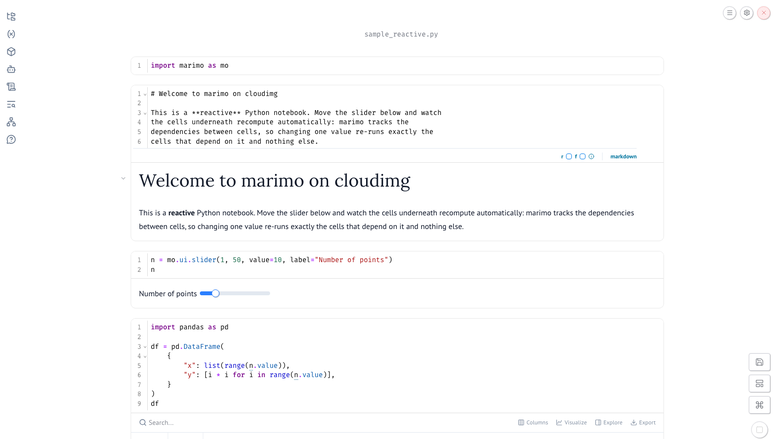
Marimo reactive notebook editor
Image
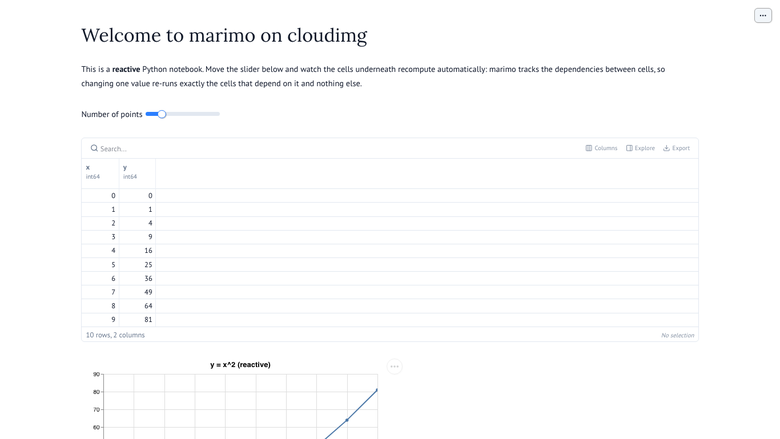
Marimo app view
Image
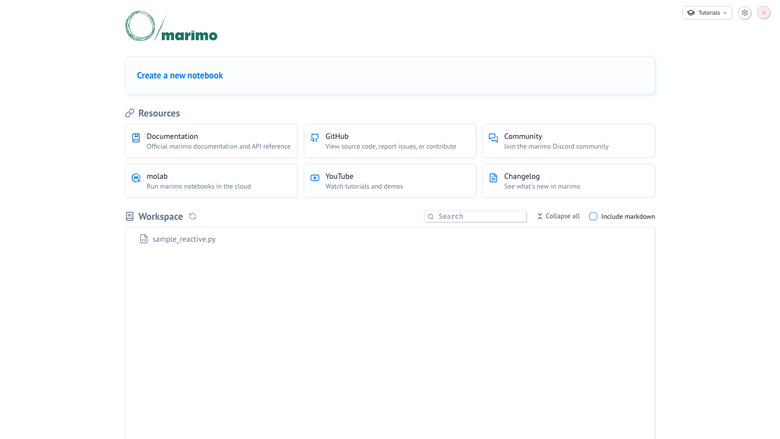
Marimo notebook file browser
This is a repackaged open source software product wherein additional charges apply for cloudimg support services.
Overview
Marimo is an open source reactive notebook for Python that eliminates the hidden state and stale outputs common in traditional .ipynb-based notebooks. Unlike JSON-based notebook formats, marimo notebooks are stored as pure Python files that produce readable diffs in git and run directly as scripts. Cells execute reactively - change one value and only the dependent cells re-run - so your outputs are always consistent with your code. This AMI delivers marimo fully installed and configured as a system service, giving you a production-grade reactive notebook environment running within minutes of launch.
Why Marimo Over Traditional Notebooks
- Pure Python storage - No JSON blobs; your notebooks produce clean, reviewable pull requests without special tooling
- Reactive execution - No need to manually "Run All" or worry about cell execution order; dependencies are tracked automatically
- Dedicated data disk - Your notebook workspace lives on a separate, independently resizable EBS volume rather than the root volume, so data survives instance replacement
- Built-in interactivity - Sliders, tables, plots, and SQL integration are native, not bolt-on extensions
- One-click web apps - Serve any notebook as a read-only interactive application for your team
Application Stack
- Marimo installed into a dedicated virtualenv and run by an unprivileged service account
- Notebook workspace on a dedicated data disk (independently resizable EBS volume)
- A systemd service that starts the notebook server on boot and restarts it on failure
- An nginx reverse proxy publishing the notebook editor on port 80 with WebSocket support for live reactive updates
AWS Integration Points
- Amazon S3 - Store and retrieve notebooks and datasets from S3 buckets using Python libraries like boto3 within your reactive cells
- Amazon CloudWatch - Monitor instance health and notebook server uptime using standard CloudWatch metrics and alarms
- EBS Volumes - The dedicated data disk leverages EBS for resizable, snapshot-capable notebook storage
- Compatible with popular data libraries - Use Pandas, Polars, Plotly, and other Python packages directly in reactive cells
Secure First Boot
On first boot, a one-shot service generates a fresh access token unique to your instance, writes it into the marimo service configuration, and stores it in a root-only file. The notebook server binds to loopback only and is never exposed without the token. No shared or default credentials ship in the image.
Ready To Use
The notebook editor is served on port 80 through nginx. Sign in with the generated access token to open the seeded sample reactive notebook, create your own notebooks, run cells, and explore the file browser. Any notebook can be served as an interactive app for your users.
Use Cases
- Data engineering teams - Build and serve daily ETL dashboards as internal web apps, with reactive cells ensuring reports always reflect the latest query results
- Education and training - Instructors can deploy individual instances for students, each with isolated workspaces on dedicated data disks, demonstrating Python with live reactive examples
- Reproducible data analysis - Analysts produce reports where outputs are guaranteed consistent with code, eliminating "works on my machine" issues common with execution-order-dependent notebooks
- Interactive data apps - Prototype and deploy internal tools with sliders, tables, and plots without leaving the notebook environment
- Exploratory analysis - Version-controllable notebooks that diff cleanly make collaborative data science practical
cloudimg Support
24/7 technical support by email and live chat. Our engineers help with deployment, configuration, the reactive execution model, UI elements, SQL integration, serving notebooks as apps, package management, TLS setup, and runtime tuning.
Highlights
- Launch a production-ready reactive Python notebook in minutes - no manual setup. The marimo editor is served on port 80 behind nginx with a unique access token generated on first boot. Unlike traditional .ipynb notebooks that store as JSON blobs, marimo notebooks are pure Python files producing clean, readable git diffs and consistent outputs every time.
Details
Sold by
Categories
Delivery method
Delivery option
64-bit (x86) Amazon Machine Image (AMI)
Latest version
Operating system
Ubuntu 24.04
Deployed on AWS
New
Introducing multi-product solutions
You can now purchase comprehensive solutions tailored to use cases and industries.

Features and programs
Financing for AWS Marketplace purchases
AWS Marketplace now accepts line of credit payments through the PNC Vendor Finance program. This program is available to select AWS customers in the US, excluding NV, NC, ND, TN, & VT.

Pricing
Free trial
Try this product free for 7 days according to the free trial terms set by the vendor. Usage-based pricing is in effect for usage beyond the free trial terms. Your free trial gets automatically converted to a paid subscription when the trial ends, but may be canceled any time before that.
Pricing is based on actual usage, with charges varying according to how much you consume. Subscriptions have no end date and may be canceled any time. Alternatively, you can pay upfront for a contract, which typically covers your anticipated usage for the contract duration. Any usage beyond contract will incur additional usage-based costs.
Additional AWS infrastructure costs may apply. Use the AWS Pricing Calculator to estimate your infrastructure costs.
If you are an AWS Free Tier customer with a free plan, you are eligible to subscribe to this offer. You can use free credits to cover the cost of eligible AWS infrastructure. See AWS Free Tier for more details. If you created an AWS account before July 15th, 2025, and qualify for the Legacy AWS Free Tier, Amazon EC2 charges for Micro instances are free for up to 750 hours per month. See Legacy AWS Free Tier for more details.
Dimension | Description | Cost/hour |
|---|---|---|
t3.medium Recommended | t3.medium | $0.05 |
t2.micro | t2.micro instance type | $0.04 |
t3.micro | t3.micro instance type | $0.04 |
c5a.12xlarge | c5a.12xlarge instance type | $0.24 |
c5a.16xlarge | c5a.16xlarge instance type | $0.24 |
c5a.24xlarge | c5a.24xlarge instance type | $0.24 |
c5a.2xlarge | c5a.2xlarge instance type | $0.24 |
c5a.4xlarge | c5a.4xlarge instance type | $0.24 |
c5a.8xlarge | c5a.8xlarge instance type | $0.24 |
c5a.large | c5a.large instance type | $0.08 |
Vendor refund policy
Refunds available on request.

Legal
Vendor terms and conditions
Upon subscribing to this product, you must acknowledge and agree to the terms and conditions outlined in the vendor's End User License Agreement (EULA) .
Content disclaimer
Vendors are responsible for their product descriptions and other product content. AWS does not warrant that vendors' product descriptions or other product content are accurate, complete, reliable, current, or error-free.
Delivery details
64-bit (x86) Amazon Machine Image (AMI)
Amazon Machine Image (AMI)
An AMI is a virtual image that provides the information required to launch an instance. Amazon EC2 (Elastic Compute Cloud) instances are virtual servers on which you can run your applications and workloads, offering varying combinations of CPU, memory, storage, and networking resources. You can launch as many instances from as many different AMIs as you need.
Version release notes
Initial release of marimo 0.23.10 reactive Python notebook.
Additional details
Usage instructions
Connect via SSH on port 22 as the default login user for your operating system variant (the user guide lists it per variant). The marimo notebook editor is served on port 80: browse to http://<instance-public-ip>/ and sign in with the generated access token. Retrieve the token with: sudo cat /root/marimo-aws-credentials.txt. marimo binds to loopback (127.0.0.1:2718) and is published on port 80 by an nginx reverse proxy with WebSocket support for the live reactive updates; the token is accepted as the ?access_token= query parameter, an Authorization: Bearer header or the login form. A sample reactive notebook is seeded in the workspace. The notebook workspace lives on a dedicated data disk mounted at /var/lib/marimo.
Resources
Vendor resources
Support
Vendor support
cloudimg provides 24/7 technical support for this product by email and live chat.
What We Help With
Our engineers assist with deployment, configuration, updates, performance tuning, troubleshooting, the reactive execution model, UI elements, SQL integration, serving notebooks as apps, package management, TLS setup, and runtime tuning.
How to Reach Us
Email: support@cloudimg.co.uk Live chat: Available 24/7
Refunds and Billing
For billing inquiries, subscription changes, or refund requests, contact us at the email address above and we will respond within one business day.
Support covers the full lifecycle of your deployment, from initial launch and token retrieval through ongoing notebook authoring, scaling, and production operations.
AWS infrastructure support
AWS Support is a one-on-one, fast-response support channel that is staffed 24x7x365 with experienced and technical support engineers. The service helps customers of all sizes and technical abilities to successfully utilize the products and features provided by Amazon Web Services.
Similar products

This product has charges associated with it for support and maintenance. Marimo is an open-source reactive notebook environment for Python that enables interactive computing, reproducible data workflows, live code execution, and application-style notebook development through a modern web-based interface.
Customer reviews
No customer reviews yet
Be the first to review this product . We've partnered with PeerSpot to gather customer feedback. You can share your experience by writing or recording a review, or scheduling a call with a PeerSpot analyst.