
Sold by: Arcus Partners
Your team types what needs changing. ArcusX WebShift makes the edit and waits for approval. A dashboard covers visitors, SEO, and AI search visibility. Arcus Partners sets it up in your AWS account.
Overview
Most website changes go through a developer and take days, so the site falls behind. ArcusX WebShift hands that access to your own team, without letting software change your live site on its own.
Edit by asking
Your staff sign in and type the change they want. Add Jane Smith to the leadership page. Publish this press release. Make the product logo smaller. They can drag in a photo or a logo. WebShift finds the right file, makes the edit, rebuilds the site and puts it on a practice copy. The preview panel refreshes itself, with desktop and mobile views. Nothing is public at this stage. One click then publishes exactly what was reviewed.
It handles the edits that pile up, from team and leadership changes to newsroom posts, product and service pages, careers, contact details, images and copy anywhere on the site. It also maintains structured content libraries, so a catalogue like your use cases stays consistent instead of hand written.
Every instruction becomes a tracked change request with its own identifier. WebShift classifies it as a content change, a code change or a subjective request, and records both its confidence and its reasoning. Status changes are written to the audit log as they happen. When the work is ready it goes to an approval gate with a written proposal and a preview link, and the approver's decision is recorded against their name.
Safe by design
WebShift cannot reach your live site. It edits the practice copy only, and publishing runs through a separate component with its own permissions. Only approvers can trigger it, checked twice. Before they commit they read a plain English summary of what will change, written from the changed files and the recent edit history. A badge shows how many files differ from live. WebShift saves a restore point before every edit, so undo is one click. It can also diff against any restore point, revert a single file, and estimate what a change will touch before making it. WebShift will not invent content either. Ask it for a bio, a job posting or a news item and it asks you for the facts first.
Access sits behind a company sign in with self signup switched off, so an administrator creates every account. There are three roles. Editors can chat and change the practice copy. Approvers can also publish. Administrators get everything, including a user register holding each person's roles, last login and login count.
Live dashboard
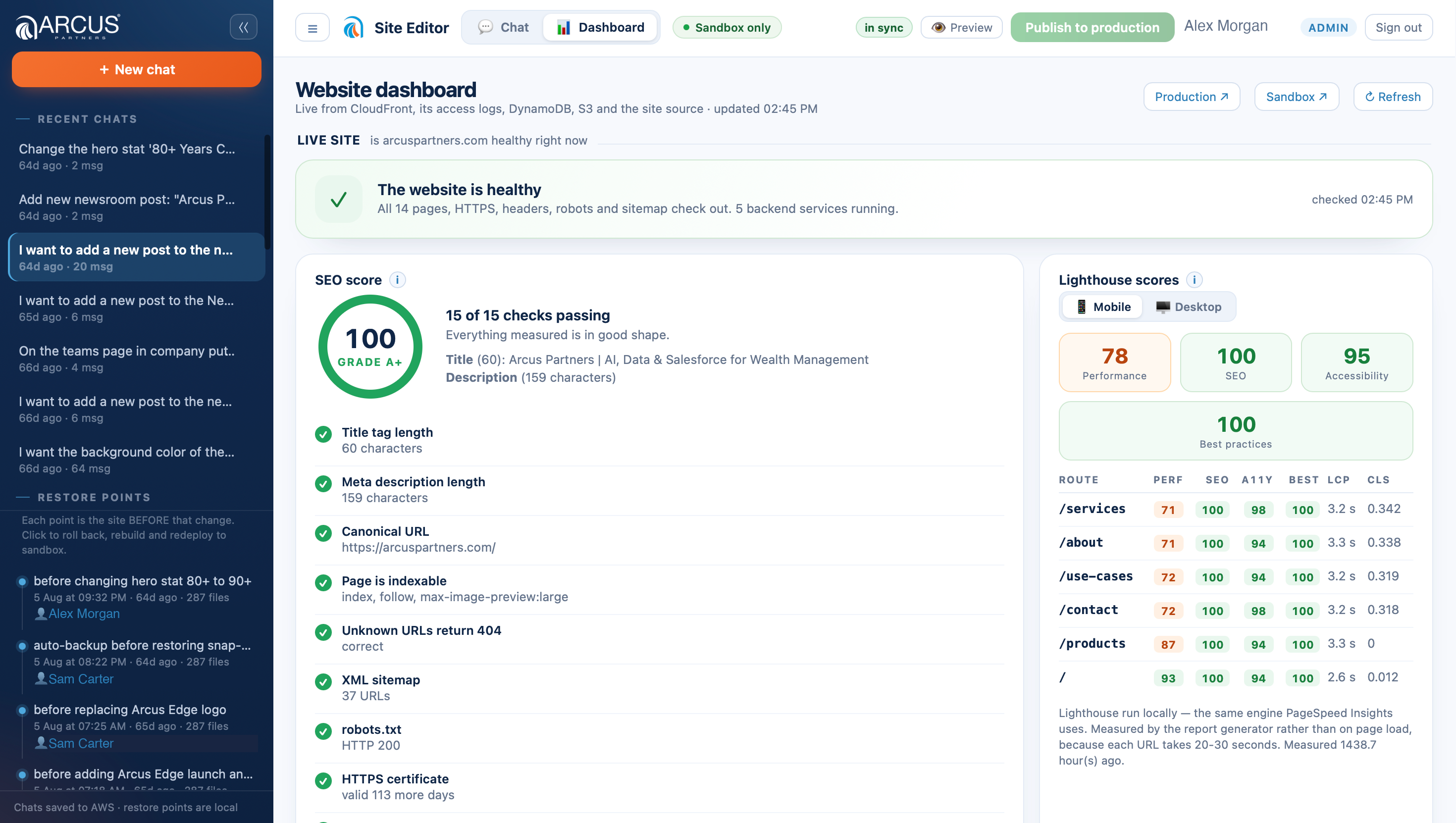
The same sign in opens a dashboard that reads live from your site rather than from stored figures. Visitors, page views, time on site, bounce rate and your most read pages. Performance, accessibility and best practice scores. A health check covering every page, your certificate, security headers, robots file and sitemap. Search queries from Google Search Console once you connect it. A file by file comparison of practice copy against live, with response times per page. A content inventory counting posts, products, team members, jobs, images and enquiries received. And an activity view of recent changes, who makes them, who has access, and every restore point. Each panel explains in plain English what it shows.
Search is covered on two fronts. WebShift scores your site out of 100 for SEO and gives it a letter grade. Behind the score sit weighted checks on the things that move rankings: titles, meta descriptions, canonical tags, structured data, your sitemap, security headers and whether unknown URLs correctly return a 404. Every failing check is named in plain English, so it is a to do list rather than a number.
The second front is generative engine optimisation, or GEO. WebShift checks that your site publishes an llms.txt file, which is the summary large language models read to understand what you do. It also confirms your crawler rules let ChatGPT, Claude, Perplexity and Google AI Overviews reach your pages.
Optional extras run on the same foundation. A demo request form with an AI screen that holds back junk but lets a real lead through even if the screen fails. A careers flow that reads and files incoming resumes. Newsletter capture. A chatbot that answers visitor questions from your own documents. And the SEO and GEO report as a branded PDF on demand.
One note for whoever owns your AWS account. WebShift runs inside it, built on Amazon Bedrock and Amazon Bedrock AgentCore, AWS Lambda, Amazon S3, Amazon CloudFront, Amazon Cognito and Amazon DynamoDB. The supporting services it also uses are listed in the statement of work.
This is not a demo. Arcus Partners built and runs its own website, , with WebShift, the same way your team would. We proved it on ourselves first.
Setup and handover
Setup is careful. Arcus checks your account first, proves everything on a practice copy, and leaves your live site untouched until your team signs off. It usually takes one to three weeks.
Highlights
- Your marketing team stops queuing for developer time. They sign in to ArcusX WebShift, type the change they want, and it is done in minutes. Team pages, newsroom posts, press releases, product and service pages, careers, contact details, logos, photos, section order, and copy anywhere on the site. No ticket. No agency invoice. No training course first. If someone can describe the change, they can make it.
- The WebShift dashboard scores your site out of 100 for SEO, gives it a letter grade, and names every failing check. It confirms AI answer engines like ChatGPT, Claude, and Perplexity can read your pages, which is where a growing share of buyers now start. It also shows visitors, the pages they read, anything broken or slow, and who changed what. Every figure reads live from the site, not a monthly report.
- Nothing goes live by accident. WebShift edits a practice copy and cannot reach your live site. Publishing is a separate step reserved for approvers, who first read a plain English summary of what will change. Every edit saves a restore point, so undo is one click. You can also diff against any restore point, revert a single file, and check what a change will touch before making it. Three roles separate editing from approving, and every action is logged against the person who made it.
Details
Sold by
Categories
Delivery method
Deployed on AWS
New
Introducing multi-product solutions
You can now purchase comprehensive solutions tailored to use cases and industries.

Pricing
Custom pricing options
Pricing is based on your specific requirements and eligibility. To get a custom quote for your needs, request a private offer.

Legal
Content disclaimer
Vendors are responsible for their product descriptions and other product content. AWS does not warrant that vendors' product descriptions or other product content are accurate, complete, reliable, current, or error-free.
Support
Vendor support
Support description You can contact us for support here: support@finity360.com For information on our products and services you can reach out at: Paul Stringer- paul.stringer@arcuspartners.com Gerry Murphy - gerry.murphy@arcuspartners.com Saurabh Bhole - saurabh.bhole@arcuspartners.com Website: