
Sold by: PuzariCloud
Free Trial
AWS Free Tier
See every date in your AWS account that can cause an outage, in one calendar: expiring SAML sign-in, VPN, ACM and IAM certificates, keys and domains, plus maintenance AWS will force on RDS, EC2, ElastiCache, OpenSearch and Redshift. Read-only, with Slack and email alerts at 30 and 7 days.
Overview
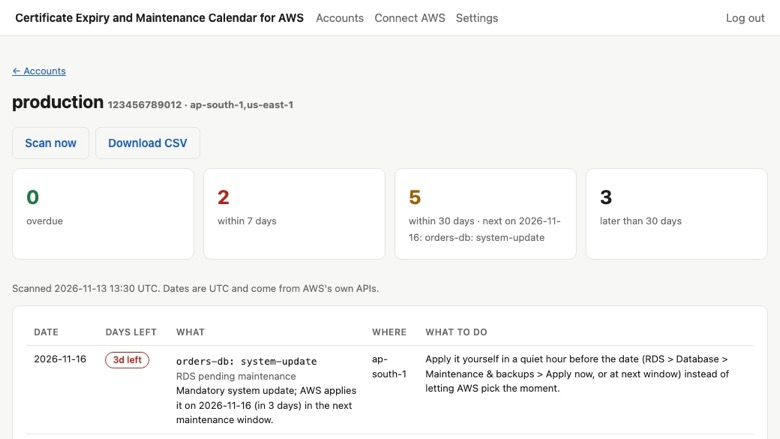
Stop outages caused by a date nobody was watching
A SAML identity provider certificate expires and nobody can sign in. A Client VPN certificate lapses and remote staff are locked out. An imported certificate does not renew by itself. AWS applies database maintenance in the middle of a busy day. AWS tells you about some of these in different consoles and emails, and about others not at all.
Certificate Expiry and Maintenance Calendar for AWS reads those dates through a narrow read-only role and shows them in one list, sorted by date, for every connected account and Region.
What it watches
Things that expire
- ACM certificates, including imported ones and renewals stuck in validation
- SAML provider signing certificates and IAM server certificates
- Client VPN and Site-to-Site VPN certificates
- RDS certificate authorities, AWS Private CA certificates
- Imported KMS key material, AppSync API keys, Route 53 registered domains
Maintenance AWS has scheduled
- RDS pending maintenance actions
- EC2 retirement, reboot and stop events
- ElastiCache service updates, OpenSearch service software updates, Redshift pending actions
What you get
- One calendar with the date, the days left and how to fix each item
- Slack and email alerts at 30 days and again at 7 days
- A private calendar feed (ICS) for Google Calendar, Outlook and Apple Calendar
- CSV export
Security and access
The CloudFormation stack creates one role with a policy of 20 list and describe actions, with an External ID so only your workspace can use it. It cannot change anything and cannot read your data. Two of those calls return more than dates: appsync:ListApiKeys returns the API keys and iam:GetSAMLProvider returns the identity provider metadata. We read only the expiry dates from them and never store or log the rest. You can review the template before you deploy it, and deleting the stack removes our access.
Typical uses
- Never again losing single sign-on because an identity provider certificate expired
- Renewing VPN and imported certificates before remote access or an API breaks
- Planning RDS, ElastiCache and OpenSearch maintenance in your own quiet hours
- Giving the whole team one calendar of upcoming dates, in the calendar app they already use
Who it is for
Platform, DevOps and security teams that run production on AWS and do not want to learn about an expiry from an outage. It suits small teams with one account and companies with many accounts alike: plans are priced by the number of AWS accounts connected, with unlimited users.
Getting started
- Subscribe, or start the 14-day free trial.
- Launch the CloudFormation stack from the Connect page. It creates a role that can only list and describe.
- Paste the role ARN. The first scan finishes in about a minute.
Nothing in your account is ever changed.
Start the 14-day free trial to see every expiry and maintenance date in your account about a minute after connecting.
Highlights
- Catches the expiry dates AWS does not warn you about. SAML identity provider signing certificates, Client VPN and Site-to-Site VPN certificates, IAM server certificates, RDS certificate authorities, imported KMS key material, AppSync API keys, private CAs and registered domains are read every day and listed with the days left, so sign-in, VPN and API outages caused by a forgotten date stop happening.
- Shows forced maintenance in one place instead of five consoles. RDS pending maintenance actions, EC2 retirement, reboot and stop events, ElastiCache service updates, OpenSearch service software updates and Redshift pending actions each appear with the date AWS will apply them, so you can do the work in your own quiet hour rather than be surprised.
- Read-only and running in minutes. One CloudFormation stack creates a narrow role that can only list and describe; nothing in your account is changed and no agent is installed. The first scan runs in about a minute, alerts go to Slack and email when an item is 30 days and again 7 days away, and a private calendar feed (ICS) puts every date in Google Calendar, Outlook or Apple Calendar.
Details
New
Introducing multi-product solutions
You can now purchase comprehensive solutions tailored to use cases and industries.

Features and programs
Financing for AWS Marketplace purchases
AWS Marketplace now accepts line of credit payments through the PNC Vendor Finance program. This program is available to select AWS customers in the US, excluding NV, NC, ND, TN, & VT.

Pricing
Free trial
Try this product free according to the free trial terms set by the vendor.
Pricing is based on the duration and terms of your contract with the vendor. This entitles you to a specified quantity of use for the contract duration. If you choose not to renew or replace your contract before it ends, access to these entitlements will expire.
Additional AWS infrastructure costs may apply. Use the AWS Pricing Calculator to estimate your infrastructure costs.
Dimension | Description | Cost/month |
|---|---|---|
Starter | Expiry and maintenance calendar for 1 AWS account; Slack and email alerts; calendar feed; CSV export; unlimited users. | $29.00 |
Pro | Expiry and maintenance calendar for up to 5 AWS accounts; Slack and email alerts; calendar feed; CSV export; unlimited users. | $79.00 |
Business | Expiry and maintenance calendar for up to 25 AWS accounts; priority support; Slack and email alerts; calendar feed; CSV export; unlimited users. | $199.00 |
Vendor refund policy
Full refund within 14 days of purchase if the product does not work for you. Email ritom@puzaricloud.in with your AWS account ID and we will arrange the refund through AWS Marketplace.

Legal
Vendor terms and conditions
Upon subscribing to this product, you must acknowledge and agree to the terms and conditions outlined in the vendor's End User License Agreement (EULA) .
Content disclaimer
Vendors are responsible for their product descriptions and other product content. AWS does not warrant that vendors' product descriptions or other product content are accurate, complete, reliable, current, or error-free.
Delivery details
Software as a Service (SaaS)
SaaS delivers cloud-based software applications directly to customers over the internet. You can access these applications through a subscription model. You will pay recurring monthly usage fees through your AWS bill, while AWS handles deployment and infrastructure management, ensuring scalability, reliability, and seamless integration with other AWS services.
Resources
Support
Vendor support
Getting help
Email ritom@puzaricloud.in . We reply within one business day, Monday to Friday, India time.
What support covers
- Launching the CloudFormation stack and connecting the role
- Questions about any item on your calendar and how to fix it
- Slack, email and calendar feed setup
- Billing and plan changes through AWS Marketplace
When you write to us
Include your AWS account ID and the Region, and the name of the item you are asking about. Support is included on every plan, including the free trial.
Plans
Starter covers 1 AWS account, Pro 5 and Business 25, with daily scans, alerts, the calendar feed and unlimited users on every plan.
Refunds
Full refund within 14 days of purchase if the product does not work for you. Email ritom@puzaricloud.in with your AWS account ID and we will arrange it through AWS Marketplace.
AWS infrastructure support
AWS Support is a one-on-one, fast-response support channel that is staffed 24x7x365 with experienced and technical support engineers. The service helps customers of all sizes and technical abilities to successfully utilize the products and features provided by Amazon Web Services.
Similar products

ACM for Nitro Enclaves is an enclave application that allows you to use public and private SSL/TLS certificates with your web applications and servers running on Amazon EC2 instances with AWS Nitro Enclaves.

Onedata Software provides complete domain management and SSL security solutions through Amazon Route 53 and AWS Certificate Manager (ACM). Their services include domain registration, DNS management, and automated SSL certificate provisioning, ensuring secure and reliable web applications.

OneData Software enables secure HTTPS for OneCare domains by using AWS Certificate Manager (ACM) to provision, manage, and renew SSL/TLS certificates, ensuring all web and API traffic is encrypted. They integrate ACM with Amazon CloudFront, API Gateway, or load balancers to enforce HTTPS, support custom domain names, and maintain trust. This ensures data in transit is protected, user communications are secure, and domain endpoints meet industry-security expectations.

New Horizons-AWS Certification Exams. This is for AWS Exams for for Foundational, Associate, or Professional AWS Certifications
Customer reviews
No customer reviews yet
Be the first to review this product . We've partnered with PeerSpot to gather customer feedback. You can share your experience by writing or recording a review, or scheduling a call with a PeerSpot analyst.