
Sold by: cloudimg
Deployed on AWS
Free Trial
AWS Free Tier
This product has charges associated with it for seller support. TimescaleDB pre-configured on PostgreSQL with up to 95% columnar compression and millisecond queries on billions of rows. Backed by 24/7 cloudimg support.
Overview
Image
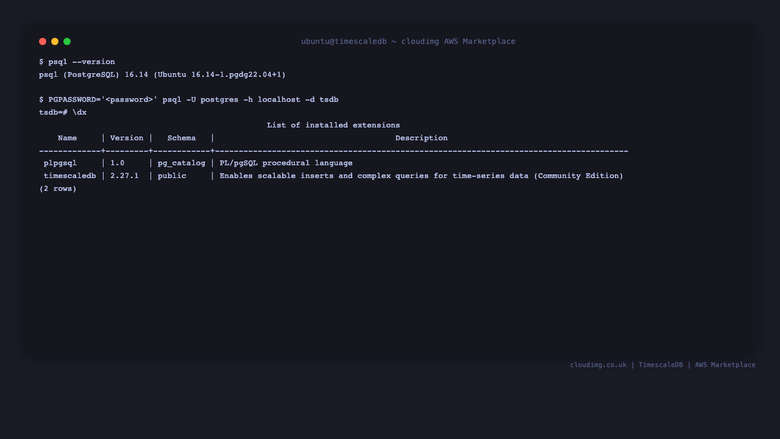
psql version and extensions
Image
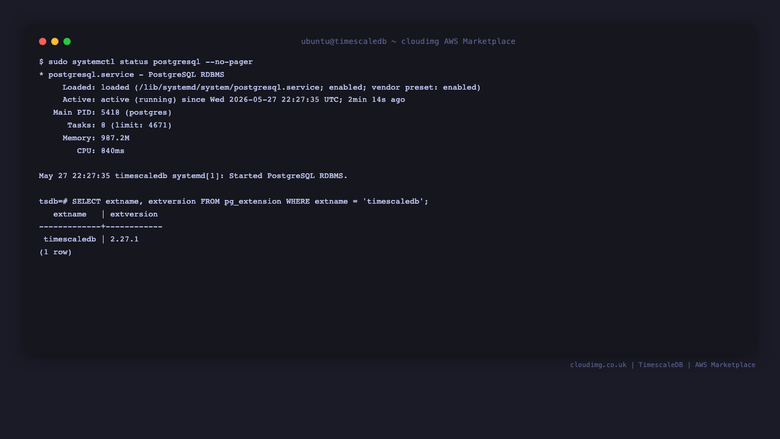
Service status and extension version
Image
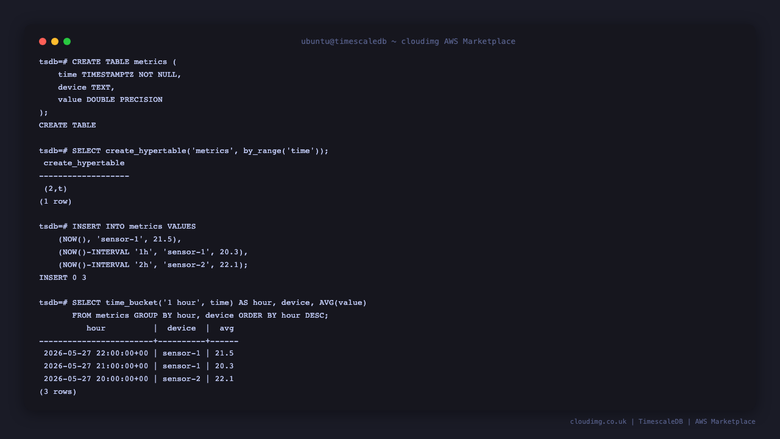
Hypertable and time_bucket query
This is a repackaged open source software product wherein additional charges apply for cloudimg support services.
TimescaleDB - Production-Ready Time-Series Database on PostgreSQL
TimescaleDB is the open-source time-series SQL extension for PostgreSQL, letting you write standard SQL queries against billions of rows and get millisecond response times. This AMI delivers TimescaleDB fully installed, tuned, and secured on top of PostgreSQL so a production-ready time-series database is running within minutes of launch.
Why This AMI Over Alternatives
Compared to installing from packages yourself, this image eliminates manual configuration steps - timescaledb-tune has already calibrated shared_buffers and work_mem to your instance's available RAM, the extension is loaded, and database files sit on a dedicated, independently resizable data disk. Unlike managed time-series services, you retain full control of your data on your own EC2 instance with no vendor lock-in and no cloud-hosting license restrictions (Community edition, Apache 2.0 only). And unlike competing time-series engines, TimescaleDB gives you full SQL compatibility and the entire PostgreSQL ecosystem of tools, extensions, and connectors.
Database Stack
- PostgreSQL with the TimescaleDB extension running as a systemd service
- Installed from the official PGDG APT repository for PostgreSQL and the Timescale Community packagecloud repository for the extension
- Community edition (Apache 2.0) only - no Timescale License cloud-hosting restrictions
- timescaledb-tune pre-applied to calibrate memory settings to the instance's available RAM
- Database files stored on a dedicated, independently resizable data disk
Security and Hardening
Per-Instance Credential Generation: On first boot, a one-shot service generates a fresh PostgreSQL superuser password unique to that instance and writes it to /root/timescaledb-credentials.txt (readable only by root). No shared or default credentials ship in the image.
Network Considerations: We recommend configuring your AWS Security Group to restrict PostgreSQL port access (5432) to trusted IP ranges only. Enable EBS encryption on the data volume for encryption at rest, and configure PostgreSQL SSL settings for encryption in transit.
Getting Started
- Launch the AMI on your chosen instance type (recommended: r-series or m-series for memory-intensive workloads)
- SSH into the instance and retrieve credentials from /root/timescaledb-credentials.txt
- Connect to PostgreSQL using the generated credentials
- Create your first hypertable and begin inserting time-series data
- Configure continuous aggregates and compression policies for your workload
Key Features Ready to Use
- Hypertables - Automatically partition time-series data into chunks for fast inserts and queries
- Continuous Aggregates - Pre-compute common rollups to accelerate dashboards and reporting
- Native Columnar Compression - Reduce storage by up to 95 percent without sacrificing query speed
- Time-Bucket Queries - Aggregate data across flexible time intervals using standard SQL
Use Cases
- IoT telemetry storage and analytics
- Application performance monitoring
- Financial tick data
- Energy meter readings
- Sensor fusion pipelines
- Observability back ends
About cloudimg
cloudimg provides expertly packaged open-source database AMIs with 24/7 professional support. Our engineers specialize in TimescaleDB deployment, hypertable design, continuous aggregates, compression policies, replication, and database administration.
Next Steps
Reach out to our team for a free hypertable design consultation to discuss your time-series architecture before or after deployment. Our engineers can help you plan partitioning strategies, compression policies, and retention rules tailored to your workload.
All product and company names are trademarks or registered trademarks of their respective holders. Use of them does not imply any affiliation with or endorsement by them.
Highlights
- TimescaleDB and PostgreSQL preinstalled and ready with hypertables, continuous aggregates and columnar compression configured, and no manual setup required
- Hardened first boot generates a fresh PostgreSQL superuser password for every instance and stores it in a file only the root user can read, so no shared credentials ever ship in the image
- 24/7 technical support from cloudimg with expert assistance for TimescaleDB hypertable design, compression policies, continuous aggregates and database administration
New
Introducing multi-product solutions
You can now purchase comprehensive solutions tailored to use cases and industries.

Features and programs
Financing for AWS Marketplace purchases
AWS Marketplace now accepts line of credit payments through the PNC Vendor Finance program. This program is available to select AWS customers in the US, excluding NV, NC, ND, TN, & VT.

Pricing
Free trial
Try this product free for 7 days according to the free trial terms set by the vendor. Usage-based pricing is in effect for usage beyond the free trial terms. Your free trial gets automatically converted to a paid subscription when the trial ends, but may be canceled any time before that.
Pricing is based on actual usage, with charges varying according to how much you consume. Subscriptions have no end date and may be canceled any time. Alternatively, you can pay upfront for a contract, which typically covers your anticipated usage for the contract duration. Any usage beyond contract will incur additional usage-based costs.
Additional AWS infrastructure costs may apply. Use the AWS Pricing Calculator to estimate your infrastructure costs.
If you are an AWS Free Tier customer with a free plan, you are eligible to subscribe to this offer. You can use free credits to cover the cost of eligible AWS infrastructure. See AWS Free Tier for more details. If you created an AWS account before July 15th, 2025, and qualify for the Legacy AWS Free Tier, Amazon EC2 charges for Micro instances are free for up to 750 hours per month. See Legacy AWS Free Tier for more details.
Dimension | Description | Cost/hour |
|---|---|---|
m5.large Recommended | m5.large | $0.08 |
t3.micro | t3.micro instance type | $0.04 |
t2.micro | t2.micro instance type | $0.04 |
c6id.large | c6id.large instance type | $0.08 |
vt1.3xlarge | vt1.3xlarge instance type | $0.24 |
inf1.6xlarge | inf1.6xlarge instance type | $0.24 |
r8a.16xlarge | r8a.16xlarge instance type | $0.24 |
m6in.large | m6in.large instance type | $0.08 |
c8ib.large | c8ib.large instance type | $0.08 |
g6e.xlarge | g6e.xlarge instance type | $0.12 |
Vendor refund policy
Refunds available on request.

Legal
Vendor terms and conditions
Upon subscribing to this product, you must acknowledge and agree to the terms and conditions outlined in the vendor's End User License Agreement (EULA) .
Content disclaimer
Vendors are responsible for their product descriptions and other product content. AWS does not warrant that vendors' product descriptions or other product content are accurate, complete, reliable, current, or error-free.
Delivery details
64-bit (x86) Amazon Machine Image (AMI)
Amazon Machine Image (AMI)
An AMI is a virtual image that provides the information required to launch an instance. Amazon EC2 (Elastic Compute Cloud) instances are virtual servers on which you can run your applications and workloads, offering varying combinations of CPU, memory, storage, and networking resources. You can launch as many instances from as many different AMIs as you need.
Version release notes
Initial release of the TimescaleDB image.
Additional details
Usage instructions
Connect via SSH on port 22 as the default login user for your operating system variant (the user guide lists it per variant). Retrieve the generated PostgreSQL credentials with: sudo cat /root/timescaledb-credentials.txt. Connect to the default tsdb database with: PGPASSWORD='<password>' psql -U postgres -h localhost -d tsdb. Restrict port 5432 to trusted networks or application subnets. The user guide at https://www.cloudimg.co.uk/guides/timescaledb-2-aws/ covers hypertable creation, continuous aggregates and compression policies.
Resources
Vendor resources
Support
Vendor support
cloudimg Support for TimescaleDB
cloudimg provides 24/7 technical support for this product via email and live chat.
Support Channels:
- Email: support@cloudimg.co.uk
- Live chat: available around the clock
Response Times:
- Critical issues receive a one-hour average response
What We Help With:
- Deployment and initial configuration
- TimescaleDB hypertable design and partitioning strategy
- Continuous aggregate setup and optimization
- Compression policy configuration
- Replication and high-availability setup
- Performance tuning and troubleshooting
- Updates and patch guidance
- Database administration best practices
Getting Started: After launching your instance, retrieve your unique credentials from /root/timescaledb-credentials.txt and connect to PostgreSQL. If you need assistance with your first hypertable or want guidance on sizing your instance for your workload, contact our team and we will help you get up and running.
Refunds and Billing: For questions about billing or to request a refund, contact support@cloudimg.co.uk with your instance details and we will assist you promptly.
AWS infrastructure support
AWS Support is a one-on-one, fast-response support channel that is staffed 24x7x365 with experienced and technical support engineers. The service helps customers of all sizes and technical abilities to successfully utilize the products and features provided by Amazon Web Services.
Similar products

Tiger Cloud (from the creators of TimescaleDB) is a fully-managed TimescaleDB solution, hosted on AWS and designed for real-time analytics on high-ingest, high-read time series workloads. Start today with $1,000 in free trial credits; trial credits expire in 30 days.

Tiger Cloud (from the creators of TimescaleDB) is a fully-managed TimescaleDB solution, hosted on AWS and designed for real-time analytics on high-ingest, high-read time series workloads. Start today with a 30-day free trial.

This product has charges associated with it for seller support. Production-ready TimescaleDB on PostgreSQL 16 for time-series workloads. Skip manual setup - hypertables, continuous aggregates, and retention policies work immediately with 24/7 expert support.
Self-hosted time-series database built on PostgreSQL. Full SQL support with automatic partitioning, compression, and continuous aggregates for IoT and metrics.
Customer reviews
No customer reviews yet
Be the first to review this product . We've partnered with PeerSpot to gather customer feedback. You can share your experience by writing or recording a review, or scheduling a call with a PeerSpot analyst.