
Sold by: cloudimg
Deployed on AWS
Free Trial
AWS Free Tier
This product has charges associated with it for seller support. Bun, the fast all-in-one JavaScript and TypeScript runtime and toolkit, preinstalled as a ready-to-use development and runtime workstation. The bun binary, a shared package install cache on a dedicated disk and an offline demo project with an HTTP server and a test are all set up, so you can run, build, test and install within minutes of launch. Backed by 24/7 cloudimg support.
Overview
Image
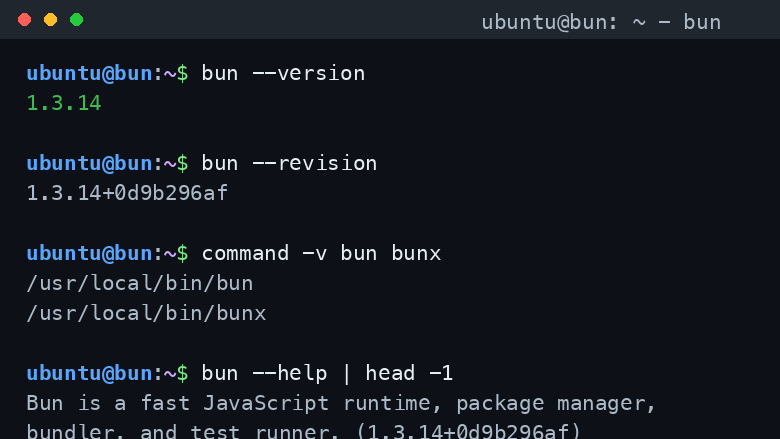
bun --version
Image
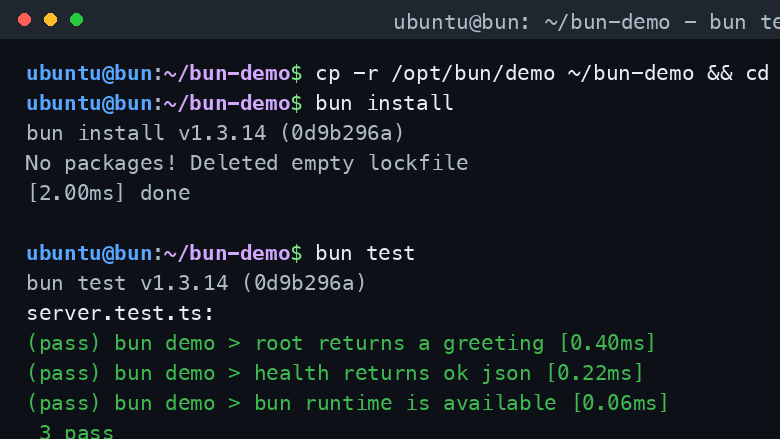
bun test
Image
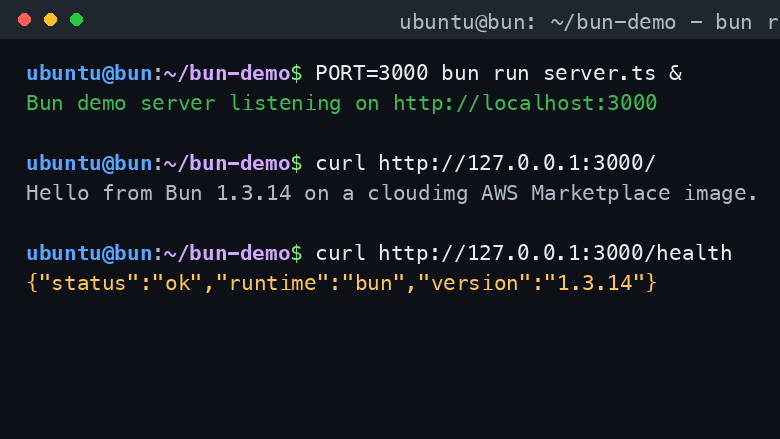
bun run + curl
This is a repackaged open source software product wherein additional charges apply for cloudimg support services.
Overview Bun is the fast all-in-one JavaScript and TypeScript toolkit: a single native binary that is a runtime, a bundler, a transpiler, a test runner and an npm-compatible package manager. It runs JavaScript and TypeScript files directly, installs packages quickly, bundles for production and runs your tests, all from one command. This image delivers Bun fully installed and configured as a ready-to-use workstation, so a developer can SSH in and start running, building and testing JavaScript and TypeScript projects immediately, with no setup.
All-in-One JavaScript Toolkit The bun binary installed at /opt/bun/bin/bun and symlinked onto the system path as bun and bunx, verified against the official release checksum. One command runs your code, installs your dependencies, bundles your app and runs your tests, with TypeScript and JSX support built in and no separate transpiler step. The npm-compatible package manager reads your existing package.json and installs into a fast, shared cache.
Shared Install Cache On A Data Disk The Bun global install root and package install cache are placed on a dedicated, independently resizable data disk and exported to every login shell, so packages downloaded by bun install are shared across projects and persist on durable storage rather than the operating system disk. The first install in any project pulls packages into the shared cache and every later project reuses them.
Offline Demo Project A self-contained demo project ships on the image with an HTTP server and a test that use only Bun's built-in APIs, so you can run bun install, bun run and bun test end to end with no third-party dependencies and no cloud credentials and confirm the runtime works the moment you log in. Copy it, point it at your own code and start building.
Run, Build, Test, Serve Use bun run to execute scripts and TypeScript files directly, bun install to manage dependencies, bun build to bundle for production, bun test as a fast Jest-compatible test runner, and Bun.serve to run a high-throughput HTTP server. Bun reads the package.json and lockfiles your team already uses and integrates cleanly into CI and container images.
Ready To Use Connect over SSH and run bun straight away. The install cache, demo project and environment are already in place, so the first bun install pulls packages into a shared cache on the data disk and every subsequent project reuses them. Build your own applications or wire the workstation into your pipelines.
cloudimg Support 24/7 technical support by email and chat. Help with project setup, dependency and lockfile management, bundling and build configuration, the test runner, running Bun as an application server, container packaging, CI integration and upgrade planning.
Use Cases A development and build workstation for JavaScript and TypeScript teams. A CI runner image for fast installs, bundling and tests. An application server host for running Bun.serve workloads. A reproducible engineering environment with a pinned, checksum-verified runtime and toolchain.
All product and company names are trademarks or registered trademarks of their respective holders. Use of them does not imply any affiliation with or endorsement by them.
Highlights
- Bun, the fast all-in-one MIT-licensed JavaScript and TypeScript runtime, bundler, transpiler, test runner and npm-compatible package manager, preinstalled as a ready-to-use workstation with the bun binary on the system path, verified against the official release checksum, no setup required
- A package install cache on a dedicated, independently resizable data disk is exported to every login shell, so packages downloaded by bun install are shared across projects and persist on durable storage rather than the operating system disk
- Ships a self-contained offline demo project with an HTTP server and a test using only Bun built-in APIs so you can run bun install, bun run and bun test end to end with no third-party dependencies, with 24/7 technical support from cloudimg
Details
Sold by
Categories
Delivery method
Delivery option
64-bit (x86) Amazon Machine Image (AMI)
Latest version
Operating system
Ubuntu 24.04
Deployed on AWS
New
Introducing multi-product solutions
You can now purchase comprehensive solutions tailored to use cases and industries.

Features and programs
Financing for AWS Marketplace purchases
AWS Marketplace now accepts line of credit payments through the PNC Vendor Finance program. This program is available to select AWS customers in the US, excluding NV, NC, ND, TN, & VT.

Pricing
Free trial
Try this product free for 7 days according to the free trial terms set by the vendor. Usage-based pricing is in effect for usage beyond the free trial terms. Your free trial gets automatically converted to a paid subscription when the trial ends, but may be canceled any time before that.
Pricing is based on actual usage, with charges varying according to how much you consume. Subscriptions have no end date and may be canceled any time. Alternatively, you can pay upfront for a contract, which typically covers your anticipated usage for the contract duration. Any usage beyond contract will incur additional usage-based costs.
Additional AWS infrastructure costs may apply. Use the AWS Pricing Calculator to estimate your infrastructure costs.
If you are an AWS Free Tier customer with a free plan, you are eligible to subscribe to this offer. You can use free credits to cover the cost of eligible AWS infrastructure. See AWS Free Tier for more details. If you created an AWS account before July 15th, 2025, and qualify for the Legacy AWS Free Tier, Amazon EC2 charges for Micro instances are free for up to 750 hours per month. See Legacy AWS Free Tier for more details.
Dimension | Description | Cost/hour |
|---|---|---|
t3.small Recommended | t3.small | $0.04 |
t2.micro | t2.micro instance type | $0.04 |
t3.micro | t3.micro instance type | $0.04 |
c5a.12xlarge | c5a.12xlarge instance type | $0.24 |
c5a.16xlarge | c5a.16xlarge instance type | $0.24 |
c5a.24xlarge | c5a.24xlarge instance type | $0.24 |
c5a.2xlarge | c5a.2xlarge instance type | $0.24 |
c5a.4xlarge | c5a.4xlarge instance type | $0.24 |
c5a.8xlarge | c5a.8xlarge instance type | $0.24 |
c5a.large | c5a.large instance type | $0.08 |
Vendor refund policy
Refunds available on request.

Legal
Vendor terms and conditions
Upon subscribing to this product, you must acknowledge and agree to the terms and conditions outlined in the vendor's End User License Agreement (EULA) .
Content disclaimer
Vendors are responsible for their product descriptions and other product content. AWS does not warrant that vendors' product descriptions or other product content are accurate, complete, reliable, current, or error-free.
Delivery details
64-bit (x86) Amazon Machine Image (AMI)
Amazon Machine Image (AMI)
An AMI is a virtual image that provides the information required to launch an instance. Amazon EC2 (Elastic Compute Cloud) instances are virtual servers on which you can run your applications and workloads, offering varying combinations of CPU, memory, storage, and networking resources. You can launch as many instances from as many different AMIs as you need.
Version release notes
Initial release of Bun 1.3.14, the fast all-in-one JavaScript and TypeScript runtime and toolkit, as a ready-to-use CLI workstation.
Additional details
Usage instructions
Connect via SSH on port 22 as the default login user for your operating system variant (the user guide lists it per variant). This is a headless command-line JavaScript and TypeScript runtime workstation: there is no web interface. Read the welcome notes with: sudo cat /root/bun-info.txt. Run bun --version to confirm the toolchain. A self-contained offline demo project ships at /opt/bun/demo (an HTTP server and a test using only Bun built-in APIs, no third-party dependencies needed): copy it somewhere writable, then run bun install, bun test and bun run start to exercise the toolkit end to end. The Bun install cache is on a dedicated data disk at /var/lib/bun/install/cache and is exported as BUN_INSTALL_CACHE_DIR for every login shell, so packages download once and are shared across all your projects. Point bun at your own JavaScript or TypeScript projects and run, build and test as normal.
Resources
Vendor resources
Support
Vendor support
cloudimg provides 24/7 technical support for this product by email and live chat. Our engineers help with deployment, configuration, updates, performance tuning and troubleshooting; critical issues receive a one hour average response. Contact support@cloudimg.co.uk .
AWS infrastructure support
AWS Support is a one-on-one, fast-response support channel that is staffed 24x7x365 with experienced and technical support engineers. The service helps customers of all sizes and technical abilities to successfully utilize the products and features provided by Amazon Web Services.
Similar products
DBbun converts any document, image, or file into an interactive simulator bundle. Upload research papers, patents, technical reports, or any content and receive runnable Python code, synthetic datasets, publication-quality figures, and full documentation. Powered by AI-driven analysis supporting 40+ file types.
![2020 Census Demographic and Housing Characteristics (DHC) Noisy Mea[...]](https://d1ewbp317vsrbd.cloudfront.net/7ea8bd89-0768-4db3-a109-43bd53a40c5e.png)
The 2020 Census Demographic and Housing Characteristics Noisy Measurement File is an intermediate output of the 2020 Census Disclosure Avoidance System (DAS) TopDown Algorithm (TDA) (as described in Abowd, J. et al [2022], and implemented in primitives.py). The 2020 Census Demographic and Housing Characteristics Noisy Measurement File includes zero-Concentrated Differentially Private (zCDP) (Bun, M. and Steinke, T [2016]) noisy measurements, implemented via the discrete Gaussian mechanism (Cannone C., et al., [2023] ), which added positive or negative integer-valued noise to each of the resulting counts. These are estimated counts of individuals and housing units included in the 2020 Census Edited File (CEF), which includes confidential data collected in the 2020 Census of Population and Housing.
The noisy measurements included in this file were subse[...]
![2010 Census Production Settings Redistricting Data (P.L. 94-171) De[...]](https://d1ewbp317vsrbd.cloudfront.net/68c033a7-97d2-490a-bdea-aafaddb32854.png)
The 2010 Census Production Settings Redistricting Data (P.L. 94-171) Demonstration Noisy Measurement File (2023-04-03) is an intermediate output of the 2020 Census Disclosure Avoidance System (DAS) TopDown Algorithm (TDA) (as described in Abowd, J. et al [2022] https://doi.org/10.1162/99608f92.529e3cb9 , and implemented in https://github.com/uscensusbureau/DAS2020RedistrictingProductionCode). The NMF was produced using the official “production settings,” the final set of algorithmic parameters and privacy-loss budget allocations, that were used to produce the 2020 Census Redistricting Data (P.L. 94-171) Summary File and the 2020 Census Demographic and Housing Characteristics File.
The NMF consists of the full set of privacy-protected statistical queries (counts of individuals or housing units with particular combinations of characteristics) of confidential 2010 Census data relating to the redistricting data portion of the 2010 Demonstration Data Products Suite – Re[...]
![2010 Census Production Settings Demographic and Housing Characteris[...]](https://d1ewbp317vsrbd.cloudfront.net/9abf3dd8-415e-4ed8-8a40-bbf6b9814b70.png)
The 2010 Census Production Settings Demographic and Housing Characteristics (DHC) Demonstration Noisy Measurement File (2023-06-30) is an intermediate output of the 2020 Census Disclosure Avoidance System (DAS) TopDown Algorithm (TDA) (as described in Abowd, J. et al [2022] https://doi.org/10.1162/99608f92.529e3cb9 , and implemented in https://github.com/uscensusbureau/DAS2020RedistrictingProductionCode). The NMF was produced using the official “production settings,” the final set of algorithmic parameters and privacy-loss budget allocations, that were used to produce the 2020 Census Redistricting Data (P.L. 94-171) Summary File and the 2020 Census Demographic and Housing Characteristics File. The NMF consists of the full set of privacy-protected statistical queries (counts of individuals or housing units with particular combinations of characteristics) of confidential 2010 Census data relating to the 2010 Demonstration Data Products Suite – Redistricting (P.L. 94-171) and De[...]
Customer reviews
No customer reviews yet
Be the first to review this product . We've partnered with PeerSpot to gather customer feedback. You can share your experience by writing or recording a review, or scheduling a call with a PeerSpot analyst.