
Sold by: SIENNA
Deployed on AWS
tamper is the leading Object Storage Monitoring Solution, 100% S3-Compatible, with FIM, DSPM, DAM, DLP features to ensure Data Integrity and Ransomware Protection.
Overview
Image
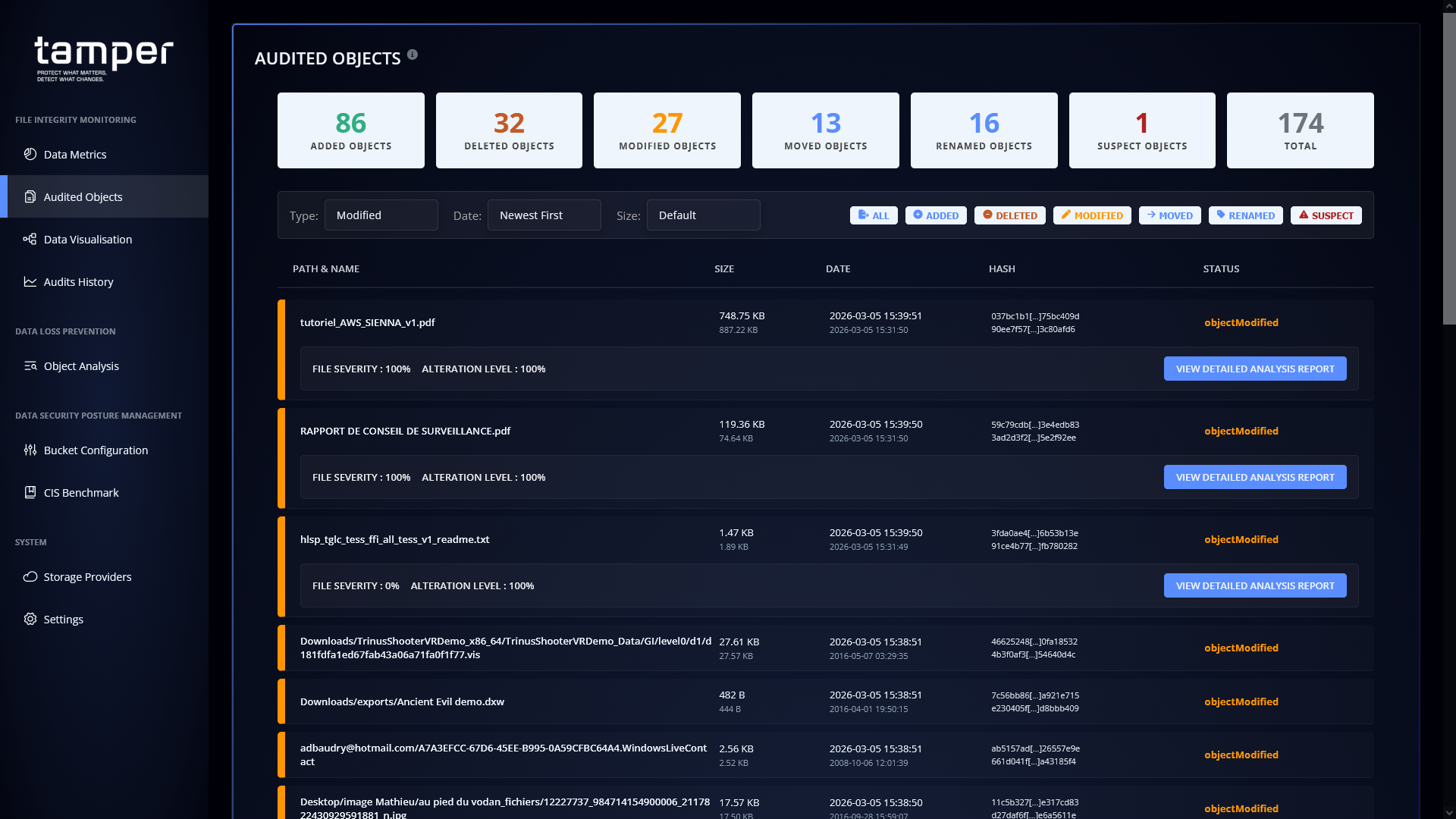
AI-Audited Objects listing
Image
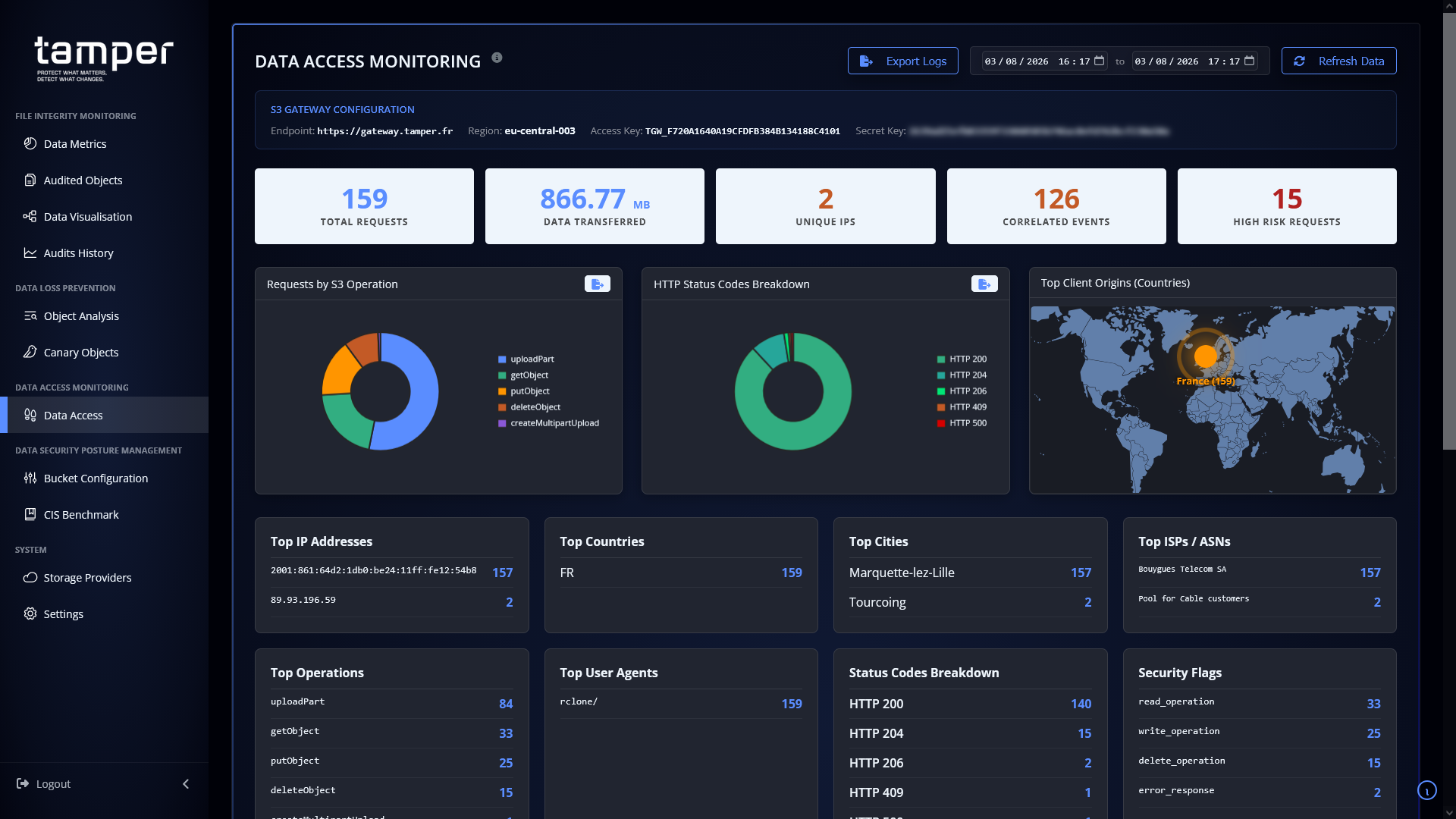
Data Access Monitoring
Image
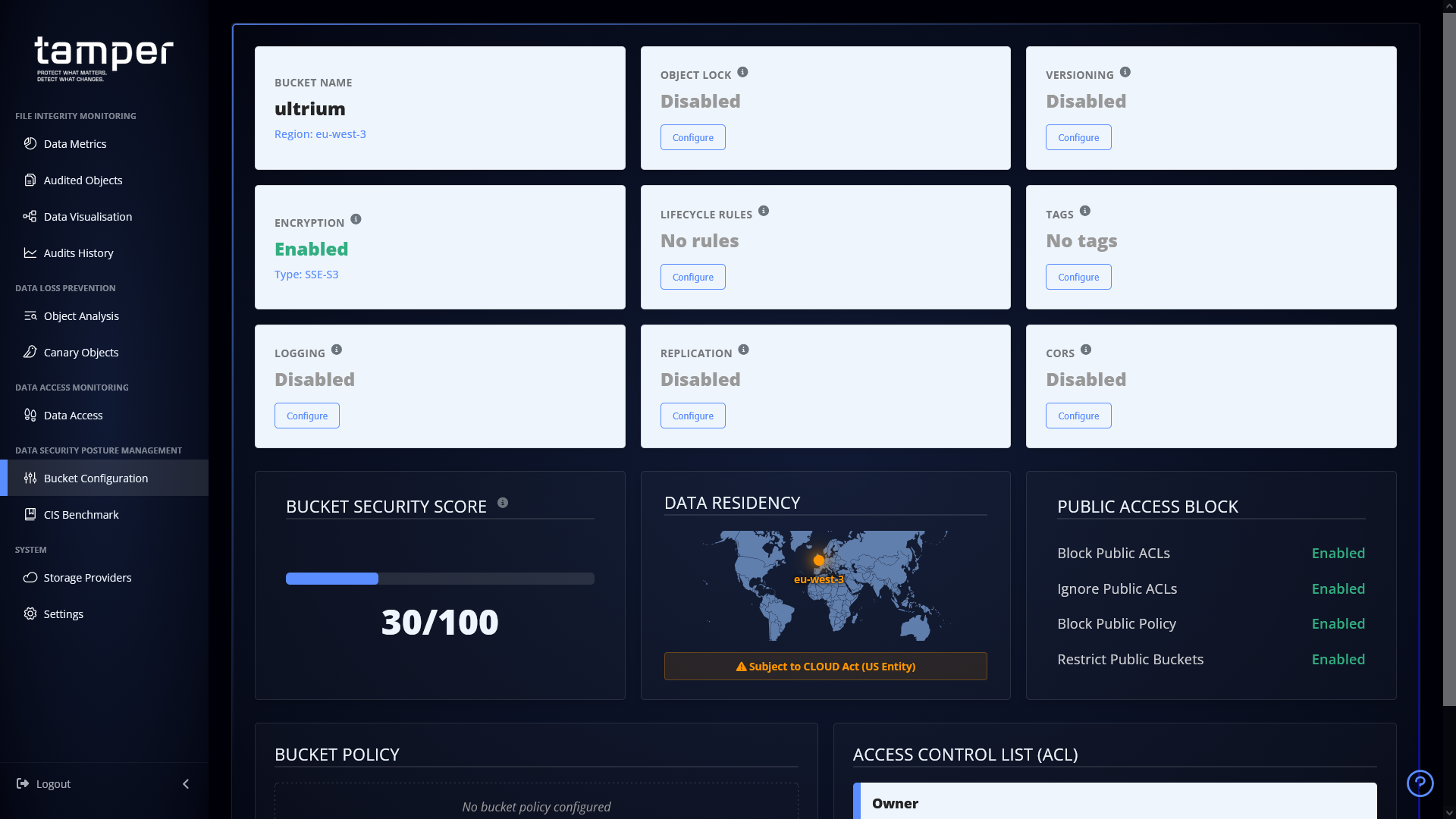
Bucket Configuration
Image
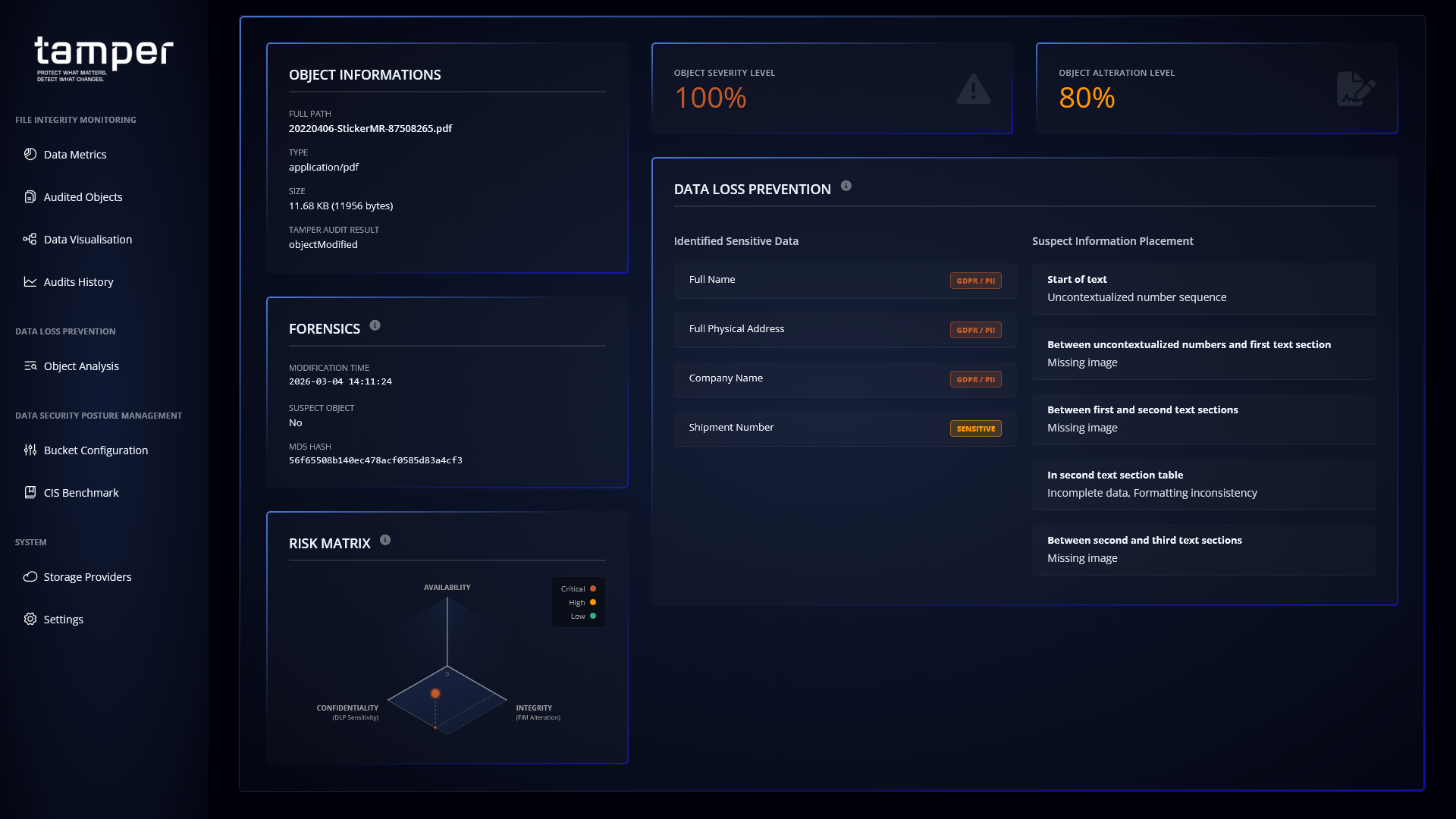
Data Loss Prevention Reports
Image
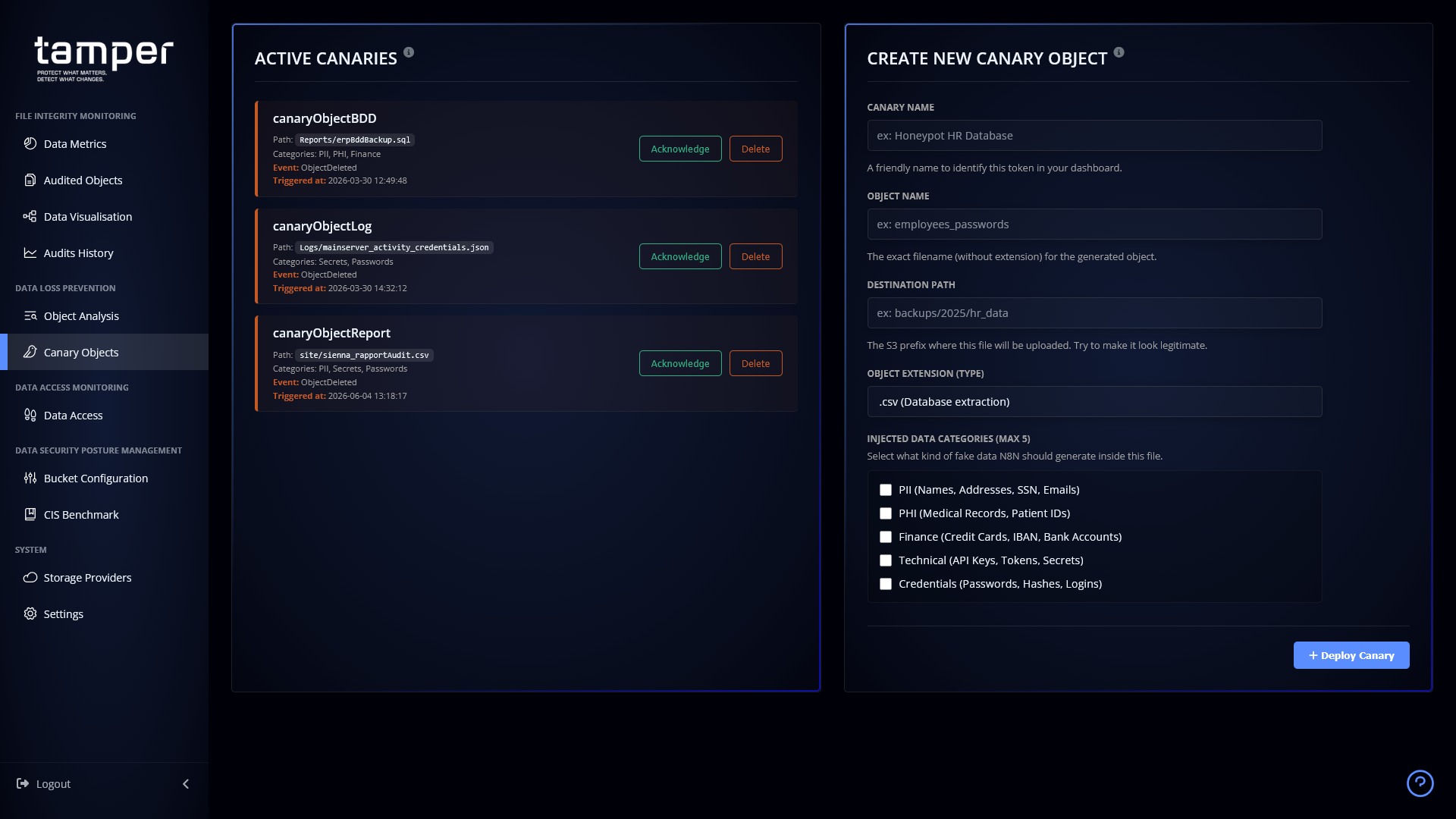
Canary Objects
Detect Unauthorized Changes to Your Object Storage Before They Become Breaches
tamper is an object storage monitoring solution that continuously audits S3 Buckets for unauthorized modifications, sensitive data exposure, and ransomware activity. Designed for security teams managing cloud storage across providers, tamper combines File Integrity Monitoring (FIM), Data Security Posture Management (DSPM), Data Activity Monitoring (DAM), and Data Loss Prevention (DLP) in a single platform.
How tamper Protects Your Data
Real-Time Change Detection
tamper detects additions, deletions, modifications, moves, renames, and storage class changes to objects in any S3-compatible bucket. Beyond simple change logging, tamper's AI module characterizes whether modifications are legitimate or the result of malicious activity, such as ransomware encryption or credential compromise.
Data Security Posture Management
- Scans and catalogues all assets within monitored buckets
- Generates dynamic visualizations of your data's hierarchical structure
- Retrieves current bucket configuration to highlight security gaps
- Identifies options that should be enabled and provides remote enablement features where supported by the provider
Sensitive Data Discovery and DLP
- Identifies sensitive content including email addresses, IBAN numbers, API keys, JWT tokens, and personal names
- Categorizes each finding by severity level
- AI-powered analysis flags data exposure risks before they escalate
Why Teams Choose tamper
Cross-Provider Compatibility: tamper works with any S3-compatible object storage, giving you consistent monitoring regardless of which cloud storage provider you use.
AI-Driven Modification Analysis: Rather than simply alerting on every change, tamper's AI module determines whether modifications are legitimate operations or indicators of compromise, reducing alert fatigue while catching real threats.
Unified Security View: Instead of stitching together separate FIM, DSPM, and DLP tools, tamper delivers all capabilities through a single monitoring platform with consolidated reporting and alerting.
Use Case: Protecting Financial Data from Ransomware
A compliance team storing customer financial records (containing IBAN numbers, personal identifiers, and transaction data) in S3 buckets needs to detect unauthorized encryption attempts before data becomes irrecoverable. tamper continuously monitors for bulk modification patterns characteristic of ransomware, flags the activity as illegitimate through AI analysis, and alerts the team, enabling rapid response before backup windows are missed.
Deployment
tamper is deployed as an AMI on AWS. Once launched, connect tamper to your S3 Buckets to begin monitoring.
Getting Started
Deploy the tamper AMI from AWS Marketplace and configure your bucket connections to begin monitoring. For a guided walkthrough or to discuss your specific environment, reach out to the tamper team to arrange a demonstration.
Highlights
- tamper is able to detect additions, deletions, modifications, moves, renames and changes to the storage class of Objects in an S3 bucket, regardless of CSP providing the remote storage service. tamper will also be able to characterise the modifications made to Objects flagged as modified, in order to determine whether they are legitimate or illegitimate; carried out by malicious programmes that have exploited a security vulnerability or impersonated a legitimate user or tenant.
- tamper offers the key features found in DSPM solutions: the tool scans the S3 bucket being audited to catalogue the assets it contains, generating dynamic visualisations that enable the user to understand the hierarchical structure of the data stored. tamper also retrieves the current configuration of the S3 bucket to highlight the options that are enabled and those that should be enabled, as well as features for remotely enabling these options, provided they are supported by the CSP.
- tamper incorporates Data Loss Prevention features, identifying sensitive content within certain Objects and analysed by the AI module, in order to inform you of their severity. Each piece of sensitive data is flagged, such as the presence of email addresses, IBAN numbers, as well as third-party API keys, JWT tokens or even first names and surnames, and is categorised according to its significance.
Details
Sold by
Categories
Delivery method
Delivery option
tamper 1-Click Launch (Recommended AMI CloudFormation template)
64-bit (x86) Amazon Machine Image (AMI)
Latest version
Operating system
Debian 12
Deployed on AWS
New
Introducing multi-product solutions
You can now purchase comprehensive solutions tailored to use cases and industries.

Features and programs
Financing for AWS Marketplace purchases
AWS Marketplace now accepts line of credit payments through the PNC Vendor Finance program. This program is available to select AWS customers in the US, excluding NV, NC, ND, TN, & VT.

Pricing
Pricing and entitlements for this product are managed through an external billing relationship between you and the vendor. You activate the product by supplying a license purchased outside of AWS Marketplace, while AWS provides the infrastructure required to launch the product. AWS Subscriptions have no end date and may be canceled any time. However, the cancellation won't affect the status of the external license.
Additional AWS infrastructure costs may apply. Use the AWS Pricing Calculator to estimate your infrastructure costs.
Vendor refund policy
Refunds can be obtained by contacting support on your tamper dashboard at https://dash.tamper.one

Legal
Vendor terms and conditions
Upon subscribing to this product, you must acknowledge and agree to the terms and conditions outlined in the vendor's End User License Agreement (EULA) .
Content disclaimer
Vendors are responsible for their product descriptions and other product content. AWS does not warrant that vendors' product descriptions or other product content are accurate, complete, reliable, current, or error-free.
Delivery details
64-bit (x86) Amazon Machine Image (AMI)
Amazon Machine Image (AMI)
An AMI is a virtual image that provides the information required to launch an instance. Amazon EC2 (Elastic Compute Cloud) instances are virtual servers on which you can run your applications and workloads, offering varying combinations of CPU, memory, storage, and networking resources. You can launch as many instances from as many different AMIs as you need.
Version release notes
tamper version 1.2.15 AMI release for AWS
Changes :
- NEW Multi-Buckets capabilities, with segmented actions depending on the selected-current bucket;
- Added a new dynamic history graph view on the Audits History" page;
- Enhanced the Tier Updated operation detection, now detecting in both sides;
- Added orchestration and logic foundation features for the tamperOne data analytics platform, with an automatic comit of FIM & DAM data at each audit for users with the Monolith Licence.
Stay tuned for the tamperOne, comming soon on dash.tamper.one !
(note on previous release : our main services have now been migrated to XXX.tamper.one, like licence.tamper.one, gateway.tamper.one and dash.tamper.one, but XXX.tamper.fr will continue to work until the end of the year).
Additional details
Usage instructions
FIRST BOOT INITIALIZATION
Upon initial launch of the EC2 instance, the Docker engine natively orchestrates and auto-starts the internal application stack. Please allow approximately 5 minutes after the instance launch for the initialization process to complete.
ACCESSING THE WEB INTERFACE
Once initialized, open your standard web browser and navigate directly to your instance's IP address via HTTP. URL: http://<EC2-Public-IP>/ You will be greeted by the tamper login screen. Log in using the default credentials (Username: admin / Password: tamperAdmin) and follow the on-screen setup guide to input your licence key (on the Settings page).
Note: We recommend placing this instance behind an AWS Application Load Balancer or Reverse Proxy to serve the web interface securely via HTTPS.
SYSTEM ADMINISTRATION (SSH ACCESS)
For system maintenance, upgrades, or container inspection, you can securely connect to the appliance operating system via SSH using the SSH Key Pair selected during your AWS instance deployment: Username: admin Command: ssh -i /path/to/your-keypair.pem admin@<EC2-Public-IP> Note: For security hardening and AWS Marketplace compliance, password authentication for root and administrative users is permanently disabled. Only SSH Key authentication is accepted on Port 22.
DOCKER & SERVICE MANAGEMENT COMMANDS
Once connected via SSH as 'admin', you can inspect internal services directly using standard Docker commands:
View active Docker containers: sudo docker ps Inspect application logs: sudo docker compose -f /root/tamperDocker/docker-compose.prod.yml logs -f
And don't forget to sudo -i to become root !
Support
Vendor support
Support Channels
tamper provides support through two primary channels:
- Customer Portal: Access support resources and manage your account at dash.tamper.one (available once you have obtained your licence).
- Email: Contact the tamper team directly at support@tamper.one for technical assistance, troubleshooting, or account inquiries.
Getting Help
If you experience issues with the tamper platform, including deployment questions, bucket monitoring configuration, alert management, or account and billing inquiries - reach out via either channel above. For refund requests, contact the tamper team by email with your licence details and a description of the issue.
AWS infrastructure support
AWS Support is a one-on-one, fast-response support channel that is staffed 24x7x365 with experienced and technical support engineers. The service helps customers of all sizes and technical abilities to successfully utilize the products and features provided by Amazon Web Services.
Similar products
Discover and protect sensitive data and personal identifiable information (PII) in Amazon S3 and Amazon EC2 to support compliance and security mandates. Scan up to 500GB for free during the 30 day free trial.
immudb is a lightweight, high-performance immutable database with cryptographic verification every record is permanently auditable and tamper-evident by design.

NetBackup is a powerful and highly scalable data protection solution that supports over 1,000 data sources and over 1,000 storage targets. With built-in threat detection, advanced analytics and integrations, and intelligent automation, NetBackup provides integrated cyber resilience and comprehensive coverage for complex hybrid and multi-cloud environments.

Tiger Cloud (from the creators of TimescaleDB) is a fully-managed TimescaleDB solution, hosted on AWS and designed for real-time analytics on high-ingest, high-read time series workloads. Start today with a 30-day free trial.
Customer reviews
No customer reviews yet
Be the first to review this product . We've partnered with PeerSpot to gather customer feedback. You can share your experience by writing or recording a review, or scheduling a call with a PeerSpot analyst.