Sold by: CloudSnorkel
Deployed on AWS
A better way to browse CloudTrail and find events with unlimited search queries.
Overview
Image
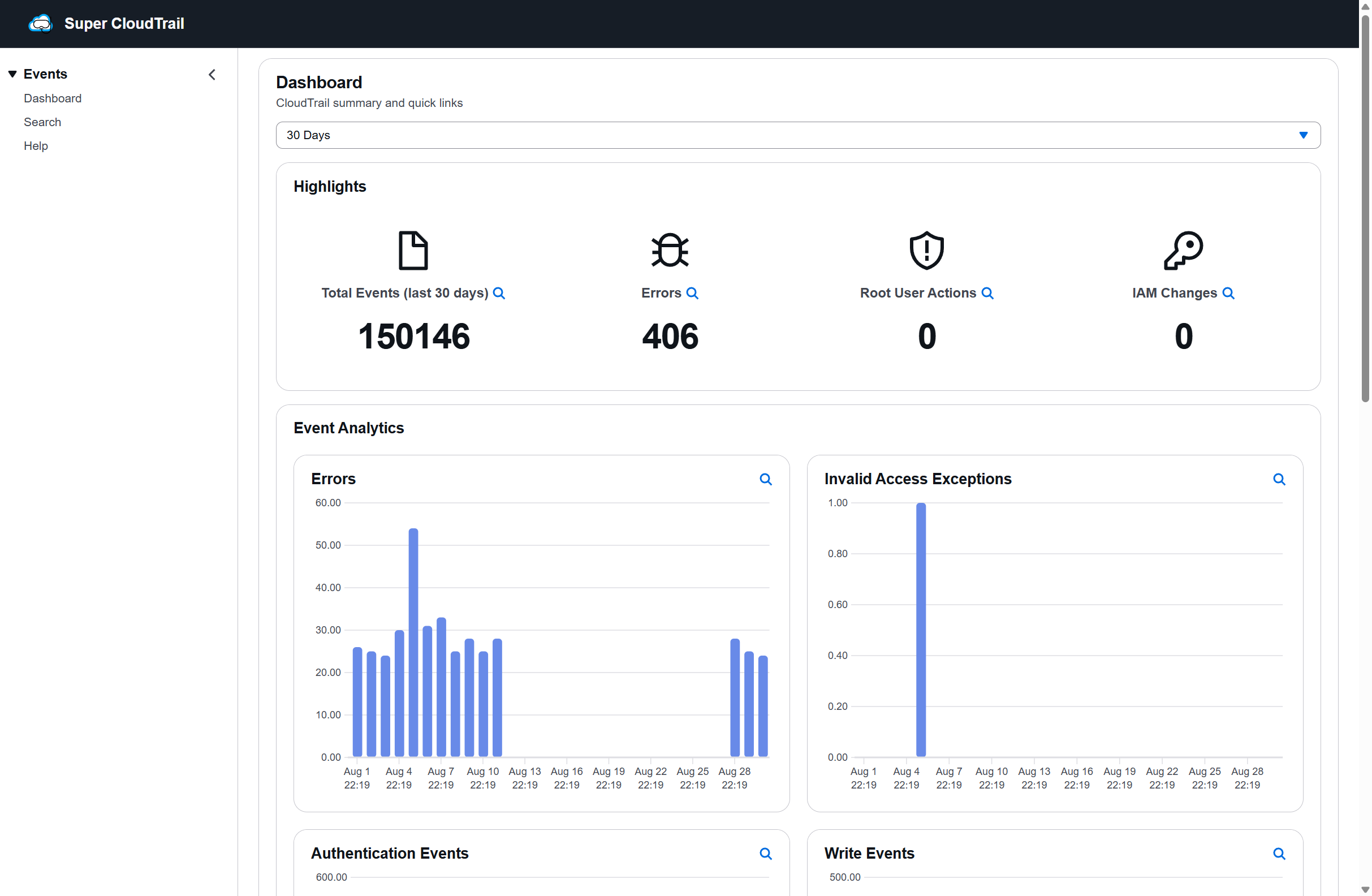
Dashboard
Image
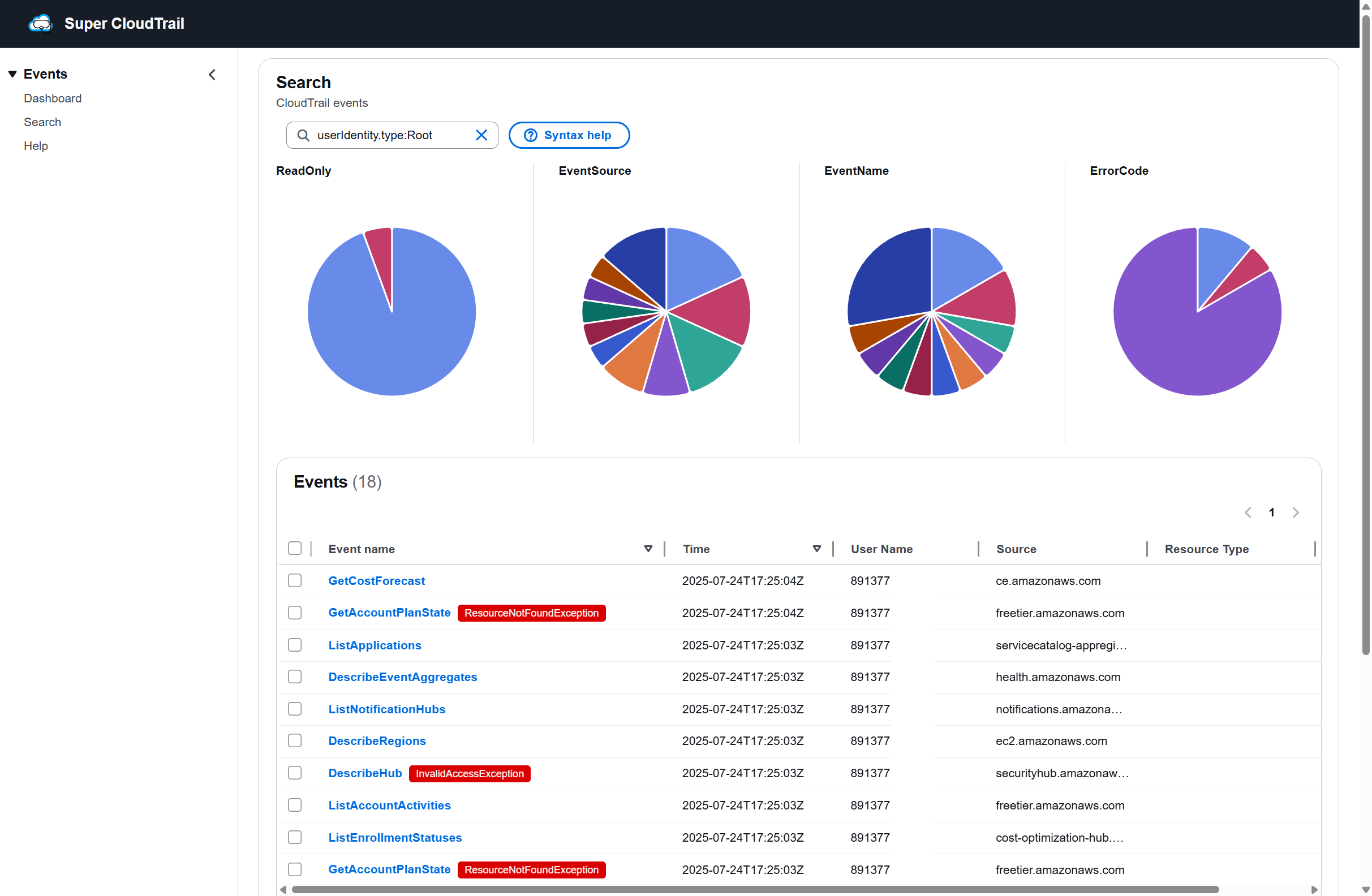
Search for root user events
Image
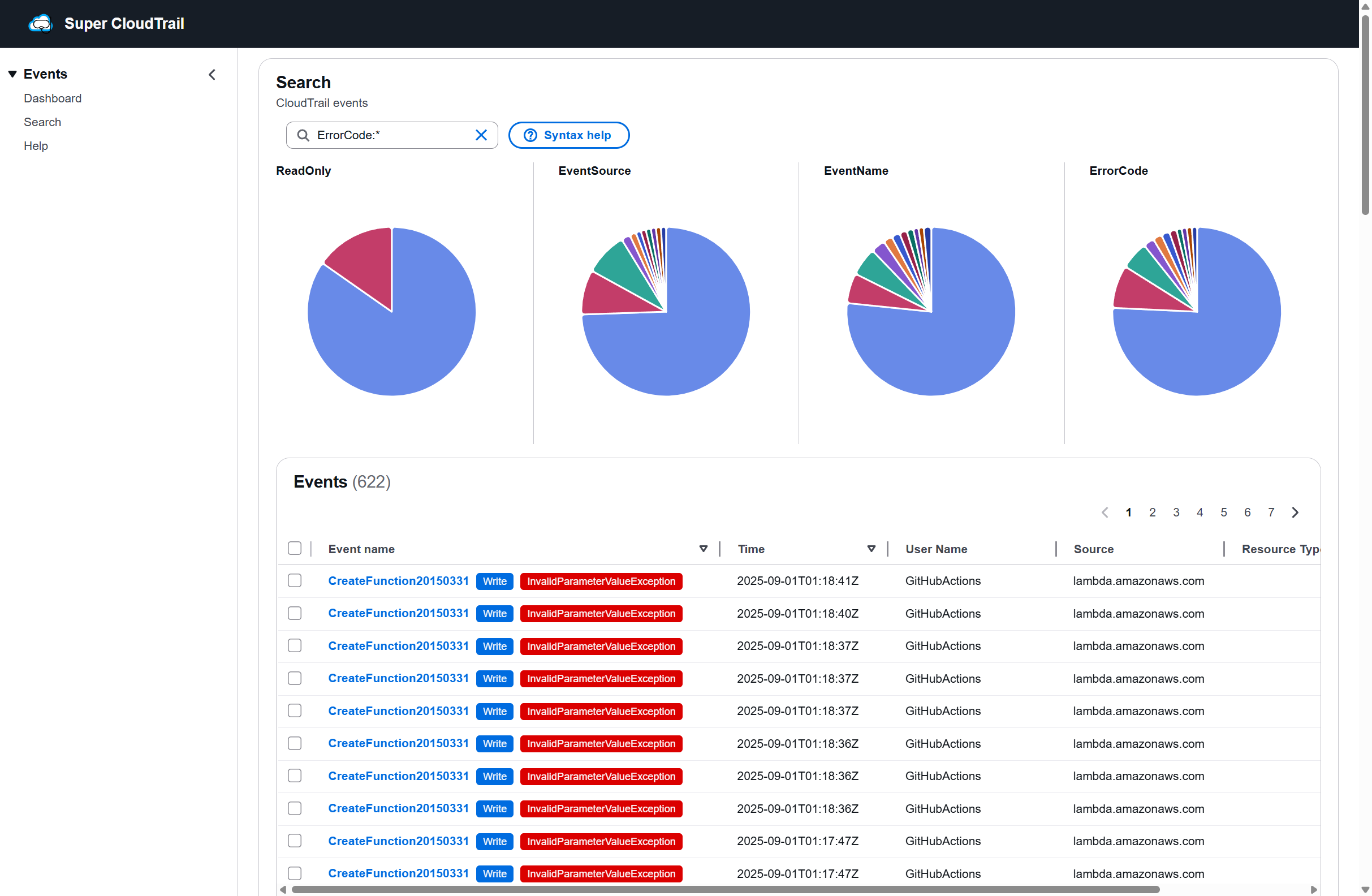
Search for errors
Image
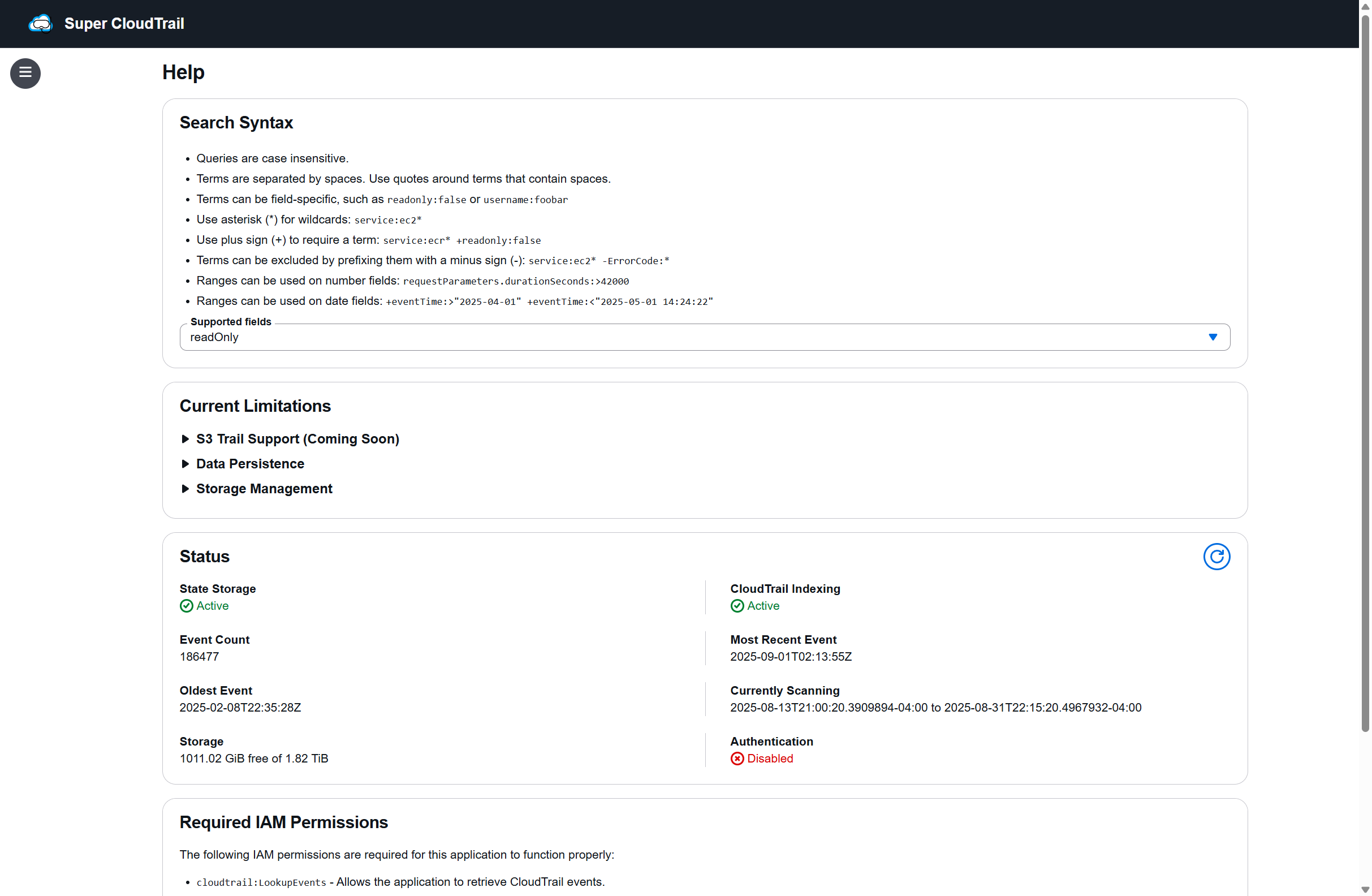
Help page
Super CloudTrail makes AWS CloudTrail actually usable. Instead of wrestling with slow queries and single-field searches, you can instantly search across multiple criteria with no limits. Investigate events faster, whether it's an IAM change, a failed login, or a suspicious root action.
On top of fast search, Super CloudTrail includes a ready-to-use security dashboard that highlights the things that matter most: invalid access attempts, root user activity, errors, authentication events, EC2 instance changes, and more. Interactive graphs and facets make it easy to visualize patterns, spot anomalies, and drill into the details.
With simple container based deployment, you'll be up and running in minutes -- no Athena, Glue, or complex pipelines required.
Highlights
- Unlimited multi-field search -- instantly query across users, actions, resources, and IPs
- Built-in security dashboard -- see errors, logins, root activity, and instance changes at a glance
- Simple setup -- deploy in minutes with just a container on Fargate, ECS or EKS
Details
Sold by
Categories
Delivery method
Supported services
Delivery option
Container image for local CloudTrail
Latest version
Operating system
Linux
Deployed on AWS
New
Introducing multi-product solutions
You can now purchase comprehensive solutions tailored to use cases and industries.

Features and programs
Financing for AWS Marketplace purchases
AWS Marketplace now accepts line of credit payments through the PNC Vendor Finance program. This program is available to select AWS customers in the US, excluding NV, NC, ND, TN, & VT.

Pricing
Pricing is based on actual usage, with charges varying according to how much you consume. Subscriptions have no end date and may be canceled any time.
Additional AWS infrastructure costs may apply. Use the AWS Pricing Calculator to estimate your infrastructure costs.
Dimension | Description | Cost/unit/hour |
|---|---|---|
Hours | Container Hours | $0.028 |
Dimensions summary
Super CloudTrail uses a single usage-based dimension billed by Container Hours. You pay for the number of hours the container runs, so cost scales directly with how long you use the service. There are no tiers, instance sizes, or separate add-ons to choose between. The tool lets you browse CloudTrail and search events with unlimited search queries, and your hourly usage is the only factor that determines what you pay.
Top-of-mind questions for buyers
A Container Hour is one hour that the Super CloudTrail container runs. Billing tracks how long the container stays active. Partial usage is metered by the running time. The count reflects run time only, not the number of searches you perform.
Charges apply for the hours the container runs. When you stop the container, software hours stop accruing. Underlying AWS resources like storage may still incur separate AWS fees, but the Super CloudTrail hourly charge meters running time only.
No. Super CloudTrail includes unlimited search queries. Your cost depends only on Container Hours, meaning how long the container runs. Running more searches during that time does not change the hourly charge.
cloudsnorkel.com
Helpful?
Vendor refund policy
The product is charged based on hourly usage. You may stop using the product at any time. We currently do not offer any refunds.

Legal
Vendor terms and conditions
Upon subscribing to this product, you must acknowledge and agree to the terms and conditions outlined in the vendor's End User License Agreement (EULA) .
Content disclaimer
Vendors are responsible for their product descriptions and other product content. AWS does not warrant that vendors' product descriptions or other product content are accurate, complete, reliable, current, or error-free.
Delivery details
Container image for local CloudTrail
Supported services: Learn more
- Amazon ECS
- Amazon EKS
- Amazon ECS Anywhere
- Amazon EKS Anywhere
Container image
Containers are lightweight, portable execution environments that wrap server application software in a filesystem that includes everything it needs to run. Container applications run on supported container runtimes and orchestration services, such as Amazon Elastic Container Service (Amazon ECS) or Amazon Elastic Kubernetes Service (Amazon EKS). Both eliminate the need for you to install and operate your own container orchestration software by managing and scheduling containers on a scalable cluster of virtual machines.
Version release notes
This release improves documentation on the help page to include information about storage, encryption, quotas and IAM.
Additional details
Usage instructions
AWS Fargate Deployment
1. Create IAM Roles
Create ECS task execution role and task role with cloudtrail:LookupEvents permission.
2. Create ECS Task Definition
Create a file named task-definition.json with this JSON content (replace role ARNs, subnet-12345, sg-12345, and log region with your actual values):
{"family": "super-cloudtrail", "networkMode": "awsvpc", "requiresCompatibilities": ["FARGATE"], "cpu": "512", "memory": "1024", "executionRoleArn": "EXEC_ROLE_ARN", "taskRoleArn": "TASK_ROLE_ARN", "containerDefinitions": [{"name": "super-cloudtrail", "image": "709825985650.dkr.ecr.us-east-1.amazonaws.com/cloudsnorkel/super/cloudtrail:v1.0.3", "portMappings": [{"containerPort": 80, "protocol": "tcp"}], "environment": [{"name": "PORT", "value": "80"}, {"name": "AUTH_USERNAME", "value": "admin"}, {"name": "AUTH_PASSWORD", "value": "your-secure-password"}], "logConfiguration": {"logDriver": "awslogs", "options": {"awslogs-group": "super-cloudtrail", "awslogs-region": "us-east-1", "awslogs-stream-prefix": "ecs"}}}]}
3. Deploy
Run these AWS CLI commands:
aws ecs register-task-definition --cli-input-json file://task-definition.json
aws ecs create-service --cluster your-cluster --service-name super-cloudtrail --task-definition super-cloudtrail --desired-count 1 --launch-type FARGATE --network-configuration "awsvpcConfiguration={subnets=[subnet-12345],securityGroups=[sg-12345],assignPublicIp=ENABLED}"
4. Access Application
- Find your service's public IP in ECS console
- Open http://YOUR-PUBLIC-IP in browser
- Login with credentials from environment variables
EKS Deployment
1. Create Namespace, Service Account, and ConfigMap
Run these kubectl commands:
- kubectl create namespace super-cloudtrail
- kubectl create serviceaccount super-cloudtrail-sa -n super-cloudtrail
- kubectl create configmap super-cloudtrail-config -n super-cloudtrail --from-literal=PORT=80 --from-literal=AUTH_USERNAME=admin --from-literal=AUTH_PASSWORD=your-secure-password
Attach IAM role to service account with cloudtrail:LookupEvents permission.
2. Create Deployment JSON
Create deployment.json with this JSON content:
{"apiVersion": "apps/v1", "kind": "Deployment", "metadata": {"name": "super-cloudtrail", "namespace": "super-cloudtrail"}, "spec": {"replicas": 1, "selector": {"matchLabels": {"app": "super-cloudtrail"}}, "template": {"metadata": {"labels": {"app": "super-cloudtrail"}}, "spec": {"serviceAccountName": "super-cloudtrail-sa", "containers": [{"name": "super-cloudtrail", "image": "709825985650.dkr.ecr.us-east-1.amazonaws.com/cloudsnorkel/super/cloudtrail:v1.0.3", "ports": [{"containerPort": 80}], "envFrom": [{"configMapRef": {"name": "super-cloudtrail-config"}}], "resources": {"requests": {"memory": "512Mi", "cpu": "250m"}, "limits": {"memory": "1Gi", "cpu": "500m"}}}]}}}}
3. Create Service JSON
Create service.json with this JSON content:
{"apiVersion": "v1", "kind": "Service", "metadata": {"name": "super-cloudtrail-service", "namespace": "super-cloudtrail"}, "spec": {"selector": {"app": "super-cloudtrail"}, "ports": [{"port": 80, "targetPort": 80}], "type": "LoadBalancer"}}
4. Apply Manifests
Run these kubectl commands:
- kubectl apply -f deployment.json
- kubectl apply -f service.json
5. Access Application
- Get LoadBalancer IP: kubectl get svc -n super-cloudtrail
- Open http://LOADBALANCER-IP in browser
- Login with credentials from ConfigMap
Configuration
Environment Variables
- PORT: Web server port (default: 80)
- AUTH_USERNAME: Basic auth username (optional)
- AUTH_PASSWORD: Basic auth password (optional)
Security Note: Set AUTH_USERNAME and AUTH_PASSWORD as CloudTrail events contain sensitive information.
IAM Permissions
Your task/container role needs:
- cloudtrail:LookupEvents
Monitoring
- Check application status at /help page
- Monitor ECS task health or Kubernetes pod status
- View CloudWatch logs for troubleshooting
Support
Vendor support
Please contact us at info@cloudsnorkel.com with any questions or suggestions you may have.
AWS infrastructure support
AWS Support is a one-on-one, fast-response support channel that is staffed 24x7x365 with experienced and technical support engineers. The service helps customers of all sizes and technical abilities to successfully utilize the products and features provided by Amazon Web Services.
Similar products
Deploy InsightArk to your AWS VPC with full configuration, integration, and security hardening by our expert team.
AWS CloudOps & DevOps Managed Services designed to help organizations build, automate, and manage secure, scalable cloud infrastructure. The solution includes infrastructure setup, CI/CD automation, monitoring, and cost optimization to improve performance, reliability, and operational efficiency. Ideal for businesses looking to accelerate cloud adoption and optimize AWS environments.
Build reliable, scalable data pipelines with AWS Data Pipeline Engineering and Orchestration Services. We help organizations integrate data from multiple sources, automate data workflows, orchestrate processing jobs, and deliver analytics-ready data to support business intelligence and data-driven decision-making.
Simplify your transition to AWS with application migration and cloud transformation services. We help organizations assess existing workloads, plan and execute cloud migrations, modernize applications, improve infrastructure scalability, and optimize performance, security, and operational efficiency.
Customer reviews
No customer reviews yet
Be the first to review this product . We've partnered with PeerSpot to gather customer feedback. You can share your experience by writing or recording a review, or scheduling a call with a PeerSpot analyst.