
Sold by: ADEO Imaging
Deployed on AWS
Free Trial
AWS Free Tier
High-Performance VPN Server on Linux/Debian with user management Control Web Panel. It designed to provide the secure internet access for computers, mobile devices and routers. Easy-to-use. After launching, this VPN server is immediately fully operational. No server setup required. This VPN server has a user-friendly web-based user control panel that allows you to add, delete, or edit user entries. Suitable for use by individuals as well as for companies offering VPN services.
Overview
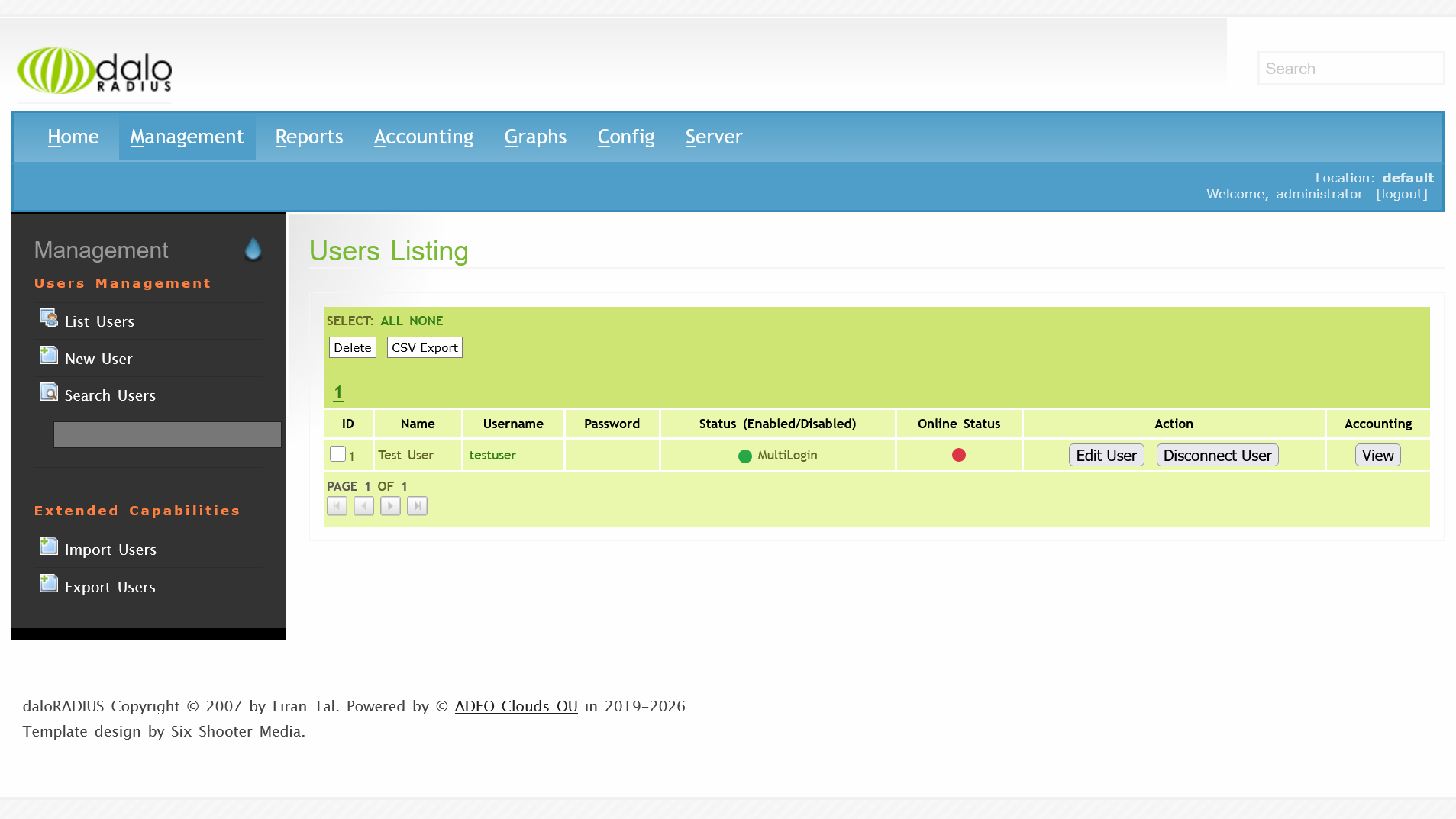
High-Performance VPN Server on Linux/Debian with user management Control Web Panel. It designed to provide users with secure internet access via encrypted VPN tunnel. It works with end-user devices on Windows, Linux, Android and iOS as well as with routers and supports standard VPN protocols PPTP, L2TP without IPSec and L2TP-IPSec-PSK. This VPN server provides a stable VPN connection at the highest possible speed. It is recommended to determine the optimal number of VPN users based on the server capacity and the real load on the server. The performance of this VPN server is quite high, which makes it possible to use it even on low-power machines that may reduce the costs. This VPN server has a user-friendly web-based user control panel that allows you to add, delete, or edit user entries via the web interface. The VPN traffic is counted for each user. It is possible to set the connection speed for each VPN user.
Areas of use:
- It can be used to provide the secure internet access for computers, mobile devices and routers.
- This VPN server can be used to provide internet access in countries where the authorities restrict the Internet.
- Suitable for use by individuals as well as for companies offering VPN services.
The key features of the current version PPTP/L2TP/L2TP-IPSec-PSK VPN Server:
- Easy-to-use. After launching, this VPN server is immediately fully operational. No server setup required.
- In addition to PPTP/L2TP-IPSec-PSK, it supports L2TP without IPSec which is widely used as standard VPN protocol in routers.
- Very high speed of the VPN channels.
- High server efficiency allows using it even on low-performance machines, that may reduce the costs.
- User management Web Panel. You can add, delete or edit user records. You can see who is online. You can deny the VPN access or restrict bandwidth for any user, if needed.
Highlights
- Easy-to-use. After launching, this VPN server is immediately fully operational. No server setup required.
- VPN Server on Linux/Debian supports standard protocols: PPTP, L2TP without IPSec and L2TP-IPSec-PSK.
- High server efficiency of this VPN server allows using it even on low-performance machines, that may reduce the costs.
Details
Sold by
Categories
Delivery method
Delivery option
64-bit (x86) Amazon Machine Image (AMI)
Latest version
Operating system
Debian 13
Deployed on AWS
New
Introducing multi-product solutions
You can now purchase comprehensive solutions tailored to use cases and industries.

Features and programs
Financing for AWS Marketplace purchases
AWS Marketplace now accepts line of credit payments through the PNC Vendor Finance program. This program is available to select AWS customers in the US, excluding NV, NC, ND, TN, & VT.

Pricing
Free trial
Try this product free for 5 days according to the free trial terms set by the vendor. Usage-based pricing is in effect for usage beyond the free trial terms. Your free trial gets automatically converted to a paid subscription when the trial ends, but may be canceled any time before that.
Pricing is based on actual usage, with charges varying according to how much you consume. Subscriptions have no end date and may be canceled any time. Alternatively, you can pay upfront for a contract, which typically covers your anticipated usage for the contract duration. Any usage beyond contract will incur additional usage-based costs.
Additional AWS infrastructure costs may apply. Use the AWS Pricing Calculator to estimate your infrastructure costs.
If you are an AWS Free Tier customer with a free plan, you are eligible to subscribe to this offer. You can use free credits to cover the cost of eligible AWS infrastructure. See AWS Free Tier for more details. If you created an AWS account before July 15th, 2025, and qualify for the Legacy AWS Free Tier, Amazon EC2 charges for Micro instances are free for up to 750 hours per month. See Legacy AWS Free Tier for more details.
Dimension | Cost/hour |
|---|---|
t3.micro Recommended | $0.063 |
t2.micro | $0.063 |
m5a.4xlarge | $0.126 |
m5d.2xlarge | $0.126 |
t3.nano | $0.063 |
t3a.nano | $0.063 |
m5a.2xlarge | $0.126 |
t3a.medium | $0.063 |
t3.2xlarge | $0.126 |
m5a.large | $0.063 |
Dimensions summary
You pay by the hour for the EC2 instance size you choose to run this VPN server. Pricing is usage-based, so charges accrue only while an instance runs. The dimensions are not feature tiers; they are different AWS instance types that vary by compute, memory, and network capacity. Options range from small burstable t2, t3, and t3a instances up to larger m5, m5a, m5d, m5n, m5ad, and m5dn families. Larger instances handle more VPN users and load. Because the server runs on low-power machines, you can pick a size matching your expected user count.
Top-of-mind questions for buyers
Charges accrue only while an instance runs. Software charges stop when you stop the instance. Note that stopped instances may still incur underlying AWS storage fees for the attached volume, but the hourly software rate meters running time only.
Each rate maps to a specific EC2 instance type running the VPN server. The unit is one instance-hour of that machine size. Burstable t2, t3, and t3a types offer smaller compute; m5 family types offer steady compute, memory, and network capacity for heavier VPN loads.
The hourly rate depends only on the instance size you run, not the number of VPN users. Adding users does not increase the software charge directly. To support more users or higher load, you choose a larger instance type, which carries a different hourly rate.
www.adeoclouds.eu
Helpful?
Vendor refund policy
You may terminate the instance at anytime to stop incurring charges.

Legal
Vendor terms and conditions
Upon subscribing to this product, you must acknowledge and agree to the terms and conditions outlined in the vendor's End User License Agreement (EULA) .
Content disclaimer
Vendors are responsible for their product descriptions and other product content. AWS does not warrant that vendors' product descriptions or other product content are accurate, complete, reliable, current, or error-free.
Delivery details
64-bit (x86) Amazon Machine Image (AMI)
Amazon Machine Image (AMI)
An AMI is a virtual image that provides the information required to launch an instance. Amazon EC2 (Elastic Compute Cloud) instances are virtual servers on which you can run your applications and workloads, offering varying combinations of CPU, memory, storage, and networking resources. You can launch as many instances from as many different AMIs as you need.
Version release notes
Some security issues have been fixed. Web panel has been modified.
Additional details
Usage instructions
Launch the server. This server does not require the powerful computing resources; you can choose a simple instance type. If the Elastic IP was assigned to a running instance, the instance must be restarted.
Linux username: admin
After launching, the VPN server becomes immediately fully operational with no additional setup required.
This server supports VPN connections:
- PPTP (login, password)
- L2TP without IPSec (login, password)
- L2TP/IPSec-PSK (login, password, PSK).
When the server is first started, a Pre-Shared Key (PSK) is generated. This key should be specified in the settings on client devices for L2TP/IPSec-PSK connections. This PSK key is the same for all users. You can find PSK with help of SSH on a Linux welcome screen or you can find it in the file "/etc/ipsec.secrets". You can change it, if needed.
User management Web Panel:
- https://[Public IP address].sslip.io
- http://[Public IP address]
- use "administrator" as username and your instance ID as password.
Initially, the database of VPN users contains 1 user named "testuser" with randomly generated password.
Please note that in order to establish L2TP/IPSec-PSK connection from a client on Windows, you may need to make changes to the Windows registry, otherwise Windows error code 809 or 789 may appear. To fix it:
- in section "HKEY_LOCAL_MACHINE\SYSTEM\CurrentControlSet\Services\PolicyAgent" please create DWORD (32 bit) parameter "AssumeUDPEncapsulationContextOnSendRule" and set value 2 for it.
- in section "HKEY_LOCAL_MACHINE\SYSTEM\CurrentControlSet\Services\RasMan\Parameters" set parameter "ProhibitIPSec" to 0.
- restart Windows.
Please note:
Despite the fact that this server supports VPN connection via the L2TP without IPSec, it should be noted that such VPN tunnel can not be considered as secure. Therefore, we recommend using L2TP-IPSec-PSK or PPTP on client devices instead of L2TP without IPSec, if possible.
It should be noted that the simultaneous connections to the VPN server of several Windows client devices that located behind a single NAT router may not work with L2TP-IPSec-PSK. In this case, we recommend to use PPTP connection for each Windows device. There are no such problems for Android, iOS or Linux client devices.
Resources
Vendor resources
Support
Vendor support
If you have any questions regarding the deployment or use of this server, you can use the Contact Us form on our website or reach out via email. We guarantee a response within 24 hours.
Contact US: https://www.adeoclouds.eu/contact.php?id=
E-mail: admin@adeoclouds.eu
AWS infrastructure support
AWS Support is a one-on-one, fast-response support channel that is staffed 24x7x365 with experienced and technical support engineers. The service helps customers of all sizes and technical abilities to successfully utilize the products and features provided by Amazon Web Services.
Similar products

Bridge VPN Server PPTP/L2TP-IPSec-PSK with User Management Web Panel.
The IOS XE based Cisco Catalyst 8000v for Transit network VPC solution with Transit Gateway

Contact us today for a free proof of concept trial and see the impact of pfSense Plus firsthand. Contact cloudsales@netgate.com or https://www.netgate.com/proof-of-concept-trial
pfSense Plus software is a leading price-performance edge firewall, router, and VPN solution. Millions of installations used by homes, businesses, government agencies, educational institutions and service providers.

Contact us today for a free proof of concept trial and see the impact of pfSense Plus firsthand. Contact cloudsales@netgate.com or https://www.netgate.com/proof-of-concept-trial
pfSense Plus software is the world's leading price-performance edge firewall, router, and VPN solution. Over seven million installations used by homes, businesses, government agencies, educational institutions and service providers.
Customer reviews
No customer reviews yet
Be the first to review this product . We've partnered with PeerSpot to gather customer feedback. You can share your experience by writing or recording a review, or scheduling a call with a PeerSpot analyst.