
Sold by: BoundaryLogic
Deployed on AWS
Mask production PostgreSQL into realistic, referentially-intact staging data inside your own AWS VPC, with no PII leaving your network. PrivaCI runs as a one-shot container job with deterministic PII masking, FK-aware subsetting, schema-drift CI gates, and Ed25519-signed compliance evidence.
Overview
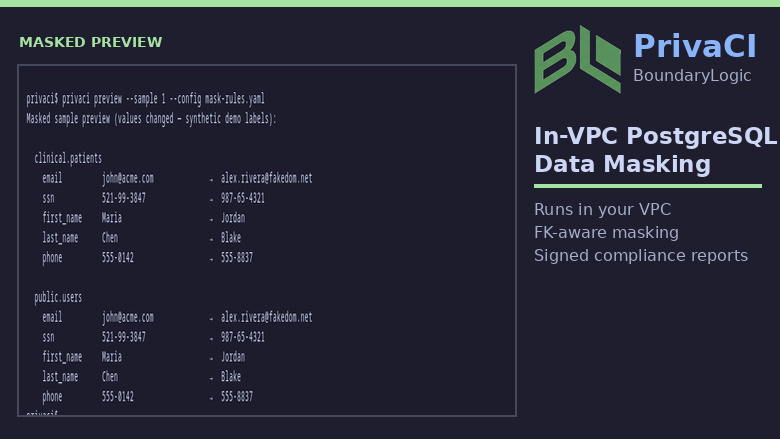
PrivaCI runs as a one-shot container job inside your AWS VPC. It reads PostgreSQL source data, masks PII deterministically, and writes sanitized rows to a target database. No data leaves your network there is no SaaS control plane and no telemetry.
Both tiers include the full open-source masking engine (regex + NER detection, deterministic faking, referential integrity, resumable streaming runs). The paid tiers add commercial capabilities on top:
- Deterministic keyed masking (hmac_hash / pseudonym) stable pseudonyms across tables and runs.
- JSONB path masking mask fields inside JSONB documents by path.
- FK-aware data subsetting copy one tenant to staging with foreign-key closure, not the whole database.
- Schema-drift detection fail CI when the schema changes out from under your mask rules.
- Strict-gate CI preview sample rows, policy diff, and SARIF output for pull-request gates.
- Ed25519-signed compliance reports tamper-evident JSON (plus Markdown / PDF summaries) mapped to common control frameworks.
Requirements: a PostgreSQL source and target, and a container runtime (Amazon ECS or docker run for v1; EKS / AWS Batch / Kubernetes CronJob on request). Entitlement is resolved at job start via AWS License Manager; the task role needs only license-manager:CheckoutLicense / CheckInLicense.
Highlights
- In-VPC batch job: mask PostgreSQL inside your VPC with no SaaS data exfiltration
- Realistic staging at any size: FK-aware subsetting copies one tenant with referential integrity intact
- Audit-ready Ed25519-signed compliance reports and schema drift evidence for CI
Details
Sold by
Categories
Delivery method
Supported services
Delivery option
ECS Fargate one-shot batch job
Latest version
Operating system
Linux
Deployed on AWS
New
Introducing multi-product solutions
You can now purchase comprehensive solutions tailored to use cases and industries.

Features and programs
Financing for AWS Marketplace purchases
AWS Marketplace now accepts line of credit payments through the PNC Vendor Finance program. This program is available to select AWS customers in the US, excluding NV, NC, ND, TN, & VT.

Pricing
Pricing is based on the duration and terms of your contract with the vendor. This entitles you to a specified quantity of use for the contract duration. If you choose not to renew or replace your contract before it ends, access to these entitlements will expire.
Additional AWS infrastructure costs may apply. Use the AWS Pricing Calculator to estimate your infrastructure costs.
Dimension | Description | Cost/month |
|---|---|---|
Standard | Flat monthly tier for teams that need realistic, safe PostgreSQL staging data. Run PrivaCI as a one-shot container job in your VPC. Includes the full masking engine plus deterministic keyed masking (hmac_hash / pseudonym) and JSONB path masking. No source-database or data-volume limits. | $149.00 |
Compliance | Flat monthly tier for regulated and platform teams. Everything in Standard plus FK-aware data subsetting (copy one tenant to staging with referential integrity), schema drift detection for CI gates, strict-gate CI preview with SARIF, and Ed25519-signed compliance reports. No source-database or data-volume limits. | $749.00 |
Dimensions summary
You choose between two flat monthly tiers billed through a contract. Pricing is capability-based, not usage-based. There is no counting of source databases or data volume, so cost stays fixed regardless of how much data you mask. Standard unlocks the masking engine with keyed masking and JSONB path masking. Compliance includes everything in Standard and adds data subsetting, schema drift detection, strict-gate CI preview, and signed compliance reports. The tiers stack: Compliance builds on Standard. You can switch tiers self-service through the AWS Marketplace console with no usage ceilings or overage charges.
Top-of-mind questions for buyers
Your subscribed tier unlocks a fixed set of capabilities, checked when the container starts. The check runs against AWS License Manager on the task or instance IAM role. There is no source-database or data-volume counting. Cost stays fixed no matter how many databases you mask or how much data you process.
No. Both tiers use flat monthly pricing with no per-run, per-database, or per-GB metering. You can run one-shot jobs or scheduled refreshes as often as you need. The tier only sets which capabilities are available, not how many times you run them.
You switch tiers self-service in the AWS Marketplace console. Compliance builds on Standard, so no migration is needed. Upgrading unlocks FK-aware subsetting, drift detection, strict-gate CI, and signed reports on top of the Standard capabilities you already run. There are no usage ceilings or overage charges.
boundarylogic.io+1
Helpful?
Vendor refund policy
PrivaCI refunds: AWS bills via Marketplace. Full refund if you cancel within 48 hours of purchase (AWS standard). After 48 hours, contact support@boundarylogic.io with AWS account ID, subscription date, and reason; we review case-by-case (billing errors, duplicate subs). Support: https://boundarylogic.io/support

Legal
Vendor terms and conditions
Upon subscribing to this product, you must acknowledge and agree to the terms and conditions outlined in the vendor's End User License Agreement (EULA) .
Content disclaimer
Vendors are responsible for their product descriptions and other product content. AWS does not warrant that vendors' product descriptions or other product content are accurate, complete, reliable, current, or error-free.
Delivery details
ECS Fargate one-shot batch job
Supported services: Learn more
- Amazon ECS
Container image
Containers are lightweight, portable execution environments that wrap server application software in a filesystem that includes everything it needs to run. Container applications run on supported container runtimes and orchestration services, such as Amazon Elastic Container Service (Amazon ECS) or Amazon Elastic Kubernetes Service (Amazon EKS). Both eliminate the need for you to install and operate your own container orchestration software by managing and scheduling containers on a scalable cluster of virtual machines.
Version release notes
PrivaCI Commercial 1.0.13 (engine 1.3.0)
New
- Conditional masking: optional CEL when: guards on column actions. Available on Standard and Compliance. Rows that fail the guard pass through unchanged; skipped rows are rolled up in audit as column.conditional_skip.
- PII catalog bootstrap: privaci catalog import-db-comments builds pii-catalog.yaml from PostgreSQL column comments (no row data read).
Changed
- Built on public engine v1.3.0.
- Schema replication uses pre-data / data / post-data phases. Views, functions, materialized view shells, non-unique indexes, and triggers run in post-data after row load. Set replicate_triggers: false to skip trigger replication. Triggers do not fire during the mask COPY itself.
Docs: https://docs.boundarylogic.io/commercial/ Support: support@boundarylogic.io
Additional details
Usage instructions
After subscribing, deploy in your VPC (recommended: ECS Fargate + CloudFormation).
- One-time per account: open AWS License Manager console and grant permissions (or see troubleshooting "Service role not found" on first run).
- Create two PostgreSQL databases (source with data, empty target).
- Create Secrets Manager secrets for SOURCE_DB_URL, TARGET_DB_URL, ANONYMIZATION_SALT. Full step-by-step: https://docs.boundarylogic.io/commercial/deploy-aws-ecs/#21-create-secrets-manager-secrets
- Upload mask-rules.yaml to S3 (or mount via EFS).
- Deploy the quick-launch CloudFormation template: https://docs.boundarylogic.io/commercial/assets/quick-launch.yaml
- ECS RunTask with the stack's task definition.
Image: 709825985650.dkr.ecr.us-east-1.amazonaws.com/boundarylogic/privaci-commercial:1.0.13 Entrypoint: privaci (do not override)
The stack creates IAM (CheckoutLicense). You supply databases, secrets, and config.
Documentation: https://docs.boundarylogic.io/commercial/deploy-aws-ecs/ Support: support@boundarylogic.io
Resources
Vendor resources
Support
Vendor support
Email: support@boundarylogic.io Support page: https://boundarylogic.io/support Documentation: https://docs.boundarylogic.io/
Commercial subscribers receive email support through support@boundarylogic.io . We aim to respond within one business day for severity-1 (production blocking) issues and within three business days for general questions. Do not send production PII in support requests. Describe schema, exit codes, and redacted logs only.
Privacy policy: https://boundarylogic.io/privacy Terms of service:
AWS infrastructure support
AWS Support is a one-on-one, fast-response support channel that is staffed 24x7x365 with experienced and technical support engineers. The service helps customers of all sizes and technical abilities to successfully utilize the products and features provided by Amazon Web Services.
Similar products

Combining direct technical delivery with targeted organizational and stakeholder engagement, this service is for organizations seeking to implement, extend, or operationalize DataMasque data masking. Scope covers technical build and enterprise integration, including direct collaboration with compliance, legal, business, and technical teams to review risk, define requirements, map data flows, and align with organizational processes. The service includes discovery and classification of sensitive data, development and configuration of reusable architectures, and integration with AWS services. Knowledge transfer is delivered through documentation, runbooks, mentoring, and internal showcases, preparing staff for sustainable operation. The approach can be tailored to any stage of a client’s DataMasque journey.

Combining direct technical delivery with targeted organizational and stakeholder engagement, this service is for organizations seeking to implement, extend, or operationalize Perforce Delphix Continuous Compliance (Data Masking) and Continuous Data (Virtualization) in enterprise environments.
Scope covers technical build and enterprise integration, including direct collaboration with compliance, legal, business, and technical teams to review risk, define requirements, map data flows, and align with organizational processes. The service includes discovery and classification of sensitive data, development and configuration of reusable architectures, integration with AWS and CI/CD workflows, and deployment of virtualization features. Knowledge transfer is delivered through documentation, runbooks, mentoring, and internal showcases, preparing staff for sustainable operation.
The approach can be tailored to any stage of a client’s Delphix journey.

Deliver a production-grade, limited-scope deployment of Delphix on AWS to enable secure data masking and virtualization using your own environment. Reduce compliance risk and build a foundation for enterprise expansion.
This Quick Start engagement includes discovery, configuration, and execution of masking workflows across supported AWS databases and environments. This produces masked, audit-ready datasets while equipping your teams for continued adoption.

Deploy DataMasque on AWS for a production-ready, limited-scope implementation that delivers real data masking using your own environment. This reduces compliance risk and builds a foundation for expansion.
This Quick Start engagement covers discovery, configuration, and execution of DataMasque masking jobs across supported AWS databases and file formats. It produces masked, audit-ready datasets and transfers knowledge so internal teams can extend usage independently.
Customer reviews
No customer reviews yet
Be the first to review this product . We've partnered with PeerSpot to gather customer feedback. You can share your experience by writing or recording a review, or scheduling a call with a PeerSpot analyst.