
Sold by: cloudimg
Deployed on AWS
Free Trial
AWS Free Tier
This product has charges associated with it for seller support. MooseFS Community Edition is an open source, POSIX compliant distributed file system, preconfigured as a ready to use single node starter cluster with a dedicated data volume and a TLS protected web monitor. Add chunkservers for redundancy. Per instance credentials are generated on first boot with no default login. Hardened, fully patched, and backed by cloudimg support.
Overview
Image
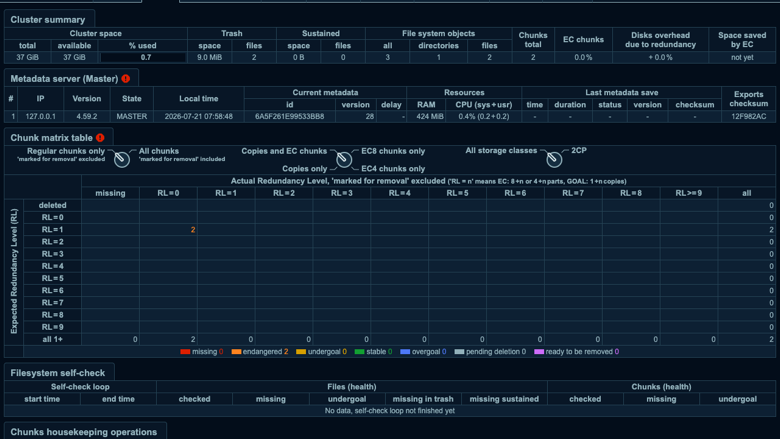
MooseFS web monitor cluster info
Image
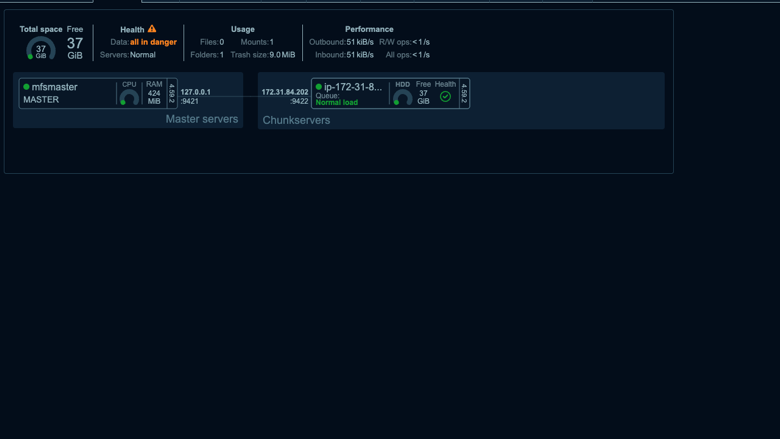
MooseFS status dashboard
Image
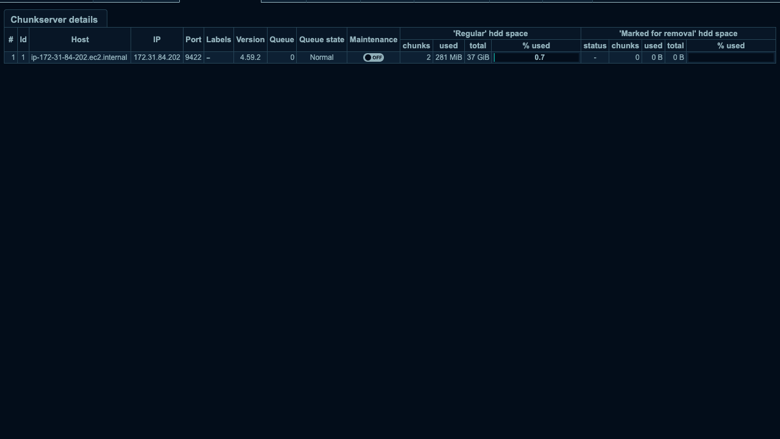
Chunkserver details
Image
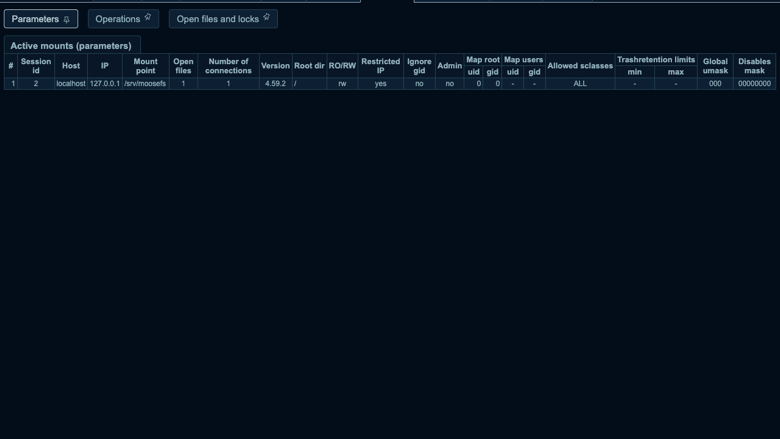
Active client mount
This is a repackaged open source software product wherein additional charges apply for cloudimg support services.
Overview MooseFS is an open source, POSIX compliant distributed file system. It spreads files across a cluster of chunkservers, so a MooseFS volume behaves like an ordinary directory on every client while the data underneath is distributed and, once you add chunkservers, replicated. This image delivers a complete, self contained MooseFS starter node: a master server, one chunkserver and the MooseFS FUSE client all run on the single instance, and the MooseFS volume is mounted and ready at /srv/moosefs the moment first boot completes. The version currently available is MooseFS 4 Community Edition.
Single Node By Design, Cluster Ready A single instance holds one copy of every chunk, so this image on its own is an evaluation and starter topology, not a redundant one. Real fault tolerance comes from adding chunkservers on separate instances and raising the goal, and the deployment guide walks through exactly how to do that.
Secure By Default The master control port, the chunkserver port and the web monitor are all bound to the host and dropped on every other interface by an nftables guard, so nothing that speaks the MooseFS protocol is exposed to the network regardless of your security group. The only published endpoint is the web monitor, served over TLS by nginx behind HTTP Basic Auth. On first boot the image generates a per instance monitor password and a TLS certificate bound to the instance. No two instances share credentials and there is no default login.
Dedicated Data Volume A dedicated data volume holds both the master metadata and the chunk storage, mounted before the software is installed and captured into the image, so every instance is re provisioned with storage separate from the operating system disk and independently resizable.
What Is Included
- MooseFS 4 Community Edition from the official MooseFS repository
- Master server, chunkserver, command line tools and the FUSE client, managed by systemd
- A dedicated data volume for the master metadata and the chunk storage
- nginx TLS front for the web monitor
- Latest security patches applied at build time
Licensing MooseFS Community Edition is open source under the GNU General Public License, version 2. There is no per node or per capacity fee. The cloudimg charge covers packaging, security patching, image maintenance and 24/7 support.
cloudimg Support 24/7 technical support by email and chat, with a guaranteed 24 hour response. Help with deployment, adding chunkservers for redundancy, TLS and access configuration, storage and upgrade planning.
All product and company names are trademarks or registered trademarks of their respective holders. Use of them does not imply any affiliation with or endorsement by them.
Highlights
- POSIX compliant distributed file system, preconfigured as a self contained single node starter cluster of master, one chunkserver and the FUSE client, with the volume mounted and ready the moment first boot completes
- A dedicated data volume holds the master metadata and the chunk storage, separate from the operating system disk and independently resizable, while the MooseFS protocol ports are bound to the host and firewalled off the network
- Secure by default: the web monitor is served over TLS behind HTTP Basic Auth with a unique password generated per instance on first boot and no default login, backed by cloudimg support
New
Introducing multi-product solutions
You can now purchase comprehensive solutions tailored to use cases and industries.

Features and programs
Financing for AWS Marketplace purchases
AWS Marketplace now accepts line of credit payments through the PNC Vendor Finance program. This program is available to select AWS customers in the US, excluding NV, NC, ND, TN, & VT.

Pricing
Free trial
Try this product free for 7 days according to the free trial terms set by the vendor. Usage-based pricing is in effect for usage beyond the free trial terms. Your free trial gets automatically converted to a paid subscription when the trial ends, but may be canceled any time before that.
Pricing is based on actual usage, with charges varying according to how much you consume. Subscriptions have no end date and may be canceled any time. Alternatively, you can pay upfront for a contract, which typically covers your anticipated usage for the contract duration. Any usage beyond contract will incur additional usage-based costs.
Additional AWS infrastructure costs may apply. Use the AWS Pricing Calculator to estimate your infrastructure costs.
If you are an AWS Free Tier customer with a free plan, you are eligible to subscribe to this offer. You can use free credits to cover the cost of eligible AWS infrastructure. See AWS Free Tier for more details. If you created an AWS account before July 15th, 2025, and qualify for the Legacy AWS Free Tier, Amazon EC2 charges for Micro instances are free for up to 750 hours per month. See Legacy AWS Free Tier for more details.
Dimension | Description | Cost/hour |
|---|---|---|
m5.large Recommended | m5.large | $0.08 |
t3.micro | t3.micro instance type | $0.04 |
t2.micro | t2.micro instance type | $0.04 |
c8a.8xlarge | c8a.8xlarge instance type | $0.24 |
m8in.4xlarge | m8in.4xlarge instance type | $0.24 |
m5dn.2xlarge | m5dn.2xlarge instance type | $0.24 |
c6in.xlarge | c6in.xlarge instance type | $0.12 |
m8azn.medium | m8azn.medium instance type | $0.04 |
r7a.48xlarge | r7a.48xlarge instance type | $0.24 |
g7.4xlarge | g7.4xlarge instance type | $0.24 |
Vendor refund policy
Refunds available on request.

Legal
Vendor terms and conditions
Upon subscribing to this product, you must acknowledge and agree to the terms and conditions outlined in the vendor's End User License Agreement (EULA) .
Content disclaimer
Vendors are responsible for their product descriptions and other product content. AWS does not warrant that vendors' product descriptions or other product content are accurate, complete, reliable, current, or error-free.
Delivery details
64-bit (x86) Amazon Machine Image (AMI)
Amazon Machine Image (AMI)
An AMI is a virtual image that provides the information required to launch an instance. Amazon EC2 (Elastic Compute Cloud) instances are virtual servers on which you can run your applications and workloads, offering varying combinations of CPU, memory, storage, and networking resources. You can launch as many instances from as many different AMIs as you need.
Version release notes
Initial release of MooseFS Community Edition as a ready to use single node starter cluster: master, chunkserver and FUSE client on one instance, a dedicated data volume for the metadata and chunk storage, and a TLS web monitor whose password is generated per instance on first boot with no default login.
Additional details
Usage instructions
Connect via SSH on port 22 as the default login user for your operating system variant (for the Ubuntu 24.04 variant the user is ubuntu). Retrieve the generated web monitor credentials with: sudo cat /root/moosefs-credentials.txt. Open the MooseFS web monitor in a browser at https://<instance-public-ip>/ and sign in as the generated user with the generated password (the certificate is self signed and bound to the instance, so your browser warns on the first visit). The MooseFS filesystem is mounted at /srv/moosefs; write to it like any other directory and the data is stored as MooseFS chunks. The master control port, the chunkserver port and the web monitor are bound to the host and firewalled off the network by nftables, so only nginx on 443 (with 80 redirecting to 443) is published; the security group opens 22, 80 and 443. This instance is a single node starter cluster with one copy of every chunk and no fault tolerance; add chunkservers on separate instances and raise the goal for redundancy, as the deployment guide explains. The services run under systemd: systemctl status moosefs-master moosefs-chunkserver moosefs-gui nginx.
Resources
Vendor resources
Support
Vendor support
cloudimg provides 24/7 technical support for this product by email and live chat. Our engineers help with deployment, configuration, updates, performance tuning and troubleshooting; critical issues receive a one hour average response. Contact support@cloudimg.co.uk .
AWS infrastructure support
AWS Support is a one-on-one, fast-response support channel that is staffed 24x7x365 with experienced and technical support engineers. The service helps customers of all sizes and technical abilities to successfully utilize the products and features provided by Amazon Web Services.
Customer reviews
No customer reviews yet
Be the first to review this product . We've partnered with PeerSpot to gather customer feedback. You can share your experience by writing or recording a review, or scheduling a call with a PeerSpot analyst.