
Sold by: Maidenhead Bridge
Deployed on AWS
Free Trial
The Cloud Security Connector is the most straightforward way to connect to Zscaler (ZIA) solution with High Availability, protecting public and private traffic.
4.3
Overview
Image
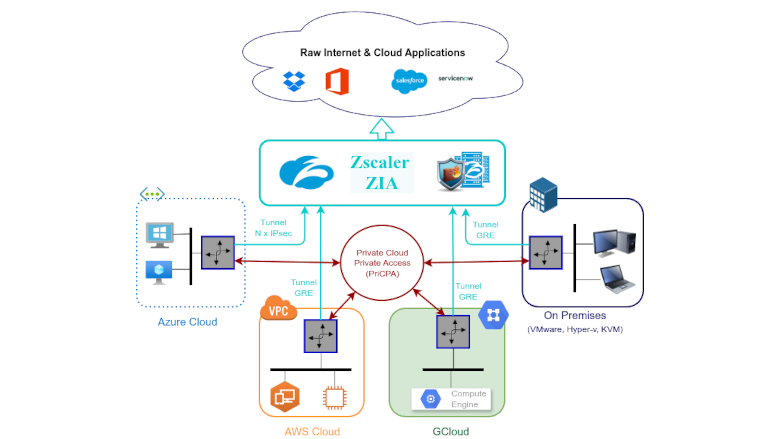
Maidenhead Bridge Cloud Security Connectors Family
Image
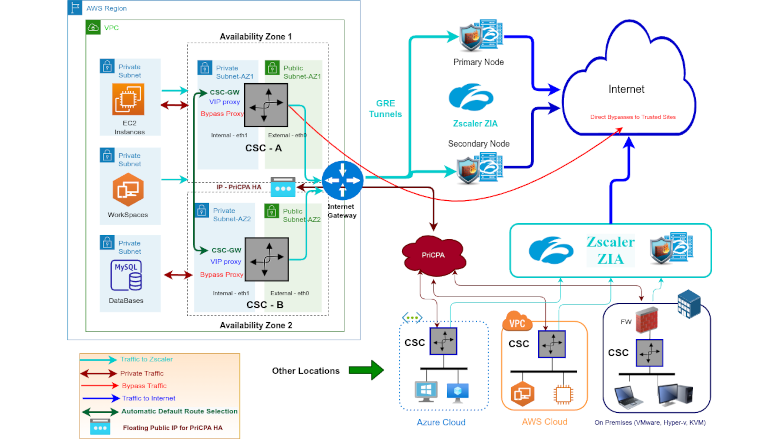
The Cloud Security Connector in High Availability
Image
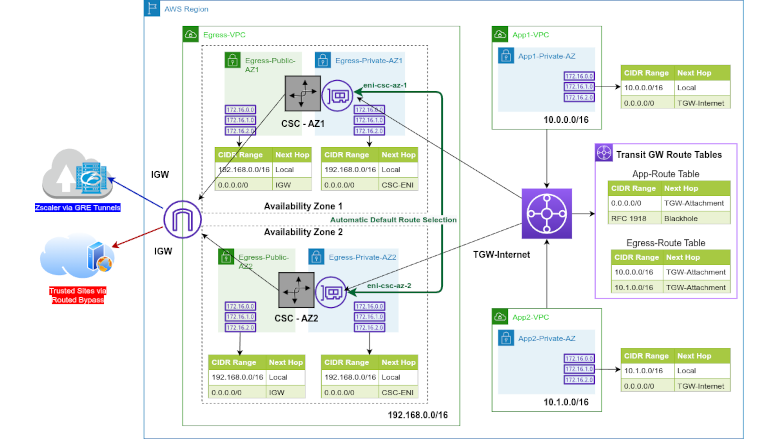
The CSC in Routing Mode using Transit Gateway
Image
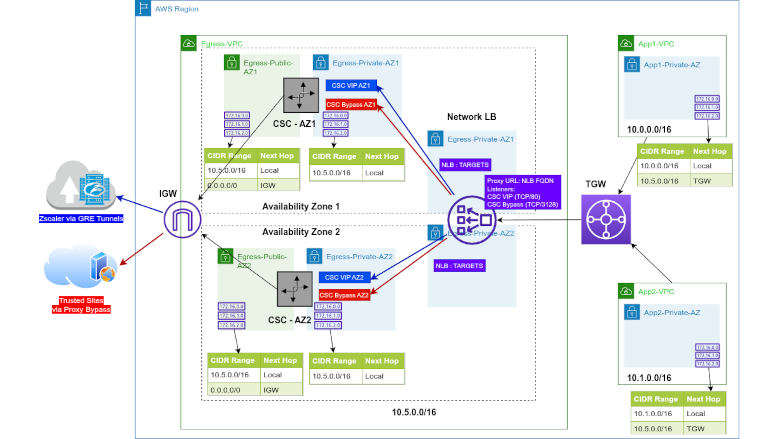
The CSC in Proxy Mode using Transit Gateway

Video
Product video
The Cloud Security Connector (CSC) for AWS is an EC2 instance that connects internal AWS resources to Zscaler Internet Access (ZIA). The CSC for AWS lets you connect securely to Zscaler ZIA up to 3 Gbps without hassle. The primary purpose of the CSC family is simplicity. The CSC for AWS comes with all the configurations required, and it works with the Zscaler API. After launching the CSC from the AWS Marketplace using the CloudFormation template provided, the CSC will automatically select the best ZEN nodes, do the GRE tunnels and create the Location on your Zscaler console. All Zscaler ZIA functionalities are available, providing complete visibility of all Internet traffic. In addition, the CSC provides high availability, changing the default route to Zscaler when configured as a High Availability pair and an easy way to manage direct bypasses to trusted sites using your public IP. Includes Private Cloud Private Access (PriCPA) functionality that allows you to create a full mesh among the CSCs communicating your private traffic on a Zero Trust model. It is simple to install and completely manageable using Amazon Systems Manager, Rundeck (or a similar tool, like Ansible, Salt, etc.), and SSH.
Highlights
- The CSC protects your Public (ZIA) and Private (PriCPA) Traffic.
- The CSC is simple to deploy and fully compliant with Zscaler's best practices.
- The CSC provides automatic detection and configuration of the Zscaler Nodes, automatic default route selection for High Availability and easy Bypass functionality.
Details
Sold by
Categories
Delivery method
Delivery option
Cloud Security Connector for Zscaler with PriCPA
Latest version
Operating system
Ubuntu 26.04 LTS (Resolute Raccoon)
Deployed on AWS
New
Introducing multi-product solutions
You can now purchase comprehensive solutions tailored to use cases and industries.

Features and programs
Buyer guide
Gain valuable insights from real users who purchased this product, powered by PeerSpot.

Financing for AWS Marketplace purchases
AWS Marketplace now accepts line of credit payments through the PNC Vendor Finance program. This program is available to select AWS customers in the US, excluding NV, NC, ND, TN, & VT.

Pricing
Free trial
Try this product free for 30 days according to the free trial terms set by the vendor. Usage-based pricing is in effect for usage beyond the free trial terms. Your free trial gets automatically converted to a paid subscription when the trial ends, but may be canceled any time before that.
Pricing is based on actual usage, with charges varying according to how much you consume. Subscriptions have no end date and may be canceled any time. Alternatively, you can pay upfront for a contract, which typically covers your anticipated usage for the contract duration. Any usage beyond contract will incur additional usage-based costs.
Additional AWS infrastructure costs may apply. Use the AWS Pricing Calculator to estimate your infrastructure costs.
Dimension | Cost/hour |
|---|---|
r5.large | $0.18 |
m5n.large | $0.18 |
r5a.xlarge | $0.18 |
m5zn.xlarge | $0.18 |
m5.large | $0.18 |
t2.small | $0.18 |
t3.small | $0.18 |
m5a.xlarge | $0.18 |
t3a.small | $0.18 |
t3a.medium | $0.18 |
Dimensions summary
You pay by the hour based on the EC2 instance type you deploy. The 20 options are not feature tiers but different compute sizes, spanning t2, t3, t3a burstable families and m5, m5a, m5n, m5zn, r5, r5a general-purpose and memory-optimized families. Sizes range from small through xlarge. Larger instances handle more traffic and encrypted throughput to Zscaler and across PriCPA connections. You choose the instance that matches your throughput and workload needs. All options run the same connector software; only capacity and hourly rate differ.
Top-of-mind questions for buyers
Software charges meter running instance-hours only. A fully stopped EC2 instance does not accrue the hourly connector rate. Stopped instances may still incur underlying AWS storage fees for attached volumes. Only active, running time counts toward the hourly software charge.
Instance size maps to throughput. The connector supports encrypted traffic to Zscaler and across PriCPA connections, with roughly 1 Gbps of encrypted traffic per connector. Higher tunnel speeds and more concurrent traffic need instances with more compute and memory. You match the size to your expected throughput.
Cost does not scale automatically. Each instance runs at one hourly rate for its fixed compute size. To handle more traffic, you deploy a instance size or add connectors. You can also run a high-availability pair, which means paying for each running instance.
www.maidenheadbridge.com+2
Helpful?
Vendor refund policy
We do not currently support refunds, but you can cancel at any time.

Legal
Vendor terms and conditions
Upon subscribing to this product, you must acknowledge and agree to the terms and conditions outlined in the vendor's End User License Agreement (EULA) .
Content disclaimer
Vendors are responsible for their product descriptions and other product content. AWS does not warrant that vendors' product descriptions or other product content are accurate, complete, reliable, current, or error-free.
Delivery details
Cloud Security Connector for Zscaler with PriCPA
The Cloud Security Connector (CSC) for AWS is an EC2 instance that connects internal AWS resources to Zscaler Internet Access (ZIA). The CSC for AWS lets you connect securely to Zscaler ZIA up to 3 Gbps without hassle. The primary purpose of the CSC family is simplicity. The CSC for AWS comes with all the configurations required, and it works with the Zscaler API. After launching the CSC from the AWS Marketplace using the CloudFormation template provided, the CSC will automatically select the best ZEN nodes, do the GRE tunnels and create the Location on your Zscaler console. All Zscaler ZIA functionalities are available, providing complete visibility of all Internet traffic. In addition, the CSC provides high availability, changing the default route to Zscaler when configured as a High Availability pair and an easy way to manage direct bypasses to trusted sites using your public IP. Includes Private Cloud Private Access (PriCPA) functionality that allows you to create a full mesh among the CSCs communicating your private traffic on a Zero Trust model. It is simple to install and completely manageable using Amazon Systems Manager, Rundeck (or a similar tool, like Ansible, Salt, etc.), and SSH
CloudFormation Template (CFT)
AWS CloudFormation templates are JSON or YAML-formatted text files that simplify provisioning and management on AWS. The templates describe the service or application architecture you want to deploy, and AWS CloudFormation uses those templates to provision and configure the required services (such as Amazon EC2 instances or Amazon RDS DB instances). The deployed application and associated resources are called a "stack."
Version release notes
Additional details
Usage instructions
Access the Cloud Security Connector configuration console via SSH to the first IP of the internal interface (eth1, labelled: csc-gre-single-internal-interface), using your SSH key and the user: "cscadmin". Example: ssh -i <yourkey.pem> cscadmin@<eth1 IP> . All Configuration and Monitoring tools are available via menu selection. Alternatively, if you deployed the CSC passing UserData values and registering the SSM Agent, you can check the status "Running Commands" from AWS Systems Manager.
Resources
Vendor resources
Support
Vendor support
We provide support for all our customers via Support Portal. Our response time is usually less than 24 hrs. Support Portal page: http://support.maidenheadbridge.com , Support Email: support@maidenheadbridge.com
AWS infrastructure support
AWS Support is a one-on-one, fast-response support channel that is staffed 24x7x365 with experienced and technical support engineers. The service helps customers of all sizes and technical abilities to successfully utilize the products and features provided by Amazon Web Services.
Updated weekly
By Maidenhead Bridge

By Zscaler, Inc.
By HONGKONG CLOUDSWAY LIMITED
Sentiment is AI generated from actual customer reviews on AWS and G2
Functionality
Ease of use
Customer service
Cost effectiveness
Positive reviews
Mixed reviews
Negative reviews
AI generated from product descriptions
Traffic Protection Capability
Protects both public internet traffic through Zscaler Internet Access (ZIA) and private traffic through Private Cloud Private Access (PriCPA) functionality
High Availability Configuration
Supports high availability deployment with automatic default route selection and failover capabilities when configured as a High Availability pair
Throughput Capacity
Enables secure connectivity to Zscaler ZIA at speeds up to 3 Gbps
Automated Node Detection and Tunnel Configuration
Automatically detects and selects optimal Zscaler ZEN nodes, establishes GRE tunnels, and creates Location configuration on Zscaler console without manual intervention
Zero Trust Private Mesh Network
Provides Private Cloud Private Access (PriCPA) functionality to create full mesh communication among Cloud Security Connectors using Zero Trust model for private traffic
Full Inline Content Inspection
Patented ByteScan engine inspects each outbound and inbound byte, including SSL traffic, with microsecond delay
Threat Detection and Blocking
Threat detected anywhere in the cloud is immediately blocked for all customers with more than 175,000 unique security updates delivered to the cloud daily
Real-Time Threat Correlation
Dynamically computes risk of web page objects and pages using content and domain analysis
Cloud-Native Security Services
Provides Sandbox, Firewall, and Data Loss Prevention capabilities as part of a complete Secure Service Edge platform
Globally Distributed Cloud Architecture
Delivers security services from a globally distributed cloud infrastructure eliminating on-premises gateway appliances and reducing traffic backhauling
Zero-Trust Security Architecture
Network concealment powered by Zero-Trust architecture with granular and dynamic access authorization to reduce attack surface and security risks
Software Defined Perimeter Implementation
Based on CSA Software Defined Perimeter (SDP) standard specification for enterprise remote access security
Distributed Security Gateway Infrastructure
Distributed security gateways with clustering capabilities to handle concurrent connections and eliminate performance bottlenecks associated with traditional VPN solutions
Multi-Platform Client Support
Support for multiple client platforms including WEB browser, Windows, MacOS, Android, iOS, and Linux with integrated office application virtual portal
Identity Authentication and Single Sign-On
Identity authentication with dynamic trust evaluation and Single Sign-On (SSO) integration for streamlined access management
Standard contract
No
No
Customer reviews
reviewer2872944
Gained deep cloud traffic visibility and strong AI governance but policy updates have needed improvement
Reviewed on Jul 15, 2026
Review from a verified AWS customer
What is our primary use case?
The main use case for Cloud Security Connector for Zscaler is monitoring the cloud traffic that we do, and we can connect cloud security applications with the AWS and GCP infrastructure so that we can get control over those infrastructures as well.
What is most valuable?
Cloud Security Connector for Zscaler offers the Cloud Firewall, IPS, DNS control, port visibility, and port protocol visibility, routing profiles, explicit profile configurations, and proxy configurations. These are the main features that we use in our infrastructure day-to-day.
The majority of the time we rely on the Cloud Firewall, URL filtering, and Cloud App Control from Cloud Security Connector for Zscaler. These are the three main features which we mainly use because the Cloud App Control has really good features. It has all the applications, more or less all the applications that we want to block for our infrastructure and for the client as well. We find all of them in there itself at the first place, and if something is not there, we can always use the URL filtering and add URL categories or block those URLs or just monitor what our users are doing.
The impact of Cloud Security Connector for Zscaler on our organization has been very positive as it is a very efficient application that we use for ninety percent of the clients. It has all the modules covered and the experience center built in there for ZIA, ZPA, ZDX, and we can do a lot from there itself. If we have to forward a profile, set up a tunnel, or anything else, it can be easily done via the ZCC agent itself.
What needs improvement?
Cloud Security Connector for Zscaler agents have some issues while applying the policies, and the main thing is when we try to apply policies over the ZCC agent, it takes a couple of minutes. I think that is a big gap while we are covering these kinds of metrics. When we are doing this thing, that should be proactive and can be applied as soon as possible.
Cloud Security Connector for Zscaler does almost everything, but sometimes it can be a pain if we are using the ZCC agent because the logs that we have to get on the end users are really difficult to gather.
Regarding Cloud Security Connector for Zscaler's accuracy and reliability of output, I would scale it on a scale of one to ten for accuracy. For accuracy, I would say it is around eight because it does the job for all the major AI platforms that are out there for browsers or maybe the applications, but there are a couple of applications that need to be added and a couple of more features which need to be added. For example, for ChatGPT itself, we can see the prompts what the users are prompting, but for Gemini, the same kind of tool, we do not have access to the prompts, so that can be improved. Obviously, if you do not have any other further tools for particularly AI security, then Cloud Security Connector for Zscaler is very reliable.
For how long have I used the solution?
I have been using Cloud Security Connector for Zscaler for more than a year now and we do the implementation for different clients.
What do I think about the stability of the solution?
Cloud Security Connector for Zscaler is indeed a very stable product. When we talk about the stability, it gives us high reliability and the user or the admin can genuinely trust the results that they are getting out of the security platform itself.
What do I think about the scalability of the solution?
Once we integrate our infrastructure with the Entra ID of Microsoft or any other identity provider, it is pretty easy to sign up for the service entitlements for the users and for the admins. It is very much helpful when we talk about the scalability of Cloud Security Connector for Zscaler agent.
How are customer service and support?
We have not used much of the customer support because we have a lot of us here. We try to resolve any issues that come at our end first and majority of the time we do it. However, there was an incident where I had to reach out to the customer support for some turning blocking, and they were very amazing.
Which solution did I use previously and why did I switch?
We were not particularly using different solutions, but for that case, we had been using Trend AI, formerly known as Trend Micro. We were using the Trend Vision One XDR, but that was not capable enough, and on top of that, it was not giving us accurate results and there were a lot of things actually. It was not for network security, and we had to separately integrate the firewall.
How was the initial setup?
For the setup of Cloud Security Connector for Zscaler with GCP and AWS, what we usually do is we install the Cloud Connectors. We download the Cloud Connectors from the Zscaler portal, and then we usually go into our infrastructure machines, take their file into there and install it. Upon installing through SSO or maybe SAML request, we sign in there and we can apply our policies from there.
What was our ROI?
The return on investment from Cloud Security Connector for Zscaler is actually pretty nice because we have gained visibility over the employees and for the organizations as well. For example, if there is a team of ten members particularly for data analysis, we can get rid of three to four people out of them just because we got better visibility on one consolidated platform.
Which other solutions did I evaluate?
We have evaluated a couple of them for Cloud Security Connector for Zscaler. The major ones were CrowdStrike, and we have gone for the Palo Alto SASE projects as well, but Zscaler was the best one we have ever used in those terms.
What other advice do I have?
The AI capabilities and governance that Cloud Security Connector for Zscaler offers are also amazing. We have been using the ZCC for monitoring the cloud responses, getting the prompt for the GPTs and Geminis, and blocking and downloading and uploading; everything is there. We usually do that on the main things that we block sensitive data which needs to be protected. Cloud Security Connector for Zscaler is able to do that, and it can help figure out what the solution is. They have almost every feature we would have a use case for in our day-to-day life.
I would recommend others to have a look at Cloud Security Connector for Zscaler platform for sure because the amount of things we are selling for Zscaler itself is really, really reliable. I give this review a rating of seven.
Sini Maria Jose
Consistent cloud security has improved traffic inspection and simplifies policy validation
Reviewed on Jun 27, 2026
Review provided by PeerSpot
What is our primary use case?
Cloud Security Connector for Zscaler is mainly used to securely forward user and application traffic to the Zscaler clouds for inspection and policy enforcement. It enables organizations to apply consistent security policies, inspect internet-bound traffic, and protect users from threats regardless of where they are connecting from. It also provides visibility into network traffic, enforces compliance, and secures access to cloud applications and the internet.
In my role, Cloud Security Connector for Zscaler is mainly used to ensure traffic is securely redirected to the Zscaler cloud for inspection and policy enforcement. My focus is on validating that the connector works as expected after configuration changes or new releases. I create automated test scenarios to verify secure connectivity, policy enforcement, authentication, and traffic routing. This helps ensure that end users receive consistent security protection and that any issues are identified before deployment to production.
What is most valuable?
The best features of Cloud Security Connector for Zscaler are its seamless integration with the Zscaler cloud, secure traffic forwarding, and centralized policy enforcement. It provides consistent security controls without requiring complex on-premise infrastructure. I also appreciate its scalability, visibility into network traffic, and the ability to apply the same security policies across different environments.
The features that help my team the most are secure traffic forwarding, centralized policy enforcement, and visibility into traffic. In day-to-day work, these features make it much easier to validate whether traffic is reaching the Zscaler cloud correctly and whether the expected security policies are being applied. Instead of manually checking every scenario, I automate many of these validations using Selenium and Java, which saves time and improves test coverage. It also helps to quickly identify configuration issues or policy mismatches before they reach production, reducing troubleshooting effort and improving the overall quality of releases.
Cloud Security Connector for Zscaler has had a positive impact by making the testing and validation process more efficient. It helps ensure that traffic is securely forwarded to the Zscaler cloud and that security policies work as expected before changes are deployed. This has helped reduce manual testing effort, identify configuration issues more easily in the release cycle, and improve the overall quality and reliability of deployments. As a result, my team can deliver changes with greater confidence and reduce the likelihood of production issues.
What needs improvement?
Overall, I am satisfied with Cloud Security Connector for Zscaler. It integrates well with the Zscaler platform, is reliable, and supports enterprise-scale deployments. From my experience, it has helped to validate secure connectivity and policy enforcement more efficiently. If I could suggest one improvement, it would be more detailed troubleshooting logs and easier diagnostic tools, which would help teams identify and resolve issues faster. Other than that, it is a solid solution. I would recommend it to organizations looking for a secure cloud connectivity solution.
Overall, I am satisfied with the solution, but I believe it could be improved in a few areas. First, the troubleshooting experience could be enhanced with more detailed logs and cleaner error messages, making it easier to identify configuration or connectivity issues. Second, having more built-in diagnostics and health check tools would help teams validate deployments more quickly. Finally, more comprehensive documentation with real-world deployment and troubleshooting examples would make the onboarding and issue resolution easier.
Overall, it is a solid solution, but there are a few areas where I believe it could be improved. More detailed troubleshooting with clear root-cause information instead of generic error messages would be beneficial. Better alerting and notification for connector failures, including configuration changes or connectivity issues with integration to platforms such as ServiceNow, Microsoft Teams, or Slack, would enhance operations. Enhanced API capabilities would make automation and integration with DevOps tools easier. Role-based dashboards tailored for administration or security teams and operations teams would provide better visibility.
One additional improvement I would like to see is more AI-driven operational assistance. For example, the connector could proactively detect configuration issues, identify policy conflicts, and recommend remediation steps before they impact users. I would also like to see deeper integration with enterprise automation and ITSM platforms, making it easier to automate common operational tasks. Finally, richer analytics and customizable dashboards would help security teams gain better visibility into connector health, traffic trends, and overall security posture. These enhancements would further improve operational efficiency for enterprise environments.
For how long have I used the solution?
I have been using Cloud Security Connector for Zscaler for about five years as part of my work at Tech Mahindra.
What do I think about the stability of the solution?
In my experience, Cloud Security Connector for Zscaler has been stable. Once it is properly configured and deployed, it performs reliably with minimal issues. Most challenges I have encountered have been related to configuration changes, network connectivity, and policy updates rather than any connector issues. I have not experienced major stability issues that affected day-to-day operations. Overall, I would consider it a stable enterprise solution.
What do I think about the scalability of the solution?
Cloud Security Connector for Zscaler is highly scalable since it is built on cloud-native architecture and can support organizations ranging from small businesses to large enterprises without requiring significant infrastructure changes. As the number of users, locations, or applications grows, the solution scales efficiently while maintaining consistent security policies and performance. In my experience, it has handled enterprise-scale environments reliably, which is one of its key strengths.
How are customer service and support?
Overall, I would rate Zscaler customer support eight out of ten. In my experience, the support team is knowledgeable and responsive, especially for standard issues. For more complex technical problems, they usually involve senior engineers or the appropriate product teams. Resolution time depends on the complexity of the issue, but they generally work with us until it is resolved. I believe they could improve by reducing the response time for high-priority cases and providing more proactive updates during long investigations.
The support engineers are technically knowledgeable and responsive, especially for standard issues. For more complex cases, they usually involve senior engineers or product teams to help resolve the issue. The reason I did not give it a perfect rating is that complex investigations can sometimes take longer than expected, and I would prefer faster resolution times and more proactive status updates during ongoing cases. Overall, the support experience has been positive.
Which solution did I use previously and why did I switch?
Before using Cloud Security Connector for Zscaler, I had exposure to other cloud security solutions in enterprise environments, including Netskope and Cisco Umbrella. I moved to Cloud Security Connector for Zscaler because it offered better integration with the Zscaler platform, centralized policy management, easier scalability, and consistent security policy enforcement. It also simplified operations by providing a cloud-native approach, less infrastructure to manage, and better visibility into user traffic.
How was the initial setup?
My advice would be to spend time planning and deploying while understanding your organization's traffic flow and security requirements before implementation. Start with a pilot deployment, validate the policy thoroughly in a test environment, and gradually roll it out to production. It is also important to monitor logs regularly, keep the connector updated, and automate validation whenever possible. This helps identify issues early, reduce operational effort, and ensure smooth deployment. Overall, if it is implemented with proper planning and governance, Cloud Security Connector for Zscaler is a reliable, scalable solution for enterprise environments.
What was our ROI?
Although I do not have the official return on investment figures, based on my experience, I estimate I have reduced the manual validation effort by around thirty-five to forty-five percent through automation. Regression testing is faster, and because configuration issues are identified before production, I have spent less time on post-deployment troubleshooting. Overall, this has improved team productivity, allowing the same team to handle more deployments without increasing headcount.
What's my experience with pricing, setup cost, and licensing?
I have experience working with the licenses and deployment aspect of Cloud Security Connector for Zscaler. From my experience, the licensing model is flexible and scales based on organization size and requirements. The setup cost depends on the deployment complexity and integration involved, but once it is implemented, it is straightforward to manage. While it may have a higher initial investment than some alternatives, I believe it provides good value because of its scalability, cloud-native architecture, centralized management, and strong security capabilities. For organizations that require enterprise-grade security and simplified operations, I believe its overall return on investment is good.
Which other solutions did I evaluate?
During the evaluation phase, I looked at other secure service edge solutions, including Netskope and Palo Alto Prisma Access. I ultimately chose Cloud Security Connector for Zscaler because of its strong integration with the Zscaler platform, cloud-native architecture, centralized policy management, scalability, and ease of deployment. It aligned better with my security and operational requirements.
What other advice do I have?
Overall, I have had a positive experience with Cloud Security Connector for Zscaler. It is a reliable, scalable, and cloud-native solution that integrates well with the Zscaler platform. From my experience, it has helped improve my testing and validation process while ensuring secure traffic forwarding and consistent policy enforcement. Although there is room for improvement in areas such as troubleshooting and diagnostics, I believe it is a strong enterprise solution. I would definitely recommend it to organizations looking for a secure and scalable cloud security platform. I would rate this solution an eight out of ten.
Yousef Almomani
Architectural shift has secured hybrid workloads and simplified multi-cloud traffic governance
Reviewed on Jun 18, 2026
Review from a verified AWS customer
What is our primary use case?
My main use case for Cloud Security Connector for Zscaler is to secure workload communication because we are operating in a hybrid multi-cloud environment. The connection is CSC, which connects our private resources seamlessly. Because it routes internal cross-cloud or cloud to data center traffic securely throughout Zscaler Private Access, it also hides our internal IP architecture from the public internet entirely. This ensures our backend resources are only reachable by authorized identities or authenticated workloads.
How has it helped my organization?
While we are operating Cloud Security Connector for Zscaler, we have noticed a radical drop in architectural complexity, along with a massive cloud infrastructure cost reduction and accelerated incident response times.
The cost reduction with Cloud Security Connector for Zscaler happens because running traditional next-generation virtual firewalls in the cloud is incredibly expensive—not just because of the software licensing, but due to the massive instance size required to handle deep packet inspection and SSL decryption. Our organization saw an immediate drop in the cloud compute bill by offloading the heavy computational lifting, such as sandbox and SSL inspection, allowing Zscaler cloud and local CSC appliances to run on a tiny lightweight micro-instance. Additionally, it significantly reduces or entirely eliminates the need for expensive native cloud gateway process fees.
What is most valuable?
The best features that Cloud Security Connector for Zscaler offers are not just about the security checkboxes; they are about the operational sanity for cloud engineers and system administrators.
Managing cloud egress traffic using traditional methods such as virtual firewalls or complex NAT tables is famously tedious. Cloud Security Connector for Zscaler makes things easier for cloud engineers and system administrators compared to traditional methods, which highlights why it delivers operational sanity. The route management nightmare is gone, and we get automated next-hop selection. We only select the next hop, and the manual tunnel management is gone. We use Zscaler API automation.
When we evaluate the governance and security for Cloud Security Connector for Zscaler, we find that it is highly advanced, particularly regarding how it tackles the shift from human users to autonomous, machine-speed AI workloads.
When evaluating the accuracy and reliability of output for Zscaler AI capabilities, specifically how it handles the traffic following throughout Cloud Security Connector for Zscaler, we have to separate it into two distinct functions: AI-driven threat detection, which means analyzing the malicious traffic, and AI data classification, covering DLP and governance rules. Zscaler AI capabilities score incredibly high on reliability because they are built on a closed loop of data, but they face inherent limitations when dealing with the unpredictable nature of generative AI.
What needs improvement?
Cloud Security Connector for Zscaler can be improved by offering seamless OS upgrades while moving beyond reprovisioning, along with high-throughput burst performance and horizontal scaling.
They can also improve deeper cloud-native infrastructure as code error handling.
For Cloud Security Connector for Zscaler, improvements are needed for complex overlapping IP and non-HTTP protocol handling, as well as granular wildcard domain and bypass proxy behavior. The friction exists because admins need it. We have also noticed that when attempting to whitelist or bypass a root domain using the wildcard, the underlying proxy logic can occasionally act inconsistently with deep sub-URLs or complex, long-string hostnames, especially those exceeding 64 characters. If one sub-URL gets blocked, admins are forced to explicitly type out dozens of individual fully qualified domain names. The improvements they can make include a highly resilient, context-aware PAC, proxy auto-configuration engine built directly into the local appliance firmware that can cleanly evaluate complex regular expressions and long hostnames.
For how long have I used the solution?
I have been using Cloud Security Connector for Zscaler for about four months.
What do I think about the stability of the solution?
Cloud Security Connector for Zscaler is generally considered a very stable solution.
What do I think about the scalability of the solution?
Cloud Security Connector for Zscaler is highly scalable by design, built to handle everything from small or localized development environments to massive enterprise cloud footprints connecting more than 9,000 server environments.
How are customer service and support?
I find customer support for Cloud Security Connector for Zscaler to be competent and technically strong.
What's my experience with pricing, setup cost, and licensing?
My experience with pricing, setup cost, and licensing for Cloud Security Connector for Zscaler reveals that the pricing can be complex since it is rarely sold at a stand-alone price. Instead, the licensing model is integrated and not separate. If integrated as a workload-specific add-on for a mid to large-sized enterprise, it often starts around 30k per year.
What other advice do I have?
I choose eight out of ten for Cloud Security Connector for Zscaler because it represents a tool that is highly successful and dominant in the specific category. However, it still has minor real-world operational friction points, keeping it from being absolutely flawless. In engineering terms, ten out of ten would mean a tool that introduces zero overhead, scales infinitely with zero configuration, and adapts perfectly to every single edge case out of the box. Cloud Security Connector for Zscaler does not quite hit that utopian standard, but it scores an eight out of ten, which is a very solid score on a clear balancing act.
The best advice I would give to others who are considering using Cloud Security Connector for Zscaler is to view it as a fundamental architectural shift, rather than just a plug-in security tool, because it changes how you design cloud networking from the ground up. I assigned a rating of eight out of ten to this product.
Which deployment model are you using for this solution?
Hybrid Cloud
If public cloud, private cloud, or hybrid cloud, which cloud provider do you use?
Amazon Web Services (AWS)
Samir Paul
Zero trust connectivity has simplified multi cloud security and has unified workload protection
Reviewed on May 30, 2026
Review from a verified AWS customer
What is our primary use case?
My main use case for Cloud Security Connector for Zscaler is that it provides security as a cloud connectivity security service that extends Zscaler Internet Access and Private Access to cloud-native workloads across AWS, Azure, and GCP. It is designed to secure workload-to-internet, workload-to-SaaS, and workload-to-private app communication without relying on traditional VPN, cloud firewall, or complex routing models.
One specific example of how I use Cloud Security Connector for Zscaler in my environment is that it secures cloud workload traffic and gives zero-trust connectivity across AWS, Azure, GCP, and on-prem environments without depending on legacy VPN or firewall-heavy design. This is the main use case of Cloud Security Connector for Zscaler.
The product has its own feature set, starting with extended ZIA and ZPA to cloud workloads, secure internet-bound traffic from workloads, enable app-to-app or app-to-private access connectivity using Zero Trust Exchange, and support AWS, Azure, and GCP deployment.
How has it helped my organization?
Cloud Security Connector for Zscaler has positively impacted my organization by improving the ROI side, as it reduced tool and architecture complexity because it can replace or reduce dependence on VPN, virtual firewall, NAT, proxy tools, and other similar solutions. That impact is approximately a 20 to 30% reduction in cloud networking and security operation center efforts. Additionally, faster multi-cloud deployment, automation support, and official deployment templates help reduce rollout effort compared with building infrastructure from scratch. Furthermore, it provides better policy consistency across the cloud environment, improved visibility for SOC, and reduced risk from overexposed cloud connectivity.
The 20 to 30% reduction is an improvement in monitoring efficiency and is a reasonable estimate where my team currently depends on separate cloud-native logs and manual correlation from an effort perspective. From an example perspective, a SOC team can investigate workload access and egress behavior faster when logs are normalized and streamed centrally.
What is most valuable?
The best features Cloud Security Connector for Zscaler offers include extended ZIA and ZPA to cloud workloads, secure internet inbound traffic from workloads with capabilities such as SSL inspection, IPS, firewall control, and DLP by ZIA. It enables app-to-app and app-to-private access connectivity using Zero Trust Exchange, including multi-cloud and hybrid cloud use cases. It supports AWS, Azure, and GCP deployment and includes centralized policy and visibility, automated orchestrated deployment support, Azure Resource Manager, and a highly scalable architecture.
Out of those features, I find the strong zero-trust approach for cloud workloads to be the most valuable day-to-day because Cloud Security Connector for Zscaler is designed around zero-trust connectivity, not legacy network extension. It provides inside-out connections through Zscaler Zero Trust Exchange, which reduces exposure and avoids broad network-level access. For example, a workload in AWS can securely connect to a private application in Azure through Zscaler policy controls without building site-to-site VPNs or opening large network paths. This is a good replacement for legacy cloud networking components. Cloud Security Connector for Zscaler positions itself as a simple alternative to legacy cloud VPN, virtual firewall routers, proxy NATs, and other tools. This is a strong advantage for organizations trying to reduce architecture complexity.
What needs improvement?
Cloud Security Connector for Zscaler can be improved because I find it relies on a VM-based connector model. While Cloud Security Connector for Zscaler simplifies traffic forwarding, it is still based on deploying virtual machine instances in a cloud. Some organizations prefer a fully agentless or native-embedded cloud solution. The best value comes when you already use the Zscaler ecosystem, so if you have anything other than the Zscaler ecosystem, it may not work optimally. It is tightly coupled with the Zscaler ecosystem, which is one drawback. Additionally, the learning curve for design and traffic steering is required because it supports several use cases including internet egress, private app access, and multi-cloud connectivity.
Another aspect I could mention is that executive reporting could be more business-focused, as that area is currently lagging.
For how long have I used the solution?
I have been using Cloud Security Connector for Zscaler for the last five years.
What do I think about the stability of the solution?
Cloud Security Connector for Zscaler is stable.
What do I think about the scalability of the solution?
Its scalability is good and it is highly scalable. Based on your requirement, you could go with either one cloud connector or two, which will depend on the criticality of your application.
How are customer service and support?
The customer support for Cloud Security Connector for Zscaler is good.
Which solution did I use previously and why did I switch?
Before choosing Cloud Security Connector for Zscaler, I have not evaluated any other option in terms of Cloud Connector, but I have worked on Netskope as well.
How was the initial setup?
My experience with pricing, setup cost, and licensing for Cloud Security Connector for Zscaler is good because whoever is buying Zscaler purchases it from an ecosystem perspective, so I do not have any other choice in that regard.
What about the implementation team?
I did not purchase Cloud Security Connector for Zscaler through the AWS Marketplace; it is from a partner.
What was our ROI?
I have seen a return on investment from this solution, and I have already shared those details.
What's my experience with pricing, setup cost, and licensing?
My experience with pricing, setup cost, and licensing for Cloud Security Connector for Zscaler is good because whoever is buying Zscaler purchases it from an ecosystem perspective, so I do not have any other choice in that regard.
Which other solutions did I evaluate?
It is not about using a different solution for me. I am a customer support executive, so I need to support different customers and solutions. Based on the customer requirement, I give them different solutions. Sometimes it is Zscaler and sometimes it is Netskope. It is not about switching one solution to another solution for me.
What other advice do I have?
While I do not have a surprise, I think others should know that consistent security policy across cloud and user is one of the most top use cases along with multi-cloud and hybrid cloud flexibility.
My advice to others looking into using Cloud Security Connector for Zscaler is that it is all about the Zscaler ecosystem. Whoever is using Zscaler knows Cloud Security Connector for Zscaler's importance, and they could use it from a centralized connectivity perspective. I have given this product a review rating of 10.
Which deployment model are you using for this solution?
Hybrid Cloud
If public cloud, private cloud, or hybrid cloud, which cloud provider do you use?
Amazon Web Services (AWS)
Dhanesan Sridhar
Secure access to sensitive financial data has improved and now protects confidential recipes
Reviewed on May 27, 2026
Review provided by PeerSpot
What is our primary use case?
I am mostly using Cloud Security Connector for Zscaler as a VPN only. If I want to access any company-related web apps, I am using Cloud Security Connector for Zscaler for connection so that I do not want any third party to access my web apps. To explain how it works, consider that we are developing a web app which will hold financial-level information. On the organizational level, we do not want any of our competitor companies to access our web app even though they know the web app link. Because anyone can log into a particular web app using the username and password, which can be easily hacked, and they could be able to see our financial-related and recipe information because we are currently working for a CPG-related company. To restrict that, we are hosted in a very secure environment. To access our web app in that particular secure environment, we either need to connect to our office email or if I am accessing from home while working from home, I need some VPN to get connected. That is why instead of connecting to any third-party VPN, we have Cloud Security Connector for Zscaler, which enables us to connect. The main use case is to restrict any other third-party persons from accessing our recipe-level information or financial-level information. We are using Cloud Security Connector for Zscaler as a VPN so that we can be able to access the app securely.
What is most valuable?
The best features Cloud Security Connector for Zscaler offers are that even in our secure environment, we have a different region hosted, such as US and UK. Before that, we were using some private VPN, so we needed a US VPN separately and UK VPN separately. But now after using Cloud Security Connector for Zscaler, which becomes a centralized VPN, we are able to access the US-hosted app as well as UK-hosted app so that we can bypass using different VPNs for different regions. That is the main use case.
Regarding ease of use, to connect to Cloud Security Connector for Zscaler, we need our org ID. Whenever we are authenticating using our org ID, it is easy to connect to Cloud Security Connector for Zscaler. It is pretty handy and user-friendly. Once it is connected, we can be able to access all the apps which are hosted inside our private environment.
Cloud Security Connector for Zscaler has positively impacted my organization. Previously, as I mentioned, we needed to connect to VPN every time separately. But now whenever we log into our VDI, we can connect to the VPN by pre-default because Cloud Security Connector for Zscaler is already installed. Once it is already installed, we can access our apps directly without connecting to the VPN. Because of this, we are saving approximately 5 to 10 minutes of time, so that increases our productivity and screen time. If I want to access some information quickly, before it would take time because I would need to connect to VPN and open the app. But now because Cloud Security Connector for Zscaler is pre-defaultly connected, I do not need to connect to any private VPN separately, so it reduces my time.
Previously, if a particular task was taking 10 minutes, now it is significantly reduced to two to three minutes only. We saved seven minutes of time in each and every task. It is actually an improvement.
What needs improvement?
Every improvement is already done on Cloud Security Connector for Zscaler. We do not need any improvement on Cloud Security Connector for Zscaler because to be honest, I did not see any flaw on this. It is already working well. However, whenever I turn on or turn off and turn on my VDI, every time while opening, it will ask me to sign into Cloud Security Connector for Zscaler. If you make the login pre-defaultly available in Cloud Security Connector for Zscaler, such as one-time login is permitted, then it will be easy for me to access Cloud Security Connector for Zscaler. Other than that, I am not seeing any flaw. It is already good.
For how long have I used the solution?
I have been using Cloud Security Connector for Zscaler for the past one year.
What do I think about the stability of the solution?
Cloud Security Connector for Zscaler is stable.
What do I think about the scalability of the solution?
Cloud Security Connector for Zscaler's scalability is good. It can handle growth and changes. It is very easy to scale also, and it is good.
How are customer service and support?
I did not interact with customer support because I did not face any issues till now. Maybe if I get the chance, I will.
Which solution did I use previously and why did I switch?
Previously, I used Trellix as my solution. But now I changed to Cloud Security Connector for Zscaler because of its pricing.
How was the initial setup?
Security-wise, Cloud Security Connector for Zscaler is good. As I mentioned, I am mainly using Cloud Security Connector for Zscaler for security only. Governance-wise, it is also good and it is easy to set up. It is pretty easy.
What was our ROI?
I will say return on investment as time saved. It is saved from 10 minutes to three minutes now. I saved seven minutes on each task.
What's my experience with pricing, setup cost, and licensing?
My experience with pricing, setup cost, and licensing is that it is handled by my organization only, so I do not know the pricing and setup cost. But I think it is very less compared to other systems.
Which other solutions did I evaluate?
I did not evaluate any other options before choosing Cloud Security Connector for Zscaler.
What other advice do I have?
My advice to others looking into using Cloud Security Connector for Zscaler is to definitely go with Cloud Security Connector for Zscaler. It is a good security connector. I would rate this product a 9 out of 10.