
Sold by: cloudimg
Deployed on AWS
Free Trial
AWS Free Tier
This product has charges associated with it for seller support. Shlink self-hosted URL shortener with REST API, visit analytics, and web client - ready in minutes on your own AWS instance. Backed by 24/7 cloudimg support.
Overview
Image
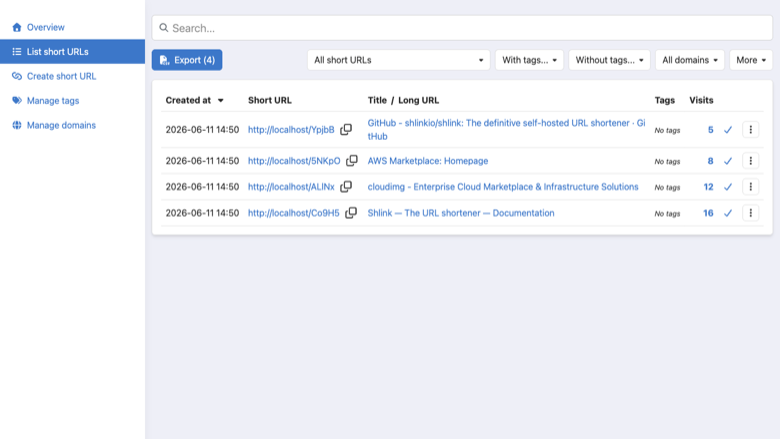
Short URLs list
Image
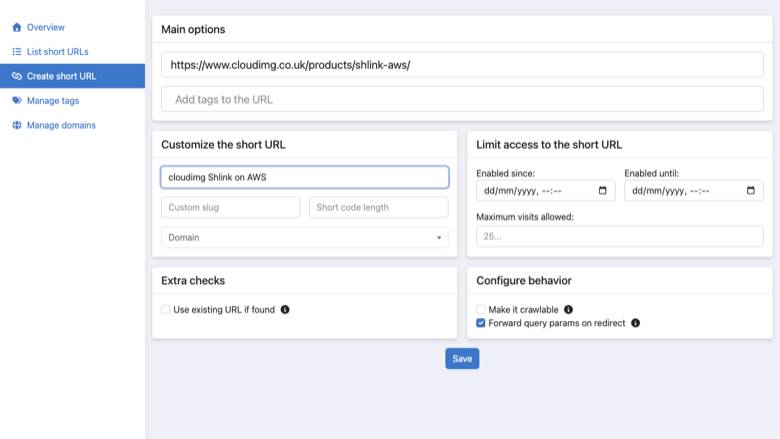
Create a short URL
Image
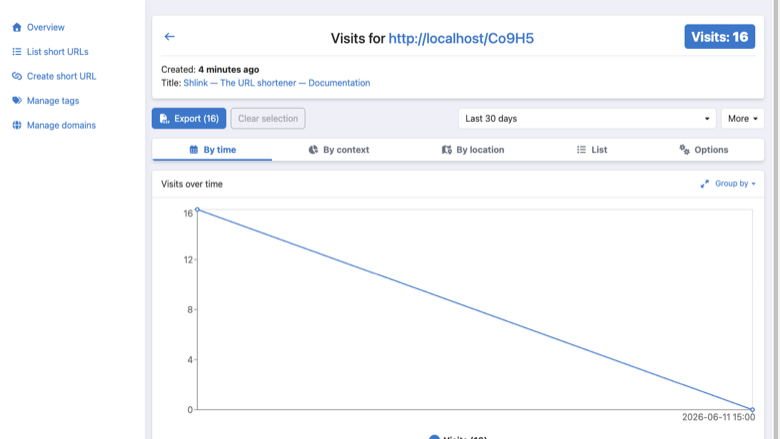
Visit analytics
This is a repackaged open source software product wherein additional charges apply for cloudimg support services.
Why This AMI Instead of Self-Installing
Deploying Shlink from source requires installing PHP 8.4 with multiple extensions, configuring nginx, setting up a database, connecting the web client to the API, and hardening credentials - a process that can take hours. This AMI eliminates that effort entirely. Launch an instance and your complete link management platform is running within minutes, with a unique API key generated automatically and no shared credentials. Compared to SaaS shorteners, you retain full ownership of your click data inside your own VPC - no third-party analytics vendor ever touches your visitor information.
Overview
Shlink is a self-hosted URL shortener that gives you complete ownership of your short links, their data and their analytics. This image delivers Shlink 5.1.0 fully installed and configured alongside the official Shlink web client, so a complete link management platform is running within minutes of launch.
Application Stack
- Shlink on PHP 8.4 with all required extensions
- nginx web server with TLS-ready configuration
- SQLite database on a dedicated, independently resizable EBS volume
- Official Shlink web client (single page application) pre-connected to the local API
- systemd timer that processes and geolocates visits on a schedule
Secure First Boot
On the first boot of your instance a one-shot service deletes any build-time API keys, short URLs and visits, generates a fresh administrator API key unique to that instance, wires the web client to it, and writes it to a root-only file. No shared or default credentials ship in the image. The dedicated data disk supports EBS encryption at rest, and nginx is configured to serve traffic over HTTPS once you attach your TLS certificate or terminate SSL at an Application Load Balancer.
AWS Integration Points
- Amazon CloudWatch - Configure the CloudWatch agent to stream nginx access logs and Shlink application logs for centralized monitoring and alerting.
- AWS Certificate Manager / Application Load Balancer - Terminate TLS at an ALB with a free ACM certificate for production-grade HTTPS without managing certificates on the instance.
- Amazon Route 53 - Point your branded short-link domain at the instance or load balancer for custom vanity URLs.
- Amazon EBS Snapshots - Schedule automated snapshots of the dedicated SQLite data disk for point-in-time backup and disaster recovery.
Ready To Use
The Shlink REST API, short URL redirects, web client and database are all configured. Browse to the web client, sign in with the generated key, and start creating short URLs, QR codes and reading visit analytics. The REST API is ready for your own applications and integrations - connect it to workflow automation tools or your existing marketing stack.
Use Cases
- Marketing teams generating thousands of branded campaign links and tracking click-through rates across channels, all within their own AWS account so visitor data never leaves their control.
- Developer teams programmatically creating short URLs via the REST API as part of CI/CD pipelines or customer-facing applications that need link generation at scale.
- QR code campaigns for retail, events or print media where you need reliable redirect performance and real-time scan analytics.
- Organizations in regulated industries (finance, healthcare, government) that require link-tracking data to remain in a specific AWS region and VPC rather than on a third-party SaaS platform.
cloudimg Support
24/7 technical support by email and live chat. Our engineers help with Shlink deployment, custom domain configuration, REST API integration, visit analytics and database administration. Critical issues receive a one-hour average response.
Get Started
Launch this AMI, retrieve your unique API key, and begin shortening URLs in minutes. For a guided walkthrough of custom domain setup or API integration, contact cloudimg support.
All product and company names are trademarks or registered trademarks of their respective holders. Use of them does not imply any affiliation with or endorsement by them.
Highlights
- Shlink URL shortener preinstalled and ready, with the REST API, visit analytics and the official Shlink web client, and no manual setup required
- Hardened first boot generates a fresh administrator API key for every instance, wires the web client to it and stores it in a file only the root user can read
- 24/7 technical support from cloudimg, with expert assistance for Shlink deployment, custom domains, API integration and analytics
Details
Sold by
Categories
Delivery method
Delivery option
64-bit (x86) Amazon Machine Image (AMI)
Latest version
Operating system
Ubuntu 24.04
Deployed on AWS
New
Introducing multi-product solutions
You can now purchase comprehensive solutions tailored to use cases and industries.

Features and programs
Financing for AWS Marketplace purchases
AWS Marketplace now accepts line of credit payments through the PNC Vendor Finance program. This program is available to select AWS customers in the US, excluding NV, NC, ND, TN, & VT.

Pricing
Free trial
Try this product free for 7 days according to the free trial terms set by the vendor. Usage-based pricing is in effect for usage beyond the free trial terms. Your free trial gets automatically converted to a paid subscription when the trial ends, but may be canceled any time before that.
Pricing is based on actual usage, with charges varying according to how much you consume. Subscriptions have no end date and may be canceled any time. Alternatively, you can pay upfront for a contract, which typically covers your anticipated usage for the contract duration. Any usage beyond contract will incur additional usage-based costs.
Additional AWS infrastructure costs may apply. Use the AWS Pricing Calculator to estimate your infrastructure costs.
If you are an AWS Free Tier customer with a free plan, you are eligible to subscribe to this offer. You can use free credits to cover the cost of eligible AWS infrastructure. See AWS Free Tier for more details. If you created an AWS account before July 15th, 2025, and qualify for the Legacy AWS Free Tier, Amazon EC2 charges for Micro instances are free for up to 750 hours per month. See Legacy AWS Free Tier for more details.
Dimension | Description | Cost/hour |
|---|---|---|
m5.large Recommended | m5.large | $0.08 |
t3.micro | t3.micro instance type | $0.04 |
t2.micro | t2.micro instance type | $0.04 |
m8i.24xlarge | m8i.24xlarge instance type | $0.24 |
i7ie.6xlarge | i7ie.6xlarge instance type | $0.24 |
c8id.metal-96xl | c8id.metal-96xl instance type | $0.24 |
c8ib.2xlarge | c8ib.2xlarge instance type | $0.24 |
m5d.metal | m5d.metal instance type | $0.24 |
m6in.2xlarge | m6in.2xlarge instance type | $0.24 |
g5.2xlarge | g5.2xlarge instance type | $0.24 |
Vendor refund policy
Refunds available on request.

Legal
Vendor terms and conditions
Upon subscribing to this product, you must acknowledge and agree to the terms and conditions outlined in the vendor's End User License Agreement (EULA) .
Content disclaimer
Vendors are responsible for their product descriptions and other product content. AWS does not warrant that vendors' product descriptions or other product content are accurate, complete, reliable, current, or error-free.
Delivery details
64-bit (x86) Amazon Machine Image (AMI)
Amazon Machine Image (AMI)
An AMI is a virtual image that provides the information required to launch an instance. Amazon EC2 (Elastic Compute Cloud) instances are virtual servers on which you can run your applications and workloads, offering varying combinations of CPU, memory, storage, and networking resources. You can launch as many instances from as many different AMIs as you need.
Version release notes
Initial release of Shlink 5.1.0 URL shortener.
Additional details
Usage instructions
Connect via SSH on port 22 as the default login user for your operating system variant (the user guide lists it per variant). The Shlink REST API and short URL redirects are served on port 80 at / and /rest; the Shlink web client is served at /client/. Browse to http://<instance-public-ip>/client/ and the web client connects automatically to this instance with the generated API key. Retrieve the generated API key with: sudo cat /root/shlink-credentials.txt. To enable HTTPS, follow the Let's Encrypt section of the user guide.
Resources
Vendor resources
Support
Vendor support
cloudimg provides 24/7 technical support for this product by email and live chat. Our engineers assist with deployment, configuration, custom domain setup, REST API integration, visit analytics, database administration, updates, performance tuning, and troubleshooting.
Response Times
- Critical issues: one-hour average response
- General inquiries: handled during the same business day
What We Help With
- Retrieving your auto-generated API key after first boot
- Configuring custom short-link domains via Amazon Route 53
- Setting up TLS with AWS Certificate Manager and an Application Load Balancer
- Integrating Shlink's REST API with your applications
- Scaling guidance and instance sizing recommendations
- Backup and restore using EBS snapshots
- Troubleshooting nginx, PHP, or SQLite issues
- Requesting refunds or resolving billing questions
Recommended Instance Sizing
For evaluation and low-traffic use, a t3.micro or t3.small instance is sufficient. For production workloads with higher redirect volumes, consider a t3.medium or larger. The SQLite database resides on a dedicated EBS volume that can be resized independently as your data grows.
Contact
Email: support@cloudimg.co.uk Live chat: available 24/7
We are committed to helping you get the most from your Shlink deployment at every stage, from initial launch through production scaling.
AWS infrastructure support
AWS Support is a one-on-one, fast-response support channel that is staffed 24x7x365 with experienced and technical support engineers. The service helps customers of all sizes and technical abilities to successfully utilize the products and features provided by Amazon Web Services.
Similar products

This product has charges associated with it for deployment, configuration, and ongoing support. Self-hosted URL shortener with analytics. Create short links with custom slugs, QR codes, and detailed click analytics including geolocation and device tracking.
Customer reviews
No customer reviews yet
Be the first to review this product . We've partnered with PeerSpot to gather customer feedback. You can share your experience by writing or recording a review, or scheduling a call with a PeerSpot analyst.