Artificial Intelligence
Build a serverless AI Gateway architecture with AWS AppSync Events
AWS AppSync Events can help you create more secure, scalable Websocket APIs. In addition to broadcasting real-time events to millions of Websocket subscribers, it supports a crucial user experience requirement of your AI Gateway: low-latency propagation of events from your chosen generative AI models to individual users.
In this post, we discuss how to use AppSync Events as the foundation of a capable, serverless, AI gateway architecture. We explore how it integrates with AWS services for comprehensive coverage of the capabilities offered in AI gateway architectures. Finally, we get you started on your journey with sample code you can launch in your account and begin building.
Overview of AI Gateway
AI Gateway is an architectural middleware pattern that helps enhance the availability, security, and observability of large language models (LLMs). It supports the interests of several different personas. For example, users want low latency and delightful experiences. Developers want flexible and extensible architectures. Security staff need governance to protect information and availability. System engineers need monitoring and observability solutions that help them support the user experience. Product managers need information about how well their products perform with users. Budget managers need cost controls. The needs of these different people across your organization are important considerations for hosting generative AI applications.
Solution overview
The solution we share in this post offers the following capabilities:
- Identity – Authenticate and authorize users from the built-in user directory, from your enterprise directory, and from consumer identity providers like Amazon, Google, and Facebook
- APIs – Provide users and applications low-latency access to your generative AI applications
- Authorization – Determine what resources your users have access to in your application
- Rate limiting and metering – Mitigate bot traffic, block access, and manage model consumption to manage cost
- Diverse model access – Offer access to leading foundation models (FMs), agents, and safeguards to keep users safe
- Logging – Observe, troubleshoot, and analyze application behavior
- Analytics – Extract value from your logs to build, discover, and share meaningful insights
- Monitoring – Track key datapoints that help staff react quickly to events
- Caching – Reduce costs by detecting common queries to your models and returned predetermined responses
In the following sections, we dive into the core architecture and explore how you can build these capabilities into the solution.
Identity and APIs
The following diagram illustrates an architecture using the AppSync Events API to provide an interface between an AI assistant application and LLMs through Amazon Bedrock using AWS Lambda.
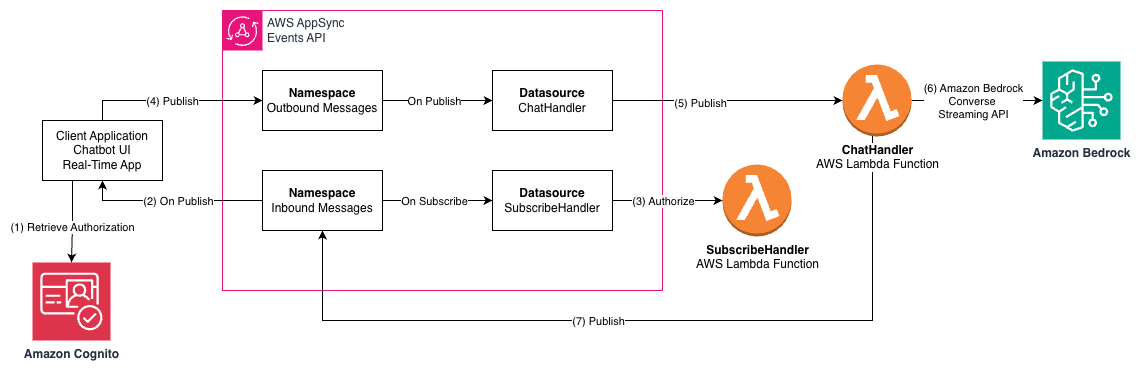
The workflow consists of the following steps:
- The client application retrieves the user identity and authorization to access APIs using Amazon Cognito.
- The client application subscribes to the AppSync Events channel, from which it will receive events like streaming responses from the LLMs in Amazon Bedrock.
- The
SubscribeHandlerLambda function attached to the Outbound Messages namespace verifies that this user is authorized to access the channel. - The client application publishes a message to the Inbound Message channel, such as a question posed to the LLM.
- The
ChatHandlerLambda function receives the message and verifies the user is authorized to publish messages on that channel. - The
ChatHandlerfunction calls the Amazon Bedrock ConverseStream API and waits for the response stream from the Converse API to emit response events. - The
ChatHandlerfunction relays the response messages from the Converse API to the Outbound Message channel for the current user, which passes the events to the WebSocket on which the client application is waiting for messages.
AppSync Events namespaces and channels are the building blocks of your communications architecture in your AI Gateway. In the example, namespaces are used to attach different behaviors to our inbound and outbound messages. Each namespace can have different publish and subscribe integration to each namespace. Moreover, each namespace is divided into channels. Our channel structure design provides each user a private inbound and outbound channel, serving as one-to-one communications with the server side:
Inbound-Messages / ${sub}Outbound-Messages / ${sub}
The subject, or sub attribute, arrives in our Lambda functions as context from Amazon Cognito. It is an unchangeable, unique user identifier within each user pool. This makes it useful for segments of our channel names and is especially useful for authorization.
Authorization
Identity is established using Amazon Cognito, but we still need to implement authorization. One-to-one communication between a user and an AI assistant in our example should be private—we don’t want users with the knowledge of another user’s sub attribute to be able to subscribe to or publish to another user’s inbound or outbound channel.
This is why we use sub in our naming scheme for channels. This enables the Lambda functions attached to the namespaces as data sources to verify that a user is authorized to publish and subscribe.
The following code sample is our SubscribeHandler Lambda function:
The function workflow consists of the following steps:
- The name of the channel arrives in the event.
- The user’s subject field,
sub, is part of the context. - If the channel name and user identity don’t match, it doesn’t authorize the subscription and returns an error message.
- Returning
Noneindicates no errors and that the subscription is authorized.
The ChatHandler Lambda function uses the same logic to make sure users are only authorized to publish to their own inbound channel. The channel arrives in the event and the context carries the user identity.
Although our example is simple, it demonstrates how you can implement complex authorization rules using a Lambda function to authorize access to channels in AppSync Events.We have covered access control to an individual’s inbound and outbound channels. Many business models around access to LLMs involve controlling how many tokens an individual is allowed to use within some period of time. We discuss this capability in the following section.
Rate limiting and metering
Understanding and controlling the number of tokens consumed by users of an AI Gateway is important to many customers. Input and output tokens are the primary pricing mechanism for text-based LLMs in Amazon Bedrock. In our example, we use the Amazon Bedrock Converse API to access LLMs. The Converse API provides a consistent interface that works with the models that support messages. You can write code one time and use it with different models.
Part of the consistent interface is the stream metadata event. This event is emitted at the end of each stream and provides the number of tokens consumed by the stream. The following is an example JSON structure:
We have input tokens, output tokens, total tokens, and a latency metric. To create a control with this data, we first consider the types of limits we want to implement. One approach is a monthly token limit that resets every month—a static window. Another is a daily limit based on a rolling window on 10-minute intervals. When a user exceeds their monthly limit, they must wait until the next month. After a user exceeds their daily rolling window limit, they must wait 10 minutes for more tokens to become available.
We need a way to keep atomic counters to track the token consumption, with fast real-time access to the counters with the user’s sub, and to delete old counters as they become irrelevant.
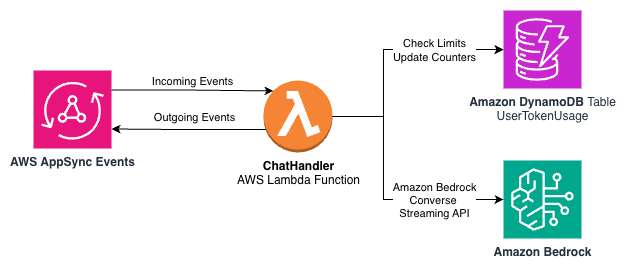
Amazon DynamoDB is a serverless, fully managed, distributed NoSQL database with single-digit millisecond performance at many scales. With DynamoDB, we can keep atomic counters, provide access to the counters keyed by the sub, and roll off old data using its time to live feature. The following diagram shows a subset of our architecture from earlier in this post that now includes a DynamoDB table to track token usage.
We can use a single DynamoDB table with the following partition and sort keys:
- Partition key –
user_id(String), the unique identifier for the user - Sort key –
period_id(String), a composite key that identifies the time period
The user_id will receive the sub attribute from the JWT provided by Amazon Cognito. The period_id will have strings that sort lexicographically that indicate which time period the counter is for as well as the timeframe. The following are some example sort keys:
10min or monthly indicate the type of counter. The timestamp is set to the last 10-minute window (for example, (minute // 10) * 10).
With each record, we keep the following attributes:
input_tokens– Counter for input tokens used in this 10-minute windowoutput_tokens– Counter for output tokens used in this 10-minute windowtimestamp– Unix timestamp when the record was created or last updatedttl– Time to live value (Unix timestamp), set to 24 hours from creation
The two token columns are incremented with the DynamoDB atomic ADD operation with each metadata event from the Amazon Bedrock Converse API. The ttl and timestamp columns are updated to indicate when the record is automatically removed from the table.
When a user sends a message, we check whether they have exceeded their daily or monthly limits.
To calculate daily usage, the meter.py module completes the following steps:
- Calculates the start and end keys for the 24-hour window.
- Queries records with the partition key
user_idand sort key between the start and end keys. - Sums up the
input_tokensandoutput_tokensvalues from the matching records. - Compares the sums against the daily limits.
See the following example code:
This range query takes advantage of the naturally sorted keys to efficiently retrieve only the records from the last 24 hours, without filtering in the application code.The monthly usage calculation on the static window is much simpler. To check monthly usage, the system completes the following steps:
- Gets the specific record with the partition key
user_idand sort keymonthly:YYYY-MMfor the current month. - Compares the
input_tokensandoutput_tokensvalues against the monthly limits.
See the following code:
With an additional Python module and DynamoDB, we have a metering and rate limiting solution that works for both static and rolling windows.
Diverse model access
Our sample code uses the Amazon Bedrock Converse API. Not every model is included in the sample code, but many models are included for you to rapidly explore possibilities.The innovation in this area doesn’t stop at models on AWS. There are numerous ways to develop generative AI solutions at every level of abstraction. You can build on top of the layer that best suits your use case.
Swami Sivasubramanian recently wrote on how AWS is enabling customers to deliver production-ready AI agents at scale. He discusses Strands Agents, an open source AI agents SDK, as well as Amazon Bedrock AgentCore, a comprehensive set of enterprise-grade services that help developers quickly and more securely deploy and operate AI agents at scale using a framework and model, hosted on Amazon Bedrock or elsewhere.
To learn more about architectures for AI agents, refer to Strands Agents SDK: A technical deep dive into agent architectures and observability. The post discusses the Strands Agents SDK and its core features, how it integrates with AWS environments for more secure, scalable deployments, and how it provides rich observability for production use. It also provides practical use cases and a step-by-step example.
Logging
Many of our AI Gateway stakeholders are interested in logs. Developers want to understand how their applications function. System engineers need to understand operational concerns like tracking availability and capacity planning. Business owners want analytics and trends so that they can make better decisions.
With Amazon CloudWatch Logs, you can centralize the logs from your different systems, applications, and AWS services that you use in a single, highly scalable service. You can then seamlessly view them, search them for specific error codes or patterns, filter them based on specific fields, or archive them securely for future analysis. CloudWatch Logs makes it possible to see your logs, regardless of their source, as a single and consistent flow of events ordered by time.
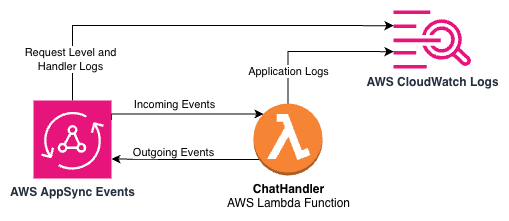
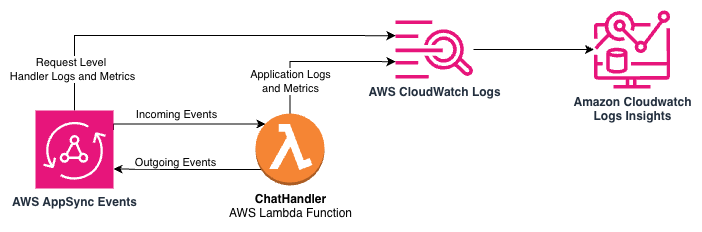
In the sample AI Gateway architecture, CloudWatch Logs is integrated at multiple levels to provide comprehensive visibility. The following architecture diagram depicts the integration points between AppSync Events, Lambda, and CloudWatch Logs in the sample application.
AppSync Events API logging
Our AppSync Events API is configured with ERROR-level logging to capture API-level issues. This configuration helps identify issues with API requests, authentication failures, and other critical API-level problems.The logging configuration is applied during the infrastructure deployment:
This provides visibility into API operations.
Lambda function structured logging
The Lambda functions use AWS Lambda Powertools for structured logging. The ChatHandler Lambda function implements a MessageTracker class that provides context for each conversation:
Key information logged includes:
- User identifiers
- Conversation identifiers for request tracing
- Model identifiers to track which AI models are being used
- Token consumption metrics (input and output counts)
- Message previews
- Detailed timestamps for time-series analysis
Each Lambda function sets a correlation ID for request tracing, making it straightforward to follow a single request through the system:
Operational insights
CloudWatch Logs Insights enables SQL-like queries across log data, helping you perform the following actions:
- Track token usage patterns by model or user
- Monitor response times and identify performance bottlenecks
- Detect error patterns and troubleshoot issues
- Create custom metrics and alarms based on log data
By implementing comprehensive logging throughout the sample AI Gateway architecture, we provide the visibility needed for effective troubleshooting, performance optimization, and operational monitoring. This logging infrastructure serves as the foundation for both operational monitoring and the analytics capabilities we discuss in the following section.
Analytics
CloudWatch Logs provides operational visibility, but for extracting business intelligence from logs, AWS offers many analytics services. With our sample AI Gateway architecture, you can use those services to transform data from your AI Gateway without requiring dedicated infrastructure or complex data pipelines.
The following architecture diagram shows the flow of data between the Lambda function, Amazon Data Firehose, Amazon Simple Storage Service (Amazon S3), the AWS Glue Data Catalog, and Amazon Athena.
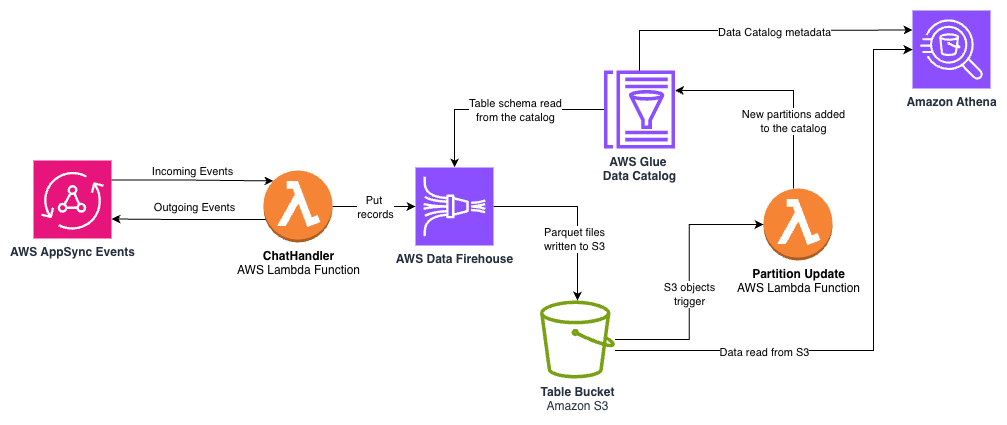
The key components include:
- Data Firehose – The
ChatHandlerLambda function streams structured log data to a Firehose delivery stream at the end of each completed user response. Data Firehose provides a fully managed service that automatically scales with your data throughput, alleviating the need to provision or manage infrastructure. The following code illustrates how the API call that integrates theChatHandlerLambda function with the delivery stream:
- Amazon S3 with Parquet format – Firehose automatically converts the JSON log data to columnar Parquet format before storing it in Amazon S3. Parquet improves query performance and reduces storage costs compared to raw JSON logs. The data is partitioned by year, month, and day, enabling efficient querying of specific time ranges while minimizing the amount of data scanned during queries.
- AWS Glue Data Catalog – An AWS Glue database and table are created in the AWS Cloud Development Kit (AWS CDK) application to define the schema for our analytics data, including
user_id,conversation_id,model_id, token counts, and timestamps. Table partitions are added as new S3 objects are stored by Data Firehose. - Athena for SQL-based analysis – With the table in the Data Catalog, business analysts can use familiar SQL through Athena to extract insights. Athena is serverless and priced per query based on the amount of data scanned, making it a cost-effective solution for one-time analysis without requiring database infrastructure. The following is an example query:
This serverless analytics pipeline transforms the events flowing through AppSync Events into structured, queryable tables with minimal operational overhead. The pay-as-you-go pricing model of these services facilitates cost-efficiency, and their managed nature alleviates the need for infrastructure provisioning and maintenance. Furthermore, with your data cataloged in AWS Glue, you can use the full suite of analytics and machine learning services on AWS such as Amazon Quick Sight and Amazon SageMaker Unified Studio with your data.
Monitoring
AppSync Events and Lambda functions send metrics to CloudWatch so you can monitor performance, troubleshoot issues, and optimize your AWS AppSync API operations effectively. For an AI Gateway, you might need more information in your monitoring system to track important metrics such as token consumption from your models.
The sample application includes a call to CloudWatch metrics to record the token consumption and LLM latency at the end of each conversation turn so operators have visibility into this data in real time. This enables metrics to be included in dashboards and alerts. Moreover, the metric data includes the LLM model identifier as a dimension so you can track token consumption and latency by model. Metrics are just one component of what we can learn about our application at runtime with CloudWatch. Because our log messages are formatted as JSON, we can perform analytics on our log data for monitoring using CloudWatch Logs Insights. The following architecture diagram illustrates the logs and metrics made available by AppSync Events and Lambda through CloudWatch and CloudWatch Logs Insights.
For example, the following query against the sample application’s log groups shows us the users with the most conversations within a given time window:
@timestamp and @message are standard fields for Lambda logs. On line 3, we compute the number of unique conversation identifiers for each user. Thanks to the JSON formatting of the messages, we don’t need to provide parsing instructions to read these fields. The Message complete log message is found in packages/eventhandlers/eventhandlers/messages.py in the sample application.
The following query example shows the number of unique users using the system for a given window:
Again, we filter for Message complete, compute unique statistics on the user_id field from our JSON messages, and then emit the data as a time series with 5-minute intervals with the bin function.
Caching (prepared responses)
Many AI Gateways provide a cache mechanism for assistant messages. This would be appropriate in situations where large numbers of users ask exactly the same questions and need the same exact answers. This could be a considerable cost savings for a busy application in the right situation. A good candidate for caching might be about the weather. For example, with the question “Is it going to rain in NYC today?”, everyone should see the same response. A bad candidate for caching would be one where the user might ask the same thing but would receive private information in return, such as “How many vacation hours do I have right now?” Take care to use this idea safely in your area of work. A basic cache implementation is included in the sample to help you get started with this mechanism. Caches in conversational AI require a lot of care to be taken to make sure information doesn’t leak between users. Given the amount of context an LLM can use to tailor a response, caches should be used judiciously.
The following architecture diagram shows the use of DynamoDB as a storage mechanism for prepared responses in the sample application.
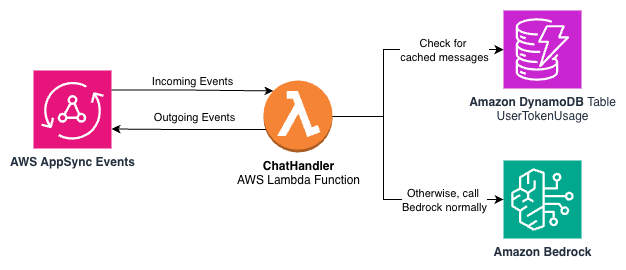
The sample application computes a hash on the user message to query a DynamoDB table with stored messages. If there is a message available for a hash key, the application returns the text to the user, the custom metrics record a cache hit in CloudWatch, and an event is passed back to AppSync Events to notify the application the response is complete. This encapsulates the cache behavior completely within the event structure the application understands.
Install the sample application
Refer to the README file on GitHub for instructions to install the sample application. Both install and uninstall are driven by a single command to deploy or un-deploy the AWS CDK application.
Sample pricing
The following table estimates monthly costs of the sample application with light usage in a development environment. Actual cost will vary by how you use the services for your use case.
| Service | Unit | Price/Unit | Sample Usage | Links |
| AWS Glue | Objects Stored | No additional cost for first million objects stored, $1.00/100,000 above 1 million per month | Less than 1 million | https://aws.amazon.com/glue/pricing/ |
| Amazon DynamoDB | Read Request Units | $0.625 per million write request units | $2.00 | https://aws.amazon.com/dynamodb/pricing/on-demand/ |
| Write Request Units | $0.125 per million write request units | |||
| Amazon S3 (Standard) | First 50 TB / Month | $0.023 per GB | $2.00 | https://aws.amazon.com/s3/pricing/ |
| AppSync Events | Event API Operations | $1.00 per million API operations | $1.00 | https://aws.amazon.com/appsync/pricing/ |
| Connection Minutes | $0.08 per million connection minutes | |||
| Amazon Data Firehose | TB / month | $0.029 First 500 TB / month | $1.00 | https://aws.amazon.com/firehose/pricing/ |
| Format Conversion per GB | $0.018 / GB | |||
| AWS Lambda | Requests | $0.20 / 1M requests | $1.00 | https://aws.amazon.com/lambda/pricing/ |
| Duration | $0.0000000067 / GB-seconds / month | |||
| Amazon Bedrock | Input Tokens | $3.00 / 1M input tokens(Anthropic Claude 4 Sonnet) | $20.00-$40.00 | https://aws.amazon.com/bedrock/pricing/ |
| Output Tokens | $15.00 / 1M Output tokens(Anthropic Claude 4 Sonnet) | |||
| AWS WAF | Base | $5.00 / month | $8.00 | https://aws.amazon.com/waf/pricing/ |
| Rules | $1.00 / rule / month | |||
| Requests | $0.60 / 1M requests | |||
| Amazon Cognito | Monthly Active Users | First 10,000 users, no additional cost | $0.00 | https://aws.amazon.com/cognito/pricing/ |
| Amazon CloudFront | Requests, Data Transfer Out | See pricing | $0.00 | https://aws.amazon.com/cloudfront/pricing/ |
| Amazon CloudWatch | Logs, Metrics | See pricing | $0.00 | https://aws.amazon.com/cloudwatch/pricing/ |
The monthly cost of the sample application, assuming light development use, is expected to be between $35–55 per month.
Sample UI
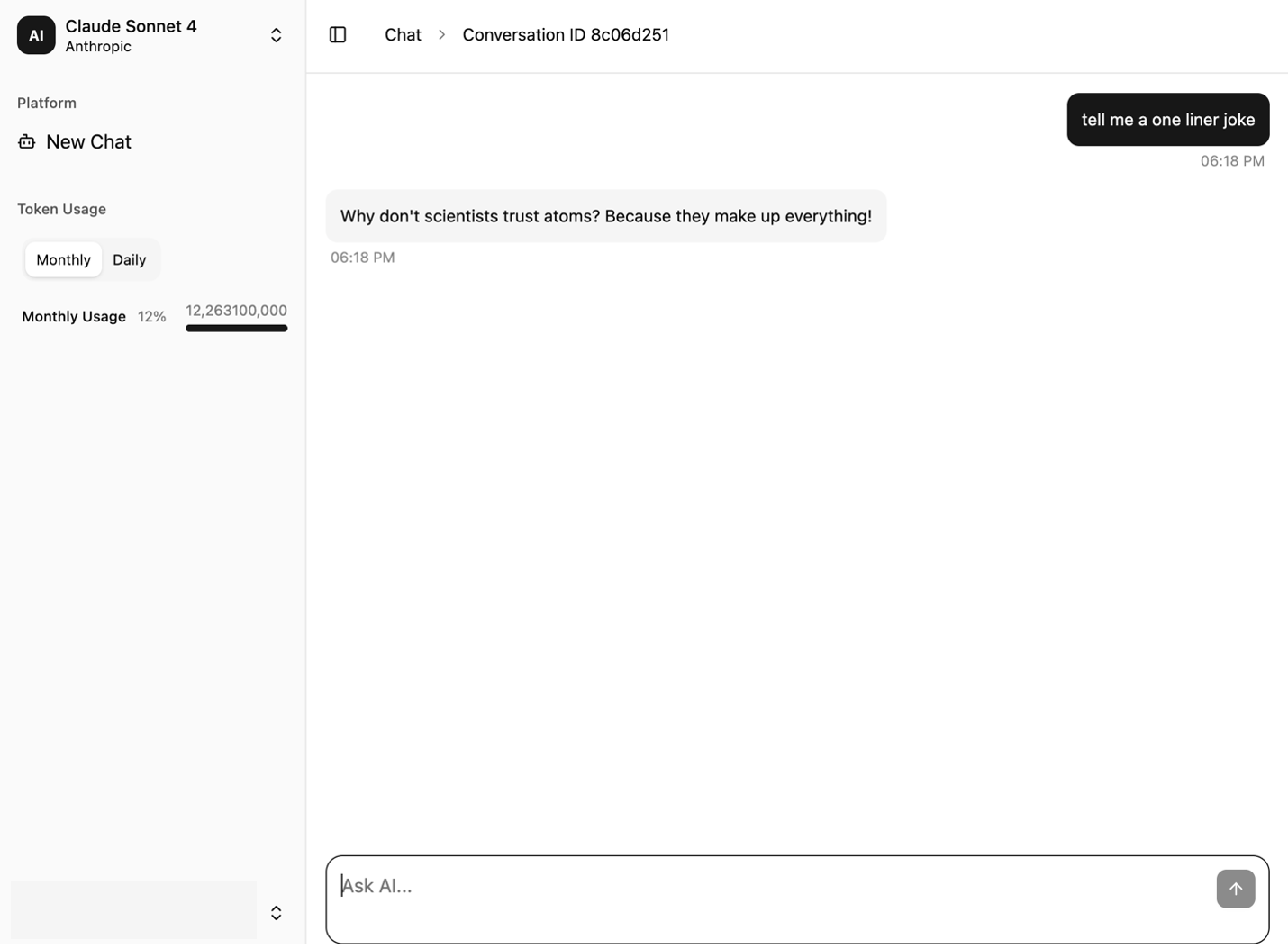
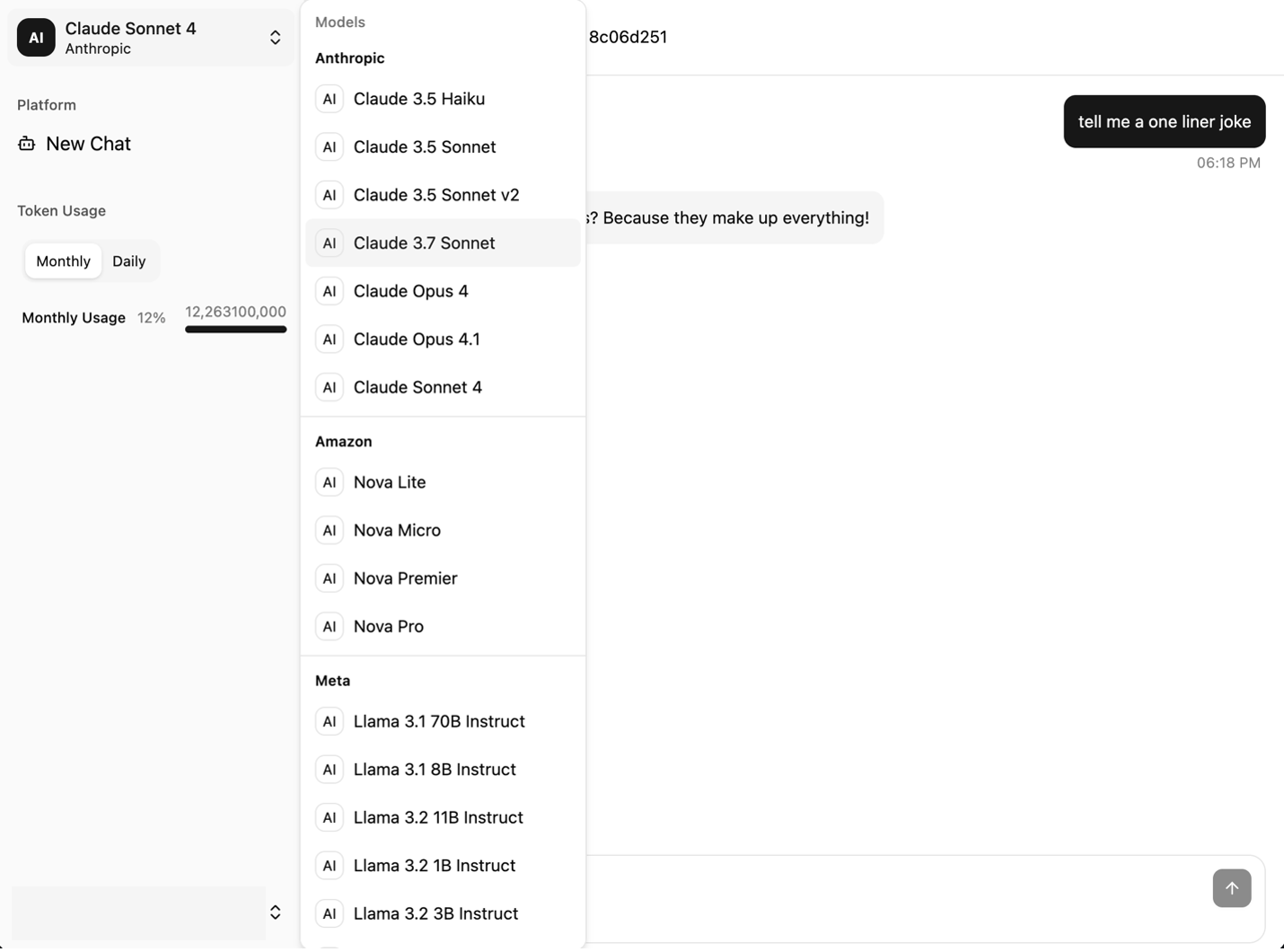
The following screenshots showcase the sample UI. It provides a conversation window on the right and a navigation bar on the left. The UI features the following key components:
- A Token Usage section is displayed and updated with each turn of the conversation
- The New Chat option clears the messages from the chat interface so the user can start a new session

- The model selector dropdown menu shows the available models
The following screenshot shows the chat interface of the sample application.
The following screenshot shows the model selection menu.
Conclusion
As the AI landscape evolves, you need an infrastructure that adapts as quickly as the models themselves. By centering your architecture around AppSync Events and the serverless patterns we’ve covered—including Amazon Cognito based identity authentication, DynamoDB powered metering, CloudWatch observability, and Athena analytics—you can build a foundation that grows with your needs. The sample application presented in this post gives you a starting point that demonstrates real-world patterns, helping developers explore AI integration, architects design enterprise solutions, and technical leaders evaluate approaches.
The complete source code and deployment instructions are available in the GitHub repo. To get started, deploy the sample application and explore the nine architectures in action. You can customize the authorization logic to match your organization’s requirements and extend the model selection to include your preferred models on Amazon Bedrock. Share your implementation insights with your organization, and leave your feedback and questions in the comments.
About the authors

Archie Cowan is a Senior Prototype Developer on the AWS Industries Prototyping and Cloud Engineering team. He joined AWS in 2022 and has developed software for companies in Automotive, Energy, Technology, and Life Sciences industries. Before AWS, he led the architecture team at ITHAKA, where he made contributions to the search engine on jstor.org and a production deployment velocity increase from 12 to 10,000 releases per year over the course of his tenure there. You can find more of his writing on topics such as coding with ai at fnjoin.com and x.com/archiecowan.