Claude Enterprise: a managed AI suite, governed and billed through AWS
How an organization gives every team a finished Claude product on day one, with the governance, single bill, and per-team cost visibility IT expects.
- Why a managed suite, not an API
- Step 1: Discover Claude Enterprise in AWS Marketplace
- Step 2: Subscribe through AWS Marketplace
- Step 3: Configure identity and role-based access
- Step 4: Install the Marketing plugin in Cowork
- Step 5: Create a Cowork project and set the brand voice
- Step 6: Plan the campaign with /campaign-plan
- Step 7: Draft and review content with /draft-content and /brand-review
- Step 8: Turn copy into visuals with Claude Design
- Step 9: Priya’s view, governance and spend
- What this shows
- Next steps
Why a managed suite, not an API
Priya leads technology at a large enterprise. Her users are a cross-section of the company, from developers and scientists to analysts and operations staff. API access alone will not work for every persona. What she needs is Claude as a finished product, ready on day one, wrapped in the governance her security team expects: SAML single sign-on, SCIM provisioning, audit logs, and role-based feature access, with the option to subscribe on standard terms or request a negotiated private offer.
Claude Enterprise, sold as managed SaaS in AWS Marketplace, is built for exactly this. A single seat includes Claude Chat across web, desktop, and mobile; Claude Code for agentic coding in the CLI and IDE plugins; Claude Cowork for multi-step knowledge work across documents, spreadsheets, slides, and the web; purpose-built agents for Chrome, Excel, and PowerPoint; and Claude Design, Anthropic Labs’ tool for producing prototypes, slides, one-pagers, and marketing collateral. On top sits the administration layer Priya cares about.
This walkthrough focuses on two features of that suite, Cowork’s Marketing plugin and Claude Design, because together they show what a ready-to-use product delivers: a marketer goes from a one-line brief to a governed, on-brand campaign without anyone on Priya’s team building or maintaining anything.
Before getting started:
- An AWS account with permission to subscribe to AWS Marketplace SaaS products.
- A Claude Enterprise subscription via AWS Marketplace, either the public listing or a private offer negotiated with Anthropic.
- An identity provider that supports SAML and SCIM (Okta, Microsoft Entra ID, and similar).
- The Claude desktop app installed for the end user. No connectors, credit cards, or proprietary data are required for any step below.
Step 1: Discover Claude Enterprise in AWS Marketplace
AWS Marketplace can guide a buyer to the right listing through conversation. From the AWS Marketplace home page, the buyer opens agent mode and describes what they need in plain language. Agent mode returns product recommendations and a side-by-side comparison, answers follow-up questions, and points the buyer to purchase options, so they reach the subscribe step already knowing what they are buying.
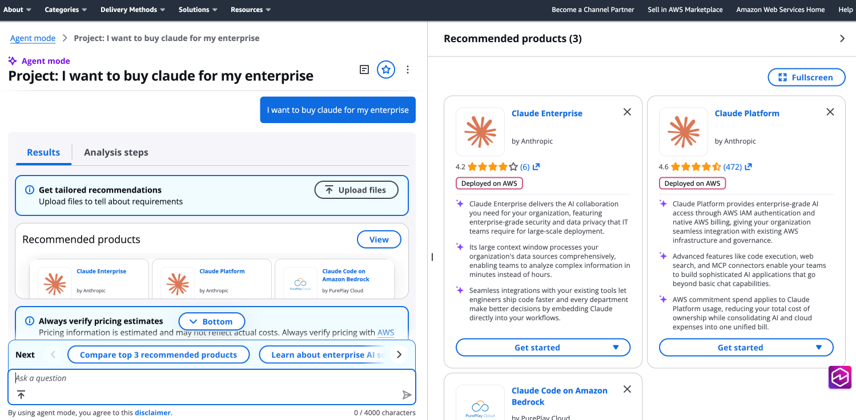
Figure 1: The AWS Marketplace home page agent mode, returning Claude Enterprise among the recommended products.
Step 2: Subscribe through AWS Marketplace
Procurement reviews the Claude Enterprise listing and clicks View purchase options or Request private offer. Charges land on the consolidated AWS bill and flow through existing procurement approvals. Nothing is deployed into Priya’s account; there is no stack, VPC, or instance to manage.
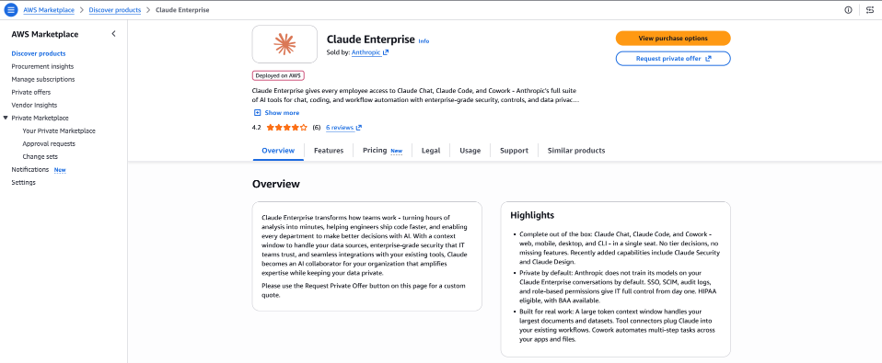
Figure 2: The Claude Enterprise listing in AWS Marketplace.
Step 3: Configure identity and role-based access
In the Claude admin console under Organization settings → Organization and access, IT verifies the corporate domain by adding a DNS TXT record, then clicks Setup SSO in the Authentication section and follows the guided flow to connect the identity provider (SAML 2.0 or OIDC). Under User provisioning, IT selects SCIM directory sync and turns on Enable group mappings, so joiners are provisioned automatically, leavers are removed when unassigned in the directory, and role and seat-type changes follow group membership. Feature availability is then set per team in organization settings: Claude Code for engineering, Cowork for analysts, and Cowork plus Claude Design for marketing.
Claude Design is off by default for Enterprise organizations. The admin turns on Claude Design [standalone] under Organization settings → Capabilities and decides whether to allow public links for designs and partner exports.
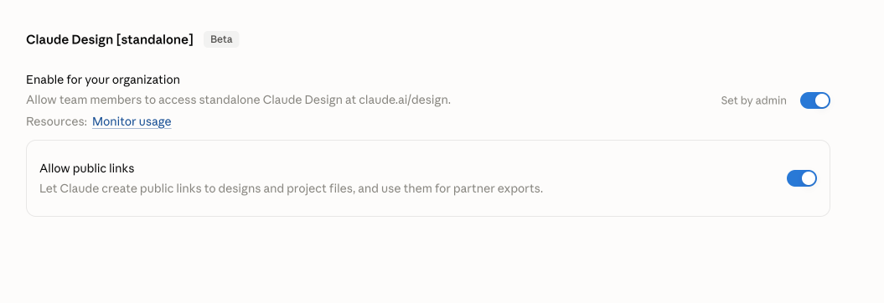
Figure 3: Enabling Claude Design for the organization.
Step 4: Install the Marketing plugin in Cowork
Dev, a product marketer, signs in with SSO and opens Cowork in the Claude desktop app. From Customize → Skills → Discover, he adds the Anthropic-published Marketing skill, one of the most-installed in the directory. It bundles slash commands for campaign planning, content drafting, brand review, email sequences, competitive briefs, SEO audits, and performance reporting. No connectors are needed; everything below runs on prompts and local files.
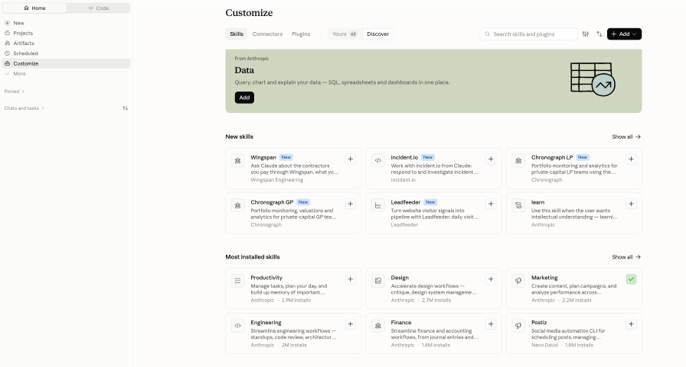
Figure 4: Cowork Customize page showing the Discover tab with the Marketing skill installed.
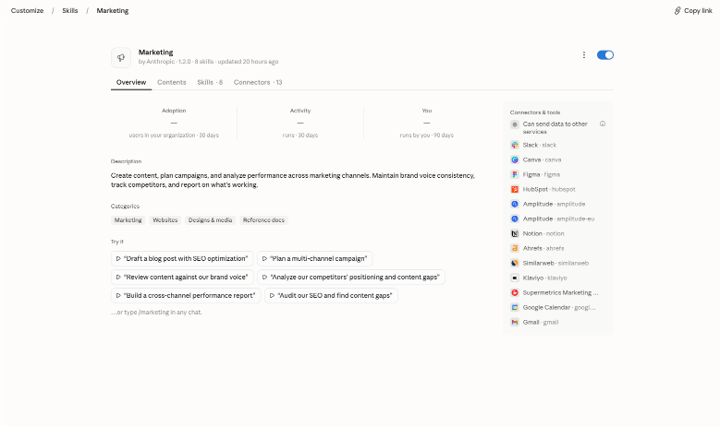
Figure 5: The Marketing skill’s overview. Connectors are optional; this walkthrough uses none of them.
Step 5: Create a Cowork project and set the brand voice
The plugin’s /draft-content and /brand-review commands apply a brand voice automatically when one is configured in project settings. In the Claude desktop app, Dev opens Projects in the left panel, clicks “+”, and chooses Start from scratch. He names the project Northstar Launch, leaves Context empty, and pastes the following into Instructions. Every task he runs inside this project inherits it. To keep the exercise free of proprietary data, the product is fictional:
Brand voice for all marketing output in this project
Product: Northstar Field Kit, a rugged tablet for utility field technicians.
Audience: operations leaders at North American electric and water utilities.
Voice attributes: plain, confident, practical. No jargon, no hype words
("revolutionary", "leverage", "seamless").
Style: sentences under 20 words; sentence case headings; Oxford comma;
define acronyms on first use.
Messaging pillars: works in rain and cold; one device replaces clipboard,
camera, and radio; IT can manage it like a laptop.
CTA standard: "Request a demo."
Every command below runs inside this project and inherits the voice without restating it.
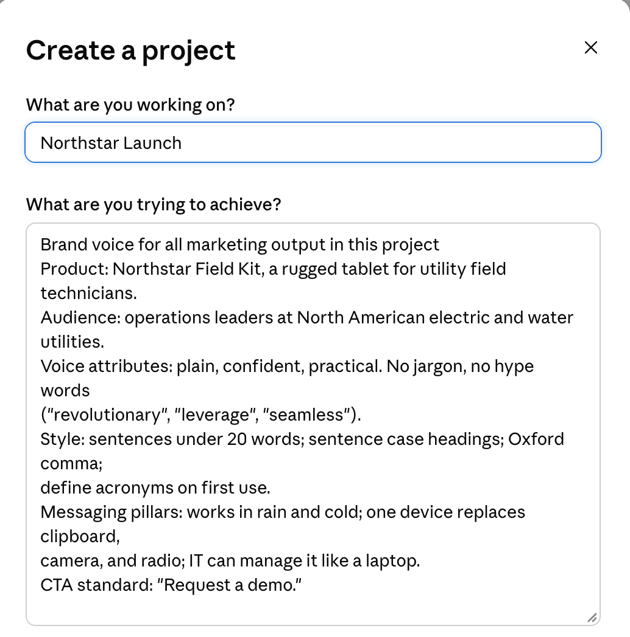
Figure 6: Create a project dialog for Northstar Launch with the brand voice pasted into the instructions field.
Step 6: Plan the campaign with /campaign-plan
Dev runs:
/campaign-plan Launch Northstar Field Kit to utility operations leaders
in North America. Six-week campaign, channels: LinkedIn, email, landing
page, one webinar. Goal: 500 qualified demo requests.
Cowork returns objectives and KPIs, channel strategy with rationale, a week-by-week content calendar, and success metrics, saved to the project as a Word document and a spreadsheet calendar he can hand to the team.
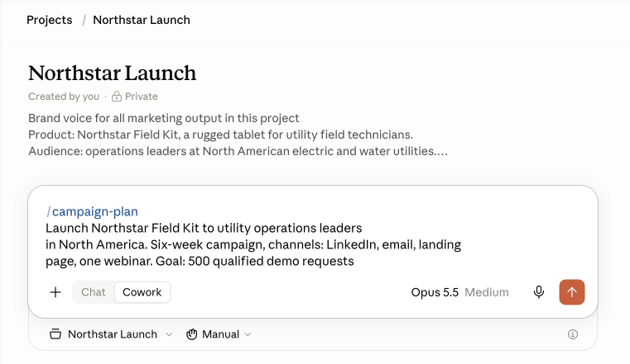
Figure 7: Running /campaign-plan inside the Northstar Launch project, in Cowork mode.
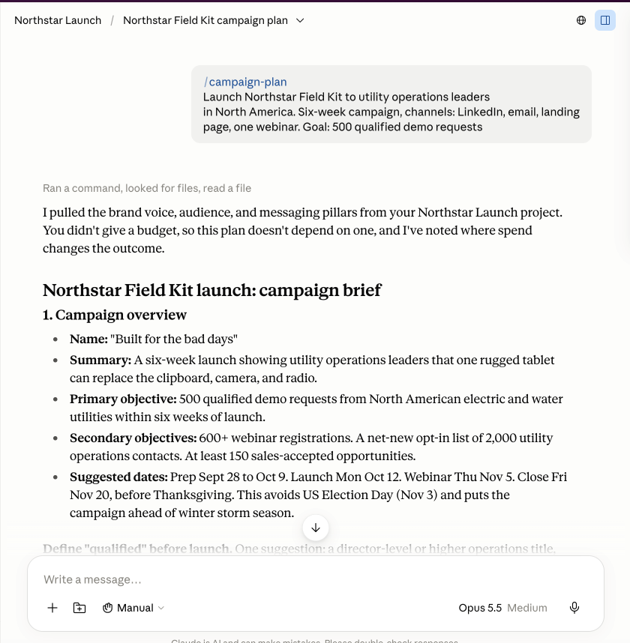
Figure 8: The campaign brief. Claude confirms it pulled the brand voice, audience, and messaging pillars from the project.
Step 7: Draft and review content with /draft-content and /brand-review
Next, Dev generates the assets the calendar calls for:
/draft-content landing page for Northstar Field Kit launch, headline plus
three benefit sections and a demo CTA
/draft-content four LinkedIn posts announcing the launch, one per week
/email-sequence three-email nurture for demo-request leads
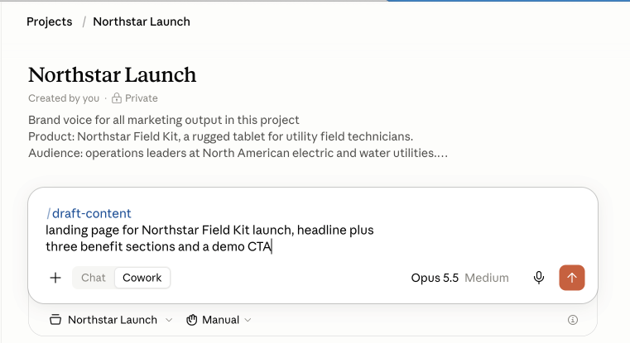
Figure 9: Running /draft-content inside the project.
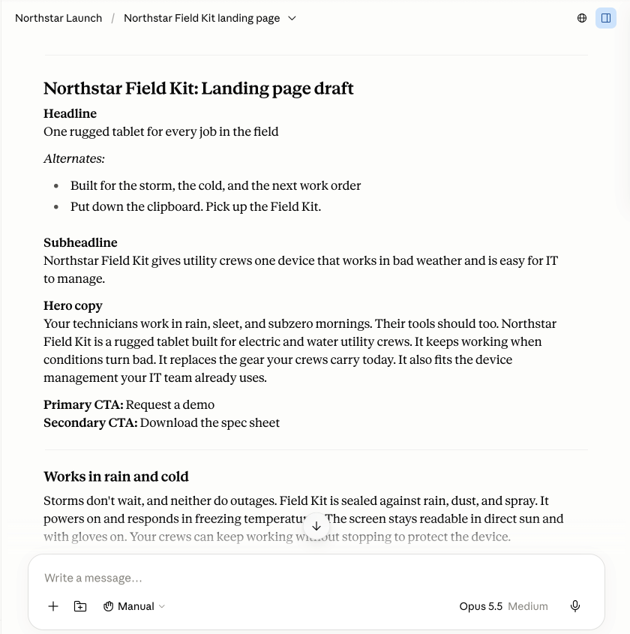
Figure 10: The landing-page draft, already in the project voice: short sentences, the three messaging pillars, and the standard CTA.
Each command produces a draft in the project. He then runs /brand-review against the landing page copy. Cowork flags an acronym that is not defined on first use, two capability claims that are not in the brief, and two sentences at or over the 20-word limit, each with a severity and a suggested rewrite.
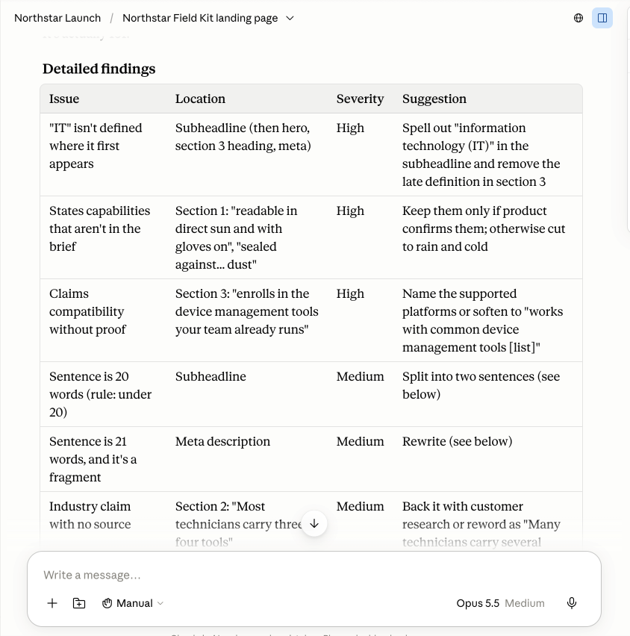
Figure 11: /brand-review findings, ranked by severity with a specific fix for each.
Dev now has a plan, calendar, landing page, social copy, and nurture sequence as editable files, without touching an API or connector.
Step 8: Turn copy into visuals with Claude Design
Copy is only half a campaign. Still inside the Northstar Launch project, Dev opens a Design canvas, pastes the link to the landing-page artifact Cowork produced, and prompts:
Build a responsive landing page from this copy. Add a hero, three
benefit cards, and a demo-request form. Then produce four 1080x1080
LinkedIn graphics matching the four posts.
Claude Design renders the page in desktop (1440 px) and mobile (390 px) versions, each with the hero, three benefit cards, and a working demo-request form. Open items from the brand review appear as bracketed placeholders rather than invented claims. Dev comments inline on the hero to make the headline larger, drags the spacing slider Claude generated to tighten the benefit cards, and edits a CTA label directly on the canvas, then asks Claude to apply those changes across all assets.
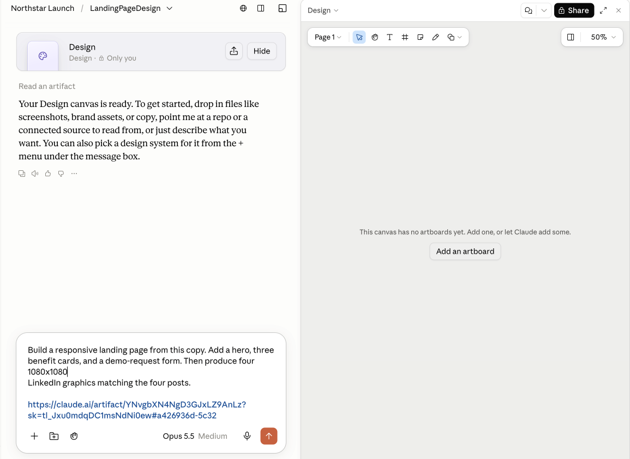
Figure 12: A new Design canvas inside the project, with the prompt and the artifact link.
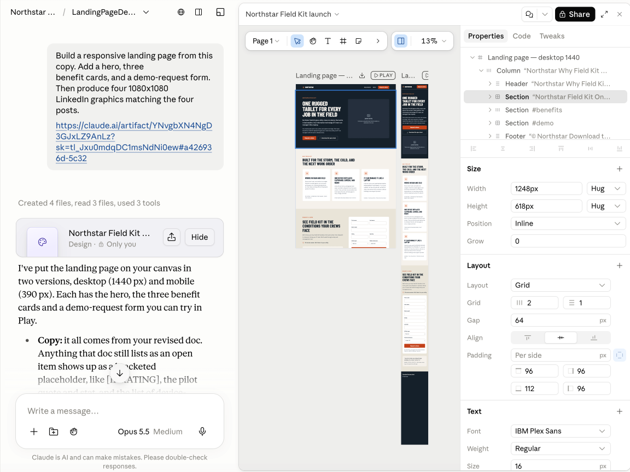
Figure 13: The rendered landing page in desktop and mobile, with the layer tree and properties panel on the right.
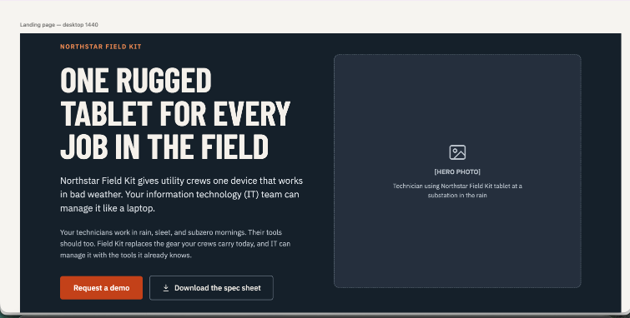
Figure 14: The hero section at full size. Copy, CTA, and acronym handling all match the brand voice.
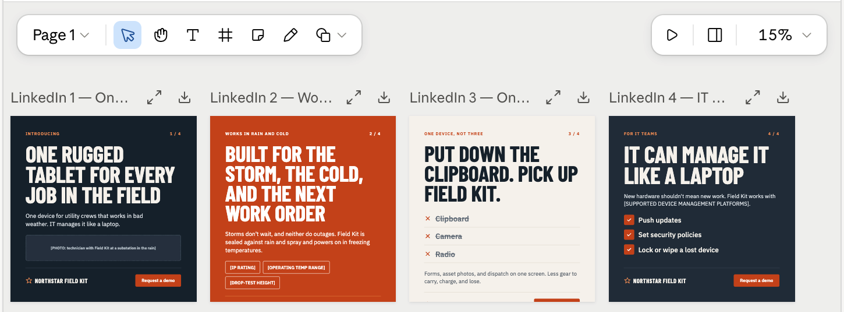
Figure 15: The four LinkedIn graphics generated from the landing page.
When the set looks right, Dev exports: the landing page as standalone HTML for the web team, the graphics as PDF for review, and the whole thing as PPTX for the launch readout. He shares the project by organization-scoped link so the design lead can comment and edit in the same conversation. Nothing leaves the company’s Claude organization.
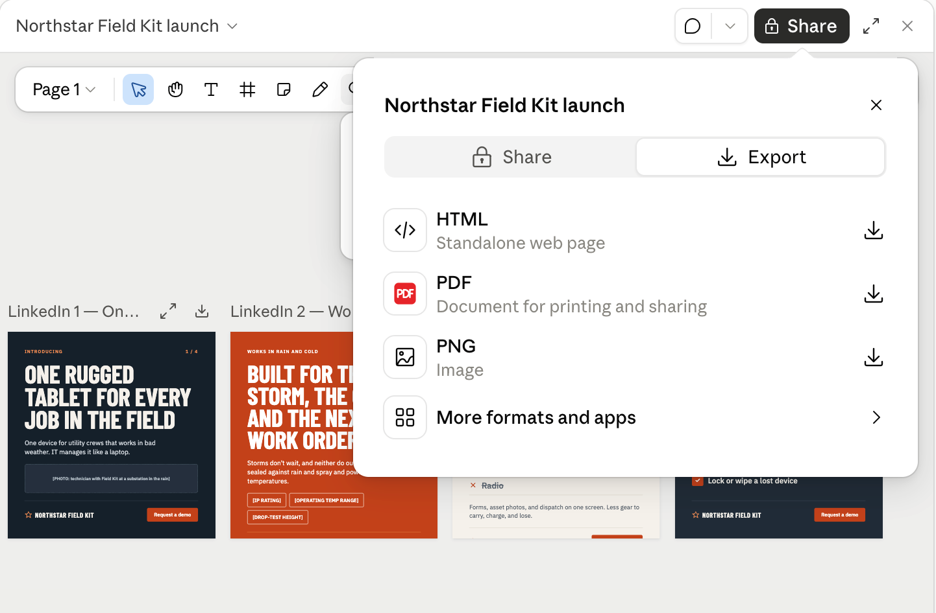
Figure 16: Export menu showing HTML, PDF and PPTX options.
Step 9: Priya’s view, governance and spend
Priya’s admin console shows organization spend against a monthly limit she sets herself, here $2,000 with a third used, plus per-member and per-group limits for the Claude Enterprise seats and member-level analytics broken down by product, model, and skill. She has turned off self-service limit increases, so any overage is a decision, not a surprise. Audit logs and data-retention policy apply uniformly. Billing stays consolidated: the seats appear on the same AWS invoice as the rest of Priya’s AWS usage, with no separate vendor payment to manage. New models and Claude Design updates reach Dev automatically; Priya never provisions or patches anything.
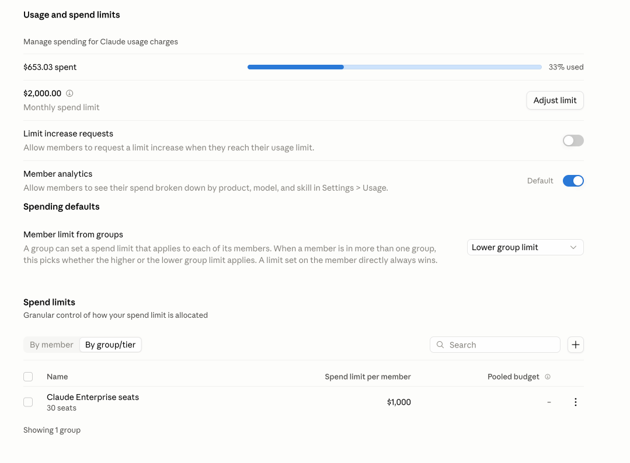
Figure 17: Usage and spend limits in the admin console: $653 spent against a $2,000 monthly limit, limit-increase requests off, and a $1,000 per-member cap on the Claude Enterprise seats group.
What this shows
A marketer used two finished features of the Claude Enterprise suite, the Cowork Marketing plugin and Claude Design, and the enterprise controls came along by default. Procurement, identity, governance, and billing all ran through infrastructure Priya already owned.
Next steps
Explore our workshop labs to see what Claude Enterprise can do across your teams. When you are ready, visit Claude Enterprise in AWS Marketplace to subscribe or request a private offer.
Explore Anthropic in AWS Marketplace

About the contributors
Chidambaram Muthappan
 Chidambaram Muthappan is a Senior Specialist Solutions Architect on the AWS Marketplace team. He helps partners bring their software to customers in AWS Marketplace.
Ayan Ray
 Ayan Ray is a Principal Partner Solutions Architect and AI Tech Lead at AWS, serving as the Worldwide Tech Lead for Anthropic. He works at the intersection of cloud architecture and AI, helping organizations adopt and scale Anthropic's technologies on AWS.