
Sold by: Cloud Infrastructure Services
Deployed on AWS
AWS Free Tier
This is a repackaged open source software product wherein additional charges apply for a web console, directory authentication, traffic reporting, optimised configuration, access control and configuration changes that roll back on failure.
These options are for Squid Proxy Server with Traffic Reporting and Access Control via Web GUI.
View 1 other optionOverview
Image
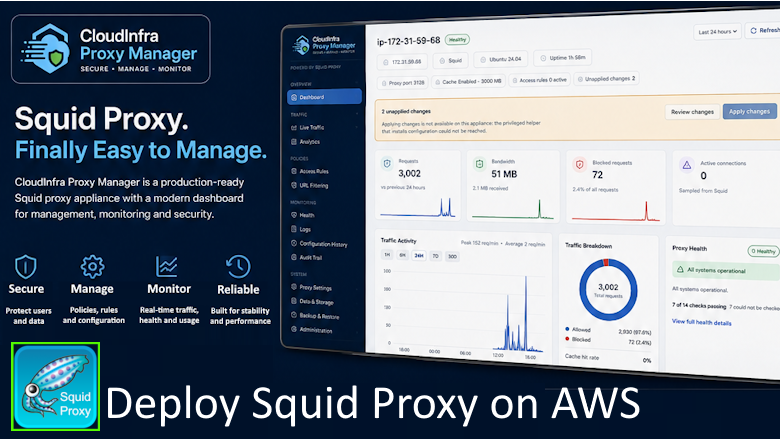
Squid Proxy with Web Console
Image
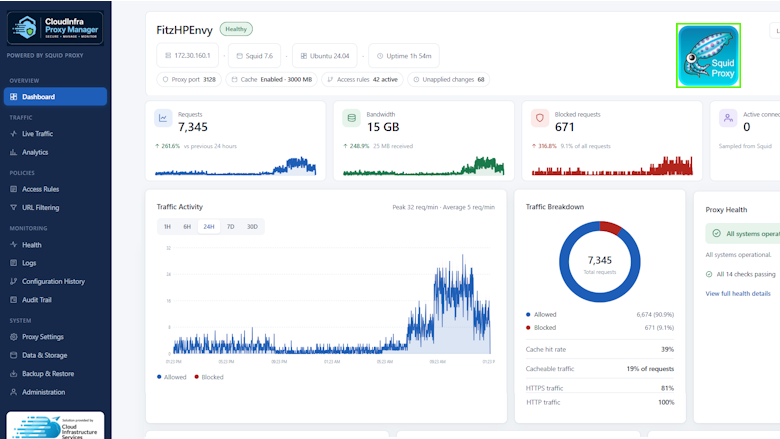
Fully Manage Squid from Web Console
Image
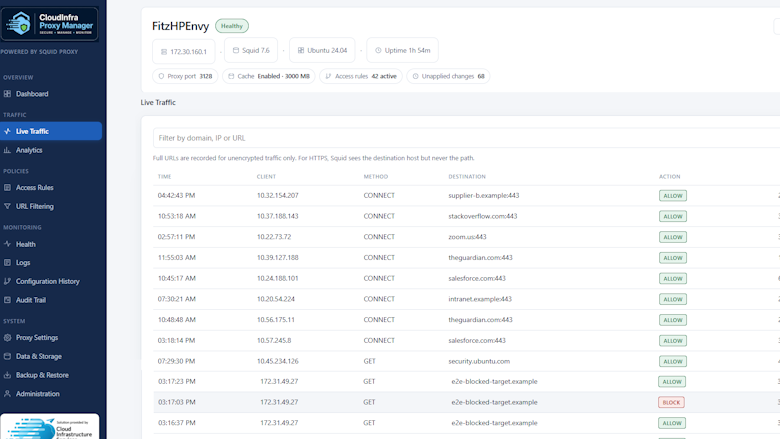
Live traffic monitoring via Squid proxy console
Image
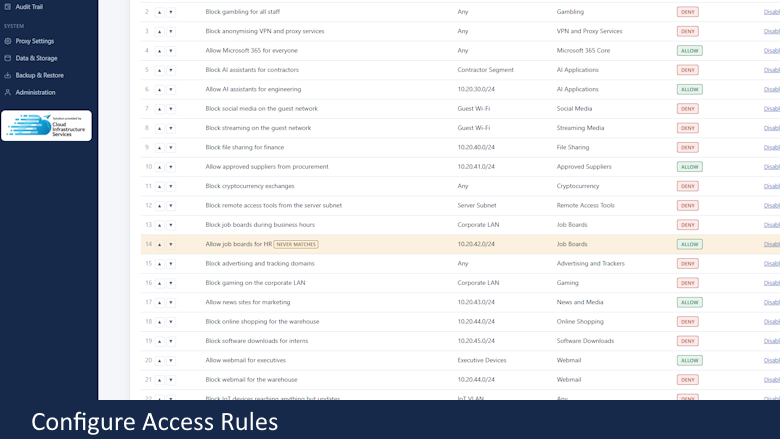
Easily setup access rules, allow or deny

Image
Squid Active Directory Authentication
Image
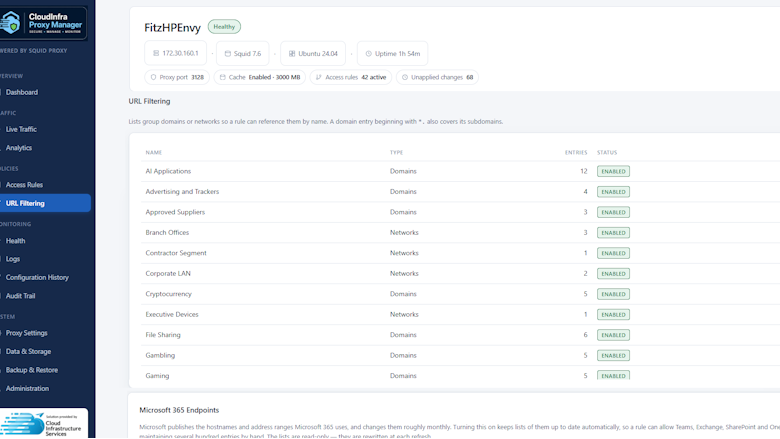
URL Filtering - Allow or Deny by IP or Group
Image
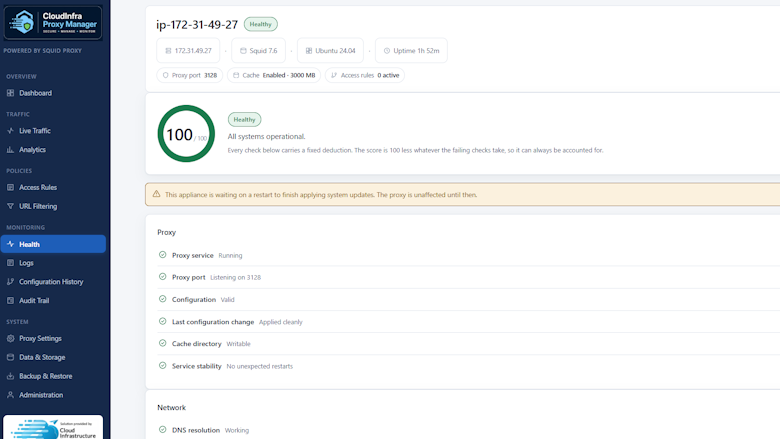
Squid Health Monitoring
Squid Proxy with Traffic Reporting and Access Control via Web GUI
A self hosted Squid caching proxy for teams that must control outbound web traffic and account for it afterwards. Squid 7.6 is compiled from source on Ubuntu 24.04 and paired with a management console (CloudInfra Proxy Manager), so it is run from a browser rather than by editing squid.conf.
This Squid proxy server comes with a full management console, filter and block websites, control outbound internet access, authenticate users against Active Directory or LDAP, cache repeated downloads, and see every request your network makes, with configuration changes that validate before they deploy and roll back automatically if they fail.
Squid Proxy Features
A caching forward proxy for HTTP and HTTPS. HTTPS is carried as CONNECT tunnels, logged by host and port. It listens on port 3128 by default, and the port is configurable. Clients are pointed at the proxy explicitly, through proxy settings or environment variables, so nothing is intercepted without your knowledge.
Caching is configurable from the console: disk cache location and size, memory cache size, and maximum object size. Cache hit rate is measured over cacheable requests only, so it is not flattered by encrypted tunnels: fifty instances pulling the same packages fetch them once. Visible hostname, DNS resolvers, connect timeout and access logging are settings, not file edits.
Access Control
Rules are built from access control lists and evaluated in order, stopping at the first match, as Squid does.
Source: any client, an IP address, a network in CIDR notation, a named network group, a directory user, or a directory group. Destination: anywhere, a domain, a network in CIDR notation, or a named domain list. Action: allow or deny.
Named lists of domains and networks are reused across rules, so one edit updates every rule referring to the list, and large lists are read by Squid from disk. The console shows the evaluation order and reads each rule back as a sentence before you apply it, so a rule doing the opposite of what you meant is visible beforehand.
Directory Authentication
Proxy authentication against Active Directory, Microsoft Entra Domain Services or OpenLDAP. Connect over LDAPS on port 636, encrypted from the first byte, or StartTLS on port 389, which fails rather than continuing in clear text. Set the base DN, bind DN and user filter from the console; the bind password is stored outside the world readable configuration file. Install your directory certificate authority so the connection validates, and referrals are followed so multi domain forests resolve.
Rules can then name individual users or directory groups, including names containing spaces. Usernames are recorded alongside requests, so reports name people, not IP addresses.
Microsoft 365
Microsoft publishes the address ranges its services use and changes them regularly. The appliance retrieves that list and keeps the matching policies current, so a Microsoft 365 rule does not go stale.
Squid Proxy Traffic Reporting
Requests, allowed and blocked counts, bytes transferred and cache hit rate, all computed from Squid own access log rather than estimated. Break traffic down by destination, client, user or rule, and search the record, so a question about one host on one afternoon has an answer. A live view shows current activity and the raw logs are readable in the console.
Configuration Changes That Cannot Break the Proxy
Every change is parsed by Squid itself before installation. The running configuration is snapshotted, the new one installed, then reloaded without dropping connections where possible. The proxy is then health checked by putting a real request through it, and if that fails the snapshot is restored without being asked. Where a fault comes from one of your rules, the message names it. Configuration history, versions, an audit log, backup and restore are included.
Security & First Boot
The console runs on port 8443 behind TLS. Its certificate and the administrator password are generated on your instance at first boot, so no two instances share them, and the password must be changed at first sign in. Replace the certificate with your own: the pair is validated first, it takes effect without a restart, and the previous one is restored if the new one fails to load.
Request history stays on the appliance own disk inside your VPC. The software calls no vendor service, reports no usage and checks no licence.
No Lock In
The generated squid.conf is ordinary, readable Squid configuration. The file /etc/squid/local.conf is yours: never generated, never overwritten, untouched by rollback, so directives such as cache peers and refresh patterns survive every update. Access rules are the exception and belong in the console, because local.conf is read after the default deny.
Highlights
- Squid 7.6 caching forward proxy for HTTP and HTTPS, managed from a web console. Access control lists, URL and domain filtering, network groups in CIDR notation, disk and memory caching, and Microsoft 365 endpoint policies, all without hand editing squid.conf.
- Proxy authentication against Active Directory, Entra Domain Services or OpenLDAP over LDAPS or StartTLS. Rules name users and directory groups, and usernames are recorded alongside requests, so traffic reports name people rather than IP addresses.
- Everything runs in your own account. Request history is stored on the appliance disk inside your VPC, the software calls no vendor service, and every change is parsed by Squid, snapshotted, health checked and rolled back automatically if the proxy fails.
Details
Categories
Delivery method
Delivery option
64-bit (x86) Amazon Machine Image (AMI)
Latest version
Operating system
Ubuntu 24.04
Deployed on AWS
Features and programs
Financing for AWS Marketplace purchases
AWS Marketplace now accepts line of credit payments through the PNC Vendor Finance program. This program is available to select AWS customers in the US, excluding NV, NC, ND, TN, & VT.

Pricing
Pricing is based on actual usage, with charges varying according to how much you consume. Subscriptions have no end date and may be canceled any time.
Additional AWS infrastructure costs may apply. Use the AWS Pricing Calculator to estimate your infrastructure costs.
If you are an AWS Free Tier customer with a free plan, you are eligible to subscribe to this offer. You can use free credits to cover the cost of eligible AWS infrastructure. See AWS Free Tier for more details. If you created an AWS account before July 15th, 2025, and qualify for the Legacy AWS Free Tier, Amazon EC2 charges for Micro instances are free for up to 750 hours per month. See Legacy AWS Free Tier for more details.
- ...
Dimension | Cost/hour |
|---|---|
t2.medium Recommended | $0.05 |
t2.micro | $0.05 |
t3.micro | $0.05 |
m3.medium | $0.05 |
m3.large | $0.05 |
m3.xlarge | $0.05 |
m3.2xlarge | $0.05 |
m4.large | $0.05 |
m4.xlarge | $0.05 |
m4.2xlarge | $0.05 |
Dimensions summary
You pay by the hour for the EC2 instance type you run this Squid proxy software on. Pricing is usage-based, so charges accrue only while an instance runs. Each dimension maps to one AWS instance size, from small general-purpose types up to large memory-, compute-, storage-, and GPU-optimized machines. The hourly software rate scales with the capacity of the instance you pick. You choose the size that fits your expected proxy traffic and cache needs. All instances run the same software inside your own AWS account, so the choice is about compute capacity, not features.
Top-of-mind questions for buyers
One unit is one running EC2 instance of the size you pick, billed per hour. Software charges accrue only while the instance runs. A stopped or powered-off instance stops the hourly software charge, though underlying AWS storage fees may still apply for the disk.
All sizes run the same software, so choose based on compute, memory, and disk needs. General-purpose types suit typical filtering and access control. Memory- or storage-optimized types help when you cache many repeated downloads, since cache size on disk and memory are configurable from the console.
Each running instance is billed separately by the hour. Several can run behind a network load balancer, but each is configured on its own. So your total software cost is the sum of hourly charges for every instance you keep running.
cloudinfrastructureservices.co.uk
Helpful?
Vendor refund policy
We do not currently support refunds, but you can cancel at any time.

Legal
Vendor terms and conditions
Upon subscribing to this product, you must acknowledge and agree to the terms and conditions outlined in the vendor's End User License Agreement (EULA) .
Content disclaimer
Vendors are responsible for their product descriptions and other product content. AWS does not warrant that vendors' product descriptions or other product content are accurate, complete, reliable, current, or error-free.
Delivery details
64-bit (x86) Amazon Machine Image (AMI)
Amazon Machine Image (AMI)
An AMI is a virtual image that provides the information required to launch an instance. Amazon EC2 (Elastic Compute Cloud) instances are virtual servers on which you can run your applications and workloads, offering varying combinations of CPU, memory, storage, and networking resources. You can launch as many instances from as many different AMIs as you need.
Version release notes
New squid proxy with web console now available. Upgrade to the latest AMI to manage your squid appliance using the new web dashboard.
Additional details
Usage instructions
SSH into the EC2 instance with the following username: ubuntu
Instructions for connecting to Linux instances via SSH can be found on: https://docs.aws.amazon.com/AWSEC2/latest/UserGuide/ec2-key-pairs.html
Once logged in, view our getting started guide on the following URL: https://proxydocs.cloudinfrastructureservices.co.uk/getting-started/quickstart/
Resources
Support
Vendor support
Support & Documentation
For any support issues or questions, you can email us via the following contact page: https://cloudinfrastructureservices.co.uk/contact-us/
For documentation on using Squid proxy and the web console, review the following URL:
AWS infrastructure support
AWS Support is a one-on-one, fast-response support channel that is staffed 24x7x365 with experienced and technical support engineers. The service helps customers of all sizes and technical abilities to successfully utilize the products and features provided by Amazon Web Services.
Updated weekly
By Cloud Infrastructure Services

By Diladele B.V.
By Lightning Wire Labs
AI generated from product descriptions
Caching Forward Proxy
Squid 7.6 caching forward proxy supporting HTTP and HTTPS traffic with configurable disk cache location and size, memory cache size, and maximum object size. Cache hit rate measured over cacheable requests only.
Access Control Lists
Rules built from access control lists evaluated in order with sources including client IP addresses, networks in CIDR notation, named network groups, directory users, and directory groups. Destinations include domains, networks in CIDR notation, and named domain lists with allow or deny actions.
Directory Authentication
Proxy authentication against Active Directory, Microsoft Entra Domain Services, or OpenLDAP over LDAPS on port 636 or StartTLS on port 389. Usernames recorded alongside requests for traffic reporting by individual users rather than IP addresses.
Configuration Validation and Rollback
Configuration changes parsed by Squid before installation with running configuration snapshotted and health checked by real request. Automatic rollback to previous snapshot if proxy fails, with fault messages identifying problematic rules.
Microsoft 365 Endpoint Management
Automatic retrieval and maintenance of Microsoft 365 address ranges published by Microsoft, with matching policies kept current to prevent rules from becoming stale.
HTTPS Decryption and SSL Inspection
Deep HTTPS decryption and SSL inspection capability to filter encrypted web traffic against security policies, preventing malicious downloads, explicit content, and policy violations.
Active Directory Integration
Integration with Active Directory, LDAP, and RADIUS authentication systems to apply granular per-user and per-group filtering policies using existing directory infrastructure.
Web Filtering and Content Blocking
Web filtering proxy appliance based on Squid that blocks illegal or potentially malicious file downloads, removes advertisements, prevents access to specified website categories, and blocks resources with explicit content.
Centralized Policy Management
Centralized web-based administrative interface for defining differentiated access levels across departments, roles, and device groups without requiring additional client software.
Multi-Platform Deployment
Pre-configured deployment on AWS as an AMI running Ubuntu 26.04 and Squid 7.6, with support for Azure, VMware, and Hyper-V environments for hybrid infrastructure scenarios.
Intrusion Detection and Prevention
Intrusion Detection and Prevention System for threat identification and mitigation
VPN Connectivity
VPN connections supporting multiple Gigabit per second bandwidth for secure interconnection between VPCs, offices, and data centers
Web Proxy with Content Filtering
Web proxy with content filtering capabilities for traffic inspection and control
Quality of Service Management
Quality of Service functionality for traffic prioritization and bandwidth management
Logging and Reporting
Comprehensive logging and reporting capabilities for security monitoring and audit trails
Standard contract
No
Customer reviews
No customer reviews yet
Be the first to review this product . We've partnered with PeerSpot to gather customer feedback. You can share your experience by writing or recording a review, or scheduling a call with a PeerSpot analyst.