
Sold by: Verified Images
Deployed on AWS
This product has charges associated with it for seller support. A hardened, self-hosted OpenClaw AI agent gateway on Ubuntu 26.04 LTS: the gateway is locked to localhost by default, no baked-in credentials, security-maintained and best-effort supported by Verified Images.
Overview
This is a repackaged open source software product wherein additional charges apply for support and ongoing security maintenance.
Verified Images publishes a hardened, self-hosted build of OpenClaw, the open-source personal AI agent, on Ubuntu 26.04 LTS. Public OpenClaw deployments have repeatedly been compromised for one reason: the gateway was left exposed to the internet. This image closes that failure mode by default and puts a team behind it.
What's included:
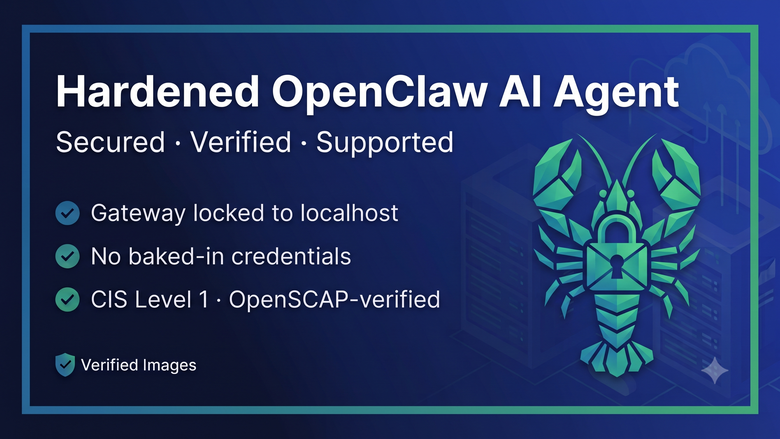
- Gateway locked to localhost by default: the OpenClaw gateway (port 18789) is published only to 127.0.0.1 and is never reachable from the network. Reach the Control UI over an SSH tunnel, or opt into an authenticated HTTPS proxy on your own domain (clawctl set-domain). This directly avoids the exposed-gateway pattern behind the widely reported OpenClaw incidents.
- No baked-in credentials: a unique gateway token is generated on this instance at first boot, and you bring your own LLM provider API key with one command (clawctl set-key). No secrets ship in the image.
- Reduced blast radius: the Docker socket is not mounted into the agent, the container runs as a non-root user with no-new-privileges, and OS-level exec sandboxing is available.
- A security-hardened Ubuntu baseline aligned with the CIS Ubuntu Linux Benchmark, Level 1 (Server profile), independently verified with OpenSCAP: SSH password and root login disabled, kernel and network sysctl hardening, and no default passwords. Verified Images is not affiliated with or certified by the Center for Internet Security; CIS Benchmarks is a trademark of CIS.
- The clawctl management CLI: status, logs, health, backups and restore, safe upgrades, bring-your-own-key, gateway-token rotation, and optional custom-domain TLS, all in one command.
- Automatic OS security updates (unattended-upgrades), nightly backups of config and secrets, and a gateway health watchdog.
- Direct vendor support from Verified Images on a commercially reasonable, best-effort basis (no specific response time is guaranteed).
Important: OpenClaw is an autonomous agent that can run commands and browse the web. Content it processes (messages, web pages) can attempt prompt injection, so this is not a set-and-forget appliance; review the actions the agent proposes and treat incoming content as untrusted. Your conversation and tool data flow to whichever LLM provider you configure, using your own API key; Verified Images never sees or stores that traffic. Compliance with each connected chat platform's terms of service is your responsibility.
OpenClaw is open-source software under the MIT License. Ubuntu 26.04 LTS is a long-term support release. OpenClaw and Ubuntu are trademarks of their respective owners; Verified Images is an independent repackager and is not affiliated with or endorsed by them.
Highlights
- Locked down by default - the OpenClaw gateway binds to localhost only; nothing is reachable from the network until you open it, avoiding the exposed-gateway pattern seen in public OpenClaw deployments.
- Bring your own key, never baked in - a per-instance gateway token is generated at first boot; add your LLM provider API key with one command. Zero secrets ship in the image.
- Hardened and operated - CIS Level 1 (OpenSCAP-verified) Ubuntu base, Docker socket not mounted, one-command clawctl for backups/upgrades/health, automatic OS patching, and best-effort vendor support.
Details
Sold by
Categories
Delivery method
Delivery option
64-bit (x86) Amazon Machine Image (AMI)
Latest version
Operating system
Ubuntu 26.04
Deployed on AWS
New
Introducing multi-product solutions
You can now purchase comprehensive solutions tailored to use cases and industries.

Features and programs
Financing for AWS Marketplace purchases
AWS Marketplace now accepts line of credit payments through the PNC Vendor Finance program. This program is available to select AWS customers in the US, excluding NV, NC, ND, TN, & VT.

Pricing
Pricing is based on actual usage, with charges varying according to how much you consume. Subscriptions have no end date and may be canceled any time.
Additional AWS infrastructure costs may apply. Use the AWS Pricing Calculator to estimate your infrastructure costs.
Dimension | Cost/hour |
|---|---|
t3.large Recommended | $0.18 |
m5.2xlarge | $0.40 |
t3.2xlarge | $0.40 |
t3.medium | $0.10 |
m5.large | $0.18 |
t3.xlarge | $0.26 |
m5.xlarge | $0.26 |
c5.xlarge | $0.26 |
Vendor refund policy
Refunds are handled through AWS Marketplace in accordance with AWS Marketplace's standard refund policy. To request a refund, buyers should submit a request via AWS Marketplace. For product-related questions, contact support@verified-images.com .

Legal
Vendor terms and conditions
Upon subscribing to this product, you must acknowledge and agree to the terms and conditions outlined in the vendor's End User License Agreement (EULA) .
Content disclaimer
Vendors are responsible for their product descriptions and other product content. AWS does not warrant that vendors' product descriptions or other product content are accurate, complete, reliable, current, or error-free.
Delivery details
64-bit (x86) Amazon Machine Image (AMI)
Amazon Machine Image (AMI)
An AMI is a virtual image that provides the information required to launch an instance. Amazon EC2 (Elastic Compute Cloud) instances are virtual servers on which you can run your applications and workloads, offering varying combinations of CPU, memory, storage, and networking resources. You can launch as many instances from as many different AMIs as you need.
Version release notes
Initial release: hardened, self-hosted OpenClaw AI agent gateway on Ubuntu 26.04 LTS. Gateway locked to localhost by default, no baked-in credentials (per-instance token + bring-your-own LLM key), Docker socket not mounted, CIS Level 1 (OpenSCAP-verified) base, clawctl management CLI, automatic OS patching and nightly backups.
Additional details
Usage instructions
-
Launch this AMI (t3.large recommended; t3.medium/4GB minimum) with your own EC2 key pair. Open TCP 22 (SSH) from your IP. No other inbound port is required.
-
Connect as the "ubuntu" user: ssh -i /path/to/your-key.pem ubuntu@<public-ip> Password auth and root login are disabled by design.
-
The OpenClaw gateway runs on 127.0.0.1:18789 and is NOT exposed to the network. Reach the Control UI from your machine over an SSH tunnel: ssh -i /path/to/your-key.pem -L 18789:127.0.0.1:18789 ubuntu@<public-ip> then open http://127.0.0.1:18789/ in your browser.
-
Get your gateway token and add your LLM API key: sudo clawctl token rotate (prints a token to paste into the Control UI) sudo clawctl set-key anthropic sk-...(or openai/deepseek/google/...)
-
Manage the appliance: sudo clawctl status | logs | health | backup | restore <file> | upgrade [version] sudo clawctl set-domain <domain> [email] (optional public HTTPS UI; opens 443)
-
Security: OpenClaw can run commands and browse the web; treat incoming content as untrusted (prompt injection is a real risk) and review proposed actions. Support: support@verified-images.com (best-effort).
Support
Vendor support
Support is provided by Verified Images (a DBA of CarmelTech LLC) via email at support@verified-images.com on a commercially reasonable, best-effort basis; no specific response time is guaranteed. Coverage includes deployment, configuration, security patching and upgrades of the image, and troubleshooting, plus ongoing security maintenance (the image is rebuilt and re-verified as OpenClaw ships new releases). Documentation is provided with the listing.
AWS infrastructure support
AWS Support is a one-on-one, fast-response support channel that is staffed 24x7x365 with experienced and technical support engineers. The service helps customers of all sizes and technical abilities to successfully utilize the products and features provided by Amazon Web Services.
Similar products
Pre-configured AI assistant with browser automation. Includes OpenClaw, Chrome, virtual display, and noVNC. Connect your AI provider, add channels (Telegram, Discord, Slack), and deploy in minutes.

OpenClaw is a one click AI agent platform for intelligent browser automation on AWS. Deploy autonomous AI agents powered by Claude or OpenAI to control web applications, perform workflows, and execute complex tasks securely inside your own EC2 instance.

Ready-to-use OpenClaw stack for executing automation workflows, system tasks, and AI-driven operations with flexible CPU/GPU deployment and support for both local and API-based models.

OpenClaw & Hermes Agent Management Panel with Built-in AI Assistant - Multi-Engine AI Framework Management.

Pre-installed and security-hardened OpenClaw AI agent AMI. Launch an EC2 instance, add your credentials, and start using your agent. Ready to configure out of the box.
Customer reviews
No customer reviews yet
Be the first to review this product . We've partnered with PeerSpot to gather customer feedback. You can share your experience by writing or recording a review, or scheduling a call with a PeerSpot analyst.