
Sold by: Security Onion Solutions, LLC
Deployed on AWS
Free Trial
Security Onion is a free and open platform built by defenders for defenders. It includes network visibility, host visibility, intrusion detection honeypots, log management, case management, and much more.
3.7
Overview
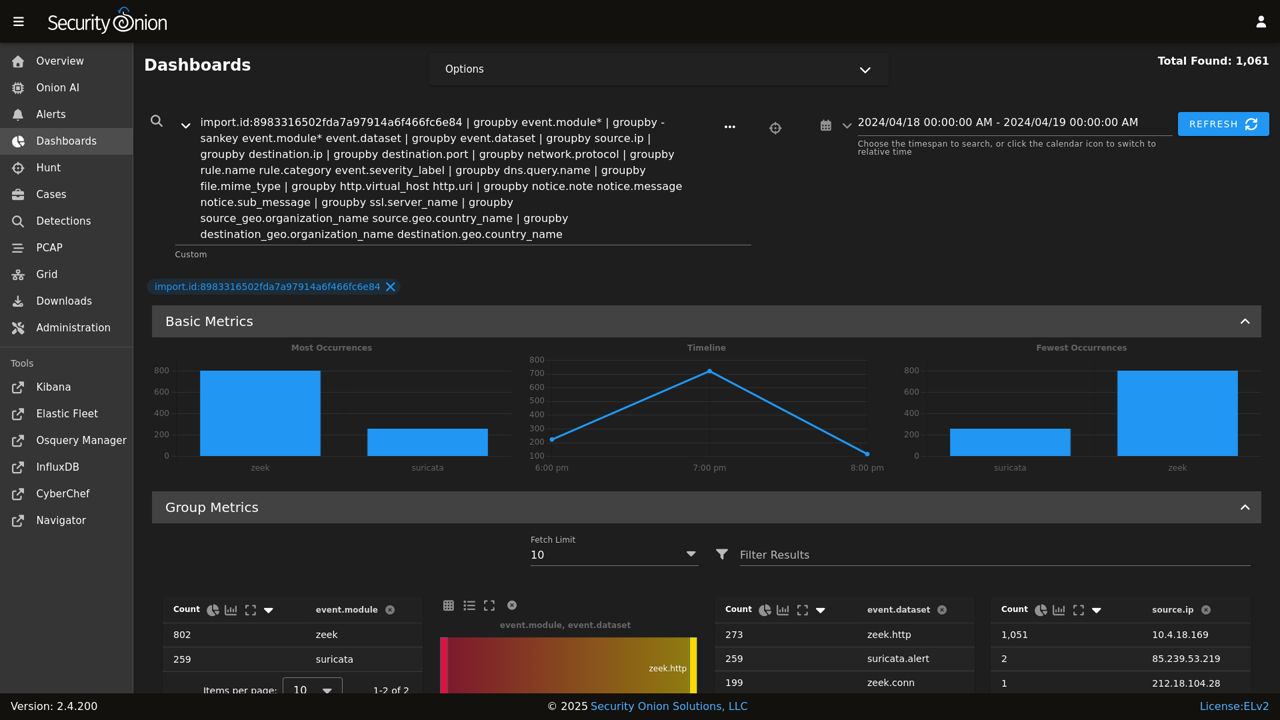
Image
Security Onion Dashboard
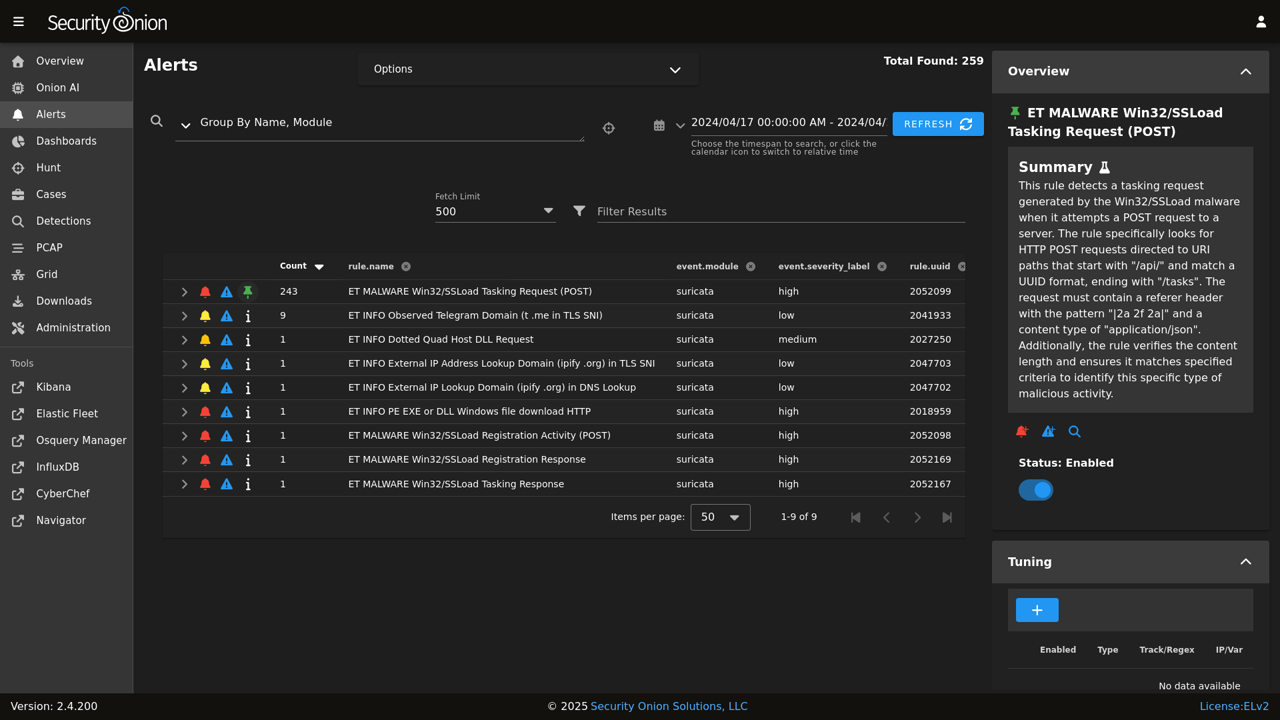
Image
Security Onion Alerts
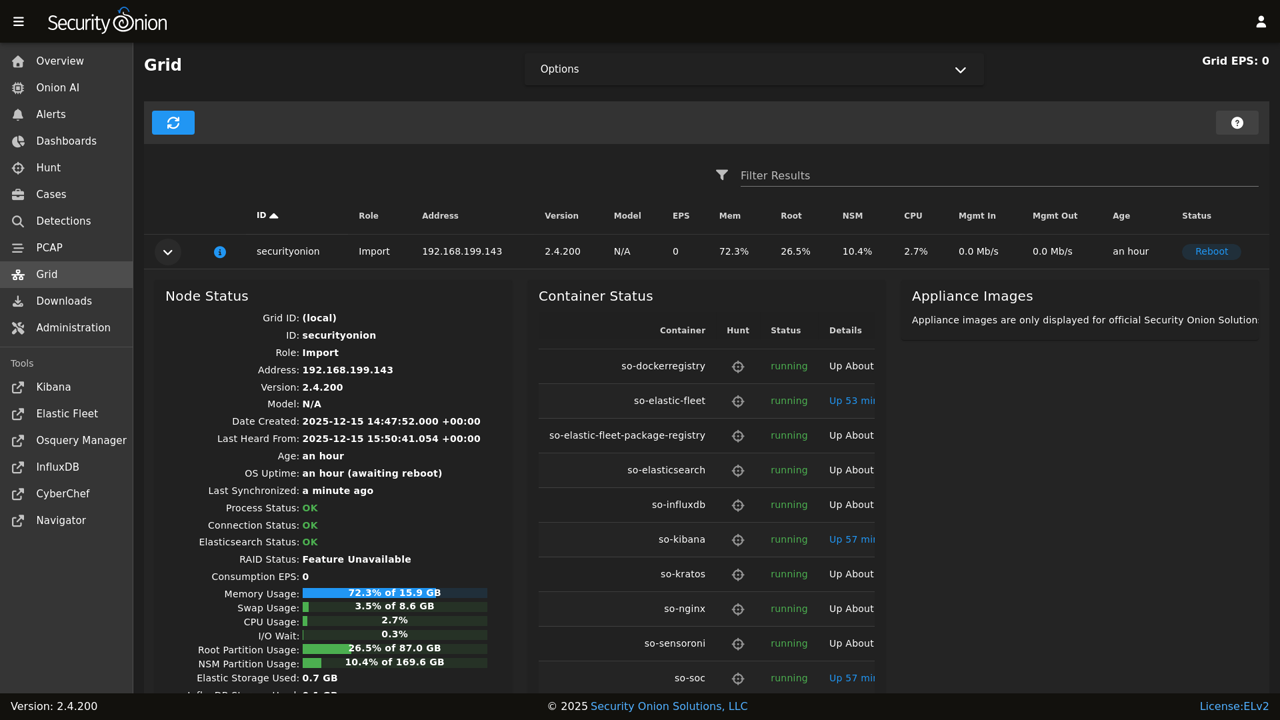
Image
Security Onion Grid
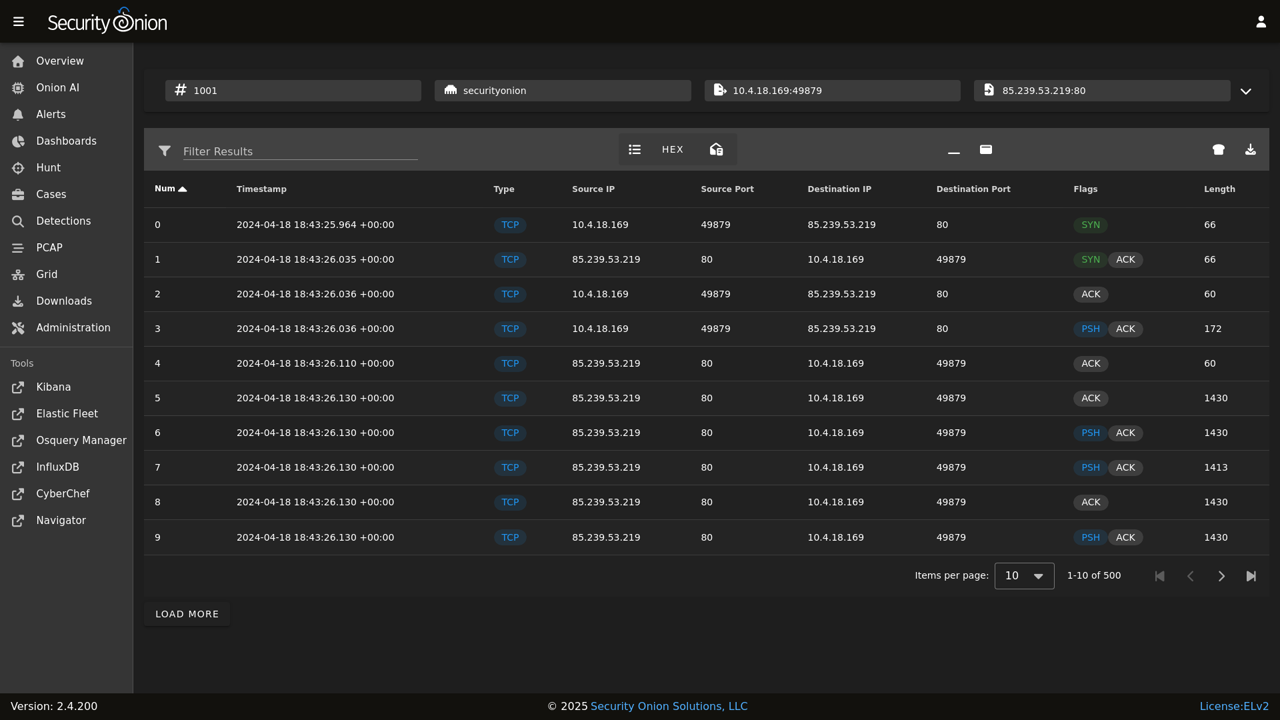
Image
Security Onion PCAP
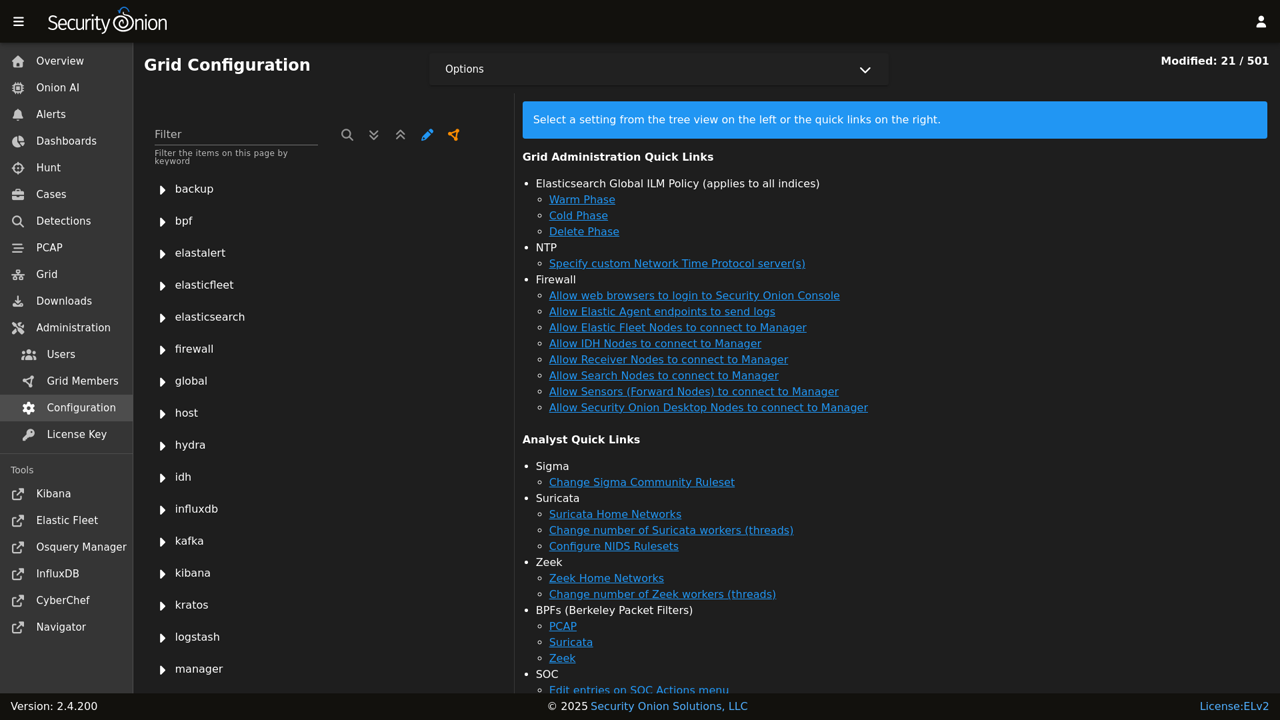
Image
Security Onion Configuration

Video
Product video
Security Onion is a free and open platform built by defenders for defenders. It includes network visibility, host visibility, intrusion detection honeypots, log management, case management, and much more.
Security Onion Pro is a licensed set of additional features useful to larger organizations, including Onion AI: a built-in AI assistant that is compatible with the either the Pro-bundled cloud AI platform offered by Security Onion, and also compatible with Google's Gemini AI platform or a locally hosted OpenAI-compatible endpoint. Contact our sales team to request a demo or more information.
For network visibility, Security Onion includes signature based detection via Suricata, rich protocol metadata and file extraction using your choice of either Zeek or Suricata, full packet capture via Suricata PCAP, and file analysis via Strelka. For host visibility, we offer the Elastic Agent which provides data collection, live queries via osquery, and centralized management using Elastic Fleet. Intrusion detection honeypots based on OpenCanary can be added to your deployment for even more enterprise visibility. All of these logs flow into the Elastic stack. Security Onion's native user interface, called SOC - short for Security Onion Console, for alerting, detection, hunting, dashboards, case management, and grid management, and much more.
Security Onion has been downloaded over 2 million times and is being used by security teams around the world to monitor and defend their enterprises. Our easy-to-use Setup wizard allows you to build a distributed grid for your enterprise in minutes!
Security Onion can be installed as a standalone, single VM, or in a distributed grid. Additionally, a single VM evaluation install mode is available for learning Security Onion, as well as an import install mode for analyzing past events. The Security Onion Console provides a consistent interface for viewing events, escalating alerts, collecting information into cases, and drilling down into associated PCAP traffic. Aggregate your platform logs into Security Onion for a comprehensive, security-focused view into activity within your infrastructure.
Note that free community-based support for Security Onion is offered via our discussion forum. Premium support is available for purchase separately, and is included with Security Onion Pro paid licenses.
Highlights
- Security Onion can be installed as a standalone, single VM, or in a distributed grid. Additionally, a single-VM evaluation install mode is available for learning Security Onion, as well as an import install mode for analyzing past events.
- Security Onion Console provides a consistent interface for viewing events, escalating alerts, and drilling down into associated PCAP traffic.
- Aggregate your platform logs into Security Onion for a comprehensive, security-focused view into activity within your infrastructure.
Details
Categories
Delivery method
Delivery option
64-bit (x86) Amazon Machine Image (AMI)
Latest version
Operating system
OtherLinux 9
Deployed on AWS
New
Introducing multi-product solutions
You can now purchase comprehensive solutions tailored to use cases and industries.

Features and programs
Buyer guide
Gain valuable insights from real users who purchased this product, powered by PeerSpot.

Financing for AWS Marketplace purchases
AWS Marketplace now accepts line of credit payments through the PNC Vendor Finance program. This program is available to select AWS customers in the US, excluding NV, NC, ND, TN, & VT.

Pricing
Free trial
Try this product free for 30 days according to the free trial terms set by the vendor. Usage-based pricing is in effect for usage beyond the free trial terms. Your free trial gets automatically converted to a paid subscription when the trial ends, but may be canceled any time before that.
Pricing is based on actual usage, with charges varying according to how much you consume. Subscriptions have no end date and may be canceled any time.
Additional AWS infrastructure costs may apply. Use the AWS Pricing Calculator to estimate your infrastructure costs.
Dimension | Cost/hour |
|---|---|
t3a.2xlarge Recommended | $0.15 |
c4.2xlarge | $0.15 |
r5n.8xlarge | $0.15 |
i4i.16xlarge | $0.15 |
m5ad.large | $0.15 |
r5b.metal | $0.15 |
r6idn.4xlarge | $0.15 |
c5a.4xlarge | $0.15 |
r6id.metal | $0.15 |
r5n.large | $0.15 |
Dimensions summary
You pay by the hour for Security Onion running on an Amazon Machine Image. The price you pay depends only on which EC2 instance type you launch. Each dimension maps to a single instance type, and there are hundreds of them across general purpose, compute, memory, storage, and GPU families in sizes from small to bare metal. Larger or more capable instances cost more per hour. You match instance choice to your grid design, whether a single-node setup for low-volume monitoring or a distributed multi-node grid for higher traffic. No upfront commitment applies; charges accrue only while instances run.
Top-of-mind questions for buyers
Hourly software charges apply only while an instance runs. A fully stopped instance stops accruing the hourly rate. You may still pay AWS for attached EBS storage on a stopped instance, but the Security Onion hourly software fee meters running time only.
Each dimension bills one running EC2 instance of that type per hour. A distributed grid runs several instances at once, for example a manager, search nodes, and a sensor. Each node accrues its own hourly charge based on its instance type. Your total is the sum across all running nodes.
The hourly rate covers the running EC2 instance for the Security Onion image. EBS and instance storage are separate AWS charges. Enterprise Pro features, such as single sign-on, FIPS, and priority support, are licensed separately by the vendor and are not part of this hourly Marketplace charge.
securityonion.net+1
Helpful?
Vendor refund policy
Refunds are not available.

Legal
Vendor terms and conditions
Upon subscribing to this product, you must acknowledge and agree to the terms and conditions outlined in the vendor's End User License Agreement (EULA) .
Content disclaimer
Vendors are responsible for their product descriptions and other product content. AWS does not warrant that vendors' product descriptions or other product content are accurate, complete, reliable, current, or error-free.
Delivery details
64-bit (x86) Amazon Machine Image (AMI)
Amazon Machine Image (AMI)
An AMI is a virtual image that provides the information required to launch an instance. Amazon EC2 (Elastic Compute Cloud) instances are virtual servers on which you can run your applications and workloads, offering varying combinations of CPU, memory, storage, and networking resources. You can launch as many instances from as many different AMIs as you need.
Version release notes
Full release notes for the latest Security Onion release are located at: https://securityonion.net/docs/release-notes
Existing Security Onion 2.4.4 or newer AMI installations should use the "soup" command to upgrade to newer versions of Security Onion. Attempting to switch to a newer AMI from the AWS Marketplace could cause loss of data and require full grid re-installation. Note that grids running Security Onion 2.3 cannot use soup to upgrade to 2.4, as the underlying operating system has changed from CentOS to Oracle Enterprise Linux.
Additional details
Usage instructions
IMPORTANT: Security Onion must be setup once the virtual machine first starts. Additionally, an understanding of DNS and networking concepts is required. Most users will need to map the VM's hostname to the VM IP address, either via their local /etc/hosts file, or via a domain resolution service in order to access the web interface.
Please review the following documentation links, as thoroughly understanding the architecture, such as which nodes should exist in AWS vs On-Premise, is an important prerequisite for deploying Security Onion in AWS.
Guidelines on instance sizing as well as AMI-specific instructions. This is a must read for all users new to running Security Onion on AWS.
Where data is stored within the VM's filesystem:
How Security Onion data is secured:
Information relating to updating passwords:
To verify a healthy installation, follow the recommendations provided in the following links:
- https://securityonion.net/docs/grid
- https://securityonion.net/docs/so-status
- https://securityonion.net/docs/help
Finally, if you run into trouble or need clarification, there is an active Security Onion community that helps answer questions relating to Security Onion. To take advantage of this free community support, visit our discussion forum:
Premium support and Security Onion Pro licenses are also available for purchase.
- Premium support: https://securityonion.net/support
- Pro license: https://securityonion.net/pro
Resources
Vendor resources
Support
Vendor support
Free community-based support for Security Onion is offered via our discussion forum. Premium support is available for purchase separately, and is included with Security Onion Pro paid licenses.
Visit our support website for more information. Premium Support:
AWS infrastructure support
AWS Support is a one-on-one, fast-response support channel that is staffed 24x7x365 with experienced and technical support engineers. The service helps customers of all sizes and technical abilities to successfully utilize the products and features provided by Amazon Web Services.
Updated weekly
By Security Onion Solutions, LLC

By Rapid7

By Check Point Software Technologies
Top
10
In Monitoring, Log Analysis
Top
25
In Data Security and Governance
Top
25
In Network Infrastructure
Sentiment is AI generated from actual customer reviews on AWS and G2
Functionality
Ease of use
Customer service
Cost effectiveness
Positive reviews
Mixed reviews
Negative reviews
AI generated from product descriptions
Network Traffic Analysis
Signature-based detection via Suricata with full packet capture (PCAP) capability and protocol metadata extraction using Zeek or Suricata
Host Visibility and Monitoring
Elastic Agent for data collection with live queries via osquery and centralized management through Elastic Fleet
File Analysis and Extraction
File analysis and extraction capabilities via Strelka with support for rich protocol metadata and file extraction from network traffic
Intrusion Detection and Deception
Intrusion detection honeypots based on OpenCanary for enterprise visibility and threat detection
Centralized Security Operations Console
Native user interface (SOC) for alerting, detection, hunting, dashboards, case management, and grid management with support for standalone, single VM, or distributed grid deployment
Threat Detection Engine
Library of 900+ out-of-the-box detections with user and attacker behavior analytics backed by community threat intelligence
Data Ingestion and Integration
Ingests CloudTrail, GuardDuty, EC2 network traffic, raw logs via SQS from multiple AWS accounts, on-premises networks, remote endpoints, and SaaS solutions
Investigation and Response Capabilities
Visual investigation timeline with detailed log timelines, automated response workflows, and instant actions such as asset quarantining
Deception Technology
Honeypots, honey credentials, and honey files for layered defense mechanisms
Compliance and Monitoring
File Integrity Monitoring (FIM) with support for PCI, HIPAA, and GDPR compliance requirements, plus detection of new AWS regions, services, and EC2 instance types
Unified Management Console
Single pane-of-glass security management console delivering consistent visibility, policy management, logging, reporting and control across all cloud environments and networks
API-Driven Automation
RESTful APIs enabling automation of security tasks, integration with orchestration and change management systems, and creation of web portals for security self-service
Integrated Logging and Monitoring
Centralized logging, monitoring, event correlation and reporting with customizable visual dashboard providing full visibility into security posture and drilldown capabilities into incident or log details
Multi-Layer Policy Management
Policy segmentation into layers for seamless network segmentation across data center and private/public/hybrid cloud deployments
Cloud Service Integration
Integration with Amazon GuardDuty, Amazon CloudWatch, AWS Security Hub, AWS Transit Gateway, AWS CloudTrail and VPC Flow Logs, with CloudGuard CloudFormation templates for simplified deployment
Standard contract
No
No
No
Customer reviews
Edward Okereke
Unified tools have improved my threat detection and investigation skills across the network
Reviewed on Oct 18, 2026
Review from a verified AWS customer
What is our primary use case?
My main use case for Security Onion is network analysis. I use Security Onion for network security monitoring, threat detection, and investigating suspicious activities. I use it to monitor traffic between Windows and Linux systems, analyze alerts, and identify potential security threats. For example, I have used Suricata to detect suspicious network activity, Zeek to examine connection logs, and Elastic Hunt to investigate alerts further. I have also used it to investigate port scans and failed login attempts. What I like most is that Security Onion brings these tools together in one platform, making it easier to investigate security events and understand what's happening across the network.
I remember one situation that stands out when I was testing network security in my virtual environment. I used Kali Linux to perform a network scan against another system, and Security Onion detected the suspicious activity. I went into Security Onion, reviewed the Suricata alert, and used Zeek logs to examine the source and destination IP address, ports, and connection patterns. I also checked the packet capture to better understand what was happening. What I found was that the alerts were triggered by the scan I had performed rather than an actual attack. Security Onion helped me to connect the different pieces of evidence and understand why the activity was flagged. That experience really helped me to improve my investigation skills and learn how to distinguish suspicious activity from legitimate testing.
How has it helped my organization?
Security Onion has impacted my organization very positively. Since I use Security Onion in my independent cybersecurity projects in my company, its biggest impact has been improving how I monitor network activity, investigate security alerts, and troubleshoot problems. Before using Security Onion, I had to work with different tools separately to understand what was happening on the network. Now, I can use Suricata, Zeek, and Elastic Hunt together to investigate suspicious activity more efficiently and effectively. It has also helped me to reduce the time I spend identifying problems, understanding the difference between genuine threats and false positives, and improve my incident investigation process. Overall, Security Onion has made my security monitoring more organized, improved my troubleshooting skills, and given me a better understanding of how a security operations center operates.
One improvement I noticed is the time it took me to investigate suspicious network activity. Before using Security Onion, I had to review information from different tools separately, which took more time. With Security Onion, I can start with a Suricata alert, check the related Zeek logs, and examine packet captures within the same investigation workflow. For example, when investigating network scans and failed login attempts, I was able to identify the source, review the activity, and determine whether it was part of my testing environment. I have noticed that my investigations have become faster, more organized, and more accurate, although I haven't formally measured the time saved.
What is most valuable?
Security Onion offers a lot of good features. The best feature for me is how it brings different security monitoring tools together in one platform. I particularly appreciate Suricata for detecting suspicious activity, Zeek for analyzing network connections, and Elastic Hunt for investigating alerts and searching logs. Another feature I really appreciate is packet capture analysis because it allows me to examine network traffic more closely and understand what actually happened. I also appreciate how I can move from an alert to related logs and investigate the source and destination IP address, the port, and timestamp. Overall, what makes Security Onion valuable to me is that it gives me different ways to investigate an incident without constantly switching between separate tools. It makes threat detection, troubleshooting, and security investigation much easier.
Packet capture is one of the features I find most useful in Security Onion because it gives me a deeper understanding of what's happening on the network. For example, when I investigate a suspicious connection, I usually start with the Suricata alert, then check the Zeek logs for the source and destination IP address, port, and timestamps. From there, I can examine the packet capture using tools such as Wireshark to understand the actual traffic behind the alert. It helps me to determine whether the activity is genuinely suspicious or just normal network behavior. It also provides additional evidence that may not be obvious from the alerts alone. Packet capture helps me to investigate incidents faster and make better decisions because I'm not relying on just one alert.
What needs improvement?
One way Security Onion could improve is by making the initial setup and configuration easier, especially for new users. When I first started working with it, I experienced challenges configuring network interfaces, getting traffic to appear correctly, and troubleshooting connectivity issues. I also think the platform could benefit from more beginner-friendly troubleshooting guidelines and clearer error messages. Sometimes, when something isn't working, it takes a while to identify the actual problem. Another improvement would be making the interface easier to navigate when moving between alerts, logs, and packet captures.
Security Onion has been helpful to me. Overall, I think Security Onion is a powerful platform, but improving performance, ease of use, and deployment flexibility would make it even better.
For how long have I used the solution?
I have been using Security Onion for about three years.
What do I think about the stability of the solution?
Security Onion is stable from my experience using it in VMware Workstation. It performs well when the system has enough CPU, memory, and strong resources. I did experience some challenges during the initial setup, particularly with network interfaces and configuration. However, once I resolved those issues, the platform worked reliably for monitoring traffic, detecting alerts, and investigating suspicious activity. Overall, I found Security Onion dependable. Most of the issues I have encountered were related to configuration or resource limitations rather than the platform itself.
What do I think about the scalability of the solution?
Security Onion offers good scalability because it supports both smaller environments and larger, distributed deployments. In my experience, I have used it in both a VMware Workstation with multiple Windows and Linux virtual machines. As I added more systems and generated more network traffic, I noticed that CPU, memory, and storage resources became increasingly important for maintaining performance.
How are customer service and support?
Customer support is really good. They try to give you the resources that you need. I would give them a rating of 10.
Which solution did I use previously and why did I switch?
Before using Security Onion, I worked with tools such as Wireshark and TCP dump to capture and analyze network traffic. Those tools were useful, but I had to investigate the information manually, which took more time. I moved to Security Onion because it brings several security tools together, including Suricata, Zeek, and Elastic. Instead of just looking at network packets, I can also review alerts, search logs, and correlate suspicious activity. The biggest reason I switched was to have a more complete security monitoring environment and make my investigations faster and more organized.
What was our ROI?
I have seen a positive return on investment for my projects, mainly in time-saving and access to security tools without additional license costs. For example, when investigating a network scan or suspicious login activity, I can review Suricata alerts, Zeek logs, and packet captures in one investigation workflow instead of checking everything separately. This has made my investigation faster and more organized. Since I use Security Onion for independent cybersecurity projects, the biggest value for me has been saving investigation time, reducing the need for separate tools, and improving my ability to identify suspicious activity.
What's my experience with pricing, setup cost, and licensing?
I have not had a problem with pricing, setup cost, and licensing because my experience with Security Onion's pricing has been positive. Security Onion is open-source, so I was able to use its core features without paying licensing fees initially before getting a license and having a paid platform. For my VMware deployment, the main costs were the hardware resources, memory, storage, and time required for setup and maintenance. I have also explored AWS, where the cost depends on the EC2 instance, storage, and other cloud resources. I found that managing those resources carefully is important to avoid unnecessary expenses. Overall, I think Security Onion provides excellent value, especially considering the number of security monitoring and investigation tools included in the platform.
Which other solutions did I evaluate?
I did not evaluate other options. Since Security Onion was working for me, I used Security Onion and I have never had any reason to use another tool.
What other advice do I have?
I would give Security Onion a rating of 10 out of 10. I have used other platforms, and I can tell that Security Onion provides powerful security monitoring and investigation tools in one platform, making it easier to manage. I particularly appreciate how Suricata, Zeek, and Elastic work together to help me detect suspicious activity, analyze network traffic, and investigate alerts. From my experience, it has made my investigations more organized and efficient. Although the initial setup can be challenging, the features and capability make it worthwhile.
Regarding Security Onion's AI capabilities, I think Security Onion takes AI governance and security seriously, especially when it comes to controlling access and protecting sensitive information. I appreciate that Security Onion AI includes permission controls, so users can review and approve actions before the AI makes changes. It also provides administrative control and activity monitoring, which are important for accountability. I have not personally used some enterprise AI features, but based on my cybersecurity experience and the ones that I have used, I believe AI should assist analysts rather than make critical security decisions without human oversight. Overall, I think Security Onion has a good approach to AI governance. I would also like to see continued improvement in transparency, data privacy, and control over how AI handles sensitive security information.
For the accuracy and reliability of output, I would say Security Onion definitely has very good security capability and has good potential to improve the speed and accuracy of security investigations. However, I believe the reliability of AI-generated results depends on the quality of the data being analyzed. I have not tested the AI features in an extensive way, so I cannot really give a precise accuracy rating for the particular AI that I have used. From my experience with Security Onion, I always verify findings against Suricata alerts, Zeek logs, and packet captures. I would take the same approach with AI-generated recommendations. I think AI is valuable for helping analysts identify suspicious patterns and understand alerts faster, but human verification is still important to avoid false positives or incorrect conclusions.
My advice would be to first understand your network environment and make sure you have enough system resources. This is very important before installing Security Onion. I would also recommend starting with a small setup and gradually expanding as you become more comfortable with the platform. From my experience, I learned how Suricata, Zeek, and Elastic work together. It is very important because it helps you investigate alerts more effectively. I would also encourage new users to take advantage of the documentation and practice analyzing real network traffic. Security Onion is an excellent solution for security monitoring and threat detection. There is a learning curve, especially during setup, but once you understand how the tools work together, it becomes very valuable.
Which deployment model are you using for this solution?
Public Cloud
If public cloud, private cloud, or hybrid cloud, which cloud provider do you use?
Amazon Web Services (AWS)
Hamidreza Talebi
Hands-on threat analysis training has transformed how students monitor attacks and investigate logs
Reviewed on Oct 18, 2026
Review provided by PeerSpot
What is our primary use case?
I use Security Onion to view logs when students are working with different threats, as it has a dashboard that monitors logs, network traffic, and suspicious activities, which is the primary usage we employ.
The scenario I use for Security Onion in one of my classes is when we have a DDoS attack, and we start to monitor the DDoS attack under Security Onion to see if the network traffic related to the DDoS is coming to Security Onion and showing an alert or not.
One of the tools we regularly use through Security Onion is to show threats and suspicious activity by conducting port scanning and monitoring unusual connections, which allows students to identify red flags on Security Onion.
How has it helped my organization?
Security Onion has positively impacted my organization by enabling students to analyze logs, understand network traffic, comprehend intrusion detection, and utilize threat hunting and incident response skills in a practical environment, which are best practices we have implemented with the students.
Students find value in using this free tool because they can install Security Onion on their own network and practice with real threats, which aids their understanding of threats and teaches them how to prevent such incidents, leading to significant outcomes stemming from their experience with Security Onion.
What is most valuable?
One of the best features that Security Onion offers is that it is open source, free to install in a lab environment, and allows for monitoring network traffic and investigating potential attacks while integrating other tools such as Suricata, Zeek, and Elastic-based components that are useful for diving into the logs, along with its threat detection capabilities to see network activity, including port scans, unusual connections, and potential intrusion attempts.
Security Onion's threat detection feature is very useful, and its dashboard is also impressive, showing graphs and allowing me to set alerts to my email or search based on events.
The governance and security of Security Onion are good in terms of how I can investigate through logs and match them with various frameworks, benefiting from being open source when working with enterprise-level organizations.
The accuracy and reliability of output from Security Onion, which is a feature recently added, will be useful for detecting alerts and minimizing false positives during investigations.
What needs improvement?
One of the improvements for Security Onion could be to address the issue of many logs and false positive alerts by reducing the number of false positives, as storage management is very hard sometimes due to a lack of storage space for logs, and they could implement methods to expand storage. Additionally, the installation process is not always straightforward.
A specific guideline for helping beginners understand the detection and investigation features of Security Onion would be beneficial, and guides for the installation process can also be helpful.
My priority for improving Security Onion would be the user interface and its installation process.
For how long have I used the solution?
I have been using Security Onion since 2018.
What do I think about the stability of the solution?
Security Onion is stable.
What do I think about the scalability of the solution?
Security Onion is quite scalable in terms of adding to other products and expanding functionality, making it a very scalable product.
How are customer service and support?
I have not used customer support, as I have been using the free version.
Which solution did I use previously and why did I switch?
I only use Security Onion for my students, and throughout my teaching, I have not used any other solution.
How was the initial setup?
The installation process for Security Onion is very hard; if you do not know the Linux operating system and security monitoring tools very well, it is not going to be easy, and it is resource-intensive, requiring good CPU, memory, and storage for installation, which can be challenging for beginners.
What was our ROI?
With this kind of tool, students can save money by using open-source software while gaining experience in working with different logs and detection systems, leading to time savings during their studies.
What's my experience with pricing, setup cost, and licensing?
I installed Security Onion as a free tool and did not utilize the licensed version.
Which other solutions did I evaluate?
I have considered other products such as Splunk, FORTISIEM, and QRadar while I used to work with QRadar, and I find Splunk to be a strong competitor due to its straightforward installation and very graphical user interface.
What other advice do I have?
I advise others looking into using Security Onion to set up a test environment to understand how it works and to explore its features, which helps in learning how to investigate logs and integrate additional tools before deploying it in a real environment. I rate Security Onion an eight out of ten because, among other competitors, Security Onion being open source provides an excellent learning opportunity for beginners to understand logs, detection, and investigation processes, leading to good outcomes in their skills development.
Matthew Sexton
Hands-on monitoring has built my threat detection skills and now supports my graduate research
Reviewed on Oct 16, 2026
Review provided by PeerSpot
What is our primary use case?
My main use case for Security Onion is monitoring components, including Zeek and Suricata, for training, as my environment runs on Proxmox and I use OpenSense as my firewall. I have also configured port mirroring on my Cisco switch to send network traffic for my lab VLANs to Security Onion for analysis.
Currently, I am taking my master's degree and have set up some victim VMs that I use for testing in my lab with Security Onion, and I am using it towards my thesis paper.
How has it helped my organization?
Although I do not use Security Onion at my actual job, it has definitely helped me learn how to look at alerts, understand what they mean, and how I can remedy the issues they cause when I get a SOC job eventually.
Security Onion has helped me analyze network traffic and better understand what is happening across my home lab. Since I have multiple VLANs separating my red team, blue team, and victim environments, I can use Security Onion to monitor traffic between systems and identify potentially suspicious activity. One of the biggest benefits is having Zeek and Suricata integrated into one platform. Zeek helps me examine network connections, DNS requests, and communication patterns. I also added a Pi-hole for DNS, and Suricata provides alerts for potentially malicious activity. It also helps me investigate why certain alerts are triggered instead of just seeing something suspicious happen. I can look at my network activity surrounding an event and better understand whether it might be a security concern or normal traffic. Overall, Security Onion has helped me develop my threat detection and network analysis skills. It is particularly useful because I can apply what I am learning in my graduate cybersecurity courses to a real hands-on lab environment.
What is most valuable?
What I appreciate most about Security Onion is that it combines multiple security monitoring tools into one platform. Rather than having to install and manage Zeek, Suricata, and other tools separately, I can work with them in a centralized environment. I also appreciate that it is free and open-source, making it accessible for people building cybersecurity labs.
Having everything in one place with Security Onion has definitely saved me time because it is one install and then everything is there, so I can learn everything all at once without having to have multiple things running at one time.
What needs improvement?
The biggest challenges I have experienced with Security Onion are the learning curve and resource requirements, as it is not necessarily something you can install and immediately understand without networking and Linux knowledge. I actually encountered an HTTP 500 error with the management interface recently, which required troubleshooting and expanding my storage, showing me how important storage planning and system maintenance are when running Security Onion.
What I would improve about Security Onion is probably the documentation around troubleshooting common issues, particularly storage management, and making the interface more approachable for new users.
Having documentation of what works best would help, especially since you can have nodes or have it all built-in one as a standalone. If you use nodes, you have to have several different Security Onion instances downloaded, then have a manager and connect all of them together.
For how long have I used the solution?
I have been using Security Onion in my personal cybersecurity lab to learn more about network security, monitoring, intrusion detection, and threat analysis for about two years.
What do I think about the stability of the solution?
In my experience, Security Onion is pretty stable, with the only significant issue being that I had to increase the storage, but other than that, it has been good.
What do I think about the scalability of the solution?
I have not tested Security Onion's scalability yet, but it seems as though it would be pretty easy to expand. I am not sure if I would have to reinstall if I wanted to make nodes and a manager; I just have not tested it.
How are customer service and support?
I have not used customer support for Security Onion; however, I have participated in some community resources, and it is pretty good because it has a large community that has been around for years, which helps.
Which solution did I use previously and why did I switch?
I have not previously used a different solution before Security Onion.
How was the initial setup?
I run Security Onion through private hardware on my server as a VM on several servers, specifically four, and it runs on my dedicated blue server where I host it myself.
What was our ROI?
I do not have any relevant metrics to share regarding return on investment, but I believe it has saved me time and since it is free, it has not cost me any money. I view it as a good learning tool.
What's my experience with pricing, setup cost, and licensing?
I do not have a license for Security Onion since I have the free version, meaning it does not cost me anything. The setup cost was really just the hardware I had; nowadays hardware can be pretty expensive, but if you have it, you should run it with at least 24 gigs of RAM.
Which other solutions did I evaluate?
I did not evaluate other options before choosing Security Onion because I thought it would be the best one to learn, as it has everything built into it and can be used as a standalone.
What other advice do I have?
I would rate Security Onion an eight out of ten, as I think it is pretty good.
I chose an eight because, as I mentioned, it takes a lot to get used to and learn, but I have not used anything else. Everything I have looked at suggests I should use Security Onion over something else first because it is good; it has everything together. Once you learn Security Onion, you can probably do most of the other things.
I cannot comment on Security Onion's AI capabilities as it is a Security Onion Pro feature that I have not tested, since I am only using the free edition.
From my experience using Security Onion in my home lab, the output from Zeek and Suricata is generally reliable, but it is important to understand what each tool is actually reporting. Zeek is particularly useful because it provides detailed information about network connections, DNS activity, and communication between devices, helping me understand what is happening across my different VLANs. Suricata is useful for detecting potential malicious activity through its detection rules, although not every alert indicates an actual security threat; false positives do occur. I think it is crucial to investigate alerts instead of automatically assuming they are accurate, as the reliability of the results depends heavily on how Security Onion is configured. For instance, if port mirroring is not configured correctly or if the system is dropping packets, the information being analyzed might be incomplete. Overall, I would say I trust Security Onion as a network monitoring and detection platform, though I would not rely solely on alerts to make security decisions. The best approach is to correlate Zeek's network activity logs with Suricata's alert logs and investigate the evidence before making a final determination.
My advice for others looking into using Security Onion is to have a solid understanding of networking fundamentals before diving in. You really need to grasp TCP/IP, VLANs, DNS, and how network traffic flows to make it much easier to understand what Security Onion is showing you. I would also recommend starting with a small lab environment instead of trying to monitor an entire network at once. That is what I have been doing with my Proxmox home lab, which has separate VLANs for my red team, blue team, and victim machines. Additionally, ensure you allocate enough hardware resources, particularly RAM, CPU, and storage, as I have faced a storage issue that caused my security interface to have faults. Learning Zeek and Suricata individually is important to understand the differences between network metadata and signature-based detection alerts. Do not assume every alert is a genuine threat; it is crucial to take the time to investigate the traffic and understand why an alert was generated. Primarily, I would tell beginners to be patient and take things one step at a time, as Security Onion has a learning curve but is a great platform for developing practical cybersecurity skills, especially if you are interested in working in a SOC or becoming a security analyst.
I also recommend generating controlled test traffic and verifying that Security Onion actually captures it because just because the dashboard is running does not mean your monitoring configuration is working correctly.
My overall rating for Security Onion is an eight out of ten.
Hiten Nandasana
Centralized monitoring has strengthened threat detection and supports faster incident investigations
Reviewed on Jul 25, 2026
Review from a verified AWS customer
What is our primary use case?
Security Onion is primarily used for network security monitoring, threat detection, log management, and centralized visibility across our infrastructure, serving as the primary means for our organization.
Security Onion is used in our organization by continuously leveraging the Linux platform, Linux system, and network-based architecture to monitor threat detections and log management systems, which has proven very helpful for our organization in terms of network security monitoring.
What is most valuable?
The most valuable features of Security Onion are its threat detection capabilities, centralized log management system, and network security monitoring.
Security Onion has positively impacted our organization by providing features such as log management and threat detection, alongside network security monitoring, which creates a significant impact in our environment, particularly in incident investigation support.
What needs improvement?
Security Onion can be made easier to set up initially, as it is somewhat difficult at the start, but once configured, it becomes a great tool to use.
I assigned a rating of eight out of ten because the initial setup requires documentation reading and planning, which could be improved to make it easier for first-time users.
I do not think of any other improvements for Security Onion.
For how long have I used the solution?
I have been using Security Onion for approximately nine months.
What do I think about the stability of the solution?
Since using Security Onion, we have not faced any issues or downtime, which indicates it is very stable.
Under heavy workloads, Security Onion works very smoothly, although there are occasions when it slows down, but overall it performs exceptionally.
What do I think about the scalability of the solution?
Security Onion is a highly scalable platform, making it suitable for medium to large-scale enterprises.
How are customer service and support?
Customer support for Security Onion is very good; whenever issues arise, help is quick and documentation is well maintained.
Which solution did I use previously and why did I switch?
I have not previously used any other solution and switched directly to using Security Onion from the start.
How was the initial setup?
Security Onion can be made easier to set up initially, as it is somewhat difficult at the start, but once configured, it becomes a great tool to use.
I assigned a rating of eight out of ten because the initial setup requires documentation reading and planning, which could be improved to make it easier for first-time users.
What about the implementation team?
Security Onion is handled by our team very effectively, as we manage issues and maintain updates whenever necessary.
For new team members, we provide reading materials and training on Security Onion platform usage after familiarizing them with basic tasks.
We handle incident response and investigation with Security Onion, where alerts indicate issues directly, leading our team to respond quickly and solve problems efficiently.
What was our ROI?
We achieve a return on investment through improved threat detection and faster incident response in log management and centralized visibility across the infrastructure.
What's my experience with pricing, setup cost, and licensing?
Security Onion does not require any cost, as it is open-source and free.
Which other solutions did I evaluate?
Before choosing Security Onion, we evaluated alternatives such as Splunk Enterprise Security.
What other advice do I have?
Security Onion is a completely open-source and free platform, making it a cost-effective solution that works smoothly and effectively for our organization.
Security Onion integrates well with our existing tools, primarily using Linux systems in our organization, allowing us to monitor logs and manage threat detection and operations in the public cloud effectively.
Security Onion is very helpful in meeting compliance requirements and supports regular standards for our environment.
I advise organizations that use Linux or have network security knowledge to consider Security Onion, as it satisfies requirements such as threat detection and log management systems.
I would rate this review eight out of ten.
Which deployment model are you using for this solution?
Public Cloud
If public cloud, private cloud, or hybrid cloud, which cloud provider do you use?
Amazon Web Services (AWS)
Anish Bajracharya
Provides good threat hunting by finding infected ports, but its initial setup is difficult
Reviewed on Mar 18, 2024
Review from a verified AWS customer
What is most valuable?
The most valuable feature of Security Onion for security monitoring is its ability to find infected ports. I have used the Squert tool within Security Onion the most for threat hunting.
What needs improvement?
The initial setup of the solution is a little bit difficult.
For how long have I used the solution?
I have been using Security Onion for one year.
How are customer service and support?
The solution’s technical support is good and responsive.
How was the initial setup?
On a scale from one to ten, where one is difficult and ten is easy, I rate the solution's initial setup a six out of ten.
What's my experience with pricing, setup cost, and licensing?
Security Onion is an open-source solution.
On a scale from one to ten, where ten is expensive and one is cheap, I rate the solution's pricing a six out of ten.
Which other solutions did I evaluate?
Before choosing Security Onion, we evaluated Splunk. We chose Security Onion because it's a free and open-source solution.
What other advice do I have?
Security Onion is deployed on the cloud in our organization. I would recommend the solution to other users.
Overall, I rate the solution a seven out of ten.